


.png)
November 3, 2026
|
Lesedauer: 5 Minuten


Erhalten Sie sofortigen Zugriff auf eine TrueFoundry-Live-Umgebung. Stellen Sie Modelle bereit, leiten Sie den LLM-Verkehr weiter und erkunden Sie die gesamte Plattform — Ihre Sandbox ist in Sekundenschnelle einsatzbereit, ohne dass eine Kreditkarte erforderlich ist.



.png)
Unglaublich schnelle Methode zum Erstellen, Verfolgen und Bereitstellen Ihrer Modelle!
Der Snowflake MCP-Server ist ein von Snowflake verwalteter MCP-Endpunkt, der innerhalb eines Snowflake-Kontos ausgeführt wird. Das Model Context Protocol ist der offene Standard, der es einem KI-Agenten ermöglicht, Tools in einem externen System zu finden und aufzurufen. Die Implementierung von Snowflake macht Cortex-Funktionen und SQL-Befehle zu aufrufbaren Tools.
Der strukturelle Unterschied zu einem gehosteten SaaS-MCP-Server: Sie definieren die Tool-Oberfläche selbst. Der Server wird mit CREATE MCP SERVER ... FROM SPECIFICATION erstellt, wobei die Spezifikation eine YAML-Datei ist, die jedes Tool, seinen Typ und seine Konfiguration auflistet. In tools/list erscheint nur das, was Sie explizit definiert haben.
Es werden fünf Tool-Typen unterstützt:
Eine minimale Spezifikation ist kompakt: Ein SYSTEM_EXECUTE_SQL-Eintrag mit read_only: true, einem Timeout und einem Warehouse-Namen genügen für einen funktionsfähigen Data-Warehouse-MCP-Server. Cortex-Tool-Typen erfordern Voraussetzungen, entweder einen bestehenden Cortex Search-Dienst oder eine semantische View.
Drei Limits, die man kennen sollte: maximal 50 Tools pro Server, Antworten werden bei 250 KBabgeschnitten, und MCP-Server-Objekte sind nicht repliziert in Failover-Gruppen.
Die wirklich relevanten Anwendungsfälle verknüpfen Tools, anstatt nur eine einzelne Abfrage auszuführen:
Die Trennung von Lese- und Schreibvorgängen sieht hier anders aus. Bei einem Warehouse sind Lesevorgänge die kritische Seite. Ein fehlerhafter Schreibvorgang beschädigt meist nur eine Tabelle, die sich wiederherstellen lässt. Ein fehlerhafter Lesevorgang kann jedoch unbemerkt die personenbezogenen Daten aller Kunden preisgeben und Hunderte von Dollar an Rechenkosten verursachen, bevor es jemand bemerkt.
Wenn ein einzelner Analyst einen MCP-Client auf sein eigenes Konto richtet, ist das in Ordnung. Bei dreißig Analysten sieht das Problem ganz anders aus.
Rechenkosten sind jetzt eine Entscheidung des Agenten. Snowflake berechnet Warehouse-Rechenleistung sekundengenau während der Laufzeit, wobei bei jedem Neustart eine Mindestgebühr anfällt. Ein Agent, der seinen eigenen SQL-Code schreibt, entscheidet unüberwacht, ob er eine Partition oder ein Petabyte scannt. Eine fehlende WHERE-Klausel bei einer großen Faktentabelle ist ein Einzeiler-Fehler, der eine vierstellige Rechnung nach sich ziehen kann. Agenten führen zudem Wiederholungsversuche durch: Ein Aufruf, der nach 600 Sekunden ein Timeout hat und fünfmal wiederholt wird, entspricht fünf vollständigen Scans, ohne dass das Protokoll einen Stopp vorsieht. Dies ist das einzige System, bei dem Tool-Metriken und Ratenbegrenzungen eine Budgetkontrolleund kein nettes Extra für den Betrieb sind.
Umfang der Lesezugriffe. Ein Warehouse ist das einzige System, in dem alle sensiblen Daten bereits zusammengeführt wurden. Ihr Repository enthält Geheimnisse, Ihr Ticketsystem Kundennamen. Ihr Warehouse enthält Bestellungen, die mit Benutzern und Zahlungen verknüpft sind – in einem Schema, auf das eine Rolle mit weitreichenden Berechtigungen zugreifen kann. Ein einziger zu weit gefasster SELECT-Befehl stellt ein größeres Risiko dar als alles, was ein Agent in Git oder Jira anrichten könnte, und hinterlässt keinerlei Spuren des Schadens. Die Daten fließen einfach ab.
Gemeinsam genutzte Anmeldedaten zerstören die Nachvollziehbarkeit. Wenn sich jeder Agent als ein Dienstbenutzer mit einer einzigen Rolle authentifiziert, weist jeder Eintrag in der Abfragehistorie von Snowflake denselben Akteur auf. Sie können nicht beantworten, „welcher Agent im Auftrag von wem um 2 Uhr morgens die Zahlungstabelle gelesen hat“, und benutzerbezogene Richtlinien sind unmöglich, da es nur einen Benutzer gibt.
Niemand ist für die Spezifikation verantwortlich. Zwei Teams schreiben zwei Versionen – eine sorgfältige und eine mit read_only: false ohne Timeout – und niemand kontrolliert, welche davon von den Produktions-Agenten verwendet wird.
Das ist ein Argument für eine Steuerungsebene davor, wofür ein MCP-Gateway gedacht ist.
Snowflake ist kein Katalogeintrag mit einem Klick. Der Endpunkt befindet sich innerhalb Ihres Kontos und seine URL ist kontospezifisch. Daher führen Sie zuerst die Einrichtung auf Snowflake-Seite durch und registrieren dann die resultierende URL über Connect any Remote MCP Server.
Sie benötigen ein Snowflake-Konto in einem kostenpflichtigen TarifDa die SQL-Ausführung in Testversionen blockiert ist, benötigen Sie zusätzlich ACCOUNTADMIN- oder globale CREATE INTEGRATION-Rechte, ein fortsetzbares Warehouse, Ihre Account-URL mit Bindestrichen statt Unterstrichen sowie ein TrueFoundry MCP-Servergruppe.
Schritt 1: Erstellen Sie das MCP-Serverobjekt. Führen Sie in einem Snowsight SQL-Arbeitsblatt (Projekte > Arbeitsblätter, nicht im Ingestions-Bildschirm) den Befehl CREATE OR REPLACE MCP SERVER mit Ihrer Tool-Spezifikation aus. Da Datenbank, Schema und Servername Teil der Connector-URL werden, wählen Sie ein beschreibbares Schema, das kein System-Schema ist, und vermeiden Sie $-Zeichen in den Namen.
Schritt 2: Erstellen Sie die OAuth-Sicherheitsintegration. Dies ist nur für ACCOUNTADMIN möglich. Verwenden Sie TYPE = OAUTH, OAUTH_CLIENT = CUSTOM, OAUTH_CLIENT_TYPE = 'CONFIDENTIAL', damit das Secret serverseitig bleibt, OAUTH_ISSUE_REFRESH_TOKENS = TRUE, eine Gültigkeitsdauer für das Refresh-Token in Sekunden sowie OAUTH_ENFORCE_PKCE = TRUE. Die Redirect-URI ist der Callback, der im TrueFoundry-Formular MCP-Server hinzufügen angezeigt wird:
https://<tfy-control-plane-base-url>/api/svc/v1/llm-gateway/mcp-servers/oauth2/callback
Eine Falle: Fügen Sie keine BLOCKED_ROLES_LIST hinzu, die ACCOUNTADMIN oder SECURITYADMIN enthält. OAUTH_ADD_PRIVILEGED_ROLES_TO_BLOCKED_LIST blockiert diese bereits standardmäßig; sie explizit aufzuführen, führt daher zu einem Fehler. Rufen Sie die Anmeldedaten mit SYSTEM$SHOW_OAUTH_CLIENT_SECRETS('<INTEGRATION_NAME>') in Großbuchstaben ab.
Schritt 3: Erstellen Sie eine Nicht-Admin-Rolle und gewähren Sie Zugriff. Da Admin-Rollen für OAuth blockiert sind, muss der Benutzer einer Standardrolle ohne privilegierte Rechte zugewiesen werden. Gewähren Sie USAGE auf das Warehouse, die Datenbank, das Schema und den MCP-Server und vergeben Sie anschließend die Berechtigungen für die einzelnen Tools separat, wie etwa USAGE ON CORTEX SEARCH SERVICE oder SELECT ON SEMANTIC VIEW. Der Zugriff auf den Server bedeutet nicht automatisch Zugriff auf dessen Tools. Legen Sie DEFAULT_ROLE und DEFAULT_WAREHOUSE für den Benutzer fest; die OAuth-Sitzung wird ohne diese nicht initialisiert.
Schritt 4: Erlauben Sie den Gateway-Ausgangsverkehr (Egress). Wenn Netzwerkrichtlinien aktiviert sind, setzen Sie die Egress-IPs von TrueFoundry auf die Allowlist. Das Gateway stellt eine Server-zu-Server-Verbindung von der TrueFoundry-Infrastruktur aus her, nicht über den Browser des Benutzers; eine aktive Browsersitzung ist daher kein Nachweis für die Konnektivität. Registrieren Sie bei PrivateLink-Konten die öffentliche Konto-URL und lassen Sie den Token-Endpunkt öffentlich.
Schritt 5: Registrierung in TrueFoundry. Klicken Sie in Ihrer MCP-Servergruppe auf MCP-Server hinzufügen und wählen Sie Beliebigen Remote-MCP-Server verbinden.
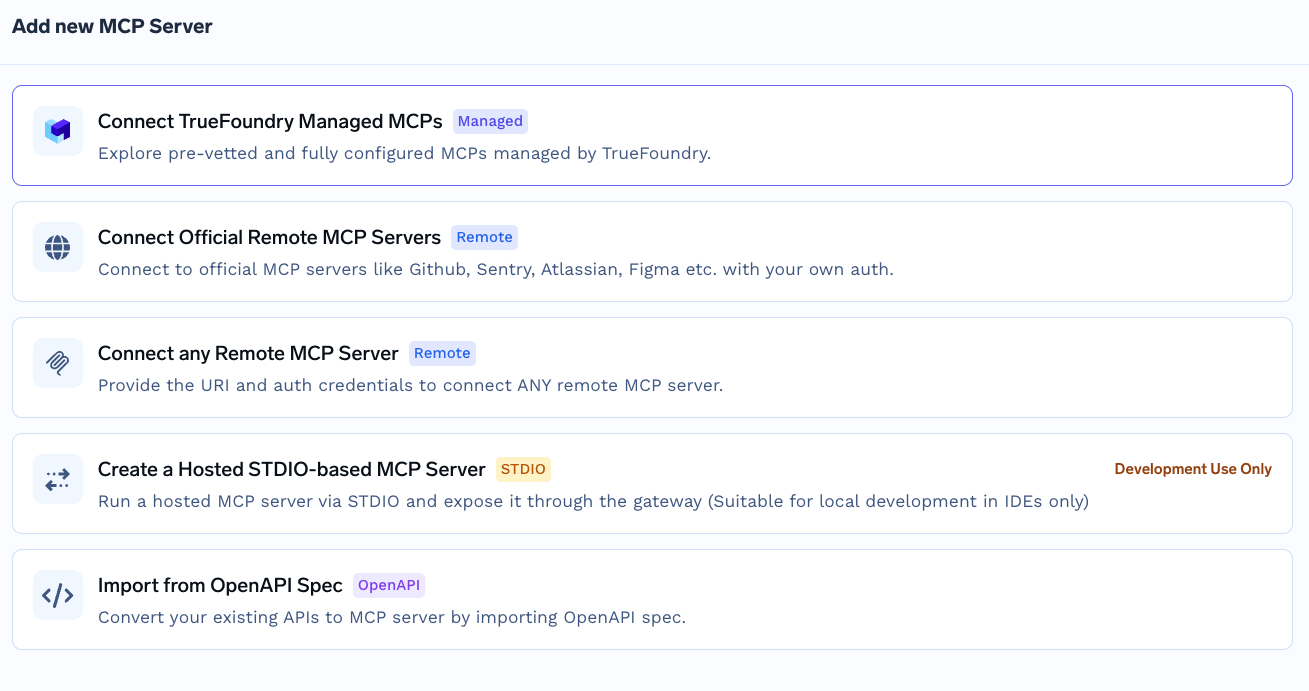
Geben Sie die MCP-Server-URL ein, die folgendem Format entspricht:
https://<account_url>/api/v2/databases/<database>/schemas/<schema>/mcp-servers/<server_name>
Wählen Sie OAuth2 mit dem Grant-Typ Authorization Codeund geben Sie anschließend die Autorisierungs-URL https://<account_url>/oauth/authorize, die Token-URL https://<account_url>/oauth/token-request sowie Ihre Client-ID und Ihr Secret ein, Unterstützte Code-Challenge-Methoden S256, JWT-Quelle Zugriffstoken und Bereiche refresh_token. Legen Sie die Zugriffskontrolle fest und klicken Sie dann auf Speichern. Speichern Sie die Client-ID und das Secret im TrueFoundry-Secret-Speicher und referenzieren Sie den FQN, anstatt sie direkt einzubetten.
Zu den Bereichen: Behalten Sie refresh_token bei, da Sitzungen ohne diesen nach etwa zehn Minuten ablaufen. Entfernen Sie die andere Option, session:role:<role>: Der Server ignoriert sie, da er die Rolle aus DEFAULT_ROLE auflöst, und sie führt zu einer Fehlerquelle durch Groß-/Kleinschreibung.
TrueFoundry hält die eingehende Authentifizierung, also wie sich ein Client gegenüber dem Gateway ausweist, getrennt von der ausgehenden, also wie sich das Gateway gegenüber Snowflake ausweist. Die beiden Ebenen sind unabhängig voneinander.
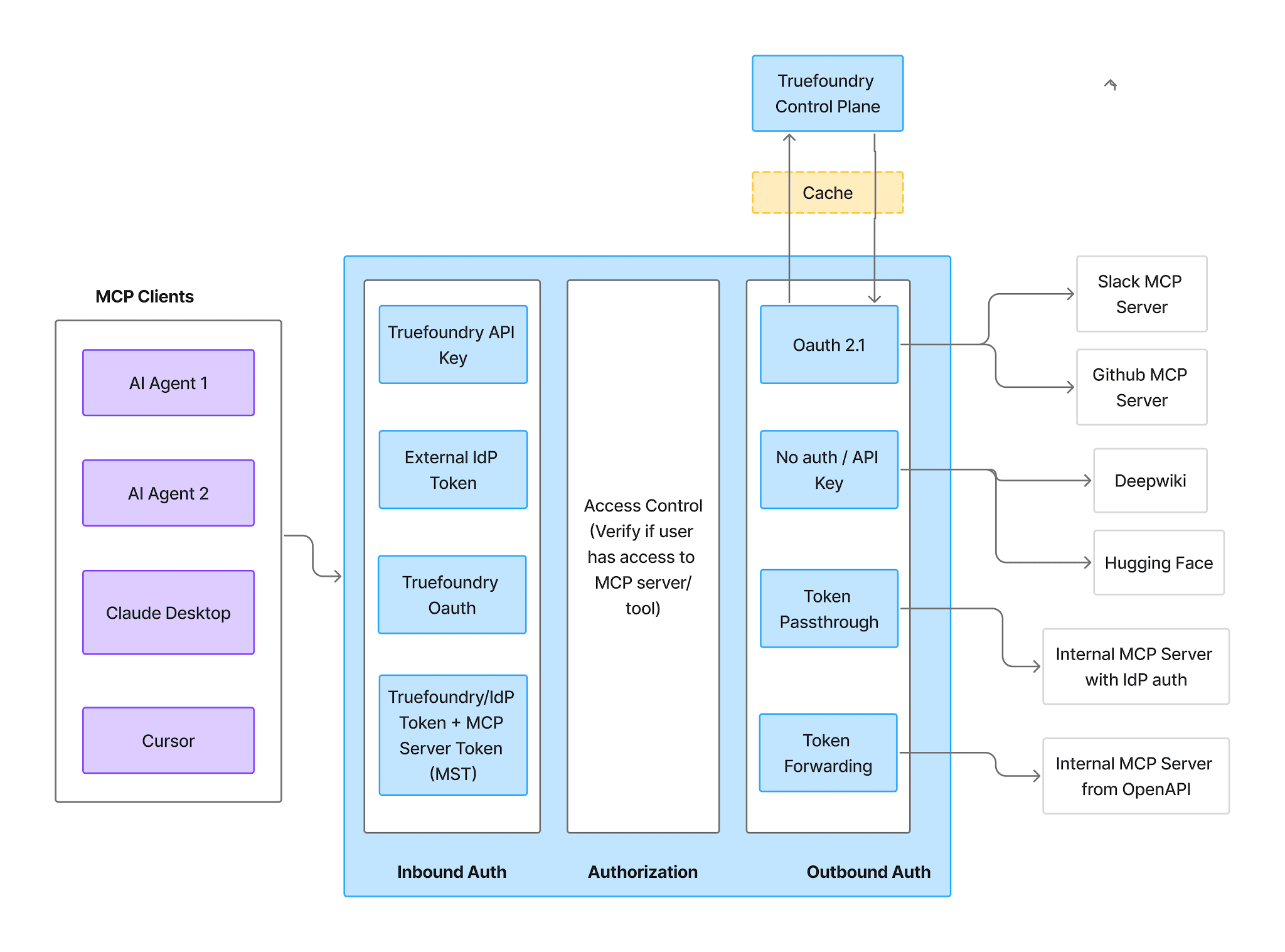
Eingehend unterstützt vier Methoden:
Virtuelle Account-Token gewähren jeder Anfrage identischen Zugriff und sind daher hier nicht verwendbar. Für ein Warehouse, bei dem das gesamte Sicherheitskonzept darauf beruht, dass jede Person ihre eigene Rolle erbt, verwenden Sie eingehend ein PAT oder ein IdP-Token.
Ausgehend ist Snowflake OAuth für die von Ihnen erstellte Integration. Um die Autorisierung durchzuführen, öffnen Sie die Server- Tools Bereich oder Tool/MCP-Server hinzufügen im Playground und klicken Sie auf Jetzt verbinden. Sie werden zur Zustimmung zu Snowflake weitergeleitet; TrueFoundry erhält zu keinem Zeitpunkt Zugriff auf Ihre Anmeldedaten.
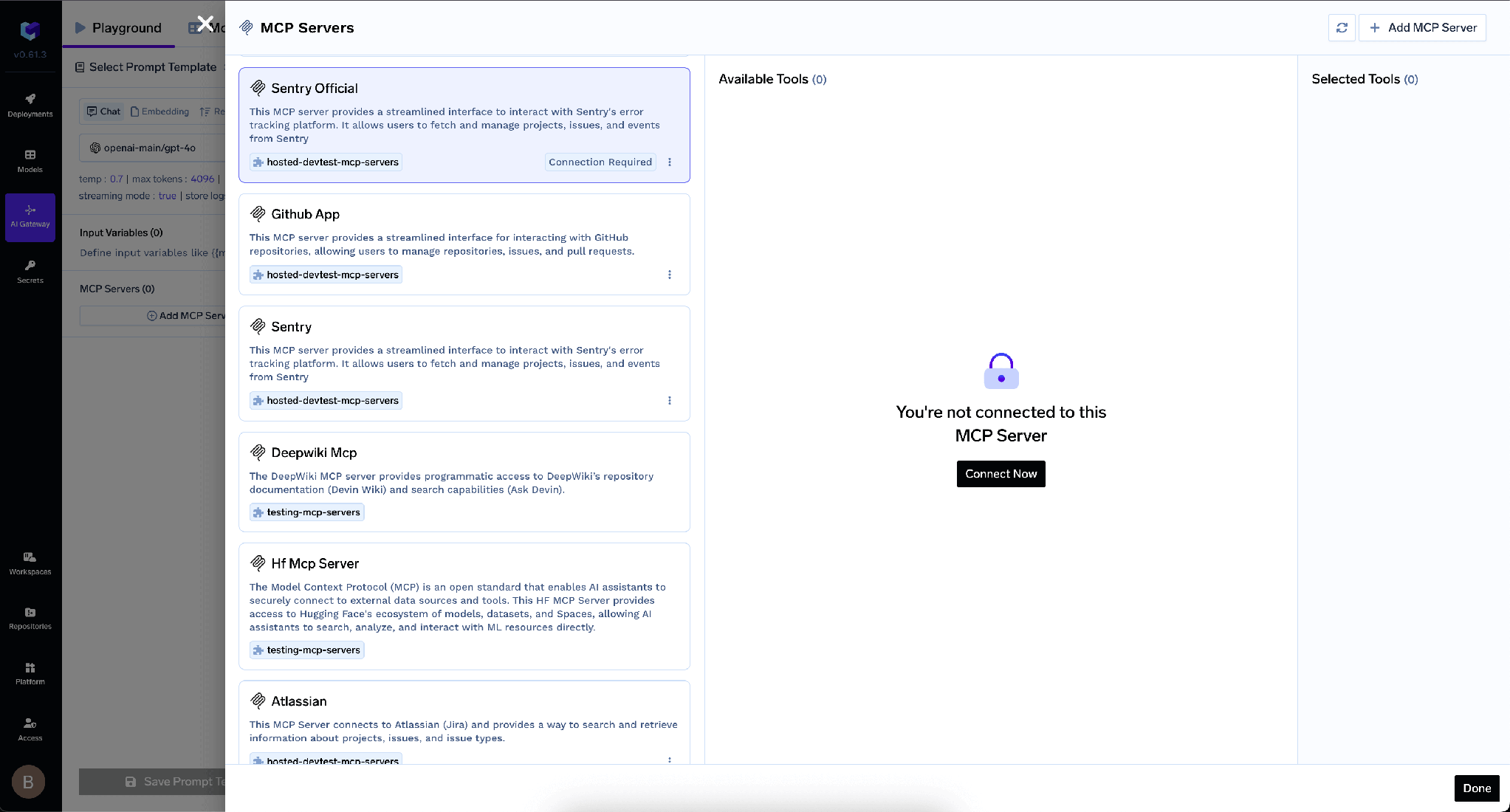
Dies ist der Teil, der Ihre Daten schützt. Jeder Benutzer agiert unter seinen eigenen Snowflake-RBAC-Berechtigungen, die über die jeweilige DEFAULT_ROLE aufgelöst werden. Nicht das Gateway entscheidet, welche Zeilen Sie sehen können, sondern Snowflake. Alles, was Sie dort bereits eingerichtet haben, gilt unverändert: Rollenzuweisungen für Datenbanken, Schemas und Tabellen sowie Zeilenzugriffsrichtlinien und dynamische Datenmaskierung, sofern Sie diese nutzen (beides erfordert Snowflake Enterprise Edition oder höher [ÜBERPRÜFEN]). Ein Agent, der im Auftrag eines Junior-Analysten handelt, sieht exakt das, was auch dieser Analyst sieht.
Zur klaren Aufgabentrennung: das Gateway legt fest, welche Tools existieren, Snowflake legt fest, welche Zeilen zurückgegeben werden. Das Deaktivieren eines Tools kann eine Tabelle, für die eine Rolle bereits Leseberechtigung hatte, nicht nachträglich schützen, und das Einschränken einer Rolle kann einen Agenten nicht daran hindern, ein Schreib-Tool aufzurufen, das Sie aktiviert gelassen haben. Siehe MCP-Authentifizierung für weitere Informationen zu den beiden Ebenen.
Wenn jeder Kunde ein eigenes Snowflake-Konto besitzt, kann eine Client-ID diese nicht übergreifend abdecken; daher registrieren Sie für jedes Konto einen separaten Eintrag.
Nach der Verbindung listet der Tools -Tab alles auf, was der Server bereitstellt.
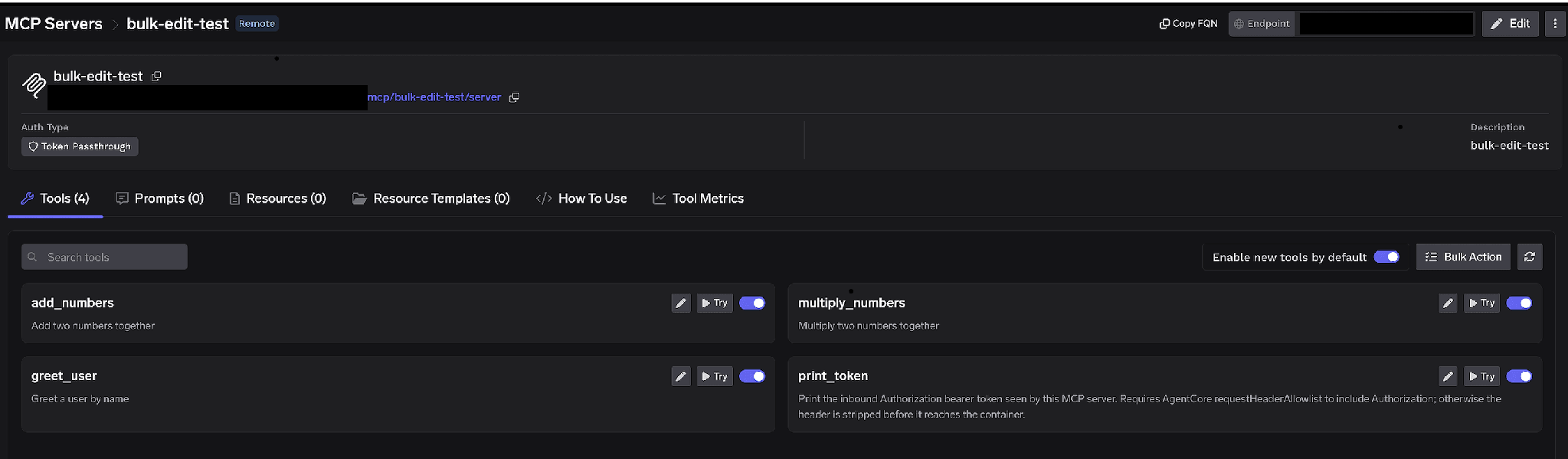
Tool-spezifische Umschalter. Deaktivieren Sie ein Tool, damit es vollständig aus der tools/list entfernt wird. Clients sehen es nicht und können es nicht aufrufen; dies ist kein Filtern auf Prompt-Ebene. Das gängige Warehouse-Muster besteht darin, Cortex Analyst und Cortex Search aktiviert zu lassen, während das rohe SYSTEM_EXECUTE_SQL deaktiviert wird. Analysten behalten die Abfrage in natürlicher Sprache über eine von Ihnen kuratierte semantische Sicht bei, und der Agent verliert die Fähigkeit, beliebige SQL-Befehle für beliebige Tabellen zu erstellen. Das ist sowohl kostengünstiger als auch sicherer.
Neue Tools standardmäßig aktivieren. Wenn diese Option aktiviert ist, werden Tools, die der Snowflake-Spezifikation hinzugefügt wurden, automatisch für Agenten verfügbar. Wenn sie deaktiviert ist, sind nur die von Ihnen explizit freigegebenen Tools erreichbar. Da die Spezifikation von denjenigen bearbeitet wird, die über Snowflake-Berechtigungen verfügen, und nicht von denjenigen, die das Gateway verwalten, ist „Aus“ die richtige Wahl: Eine Änderung der Spezifikation kann dann nicht unbemerkt den Funktionsumfang von Produktionsagenten erweitern. Massenaktion verwandelt jede Zeile in ein Kontrollkästchen, sodass Sie mehrere gleichzeitig bearbeiten können.
Klicken Sie bei einem beliebigen Tool auf den Stift, um zu überschreiben, wie es dem Modell präsentiert wird:
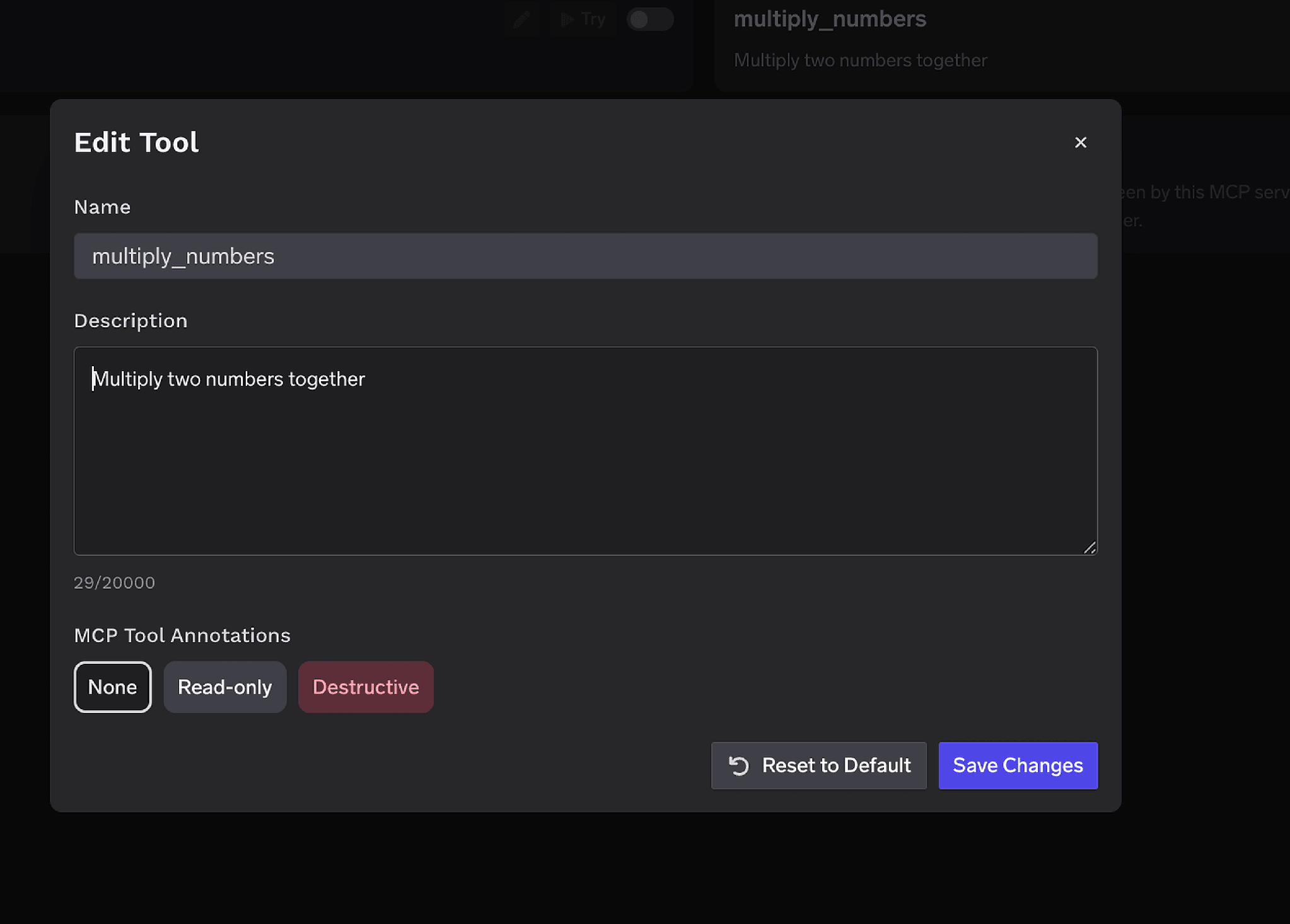
Die Beschreibung -Überschreibung mit bis zu 20.000 Zeichen ist hier besonders wertvoll. Snowflake-Tool-Beschreibungen entsprechen dem, was Sie in die Spezifikation eingegeben haben. Eine vage Beschreibung führt dazu, dass ein Modell auf SYSTEM_EXECUTE_SQL zurückgreift, obwohl ein kuratiertes Analysten-Tool die Frage hätte beantworten können. MCP-Tool-Anmerkungen kennzeichnen ein Tool als Schreibgeschützt oder Destruktiv, setzen readOnlyHint oder destructiveHint und speisen die unten aufgeführten Genehmigungsrichtlinien.
Die Zugriffskontrolle erfolgt für Benutzer, Teams oder virtuelle Konten auf zwei Ebenen: auf welche Server eine Identität zugreifen kann und welche Tools sie aufrufen darf.
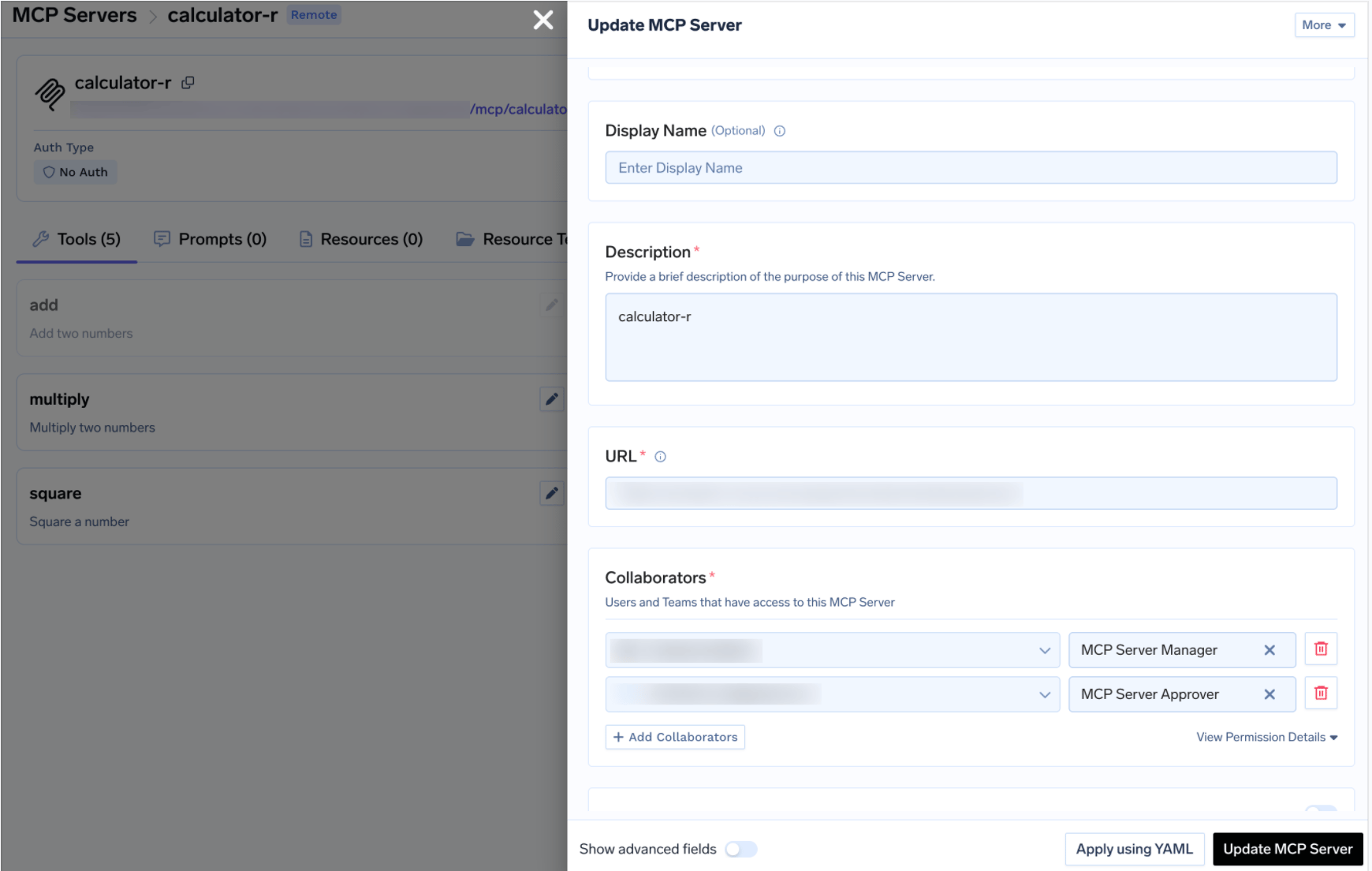
Das Plattform-Team hat die Rolle „Manager“, Analyse-Teams haben die Rolle „User“ und ein Governance-Verantwortlicher hat die Rolle „Approver“. Es ist dasselbe MCP-Zugriffskontrolle Modell, das auf jedem Server im Registry verwendet wird.
Das Deaktivieren von Tools ist eine sehr grobe Methode. Manchmal soll ein Agent zwar in eine Tabelle schreiben oder eine unbegrenzte Abfrage ausführen, aber eben nicht unbeaufsichtigt. Wenn ein geschütztes Tool aufgerufen wird, wird der Aufruf angehalten, eine Freigabeanfrage erstellt und die Genehmigenden werden benachrichtigt. Sobald eine Person zustimmt, sind die Aufrufe für ein konfigurierbares Zeitfenster erfolgreich. Erstellen Sie eine Richtlinie unter AI Gateway > Policies > MCP Tool Approval, in der Konsole als Beta gekennzeichnet:
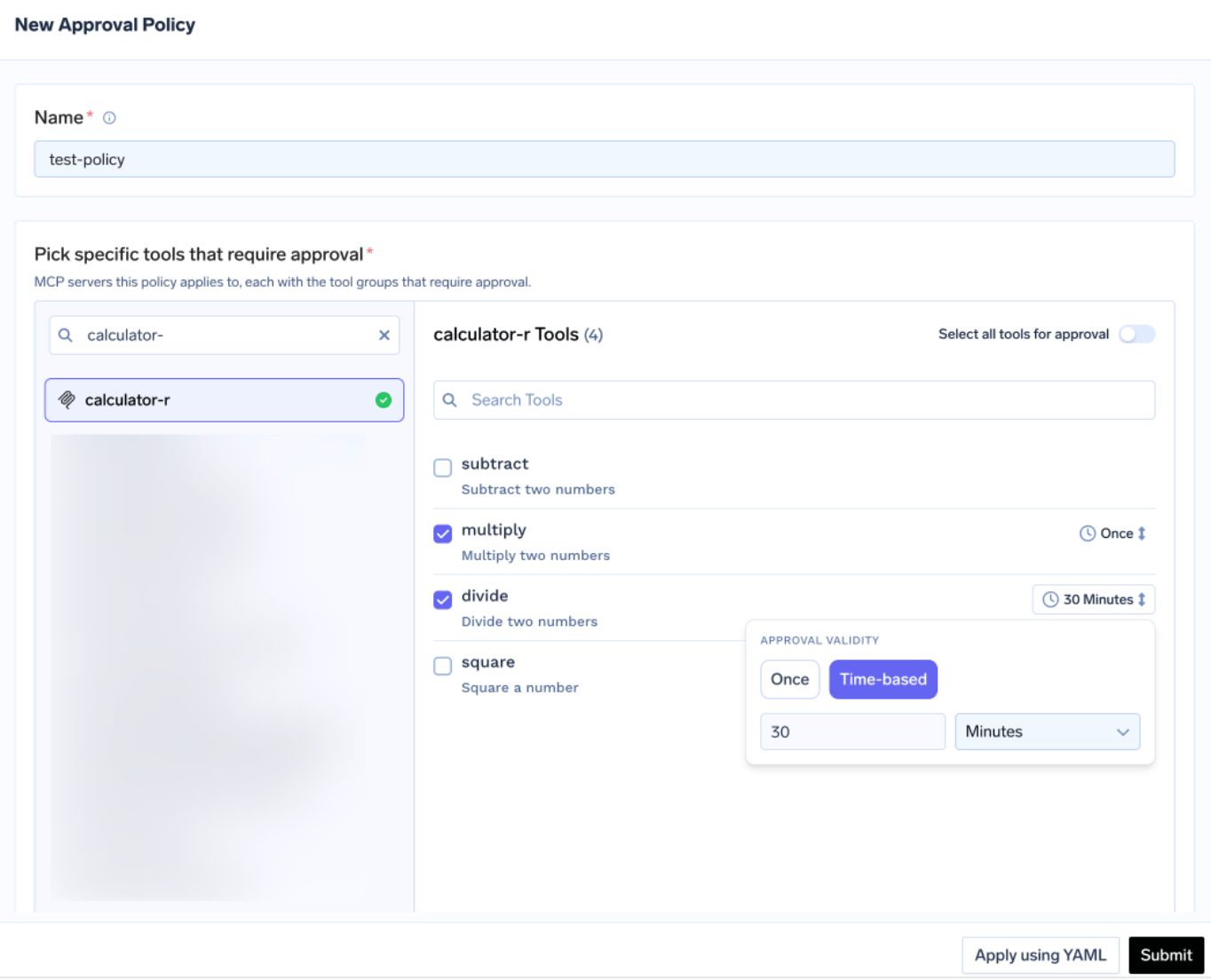
Jede Richtlinie benennt die Server, die sie schützt, und wählt einen Freigabebereich:
Für Snowflake ist die Benennung des SQL-Ausführungstools meist die richtige Wahl: Lassen Sie die kuratierten Cortex-Tools laufen und halten Sie jeden rohen SQL-Aufruf für eine manuelle Prüfung an. Wenn sich Bereiche überschneiden, gewinnt die spezifischste Regel: „Benannt“ schlägt „Destruktiv“, was wiederum alles andere schlägt. Gültigkeit ist entweder einmalig oder zeitbasiert in Minuten. Bei Konflikten zwischen Richtlinien gewinnt die restriktivste Einstellung, daher schlägt „einmalig“ ein 10-Minuten-Fenster, welches wiederum ein 30-Minuten-Fenster schlägt.
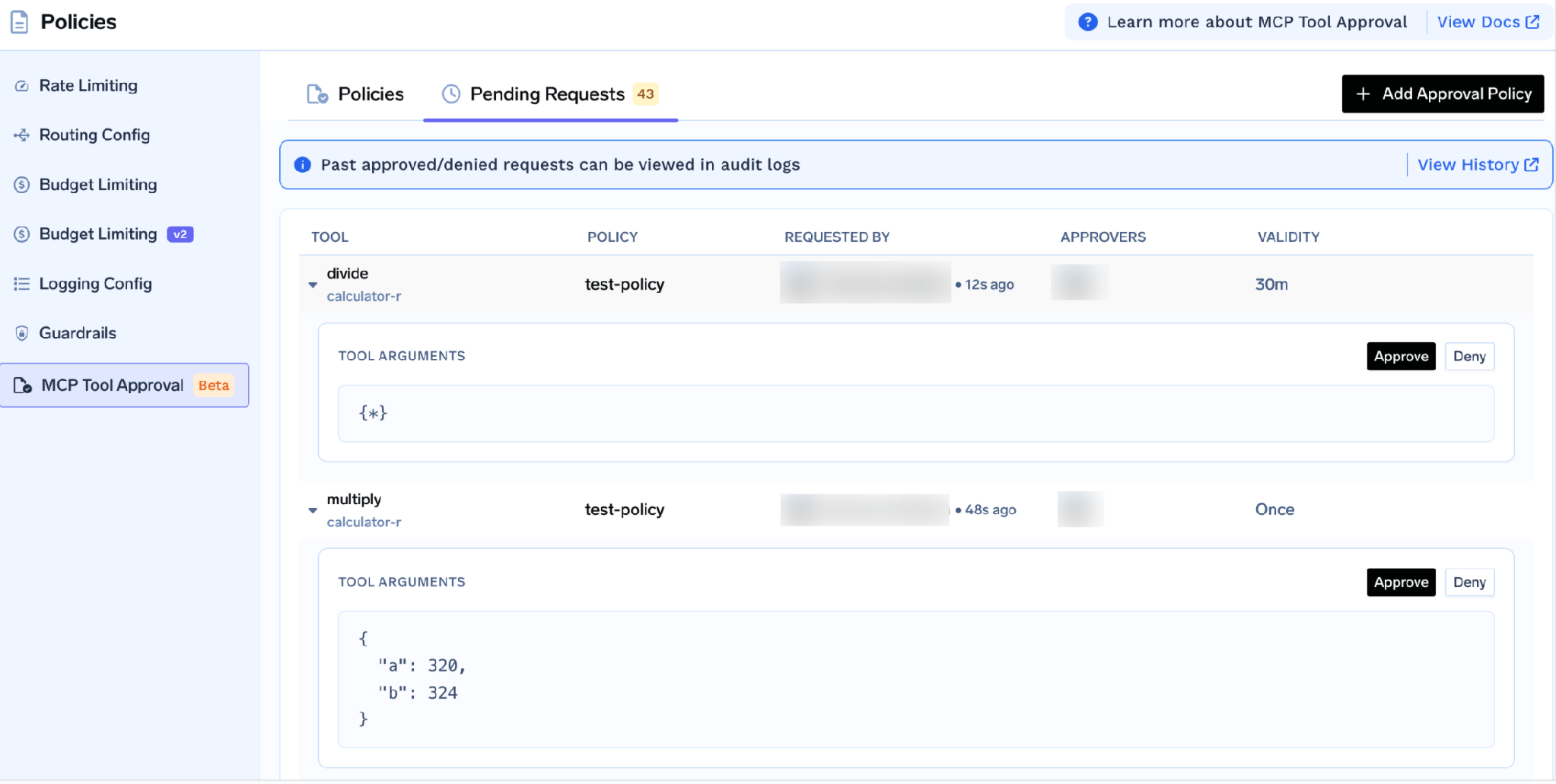
Genehmigende werden per E-Mail, Slack, PagerDuty oder MS Teams benachrichtigt. Jede Anfrage zeigt das Tool, die Richtlinie, den Anfragesteller und die tatsächlichen Tool-Argumentean. Bei einem Data Warehouse ist genau dieser letzte Punkt das entscheidende Feature: Ein Genehmigender liest den tatsächlichen SQL-String, bevor er ausgeführt wird. So wird ein unbegrenzter Cross-Join von einem Menschen erkannt, anstatt erst auf der Rechnung des nächsten Monats aufzutauchen. Während der Wartezeit erhält der Aufrufer ein JSON-RPC-Ergebnis mit _meta.approval_status: "pending" anstelle eines Fehlers, sodass ein gut programmierter Agent wartet, anstatt abzustürzen.
Berechtigungen gelten jeweils pro Anfragesteller. Eine Genehmigung für einen Analysten gilt daher nicht für das gesamte Team.
Bevor Sie einen Agenten darauf ansetzen, führen Sie die Tools manuell aus. Klicken Sie auf Ausprobieren neben einem Tool, geben Sie die Parameter ein und klicken Sie auf Tool ausführen , um das rohe JSON zu lesen. Ausprobieren ist für Tools deaktiviert, die Sie ausgeschaltet haben.
Hier lassen sich Einrichtungsfehler kostengünstig erkennen. Ein Tool, das einen Fehler ausgibt, liegt fast immer an einer fehlenden Berechtigung, da USAGE ON MCP SERVER nur die Erkennung, aber nicht die Ausführung ermöglicht. Wenn ein Tool hängen bleibt, liegt das meist an einem fehlenden Standard-Warehouse oder einem Warehouse, das nicht fortgesetzt werden kann.
Öffnen Sie den Anwendung -Tab für Ihre mandantenspezifische Gateway-URL und fertige Code-Snippets zum Kopieren.
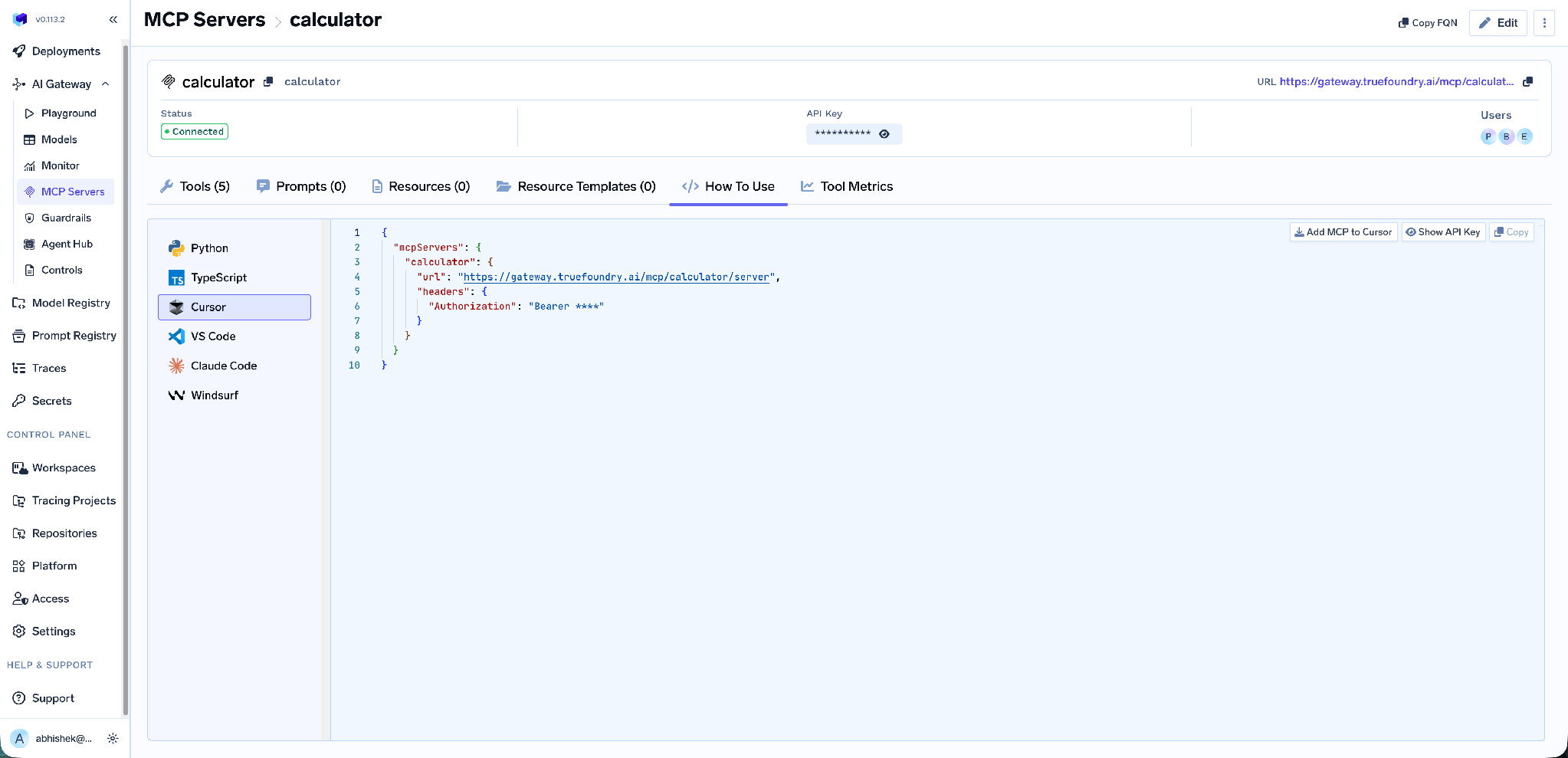
Dies umfasst Claude Code, VS Code, Claude Desktop, Cursor, Windsurf, Codex sowie die MCP-SDKs für Python und TypeScript. Verwenden Sie die URL aus diesem Tab, anstatt sie selbst zusammenzusetzen; ein manuell erstellter Endpunkt ist die häufigste Ursache dafür, dass ein Client zwar eine Verbindung herstellt, aber keine Tools auflistet.
Auf Warehouse-Ebene erfahren Sie über die operative Schicht, welche Kosten Ihre Agenten verursachen.
Metriken auf Tool-Ebene. Das MCP-Metrik-Dashboard schlüsselt Anfragen pro Sekunde, Latenz bei P50/P75/P90/P99, Fehlerraten nach Fehlertyp sowie eine Rangliste der Anfragen pro Tool auf.
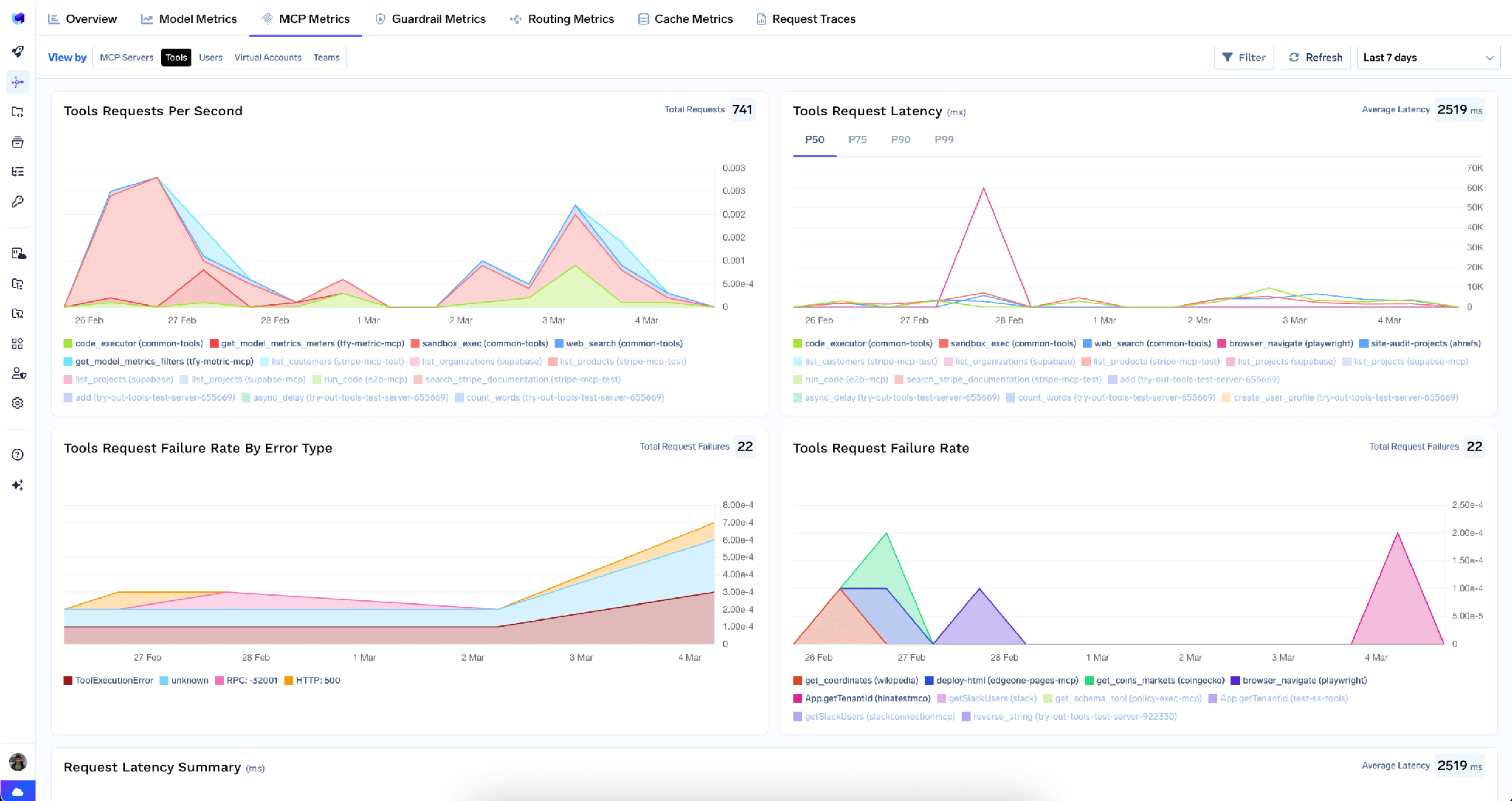
Betrachten Sie dies als Ausgaben-Dashboard, nicht als Latenz-Dashboard. Die P99-Latenz eines SQL-Tools ist ein Indikator dafür, wie viel Rechenleistung eine lange Reihe von Abfragen verbraucht. Eine steigende Fehlerrate in Verbindung mit einer steigenden Anzahl von Aufrufen ist das typische Anzeichen für eine Wiederholungsschleife, die Credits verbraucht. Nichts davon ersetzt die eigenen Kontrollmechanismen von Snowflake: Behalten Sie einen Ressourcenmonitor für das Warehouse, das die Tools verwendet, und halten Sie das query_timeout kurz.
Vollständige Anfrage-Observability. Jeder Tool-Aufruf wird mit Anruferidentität, Tool-Name, Eingaben und Latenz nachverfolgt und über OpenTelemetry in Grafana, Datadog oder Prometheus exportiert. Da die ausgehende Authentifizierung über benutzerbezogenes OAuth erfolgt, stimmt die Anruferidentität mit dem Benutzer in der Abfragehistorie von Snowflake überein, sodass die Frage „Wer hat das ausgeführt?“ eindeutig beantwortet werden kann.
Schutzmechanismen. Pre- und Post-Tool-Schutzmechanismen führen Richtlinien für Tool-Aufrufe aus. Das bedeutet hier, dass ein Ergebnissatz auf PII-Muster überprüft wird, bevor er das Modell erreicht.
Geringer Overhead. Das Gateway fügt etwa 3-4 ms an Latenz hinzu und bewältigt über 350 RPS auf einer einzelnen vCPU. Bei einer Abfrage, die in Sekunden gemessen wird, ist das vernachlässigbar.
Ein zentrales Verzeichnis. Sobald mehrere Server registriert sind, können Sie eine kuratierte Auswahl an Tools hinter einem einzigen Endpunkt mit einem virtuellen MCP-Serverbündeln, sodass ein Reporting-Agent ein Snowflake-Analysetool und ein Slack-Posting-Tool erhält.
Mandantenadministratoren können alle gespeicherten Anmeldedaten auf dem Server mit einer einzigen Aktion löschen, über das Drei-Punkte-Menü neben Bearbeiten:
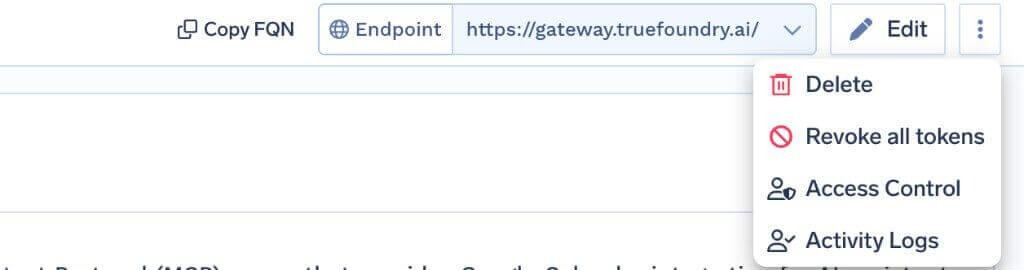
Alle Token widerrufen löscht sämtliche Authentifizierungs-Overrides und gespeicherten OAuth-Token für alle Benutzer und virtuellen Konten auf diesem Server. Dies wird mit der nächsten Anfrage wirksam und in den Aktivitätsprotokollen festgehalten. Der Vorgang ist unumkehrbar und nur für Mandantenadministratoren sichtbar.
Das Limit ist entscheidend: Dies löscht Token nur am Gateway, nicht die Berechtigung in Snowflake. Deaktivieren Sie im Falle eines tatsächlichen Sicherheitsvorfalls zusätzlich die Sicherheitsintegration und rotieren Sie das Client-Secret.
Testkonten können kein SQL ausführen. Das Tool zur SQL-Ausführung ist für Testkonten gesperrt. Wenn Sie einen Proof of Concept auf einem Testkonto durchführen und das Tool zwar angezeigt wird, aber nicht ausgeführt werden kann, liegt es daran.
Serverzugriff ist nicht gleich Tool-Zugriff. GRANT USAGE ON MCP SERVER ermöglicht es einer Rolle, eine Verbindung herzustellen und Tools zu entdecken. Für deren Ausführung sind die zugrunde liegenden Berechtigungen erforderlich: USAGE für den Cortex Search-Dienst, SELECT für die semantische Sicht sowie Tabellenberechtigungen für SQL.
Semantische Sichten, nicht semantische Modelle. CORTEX_ANALYST_MESSAGE akzeptiert eine Kennung für eine semantische Sicht. Der Verweis auf ein semantisches Modell funktioniert nicht, und die Fehlermeldung ist nicht eindeutig.
Der Snowflake MCP-Server ist das mächtigste Werkzeug, das Sie einem Agenten an die Hand geben können – aber auch dasjenige mit den kostspieligsten Fehlermöglichkeiten. Bei den meisten Servern in einer Registry droht lediglich ein peinlicher Schreibfehler. Hier riskieren Sie eine hohe Rechnung und den umfassenden Zugriff auf Daten, die bereits aus Gründen der Bequemlichkeit zusammengeführt wurden.
Beim zweiten Risiko fangen Sie nicht bei null an. Snowflakes RBAC, Zeilenzugriffsrichtlinien und Maskierungsrichtlinien bilden die primäre Kontrolle, und per Benutzer vergebenes OAuth sorgt dafür, dass ein Agent diese erbt, anstatt sie über ein gemeinsames Dienstkonto zu umgehen. Die Aufgabe des Gateways ist die andere Hälfte: Es entscheidet, welche Tools verfügbar sind, hält gefährliche Funktionen für menschliche Freigaben zurück und bietet Ihnen ein Anrufprotokoll sowie eine Metrik-Übersicht, damit die Kosten keine Überraschung mehr sind.
TrueFoundry AI Gateway bietet eine Latenz von ~3—4 ms, verarbeitet mehr als 350 RPS auf einer vCPU, skaliert problemlos horizontal und ist produktionsbereit, während LiteLM unter einer hohen Latenz leidet, mit moderaten RPS zu kämpfen hat, keine integrierte Skalierung hat und sich am besten für leichte Workloads oder Prototyp-Workloads eignet.




Ein von Snowflake verwalteter Endpunkt für das Model Context Protocol, der in Ihrem eigenen Account gehostet wird. Sie erstellen ihn mit CREATE MCP SERVER und einer YAML-Spezifikation, die auflistet, welche Tools er bereitstellt. Agenten erreichen ihn über eine accountspezifische URL und authentifizieren sich mit Snowflake OAuth.
Diejenigen, die Sie deklarieren, bis zu 50 pro Server, in fünf Typen: SYSTEM_EXECUTE_SQL, CORTEX_ANALYST_MESSAGE, CORTEX_SEARCH_SERVICE_QUERY, CORTEX_AGENT_RUN und GENERIC für UDFs. Auf TrueFoundry erscheint die aufgelöste Liste nach dem OAuth im Tab Tools, wo sich jedes Tool aktivieren, deaktivieren, neu beschreiben oder annotieren lässt.
Arbeiten Sie mit mehreren Ebenen. Bevorzugen Sie kuratierte Cortex-Analyst-Tools gegenüber rohem SQL und deaktivieren Sie SYSTEM_EXECUTE_SQL, wo es möglich ist. Andernfalls setzen Sie ein knappes query_timeout, legen Sie einen Resource Monitor auf das Warehouse, stellen Sie das SQL-Tool hinter eine Freigaberichtlinie, damit ein Mensch die Abfrage zuerst liest, und achten Sie im Metrik-Dashboard auf das typische Muster von Retry-Schleifen.
Ja. TrueFoundry läuft in Ihrer VPC, On-Prem, Air-Gapped oder hybrid, sodass Prompts und Antworten Ihre Domäne nie verlassen, auch wenn Sie über viele Anbieter hinweg routen.
Ja. Es umfasst ein MCP Gateway, ein Agent Gateway und eine MCP & Agents Registry mit Zugriffskontrolle auf Tool-Ebene. Agenten auf Basis von LangGraph, CrewAI, AutoGen oder einem eigenen Framework lassen sich alle zentral steuern.
Ja. Das Gateway ist OpenTelemetry-kompatibel und lässt sich in Grafana, Datadog, Prometheus oder Ihren bevorzugten Stack integrieren. Es verfolgt jede Anfrage vom Prompt bis zur Ausführung von Tools und Modellen, sodass Sie eine einheitliche Protokollierung erhalten, ohne Ihre bestehenden Systeme entfernen zu müssen.



Die neuesten Nachrichten, Artikel und Ressourcen werden in Ihren Posteingang gesendet
%20(28).webp)
.png)
.png)
.png)
.png)
.png)
.webp)
.webp)

.png)
.png)
.png)
.png)
.png)


