


.png)
November 1, 2026
|
Lesedauer: 5 Minuten


Erhalten Sie sofortigen Zugriff auf eine TrueFoundry-Live-Umgebung. Stellen Sie Modelle bereit, leiten Sie den LLM-Verkehr weiter und erkunden Sie die gesamte Plattform — Ihre Sandbox ist in Sekundenschnelle einsatzbereit, ohne dass eine Kreditkarte erforderlich ist.



.png)
Unglaublich schnelle Methode zum Erstellen, Verfolgen und Bereitstellen Ihrer Modelle!
Der Airtable MCP-Server ist ein von Airtable unter https://mcp.airtable.com gehosteter Remote-Server für das Model Context Protocol. Das Model Context Protocol ist der offene Standard, der es einem Agenten ermöglicht, Tools auf einem externen System zu finden und aufzurufen. Die Implementierung von Airtable macht Bases, Tabellen, Datensätze und Schemata zu aufrufbaren Tools.
Die Dokumentation von TrueFoundry beschreibt dies eher anhand von Funktionen und OAuth-Scopes als anhand von Tool-Namen – was der richtige Ansatz ist, um die Funktionsweise zu verstehen. Der von Ihnen gewährte Scope begrenzt die Möglichkeiten des Agenten.
Da es sich um einen Remote-Server handelt, müssen Sie keinen Container verwalten und keinen npx-Prozess auf jedem Laptop ausführen – Sie verweisen einen Client einfach auf eine URL und authentifizieren sich, genau wie bei anderen Remote-MCP-Servern.
Was Airtable so besonders macht, ist der Ursprung der Daten: Hier bauen Betriebsteams die Systeme auf, die die IT nie bereitgestellt hat – Lieferantenlisten, Recruiting-Pipelines, Onboarding-Tracker, Budgettabellen. Das hat zwei Konsequenzen.
Es ist von hohem Wert für einen Agenten. Die Daten sind tatsächlich strukturiert – Tabellen, typisierte Felder, verknüpfte Datensätze –, sodass ein Agent sie abfragen und ändern kann, ohne dass ein Data-Engineering-Projekt vorgeschaltet werden muss. schema.bases:read verrät ihm, welche Felder existieren, und data.records:read liefert die Zeilen.
Es ist schwer zu durchschauen. Da Airtable organisch gewachsen ist, gibt es kein Inventar. Die Basis zur Nachverfolgung von Tagessätzen für Auftragnehmer liegt neben der Basis für Büro-Snackbestellungen, bei gleichen Freigabeeinstellungen. Diese Datensätze sind oft die operative Wahrheit, von der menschliche Prozesse abhängen, ohne dass eine disziplinierte Versionshistorie dahintersteht. Ein überschriebener Datensatz macht sich nicht von selbst bemerkbar.
Die Governance-Frage ist daher eng gefasst: Welche Bases sind betroffen und darf dieser Agent Schreibzugriffe ausführen?
Anwendungsfälle, die die Verknüpfung von Chain-Tools rechtfertigen:
Drei dieser vier Vorgänge sind schreibgeschützt; der vierte schreibt Kommentare, keine Datensätze.
Die Unterscheidung zwischen Lesen und Schreiben ist entscheidend. Das Auslesen einer Anbieterliste ist harmlos. Die Aktualisierung eines Datensatzes im Onboarding-Tracker verändert jedoch, was ein Mitarbeiter am Montag sieht und wie er handelt. Die Änderung eines Schemas kann eine Ansicht, eine Automatisierung oder eine verknüpfte Datensatzbeziehung zerstören, von der drei andere Bases abhängen. data.records:read und data.records:write sind nicht ohne Grund getrennte Berechtigungsbereiche.
Wenn ein Analyst dies in Claude Desktop einbindet, ist das in Ordnung. Bei zwanzig Personen in vier Teams ist das nicht mehr der Fall.
Niemand weiß, welche Bases tatsächlich betroffen sind. Während des OAuth-Prozesses von Airtable wählt der Benutzer aus, auf welche Bases die Integration zugreifen darf. Das ist eine gute Kontrollmöglichkeit, wird aber von der Person ausgeübt, die gerade autorisiert – im Browser, in dem Moment, in dem der Agent arbeiten soll. Der Weg des geringsten Widerstands ist es, einfach alles auszuwählen, und niemand überprüft dies im Nachhinein.
Persönliche Zugriffstokens überdauern die Person. Teams, die bei Airtable auf OAuth verzichten und stattdessen ein PAT (Personal Access Token) verwenden, enden mit einem langlebigen Anmeldeinformationssatz in einer lokalen Konfiguration, der zudem weit gefasst ist, da eine Einschränkung zu mühsam wäre.
Schreibzugriff wird standardmäßig gewährt. Wenn die Integration mit Schreibrechten registriert wurde, weil das einfacher erschien, kann jeder Agent, der sie nutzt, Datensätze verändern. Das Problem bleibt unbemerkt: Ein Agent, der eigentlich einen Tracker zusammenfassen soll, hält es für hilfreich, ein falsch formatiertes Feld zu bereinigen, und überschreibt dabei zwölf Zeilen.
Kein Audit-Trail mit der erforderlichen Granularität. Airtable speichert zwar den Revisionsverlauf von Datensätzen, protokolliert jedoch nicht, dass Ihr Onboarding-Agent die Änderung aufgrund einer Anweisung aus einem Slack-Thread vorgenommen hat.
Das ist kein Argument gegen die Anbindung von Airtable, sondern spricht für die Steuerungsebene, die ein MCP-Gateway bietet.
Airtable wird als Remote-MCP-Server über Ihre eigene OAuth-Integration registriert und nicht aus dem Katalog der verwalteten MCPs von TrueFoundry bereitgestellt. Es gibt keine Ein-Klick-Lösung: Sie erstellen die OAuth-Integration in Airtable, wählen die Scopes aus und übertragen die Anmeldedaten. Dieser zusätzliche Schritt ist der Ort, an dem der Großteil der Governance stattfindet.
Schritt 1 – Registrieren Sie eine Airtable-OAuth-Integration. Unter airtable.com/create/oautherstellen Sie eine Integration und setzen Sie die Redirect-URL auf:
https://<tfy-control-plane-base-url>/api/svc/v1/llm-gateway/mcp-servers/oauth2/callback
Ersetzen Sie <tfy-control-plane-base-url> durch die URL Ihrer Steuerungsebene. Dies ist der selbst registrierte Callback, nicht der verwaltete; das Einfügen des auth.truefoundry.com-Callbacks führt zu Fehlern bei der Redirect-Übereinstimmung.
Schritt 2 – Fügen Sie nur die Scopes hinzu, die Ihre Agenten benötigen. Dies ist die wichtigste Entscheidung bei der Einrichtung. Gewähren Sie data.records:read, schema.bases:read und workspacesAndBases:read für einen Reporting-Agenten und belassen Sie es dabei. Fügen Sie data.recordComments:write hinzu, wenn der Agent kommentieren statt bearbeiten soll. Lassen Sie die Schreib- und Webhook-Scopes weg, es sei denn, ein Workflow benötigt diese zwingend.
Schritt 3 – Öffnen Sie die Auswahl. Gehen Sie zu MCP-Gateway in der linken Seitenleiste und klicken Sie auf Server hinzufügen.
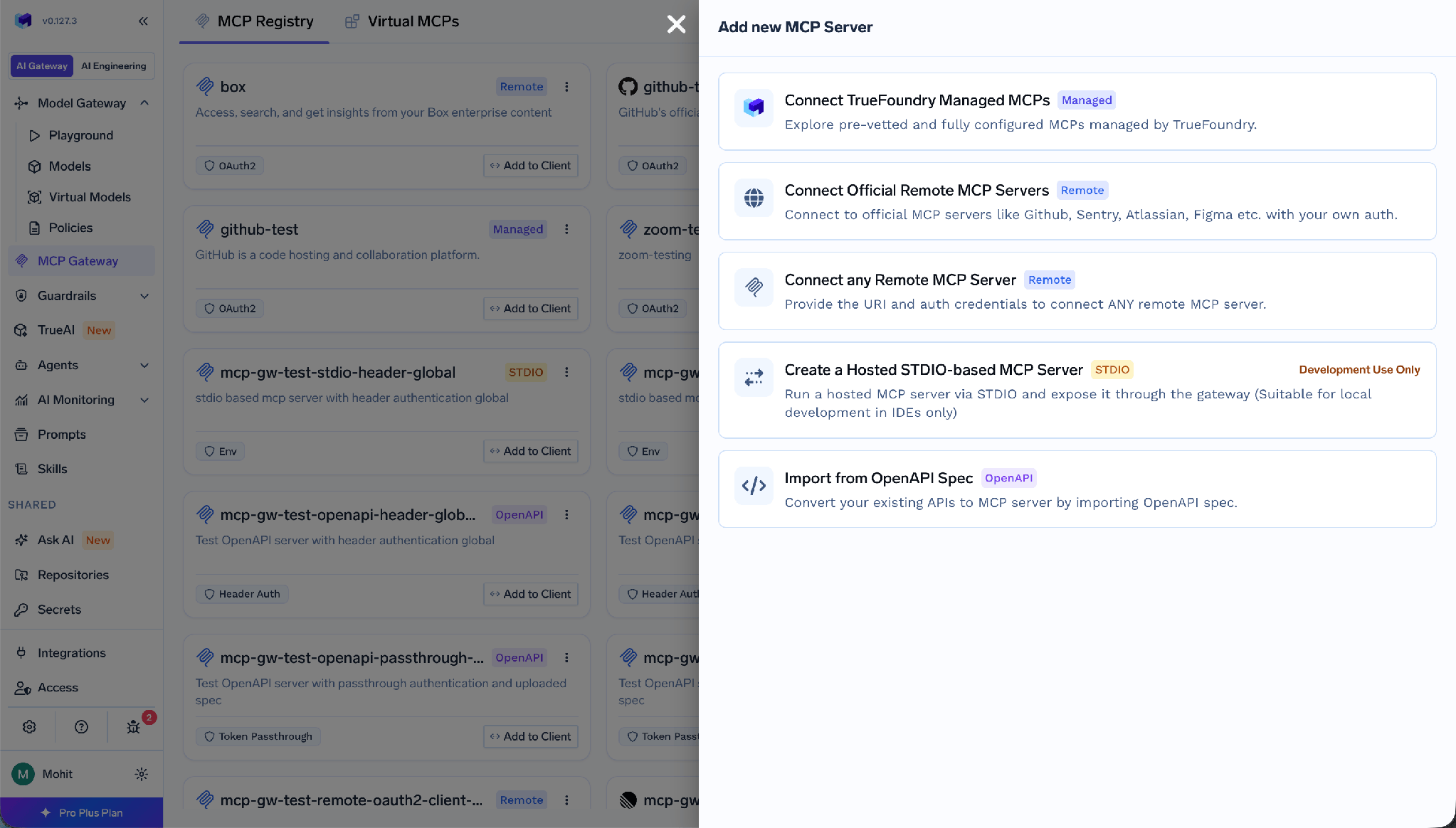
Auswahlmenü für MCP-Server mit der Option „Beliebigen Remote-MCP-Server verbinden“
Wählen Sie Beliebigen Remote-MCP-Server verbindenaus.
Schritt 4 – Geben Sie die Serverdetails ein.
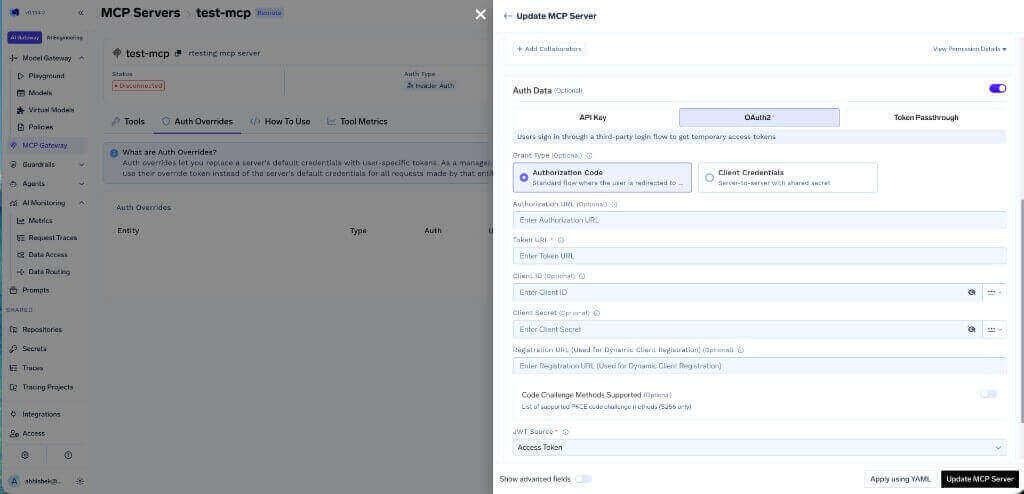
Speichern Sie die Anmeldedaten im TrueFoundry-Secrets-Speicher und referenzieren Sie diese über den FQN, anstatt das Secret direkt in das Formular einzufügen.
Schritt 5 – Fügen Sie Mitarbeiter hinzu und speichern Sie.
Schritt 6 – Verbinden. Jeder Benutzer öffnet den Bereich Tools des Servers und klickt auf Jetzt verbinden. Der Zustimmungsbildschirm von Airtable erscheint; hier wählt der Benutzer aus, auf welche Bases die Integration zugreifen darf.
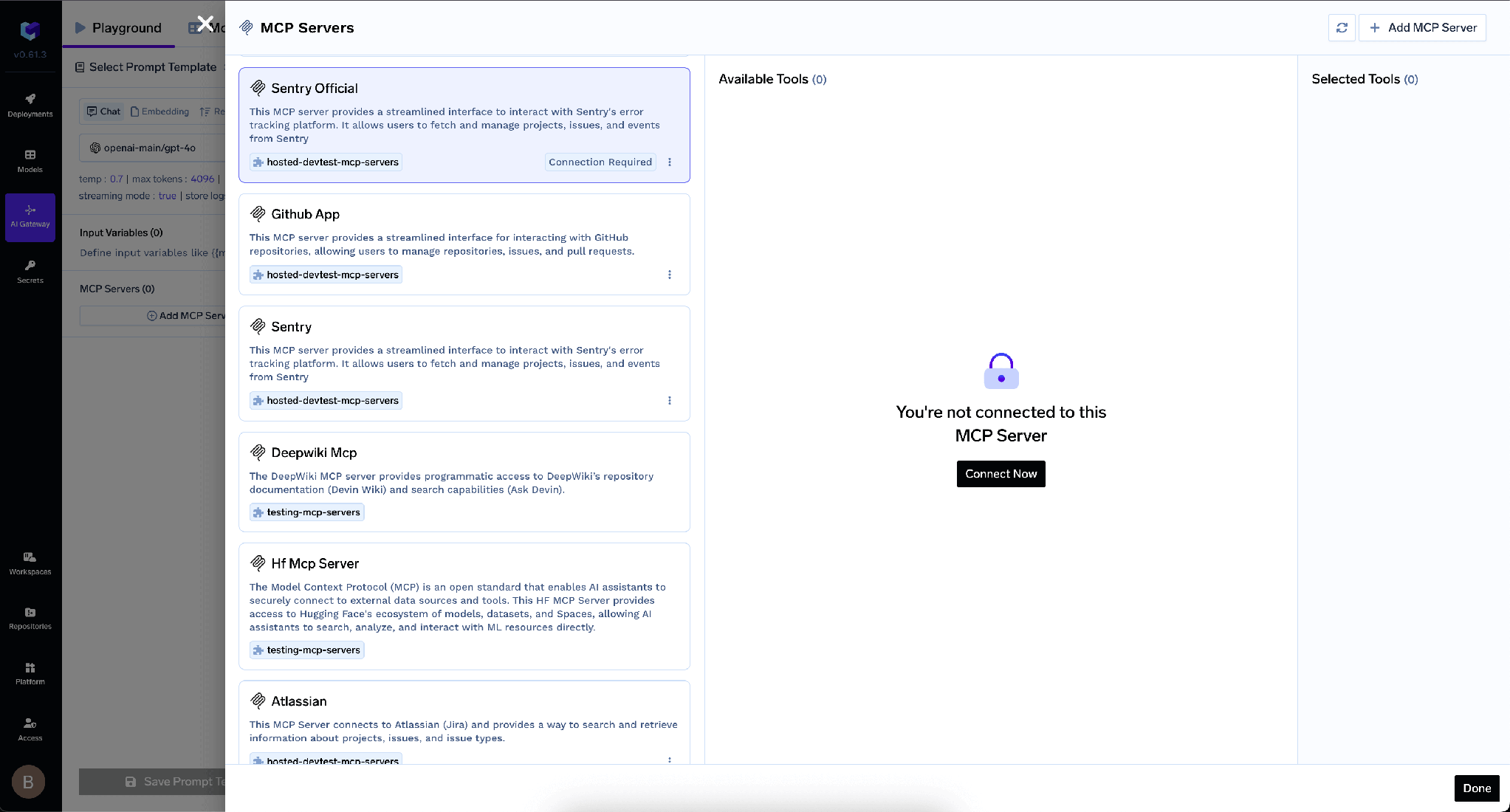
Nach erfolgreichem OAuth erscheinen die Airtable-Tools und können über den folgenden Bereich getestet werden: Agent-Spielwiese.
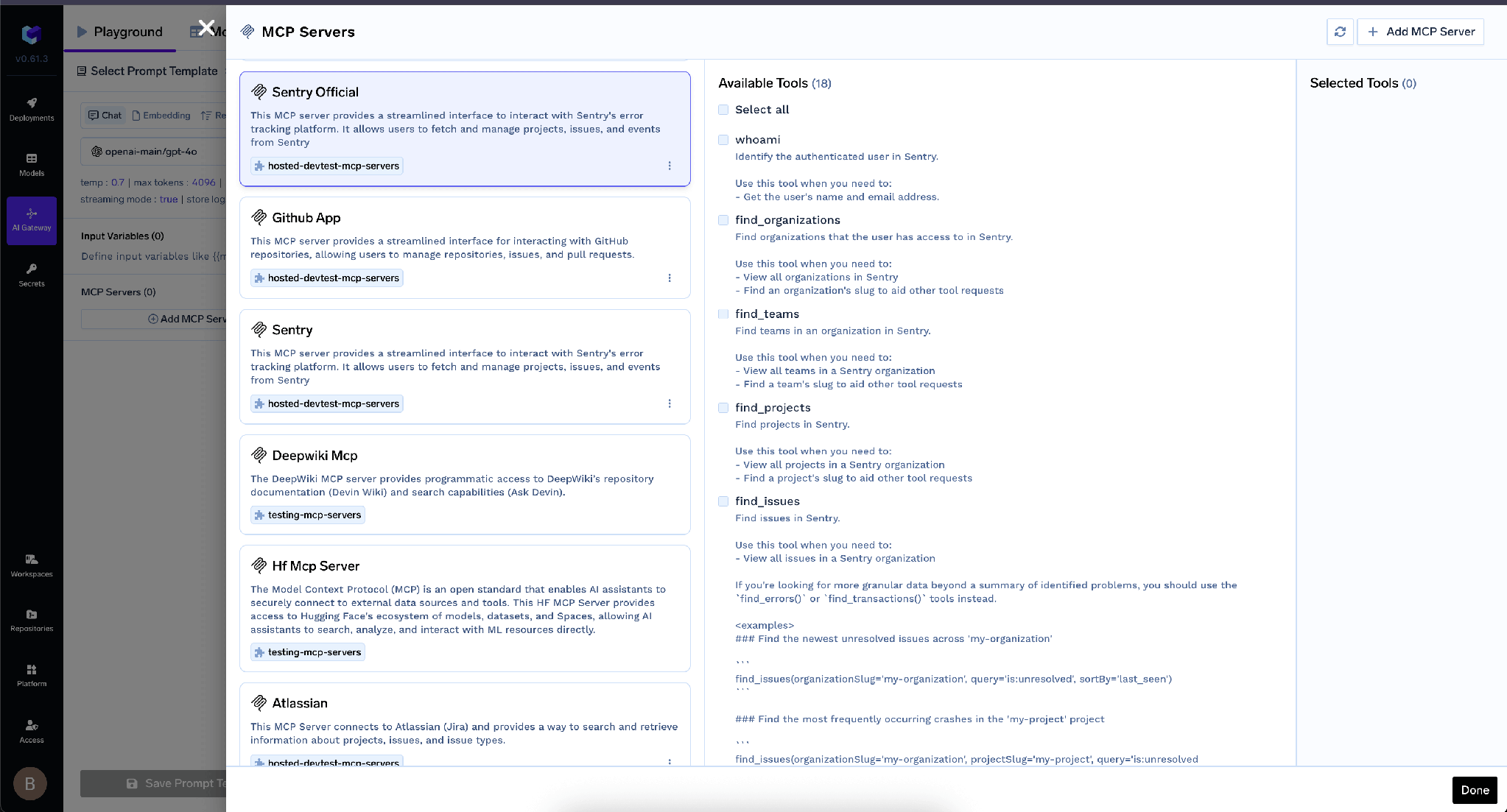
Detailansicht des MCP-Servers mit Auflistung der nach der OAuth2-Authentifizierung verfügbaren Tools
TrueFoundry trennt die eingehende Authentifizierung – wie sich ein Client gegenüber dem Gateway ausweist – von der ausgehenden, also wie sich das Gateway gegenüber Airtable ausweist. Die Ebenen sind unabhängig voneinander, und sie zu vermischen ist ein häufiger Fehler.
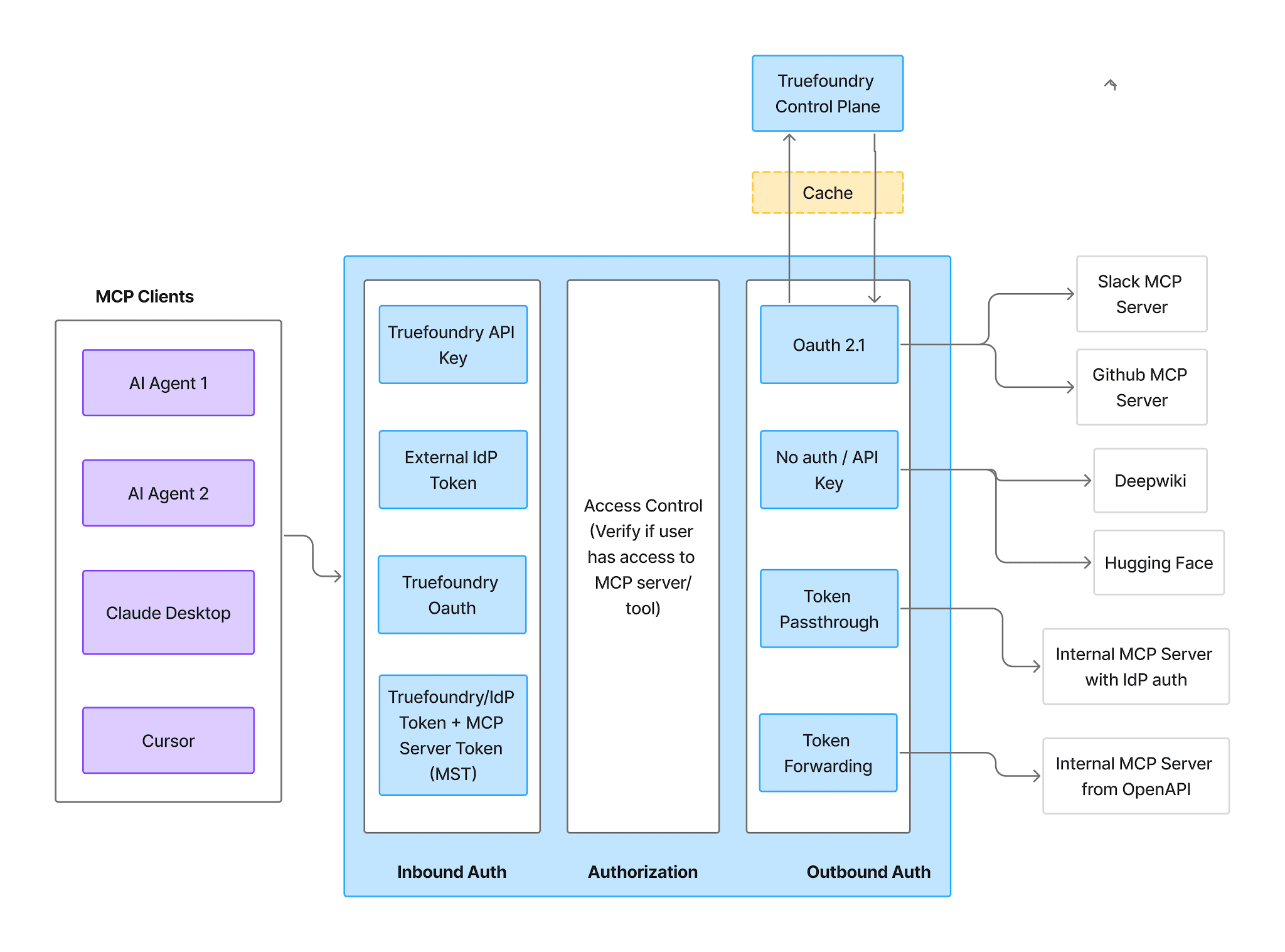
MCP-Gateway-Diagramm der Phasen für eingehende Authentifizierung, Zugriffskontrolle und ausgehende Authentifizierung
Eingehend unterstützt vier Methoden:
TrueFoundry AI Gateway bietet eine Latenz von ~3—4 ms, verarbeitet mehr als 350 RPS auf einer vCPU, skaliert problemlos horizontal und ist produktionsbereit, während LiteLM unter einer hohen Latenz leidet, mit moderaten RPS zu kämpfen hat, keine integrierte Skalierung hat und sich am besten für leichte Workloads oder Prototyp-Workloads eignet.





Die neuesten Nachrichten, Artikel und Ressourcen werden in Ihren Posteingang gesendet
.png)
.webp)
.png)
.png)
.png)
.webp)
.webp)

.png)
.png)
.png)
.png)
.png)
.png)
.png)


