


October 31, 2026
|
Lesedauer: 5 Minuten


Erhalten Sie sofortigen Zugriff auf eine TrueFoundry-Live-Umgebung. Stellen Sie Modelle bereit, leiten Sie den LLM-Verkehr weiter und erkunden Sie die gesamte Plattform — Ihre Sandbox ist in Sekundenschnelle einsatzbereit, ohne dass eine Kreditkarte erforderlich ist.



.png)
Unglaublich schnelle Methode zum Erstellen, Verfolgen und Bereitstellen Ihrer Modelle!
Der Notion MCP-Server ist ein Remote- Model Context Protocol -Server für Notion. MCP ist der offene Standard, der es einem Agenten ermöglicht, Tools auf einem externen System zu finden und aufzurufen; die Implementierung von Notion stellt die Suche im Arbeitsbereich, das Lesen und Schreiben von Seiten und Datenbanken sowie Kommentare als aufrufbare Tools bereit.
Die Dokumentation von TrueFoundry beschreibt die Schnittstelle als Suchen, Abrufen, Erstellen und Aktualisieren von Seiten, Datenbanken und Kommentaren, wobei die Tools der Konvention notion-* folgen – notion-search, notion-fetch, notion-create-pages, notion-update-page. Gruppiert nach Funktionen:
Der Reiter „Resources“ ist wichtig: Die meisten MCP-Server stellen nur Tools bereit, daher ist „Resources“ ein zusätzlicher Abrufpfad, der bei der Überprüfung der Zugriffsrechte eines Agenten leicht übersehen wird.
Da es sich um einen Remote-Server handelt, müssen Sie keinen Container ausführen und keinen npx-Prozess pro Laptop starten – Sie verweisen einen Client auf eine URL und authentifizieren sich. Dieses Muster ist mittlerweile Standard bei Remote-MCP-Servern.
Die nützlichsten Anwendungen verknüpfen Tools und setzen auf die Suche, da Notion-Inhalte von Natur aus unstrukturiert sind:
Die Trennung zwischen Lese- und Schreibzugriff ist hier deutlicher ausgeprägt als bei den meisten anderen Tools. Das Lesen ist der eigentliche Zweck – der Abruf von Informationen ist der Grund für die Anbindung. Schreibzugriffe sind zwar praktisch, aber selten geschäftskritisch, und sie können eine Seite überschreiben, an der ein Mensch eine Woche lang gearbeitet hat. Praktischerweise sind die Tools von Notion bereits entsprechend gekennzeichnet: Schreibgeschützt oder Destruktiv, sodass Sie im Tab „Tools“ ohne weitere Prüfung sofort sehen, um welche Art es sich handelt.
Das Risikoprofil von Notion unterscheidet sich von dem eines Code-Repositorys. Das gefährliche Szenario ist nicht, dass ein Agent böswillig eine Seite umschreibt, sondern dass er legitimerweise viel mehr liest, als irgendjemand beabsichtigt hat.
Durch die Vererbung von Berechtigungen bleibt der tatsächliche Umfang unsichtbar. Der Zugriff in Notion ist baumartig strukturiert: Wenn Sie eine übergeordnete Seite freigeben, überträgt sich diese Berechtigung automatisch auf alle untergeordneten Seiten, Unterseiten und Datenbanken. Wenn jemand eine „Engineering-Wiki“-Seite für eine Integration freigibt, denkt er nur an die Startseite. Tatsächlich gewährt er jedoch Zugriff auf alles, was sich über drei Jahre hinweg unter diesem Knoten angesammelt hat – einschließlich der Seite zur Gehaltsplanung, die ein Manager dort in Eile abgelegt hat. Niemand hat die Absicht, einem Agenten Zugriff auf HR-Daten zu geben. Die Vererbung erledigt das von selbst.
Die Zustimmung auf Workspace-Ebene ist zu grob gefasst. Der OAuth-Bildschirm von Notion fordert Sie auf, einen Workspaceauszuwählen, und zeigt dann die erteilten Kategorien an – Zugriff auf Seiten und Datenbanken, Suche, Workspace-Benutzer. Es wird nie verlangt, einzelne Seiten aufzulisten. Die Einheit der Zustimmung ist weitaus größer als die Einheit des Bedarfs. Daher ist die Standardeinstellung zwangsläufig „der Agent kann viel sehen“, sofern nichts anderes festgelegt wird.
Die Suchfunktion verstärkt dieses Problem. Eine zu weitreichende Berechtigung wäre verkraftbar, wenn ein Agent die URLs von Seiten erraten müsste. Das muss er aber nicht. Die Notion-Suche ist ein Discovery-Tool: Wenn Sie einen Agenten auf einen Workspace ansetzen, findet er die sensiblen Seiten, denn genau das ist seine Aufgabe. Die Qualität der Suchergebnisse und der potenzielle Schaden wachsen also Hand in Hand.
Niemand kann nachvollziehen, was gelesen wurde. Notion protokolliert zwar API-Aktivitäten, aber nicht, dass Ihr interner Support-Agent hat bei der Beantwortung einer Frage aus einem Slack-Thread nach „Abfindung“ gesucht. Lesezugriffe stellen die Angriffsfläche dar und werden im Nachhinein am ehesten übersehen.
Nichts davon ist ein Grund, auf den Notion-MCP-Server zu verzichten. Es ist ein Grund, eine Steuerungsebene davorzuschalten – genau das, wofür ein MCP-Gateway da ist.
Auf TrueFoundry ist Notion ein TrueFoundry Managed MCP. TrueFoundry veröffentlicht plattformgeprüfte Serverdefinitionen in einem verwalteten Katalog; um einen bereitzustellen, müssen Sie lediglich einen Namenangeben, und die Plattform kümmert sich um alle URLs, Authentifizierungsdetails, Scopes und Anmeldedaten – und hält diese aktuell, sobald der Upstream-Anbieter Änderungen vornimmt.
Schritt 1 – Öffnen Sie den Katalog. Gehen Sie in der Seitenleiste auf MCP-Server , klicken Sie auf Neuen MCP-Server hinzufügenund wählen Sie TrueFoundry Managed MCPs verbindenaus. Suchen Sie nach notion — katalogisiert als „Notion ist ein Tool für Zusammenarbeit und Produktivität“ — und klicken Sie auf + Hinzufügen. TrueFoundry registriert den Server und öffnet dessen Detailseite.
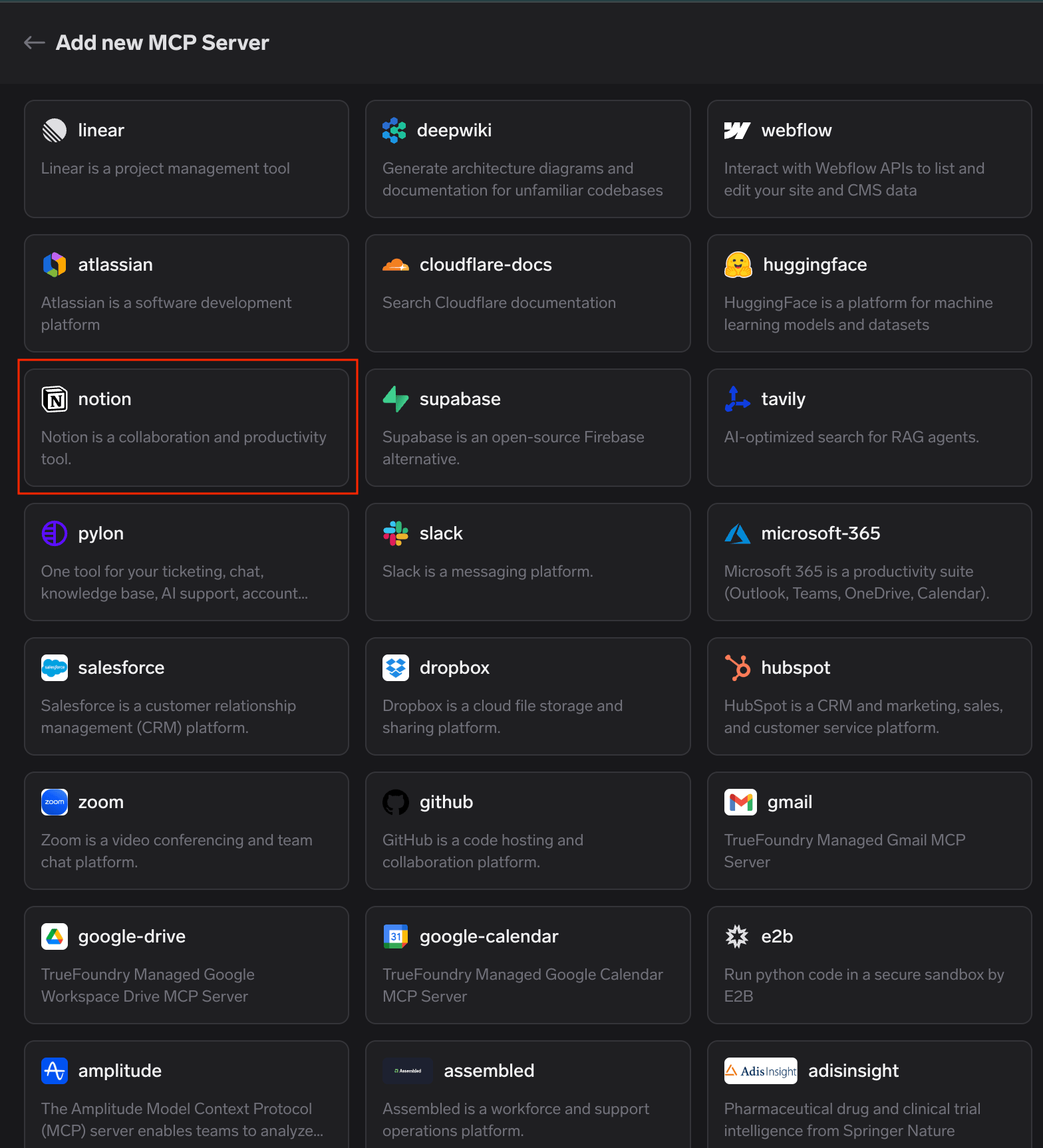
Der von TrueFoundry verwaltete MCP-Katalog mit der hervorgehobenen Notion-Karte unter den verfügbaren, plattformverifizierten MCP-Servern
Das war die gesamte Registrierung – keine URL zum Einfügen, keine Notion-Integration zum Erstellen, kein Client-Secret zum Speichern.
Schritt 2 – Verbindung starten. Der Tab „Tools“ öffnet sich mit der Meldung „Sie sind nicht mit diesem MCP-Server verbunden.“ Klicken Sie auf Jetzt verbinden , um die OAuth2-Autorisierung zu starten; die Detailseite zeigt den Authentifizierungstyp an, noch bevor Sie etwas anklicken.
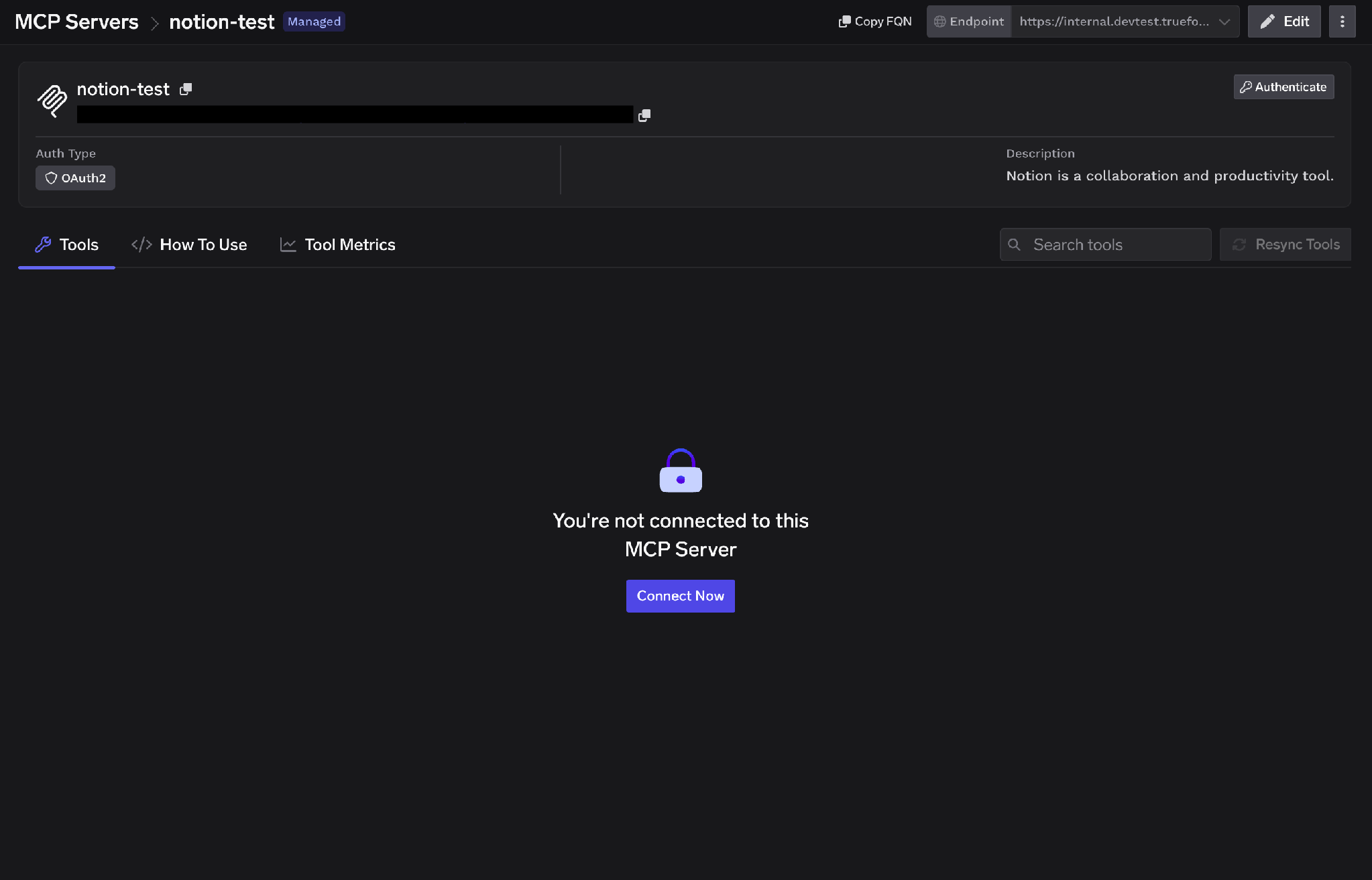
Detailseite des Notion-MCP-Servers mit dem OAuth2-Authentifizierungstyp und der Schaltfläche „Jetzt verbinden“ auf dem nicht verbundenen Tab „Tools“
Schritt 3 – Am Gateway genehmigen. Ein Popup mit dem Titel „Verbindung über TrueFoundry AI Gateway“ zeigt die MCP-Gateway-URL, die Redirect-URL und die zu autorisierenden Server an. Überprüfen Sie diese und klicken Sie auf Genehmigen. Sie werden anschließend nacheinander zu jedem MCP-Server weitergeleitet – gut zu wissen, wenn Sie mehrere gleichzeitig autorisieren, da der Ablauf eine Kette und kein einzelner Schritt ist.
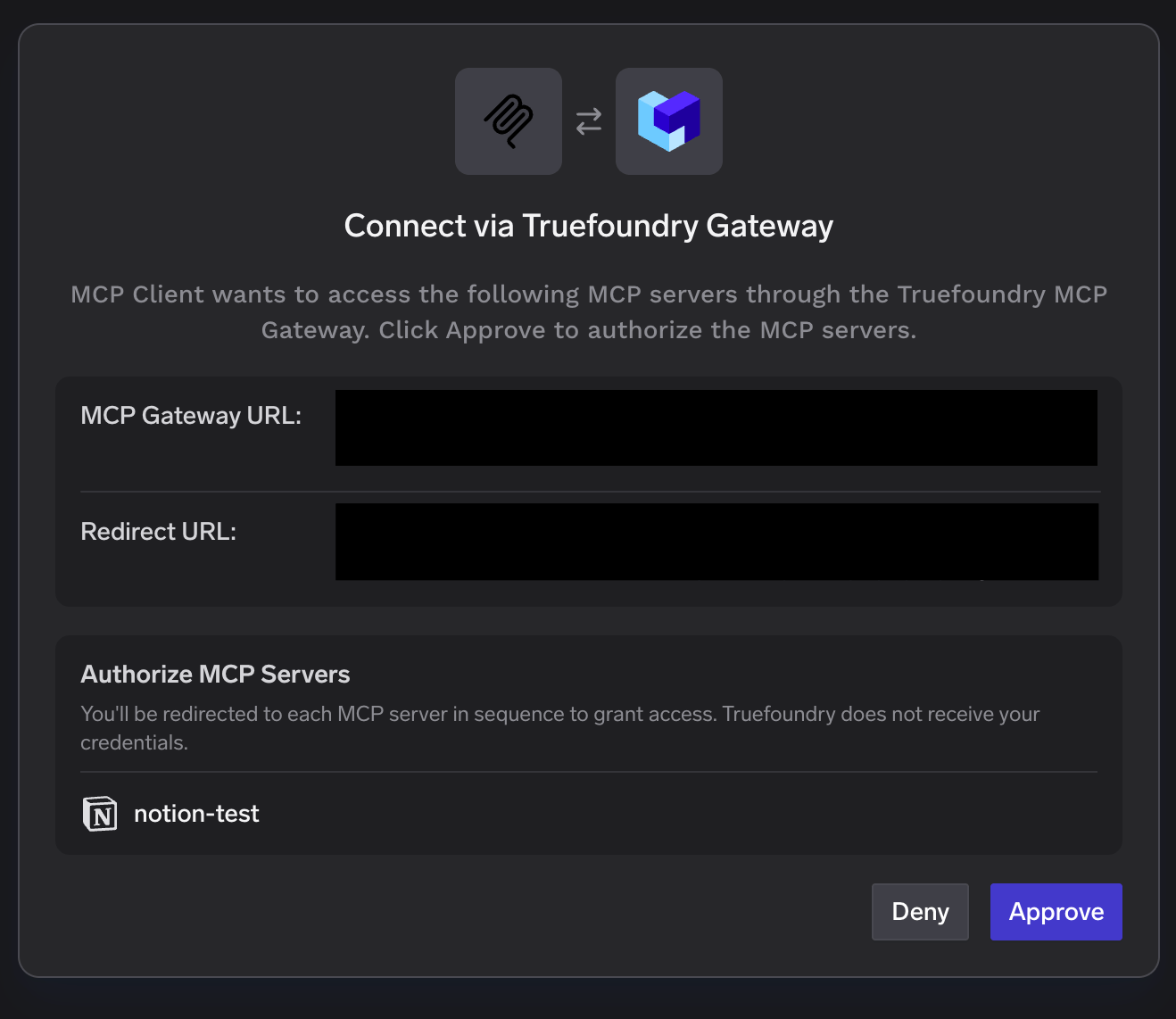
Popup „Verbindung über TrueFoundry AI Gateway“ mit Auflistung des Notion-Servers unter „MCP-Server autorisieren“ sowie den Schaltflächen „Ablehnen“ und „Genehmigen“
Schritt 4 – Notion-Workspace autorisieren. Der Zustimmungsbildschirm von Notion öffnet sich. Wählen Sie den Workspaceaus, überprüfen Sie die gewährten Zugriffsrechte – Zugriff auf Seiten und Datenbanken, Suche, Workspace-Benutzer –, bestätigen Sie, dass Sie der Redirect-URL vertrauen, und klicken Sie auf Weiter.
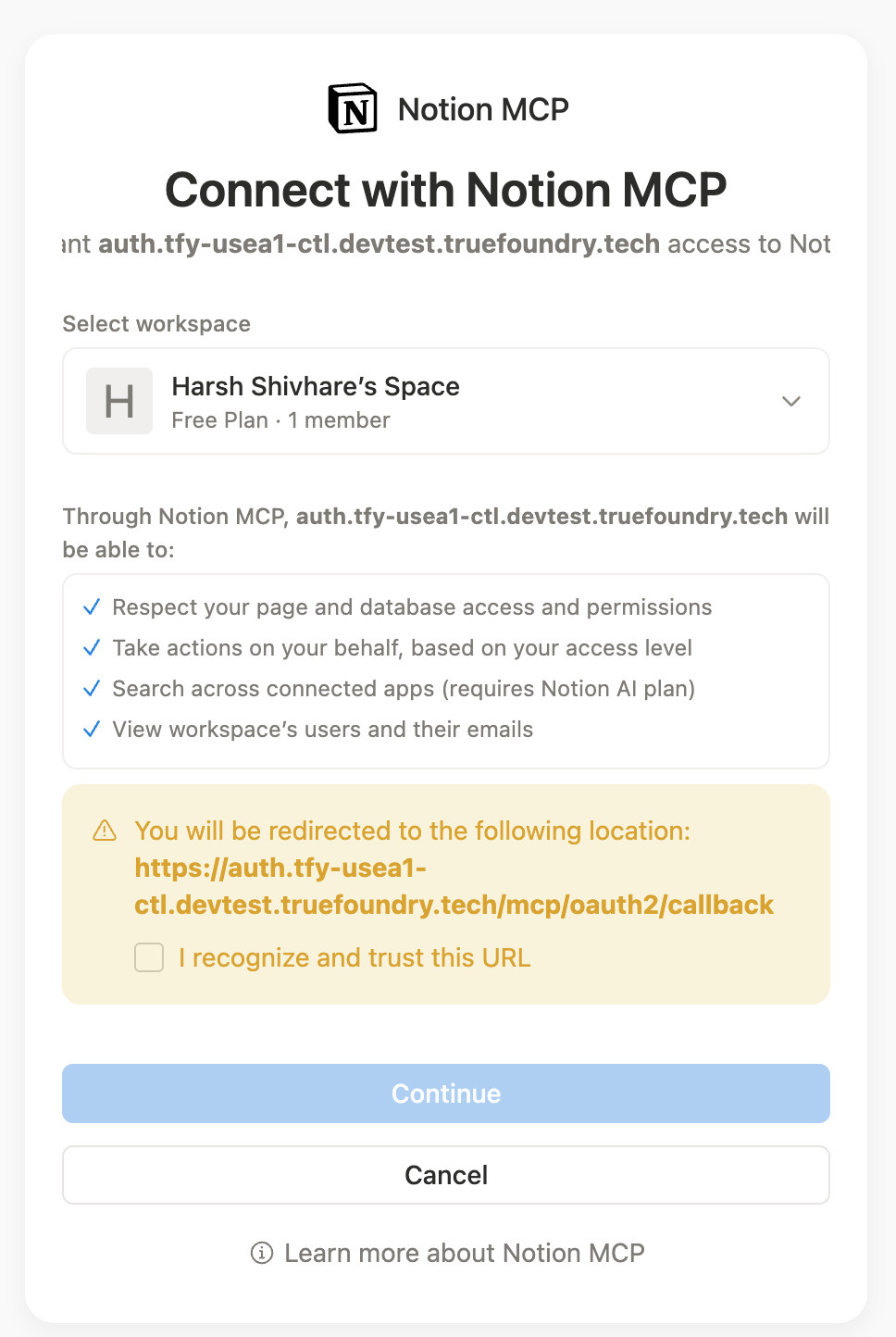
Zustimmungsbildschirm für die Notion-MCP-Verbindung mit Auswahl des Arbeitsbereichs, Liste der erteilten Berechtigungen und der Schaltfläche „Weiter“
Lesen Sie diesen Bildschirm aufmerksam durch – hier wird das Vererbungsproblem zu einer bewussten Entscheidung. Wer auf „Weiter“ klickt, legt fest, auf welche Bereiche des Arbeitsbereichs ein Agent zugreifen darf.
Schritt 5 – Tools überprüfen. Der Tools -Tab enthält die Notion-Tools, jeweils mit einer Beschreibung, einer Ausprobieren -Schaltfläche sowie einer Kennzeichnung als „Schreibgeschützt“ oder „Destruktiv“. Ressourcen erscheinen auf einem eigenen Tab.
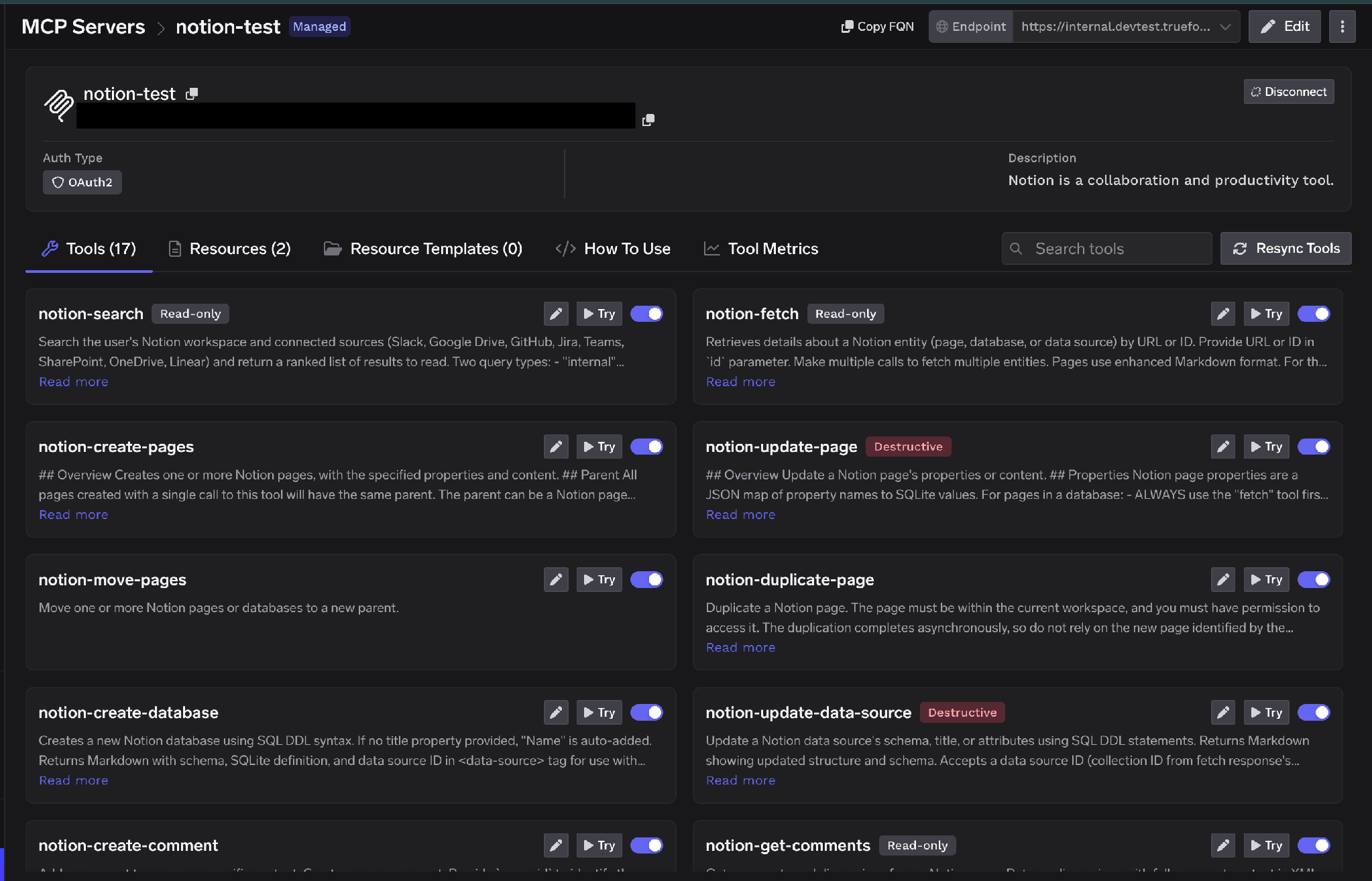
Notion-Tools-Tab mit verschiedenen Tools wie notion-search, notion-fetch, notion-create-pages und notion-update-page, jeweils als „Schreibgeschützt“ oder „Destruktiv“ gekennzeichnet
TrueFoundry unterscheidet zwischen eingehender Authentifizierung (wie sich ein Client gegenüber dem Gateway ausweist) und ausgehender Authentifizierung (wie sich das Gateway gegenüber Notion ausweist). Diese Ebenen sind unabhängig voneinander, und genau diese Trennung ermöglicht die nutzerspezifische Zugriffsbeschränkung.
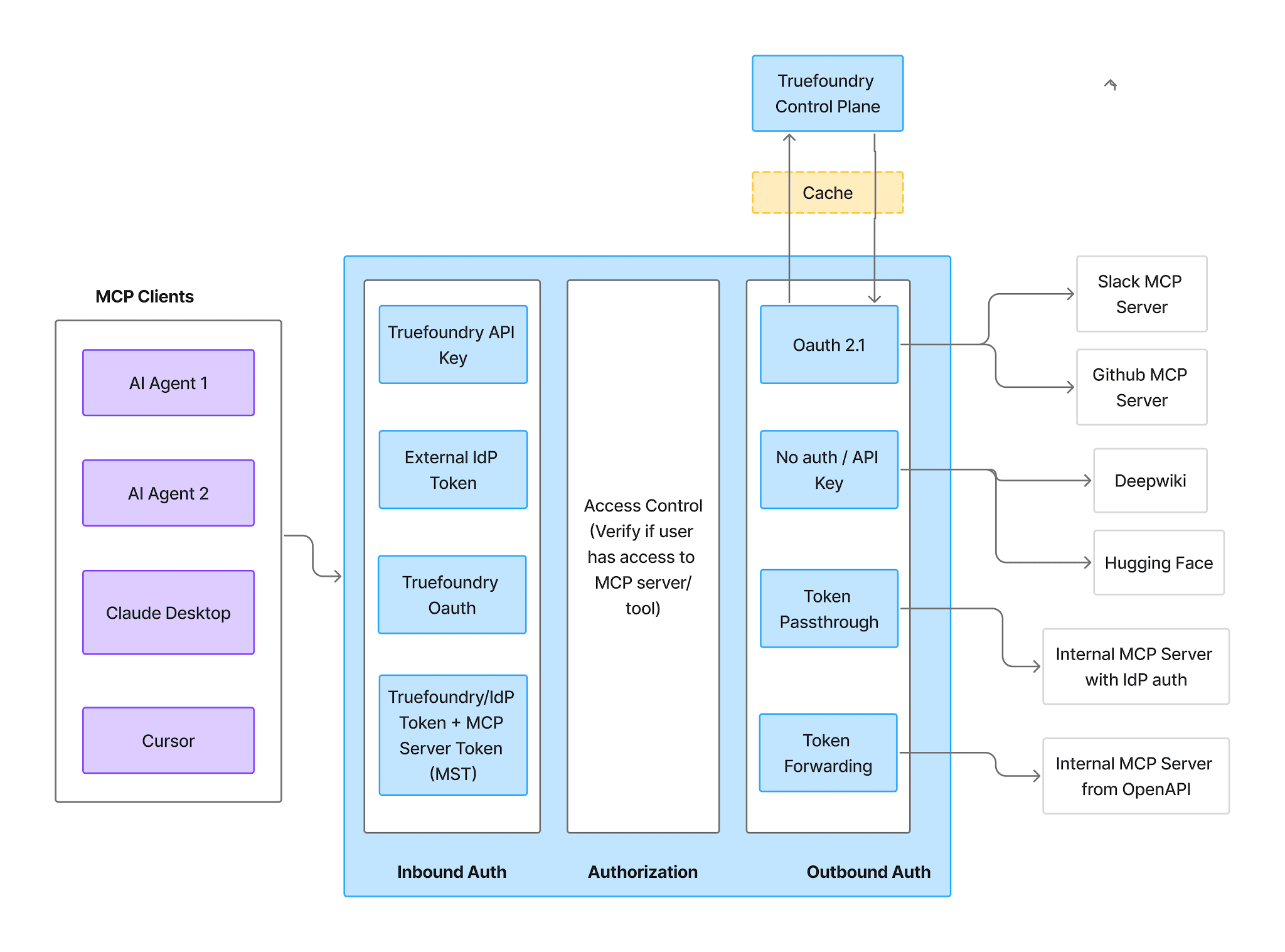
Authentifizierungs- und Autorisierungsablauf des MCP-Gateways mit den drei getrennten Phasen: eingehende Authentifizierung, Zugriffskontrolle und ausgehende Authentifizierung
Eingehend — vier unterstützte Methoden:
TrueFoundry AI Gateway bietet eine Latenz von ~3—4 ms, verarbeitet mehr als 350 RPS auf einer vCPU, skaliert problemlos horizontal und ist produktionsbereit, während LiteLM unter einer hohen Latenz leidet, mit moderaten RPS zu kämpfen hat, keine integrierte Skalierung hat und sich am besten für leichte Workloads oder Prototyp-Workloads eignet.




Ein Remote-Server für das Model Context Protocol für Notion, der einen Workspace als aufrufbare Tools bereitstellt – suchen, Seiten und Datenbanken abrufen, Seiten erstellen und aktualisieren, Kommentare lesen und schreiben. Agenten verbinden sich über eine URL und autorisieren sich mit OAuth2, statt etwas lokal auszuführen. Notion stellt außerdem MCP Resources als eigenes Primitiv bereit.
Suche, Abruf, Erstellen und Aktualisieren von Seiten, Lesen und Schreiben in Datenbanken sowie Kommentare – benannt nach der Konvention notion-*, etwa notion-search, notion-fetch, notion-create-pages und notion-update-page. Die vollständige Liste erscheint nach der Autorisierung im Tab Tools; jedes Tool ist als Read-only oder Destructive gekennzeichnet und einzeln konfigurierbar.
Ja, mit sauber eingegrenztem Umfang – und die Frage ist die Breite des Lesezugriffs, nicht böswillige Schreibvorgänge. Notion-Berechtigungen vererben sich entlang der Seitenbäume nach unten, sodass eine einzige Freigabe weit mehr offenlegen kann als beabsichtigt. Betreiben Sie ihn hinter einem Gateway, das OAuth pro Nutzer statt eines gemeinsamen Integrations-Tokens durchsetzt, deaktivieren Sie Schreib-Tools, die ein Agent nicht benötigt, stellen Sie die übrigen hinter eine menschliche Freigabe und tracen Sie jeden Aufruf mit dem aufrufenden Nutzer.
Ja. TrueFoundry läuft in Ihrer VPC, On-Prem, Air-Gapped oder hybrid, sodass Prompts und Antworten Ihre Domäne nie verlassen, auch wenn Sie über viele Anbieter hinweg routen.
Ja. Es umfasst ein MCP Gateway, ein Agent Gateway und eine MCP & Agents Registry mit Zugriffskontrolle auf Tool-Ebene. Agenten auf Basis von LangGraph, CrewAI, AutoGen oder einem eigenen Framework lassen sich alle zentral steuern.
Ja. Das Gateway ist OpenTelemetry-kompatibel und lässt sich in Grafana, Datadog, Prometheus oder Ihren bevorzugten Stack integrieren. Es verfolgt jede Anfrage vom Prompt bis zur Ausführung von Tools und Modellen, sodass Sie eine einheitliche Protokollierung erhalten, ohne Ihre bestehenden Systeme entfernen zu müssen.



Die neuesten Nachrichten, Artikel und Ressourcen werden in Ihren Posteingang gesendet
.webp)
.png)
.png)
.png)
.webp)
.webp)

.png)
.png)
.png)
.png)
.png)
.png)
.png)

.png)


