Built for Speed: ~10ms Latency, Even Under Load Blazingly fast way to build, track and deploy your models!
Handles 350+ RPS on just 1 vCPU — no tuning needed Production-ready with full enterprise support
⚡ TL;DR
AI agent guardrails inspect what flows through an agent — the prompts, the model outputs, and every MCP tool call — and block or rewrite anything unsafe before it acts. Identity decides whether a call is allowed; guardrails decide what the call is allowed to contain. On TrueFoundry, guardrails run at the AI Gateway on four hooks (LLM input, LLM output, MCP pre-tool, MCP post-tool), so the same policy covers every agent with no per-agent code. This guide walks through where guardrails run, which risks they stop, and how to roll them out.
AI Gateway , which risks each one addresses, and how to enforce them without rewriting a single agent.
AIエージェントのガードレールとは? AIエージェントのガードレールとは、エージェントのやり取りにおける実際のペイロード(ユーザープロンプト、モデルの応答、ツール呼び出しの引数と結果)を精査し、ポリシーに基づいて許可、ブロック、書き換えといったアクションを実行するコンテンツ検査制御のことです。
ガバナンス対象となるエージェントの呼び出しにおいて、以下の2つの問いを分けて考えると理解が深まります。
呼び出しが許可されているか — IDおよびアクセス制御によって管理されます(どのエージェントか、何が許可されているか)。呼び出しの内容は何か — ガードレールによって管理されます(ツール結果にインジェクションが含まれていないか、出力に機密情報が含まれていないか、引数に「DROP TABLE」のような不正な命令がないか)。アクセス制御が入り口の警備員なら、ガードレールは金属探知機です。両方が必要不可欠です。エージェントがPostgres MCPサーバーへの呼び出しを完全に許可されていても、悪意のあるクエリを実行するように誘導される可能性があります。アクセス制御が「許可」を出しても、ツール引数に対するガードレールだけが、そのクエリの真の内容を検知できるのです。
なぜエージェントがリスクを高めるのか ガードレールはLLMアプリケーションにとって新しい概念ではありませんが、エージェントの登場により、問題は以下の3つの具体的な点で変化しました。
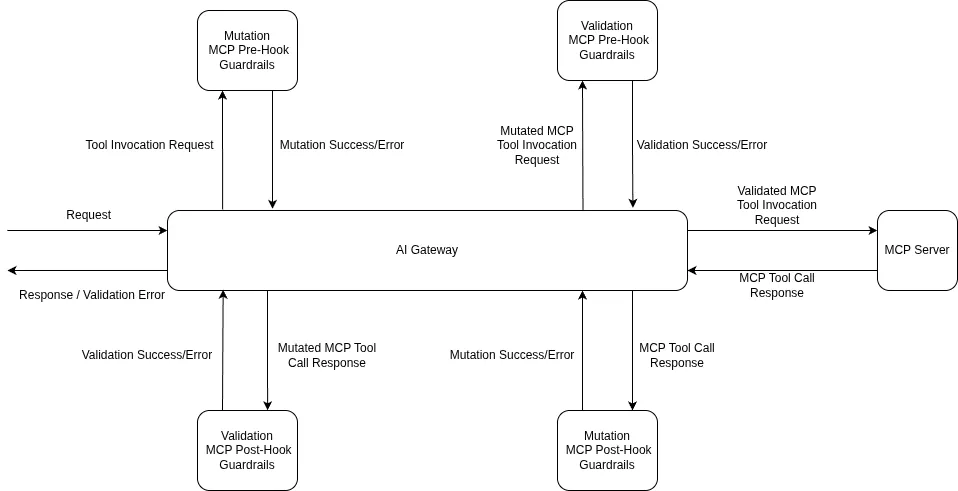
信頼できないコンテンツが継続的に流入する。 Webページ、サポートチケット、データベースの行など、あらゆるツール結果が次のターンでモデルのコンテキストに再入力されます。そのすべてがインジェクションを含む可能性があるため、入力のチェックが必要です。 たとえユーザーが信頼できる場合であっても 。出力がアクションに変わる。 ハルシネーション(幻覚)によるシェルコマンドや、過度に広範なSQL文は、単に表示が不適切なだけでなく、実際に実行されてしまいます。ツール引数は、 実行される前 にチェックする必要があります。チェーンはリスクの露出を増大させます。 5つのツールチェーンがあれば、秘密の漏洩や個人情報(PII)の流出につながる機会も5倍になります。効果的なガードレールは、 ツール呼び出しごとに個別に 実行されるため、各ステップで独自のチェックが行われます。AIエージェントのガードレールが機能する場所:4つのフック TrueFoundryでは、ガードレールはゲートウェイ上の エージェント呼び出しパス (ユーザー → アプリ → エージェント → サブエージェント → MCPツール呼び出しというチェーン)で強制適用されます。管理対象となるすべてのホップは、 実行前(before) および 実行後(after) のフックを介したインターセプションポイントを通過します。
製品スクリーンショット — TrueFoundryドキュメント:ガードレールはLLMの入出力、およびMCPツールの実行前後のフックで実行されます。
Surface
Hook
Runs
Typical checks for agents
LLM call
Input Before the prompt reaches the model
PII masking, prompt-injection detection (incl. injected tool results), content moderation
LLM call
Output After the model responds
Secrets detection, unsafe-code detection, content filtering
MCP tool call
Pre-tool Before the tool executes
SQL sanitizer, code-safety linter, parameter validation, Cedar/OPA policy checks
MCP tool call
Post-tool After the tool returns
Secrets and PII redaction from results, code safety on returned content
コストと影響範囲を抑えるには、順序が重要です。 ツール実行前(pre-tool) での失敗は、ツールが実行されないことを意味し、最も低コストな失敗となります。 LLM入力 での失敗は、料金が発生する前に進行中のモデルリクエストをキャンセルします。すべてのホップが個別にチェックされるため、3番目のホップで侵害されたツール結果は、さらに3つの呼び出しに波及する前に、その場で阻止されます。
リスクとガードレールの対応付け MCP Gatewayでガードレールを実行する価値は、 MCP Gateway エージェントが直面する個々のリスクを、特定の組み込みコントロールにマッピングできる点にあります。TrueFoundryの組み込みガードレールはTrueFoundryが管理するインフラ上で動作するため、サードパーティのAPIキーをプロビジョニングする必要はありません。
Risk
Guardrail
Hook
Indirect prompt injection via tool results or documents
Prompt injection detection (Azure Prompt Shield under the hood)
LLM input
PII reaching an external model or leaking in results
PII / PHI detection and redaction (Azure AI Language)
LLM input, post-tool
Credentials leaking through model output or tool results
Secrets detection
LLM output, post-tool
Destructive database operations (DROP , DELETE without WHERE )
SQL sanitizer
Pre-tool
Dangerous shell commands or unsafe code
Code safety linter
Pre-tool, LLM output
Tool calls that violate fine-grained policy
Cedar / OPA policy guardrails
Pre-tool
Requests missing required context (environment, cost center)
Metadata validation
LLM input
組み込み機能に加え、Palo Alto Prisma AIRS、CrowdStrike AIDR、Cisco AI Defense、AWS Bedrock Guardrails、Google Model Armor、NVIDIA NeMo Guardrails、Guardrails AIなどの外部プロバイダーとも連携可能です。また、ドメイン固有のロジックが必要な場合には、完全にカスタムなガードレールもサポートしています。
プロンプトインジェクション対策のガードレールは、エージェント特有の課題を解決するために構築されています。このガードレールはユーザーのプロンプトを分析し、 かつ ドキュメントやコンテキストの内容を個別に解析します。そのため、ユーザー自身のメッセージがクリーンであっても、Webページやチケットの戻り値に隠されたインジェクションを検知することが可能です。
Ship agents that can't act on a bad instruction.
TrueFoundry enforces prompt-injection, PII, secrets, and unsafe-tool-call checks on every agent hop — inside your own VPC.
AIエージェント向けガードレールの実装方法 エージェントのトラフィックにガードレールを適用するプロセスは3ステップで構成されており、重要なのは、そのいずれもエージェントのコード内に記述する必要がないという点です。
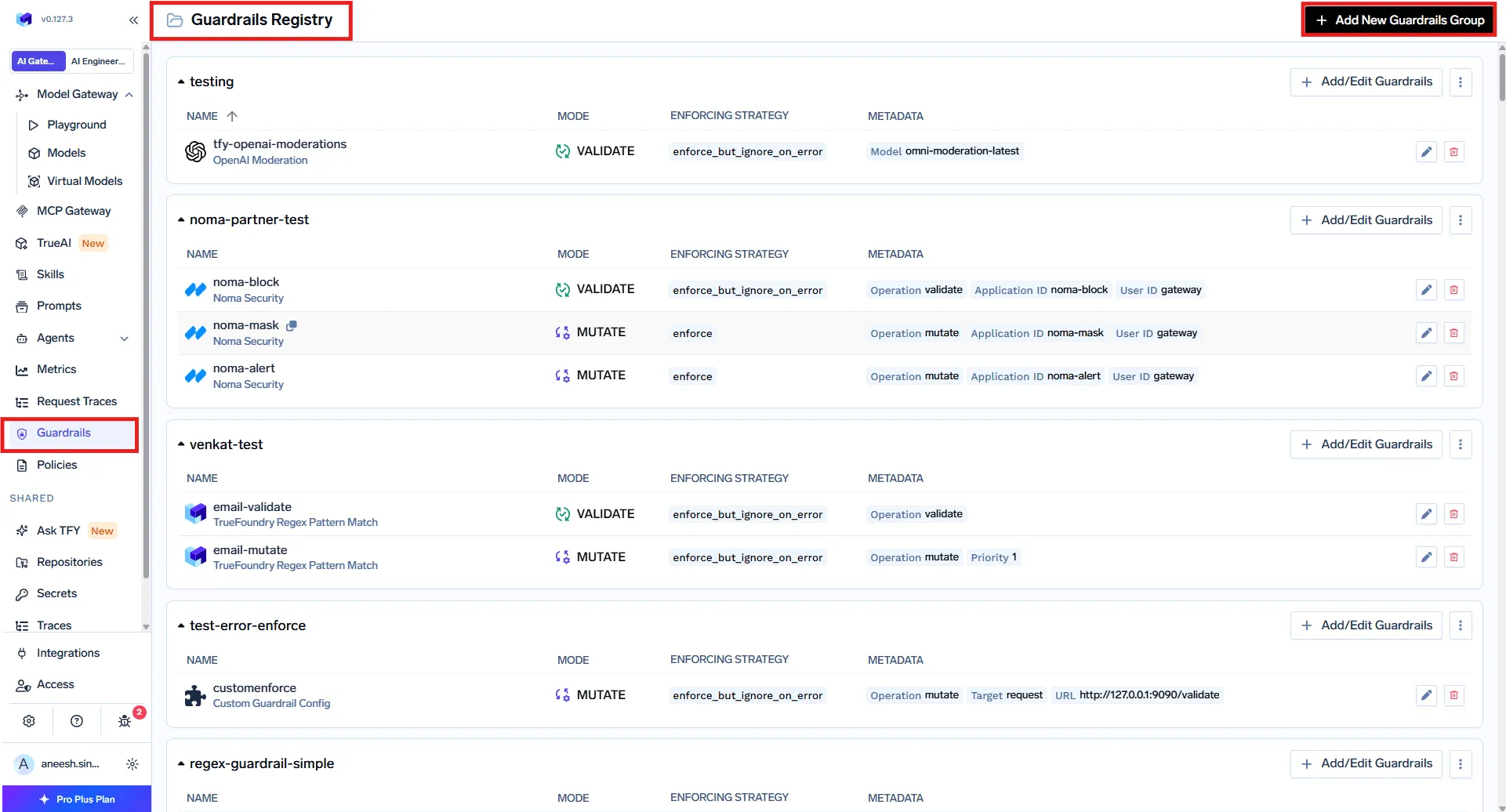
ステップ1 — ガードレールの登録 「 AI Gateway → Guardrails 」にて、ガードレールグループを作成し、必要な統合(組み込み、外部プロバイダー、またはカスタム)を追加します。グループはアクセス制御の単位でもあり、マネージャーはガードレールの追加・編集・削除が可能ですが、ユーザーは適用のみが可能です。一般的なパターンとして、プラットフォームチームが管理する組織全体のグループと、製品固有のチェックを行うチームごとのグループを併用する方法があります。
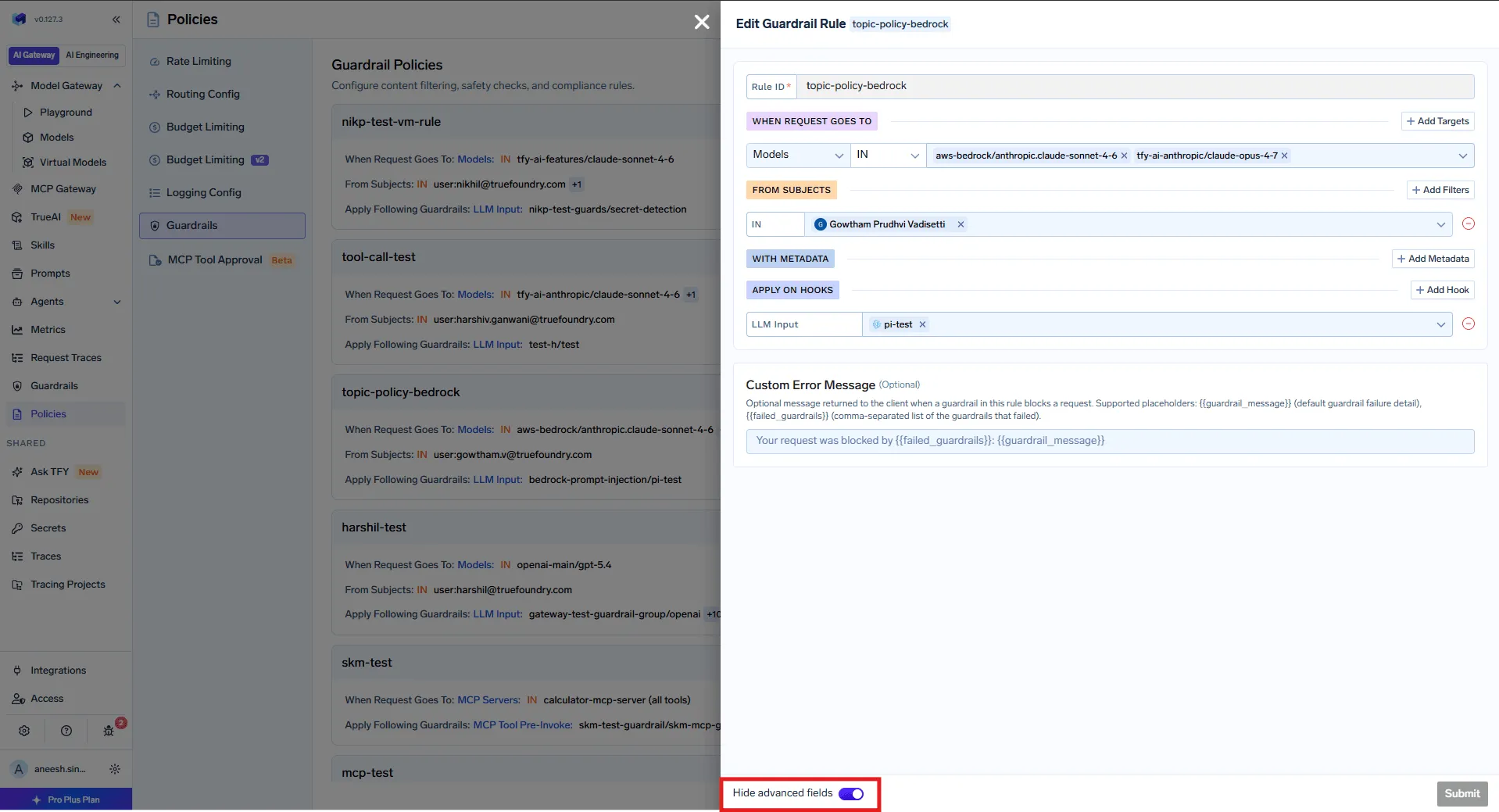
製品スクリーンショット — TrueFoundryドキュメント:AI Gateway → Guardrails。 ステップ2 — ターゲット別にガードレールを適用するポリシーの作成 「 AI Gateway → Policies → Guardrails 」にて、 いつ 各ガードレールが実行されます。これが、モデルをエージェントのフリートへと拡張可能にする理由です。ルールは以下をキーとして設定されます。 ターゲット (モデル、MCPサーバー、さらには呼び出される特定のツール)および以下をキーとします。 サブジェクト (ユーザー、チーム、または仮想アカウント)。ルールは以下をカバーするため、 すべて の特定のMCPサーバーやモデルの呼び出し元に対して適用され、そのターゲットに触れるすべてのエージェントを保護します。エージェントごとの設定は不要です。
各ルールは以下を組み合わせたものです:
ターゲット — モデル(IN / NOT IN)およびMCPサーバー。オプションで特定のツールに絞り込むことも可能です(例:データベースサーバーのrun_queryツールのみ)。サブジェクト — ユーザー、チーム、または仮想アカウントに対するIN / NOT INフィルター。メタデータ — X-TFY-METADATAのキーと値で一致判定を行います。これにより、環境が「本番(production)」の場合のみルールを適用するといった制御が可能です。フック — 登録済みのガードレールを、LLM入力、LLM出力、MCPツール呼び出し前(Pre-Invoke)、または呼び出し後(Post-Invoke)に適用します。
製品スクリーンショット — TrueFoundryドキュメント:ガードレールポリシーのルールエディター。
一致するすべてのルールが評価され、フックごとにガードレールが統合されます。ルールAがLLM入力に対してPII検出を適用し、ルールBがLLM入力に対してプロンプトインジェクション検出を適用する場合、両方が実行されます。ターゲットやサブジェクトの条件がないルールは、すべてのトラフィックに適用されるベースラインとなります。これは、他のすべてのチェックに加えて、全社的なプロンプトインジェクションチェックを行う場合に便利です。
クイックテストや単発の呼び出しを行う場合は、X-TFY-GUARDRAILSヘッダーを使用してリクエストごとにガードレールを渡すこともできます。これにより、ポリシーを完全にバイパスできます。
curl https://<your-gateway>/api/llm/chat/completions \
-H "Authorization: Bearer $TFY_API_KEY" \
-H 'X-TFY-METADATA: {"environment":"production","agent":"research-agent"}' \
-H 'X-TFY-GUARDRAILS: {"llm_input":["global/prompt-injection","global/pii-detection"]}' \
-H "Content-Type: application/json" \
-d '{
"model": "openai-main/gpt-4o",
"messages": [{"role":"user","content":"Summarize ticket #4521 and email the customer"}]
}'
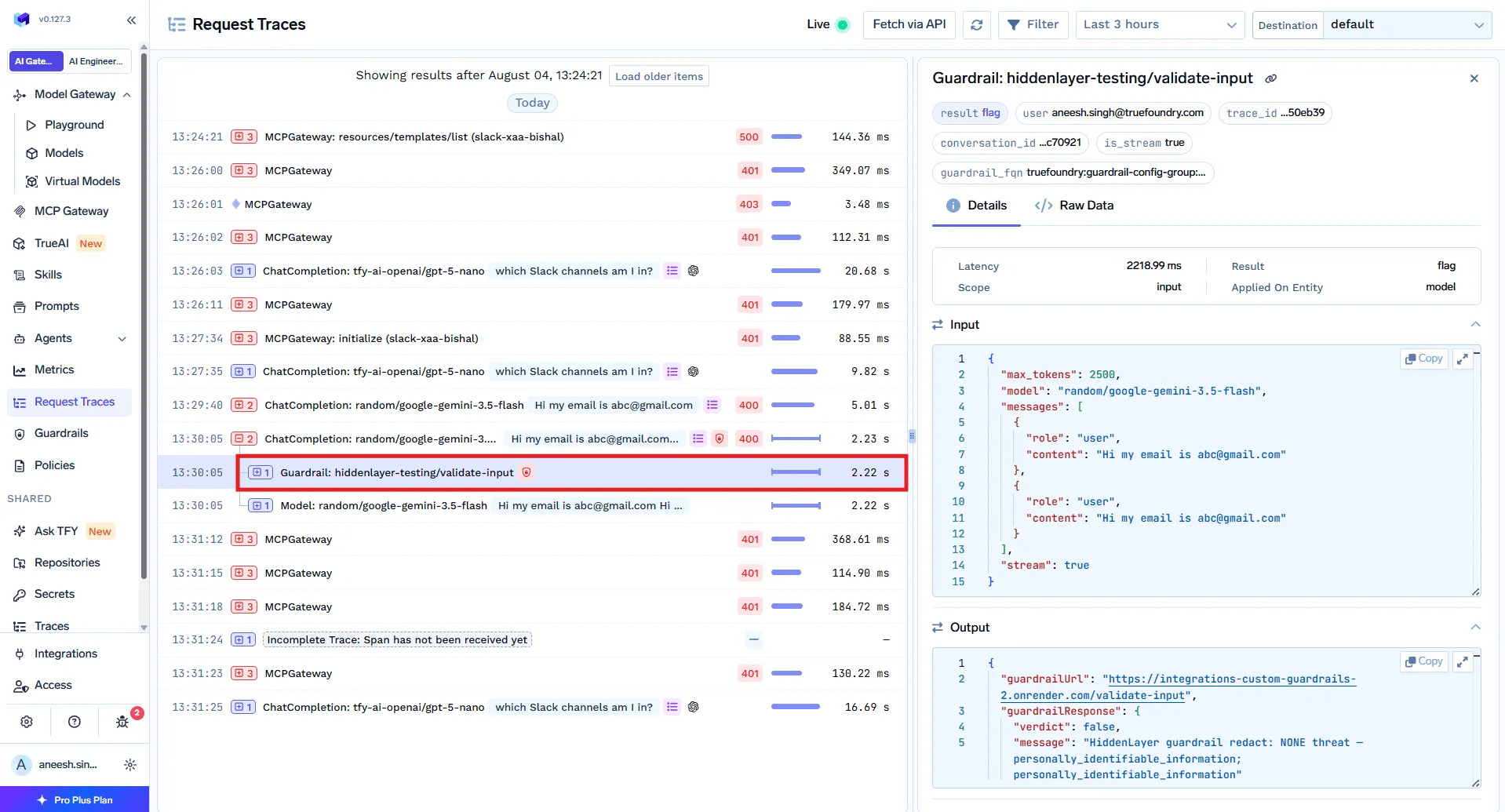
ステップ3 — トレースでの確認 すべてのリクエストは、実行されたガードレールとその判定結果とともにトレースされるため、信頼する前にカバレッジを確認できます。また、ここでは誤検知の調整も行えます。エージェントの場合、チャットボットよりも誤検知が重要になります。ホップがブロックされると、チェーン全体が失敗する可能性があるためです。
製品スクリーンショット — TrueFoundryドキュメント:リクエストトレースにおけるガードレールの結果。
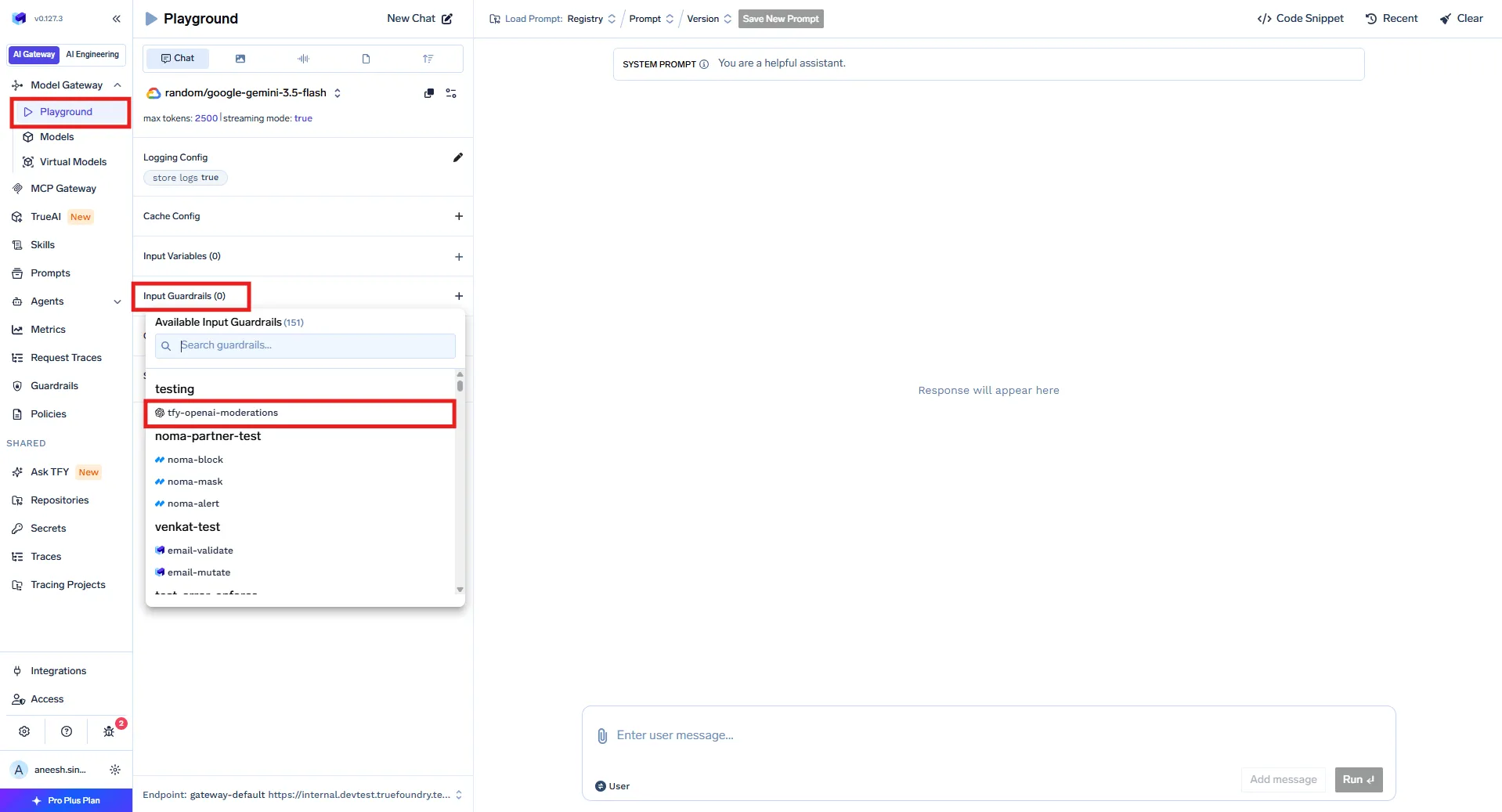
本番環境へデプロイする前に、 Playground を使用して、4つのすべてのフックに対してテストプロンプトやツール呼び出しを実行し、何が検知されるかを確認してください。
製品スクリーンショット — TrueFoundryドキュメント:AI Gateway Playground
適用モード:検証、変更、およびブロックの強度 各ガードレールの動作は、2つの設定によって制御されます。
操作モード:
検証(Validate) — 検査およびブロック(例:プロンプトインジェクション検知。検知とブロックのみを行います)。変更(Mutate) — コンテンツの書き換えおよび必要に応じたブロック(例:PII検知。プロンプトがモデルに到達する前にメールアドレスをマスキングします)。
適用戦略:
強制 — 違反時にブロック および ガードレール自体がエラーとなった場合。PII(個人情報)など、厳格なコンプライアンスチェックに使用します。強制(エラー時は無視) — 違反時にブロックしますが、ガードレールプロバイダーで障害が発生した場合はトラフィックを通過させます。ほとんどのエージェントトラフィックにおける実用的なデフォルト設定です。監査 — ログ記録のみを行い、ブロックはしません。
カスタムロジックの場合、ガードレールをHTTPサービスとしてデプロイします。ゲートウェイは、そのレスポンス契約を読み取ります。HTTP 2xxはガードレールが実行されたことを意味し、JSONボディには結果が含まれます。verdict: falseで拒否、または変更された結果ボディで書き換えを行います:
TrueFoundry AI Gateway delivers ~3–4 ms latency, handles 350+ RPS on 1 vCPU, scales horizontally with ease, and is production-ready, while LiteLLM suffers from high latency, struggles beyond moderate RPS, lacks built-in scaling, and is best for light or prototype workloads.





.webp)




.png)
.png)

.png)
.png)
.png)





.png)







