September 13, 2026
|
5 min de lecture


Accédez instantanément à un environnement TrueFoundry en direct. Déployez des modèles, acheminez le trafic LLM et explorez la plateforme complète : votre sandbox est prête en quelques secondes, aucune carte de crédit n'est requise.



Published: June 15, 2026
Une méthode incroyablement rapide pour créer, suivre et déployer vos modèles !
Somebody on your team is already using Claude Code. Probably several people. The question isn't whether to allow it—that ship sailed. The question is whether you govern it before something goes wrong, or after.
Claude Code runs in your terminal with full user-level privileges. It reads files, runs bash commands, connects to MCP servers, and sends code context to Anthropic's servers for processing.
Without a usage policy, you've got API keys in Slack channels, no visibility into what the tool accesses, and no audit trail when compliance comes knocking. We've watched this happen at enough organizations to know the pattern.
Most teams adopt Claude Code bottom-up. A few developers try it, get hooked, and tell their teammates. By the time platform engineering or security gets involved, 30 people are running it with default settings and no guardrails.
Three risks show up fast at that point:
A usage policy doesn't kill productivity. It channels it. Get the policy right, and developers work faster, and you can prove what happened.
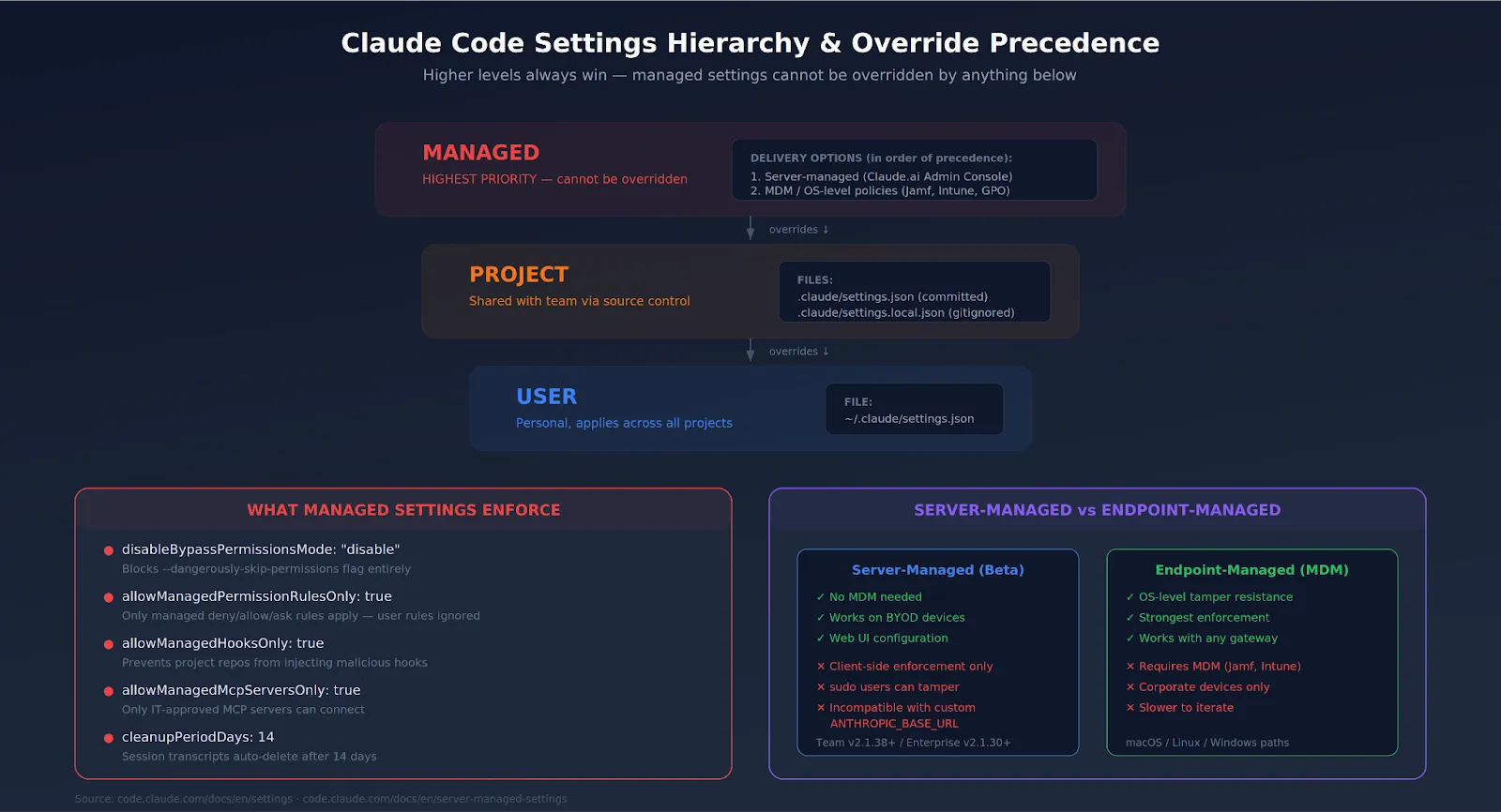
Your governance options depend entirely on which plan you're on. Here's the honest breakdown:
SSO integration takes about 2-4 hours. You verify domain ownership via DNS TXT record, upload IdP metadata to the Claude Admin Console, and connect Okta, Azure AD, or whatever SAML 2.0 provider you run. Domain capture automatically enrolls new users under your org when they sign up with a company email.
Here's the core of enterprise governance. The managed-settings.json file enforces organization-wide policies that developers cannot override. Higher-level settings always win.
You have two delivery options:
Start with a baseline policy that blocks the most dangerous operations:
{
  "permissions": {
    "disableBypassPermissionsMode": "disable",
    "deny": [
      "Bash(curl*)",
      "Bash(wget*)",
      "Read(**/.env)",
      "Read(*/.env.)",
      "Read(*/secrets/*)",
      "Read(*/.ssh/*)"
    ],
    "ask": [
      "Bash(git push:*)",
      "Write(**)"
    ]
  },
  "allowManagedPermissionRulesOnly": true,
  "allowManagedHooksOnly": true,
  "cleanupPeriodDays": 14
}
disableBypassPermissionsMode is the single most important setting. Without it, any developer can run Claude Code with --dangerously-skip-permissions and bypass every safety check you set up. Block it.
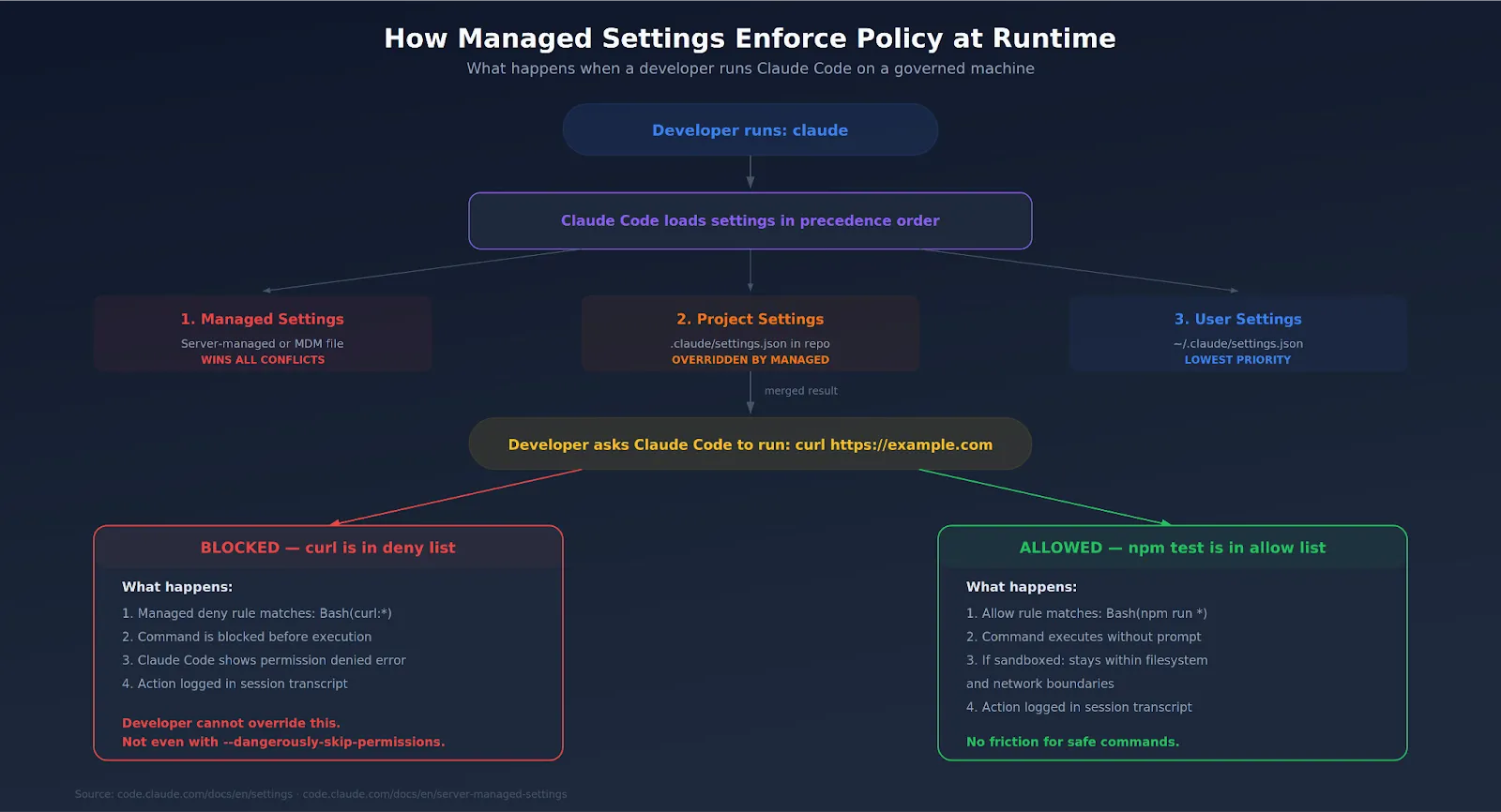
Claude Code connects to external tools through MCP servers—Slack, GitHub, databases, and internal APIs. Each connection expands the attack surface. CVE-2025-59536 showed that malicious MCP configs in a cloned repo could execute commands before the trust dialog appeared.
Your policy should include:
For organizations running MCP servers at scale, routing through a centralized MCP gateway with proper access control gives you one chokepoint for authentication, rate limiting, and audit logging across every agent-tool interaction.
Claude Code burns through tokens fast during agentic loops. A single runaway session can rack up serious costs overnight. Without limits, nobody notices until the invoice arrives.
Set boundaries at two levels:
Usage-based Enterprise plans bill all Claude Code activity at standard API rates on top of the seat fee. There's no included token allowance. Track per-developer consumption through Claude Code analytics (lines of code accepted, suggestion accept rate, usage patterns) and set alerts before caps are hit.
For more granular control, teams routing through an AI gateway can set per-team and per-project budgets, implement rate limiting, and get consolidated cost dashboards that cover both LLM and MCP usage.
Your auditor doesn't care about what Claude Code can do. They care about what it did. Two tools matter here.
The practical setup: pipe Compliance API output into Grafana, Datadog, or Splunk via OpenTelemetry. Route LLM and MCP traffic through a centralized gateway for unified tracing with user attribution. Document your review cadence. Auditors want to see that someone looks at the logs weekly—not just that the logs exist.
Here's The Evaluation Framework
| Criteria | What should you evaluate ? | Priority | TrueFoundry |
|---|---|---|---|
| Policy Model & Runtime Enforcement | |||
| Policy lifecycle | How are AI policies represented, versioned, reviewed, approved, tested, and promoted across environments? | Must have | ✅ Supported: versioned policies with review and promotion workflows. |
| Runtime enforcement | Can policy decisions block or transform requests before model, provider, or tool execution? | Must have | ✅ Supported: inline enforcement via guardrails, budgets, and RBAC. |
| Risk tiers | Can different rules apply by application criticality, data sensitivity, model risk, geography, and user role? | Should have | ✅ Supported: tiered policies by team, app, model, and deployment. |
| Exception workflow | Can temporary exceptions be requested, approved, logged, expired, and reported without weakening baseline policy? | Should have | ✅ Supported via governed configuration workflows. |

Everything above is a technical configuration. You also need an actual written policy—the thing that sits in your internal wiki, gets reviewed by legal, and gets linked in onboarding docs.
A solid Claude Code usage policy covers:
Keep it short. If the policy is 40 pages, nobody reads it. Two pages with clear rules and links to configuration docs are better than a compliance novel.
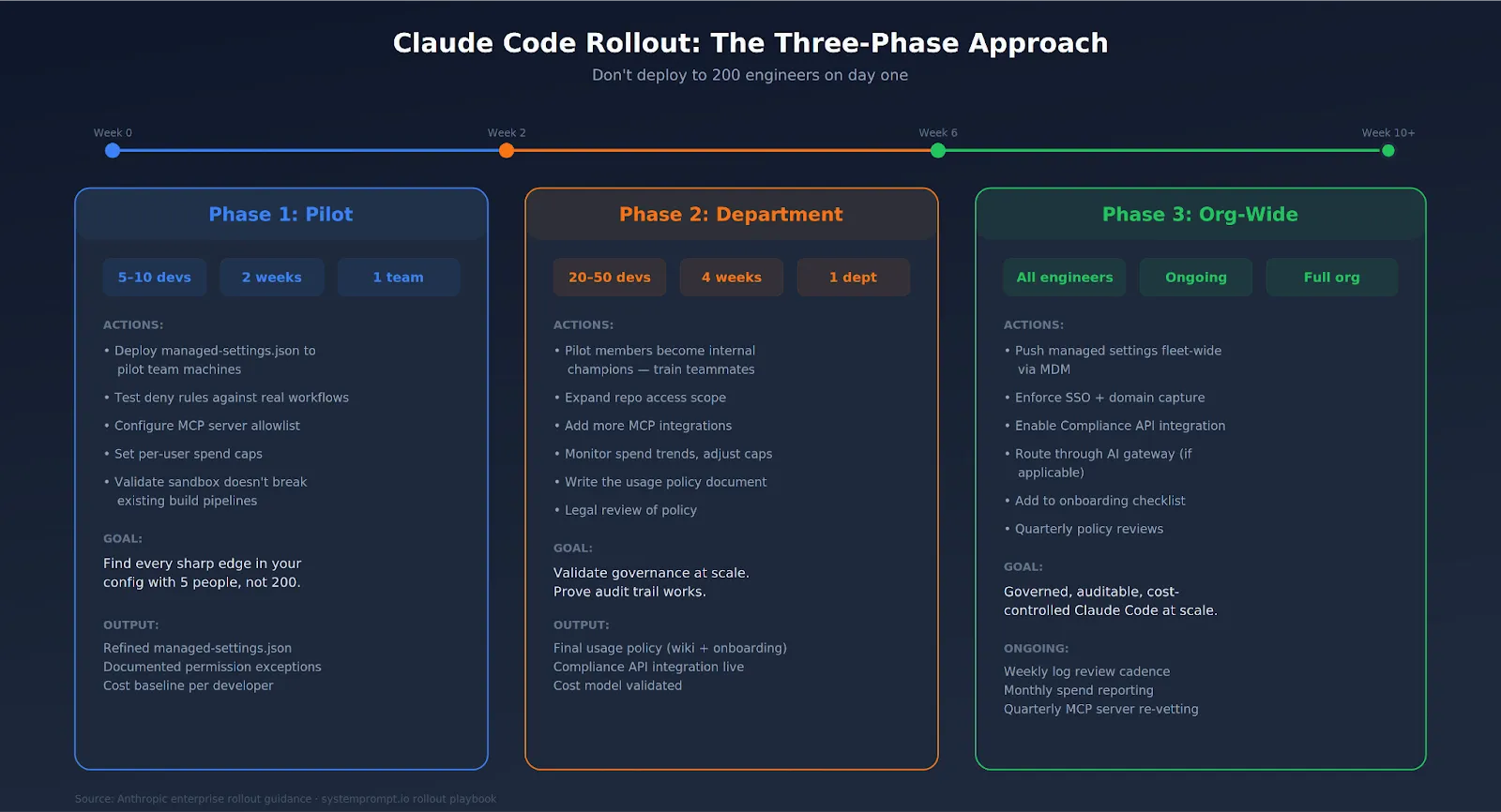
Don't deploy to 200 engineers on day one. That's how you find out your deny rules break someone's build pipeline on a Friday afternoon.
The pilot team will find every sharp edge in your config. Let them. Better to break things with 5 people than 200.
Enterprise governance for Claude Code is no longer optional. Not when the tool runs with your user permissions, sends code to external servers, and connects to your internal tools through MCP.
The good news: Anthropic built real governance tooling. Managed settings that developers can't override. A Compliance API with real-time access to usage data. SSO, SCIM, spend caps, and sandboxing. The building blocks exist. Your job is to assemble them into a policy that fits your org, deploy it through MDM or server-managed settings, and enforce it from day one—not after the first incident.
TrueFoundry AI Gateway offre une latence d'environ 3 à 4 ms, gère plus de 350 RPS sur 1 processeur virtuel, évolue horizontalement facilement et est prête pour la production, tandis que LiteLM souffre d'une latence élevée, peine à dépasser un RPS modéré, ne dispose pas d'une mise à l'échelle intégrée et convient parfaitement aux charges de travail légères ou aux prototypes.





Les dernières nouvelles, articles et ressources envoyés dans votre boîte de réception
.webp)
.webp)
.webp)
.webp)
.webp)