


.webp)
September 24, 2026
|
5 minutos de lectura


Obtenga acceso instantáneo a un entorno TrueFoundry en vivo. Implemente modelos, dirija el tráfico de LLM y explore la plataforma completa: su sandbox estará listo en segundos, sin necesidad de tarjeta de crédito.



Published: October 7, 2026
.webp)
¡Una forma increíblemente rápida de crear, rastrear e implementar sus modelos!
Request 51 fails.
You check the model page and it still says free. You check your balance and there is money in it. You check the docs and find a 20 requests per minute cap, which you were nowhere near, because you were making maybe three.
What you hit was the daily cap. And how high that sits depends on something no other gateway would think to tie it to: how much money you have ever given OpenRouter. Under 10 credits purchased across the lifetime of your account, free models give you 50 requests a day. At 10 or more, you get 1,000. The upgrade is permanent, so you can spend it all, drop back to a zero balance, and keep the higher ceiling.
That is the most useful thing to know about OpenRouter rate limits, and it is not the only surprise. We spent two weeks hammering the platform for a gateway evaluation. Here is what we found, including a few things the documentation does not say.
Four separate mechanisms can reject your request, and they are easy to mistake for each other.
The first is the free-model cap: 20 per minute, 50 or 1,000 per day, applied to any model ID ending in :free. That one is published and predictable. The second is the capacity of whichever provider is actually serving your paid request, which OpenRouter does not publish and cannot really control. The third is Cloudflare's DDoS protection, described in their docs only as blocking requests that dramatically exceed reasonable usage, with no number attached. The fourth is whatever budget or credit limit you configured yourself, which is not a rate limit at all but rejects traffic the same way.
Only the first of those is a rate limit in the sense you mean when you say rate limit. The rest are somebody else's capacity, a blunt safety net, and your own accounting.
Only the first of those is a rate limit in the sense you mean when you say rate limit. The rest are somebody else's capacity, a blunt safety net, and your own accounting.
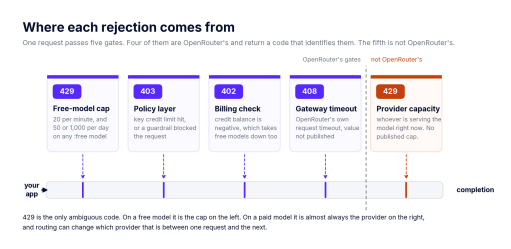
Figure 1: the five gates a request passes, and the code each one returns.
The free tier runs on your payment history
The 20 per minute cap is flat. It does not move with your account status, your balance or your spend. If you need more than 20 requests a minute, free models are not the answer and no amount of money changes that.
The daily cap is the one tied to payment history, and the threshold is on lifetime purchases rather than current balance. The minimum credit purchase on OpenRouter is $5, so $10 is a deliberate second step, not the price of entry. Buying in two $5 chunks gets you to the same place as one $10 purchase, as far as we can tell.
blog-openrouter-rate-limits-2026-10-05.md 2026-10-05
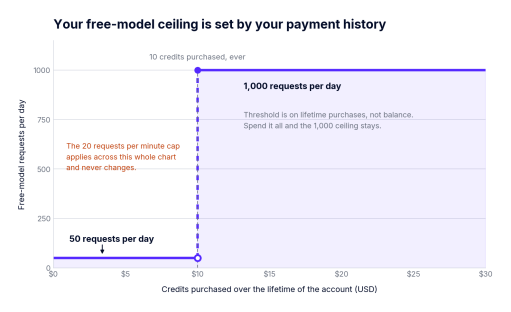
Figure 2: the daily free-model ceiling as a function of lifetime credit purchases.
What makes this odd is the direction of causation. Your throughput ceiling is not a function of your plan or your traffic pattern. It is a function of a procurement decision, which means a finance question now answers an availability question. On a side project, fine. Once you have users, you are one accounting delay away from a capacity change.
There is a second trap underneath it: failed requests can still count against the daily allowance. A retry loop hammering a busy free model can eat your 50 requests without returning a single usable completion. If you are going to retry, cap the attempts.
Your real limits live in one API call
The dashboard will not show you a limit counter. GET /api/v1/key will, and it returns exactly what OpenRouter is enforcing on that key right now.
TrueFoundry AI Gateway ofrece una latencia de entre 3 y 4 ms, gestiona más de 350 RPS en una vCPU, se escala horizontalmente con facilidad y está listo para la producción, mientras que LitellM presenta una latencia alta, tiene dificultades para superar un RPS moderado, carece de escalado integrado y es ideal para cargas de trabajo ligeras o de prototipos.





Las últimas noticias, artículos y recursos enviados a tu bandeja de entrada
.webp)


.png)



.png)
.png)
.png)
.png)
.png)
.png)
.png)
.png)
.png)
.png)


