



October 1, 2026
|
5 min read


Published: September 11, 202612
Blazingly fast way to build, track and deploy your models!
Eight out of ten Fortune 10 companies now use Claude, and over 300,000 businesses run it in production. Two CVEs in the past year proved that a cloned repo is all it takes to exfiltrate API keys or execute code before a trust dialog even appears.
Claude ships across three interfaces — web, desktop, and CLI — and each one has a different attack surface. The web version runs in a browser sandbox, the desktop app connects to local tools, and Claude Code sits in your developers' terminals with the same permissions as their user accounts. It can read files, run bash commands, and connect to external services.
Most enterprise security guides treat these interfaces as one thing, but they are not. Governing Claude well means applying the right controls to each surface, rather than blanket policies that over-restrict developers or leave gaps. The sections below walk through how to do it.
SSO should be live before you hand Claude to a single developer — not after, and certainly not "soon."
Claude supports SAML 2.0 and OIDC with Okta, Azure AD (Entra ID), Auth0, and Google Workspace, and you can manage all of it from the Claude Admin Console (see the setup guide). Three settings matter most at this stage.
Revoking someone in your IdP drops their access across web, desktop, and CLI instantly.
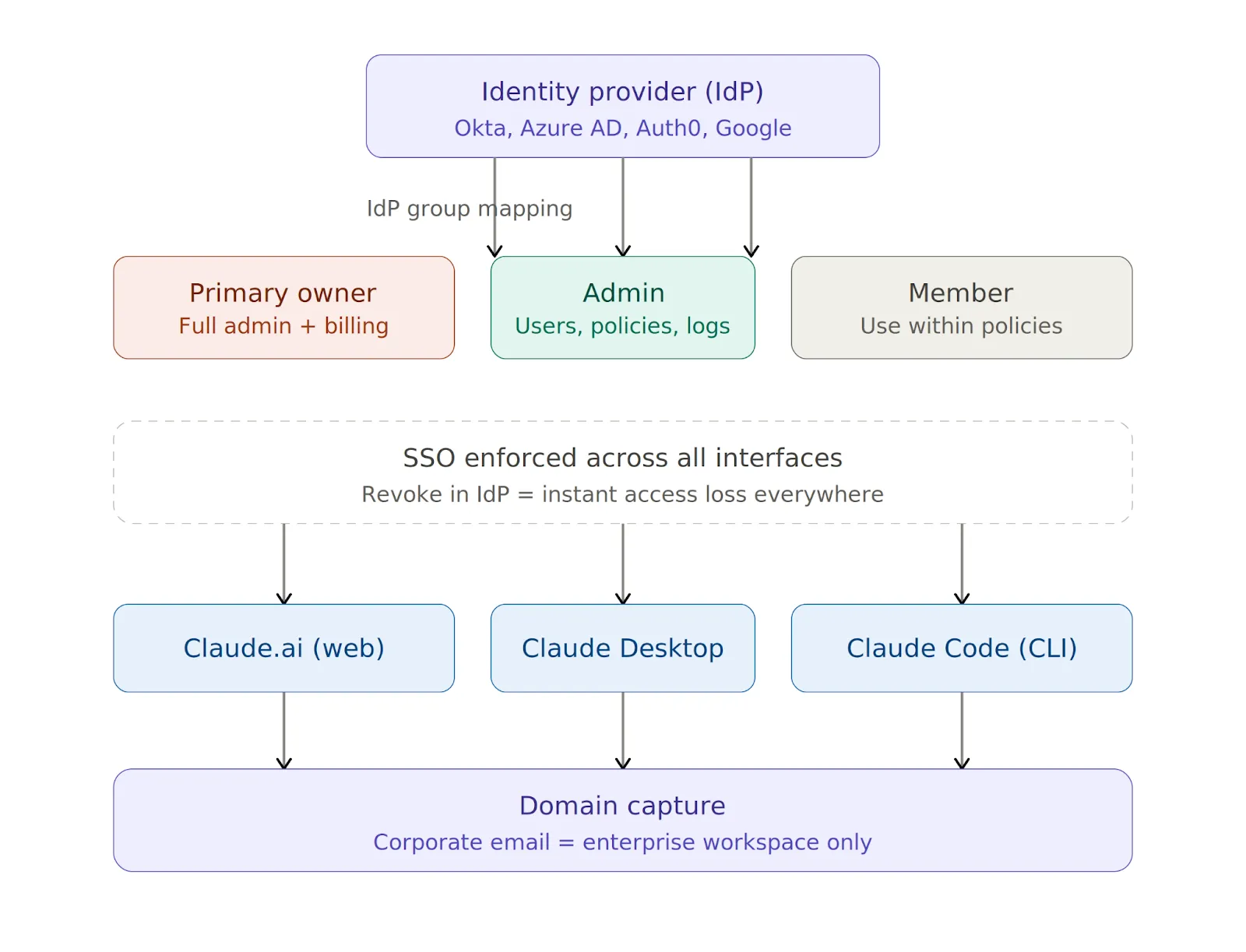
SSO handles interactive logins, while API keys handle everything else — Claude Code sessions, CI/CD pipelines, and any automation hitting the API outside a browser.
You should issue keys through the Admin Console because developers should never use personal keys in a corporate context. Store them in AWS Secrets Manager, HashiCorp Vault, or Azure Key Vault, rotate them quarterly, and revoke them immediately on suspected compromise or when someone leaves the team.
After identity, the next layer is model access and traffic routing. You need answers to two questions: which models can developers use, and where does their Claude traffic actually flow?
A simple allowlist in the Admin Console stops developers from switching to higher-cost or unapproved models:
{
  "allowedModels": ["claude-sonnet-4-5", "claude-haiku-4-5"]
}
Routing Claude traffic through your own LLM gateway lets you inspect, log, and govern requests at the network layer. You can set these environment variables on developer machines to get started:
export ANTHROPIC_BASE_URL=https://your-gateway.internal.corp
export HTTPS_PROXY=https://proxy.your-company.com:8080
One important detail is that these variables apply only to Claude Code and Claude Desktop. Web routing is controlled at the organization level through the Admin Console.
Setting variables on one machine is easy, but doing it across 100 machines and ensuring nobody changes them is the real challenge.
You can enforce routing policies across developers’ machines in three ways:
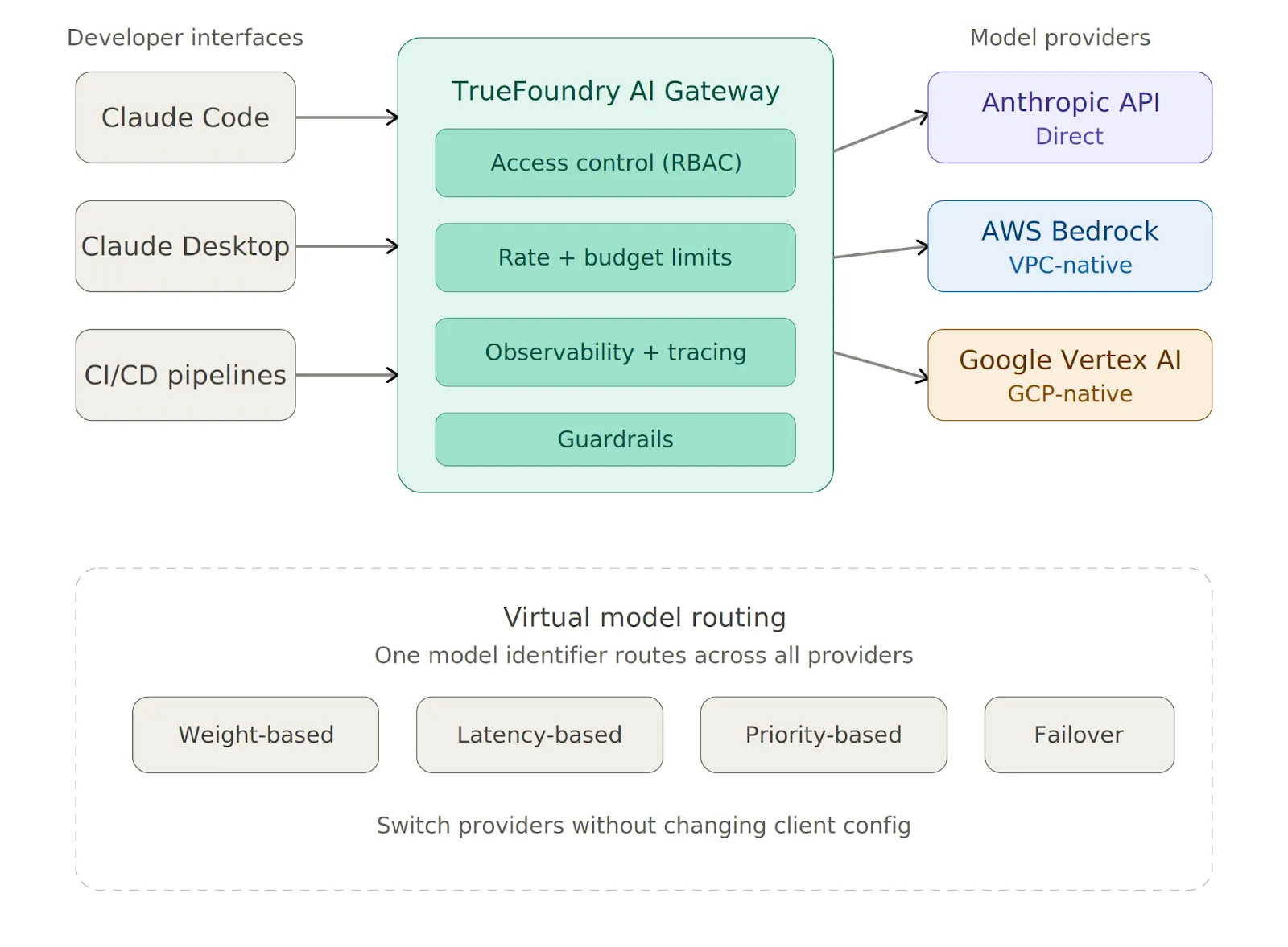
Instead of configuring each provider one by one, TrueFoundry AI Gateway gives you a single proxy layer between Claude Code and all your model providers. You can point Claude Code at it with one variable:
export ANTHROPIC_BASE_URL=https://<your-truefoundry-gateway-url>From there, you add provider accounts in the Gateway dashboard, and Claude Code reaches all of them — Anthropic, Bedrock, Vertex — via a single endpoint. Virtual Models let you create a single model identifier that routes across providers with weight-based or latency-based logic, and you can switch providers without touching any client configuration.
The Gateway also enforces rate limits, budget limits, and access control on every request before it reaches the provider.
The mistake most teams make is treating all three interfaces the same, even though they are fundamentally different in what they can touch.
The web interface has no local code execution, so the primary risks are data exfiltration through prompts and shadow IT from personal accounts. Domain capture solves the second problem.
For the first, classify Claude.ai as a third-party SaaS tool in your data loss prevention (DLP) and AI security tooling and apply the same controls you would to Google Docs or Notion. The Admin Console also lets you restrict file uploads, disable Artifacts, and control conversation retention.
The desktop app does not run arbitrary shell commands by default, but local tool integrations let developers connect Claude to scripts, file systems, and other resources. You should review each tool before approval and require explicit human confirmation before execution for anything with write access. Keeping the app current via MDM-enforced auto-update is also essential.
Claude Code has the broadest attack surface of the three interfaces. It can read .env files, SSH keys, and credentials, run arbitrary bash commands in the developer's user context, and send code and context to Anthropic's servers for processing.
The following baseline managed-settings.json blocks the most dangerous operations:
{
  "permissions": {
    "disableBypassPermissionsMode": "disable",
    "deny": [
      "Bash(curl:*)", "Bash(wget:*)",
      "Read(**/.env)", "Read(**/.env.*)",
      "Read(**/secrets/**)", "Read(**/.ssh/**)",
      "Read(**/credentials/**)"
    ],
    "ask": ["Bash(git push:*)", "Write(**)"]
  },
  "allowManagedPermissionRulesOnly": true,
  "allowManagedHooksOnly": true,
  "transcriptRetentionDays": 14
}
Here is what each key setting does:
One more thing worth emphasizing: Claude Code should never run as root under any circumstances.
Claude Code's native sandbox enforces filesystem and network isolation at the OS level, using Seatbelt on macOS and bubblewrap on Linux. Anthropic's own internal testing found that sandboxing reduces permission prompts by 84% while maintaining stronger execution boundaries. You should enable it for all developers:
{
  "sandbox": {
    "enabled": true,
    "network": { "httpProxyPort": 8080, "socksProxyPort": 8081 }
  }
}
The sandbox prevents modification of system-level files, blocks contact with domains you have not allowed, and limits the blast radius of prompt injection attacks. You should also set "allowUnsandboxedCommands": false to close the escape hatch that would otherwise let commands run outside the sandbox.
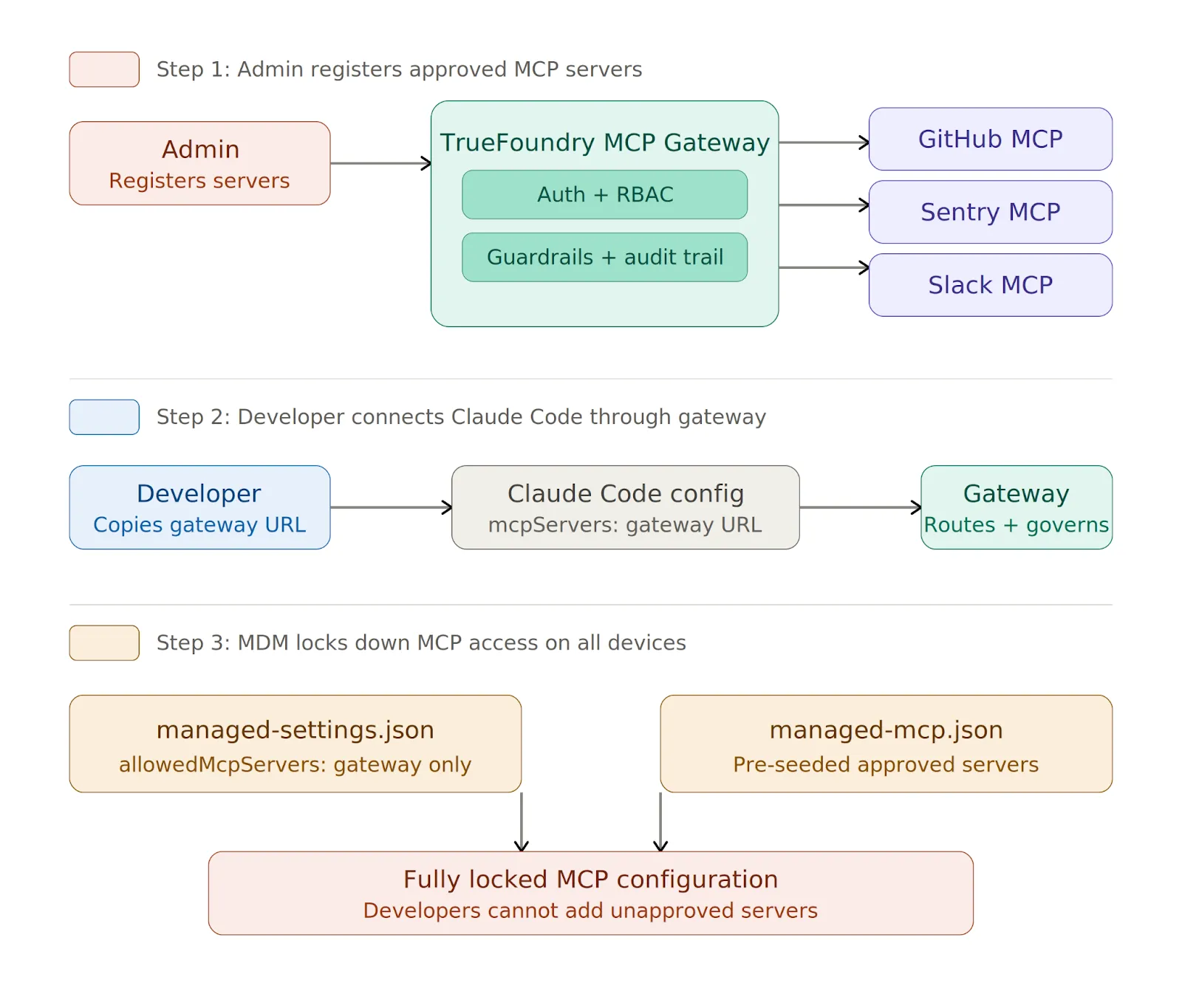
MCP servers connect Claude to external databases, APIs, and SaaS tools, and every new server a developer adds expands the attack surface. Without centralized control, you end up with credential sprawl, unvetted public servers running on developer machines, and no audit trail of which tools were called or what data returned.
The solution is to route all MCP access through a centralized gateway and allowlist only that gateway URL.
TrueFoundry MCP Gateway handles enterprise MCP governance through a single control plane:
managed-settings.jsonでロックダウンできます。
{
  "allowedMcpServers": [
    { "serverUrl": "https://truefoundry-mcp-gateway.your-company.com/*" }
  ],
  "strictKnownMarketplaces": []
}
空のstrictKnownMarketplaces配列は、マーケットプレイスから提供されるすべてのMCPインストールをブロックします。管理対象デバイスでは、MDM経由でmanaged-mcp.jsonを展開して、承認済みサーバーをマシンに事前に設定できます。一度展開されると、開発者はファイルで定義されたサーバー以外を追加できません。
Anthropicは、安全性と品質向上のため、プロンプトと出力をデフォルトで保持する場合がありますが、保持を制御するための3つの手段があります。
Claude.aiの場合、保持期間を最大30日に設定できます。場所は 組織設定 > データとプライバシー。Claude Codeの場合、managed-settings.jsonのtranscriptRetentionDays設定を、妥当なデフォルトとして7~14日の値で使用してください。
規制対象のワークロードの場合、リクエストする必要があります ZDR Claudeアカウントチームを通じて行われます。ZDRは、リクエストの処理に必要な範囲を超えてAnthropicがプロンプトや出力を保存することを防ぎますが、契約上の追加条項が必要です。追加条項が署名され、有効であることが確認されるまで、PHIやその他の規制対象データを処理すべきではありません。
監査ログは定期的にSIEMにエクスポートし、SOC 2の場合は最低90日間、規制対象業界の場合はそれ以上の期間保持する必要があります。取得すべき内容はインターフェースによって異なります。
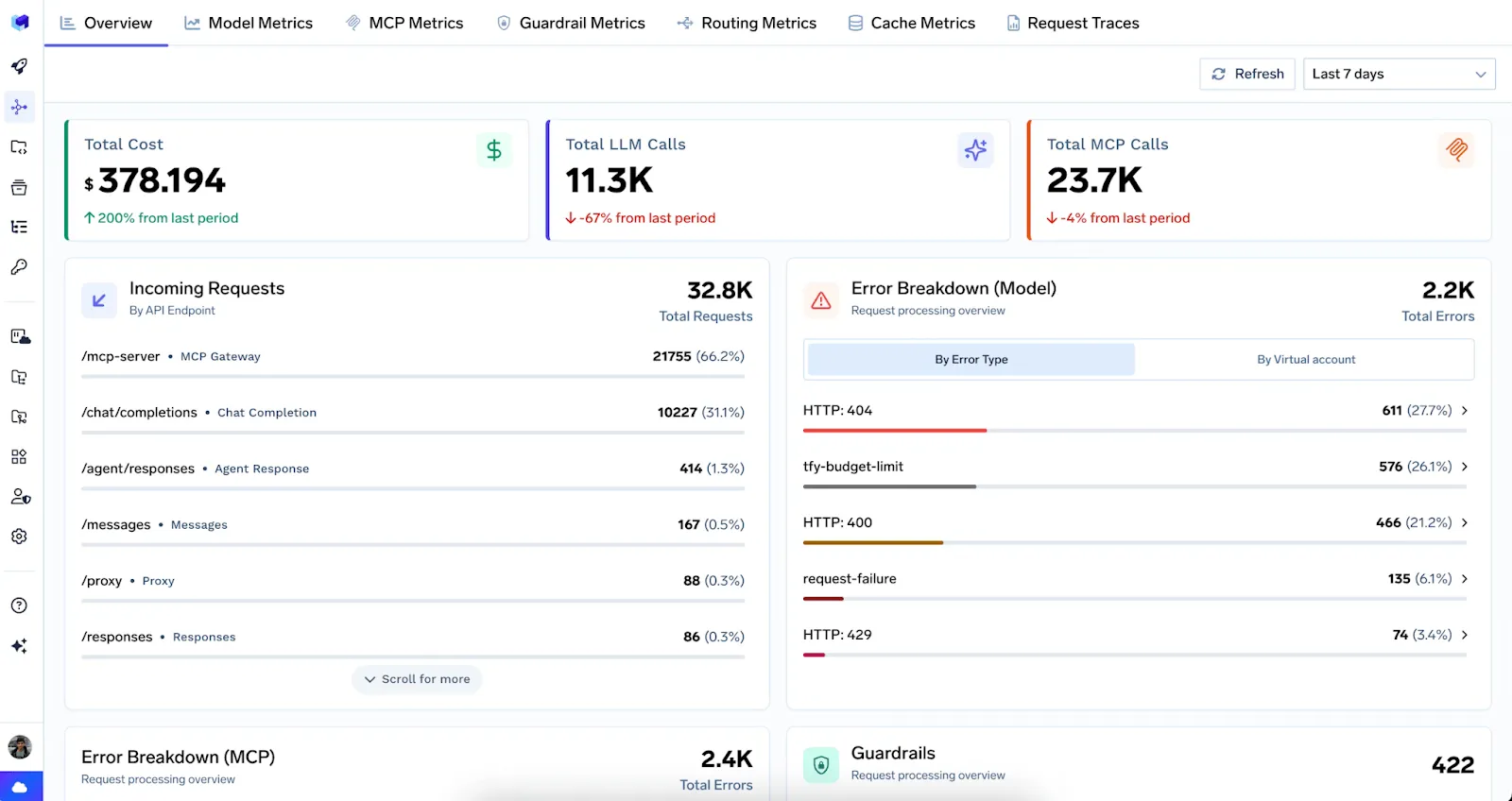
Claudeのトラフィックが以下を介して流れる場合 TrueFoundry AI Gateway、すべてのリクエストは、LLMとMCPの両方のリクエストにわたって、完全なユーザー属性とともにトレースされます。統合ダッシュボードはリアルタイムのメトリクスを提供し、すべてのトレースはGrafana、Datadog、またはSplunkにエクスポートされます。 OpenTelemetry。
管理者は、 OpenTelemetryの設定 をマネージド設定ファイル内でネイティブに設定し、Claude Codeから直接テレメトリをエクスポートすることもできます。
コストについては、厳格な月間 支出制限 を管理コンソールでユーザーごと、チームごとに設定します。これらの上限がないと、設定ミスのあるパイプラインが一晩で予算を使い果たしてしまう可能性があります。ユーザーごと、モデルごとの内訳は、チャージバックレポート、異常検出、およびより広範な AIコストの可視性に役立ちます。
Here's The Evaluation Framework
| Criteria | What should you evaluate ? | Priority | TrueFoundry |
|---|---|---|---|
| Identity, Access Control & Secret Protection | |||
| Central authentication | Does every model and tool request go through SSO, workload identity, service accounts, or scoped gateway keys? | Must have | ✅ Supported: SSO, workload identity, and scoped gateway keys. |
| SSO and IdP integration | Does the platform integrate with SAML, OIDC, Okta, Azure AD, or Google Workspace and sync roles from the IdP? | Must have | ✅ Supported: SAML, OIDC, IdP role sync. |
| Role-based access control | Can RBAC restrict models, providers, tools, environments, and logs by user, team, and application? | Must have | ✅ Supported: fine-grained RBAC at every resource level. |
| Virtual API keys | Can API keys be generated and scoped to individual apps with configurable expiration and access controls? | Must have | ✅ Supported: scoped virtual keys with expiration policies. |
| Provider key isolation | Can applications call models without receiving raw provider keys, and can keys be rotated without app redeploys? | Must have | ✅ Supported: centralized provider keys, zero-downtime rotation. |

Claudeのセキュリティ確保は、単一の決定ではなく、ID管理、モデルルーティング、サンドボックス化、MCPガバナンス、データ保持、監査ログ、コスト管理といった複数の要素の積み重ねであり、これらはインターフェースによって適用方法が異なります。ウェブ版にはDLP制御とドメインキャプチャが必要です。デスクトップアプリにはツールごとのレビューが必要です。Claude Codeには、MDM経由でデプロイされ、ネイティブサンドボックスが有効化されたロックダウンされたmanaged-settings.jsonが必要です。
これら3つすべてに共通するのは、トラフィックとMCPアクセスを、自身が管理する一元化されたゲートウェイ経由でルーティングすべきだということです。1つのエンドポイント、1つのポリシーセット、そして1つの監査証跡。 TrueFoundry AI Gateway は、LLMトラフィックとMCPサーバーガバナンスの両方にそのレイヤーを提供し、アクセス制御、レート制限、ガードレール、可観測性を内蔵しています。
今日からSSOとドメインキャプチャを開始し、その後、フリート全体にマネージド設定を適用し、すべてを自身が管理するゲートウェイ経由でルーティングしてください。CVEは現実のものであり、Claude Codeを開く開発者が増えるたびにリスクは増大します。

TrueFoundry AI Gateway delivers ~3–4 ms latency, handles 350+ RPS on 1 vCPU, scales horizontally with ease, and is production-ready, while LiteLLM suffers from high latency, struggles beyond moderate RPS, lacks built-in scaling, and is best for light or prototype workloads.



Anthropicは、Claude APIおよびエンタープライズ向け製品においてSOC 2 Type IIの認証を維持しています。ただし、Claude Codeを利用したデプロイメントにおけるSOC 2コンプライアンスは、運用者が独自のインフラストラクチャ、データ処理、およびログ管理をどのように設定するかにも依存します。企業は通常、Anthropicが提供するベースラインの上に、自社のコンプライアンス管理体制を構築しています。
Claudeは、周辺インフラストラクチャが必要な安全対策を満たしている場合、HIPAA準拠の環境で導入可能です。Anthropicは、条件を満たすエンタープライズ顧客向けに事業提携契約(BAA)を提供しています。組織は、PHI(保護対象保健情報)がプロンプトに意図せず含まれたり、適切な管理なしに保存されたりしないよう徹底する必要があります。
はい、ClaudeはAnthropicのAPIを通じて商用利用が可能です。企業はAnthropicの利用ポリシーに従い、自社の製品やサービスにClaudeを組み込むことができます。商用利用にはAnthropicの利用規約への同意が必要であり、高リスク分野など特定のユースケースでは追加の審査が必要となる場合があります。
Anthropicは、インフラストラクチャにおいて主要なセキュリティ認証の取得を推進しており、ClaudeのエンタープライズAPIは堅牢なセキュリティ管理体制によって支えられています。ISO 27001への準拠を検討されている組織の皆様は、認証の範囲や更新時期が変更される可能性があるため、最新の認証状況についてAnthropicまで直接お問い合わせください。
Claude Code自体に固有のセキュリティリスクはありませんが、エージェントとしての性質上、コードの実行、ファイルの変更、ネットワークリクエストの送信が可能なため、適切なスコープ設定を行わないとリスクが生じます。Claude Codeをサンドボックス環境で実行し、ファイルシステムへのアクセスを制限し、権限確認のプロンプトを維持することは、リスクを最小限に抑えるために不可欠な対策です。
はい、Anthropicは開発者や企業がプログラムを通じてClaudeにアクセスできるよう、詳細なドキュメントを備えたREST APIを提供しています。このAPIはテキスト生成、画像認識、ツール利用、マルチターン会話をサポートしており、複数のClaudeモデル階層で利用可能です。
Claude APIのコンプライアンスとは、Claude APIの運用およびアクセスを管理する一連のセキュリティ基準、認証、および利用ポリシーを指します。これには、SOC 2 Type II、データ保持ポリシー、コンテンツフィルタリング制御、そしてAnthropicの利用規定が含まれます。これらすべてが、Claudeを基盤として構築されるあらゆるシステムのコンプライアンス体制を定義しています。
Anthropicは、コンプライアンス関連ドキュメント、セキュリティ概要、および利用ポリシーを自社ウェブサイトとトラストポータルで公開しています。開発者はこれらの資料を無料で閲覧可能です。SOC 2監査レポートなどの正式なコンプライアンスレポートへのアクセスには、通常、秘密保持契約(NDA)の締結およびAnthropicのエンタープライズ営業窓口を通じた申請が必要です。
Claude APIは設計上ステートレスであり、各APIリクエストは独立していて、呼び出し間でセッション状態を保持しません。会話履歴は、リクエストごとに明示的に渡す必要があります。このステートレスなアーキテクチャは、ユーザーデータの永続性を制限することでコンプライアンスを簡素化しますが、会話コンテンツを自社のインフラストラクチャでどのように保存・管理するかについては、引き続き運用者の責任となります。
.png)



.png)

.png)
.png)
.png)

.png)
.png)
.png)
.png)
.png)
.png)
.png)





