

Tracing
OpenTelemetry tracing allows you to capture detailed traces of requests as they flow through the AI Gateway. This enables debugging, performance analysis, and end-to-end visibility. Optionally, traces can also be configured to be exported to any existing OTEL compatible observability platform. This will not affect the storage of traces managed by TrueFoundry. How you export depends on your deployment:Exporting traces to OTEL compatible platforms via Truefoundry’s control plane
To export spans to your existing OTEL Platform: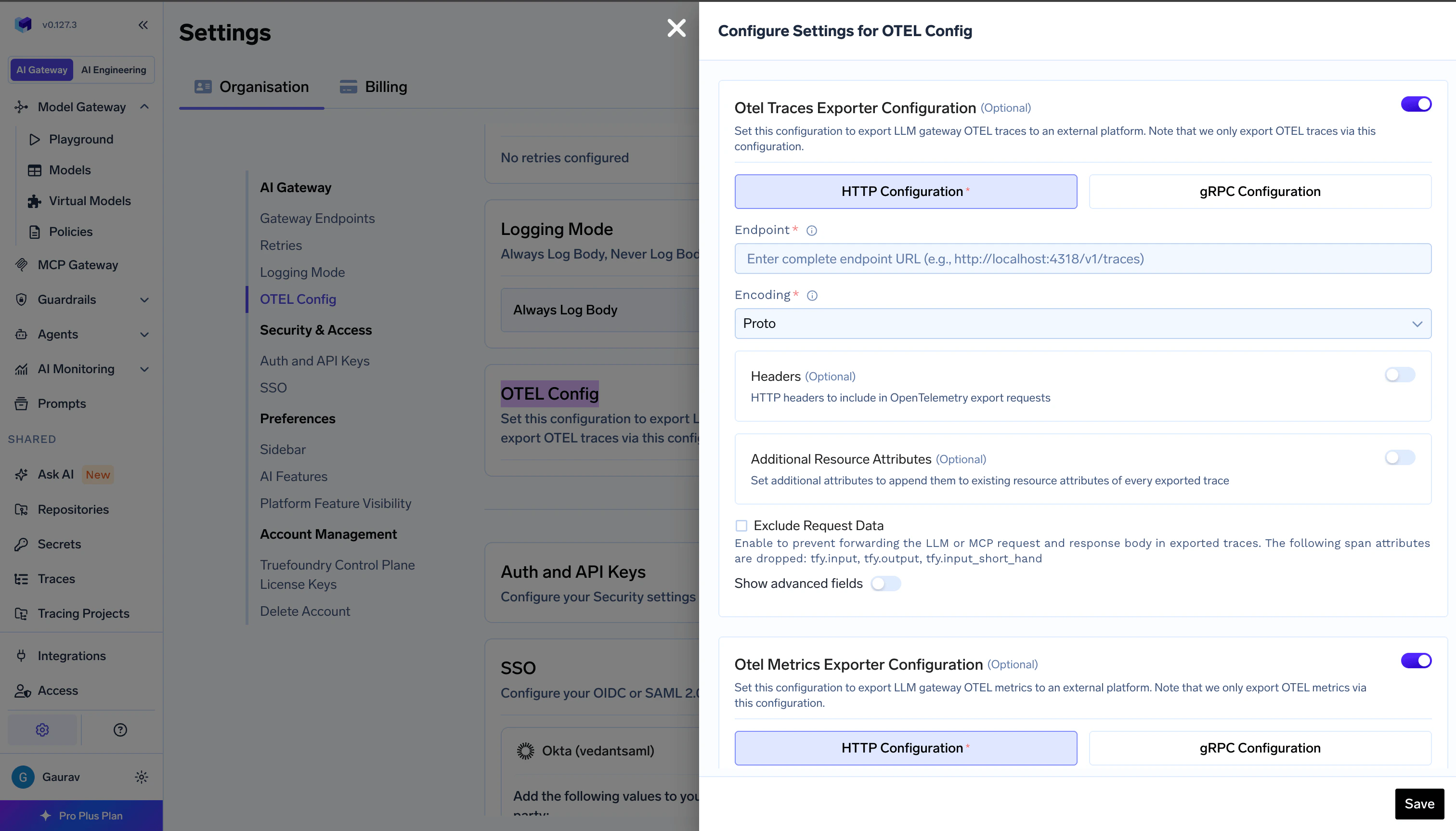
AI Gateway - OpenTelemetry Tracing Export Config Form
- Go to AI Gateway → Controls → Settings in the TrueFoundry dashboard
- Scroll down to the OTEL Config section and click the edit button
- Enable the OTEL Traces Exporter Configuration toggle
- Select either HTTP Configuration or gRPC Configuration based on your OTEL platform’s endpoint
- Enter the complete traces endpoint for eg., the traces endpoint for Grafana Cloud is
https://otlp-gateway-prod-ap-south-1.grafana.net/otlp/v1/traces - Select the encoding (only for HTTP Configuration) as either
protoorjson - Optionally, enter the headers required to export spans to the OTEL provider for eg., authorization, region, etc..
For gRPC endpoints, always include the scheme. Use
http:// for plaintext (e.g., http://otel-collector:4317). If omitted, TLS is used by default.The OTEL Traces Exporter sends only trace data to your OTEL platform, not metrics. For OpenTelemetry metrics export, see Metrics below.
Exporting traces to OTEL compatible platforms via Gateway Plane
The OTEL buffer runs next to the AI Gateway in your gateway plane. It stores gateway traces on disk and forwards them to the TrueFoundry control plane, so traces are not lost when the control plane is briefly unreachable. It can also send the same traces to your own OpenTelemetry collectors.Send traces to your collectors
To send traces to your own OTEL collector, add the collector as a destination intfy-otel-buffer.additionalSinks
1
Store the collector token in a Secret
2
Add the sink to your values file
truefoundry-values.yaml
FAQ
Which collectors can I send traces to?
Which collectors can I send traces to?
Any collector that accepts OTLP over HTTP. Use
protocol.type: http and the collector’s /v1/traces endpoint. OTLP over gRPC is not supported in the current TrueFoundry release.How do I add or rotate a credential?
How do I add or rotate a credential?
Add one key per credential to the
tfy-otel-buffer-sink-credentials Secret and reference it in the sink as SECRET[additional_sink_credentials.<KEY>], for example in a header.After you change a key, restart the buffer so it picks up the new value:What happens when one of my collectors is down?
What happens when one of my collectors is down?
Each destination buffers and retries on its own, so an unreachable collector does not delay traces to the control plane or to your other collectors.
How much disk can additional sinks use?
How much disk can additional sinks use?
The disk buffers of all additional sinks together can use up to 5 GiB per replica. This limit can be increased by increasing the buffer volume size.
How do I send traces to an Amazon S3 bucket directly from the gateway plane?
How do I send traces to an Amazon S3 bucket directly from the gateway plane?
- Store the AWS keys in the sink credentials Secret. The IAM user needs
s3:PutObjecton the bucket objects ands3:ListBucketon the bucket, which is used for the startup health check.
- Add the sink to your values file:
truefoundry-values.yaml
auth block, skip the Secret, and annotate the buffer’s service account with a role that has the same permissions:truefoundry-values.yaml
Metrics
OpenTelemetry metrics export lets you send gateway metrics to an OTLP-compatible observability platform. Configure this in the same OTEL Config editor as traces; it does not replace metrics stored and shown inside TrueFoundry.Export Metrics to OTEL Compatible Observability Platforms
To export metrics to your existing OTEL platform: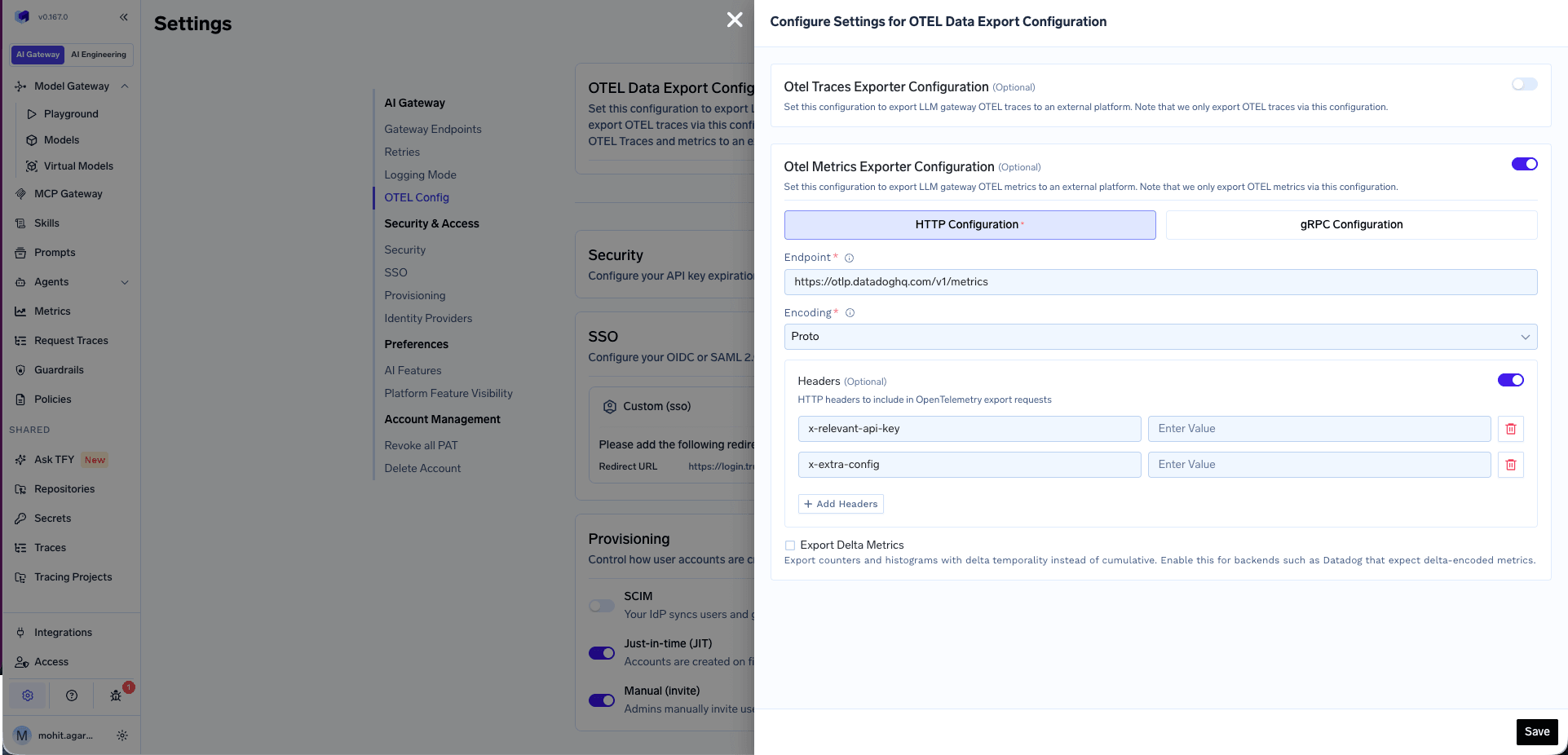
AI Gateway - OpenTelemetry Metrics Export Config Form
- Go to AI Gateway → Controls → Settings in the TrueFoundry dashboard
- Scroll down to the OTEL Config section and click the edit button
- Enable the OTEL Metrics Exporter Configuration toggle
- Select either HTTP Configuration or gRPC Configuration based on your OTEL platform’s metrics endpoint
- Enter the complete metrics endpoint—for example, Datadog uses
https://otlp.datadoghq.com/v1/metrics - Select the encoding (only for HTTP Configuration) as either
protoorjson - Optionally, enter the headers required to export metrics to the OTEL provider—for example, API keys or vendor-specific headers
- Optionally, enable Export Delta Metrics to send counters and histograms with delta temporality instead of cumulative. Enable this for backends such as Datadog that expect delta-encoded metrics.
- Click Save
For gRPC endpoints, always include the scheme. Use
http:// for plaintext (e.g., http://otel-collector:4317). If omitted, TLS is used by default.The OTEL Metrics Exporter sends only metrics to your OTEL platform, not traces. For OpenTelemetry traces export, see Tracing above.
Example 1: Exporting Metrics to Datadog
Datadog supports OTLP metrics ingest natively. Use the following configuration: Step 1 — Set the environment variable on yourtfy-llm-gateway deployment
Datadog’s OTLP ingest endpoint only accepts delta-encoded metrics. Set this environment variable in your tfy-llm-gateway deployment before configuring the exporter:
Add the following headers:
The
dd-otel-metric-config header enables the histogram translator, which converts OTLP histogram metrics into Datadog distribution metrics. This is required to query percentile aggregations such as p50:ai_gateway_request_processing_ms{*}, p95:ai_gateway_request_processing_ms{*}, and similar metrics in the Datadog Metrics Explorer.
For sites other than US1, use the region-specific endpoint—for example,
https://otlp.datadoghq.eu/v1/metrics for the EU site. See the Datadog OTLP metrics ingest documentation for the full list of endpoints and additional dd-otel-metric-config options.Example 2: Exporting Metrics to AWS Cloudwatch
AWS Cloudwatch supports OTLP metrics ingest. Use the following configuration: Step 1 - Set the environment variable on yourtfy-llm-gateway deployment
Cloudwatch’s OTLP ingest endpoint only accepts delta-encoded metrics. Set this environment variable in your tfy-llm-gateway deployment before configuring the exporter:
OTEL
Delta metric temporality does not export Gauges and UpDownCounters. Any metrics of these types might not be sent with Delta temporality.For scraping
/metrics with Prometheus, OTLP endpoint patterns, and a full list of metric names and labels, see Prometheus & Grafana integration.