

Authentication Architecture Overview
The AI Gateway provides a three-part authentication and authorization system: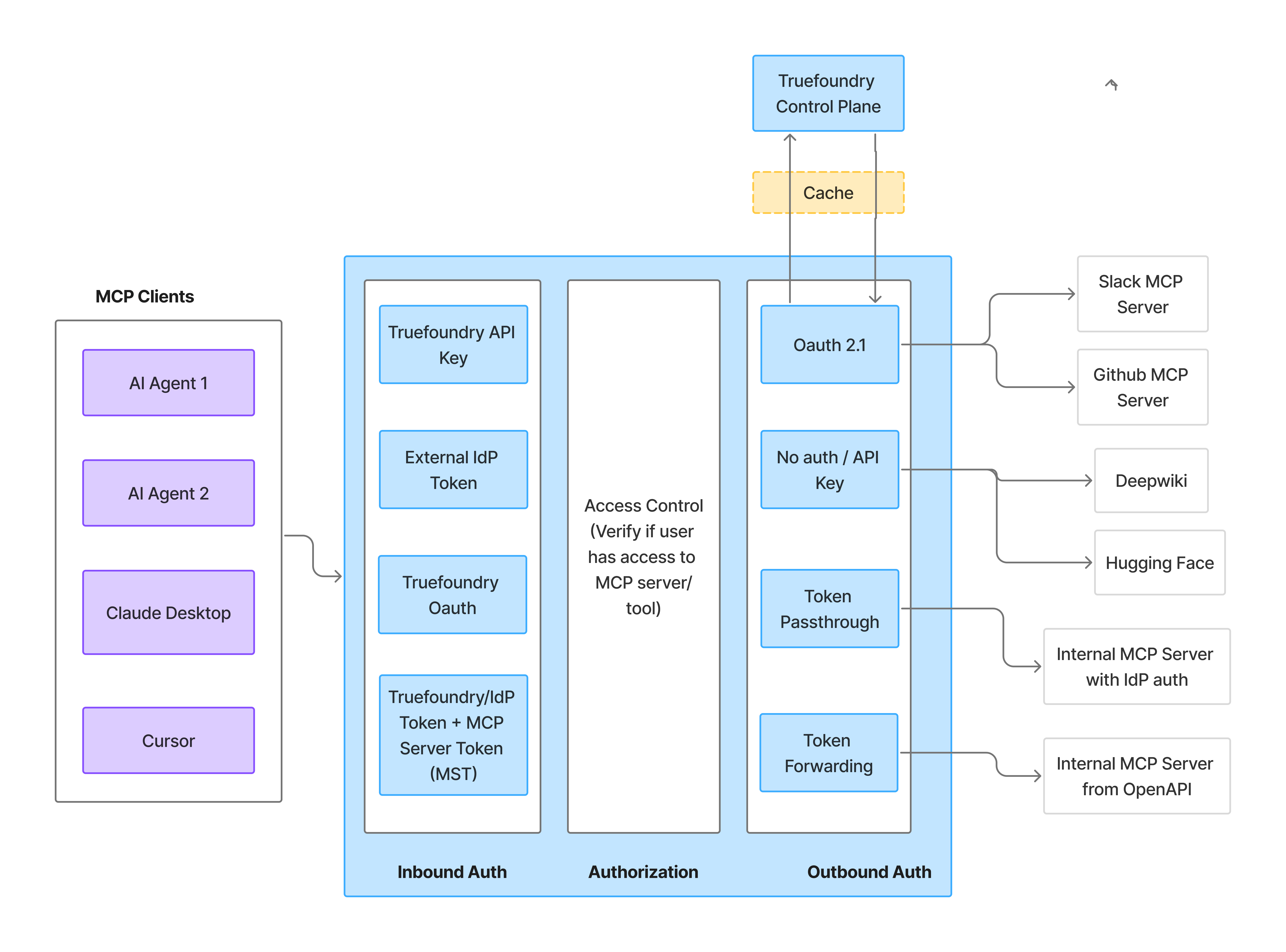
MCP Gateway Authentication and Authorization Flow
Inbound Authentication
Access Control
Outbound Authentication
Inbound Authentication
Inbound authentication controls how clients authenticate to the AI Gateway. Any user or application requires valid credentials to talk to the AI Gateway, which allows the AI Gateway to identify the caller and apply authorization rules.When to use which method?
Setup
Expand the method that matches your use case for the full setup steps and a code snippet.TrueFoundry API Key (Personal Access Token)
TrueFoundry API Key (Personal Access Token)
Generate a PAT
- On the left menu panel, navigate to Access > API KEYS > Personal Access Tokens in the TrueFoundry UI
- Click + New Personal Access Token
- Store the token securely
Use the token in requests
Virtual Account Token (VAT)
Virtual Account Token (VAT)
Create a Virtual Account
- On the left menu panel, navigate to Access > API KEYS > Virtual Accounts in the TrueFoundry UI
- Click + New Virtual Account
- Give it a descriptive name (e.g.,
my-agent-mcp-access) - Add permissions for the MCP servers your application needs to access
Generate and use the token
Identity Provider Token
Identity Provider Token
- B2B SaaS applications where your customers don’t have TrueFoundry accounts
- Applications that want to use their existing identity infrastructure
- Customer Identity and Access Management (CIAM) scenarios
- Service-to-service authentication where the caller already holds an IdP-issued JWT
Configure an Identity Provider
- On the left menu panel at bottom, navigate to Settings > Security & Access > Identity Providers
- Click + (Add Identity Provider)
- Fill in the form with the issuer URL, allowed audiences, and JWKS URI for your IdP (e.g., Okta, Azure AD)
- Choose whether validated tokens resolve to a virtual account (machine-to-machine callers), or a TrueFoundry user with team mapping (human users)
Add the Identity Provider mapping on the target
- For a virtual account, add an identity provider mapping that matches the configured Name Claim.
- For a team, add an identity provider mapping that matches the configured Team Claim, and ensure the target users exist in the tenant.
Grant MCP server access
- Navigate to the MCP server’s settings
- Go to Collaborators
- Add the mapped team, user, or virtual account with appropriate permissions
Use your IdP token in requests
TrueFoundry OAuth
TrueFoundry OAuth
- Connecting to MCP servers from Cursor, Claude Code, VS Code, or other MCP-compatible IDEs.
- Enabling team members to access MCP tools without sharing or managing API keys.
- Leveraging existing TrueFoundry user authentication for MCP access.
- Add the MCP server’s Gateway URL in your IDE, or click Connect on the server in TrueFoundry.
- Your browser opens and you sign in to TrueFoundry (using SSO if your organization has it configured).
- You review and approve the access request, which shows your IDE and the MCP Gateway URL.
- If the server connects to a third-party provider (such as GitHub or Slack), you authorize that provider with your own account.
Access Control
Once authenticated, the AI Gateway verifies whether the user has permission to access the requested MCP servers and tools.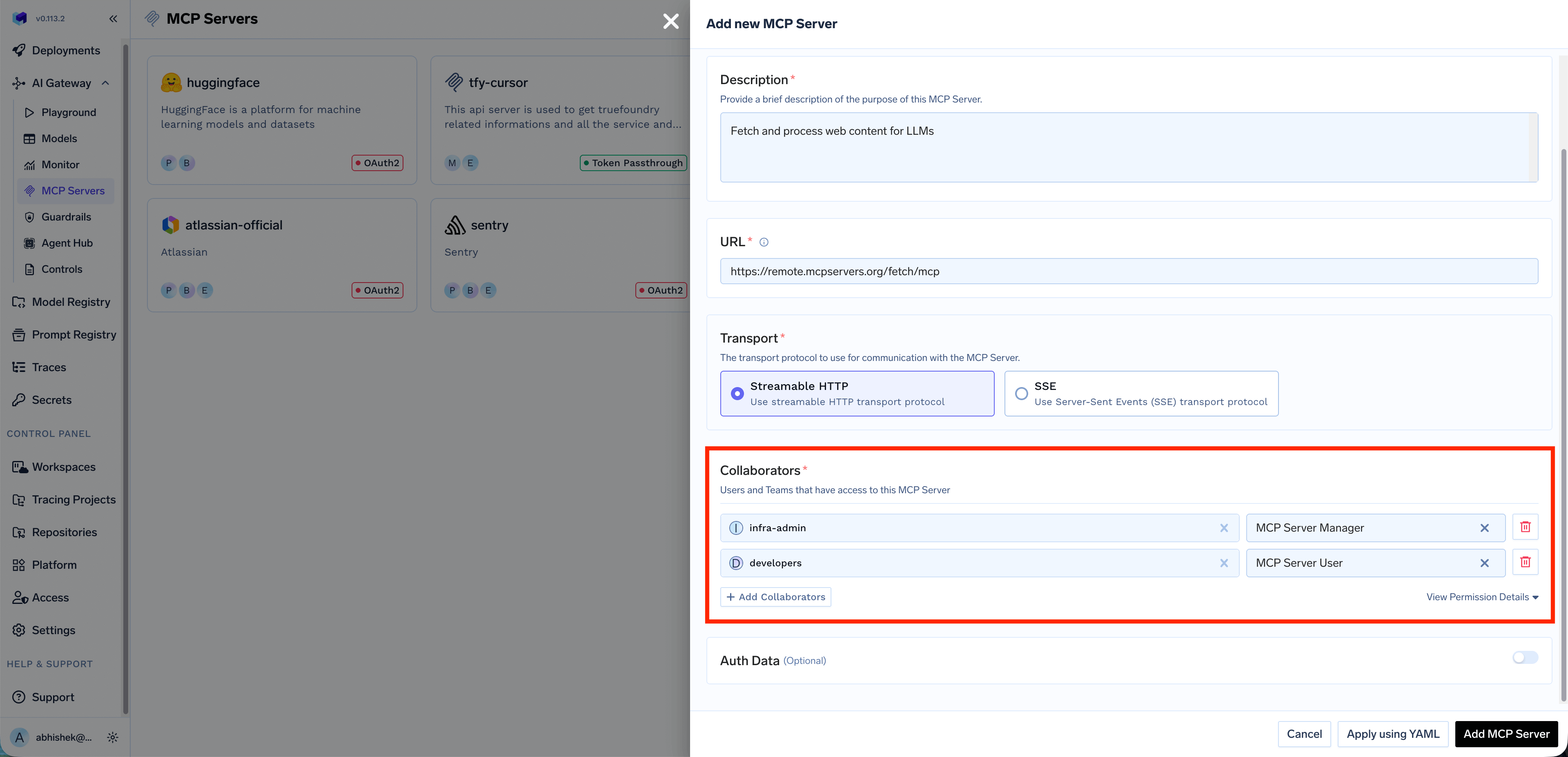
- Which MCP servers a user can access?
- Which tools within an MCP server a user can invoke?
Outbound Authentication
Outbound authentication controls how the AI Gateway authenticates to downstream MCP servers. TrueFoundry supports multiple authentication models to handle different MCP servers requirements.When to use which method?
Setup
Expand each method below for configuration details and example use cases.No Auth / API Key
No Auth / API Key
- Demo or sandbox APIs
- Public tools like a Calculator or DeepWiki MCP server
- Shared Credentials: One key is used by everyone. You configure the credential once, and the AI Gateway injects it into every request regardless of which end user is calling.
- Individual Credentials: Each user provides their own key. Users must supply their own API key through Auth Overrides before they can use the MCP server. The AI Gateway injects the user-specific key into requests.
Bearer {{API_KEY}} placeholder. Each developer provides their API key via Auth Overrides, and the AI Gateway injects the correct key per user.OAuth2
OAuth2
Authorization Code
The Authorization Code flow is a user-facing flow where each end user is redirected to the provider (e.g., GitHub, Slack, Atlassian) to authorize access to their resources. The AI Gateway manages the full OAuth lifecycle — consent, token storage, and automatic refresh.How it works?- End user authenticates with the AI Gateway (using a TrueFoundry token or an Identity Provider token)
- End user attempts to call an MCP tool → AI Gateway returns an auth error with the authorization URL
- End user visits the URL and completes OAuth consent on the third-party service (e.g., GitHub)
- TrueFoundry stores the OAuth token for that end user
- Future requests automatically include the end user’s OAuth token
Client Credentials
The Client Credentials flow is a server-to-server flow where the AI Gateway authenticates to the downstream MCP server using a shared client ID and secret. No user interaction is required — the AI Gateway obtains an access token directly from the provider’s token endpoint.How it works?- The AI Gateway sends the client ID and secret to the provider’s token endpoint
- The provider returns an access token
- The AI Gateway uses this token to authenticate requests to the MCP server
- Tokens are automatically refreshed when they expire
Token Passthrough
Token Passthrough
- Your MCP server trusts the same IdP that authenticated the user to the AI Gateway
- The MCP server is configured to validate TrueFoundry tokens or your IdP’s JWTs
- You want the MCP server to make authorization decisions based on the user’s identity
- User authenticates to the AI Gateway with their token (TrueFoundry or IdP)
- Gateway validates the token and checks access control
- Gateway forwards the same token to the MCP server
- MCP server validates the token and processes the request
AWS SigV4
AWS SigV4
- The MCP server is an AgentCore runtime (or other AWS endpoint) that requires SigV4
- The runtime is configured for IAM inbound auth
- You authenticate with either an IAM access key pair or an IAM role the gateway can assume
- Admin registers the remote MCP server with auth type AWS SigV4, region, and either access key credentials or an assumed-role ARN (prefer
tfy-secret://FQNs) - User authenticates to the AI Gateway (TrueFoundry or IdP token)
- Gateway checks RBAC, then SigV4-signs the upstream request with the stored credentials (or temporary STS credentials from the assumed role)
- AgentCore validates the signature and processes the MCP call
bedrock-agentcore:InvokeAgentRuntime on that runtime ARN. Every tools/list and tools/call is signed by the gateway.Token Forwarding (Custom Headers)
Token Forwarding (Custom Headers)
x-tfy-mcp-headers header. This is useful when the MCP server requires specific authentication tokens or metadata that are different from the AI Gateway authentication.When to use Token Forwarding?- The MCP server requires a specific token format that differs from Gateway authentication
- You need to pass additional metadata or authentication headers
- The client has direct credentials for the MCP server
- Client authenticates to the AI Gateway with TrueFoundry token or IdP token (inbound auth)
- Client includes
x-tfy-mcp-headerswith additional headers for the MCP server - Gateway validates the inbound token and checks access control
- Gateway forwards the custom headers to the MCP server
Quick Decision Guide
Now that you’ve seen the inbound and outbound auth options, use this flowchart to pick the combination that matches your agent. Each outcome below includes a starter code snippet you can copy.Starter code for each outcome
Scenario A: Agent acts on YOUR behalf (Service mode)
Scenario A: Agent acts on YOUR behalf (Service mode)
- An internal support bot that queries your company’s knowledge base
- A code assistant that uses a shared GitHub service account
- A data analysis agent that accesses shared analytics databases
Scenario B: Agent acts on USER'S behalf (Per-user mode)
Scenario B: Agent acts on USER'S behalf (Per-user mode)
- A productivity agent that accesses the user’s own Gmail, Slack, or Calendar
- A development assistant that accesses the user’s GitHub repositories
- A CRM agent that sees only what the logged-in user can see
Implementation Recipes
Code patterns for common implementation needs. The AI Gateway uses standard MCP transports — install thefastmcp Python client to follow these examples.
Connecting to an MCP server
The MCP Gateway exposes each registered MCP server at a unique URL. You can copy each server’s URL from the TrueFoundry UI.Handling OAuth-protected MCP servers
When an MCP server is configured with OAuth2, each user authorizes the upstream provider (such as GitHub or Slack) once before they can use the server’s tools. How that authorization happens depends on how you connect.From an IDE or MCP client
If you connect from Cursor, Claude Code, VS Code, or another MCP client, this is handled for you in the browser. The first time you use the server, you sign in to TrueFoundry, approve the access request, and authorize the upstream provider if the server needs it. After that, the tools are available — no code required. For per-IDE setup steps and what to expect, see Connect MCP Servers from Your IDE.From a programmatic agent or SDK
If you call the AI Gateway directly from your own agent or SDK, you handle the authorization prompt yourself. When the user hasn’t completed the OAuth flow, the AI Gateway returns a401 HTTP error whose JSON body contains authorization_urls the user must visit.
Handling OAuth errors in code:
error.type set to "McpAuthRequiredError". The authorization_urls field is a dictionary keyed by server name, and each value is the URL the user must visit to complete the OAuth consent flow.Mixing OAuth and header-based MCP servers
A common question: “My agent uses Gmail (OAuth), and a web search API (header-based). Do I need to handle them differently?” Answer: No. The AI Gateway handles this for you.-
Configure each MCP server with its auth model in the UI:
- Gmail MCP Server → OAuth2
- Web Search MCP Server → Static Header (API key)
- In your code, pass ONE AI Gateway token:
- The AI Gateway handles auth per server:
Overriding auth with x-tfy-mcp-headers
If you need to override the default auth for a specific MCP server, use the x-tfy-mcp-headers header. This is the implementation of the Token Forwarding outbound auth model.
Building a complete MCP-enabled agent
A reusable wrapper that handles connection, OAuth errors, and multiple MCP servers:End-to-End Authentication Scenarios
The accordions below show how inbound and outbound auth combinations work end-to-end, with sequence diagrams and step-by-step request flow tables. Most readers can skip this section unless they’re auditing the full request flow or implementing a less common combination.Scenario 1: TrueFoundry API Key + OAuth2 Outbound
Scenario 1: TrueFoundry API Key + OAuth2 Outbound
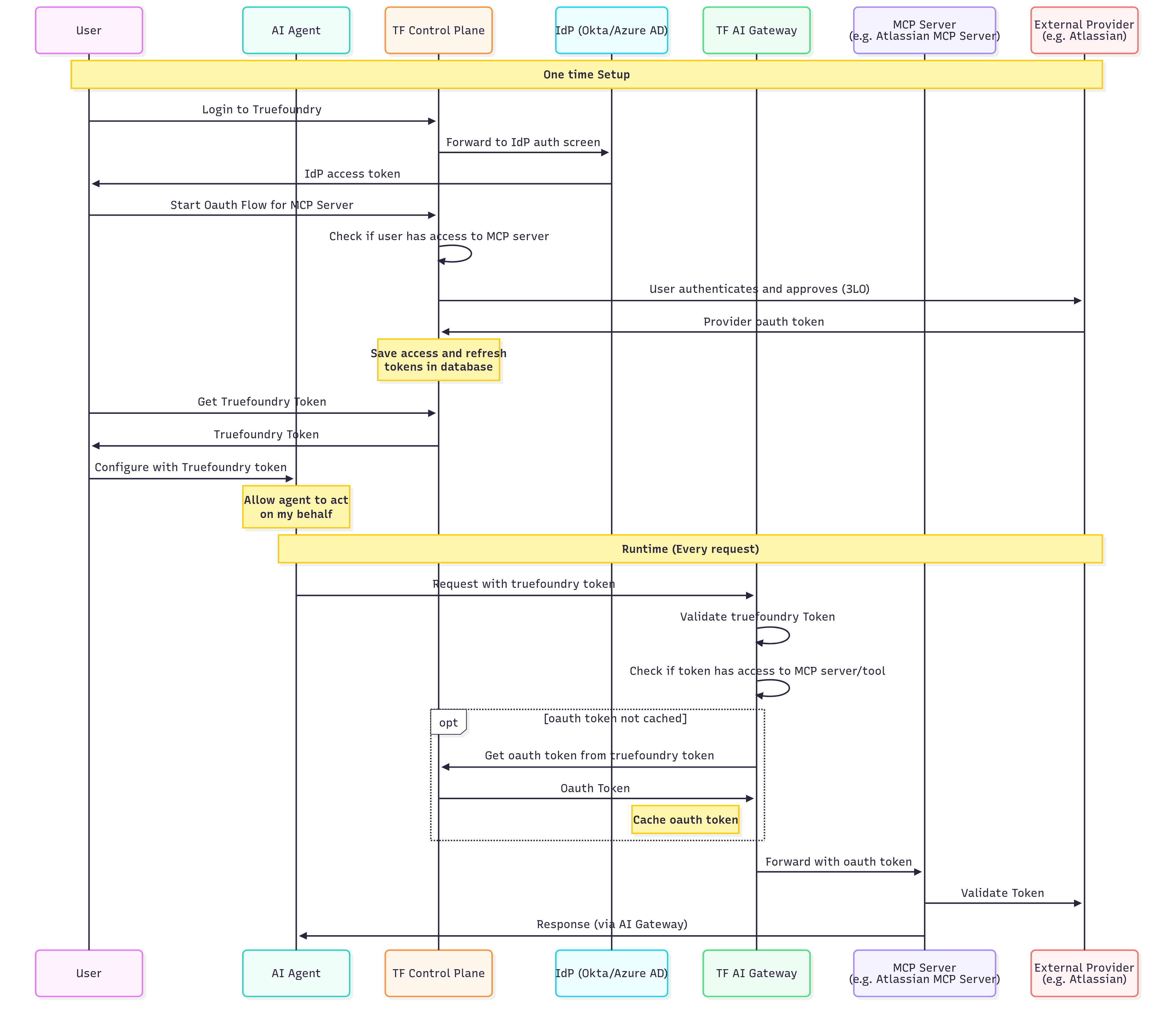
- Sign in to TrueFoundry (using SSO if your organization has it configured).
- Start the connection for the MCP server — add its Gateway URL in your IDE, or click Connect on the server in TrueFoundry.
- Approve the access request.
- Authorize the upstream provider (e.g., Atlassian) with your own account.
- Users authenticate once to TrueFoundry and access multiple OAuth-protected services
- Tokens are automatically refreshed when they expire
- Each user’s actions are attributed to their individual identity
- Users can revoke access to specific services at any time
Scenario 2: Identity Provider Token + OAuth2 Outbound (CIAM)
Scenario 2: Identity Provider Token + OAuth2 Outbound (CIAM)
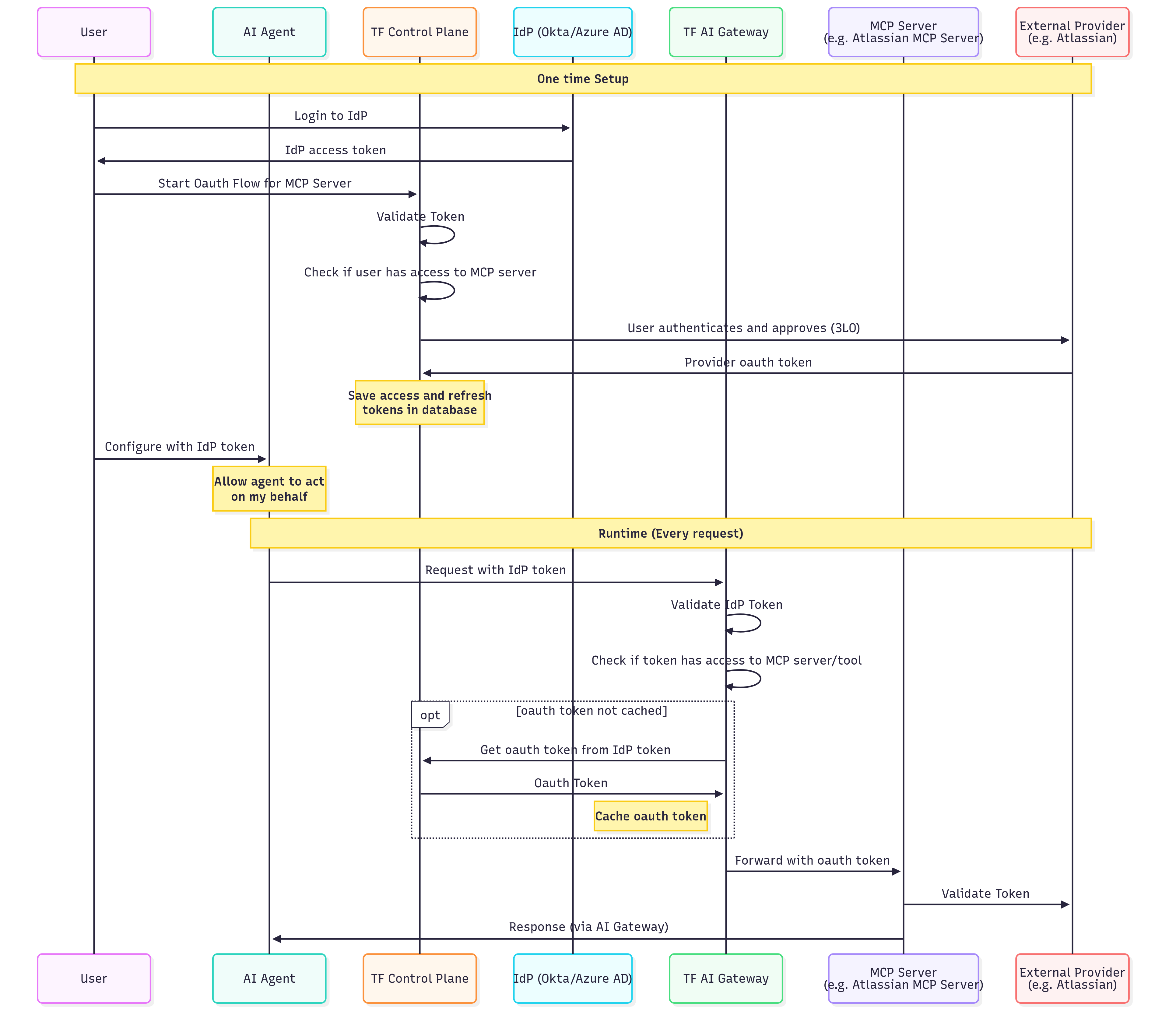
- Sign in to your application, which authenticates the user with your identity provider.
- Start the connection for the MCP server.
- Approve the access request.
- Authorize the upstream provider with their own account.
- Users authenticate with your IdP, not TrueFoundry (different inbound auth)
- The AI Gateway validates your IdP tokens directly
- Useful for B2B SaaS applications with end-customer integrations
Scenario 3: TrueFoundry/IdP Token + API Key Outbound
Scenario 3: TrueFoundry/IdP Token + API Key Outbound
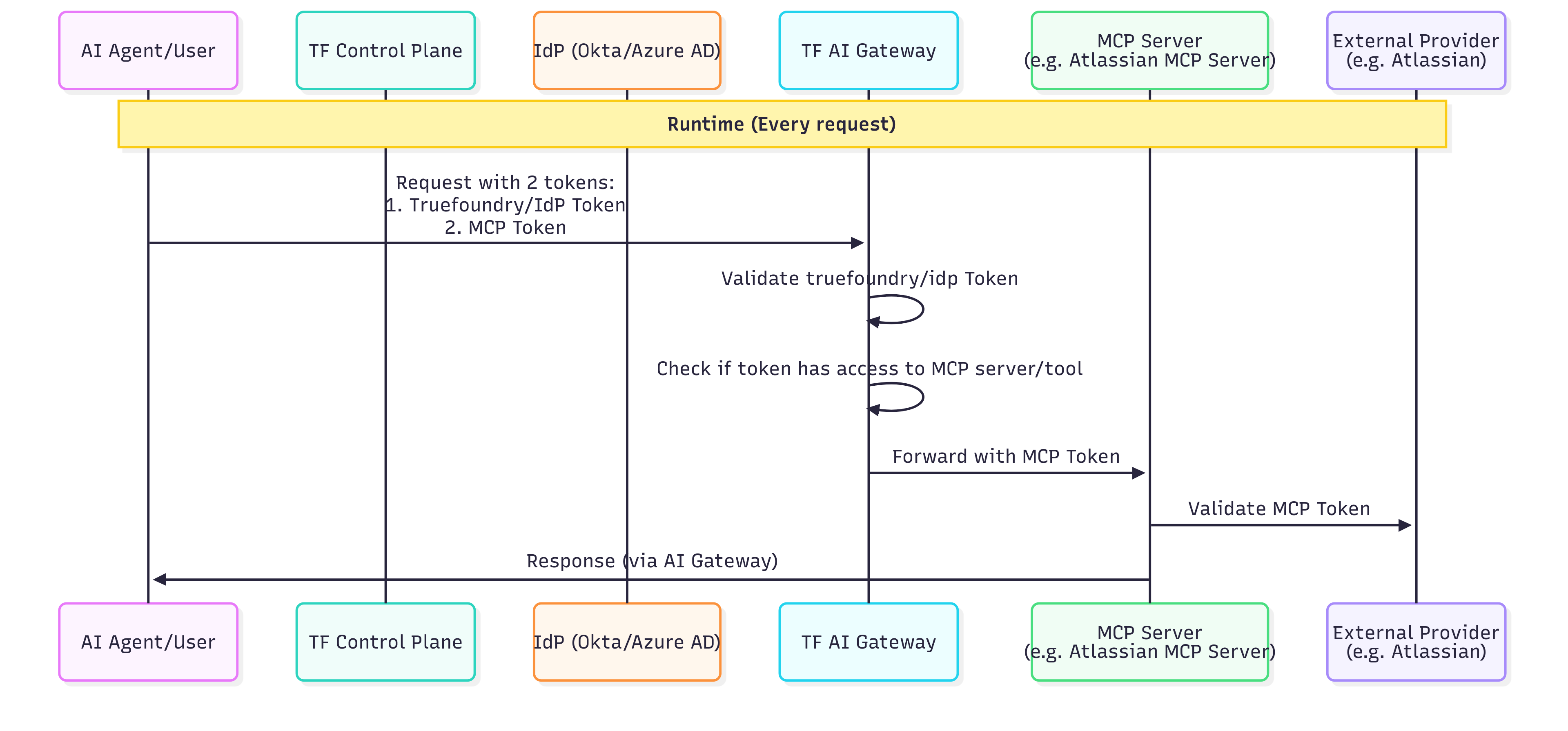
- All users share the same level of access to the downstream service
- Actions cannot be attributed to individual users at the downstream service level
- TrueFoundry’s audit logs still track which user made each request at the AI Gateway level
Scenario 4: TrueFoundry/IdP Token + AWS SigV4 Outbound
Scenario 4: TrueFoundry/IdP Token + AWS SigV4 Outbound
tfy-secret:// refs.Administrator Setup (One-Time):- Downstream AgentCore sees the shared IAM principal (the access-key user or the assumed role), not the end-user identity
- TrueFoundry audit logs still attribute each call to the inbound user
- Region in the URL, ARN, and SigV4 region field must match or AWS returns 403
Scenario 5: Token Passthrough (inbound token forwarded to MCP server)
Scenario 5: Token Passthrough (inbound token forwarded to MCP server)
- Your MCP server can validate TrueFoundry tokens or your IdP’s JWTs
- You want the MCP server to know the user’s identity
- The MCP server makes authorization decisions based on token claims
Scenario 6: Token Forwarding (Custom MCP Server Headers)
Scenario 6: Token Forwarding (Custom MCP Server Headers)
- The MCP server has its own authentication system separate from Gateway authentication
- You need to pass user-specific tokens that the client manages
- The MCP server requires additional metadata alongside authentication
Scenario 7: Okta OBO Token Exchange (outbound)
Scenario 7: Okta OBO Token Exchange (outbound)
sub/uid stay the original user, while cid becomes the service app that performed the exchange (Okta conveys the actor via cid rather than a nested RFC 8693 act claim), and iss/aud/scp flip to the service-side authorization server, its audience, and the API scopes requested in the exchange. If you need a standard nested act claim with the agent as a first-class identity, use ID-JAG (Cross App Access) instead.subject_token.audience field is sent as the RFC 8693 audience parameter and becomes the aud claim of the OBO token; scopes must be allowed by the service authorization server’s access policy. The gateway automatically sets grant_type=urn:ietf:params:oauth:grant-type:token-exchange and subject_token_type=urn:ietf:params:oauth:token-type:access_token. Store client_secret as a TrueFoundry Secret FQN rather than a raw value.Caller contract and test: send the user’s Okta SSO access token as the inbound bearer — there is no interactive consent step for this grant type (ignore any “Connect Now” prompt in the UI; the exchange happens server-side per request):url at an echo endpoint (e.g. https://postman-echo.com/post) during testing. The echoed request carries the freshly exchanged OBO token:- No refresh token — Okta’s exchange response contains only an access token (typically 1 hour).
- Cached per resolved subject — sequential and concurrent requests from the same user reuse the same OBO token (same
jti); no duplicate exchanges. - Re-exchange on expiry — the next request after expiry triggers a fresh exchange using that request’s inbound token, so callers must always present a currently valid SSO access token. An expired or missing inbound token fails with a 401 before any exchange is attempted.
Troubleshooting a failing OBO exchange
Troubleshooting a failing OBO exchange
- 401 “Invalid token” although the JWT is valid — the token could not be resolved to a TrueFoundry identity: check the virtual account mapping (
valuemust equal the token’scid), thename_claim: cidsetting, and thatissuer/audiencesexactly match the token’siss/aud. - The Okta exchange itself fails — verify the Token Exchange grant is enabled on both the API Services app and the service authorization server’s policy rule, DPoP is unchecked on the service app, the service authorization server lists the user authorization server under Trusted Servers, and every requested scope is allowed by the policy. Reproduce with the manual curl in the Okta setup runbook.
invalid_clientfrom the token endpoint — Okta accepts client credentials in the form body (client_secret_post) or anAuthorization: Basicheader (client_secret_basic), but rejects requests carrying both. Also confirm the credentials belong to the API Services app (not the native app).- Requests fail after ~1 hour — an expired OBO token re-exchanges automatically; an expired inbound SSO token requires the caller to re-authenticate with Okta.
FAQ
OAuth2 vs Token Passthrough: which outbound auth should I choose?
OAuth2 vs Token Passthrough: which outbound auth should I choose?
Token Passthrough vs Token Forwarding: what's the difference?
Token Passthrough vs Token Forwarding: what's the difference?
- Token Passthrough: The AI Gateway forwards the same token used for inbound authentication to the MCP server. The MCP server must be able to validate TrueFoundry tokens or your IdP tokens.
- Token Forwarding: The client provides separate credentials for the MCP server via
x-tfy-mcp-headers. These are different from the inbound auth token and are forwarded as-is to the MCP server.
Can I use multiple inbound auth methods for the same MCP server?
Can I use multiple inbound auth methods for the same MCP server?
Can I use a Virtual Account with OAuth-protected MCP servers?
Can I use a Virtual Account with OAuth-protected MCP servers?
- Use a TrueFoundry PAT or a JWT from a configured Identity Provider for per-user OAuth
- Configure the MCP server with Static Header (shared) auth instead
How do I use Auth0 Organizations for MCP Gateway authentication?
How do I use Auth0 Organizations for MCP Gateway authentication?
Register Auth0 as an Identity Provider
- Navigate to Settings > Security & Access > Identity Providers, and click + (Add Identity Provider).
- Select Auth0 in the Provider dropdown and fill in the issuer, allowed audiences, and JWKS URI.
- Under Resolve Token To > Virtual Account, set the Name Claim and the Organization Claim.
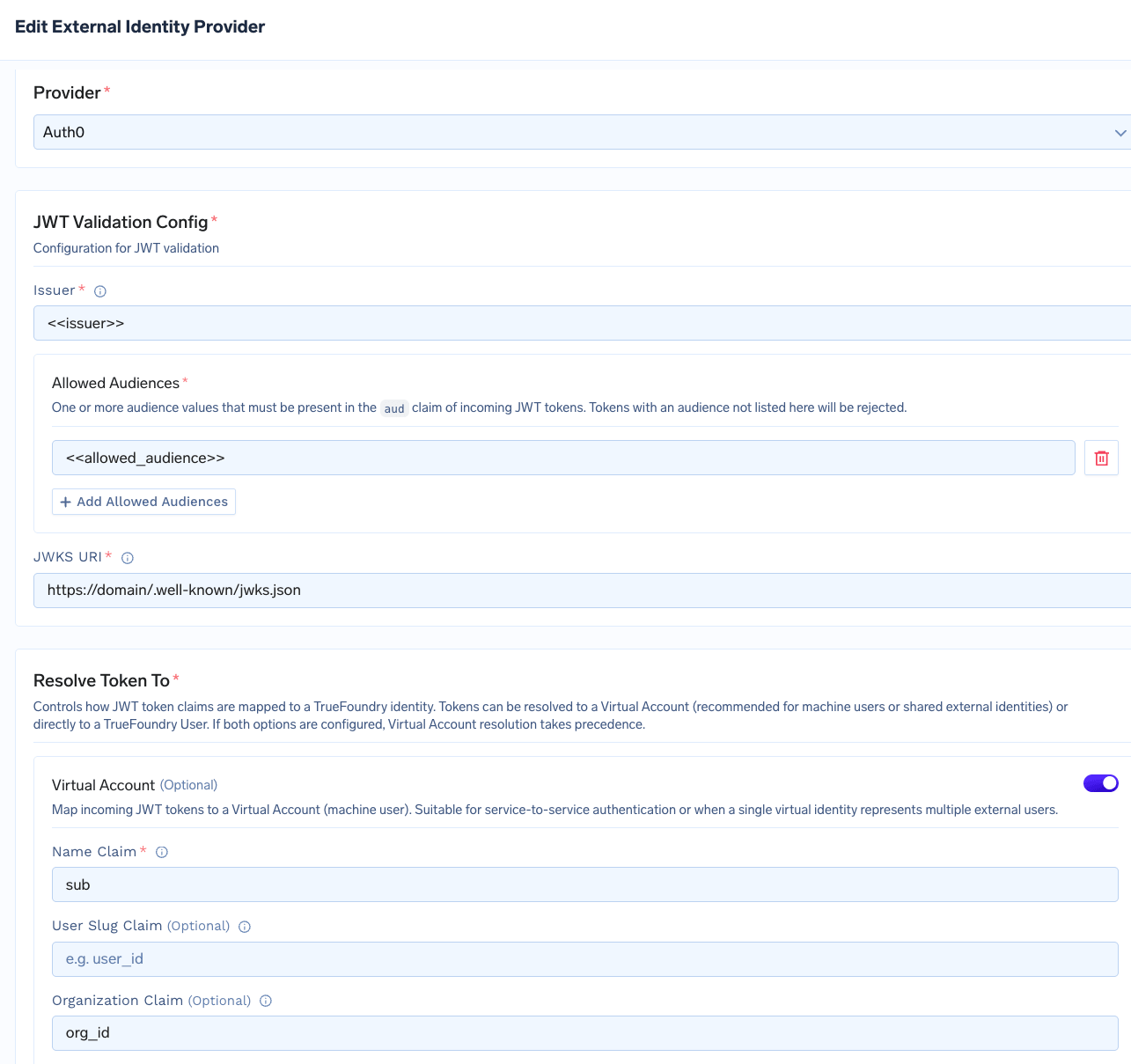
Configuring an Auth0 Identity Provider with an Organization Claim
Configure the MCP server's outbound OAuth2
- Choose OAuth2 > Client Credentials.
- Enter the Token URL, Client ID, and Client Secret from your Auth0 application.
- Set OAuth Provider to Auth0 and enable Use Organization.
- Under Additional Token Parameters, add
audienceset to the API identifier of the protected resource the MCP server fronts.
organization parameter when calling the Auth0 token endpoint.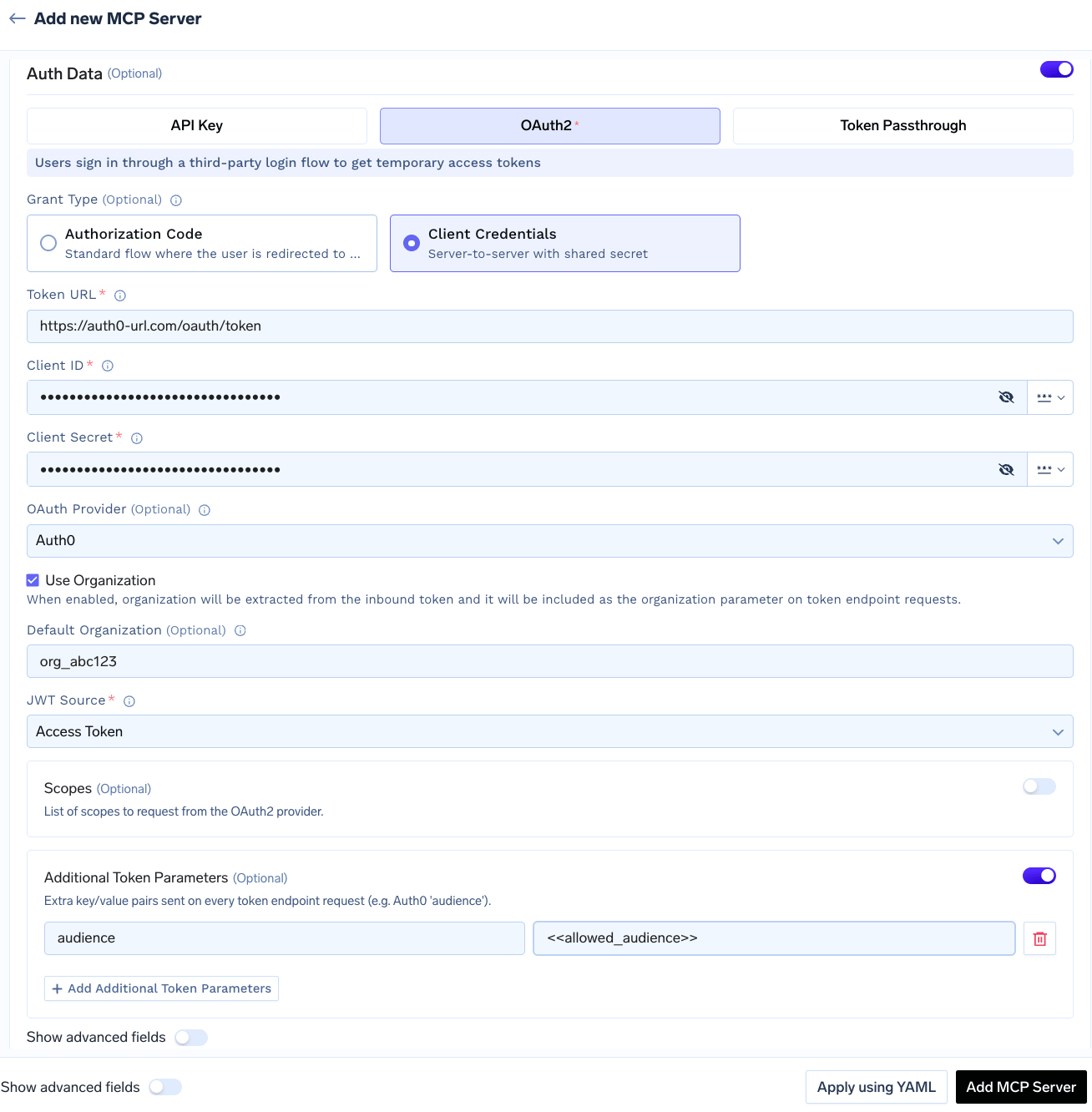
Configuring an MCP server with Auth0 Client Credentials and Use Organization enabled
Call the AI Gateway with an Auth0 token
Authorization header, exactly as in the Identity Provider Token flow.What the AI Gateway does on each request:- Resolves the token to a virtual account.
- Applies that virtual account’s permissions for access control.
- If the MCP server uses outbound Auth0, forwards the same Organization to the downstream token endpoint.
The tool I want to call says 'tool not found' — what now?
The tool I want to call says 'tool not found' — what now?
- List available tools using
client.list_tools()to confirm what’s exposed - Tool names are case-sensitive
- The MCP server may have been updated — refresh the tool list
Revoking all tokens
Tenant admins can revoke every stored credential on an MCP server in a single action. This action is only visible to tenant admins; MCP Server Managers do not see it. To revoke all tokens:- Navigate to the MCP server detail page and open the three-dot menu next to Edit.
- Click Revoke all tokens.
- Review the confirmation dialog and click Revoke All.

- Deletes every auth override and stored OAuth token for all users and virtual accounts on the server.
- Takes effect immediately — the AI Gateway stops honouring the cached credentials on the next request.
- Is recorded as an entry in the server’s Activity Logs.