

my-group/production-chat). Behind that name, you configure one routing strategy and one or more real target models (for example azure/gpt-4o and openai/gpt-4o). The AI Gateway handles load balancing, health-aware routing, retries, and fallbacks automatically so you do not hard-code provider details in every service.
/batches) does not support virtual models — batch jobs run on a single provider asynchronously, so the AI Gateway has no opportunity to fallback to another target if a request inside the batch fails. Send batch requests directly to a real catalog model (for example openai-main/gpt-4o).Why route across multiple targets?
Production LLM traffic benefits when the AI Gateway can choose or failover among more than one backend. Common drivers:Service outages and downtime
Service outages and downtime
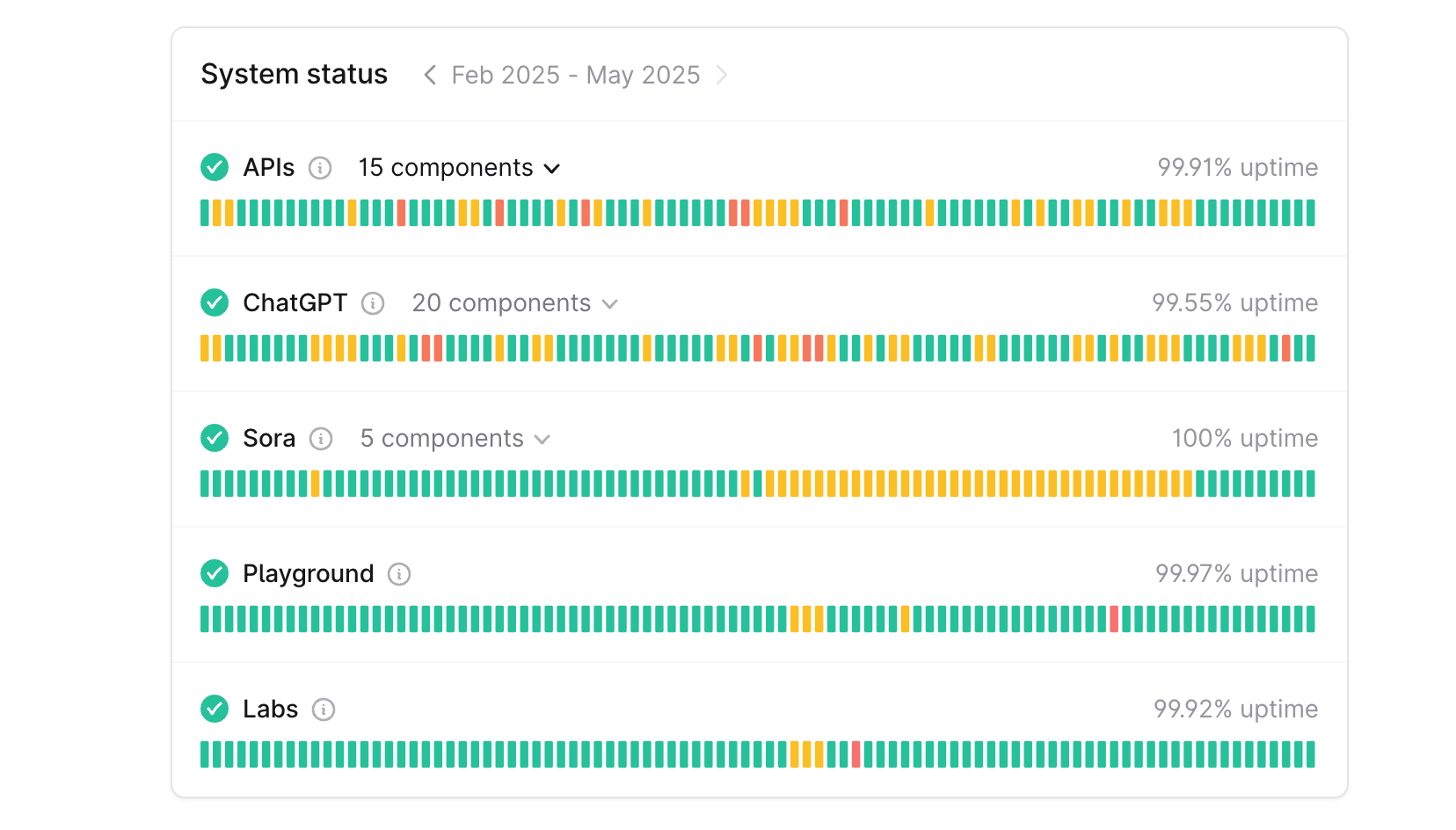
OpenAI Status Page
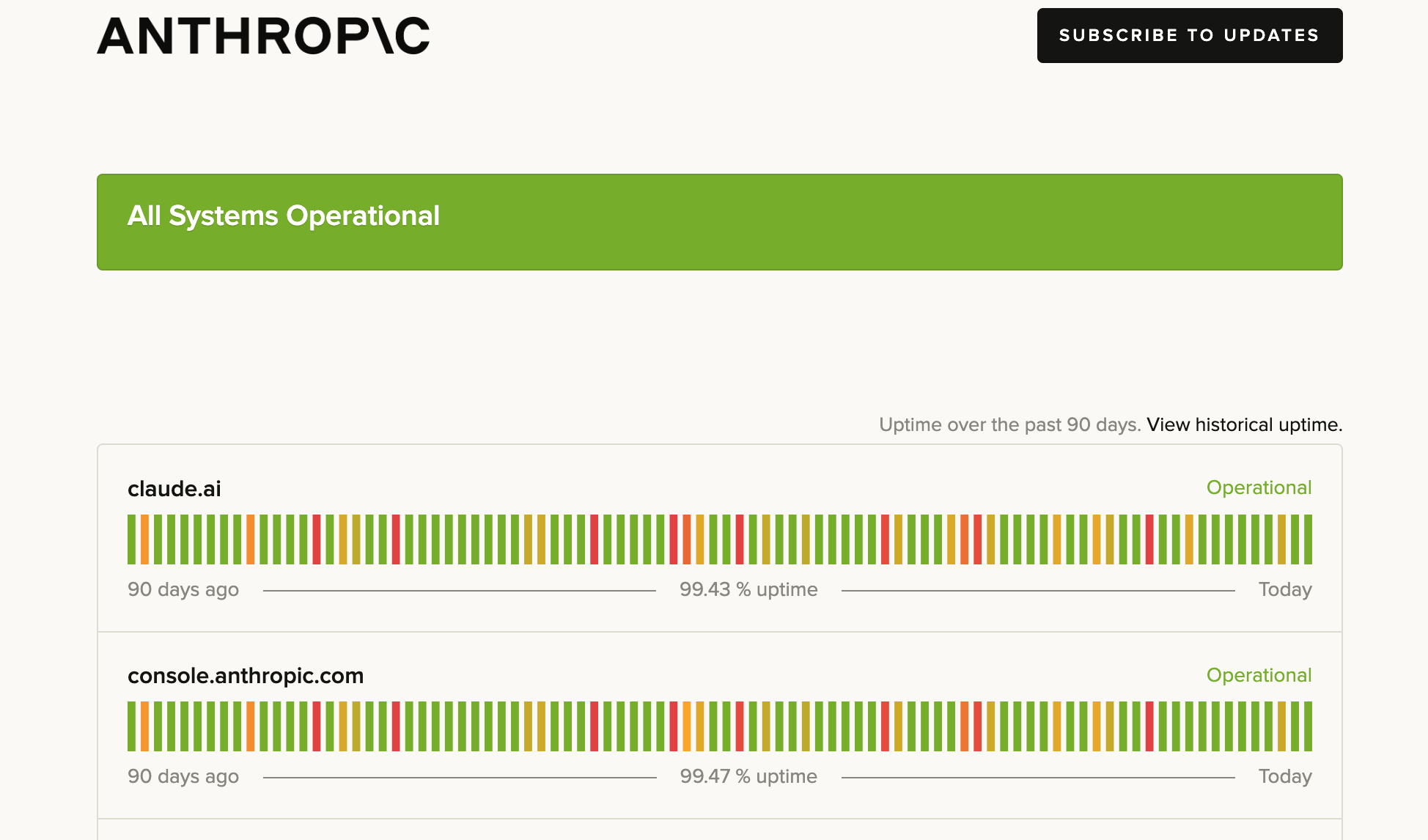
Anthropic Status Page
Latency variance among models
Latency variance among models
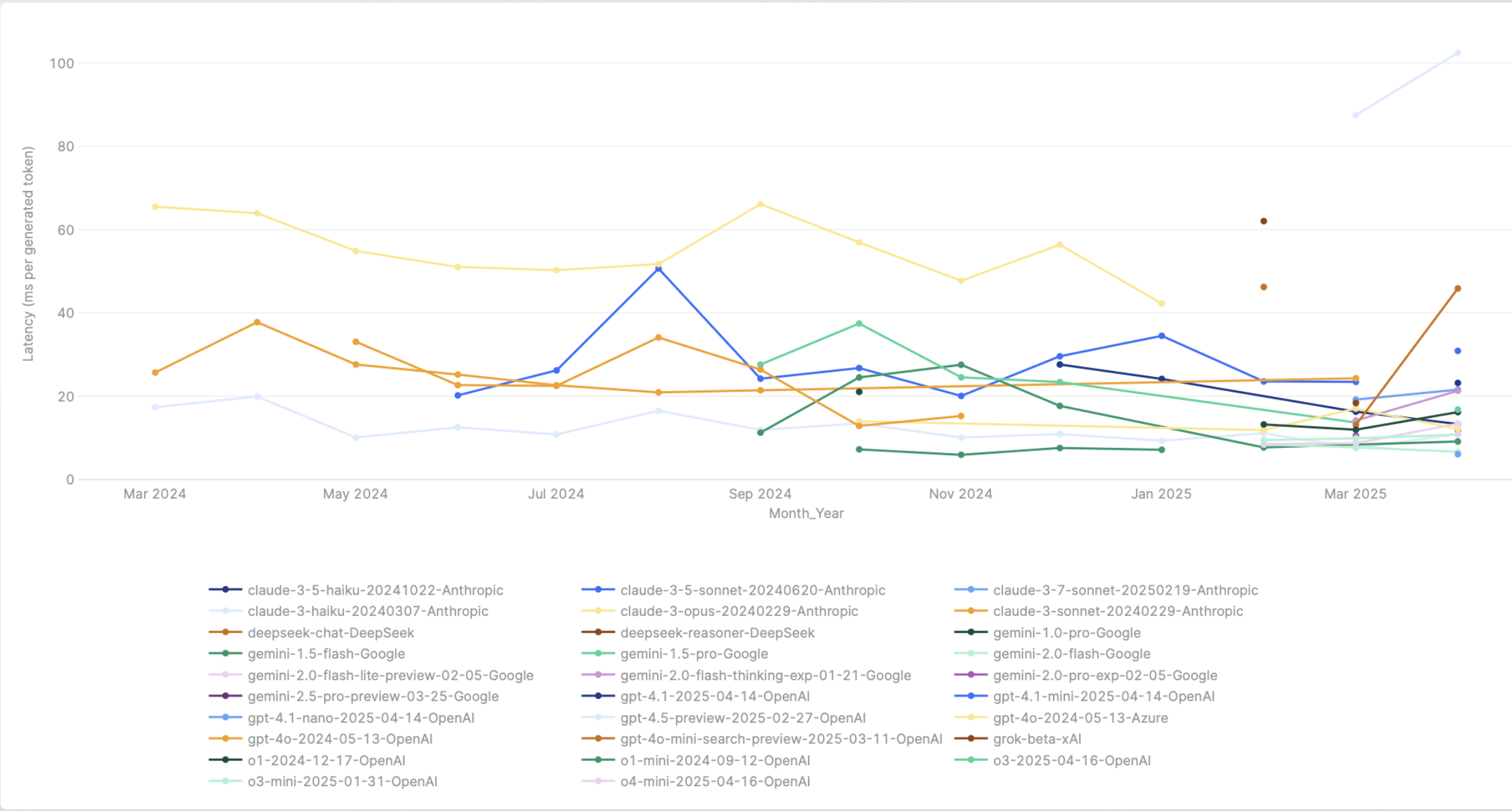
Latency variance of models over a course of a month
Rate limits of models
Rate limits of models
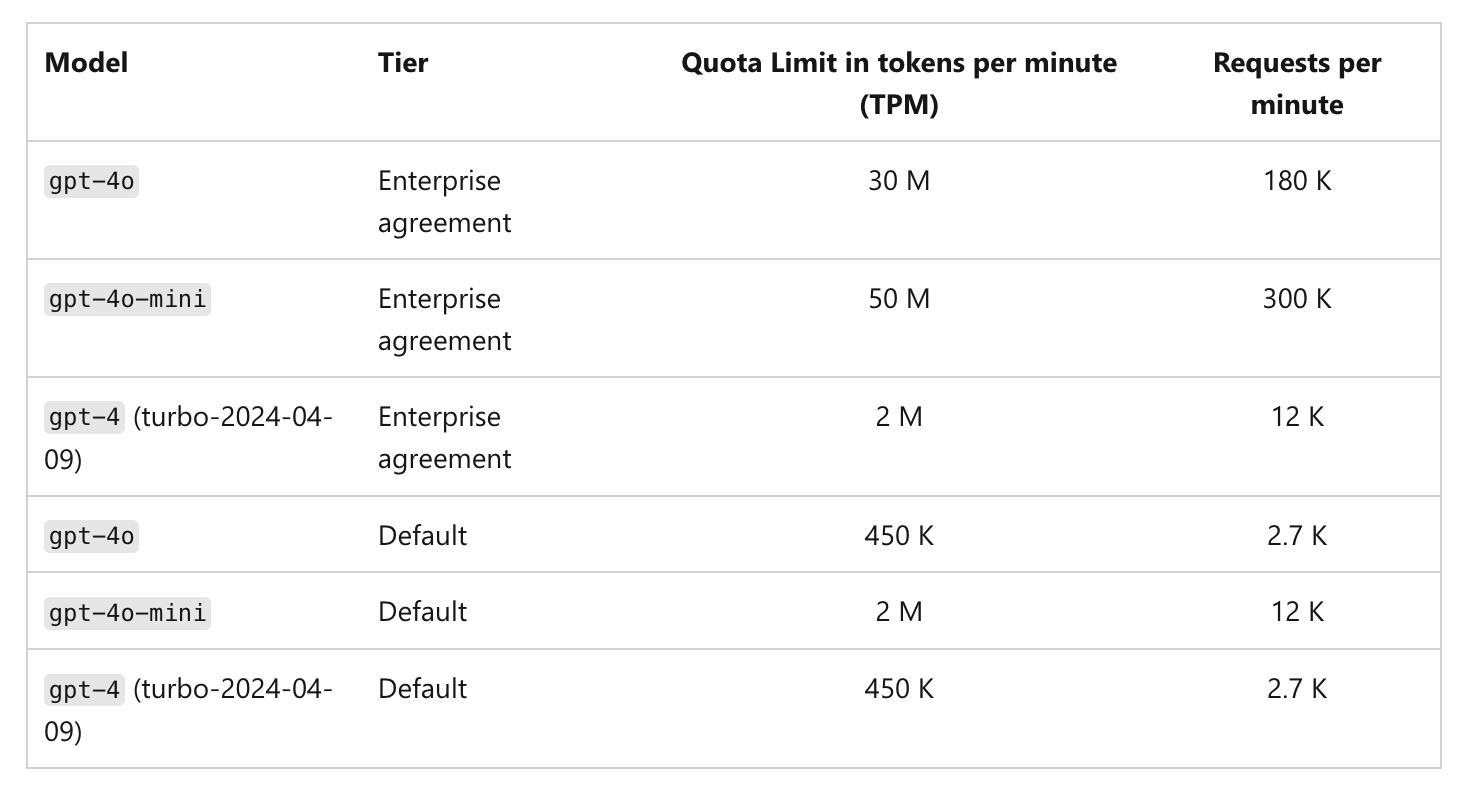
Azure OpenAI Rate Limits
Canary testing
Canary testing
Why Virtual Models?
- Stable API surface — Your apps pass one model identifier; you change targets, weights, or providers in the AI Gateway without redeploying clients.
- Resilience — Retries and fallback status codes route around rate limits and transient errors across targets.
- Governance — Virtual model provider groups support collaborator roles so teams can use or manage routing separately.
Supported API Types
A virtual model is configured with one or more model types (set under Model types when you create it). The model type controls which API operations the virtual model can serve — and every target in the virtual model must support the operation you call. TrueFoundry AI Gateway supports the following model types, each callable on the matching OpenAI-compatible endpoint:messages can be served by a virtual model with chat.chat and embedding), as long as every target supports each operation you intend to call.
responses type behaves differently from the rest: conversations are pinned to the backend that started them, and every target must support the Responses API natively. See Responses API conversations in the FAQ.Routing Strategies
When you create a virtual model, you choose one routing strategy. Each strategy uses the same list of targets — the difference is how the AI Gateway picks among healthy targets for each request.Weight-based routing
You assign a weight to each target. The AI Gateway distributes incoming requests in proportion to those weights. For example, 90% toazure/gpt-4o and 10% to openai/gpt-4o.
Sticky routing (weight-based only)
Sticky routing pins requests that share the same session key to the same target model for a configurable time window (ttl_seconds). Within that window, every request carrying the same session identifier is routed to the same model. When the window expires, the session is re-evaluated and may land on a different model. Useful for multi-turn conversations, prompt cache efficiency, and consistent user experience.
Configuring sticky routing
Configuring sticky routing
sticky_routing block inside your weight-based routing configuration. Two fields are required: ttl_seconds and at least one entry in session_identifiers.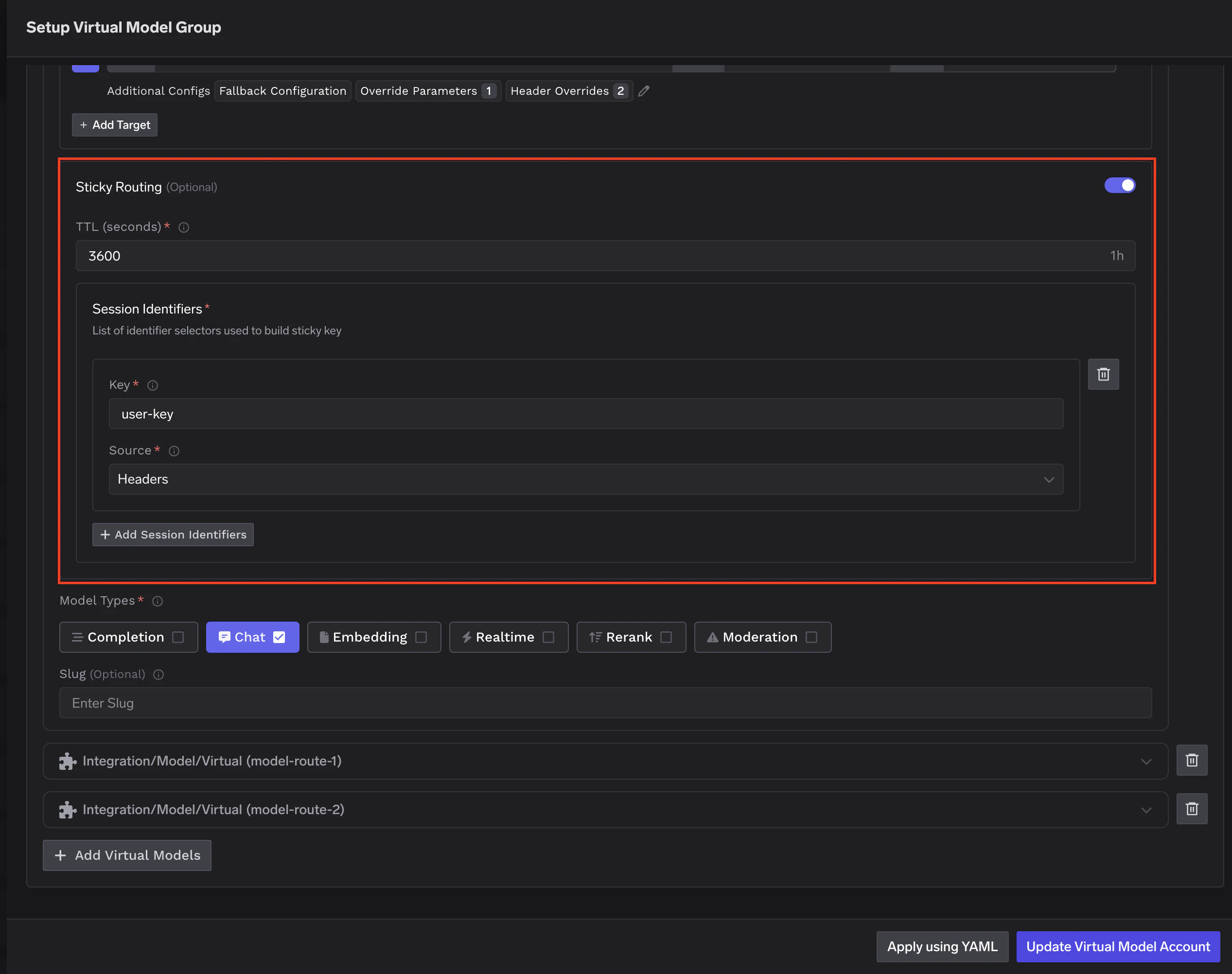
Sticky routing configuration in the Virtual Model dashboard
key— The header or metadata field name to read.source—headersto read from HTTP request headers, ormetadatato read from request metadata.
ttl_seconds defines how long a session stays pinned. For chatbots, 3600 (1 hour) is a common starting point. For longer workflows, consider 86400 (24 hours).Fallback during a sticky session: If the pinned model fails, the remaining healthy targets are tried in sequence (this fallback order is not weight-based). Only targets with fallback_candidate: true are eligible. After a successful fallback, subsequent requests for that session in the same TTL window are routed to the working target — not back to the one that failed.Priority-based routing
Each target has a priority number. The AI Gateway routes to the highest priority target (0 is highest) that is healthy. If that target fails or is unavailable, the AI Gateway falls back to the next priority model.SLA cutoff
SLA cutoff
- Time Per Output Token (TPOT) threshold per target using
sla_cutoff.time_per_output_token_ms - Time To First Token (TTFT) threshold per target using
sla_cutoff.time_to_first_token_ms
- The AI Gateway monitors the rolling average of each configured metric over a 3-minute window (up to 10 samples, minimum 3 required)
- For TTFT, only streaming requests record a sample — non-streaming requests are skipped from the TTFT average
- For TPOT, only requests with at least 30 output tokens count as valid samples — shorter responses are excluded because their per-token latency is dominated by TTFT rather than steady-state generation speed
- If either metric exceeds its threshold, the target is marked unhealthy and moved to the end of the list
- Recovery is automatic when metrics improve or older data ages out
Latency-based routing
You do not set weights. The AI Gateway picks a target for each caller deterministically, and keeps the same target for the duration of a short time window. This gives every caller a stable behaviour for prompt-cache reuse and reduces routing variance for agents and long conversations. Across many independent callers, traffic distributes in inverse proportion to each target’s measured latency — faster targets get a larger share of overall traffic, but every healthy target still receives some.sticky_routing block to enable this. The behaviour applies as soon as you choose latency-based-routing as the rule type.How the target is selected?
How the target is selected?
- Measure each target’s recent latency. For each target, the AI Gateway looks at recent successful requests over the last 20 minutes and computes the Time Per Output Token (TPOT) — total response time divided by the number of output tokens. TPOT folds time-to-first-token and inter-token latency into a single, output-length-independent number. Targets that don’t have recent samples are treated as average so they aren’t penalised before they’ve had a chance to be measured.
- Pick a target per caller, sticky for the epoch. Selection is based on the caller’s identity and the current 10-minute epoch. Lower-latency targets (lower TPOT) are more likely to be picked, but every healthy target retains some share. Because the selection inputs are stable for the duration of an epoch, the same caller routes to the same target for up to 10 minutes — this is the sticky part of the algorithm, and is what gives you prompt-cache reuse and lower routing variance within a session.
- Order the remaining targets for fallback. Lower-latency targets come first in the fallback chain. If the primary target fails or returns a fallback-status-code response, the AI Gateway tries the next target in the chain.
Complexity-based routing
Each target is assigned a complexity tier —simple, medium, or complex — and the AI Gateway classifies every incoming request into one of those tiers before choosing a target. Easy requests are served by your cheapest model and hard ones by your most capable, without your application changing anything. You must assign at least one model to each of the three tiers.
Classification uses an in-process heuristic (default, no added latency or cost), a catalog chat model, or a TypeSafe Jev decision model. Multi-turn conversations are pinned automatically: a later turn can move to a higher tier, but cannot move back down while the conversation remains active.
This is the one strategy that reads the request body to make its decision, so it applies only to virtual models with chat, completion, or responses model types, and only to virtual models — not the tenant-level routing config.
See Complexity-based Routing for tiers, classifier options, escalation, automatic conversation pinning, and the full configuration reference.
Configuration structure
The following YAML shows the complete shape of a virtual model’s routing configuration with all available fields. In the dashboard UI, the same fields are set through the form editor. For the complexity-based shape — which uses per-target tiers and a classification strategy instead of weights or priorities — see the Complexity-based Routing reference.Key fields
type — The routing strategy for this virtual model:
weight-based-routing— Distribute traffic by assigned weights that sum to 100.latency-based-routing— Per-caller deterministic selection weighted by recent latency, sticky for 10-minute windows so the same caller stays on the same target within that window. No weights needed.priority-based-routing— Route to the highest priority (lowest number) healthy target, falling back to the next on failure.complexity-based-routing— Classify each request assimple,medium, orcomplexand route it to the target configured for that tier. Every tier must have at least one model. See Complexity-based Routing.
load_balance_targets — The list of real models eligible for routing. Each target and its configuration options are described in detail in the Per-target configuration section below.
Per-target configuration
Regardless of which routing strategy you choose, each target in the virtual model supports several options that control what happens when a request is routed to that target.Retries and fallbacks
Each target can define how the AI Gateway should handle failures before giving up or moving to another target:- Retry configuration — Number of attempts, delay between retries, and which status codes trigger a retry on the same target. Defaults: 0 attempts, 100 ms delay, retry on
429,500,502,503. - Fallback status codes — Which status codes cause the AI Gateway to stop retrying this target and try a different target instead. Default:
401,403,404,408,429,500,502,503. - Fallback candidate — Whether this target is eligible to receive traffic when another target fails. Default:
true. Set tofalsewhen you want a target to be used only as a primary and never receive fallback traffic from other targets.
Retry and fallback example
Retry and fallback example
- A request first goes to
azure/gpt-4o(priority 0). If it returns429, the AI Gateway retries up to 3 times with 200 ms delay. If retries are exhausted or a fallback status code is returned, it falls back to the next target. openai/gpt-4o(priority 1) is tried next with its own retry config.anthropic/claude-sonnet(priority 2) hasfallback_candidate: false, so it is never tried as a fallback for the other two targets — it is only used when it is itself the highest-priority healthy target.
Parameter overrides
override_params sets request parameters for one target. The AI Gateway applies them to the incoming request body before any provider-specific transformation, so the provider can still rename, transform, or drop a parameter its endpoint doesn’t support.
- A value replaces the client’s value for that parameter.
nullremoves the parameter. - The target always controls
model; an override ofmodelis ignored. prompt_version_fqnandprompt_variablesare handled separately as model-specific prompt overrides.
Header overrides
You can inject or remove HTTP headers on a per-target basis, applied just before the request is sent to that model. This is useful when a specific target requires headers that the others don’t — for example, a region identifier, a deployment ID, or an API version header expected by one provider but not the rest.Configuration and examples
Configuration and examples
headers_override block to any target in your load_balance_targets list: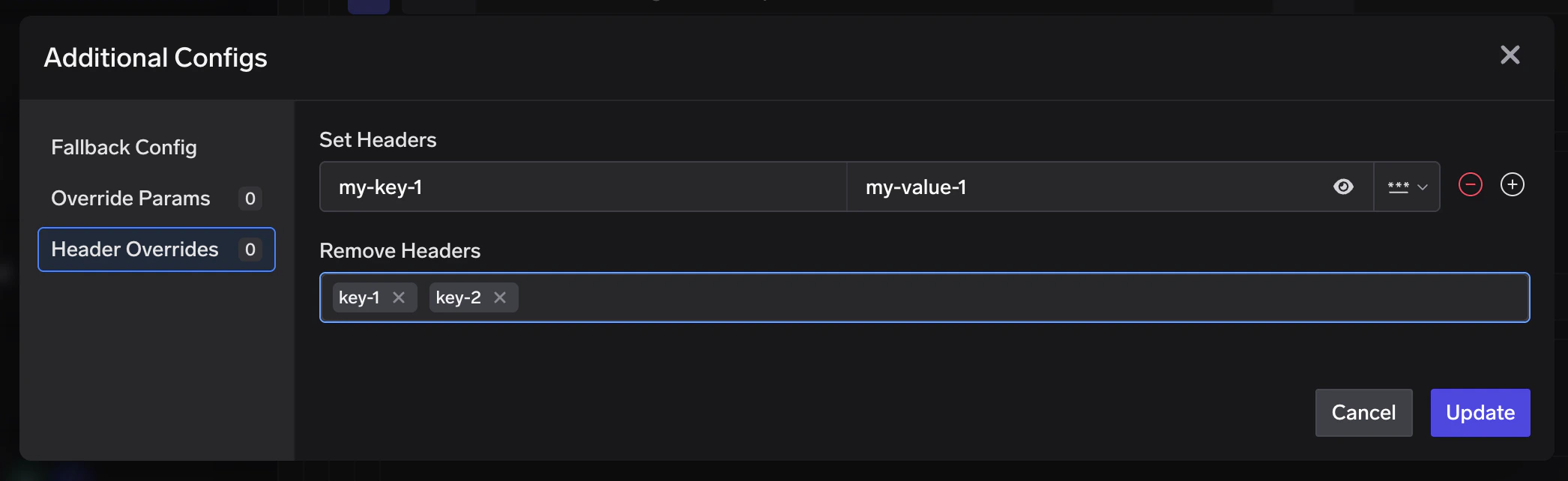
Header overrides configuration per target in the Virtual Model dashboard
set— Key-value pairs of headers to add or overwrite on the outgoing request.remove— List of header keys to strip from the outgoing request.
X-Custom-Auth and x-custom-auth refer to the same header. The AI Gateway normalises all keys to lowercase before applying overrides. Header overrides are applied last, after parameter overrides, so they reflect the final outgoing headers sent to the provider.Header overrides apply to every virtual model request type, including image edit, image variation, audio transcription, and audio translation.x-tfy-anthropic-beta is an exception: it is consumed into the Anthropic beta pipeline and is not forwarded upstream. When that header is present on the request (or set here), it replaces every other client beta source and is not merged. Setting or removing anthropic-beta in headers_override does not override it — to change the betas, set x-tfy-anthropic-beta.Metadata-based target filtering
You can constrain a target to only receive traffic when request metadata matches specific key-value pairs usingmetadata_match.
The AI Gateway evaluates resolved metadata (not just raw request headers). Metadata can come from:
- Request metadata header —
x-tfy-metadata(JSON object with string keys and values) - Virtual account tags — when using a virtual account, its tags are included in metadata
- Default gateway metadata — configured at gateway level (commonly used in self-hosted setups)
- SaaS gateway location metadata —
tfy_gateway_regionandtfy_gateway_zoneare automatically added by the SaaS gateway based on which region handled the request
- request metadata
- default gateway metadata (overrides request value for overlapping keys)
- virtual account tags (highest precedence)
- If
metadata_matchis not set (or empty), that target always stays eligible. - If
metadata_matchis set, all configured pairs must match exactly (ANDsemantics). - Filtering happens before load-balancing order and sticky routing are computed, so only matching targets participate in routing for that request.
Basic metadata filtering
Basic metadata filtering
openai/gpt-4o remains eligible because the first target does not match.SaaS gateway region-based routing
SaaS gateway region-based routing
tfy_gateway_region and tfy_gateway_zone based on which gateway handled it. You can use metadata_match to route traffic from specific regions to region-appropriate model deployments — without the client needing to send any metadata.- A user in the US hits
gateway.truefoundry.ai, which routes to the nearest US gateway. The AI Gateway automatically setstfy_gateway_region: USin resolved metadata, so the request matchesazure-us/gpt-4o. - A user in Europe hits the nearest EU gateway (
tfy_gateway_region: EU), matchingazure-eu/gpt-4o. - A user in India hits the nearest India gateway (
tfy_gateway_region: IN), matchingazure-in/gpt-4o. - Users from any other region (e.g. Australia, South America) don’t match any
metadata_matchrule, so they fall through toopenai/gpt-4o(priority 1) which has nometadata_matchand acts as the default.
Model-specific prompt overrides
When a virtual model sends traffic to targets from different model families, you may need different prompt versions per provider. Configureprompt_version_fqn in override parameters on each target. When a request is routed to a target, the AI Gateway uses that target’s prompt version for hydration.
When and how to use prompt overrides
When and how to use prompt overrides
- Different models require different prompt formats or structures
- You want to optimize prompts for specific model capabilities
- You need to maintain model-specific prompt versions behind one virtual model name
prompt_version_fqn override does not work with agents (when using MCP/tools). It is supported for standard chat completion requests.Unhealthy target detection
All the routing strategies described above only consider healthy targets when deciding where to send a request. The AI Gateway continuously monitors every target and automatically marks targets as unhealthy when they start failing or breaching performance thresholds. This section explains how that health tracking works. When a target is marked unhealthy, healthy targets are always tried first. Unhealthy targets are moved to the end of the list and only used as a last resort if all healthy targets fail. Recovery is automatic once errors age out of the evaluation window.Failure-based cooldown (all routing types)
Failure-based cooldown (all routing types)
- Error responses considered:
5xx,429,401, and403 - Default failure threshold:
2or more failures - Default evaluation window: last
2minutes (rolling window) - Recovery: automatic, once failures age out of the window
SLA-based cooldown (priority-based routing only)
SLA-based cooldown (priority-based routing only)
sla_cutoff:time_per_output_token_ms— average TPOT over a 3-minute rolling window (only requests with at least 30 output tokens are counted; shorter responses are excluded as their per-token latency is dominated by TTFT rather than steady-state generation speed)time_to_first_token_ms— average TTFT over a 3-minute rolling window (streaming requests only)
FAQ
Can I change the routing strategy after creating a virtual model?
Can I change the routing strategy after creating a virtual model?
How do I know which target handled a request?
How do I know which target handled a request?
x-tfy-resolved-model response header. This may differ from the virtual model you requested due to load balancing or fallbacks. You can also view per-target traffic, success rates, and latency in the AI Gateway dashboard.Can one virtual model support several API types (chat, embedding, audio, etc.)?
Can one virtual model support several API types (chat, embedding, audio, etc.)?
chat, responses, completion, embedding, rerank, moderation, image, and the audio types — text_to_speech, audio_transcription (STT), and audio_translation. Every target must support the operation you call. See Supported API types for the full endpoint mapping.Can I use a virtual model with the Batch API?
Can I use a virtual model with the Batch API?
/batches) is asynchronous — requests inside a batch are processed by a single provider hours later, so there is no live response for the AI Gateway to act on, and no opportunity to fail over.Use a real catalog model identifier (e.g. openai-main/gpt-4o) when creating batch jobs. For synchronous traffic that needs resilience across providers, virtual models are the right tool.What if every target fails?
What if every target fails?
Can a virtual model point to another virtual model as a target?
Can a virtual model point to another virtual model as a target?
Can I use sticky routing with latency-based or priority-based routing?
Can I use sticky routing with latency-based or priority-based routing?
sticky_routing configuration isn’t supported for latency-based or priority-based routing — and it’s typically not needed.- Priority-based routing sends every request to the highest-priority healthy target, so a session naturally stays on the same target until that target becomes unhealthy.
- Latency-based routing is inherently sticky-per-caller-per-epoch: the target is picked deterministically from a hash of the caller’s identity and the current 10-minute epoch, so the same caller stays on the same target for up to 10 minutes at a time. This gives you prompt-cache benefits and consistent behaviour for agents and long conversations without any extra configuration.
- Weight-based routing is the one strategy that deliberately spreads traffic across targets on every request — so
sticky_routingexists there for cases where you want to override that and pin a session to a single target. - Complexity-based routing pins multi-turn conversations automatically, with no
sticky_routingblock. It can raise a conversation to a more capable tier but does not lower it while the pin is active. See Conversation pinning for complexity-based routing.
Will the same session always go to the same model forever?
Will the same session always go to the same model forever?
ttl_seconds window. Once the window expires, the session is re-evaluated and may land on a different model. Size ttl_seconds to match your typical session duration.Will sticky routing work if my gateway has multiple pods?
Will sticky routing work if my gateway has multiple pods?
Do header overrides affect all targets or just the one I configure them on?
Do header overrides affect all targets or just the one I configure them on?
How does metadata matching work across multiple keys?
How does metadata matching work across multiple keys?
metadata_match uses all-keys-must-match logic for a target. If you configure multiple keys, every key-value pair must match request metadata exactly for that target to be eligible.What if I set metadata rules on some targets but not others?
What if I set metadata rules on some targets but not others?
metadata_match remain eligible for all requests and act as a default path. Targets with metadata_match are included only when their conditions match.How does metadata filtering interact with sticky routing and fallback?
How does metadata filtering interact with sticky routing and fallback?
Responses API conversations
Calling/responses on a virtual model works differently from the other model types, because a conversation belongs to the backend that created it.
How does the AI Gateway keep a conversation on one target?
How does the AI Gateway keep a conversation on one target?
previous_response_id and the request would fail. The AI Gateway prevents this automatically: the first turn load-balances normally, and every follow-up is pinned to whichever target served the first turn.To do this, the AI Gateway returns a response id of its own — prefixed resp_tfyv1- — that encodes which target served the turn alongside the provider’s real response id. When you send that id back as previous_response_id (or in the path of GET/DELETE /responses/{id}), the AI Gateway decodes it, routes only to that target, and swaps in the provider’s native id before forwarding.There is nothing to configure. The routing information travels inside the id itself rather than a shared cache, so pinning works across gateway pods and survives restarts.Why does my Responses API id look different from the provider's?
Why does my Responses API id look different from the provider's?
resp_tfyv1-… id that encodes which target served the turn, so it can pin follow-ups to that same backend. Pass the id back verbatim — it is opaque, and the provider’s raw id is not exposed. Do not parse it or assume it matches the provider’s id format.The format does not depend on store, so a store: false turn returns a gateway-encoded id too; it just has nothing on the provider side to chain to.What does pinning change about routing?
What does pinning change about routing?
- Load balancing is skipped. Weights, priorities, and latency scores do not apply — the request goes to the origin target only.
- Sticky routing is skipped. The origin binding is authoritative and must not rotate when a
ttl_secondswindow expires. - Fallback is disabled. Falling back to a sibling target would silently drop the conversation history, so the AI Gateway fails the request instead.
- Retries still apply. Only cross-target fallback is removed — retries against the pinned target itself work as configured.
How do stateless (store: false) conversations behave?
How do stateless (store: false) conversations behave?
store: false and the AI Gateway does not track conversation state for you — you carry the full history in input yourself, and there is no previous_response_id to chain on.- If your
inputcarries reasoning items withencrypted_contentthat the AI Gateway minted, that turn is pinned to the backend that produced it. Reasoning ciphertext is only valid at the model that created it, so replaying it elsewhere would fail. - If your
inputcarries no such content — plain text history only — the turn load-balances like a chat completion.
store. It applies to store: false and store: true turns alike.The AI Gateway marks its own reasoning ciphertext so it can recognise it later, and strips that marking before forwarding, so the provider only ever sees its own value. Treat encrypted_content as opaque and round-trip it verbatim — rebuilding or truncating it loses the pin. Ciphertext minted by a direct (non-virtual) model call is not marked, so replaying it at a virtual model is not pinned and can still be rejected by the provider.This is also the right mode for targets whose Responses API is stateless — OpenRouter, for example, rejects store: true outright.Which targets can serve /responses?
Which targets can serve /responses?
/responses on must support the Responses API natively. Translating a Responses request into a chat completion would lose conversation state, so the AI Gateway rejects it rather than falling back.See the provider table on the Responses API page for which providers qualify.What errors can Responses pinning return?
What errors can Responses pinning return?
4xx) pass through unchanged. A pinned target that is rate limited returns its own 429 — the AI Gateway does not reroute around it.If you replay reasoning encrypted_content that the AI Gateway did not mint — for example content from a direct model call, or content your client rebuilt — the turn is not pinned and the provider may reject the ciphertext with an error of its own.