


October 1, 2026
|
5 min read


Published: September 11, 2026
Blazingly fast way to build, track and deploy your models!
AIOps has gone through a few identity shifts in recent years. Dashboards and threshold alerts came first. Then ML-driven anomaly detection had its moment. Now something different is happening—engineers are dragging AI coding agents like Cursor into their incident response workflows. Sometimes it works. A lot of the time, it doesn't.
We get why the confusion exists. Infrastructure is code. Incidents usually need code-level fixes. Cursor, with its whole-codebase understanding and agentic editing, looks like it belongs in an SRE's toolkit.
Except Cursor is a coding agent. Not an AIOps system. It won't monitor your infra. Won't correlate alerts. Has zero awareness that your Kubernetes cluster is melting down unless someone explicitly tells it so.
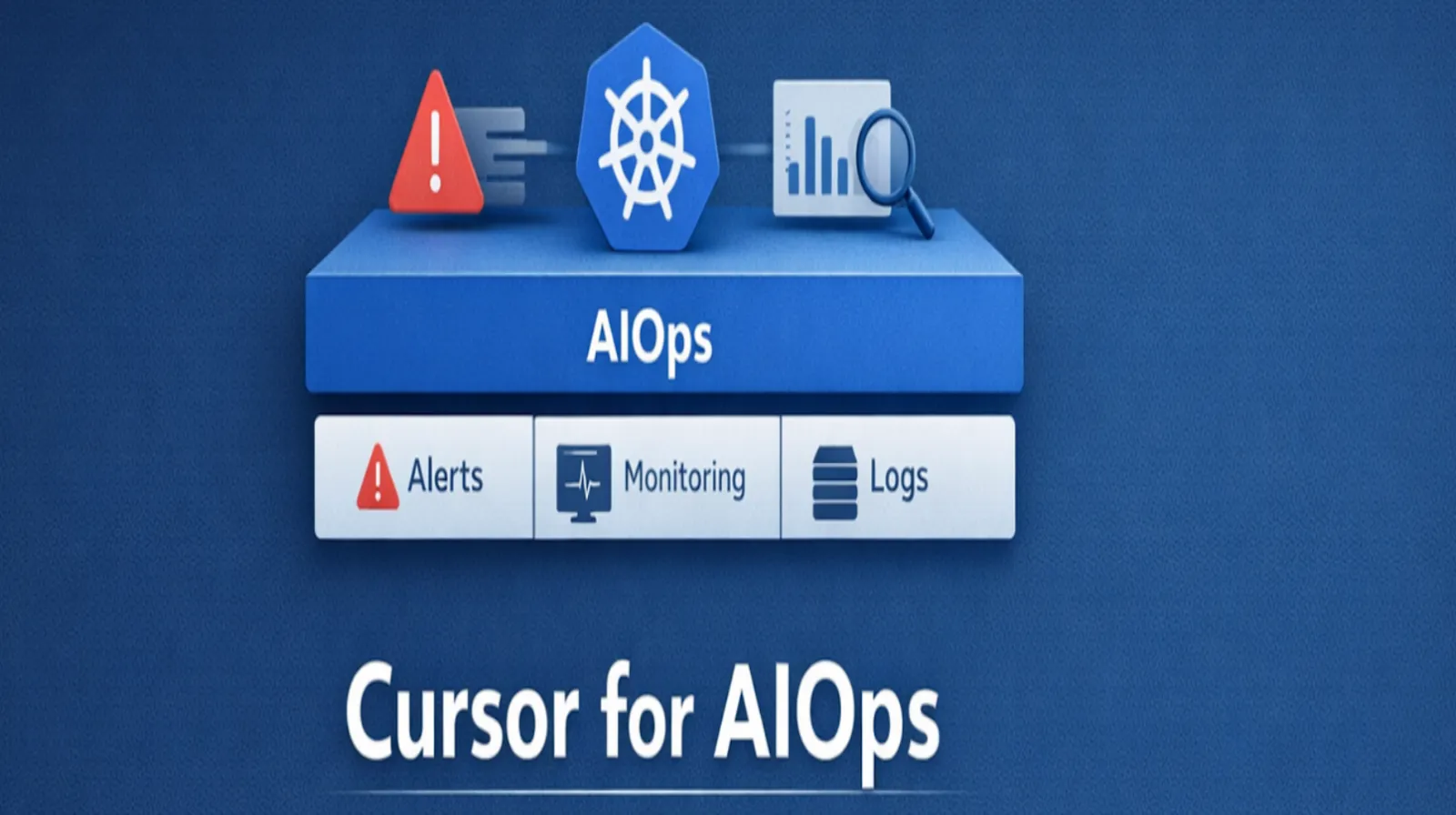
What follows is an honest breakdown of where Cursor adds real value in AIOps—and where it falls flat. If you're an SRE, DevOps engineer, or platform lead trying to figure out what actually works, this is for you.
AIOps (Artificial Intelligence for IT Operations) has been around since Gartner coined the term in 2017. Strip away the marketing, and it boils down to applying ML, NLP, and data analytics to IT operations chaos.
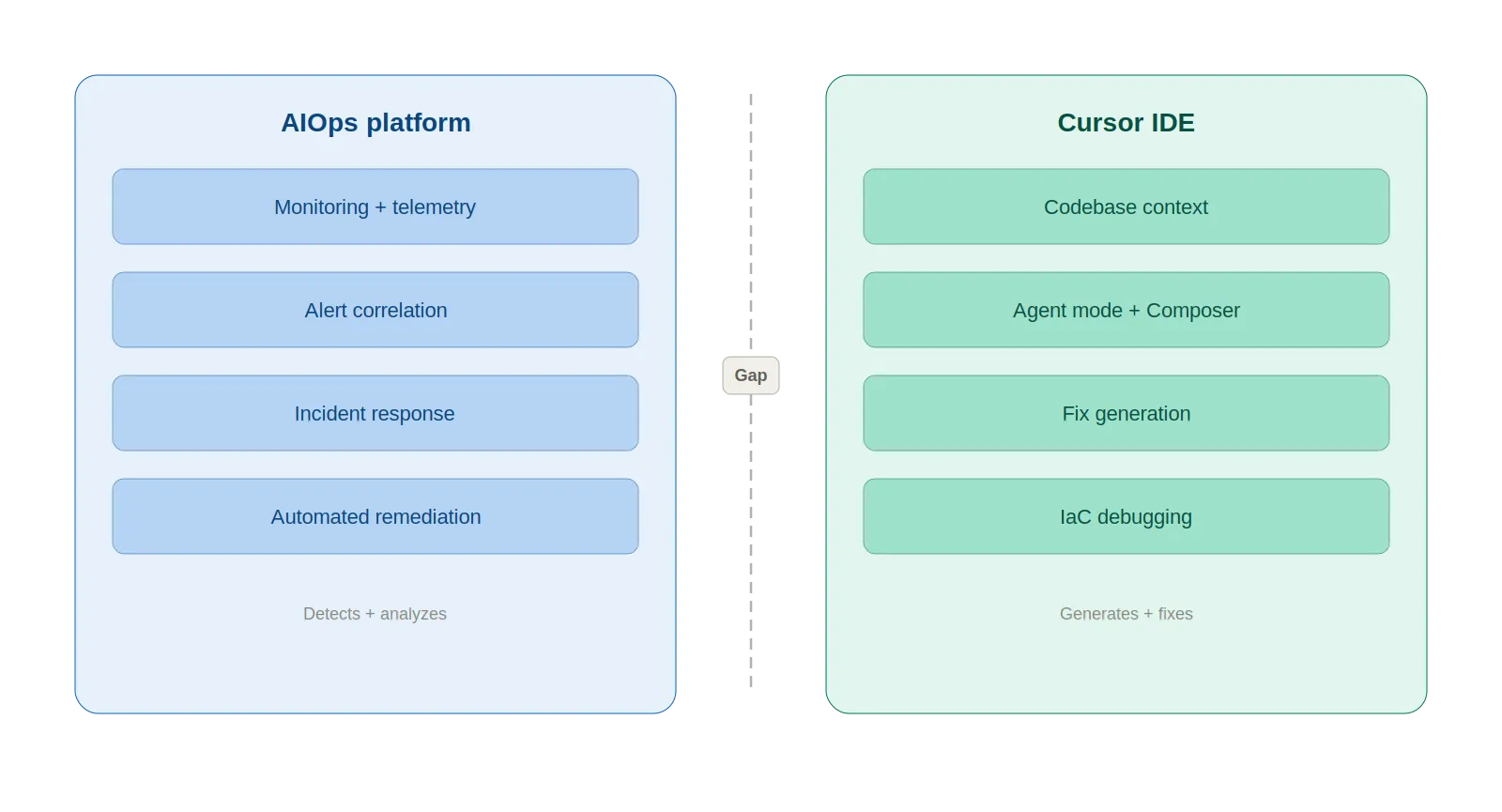
AIOps platforms ingest logs, metrics, and events, then do four things with that data:
The market backs this up. AIOps hit $2.23 billion in 2025, per Fortune Business Insights, with a $11.8 billion projection for 2034. Gartner expects 60% of large enterprises to treat AIOps as standard practice by 2026.
The key takeaway: AIOps is about system-level intelligence. "What is happening in my infrastructure right now?" That's the question it answers.
Cursor is an AI-first code editor—Anysphere forked VS Code and rebuilt it around AI as the foundation, not a plugin. As of March 2026, it supports GPT-5.2, Claude Opus 4.6, Gemini 3 Pro, and Grok Code, swappable per task. Key features:
Cursor crossed $500M ARR in 2025 and reportedly neared $2B by early 2026. Over 90% of Salesforce's developers use it.
Why would SREs care? Because infrastructure lives in Git. Terraform modules, Kubernetes manifests, CI/CD pipelines—when something breaks at 3 AM, the fix is almost always a code change. Cursor reads code at the project level, not just the open file. For an on-call engineer knee-deep in YAML at 3 AM, that context matters.
Helpful, though, is not the same as sufficient.
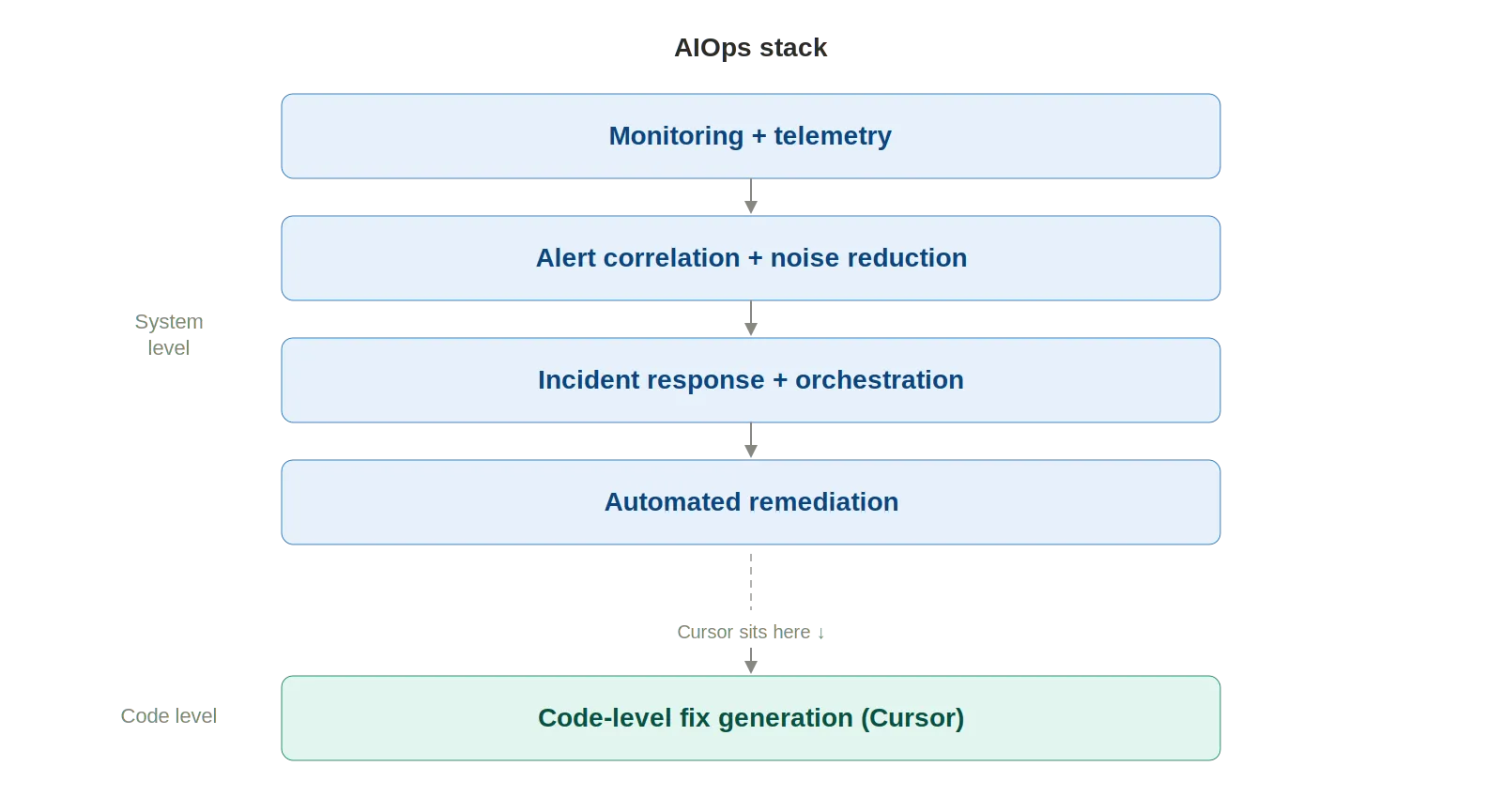
Cursor won't replace AIOps tools. What it does well is fill specific holes in the incident response workflow that AIOps platforms don't touch. Five use cases stand out:
Paste error logs into the agent. Cursor reads the stack trace, finds relevant files across the codebase, and narrows down the root cause with full project context. With the Datadog Cursor extension connected via MCP, it pulls logs, metrics, and traces right from the IDE. No browser needed. The time between "I see an alert" and "I understand the code path" drops from minutes to seconds.
Every team has runbooks. Almost every team's are outdated. Cursor drafts runbooks grounded in what the codebase actually looks like right now—real file paths, real config values, real commands. Even better, it updates existing runbooks by flagging stale references and outdated commands. Still needs human review, but the maintenance burden drops considerably.
Tell the agent what went wrong, point it at deployment files, and you get rollback scripts, config patches, hotfix code. The PagerDuty MCP plugin lets engineers pull incident context and on-call schedules straight into the editor. A common pattern: engineer spots a bad deployment, pivots to Cursor, has a draft rollback PR in minutes.
Cursor traces Terraform resource definitions through module references, variable files, and provider configs. It catches YAML indentation errors, missing labels, and misconfigured resource limits that file-level linters miss. StackGen's MCP integration brings IaC generation and SRE remediation workflows into the editor, grounded in the team's actual infrastructure standards.
"Write a Bash script to rotate secrets across dev, staging, and prod." Done on the first attempt. "kubectl command chain to cordon, drain, and uncordon a node safely." Right sequence, right flags. Small wins individually; hours recovered weekly.
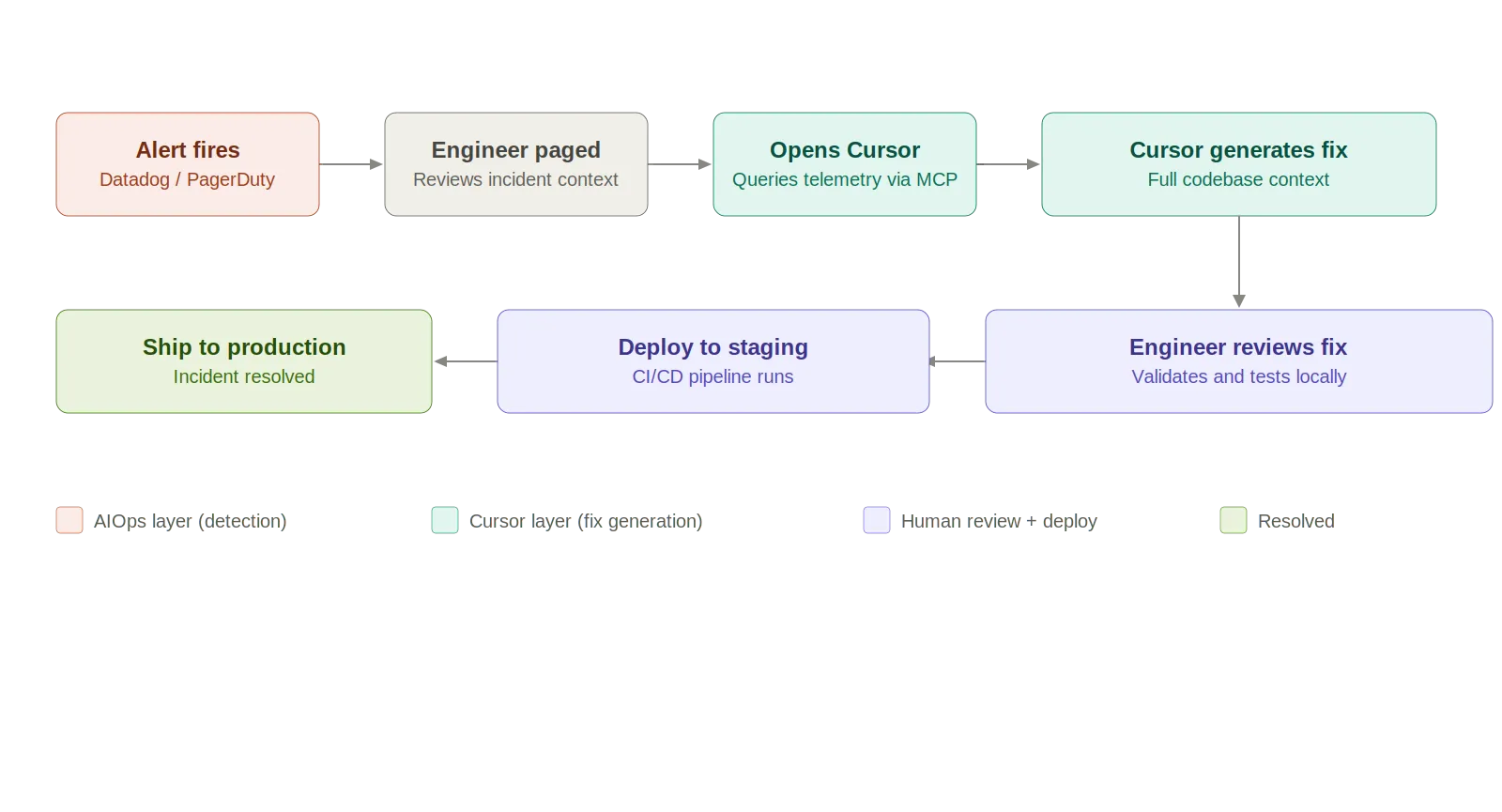
The limitations are real. At a glance:
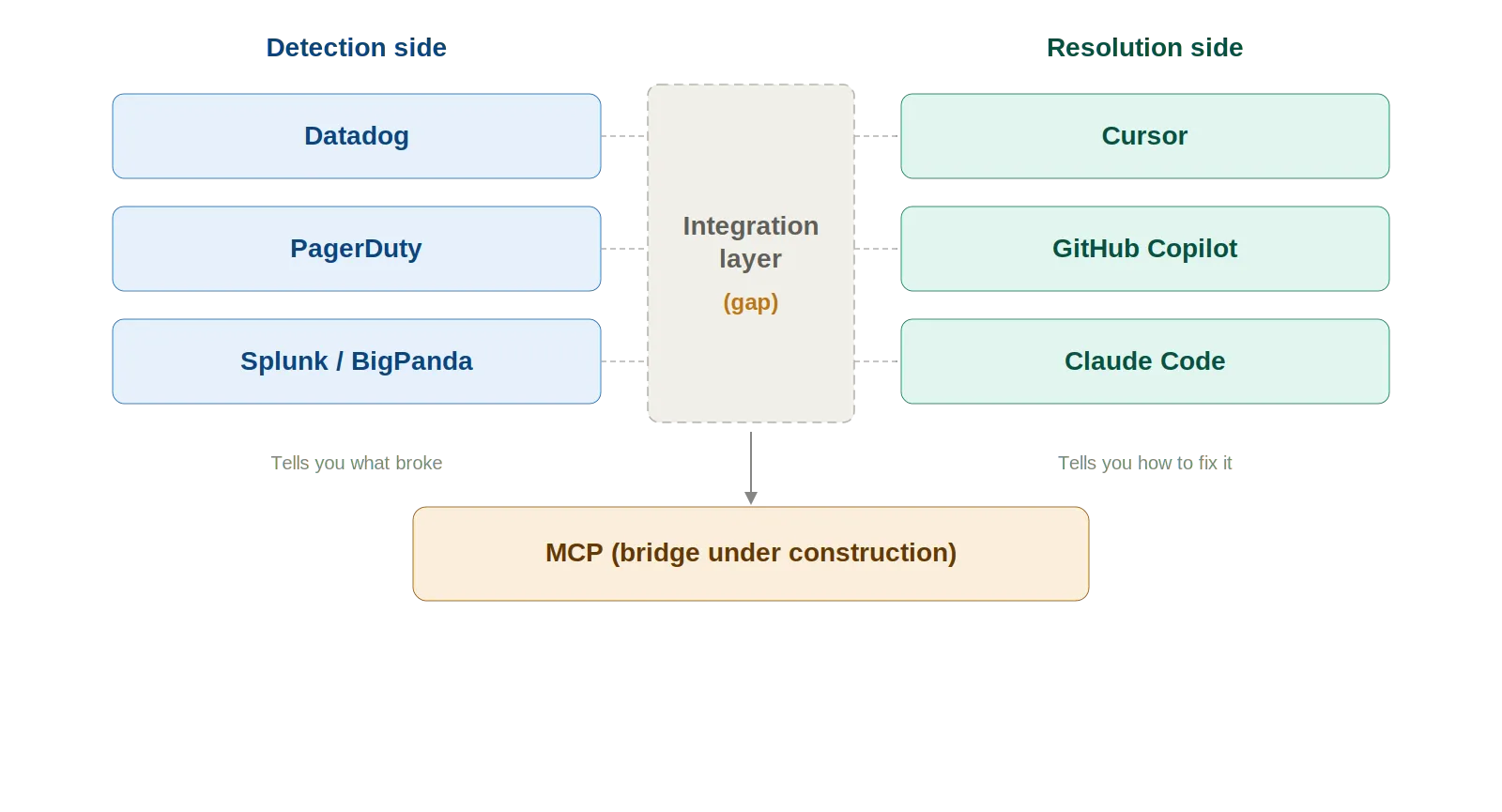
Cursor helps you fix problems. It won't tell you what the problem is.
AIOps tells you what broke. Cursor tells you how to fix it. Different jobs entirely.
The missing piece? The handoff between detection and resolution. MCP is chipping away at this—Datadog's and PagerDuty's MCP servers let Cursor query telemetry and incident data. But most integrations are still in preview. The data traversal is engineer-directed, not autonomous. Safety guarantees for AI-generated infrastructure changes in prod? Nonexistent.
Four problems surface when you move beyond one engineer experimenting:
Six guardrails that matter:
The detection-to-resolution gap won't stay this wide. Four trends to watch:
TrueFoundry's AI Gateway provides the observability, governance, and routing layer that production LLM deployments need. As AI agents take on bigger roles in ops workflows, that gateway layer becomes foundational—rate limits, token cost tracking, model fallbacks, audit trails for every AI-driven action.

Cursor speeds up the things SREs already do—tracing code, writing rollbacks, refreshing runbooks, grinding through toil. It belongs in the toolkit.
What it can't do: detect anomalies, correlate alerts, watch your infra, manage incident lifecycles. Use it as the execution layer—the tool you grab after AIOps tells you what's broken. Pair it with Datadog, PagerDuty, and MCP. Always keep a human between the AI-generated fix and production.
両方活用してください。どちらか一方に置き換えるのではなく。
1. Cursorは、DatadogやPagerDutyのようなAIOpsツールを置き換えることができますか?
答えは明確に「いいえ」です。これらは異なる問題を解決するからです。Datadog、PagerDuty、その他のAIOpsツールは、主にリアルタイムで問題を特定するために使用されますが、AIコーディングエージェントであるCursorはコードベース内で動作します。Cursorは、問題が特定された後、開発者がデバッグ、理解、さらには問題を修正するためのコード生成を支援します。つまり、Datadogは何がどこで壊れているかを伝え、Cursorはその問題をどのように修正するかを伝えるのです。
2. AIコーディングエージェントはインシデント対応でどのように活用されますか?
Cursorを含むAIコーディングエージェントは、インシデントのトリアージおよび解決フェーズでますます活用されています。開発者が関連するログ、スタックトレース、またはエラーメッセージを入力すると、AIコーディングエージェントはそれらを使用してコードベース全体をスキャンし、インシデントの最も可能性の高い原因を特定します。さらに、AIコーディングエージェントは、コードをロールバックするスクリプトの生成、ホットフィックスの生成、現在のコードに基づいたランブックの更新または作成、インフラストラクチャへの修正の提案、さらにはコマンドの自動化にも利用されます。
3. AIOpsツールとAIコーディングエージェントの違いは何ですか?
AIOpsツールとAIコーディングエージェントの違いは、提供するインテリジェンスにあります。Datadog、PagerDutyなどを含むAIOpsツールは、テレメトリーデータを分析して、分散システムにおける異常の特定、アラートの関連付け、障害の予測を行います。一方、Cursorを含むAIコーディングエージェントは、コードベース内で動作し、開発者がアプリケーションのロジック、依存関係、構成を理解し、コードを生成するのを支援します。
言い換えれば、AIOpsツールは問題を特定するためのインテリジェンスを提供し、AIコーディングエージェントは問題を修正するためのインテリジェンスを提供します。AIOpsは「本番環境で何が起きているのか?」に答え、AIエージェントは「それを修正するためにどのような変更が必要か?」に答えます。「何が起こったのか?」という問いに対する完全な答えを得るためには、両方が必要であり、これは完全なインシデント対応サイクルの一部です。
4. AIが生成した修正を本番システムで使用するのは安全ですか?
厳格な管理体制がなければ、AIが生成した修正を本番システムで使用するのは安全ではありません。AIによって「正しい」ように見えても論理的に誤っていたり、安全でないコードが生成されるリスクがあります。TerraformやKubernetesのようなインフラ関連の領域では、小さな変更が大きな影響範囲を持つ可能性があります。このリスクを軽減するためのベストプラクティスとしては、検証の実施、変更の段階的導入、人間による変更のレビュー、AIによる変更の監査ログの保持などが挙げられます。本番システムにおいて、AIは単独のオペレーターではなく、コパイロットとして扱うのが最善です。
5. MCP(Model Context Protocol)はAIOpsとAIエージェントをどのように統合しますか?
MCPは、システムとツール、特にAIOpsツールとCursorのようなAIコーディングツールの間に橋渡しをするプロトコルです。これにより、AIはDatadog、PagerDuty、Slackなどの外部システムに直接クエリを実行し、ログ、インシデント、アラートなどの関連コンテキストを取得できます。これは、今日のソフトウェア開発における一般的な問題である、手動でのツール切り替えやデータのコピー&ペーストの必要性を減らします。AIが本番システムのコンテキストと直接連携できるようになるのは大きな利点ですが、これは開発環境での話です。ただし、今日のほとんどの統合はエンジニア主導の読み取り専用であり、AIがシステムに対してアクションを起こすのではなく、取得できるデータを使用して問題解決を支援することを意味します。
6. DevOpsまたはAIOpsワークフローでAIを使用する最大の危険性は何ですか?
さまざまなリスクがありますが、主なものは、ハルシネーションによる修正、完璧に見えても誤った問題を解決しているコードなど、リスクの高い環境でのテクノロジーへの過度な依存に関連しています。システム認識の欠如:AIシステムは、情報が提供されない限り、システムの現在の状態をリアルタイムで本質的に理解していません。
セキュリティリスク:設定、シークレット、IAMポリシーへのアクセスが不適切に管理される可能性があります。
本質的な監査可能性の欠如:多くのツールには、AIが行った変更とその理由を追跡する機能がありません。
過剰な自動化:検証や人間によるレビューをスキップすると、本番システムで問題が発生する可能性があります。
これを軽減するには、チームはモデルだけでなく、AIの使用に関するガードレール、可観測性、ガバナンスの層を設ける必要があります。
TrueFoundry AI Gateway delivers ~3–4 ms latency, handles 350+ RPS on 1 vCPU, scales horizontally with ease, and is production-ready, while LiteLLM suffers from high latency, struggles beyond moderate RPS, lacks built-in scaling, and is best for light or prototype workloads.



.png)


.png)
.png)
.png)
.png)
.png)
.png)
.png)
.png)
.png)
.png)





