Blank white background with no objects or features visible.

Ask TFY:AIゲートウェイ内のあらゆる事象をデバッグ、分析、実行 詳細はこちら

TrueFoundryはSeldon AIの買収を発表し、エンタープライズAI向けコントロールプレーンを拡張します。プレスリリース全文はこちら→

Cognitaを活用したリアルタイムAIアシスタンスによる顧客サポートの強化

By マナス・ガーグ

Published: July 6, 2026

About Cognita

Cognita is a versatile open-source RAG framework designed to enable Data Science, Machine Learning, and Platform Engineering leaders to build and deploy scalable RAG applications. It features a fully modular, user-friendly, and adaptable architecture, ensuring complete security and compliance. It also ships with a UI that makes it easier to try out different RAG configurations and see the results in real-time.

Introduction to the Use Case

In an era where customer experience defines business success, the ability to provide immediate and precise support is crucial. TrueFoundry's Cognita framework enables the development of sophisticated real-time AI applications tailored for customer support. By leveraging the modular and open-source nature of Cognita, businesses can enhance their support systems to deliver superior customer service.

What is the problem we are trying to solve?

Present customer support systems have substantial problems in delivering customers' high expectations for prompt and accurate responses. Conventional support approaches fail to handle vast amounts of requests, ensure consistency in responses, and provide 24/7 availability. These difficulties lead to higher operating expenses, lower customer satisfaction, and inefficiencies, which can deter business growth.

Manual vs Automated Customer Support

In a traditional manual customer support system, human agents are responsible for addressing each customer inquiry individually. This labor-intensive process involves agents navigating through extensive knowledge bases, documentation, and past query records to find accurate and relevant information. The variability in human performance can lead to inconsistencies in responses, with the quality of support depending heavily on the agent's expertise and experience. Furthermore, maintaining a 24/7 support system requires a significant workforce, necessitating shift rotations and leading to increased operational costs. During peak query times, the manual approach often results in backlogs, prolonged response times, and customer dissatisfaction.

This automated pipeline not only significantly reduces response times but also ensures that each customer interaction is handled with consistent accuracy and reliability. Cognita's scalability enables the system to handle high numbers of requests at once, making it a practical choice for enterprises facing growth or shifting support demands. Furthermore, this automation relieves human agents of mundane questions, allowing them to concentrate on more complicated issues, thus increasing the overall efficiency and efficacy of the support operation.

Solution

Transitioning to an automated system powered by TrueFoundry's Cognita framework enables the integration of advanced AI components to automate customer query handling. Specifically, the use of data loaders and parsers ensures that a comprehensive and structured dataset is readily available for the system to learn from. By implementing embedders, textual data is converted into high-dimensional vectors, facilitating efficient and accurate similarity searches. The vector databases support rapid retrieval of this embedded information, ensuring real-time performance. When a query is received, the query controller orchestrates the process, utilizing rerankers to evaluate and prioritize the most relevant responses.

Implementing Cognita for customer support can address these challenges by:

  • Automated Query Handling: Using Cognita's embedders and vector databases to quickly retrieve relevant information and provide accurate responses to customer queries.
  • Real-Time Assistance: Leveraging the reranking and query controller modules to ensure that the most relevant and concise information is provided, enhancing the customer's experience.
  • Scalability: Cognita's modular design allows for easy scaling of the system to handle increasing volumes of queries without compromising performance.

Deploying Cognita using TrueFoundry

You can use Cognita locally or with/without using any Truefoundry components. However, using Truefoundry components makes it easier to test different models and deploy the system in a scalable way. Cognita allows you to host multiple RAG systems using one app. Hence, we will be using TrueFoundry components to create a small-scale support bot for just the MacBook Pro initially and then add a few more products and support for different languages to scale it.

Once you've set up a cluster, added a Storage Integration, and created an ML Repo and Workspace, you are all set to begin deploying a Cognita-based RAG application using TrueFoundry. More information on this one-time setup can be found here. Once done:

  • Navigate to the Deployments tab.
  • Click on the + New Deployment button on the top-right and select Application Catalogue. Select your workspace and the RAG Application.
  • Fill up the deployment template
    • Give your deployment a Name
    • Add ML Repo
    • You can either add an existing Qdrant DB or create a new one

By default, the release branch is used for deployment (You will find this option in Show Advance fields). You can change the branch name and git repository if required.

Make sure to re-select the main branch, as the SHA commit does not get updated automatically.
  • Click on Submit, and your application will be deployed.

Implementation Steps

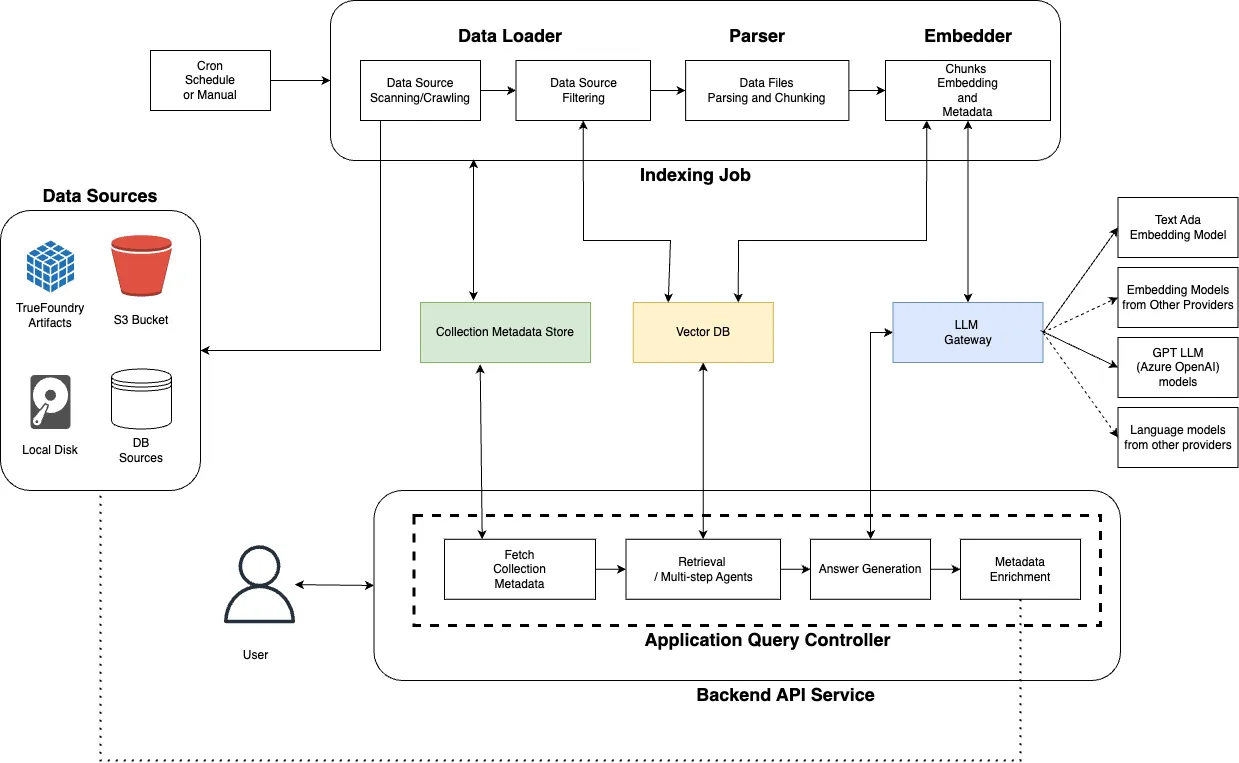
Cognita Project Architecture

Overall, the architecture of Cognita is composed of several entities. We will be delving into each of them through the implementation steps below.

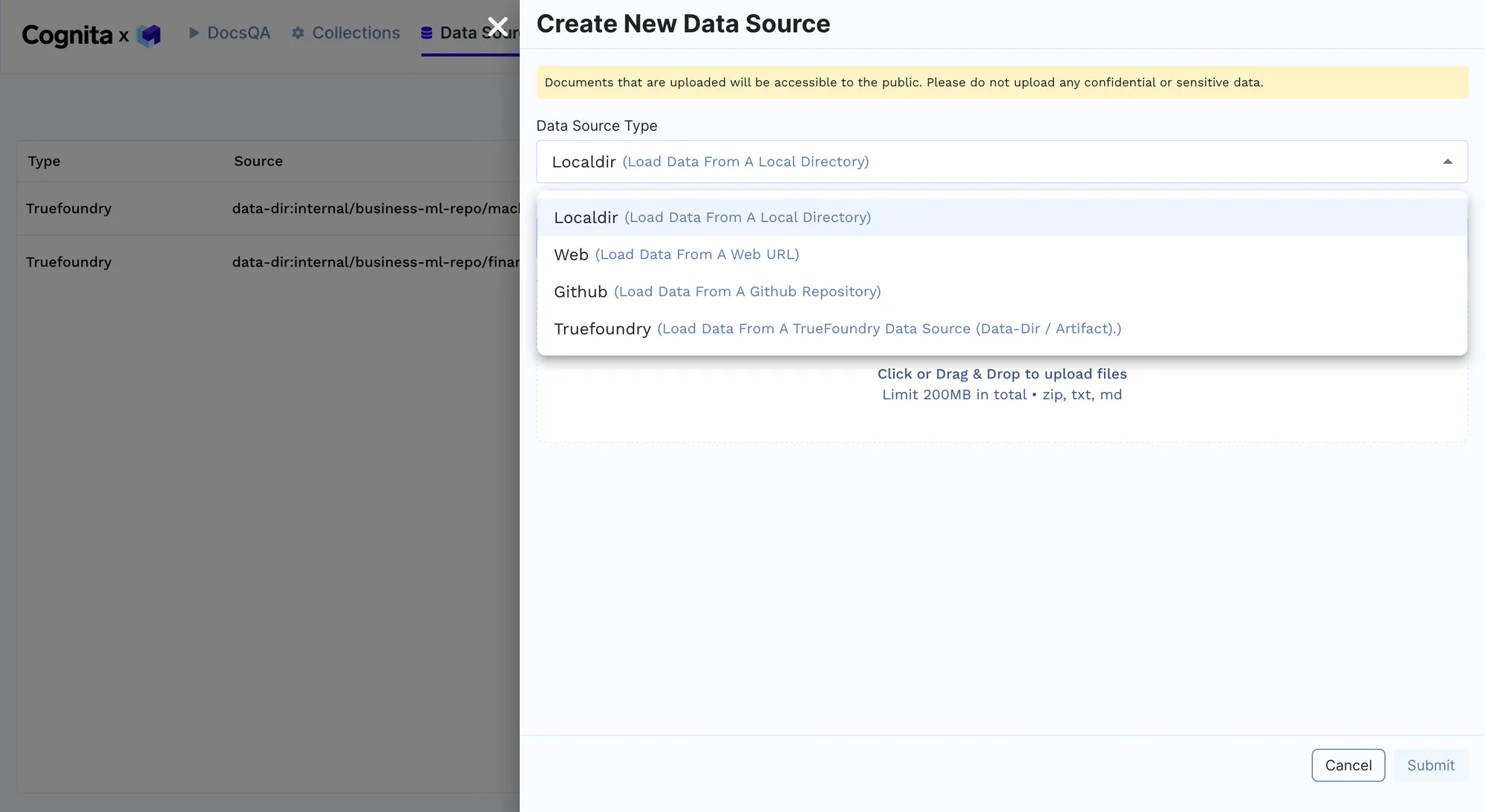
  • Data Loading: Cognita's data loaders are used to import customer support documents and historical query data from various sources, such as local directories or cloud storage. This can be done by adding a new data source from the RAG Endpoint provided after deployment, as shown below. Multiple sources of data can be added here as per the requirements to improve the model's performance. We will begin with adding just one MacBook guide initially and then add other data later. The link to all the documents uploaded can be found here.
Creating a New Data Source
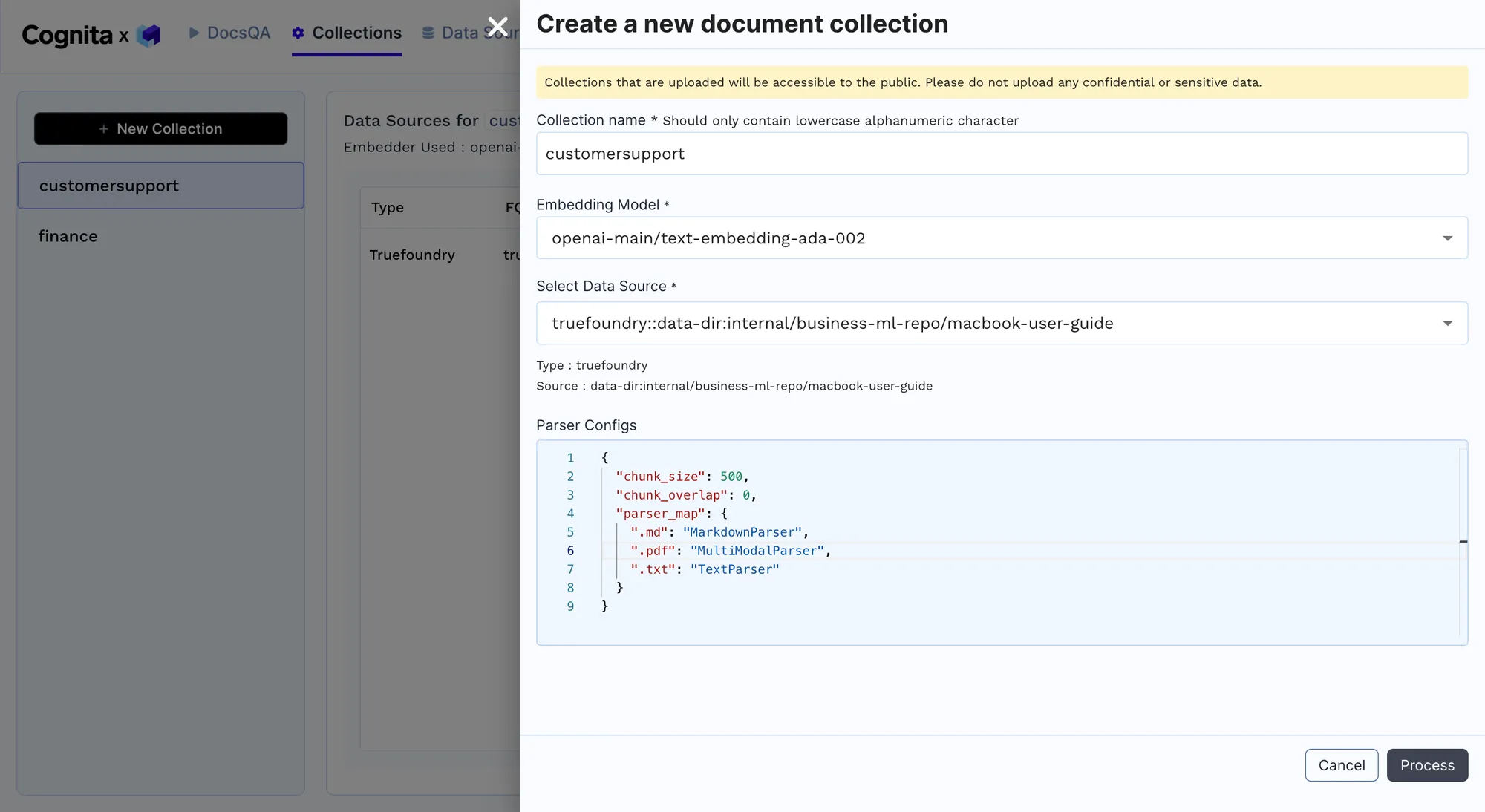
  • Parsing and Embedding: Parse the documents into a uniform format and create embeddings using pre-trained models to facilitate quick retrieval of relevant information. A new collection of documents from a data source added in the previous step can be used for parsing and embedding. We are trying to solve a multimodal use-case here, where we are taking a PDF, converting it into an image, and breaking it down into pages, and each page is converted into images. Then, specific analysis is done through prompts, where insights are gathered and stored in the VectorDB. When a question is asked, the question is searched across all the stored insights; the page is retrieved, which is then sent to the vision model for question answering. Once the Process button is clicked, the collection is created, a new pod is created, the indexing job begins, and the data is ingested into the different qdrants. Note: This may take a few minutes.
Parsing and Embedding Data
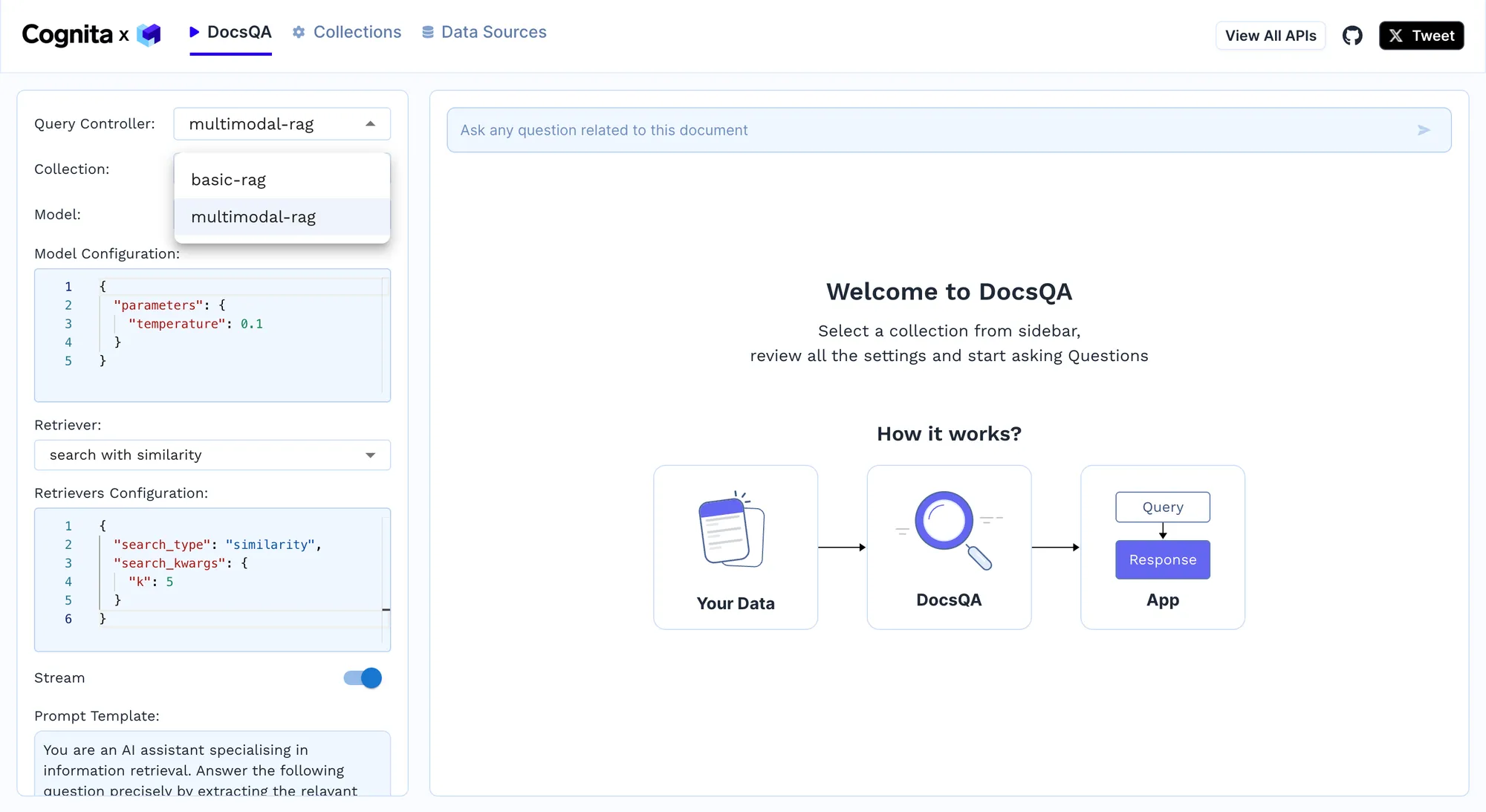
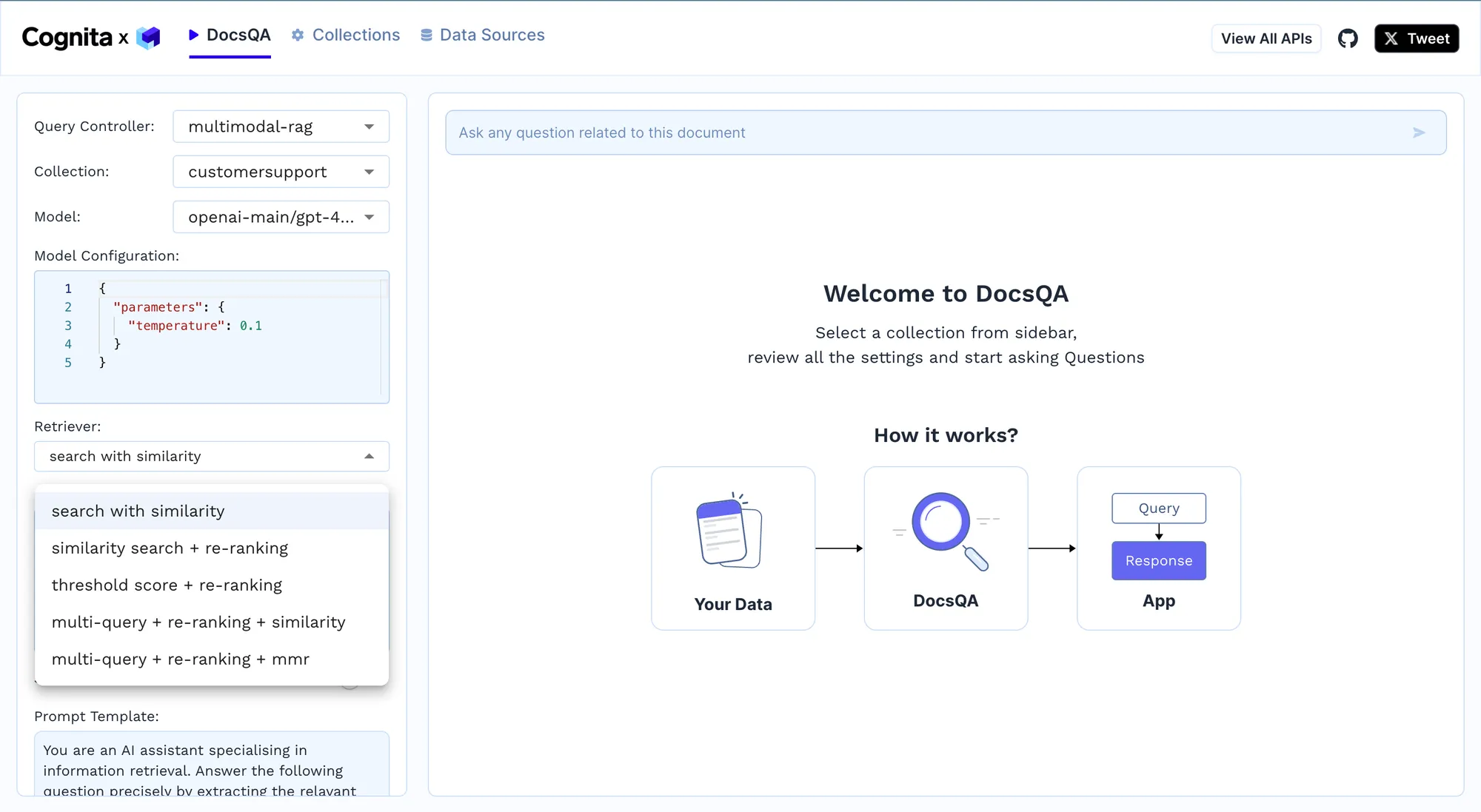
  • Query Handling: Implement the query controller to process incoming queries, rerank potential answers, and provide the most accurate responses in real time. For example, we can use the basic-rag for simple text parsing. However, when dealing with PDF documents, a multimodal-rag will be a better option since it uses the vision model, presently GPT-4, to answer questions on PDF, which are parsed using the multimodal parser. Since we are using a multimodal parser, the multimodal-rag leads to better results.
Implementing Different Query Controllers
  • Continuous Improvement: Continuously update the embeddings and reranking models based on new data and customer interactions to improve the system's accuracy and efficiency. Different retrievers can be used from the dropdown, as shown below. Furthermore, new documents can be added to the data source, and the indexing job can be rerun to improve the model. E.g. For more complex user queries, a multi-query + re-ranking + similarity model can be used, which requires k in search_kwargs for similarity search, and the search_type can either be similarity or MMR or similarity_score_threshold. This works by breaking down complex queries into more straightforward queries, finding relevant documents for each of them, reranking them, and sending them to LLM. Then, the results are accumulated and provided. We can play with the prompt template below the Retriever option to get richer responses.
Modifying Retrievers for Continuous Improvement

Suppose you want to scale the RAG application. In that case, we can do this by adding different data sources to allow it to cater to various customer queries and be an all-inclusive solution. We add other documents, including support documents for different MacBooks, iPads, iPhones, AirPods, and watchOS, by adding a new data source and linking it to the collection. The RAG now acts as a comprehensive AI customer support agent for a broad suite of Apple products. Some documents are also in different languages to further scale it by adding multi-language support.

Implementation Example

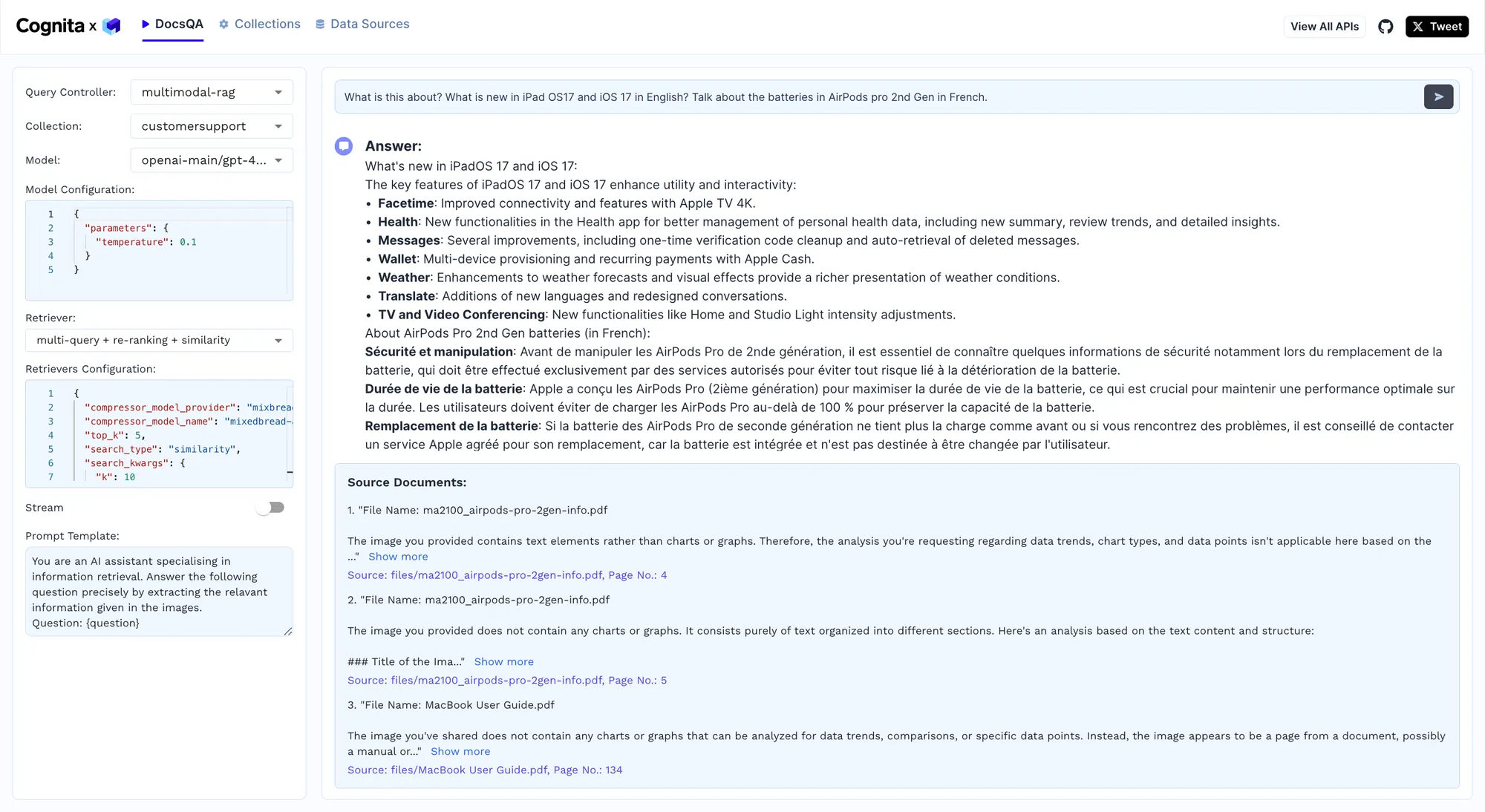
We will now test the model by giving it a complex query, and the results are shown below.

Cognita In Action!

Cognitaフレームワークのテストにおいて、モデルは「iPadOS 17とiOS 17の英語での新機能は何ですか?AirPods Pro(第2世代)のバッテリーについてフランス語で教えてください」という質問に成功裏に回答し、複雑な多言語質問を処理する能力を示しました。モデルはマルチモーダルRAG構成を利用して、さまざまなドキュメントから情報を処理・統合し、FaceTime機能の改善やヘルスケアアプリの強化など、iPadOS 17とiOS 17の新機能の詳細なリストを提供しました。さらに、AirPods Pro(第2世代)のバッテリーに関する正確な情報をフランス語で提供し、安全性、バッテリー寿命、交換手順について説明しました。このテストは、Cognitaが高度なNLPおよびビジョンモデルを統合し、複数の言語で正確かつ文脈に沿った応答を保証する能力を強調するものであり、リアルタイムで高品質な情報検索により顧客サポート業務を強化します。

メリット

  • 低遅延化とスループットの向上: 高度な埋め込み技術と効率的なベクトルデータベースを活用することで、Cognitaは迅速なクエリ処理を保証し、応答時間をミリ秒単位に短縮します。これは、高負荷環境下で顧客満足度を維持するために不可欠です。
  • 適応学習と継続的な改善: フィードバックループを統合し、リアルタイムのインタラクションに基づいてモデルの埋め込みを継続的に更新することで、システムは学習・改善し、エラー率を低減し、時間の経過とともに応答の精度を高めます。
  • リソースの最適化とコスト効率: クエリ処理を自動化することで、広範な人的サポートスタッフの必要性が大幅に減少し、大幅なコスト削減につながります。さらに、人間のエージェントはより複雑で価値の高いタスクに集中できるようになり、サポート全体の品質が向上します。
  • スケーラビリティと柔軟性: Cognitaのモジュール型アーキテクチャにより、システムはパフォーマンスを損なうことなく、増大するクエリ量に対応するために水平方向に迅速にスケールできます。この汎用性は、急速な開発や季節的なアシスタンス需要の急増がある企業にとって不可欠です。
  • 顧客維持とロイヤルティの向上: 一貫性があり、正確でタイムリーな応答を提供することで、Cognitaは顧客体験を向上させ、顧客満足度の向上、ロイヤルティの増加、解約率の低減につながります。これは、顧客生涯価値と事業収益の向上に直接結びつきます。

企業による追加の改善点

  • 高度なパーソナライゼーションとユーザープロファイリング:
    ユーザープロファイリングと高度なパーソナライゼーションアルゴリズムを統合することで、企業は個々のユーザーの好みや過去のインタラクションに基づいて応答を調整できます。これは、履歴データを分析し、ユーザー固有のコンテキストをクエリに埋め込むことで実現でき、応答の関連性とパーソナライゼーションを向上させます。
  • 多言語サポート:
    多言語機能を組み込むことで、企業は複数の言語でサポートを提供できます。これは、Cognita内に言語検出および翻訳モジュールを統合することで実装でき、追加の人的資源を必要とせずにグローバルな顧客ベースにシームレスなサポートを提供します。
  • 感情分析と感情的知性:
    感情分析および感情的知性モジュールを統合する企業は、顧客の感情を把握し、それに応じて回答を調整できます。これには、顧客のトーンと態度をリアルタイムで分析することが含まれ、AIが共感的で適切な応答を提供できるようになり、顧客全体の満足度を高めます。
  • プロアクティブサポートと予測分析:
    予測分析により、企業は顧客のニーズや課題が発生する前に予測できるようになります。さらに、利用パターンと過去のデータを評価することで、Cognitaは、頻繁に発生する問題への解決策の提供や、将来的な問題の顧客への通知といった、プロアクティブなサポート介入を開始できます。これにより、顧客体験が向上し、問い合わせ件数を削減できます。
  • CRMシステムとの連携:
    CRMシステムとのシームレスな連携により、顧客とのやり取りを包括的に把握できます。CRMプラットフォームからデータを取り込むことで、Cognitaはより情報に基づいた、文脈を理解した応答を提供し、すべてのタッチポイントで顧客とのやり取りの一貫性とパーソナライズを保証します。
  • セキュリティとプライバシーの強化:
    高度なセキュリティ対策を導入することで、顧客データが安全に処理されることを保証します。企業はCognitaを安全なデータストレージソリューションと統合し、暗号化プロトコルを利用して機密情報を保護することで、データ保護規制への準拠を確保し、顧客の信頼を維持できます。
  • 動的なコンテンツとナレッジベースの更新:
    ナレッジベースの更新プロセスを自動化することで、システムは常に最新の情報にアクセスできるようになります。新しいコンテンツを取り込み、処理するための自動パイプラインを設定することで、Cognitaは常に新しいデータから学習し、サポートシステムを最新の情報とトレンドに保つことができます。

まとめ

Cognitaのモジュール型アーキテクチャと高度なAI機能は、顧客サポートを強化するための堅牢なソリューションを提供します。複雑な問い合わせを効率的に処理し、多様なデータタイプを分析し、正確でリアルタイムな応答を提供します。多言語サポートや予測分析などの機能を統合することで、Cognitaは顧客満足度と運用効率を大幅に向上させ、現代のサポートシステムにとって不可欠なツールとなっています。

Try now.

One gateway for all your models, MCP servers, and agents.
No credit card needed.

Start free
Table of Contents

One Gateway for Every LLM, Agent and MCP Server

Book a 30-min with our AI expert

Book a Demo

The fastest way to build, govern and scale your AI

Book Demo
Summarize with
ChatGPT logo by OpenAI
Perplexity AI logo
Blurry red snowflake on white background, symmetrical frosty design with soft edges and abstract shape.

Discover More

November 5, 2025
|
5 min read

エージェンティックAI時代におけるデータレジデンシー:AIゲートウェイはいかに主権的規模とコンプライアンスを実現するか

October 5, 2023
|
5 min read

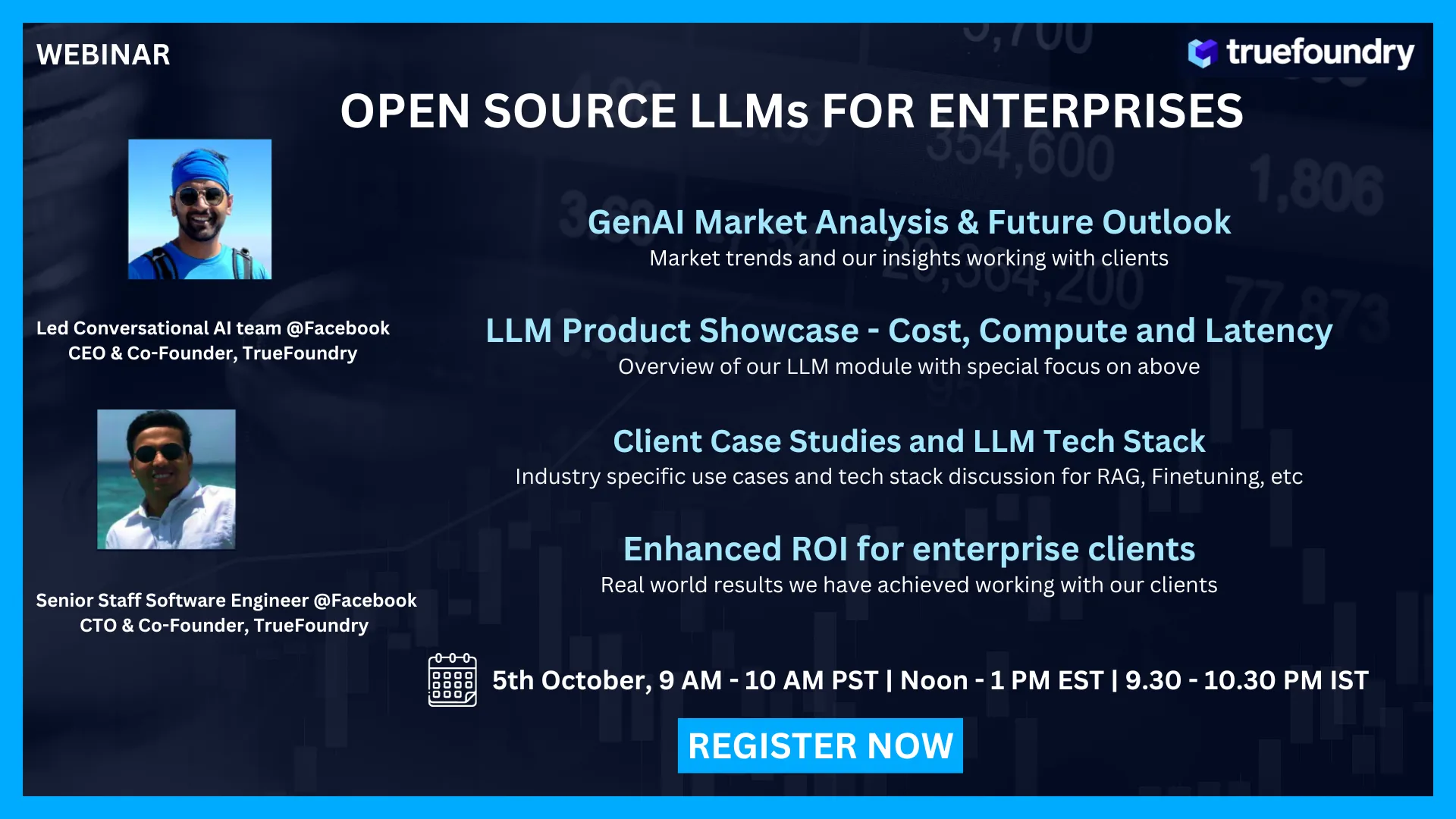
<Webinar> 企業向け生成AIショーケース

Best Fine Tuning Tools for Model Training
May 3, 2024
|
5 min read

モデルトレーニング向けファインチューニングツール主要6選:2026年版

May 25, 2023
|
5 min read

オープンソースLLM:受け入れるか、滅びるか

August 17, 2026
|
5 min read

Sandboxed Code Agents: Let Models Execute Without Letting Them Roam

No items found.
Portkey AI Gateway Pricing
August 15, 2026
|
5 min read

2026年版 Portkey AI Gateway 料金:完全ガイドと比較

No items found.
MCP registry connecting agents to governed MCP servers
August 15, 2026
|
5 min read

2026年版 最高のMCPレジストリ:開発者と企業向け比較

No items found.
TrueFoundry AI gateway powers enterprise AI platform engineering at scale
August 15, 2026
|
5 min read

AIプラットフォームエンジニアリングとは?エンタープライズチームのための実践ガイド

No items found.
No items found.

Recent Blogs

Black left pointing arrow symbol on white background, directional indicator.
Take a quick product tour
Start Product Tour
Product Tour