



October 1, 2026
|
5 min read

Published: August 8, 2026
Blazingly fast way to build, track and deploy your models!
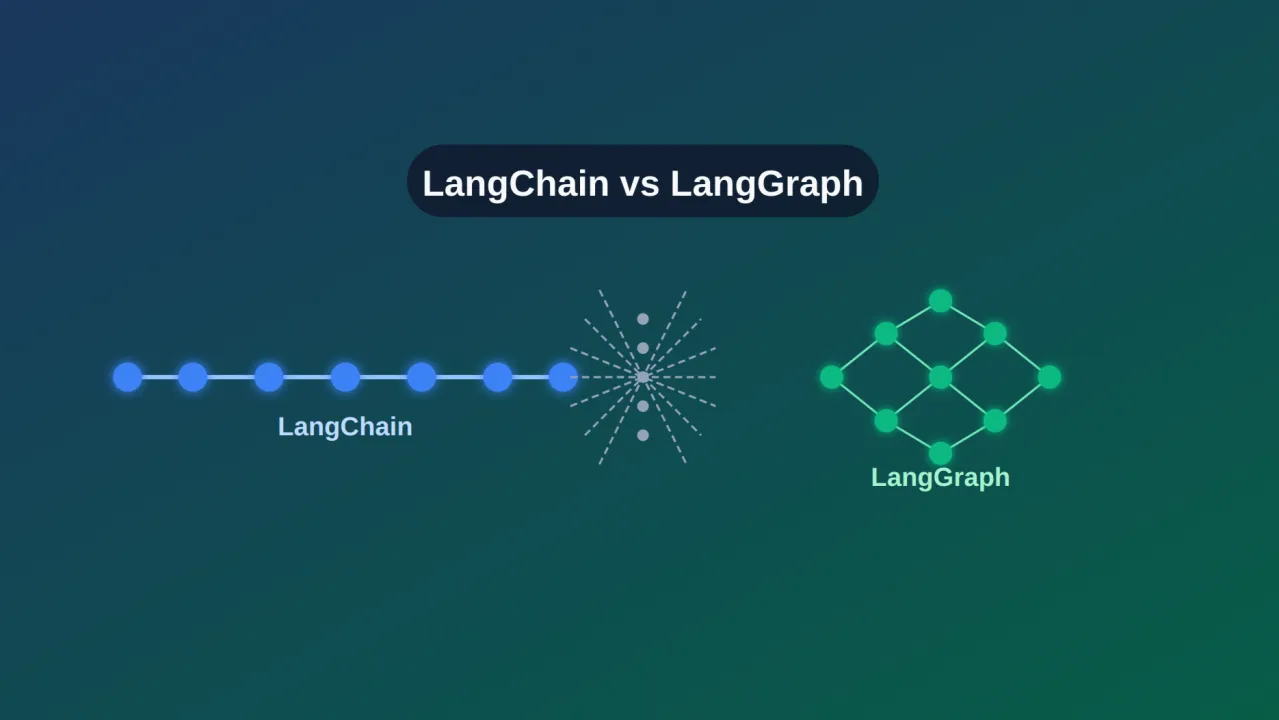
When it comes to building applications powered by large language models (LLMs), developers now have more choices than ever. Two of the most talked-about frameworks are LangChain and LangGraph. While both aim to simplify the process of connecting LLMs with tools, data, and workflows, they take very different approaches. LangChain has quickly become one of the most popular libraries for creating AI-driven applications, offering a wide ecosystem of integrations and abstractions. On the other hand, LangGraph—built on top of LangChain—focuses on stateful, agent-like systems, using a graph-based execution model to handle complex reasoning and multi-step interactions.
If you’re trying to decide between LangChain vs LangGraph, it’s important to understand their strengths, limitations, and ideal use cases. This comparison will help you evaluate which framework best fits your project, whether you’re building simple LLM apps, robust AI agents,or scalable enterprise solutions.
LangChain is an open‑source framework for designing LLM-powered AI applications. It offers developers a library of modular components in Python and JavaScript that connect language models with external tools and data sources, while offering a consistent interface for chains of tasks, prompt management, and memory handling.
LangChain acts as a bridge between raw LLM capabilities and real‑world functionality. It helps developers create workflows called “chains”, where each step involves generating text, querying a database, retrieving documents, or invoking external APIs, all in a logical sequence. This modular structure not only speeds up prototyping but also promotes clarity and reuse, which is helpful whether you’re creating chatbots, summarizing documents, generating content, or automating workflows
Originally launched in October 2022, LangChain quickly evolved into a vibrant, community‑driven project. It has since earned adoption across hundreds of tool integrations and model providers, enabling easy switching between OpenAI, Hugging Face, Anthropic, IBM watsonx, and more. LangChain offers an elegant, structured way to bring language models into practical applications. It abstracts complexity, amplifies flexibility, and streamlines development, making it a go-to choice for teams building capable, LLM-based systems.
LangChain is designed to simplify the creation of LLM-powered applications with linear, step-by-step workflows. Its core functionalities include:
LangGraph is an open-source framework from the LangChain team that helps developers build smarter and more adaptable AI agent workflows. Instead of running tasks in a straight line like a traditional chain, LangGraph organizes them into a graph, where each “node” represents a task and the “edges” define how those tasks connect. This design makes it possible to create flows that can branch, loop, and maintain state, giving agents the flexibility to handle more complex scenarios.
One of LangGraph’s key strengths is that it supports long-running, state-aware agents. If an agent encounters an error or needs to pause, it can pick up exactly where it left off. You can also build in human checkpoints, so a person can review or adjust an action before the agent moves forward. In addition, LangGraph can remember past interactions and context over time, which is essential for creating agents that learn and adapt.
It also comes with strong production features. Developers can monitor workflows using tools like LangSmith, which provide visual debugging, detailed logs, and full visibility into how an agent makes decisions. LangGraph can run locally or be deployed on managed platforms like LangGraph Platform and Studio. LangGraph is built for reliability, flexibility, and transparency, making it a solid choice for complex AI systems that go beyond simple step-by-step automation.
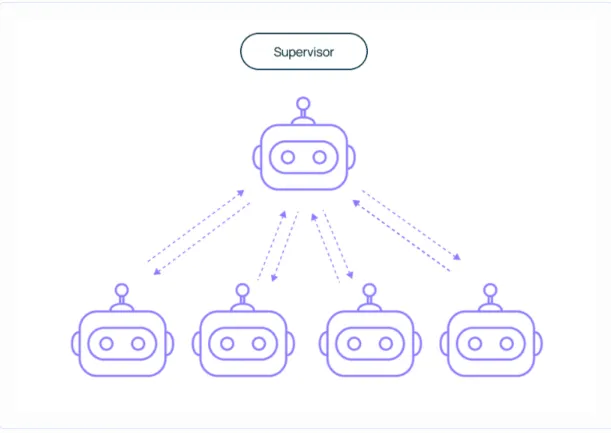
LangGraph is built for dynamic, stateful, and multi-agent workflows, offering features that go beyond linear task execution. Its core functionalities include:
Now that we’ve covered the basics of LangGraph and LangChain. Let’s take a deep dive into the difference between LangChain and LangGraph.
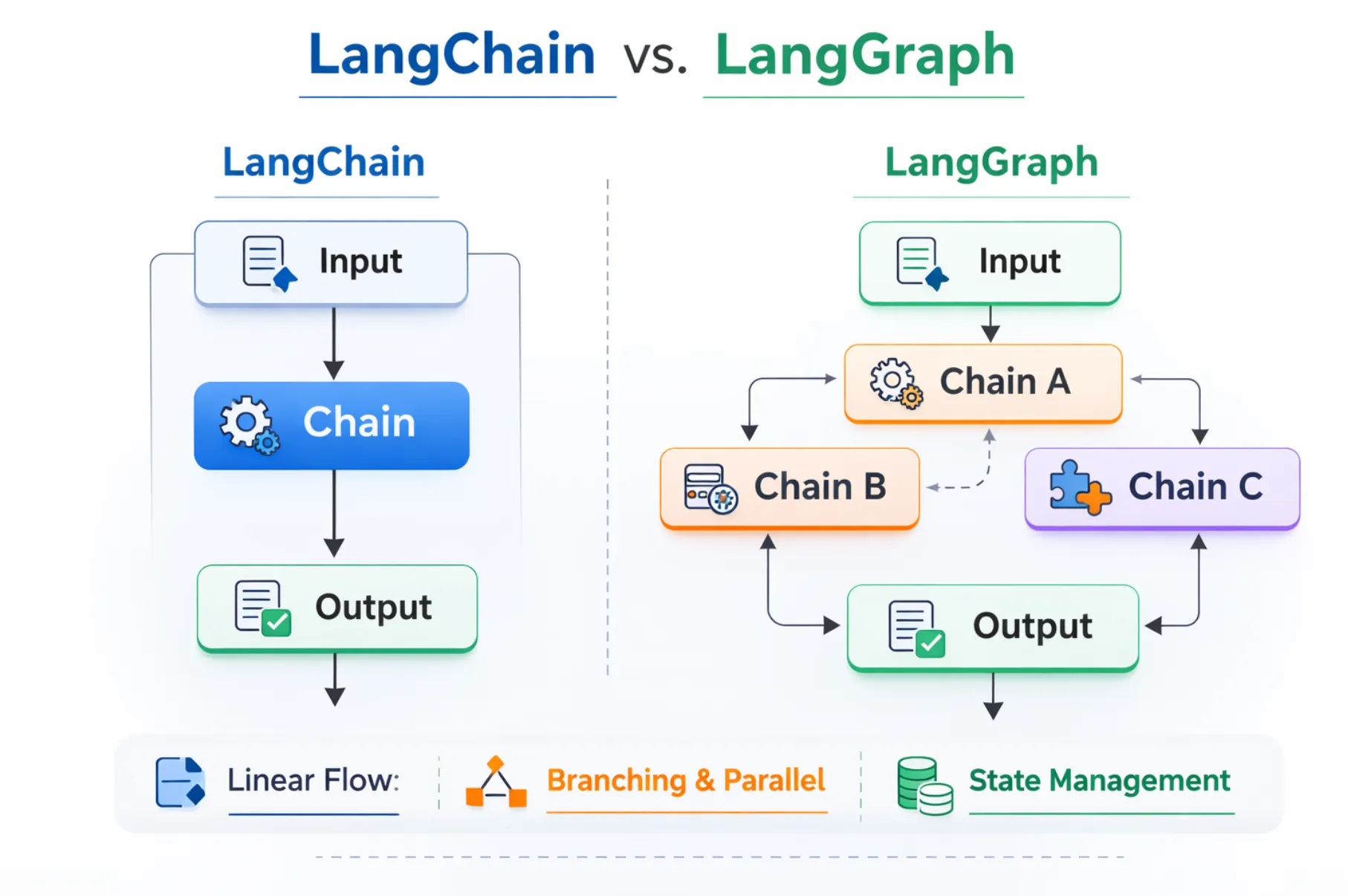
LangChain is built to make complex LLM-powered workflows feel simple and intuitive. It excels when your tasks follow a predictable, sequential pattern, fetching data, summarizing, answering questions, and so on. Its modular design offers ready-made building blocks like chains, memory, agents, and tools, which makes prototyping fast and coding straightforward. If you want to assemble a workflow that sticks to a known path quickly, LangChain is your go-to.
On the other hand, LangGraph gives you power and flexibility where things start to break or loop. Instead of linear sequences, you design graph-based workflows with nodes, edges, explicit state, retries, branching logic, and even human-in-the-loop checkpoints. It shines when your application needs to adapt, backtrack, loop, or remember long-running context, think multi-stage agents, complex decision trees, or virtual assistants that need to reason over time.
Workflow
State Management
Ease of Use
Complexity
Production
LangChain is best when your process moves step-by-step without frequent branching, looping, or complex state management.
LangChain is ideal for tasks that follow a clear sequence without complex branching. For instance, translating text or summarizing documents in one step.
from langchain.chat_models import ChatOpenAI
from langchain.prompts import ChatPromptTemplate
prompt = ChatPromptTemplate.from_template("Summarize this text: {text}")
model = ChatOpenAI()
chain = prompt | model
output = chain.invoke({"text": "LangChain simplifies working with LLMs."})
print(output)
Langchain’s library of pre-built connectors (LLMs, databases, APIs) lets developers quickly assemble and test workflows. Useful for proof-of-concept projects or fast iterations.
With built-in memory modules, LangChain can retain context temporarily. This is useful for chat experiments, research tests, or multi-step prompts that don’t require long-term state.
from langchain.memory import ConversationBufferMemory
from langchain.chains import ConversationChain
from langchain.llms import OpenAI
memory = ConversationBufferMemory()
conversation = ConversationChain(llm=OpenAI(), memory=memory)
conversation.run("Explain LangChain for beginners.")
conversation.run("Give a one-line summary of your explanation.")
For apps that don’t need looping, adaptive logic, or multi-agent orchestration, LangChain keeps workflows straightforward, modular, and easy to manage.
from langchain.chains import SimpleSequentialChain, LLMChain
from langchain.prompts import PromptTemplate
from langchain.llms import OpenAI
llm = OpenAI()
prompt = PromptTemplate(template="Translate to French: {text}", input_variables=["text"])
chain = LLMChain(llm=llm, prompt=prompt)
seq_chain = SimpleSequentialChain(chains=[chain])
print(seq_chain.run("Hello, how are you?"))
Choose LangChain when your focus is on building clear, structured, and well-integrated LLM workflows with minimal setup and maximum flexibility.
LangGraph is ideal for dynamic, adaptive workflows where state tracking, branching, or multi-agent orchestration is required. It’s best suited for AI agents and complex systems that need to revisit steps, handle alternative paths, or maintain context over time.
Use LangGraph when your process needs to change direction, retry steps, or handle multi-stage decisions.
from langgraph import StateGraph
def process_input(state):
input_data = state["input"]
result = input_data.upper() # simple transformation
return {"result": result, "input": input_data}
graph = StateGraph()
graph.add_node("processor", process_input)
graph.add_edge("processor", "processor") # loop back for retry
output = graph.run({"input": "hello world"})
print(output)
LangGraph provides explicit state management, making it perfect for workflows that must preserve context over multiple steps or sessions.
def agent_step(state):
state["history"].append(state["input"])
return {"history": state["history"], "input": state["next_input"]}
graph = StateGraph()
graph.add_node("agent", agent_step)
result = graph.run({"history": [], "input": "Step 1", "next_input": "Step 2"})
print(result)
Langgraph coordinates multiple AI agents with specialized roles in a single workflow. Loop, branch, and retry steps while maintaining consistent state.
def agent1(state):
return {"message": "Agent1 processed " + state["data"]}
def agent2(state):
return {"message": "Agent2 confirmed " + state["message"]}
graph = StateGraph()
graph.add_node("A1", agent1)
graph.add_node("A2", agent2)
graph.add_edge("A1", "A2")
output = graph.run({"data": "task info"})
print(output)
LangGraph integrates with LangSmith and LangGraph Studio to provide real-time logging, debugging, and monitoring of agent workflows. Perfect for complex applications where transparency and error handling matter.
Use LangGraph when your application requires dynamic, stateful, and adaptive workflows. It excels in multi-agent systems, AI orchestration, and processes where memory, context, and branching logic are critical.
Both LangChain and LangGraph are excellent tools, but they solve different problems. Deciding which is best for you comes down to how complex your workflows are and what kind of control you need over them.
LangChain is perfect if your application follows a clear, step-by-step process. It works well when the workflow is predictable, without frequent branching or looping back. For example, you might use LangChain to:
Its main strengths are speed, simplicity, and an extensive library of integrations. This makes LangChain especially appealing for prototyping, small-to-medium projects, and educational use, where getting something working quickly matters more than handling edge cases or complex branching.
LangGraph shines in situations where the application must adapt, backtrack, or run over a longer period while keeping track of state. It’s built for agent-style workflows that can:
This makes LangGraph the stronger choice for multi-agent systems, complex decision-making, and production-grade deployments where flexibility and resilience are critical.
If you’re still unsure, consider these guiding points:
Imp:
LangChain is the fast, approachable option for simple to moderately complex workflows. LangGraph is the robust, flexible choice for high-complexity, dynamic AI systems. Both are part of the same ecosystem, so you can start with one and transition to the other if your needs change. Your choice should align with your current project scope and your future scalability goals.
Different companies leverage LangChain or LangGraph based on the complexity and type of workflow they need. LangChain is typically chosen for linear, step-by-step tasks, while LangGraph handles dynamic, stateful, and multi-agent processes.
When you build with LangChain or LangGraph, you’re creating powerful LLM-powered workflows. But getting them to run reliably, cost-effectively, and securely in production requires more than just orchestration. This is where an AI gateway comes in. It acts as the control layer between your application and the models it uses, ensuring smooth routing, cost tracking, prompt management, and security.
Building a workflow in LangChain or LangGraph is only the first step. Once you move to production, managing the operational side of LLM usage becomes just as important as designing the workflow itself. An AI Gateway acts as a control layer, helping you route requests to the most suitable model, monitor performance, and keep your applications running smoothly.
Without this layer, it’s easy to run into issues like unpredictable latency, rising costs, or inconsistent prompt usage across different parts of your system. AI Gateways provide the visibility and control needed to maintain performance, optimize spending, and keep your LLM endpoints secure.
TrueFoundry AI Gateway extends the capabilities of your LLM workflows by offering:
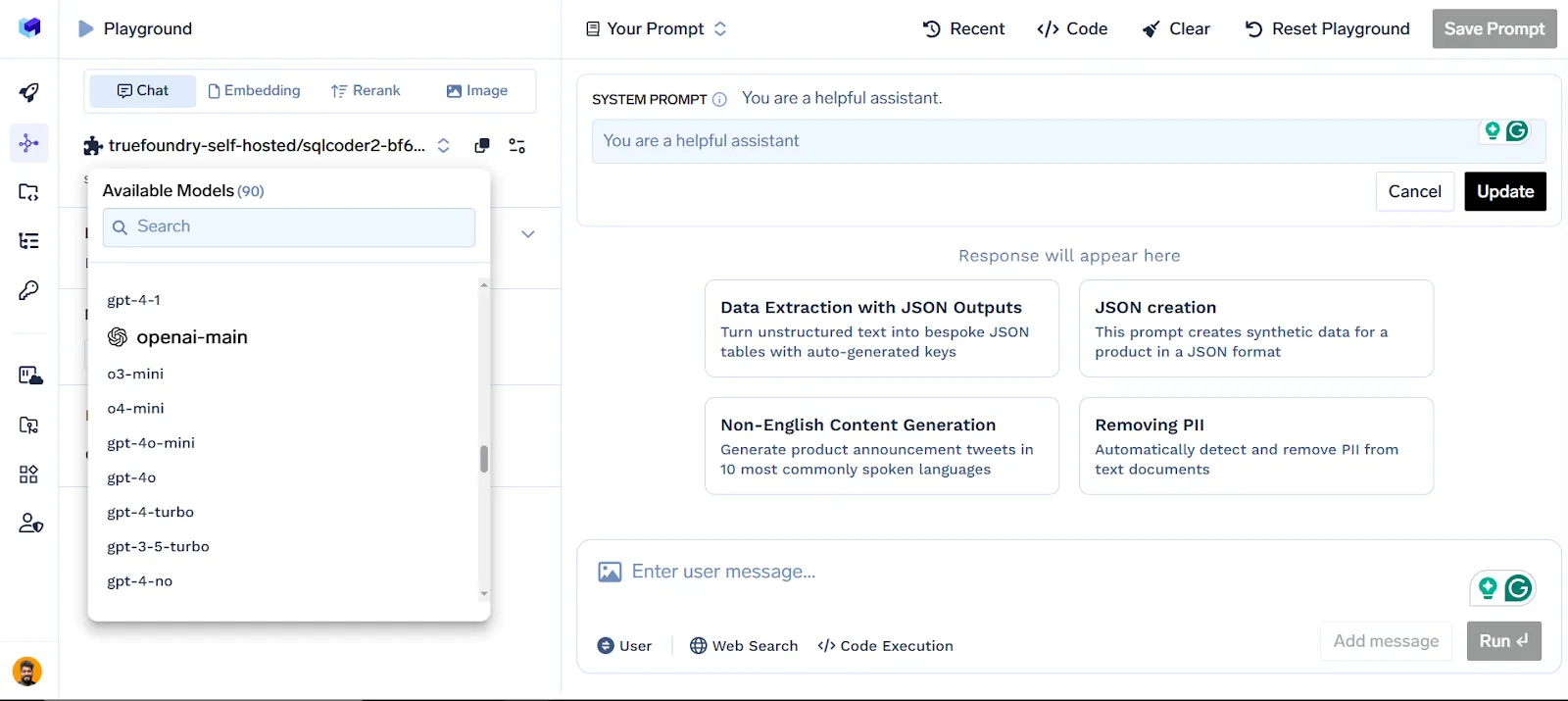
Centralized LLM Management: Connect and manage multiple model providers such as OpenAI, Anthropic, and Hugging Face from one dashboard.
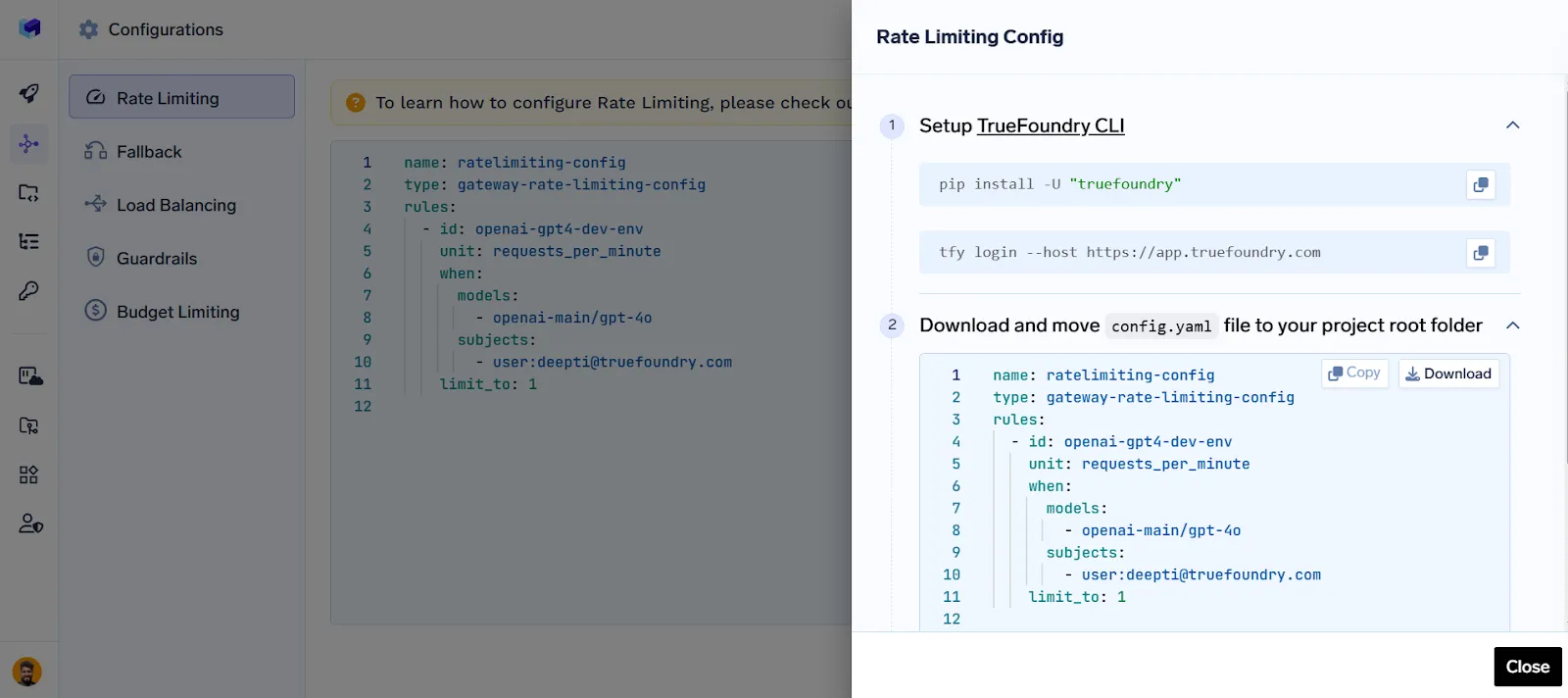
Routing, Rate Limiting, Fallback, Guardrails & Load Balancing: Optimize request flow, control usage, ensure safe outputs, switch to backups on failure, and balance traffic across models..
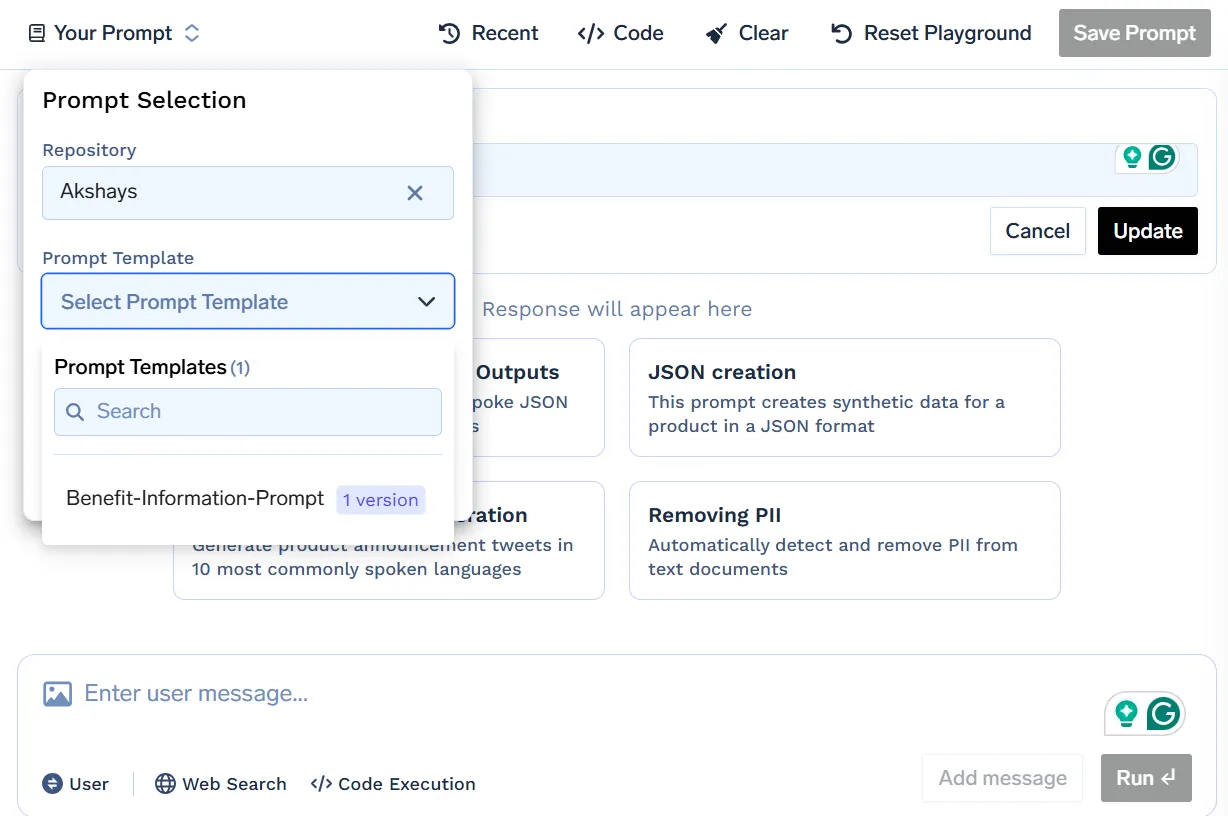
Prompt Management: Version, test, and roll back prompts with zero disruption to your live system.
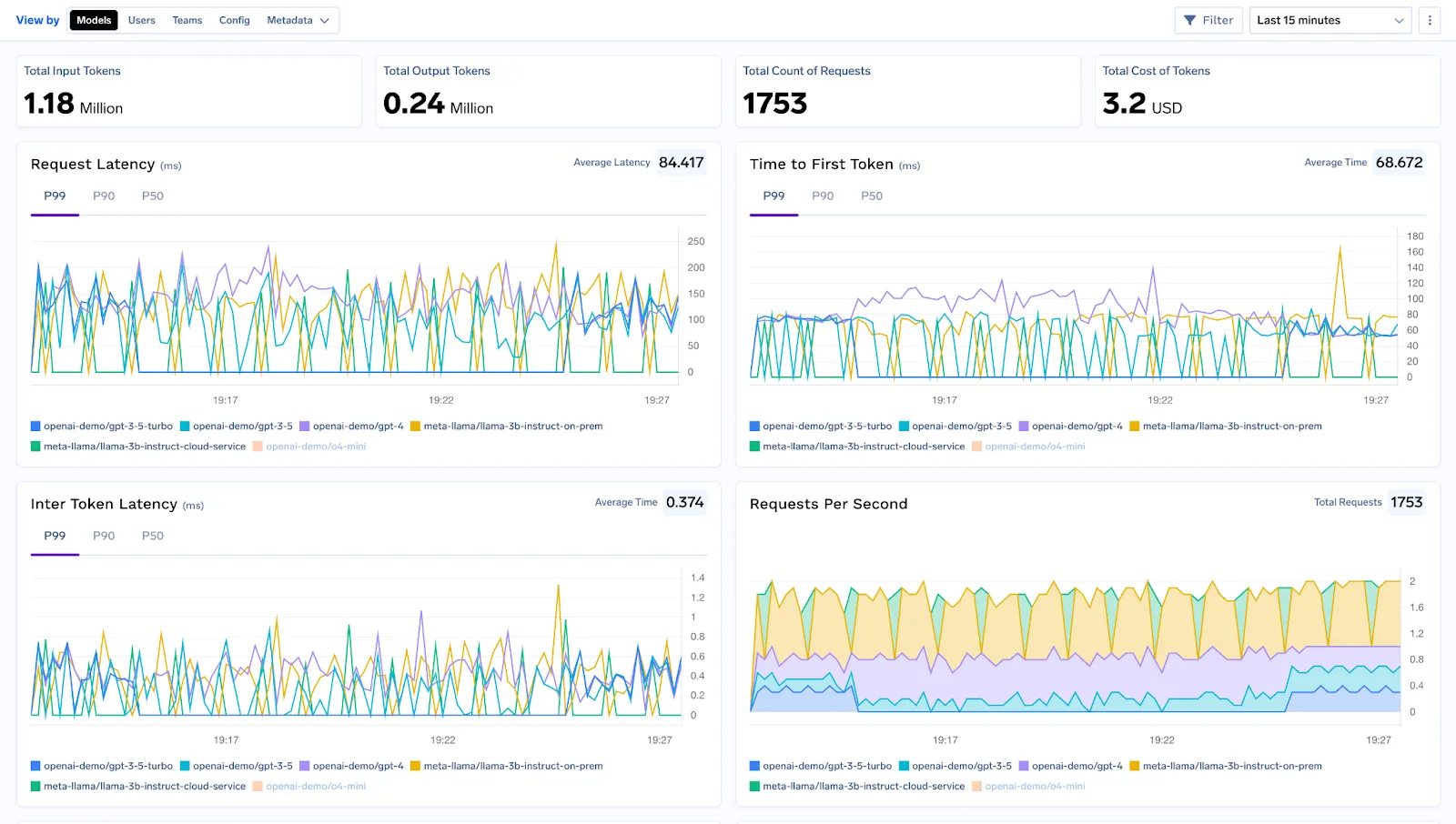
Observability, Tracing & Debugging: Monitor latency, token usage, and error rates in real time, and trace each request through your workflow for easier debugging and optimization..
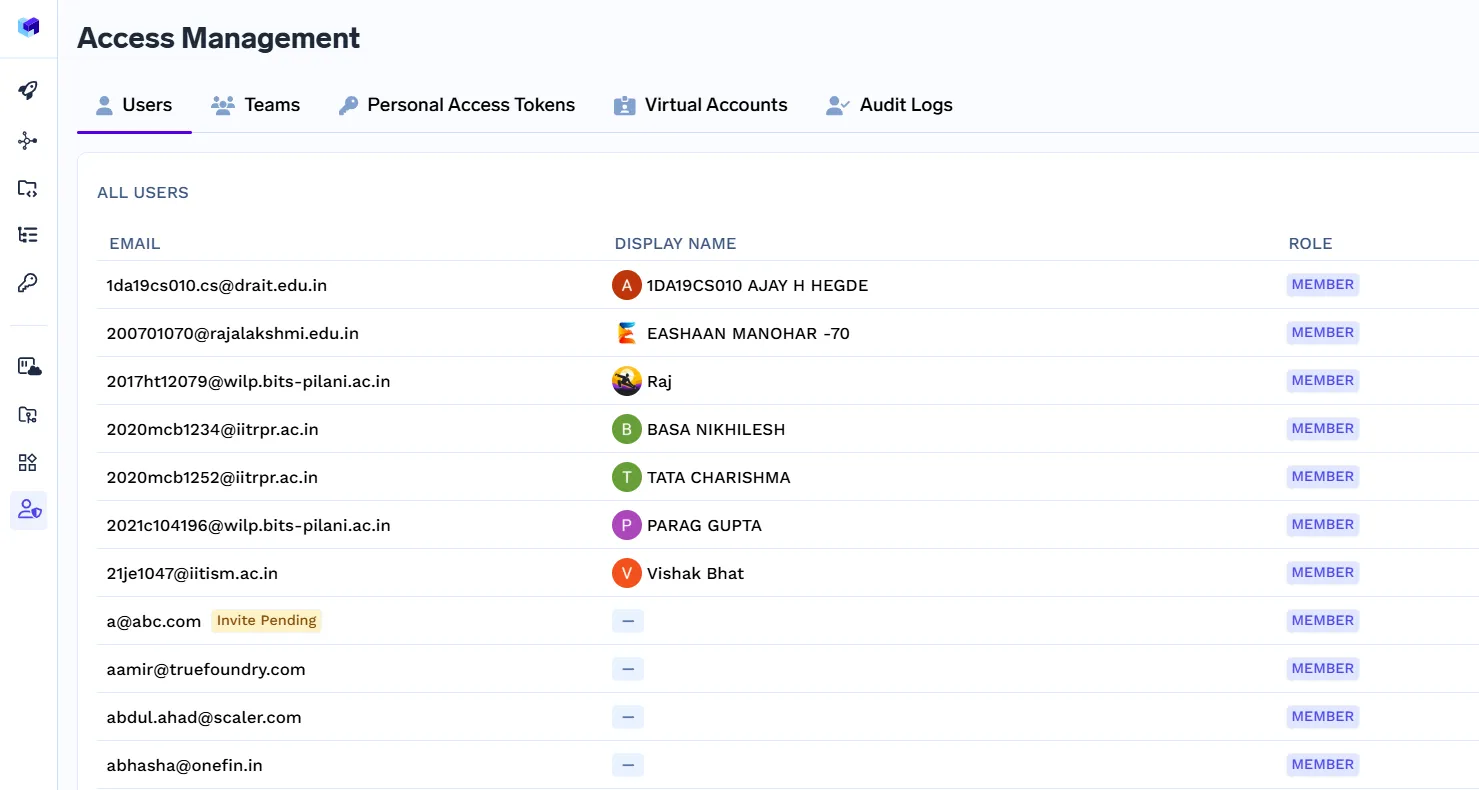
Access Control, RBAC & Compliance: Define who can access the resources using role-based access control, and maintain enterprise-grade AI security and governance.
TrueFoundry supports over 250 LLMs out of the box, giving you maximum flexibility. It’s designed for production-grade performance, offering caching, rate limiting, and advanced analytics. Whether you are running a simple LangChain sequence or a complex LangGraph agent network, it integrates seamlessly.
With enterprise-ready compliance, data governance, and security features, TrueFoundry ensures your LLM workflows are not only functional but also robust, scalable, and secure.
LangChainとLangGraphはどちらもLLMを活用したアプリケーションを構築するための強力なツールであり、それぞれ異なるシナリオで優れた能力を発揮します。LangChainは、迅速なプロトタイピングと広範な統合の恩恵を受ける、よりシンプルで線形なワークフローに最適ですが、LangGraphは、複雑で適応性のあるステートフルなエージェントシステム向けに設計されています。どちらを選ぶかは、プロジェクトの複雑さと長期的な目標によって異なります。どちらを選択するにしても、これらのフレームワークをTrueFoundryのAIゲートウェイと組み合わせることで、ワークフローの安全性、効率性、本番環境への対応が保証されます。適切な組み合わせにより、自信を持ってコンセプトから堅牢でスケーラブルなAIソリューションへと移行できます。
いいえ。LangGraphとLangChainは異なる目的を持っています。LangChainは線形な、段階的なLLMワークフローと迅速なプロトタイピングに最適化されていますが、LangGraphは動的でマルチエージェント、ステートフルなワークフロー向けに設計されています。それぞれに独自のニッチがあり、一方が他方を置き換えるものではありません。複雑なシステムでは互いに補完し合うことができます。
はい。LangGraphは、グラフベースのワークフロー、マルチエージェントシステム、ステートフルなプロセスを管理するために独立して機能できます。特定のタスクのためにLangChainコンポーネントを統合することは可能ですが、LangGraphでアプリケーションを構築または実行するためにLangChainは必要ありません。これにより、線形な依存関係のない複雑なワークフローに対して柔軟性があります。
いいえ。LangGraphはLangChainを開発したのと同じ組織によって開発されていますが、別のフレームワークです。グラフベースのオーケストレーションとマルチエージェントワークフローに焦点を当てています。いくつかの統合と設計思想を共有していますが、LangGraphは独立して管理されており、LangGraph StudioやLangSmithなどの独自のツールを持っています。
必ずしもそうではありません。特にアプリケーションが複雑なワークフロー、ループ、またはマルチエージェントのオーケストレーションを必要とする場合は、LangGraphから直接始めることができます。ただし、LangChainに精通していると、モジュール式のLLMコンポーネント、プロンプトチェーン、および基本的なワークフローを理解するのに役立ち、これにより、ハイブリッドな設定でのLangGraphの学習が加速される可能性があります。
LangGraphの複雑さは、シンプルなプロジェクトにとっては制約となる可能性があります。LangChainよりも学習曲線が急であり、小規模なワークフローでは、そのグラフ構造を使用することで過剰な設計になる可能性があります。さらに、そのマルチエージェントオーケストレーションは、慎重な状態管理、計画、および監視を必要とするため、迅速なプロトタイピングにはあまり適していません。
いいえ。LangGraphはLangChainのスーパーセットではありません。LangChainが効率的に処理できない高度なワークフローをサポートしていますが、LangChainのすべての線形ワークフローユーティリティや事前構築されたコネクタを自動的に含むわけではありません。これらは補完的なフレームワークであり、それぞれ特定のワークフロータイプとユースケースに最適化されています。
LangChainのメモリは暗黙的でモジュール式であり、通常はチャット履歴のような短期的なコンテキスト保持に使用されます。一方、LangGraphのメモリは明示的であり、開発者は状態追跡、マルチエージェントのコンテキスト、および長時間実行されるワークフローを完全に制御できます。LangGraphのメモリは複雑で適応性のあるシステムに適しており、LangChainのメモリは線形な、よりシンプルなタスクに適しています。
TrueFoundry AI Gateway delivers ~3–4 ms latency, handles 350+ RPS on 1 vCPU, scales horizontally with ease, and is production-ready, while LiteLLM suffers from high latency, struggles beyond moderate RPS, lacks built-in scaling, and is best for light or prototype workloads.



.png)



.png)
.png)
.png)

.png)
.png)
.png)
.png)
.png)
.png)
.png)





