



October 9, 2026
|
5 min read


Published: October 6, 2026
.webp)
Blazingly fast way to build, track and deploy your models!
Claudeスキル(エージェントスキルとも呼ばれます)は、データベースへのクエリ実行、アラートのトリアージ、エスカレーション手順の実行、リリースノートの作成といった専門的なタスクをエージェントに教えるための、再利用可能な機能バンドルです。スキルは一度作成すればどこでも再利用できるため、同じ手順を本番環境のエージェント、ローカルのClaude Codeセッション、Cursorなどで、書き直すことなくそのまま活用できます。
重要な点は、スキルは単に貼り付けるためのプロンプトではないということです。スキルは、タスクが必要になった際にエージェントがオンデマンドで読み込む、自己完結型の小さなパッケージです。
すべてのスキルは、SKILL.mdファイルをルートとするディレクトリで構成されています。このファイルには2つの要素が含まれます。
スキルには、SKILL.mdに加えて、参照ドキュメントやスクリプトなどのサポートファイルを同梱することも可能です。これらは、スキルがスコープ内に入った際にモデルがオンデマンドで読み込みます。一般的なマルチアセットスキルの例を以下に示します。
---
name: analytics-helper
description: 分析ウェアハウスへのクエリ方法。ユーザーが売上、利用状況、またはコストの数値を求めたときに使用します。
---
# 分析ヘルパースキル
## テーブルのクエリ実行
1. このスキルの `scripts/` ディレクトリにある `query.py` スクリプトを使用してください。
2. `references/sales-tables.md` でスキーマを確認してください。
3. ユーザーから全件エクスポートの要求がない限り、結果は1000行までに制限してください。
## 一般的な集計
収益については、`month_start` でグループ化し、`gross_revenue` を合計してください。
ユーザーが「10月の収益はいくらでしたか?」と尋ねた際、エージェントはスキーマを推測するのではなく、スキルを読み込み、手順に従い、同梱されたスクリプトとリファレンスを使用して回答します。
最初のスキルを作成するのは数分で済みますが、企業全体でライブラリを運用しようとするとチームは摩擦に直面します。それは通常、共通の課題として現れます。
スキルファイルがリポジトリ全体に散らばってしまうため、どのスキルが存在するのか、どれが正当なバージョンなのかが誰にも分からなくなります。コードとは独立したバージョン固定ができないため、スキルの変更が本番環境のエージェントの挙動を意図せず変えてしまうことがあります。スキルごとのアクセス制御がないため、どのチームでも手順を読み取ったり変更したりできてしまいます。さらに、同じスキルが3つのリポジトリにコピーされ、徐々に内容が食い違っていきます。
これらは作成上の問題ではなくガバナンスの問題であり、まさに中央レジストリが必要とされる理由です。
TrueFoundryでは、 TrueFoundryスキルは、一元管理され、バージョン管理とRBAC(ロールベースのアクセス制御)が適用されたカタログである「スキルレジストリ」に格納されます。これは、スキルファイルがエージェントのリポジトリにコミットされたり、共有レジストリやバージョン固定、スキルごとのアクセス制御がない状態でアドホックにアップロードされたりするデフォルトの運用とは対照的です。
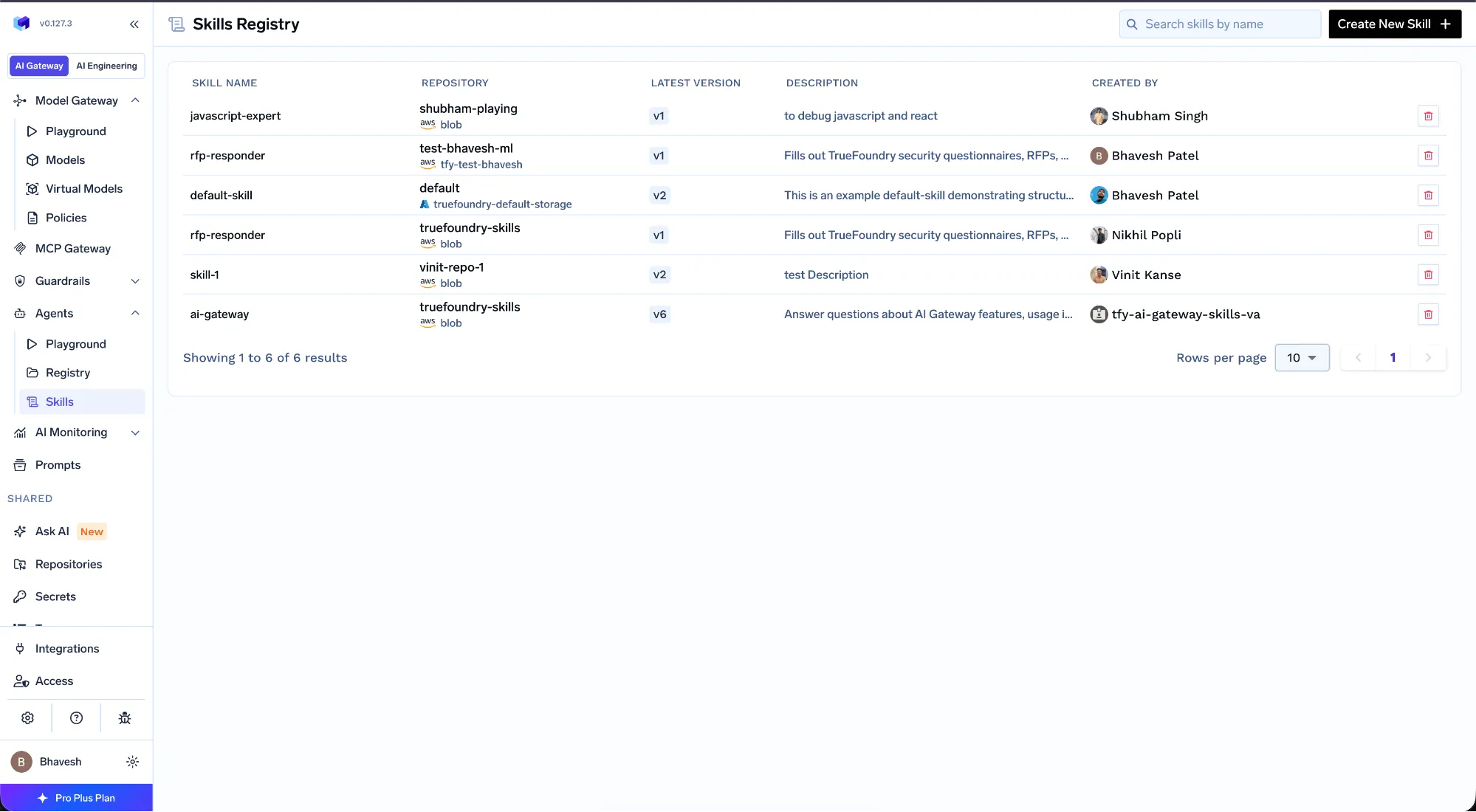
TrueFoundryドキュメントの製品スクリーンショット:スキルレジストリ。
このレジストリは、スキルライブラリの拡大に必要な以下の制御機能を提供します。
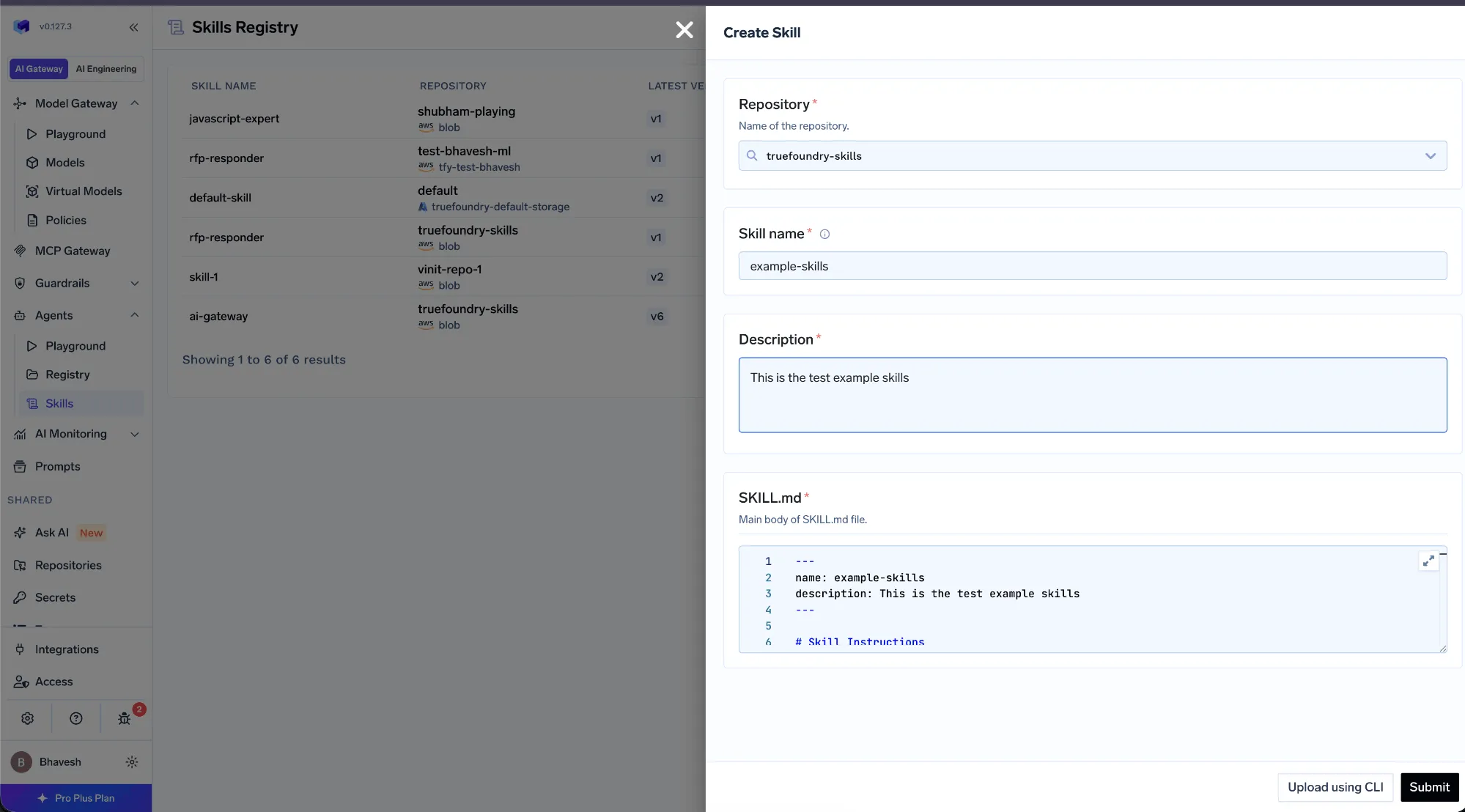
TrueFoundryドキュメントの製品スクリーンショット:スキルバージョンの公開。
レジストリは AI Gateway およびMCP Gatewayと連携して機能するため、スキルは単なる独立したファイルではありません。プラットフォームチームがどのスキルをどのエージェントやチームに提供するかを管理し、エージェント開発者は手動でファイルを管理するのではなく、承認済みのカタログから選択します。開発者がClaude Codeで使用するスキルは、本番環境のエージェントが使用するものと同じ管理されたアーティファクトであるため、規模が拡大しても一貫した動作が維持されます。
TrueFoundry AI Gateway delivers ~3–4 ms latency, handles 350+ RPS on 1 vCPU, scales horizontally with ease, and is production-ready, while LiteLLM suffers from high latency, struggles beyond moderate RPS, lacks built-in scaling, and is best for light or prototype workloads.




Claude Skills are reusable bundles of instructions, packaged as a SKILL.md file with a name, a description, and a procedure, that teach an agent how to perform a specific task. The same skill can run in Claude Code, Cursor, or a production agent, so a known-good procedure is reused everywhere instead of being re-derived each time.
You create a directory with a SKILL.md file. The frontmatter holds a name and an action-oriented description that tells the model when to use the skill, and the Markdown body holds the steps. You can add reference files and scripts alongside it, and the agent reads those on demand once the skill is in scope.
A skill provides instructions, the procedure an agent should follow, while MCP provides a connection to tools and data the agent can call. They are complementary: the skill says how to do the task, and MCP gives the agent the tools to do it. TrueFoundry governs both from one place.
Store them in a central, versioned registry rather than scattering files across repos. TrueFoundry's Skills Registry lets you pin versions, apply RBAC per skill, and reuse the same skill across many agents and surfaces like Claude Code and Cursor without duplication or drift.
Yes. In TrueFoundry, skills inherit RBAC from their parent repository, so you decide who can read, use, or publish each skill, and every version change and use is logged for audit.
Yes. TrueFoundry runs in your VPC, on-prem, air-gapped, or hybrid, so your skills, prompts, and agent traffic stay inside your own domain.
.png)
.png)

.png)
.png)
.png)





.png)







