novembre 20, 2026
|
5 min de lecture


Accédez instantanément à un environnement TrueFoundry en direct. Déployez des modèles, acheminez le trafic LLM et explorez la plateforme complète : votre sandbox est prête en quelques secondes, aucune carte de crédit n'est requise.



Published: novembre 23, 202615
Une méthode incroyablement rapide pour créer, suivre et déployer vos modèles !
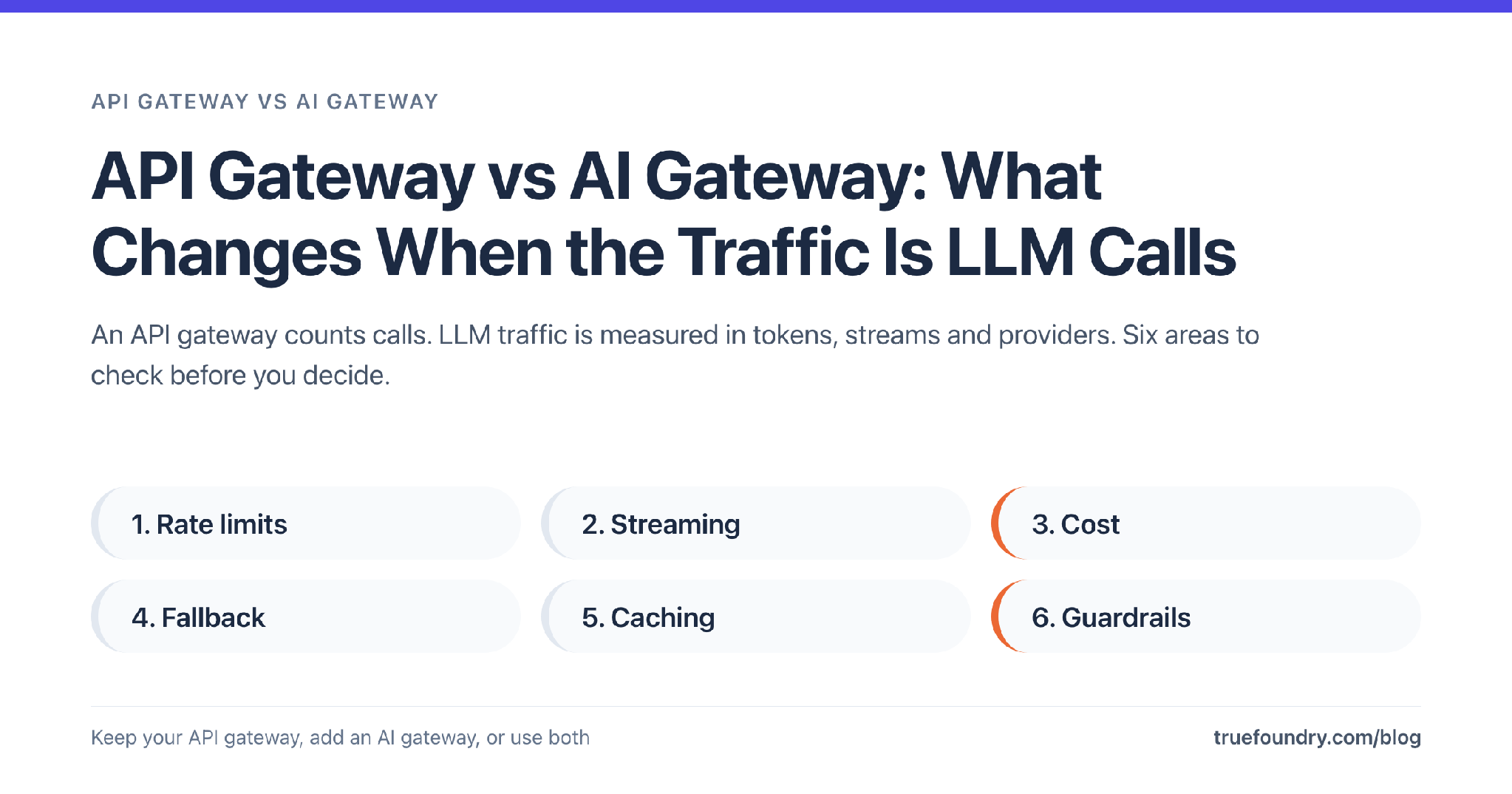
Fair question. Your API gateway already handles sign-in, encryption, routing, rate limits, logs and a web application firewall. For many teams it's the right place to start, and a lot of it works for LLM traffic as it is.
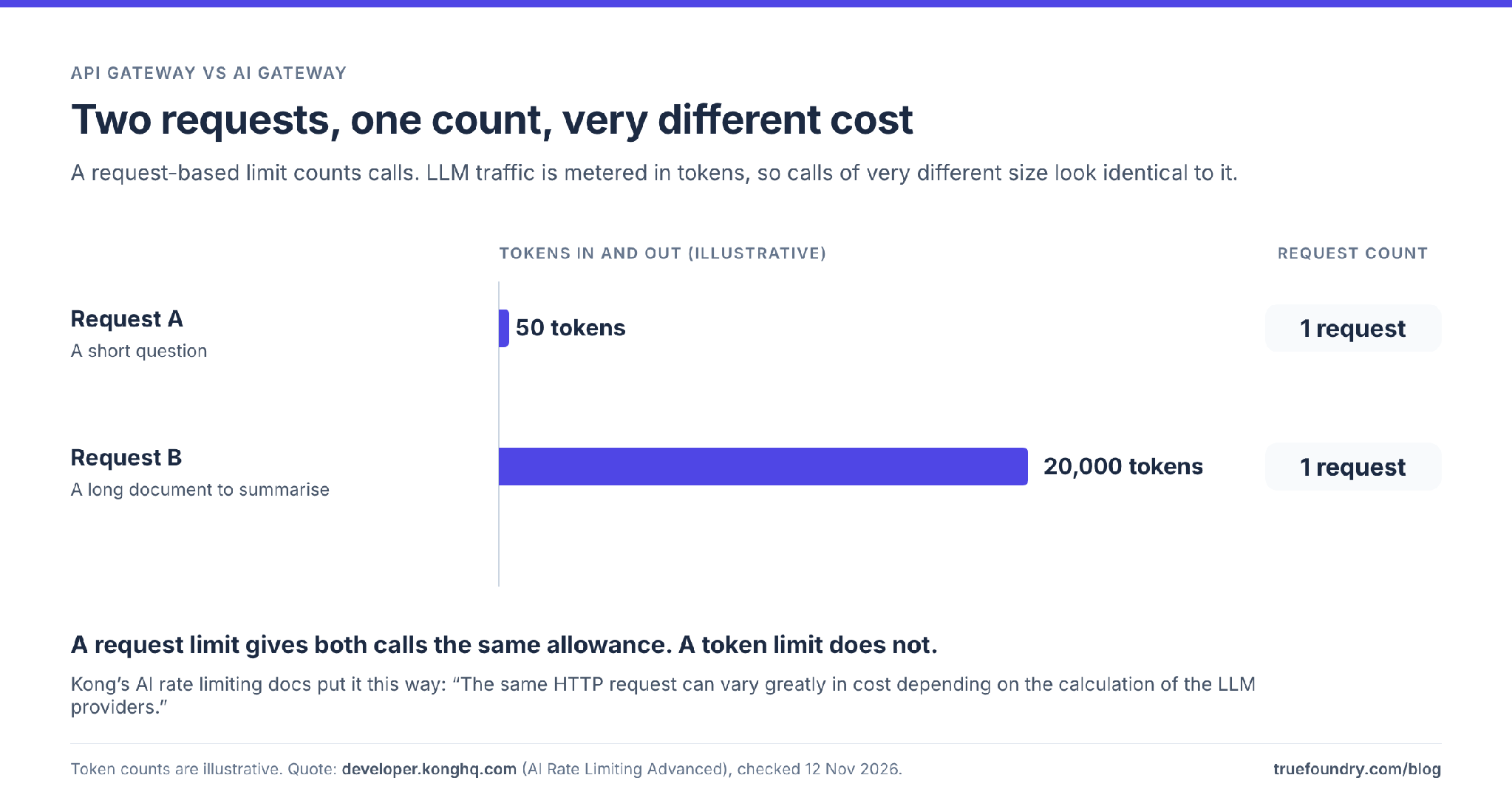
What changes is what those features assume. They assume every request is about the same size and costs about the same. LLM calls don't work that way. One call might use 50 tokens (a token is a small piece of a word) and another 20,000, and the second costs far more. Replies can also stream back over a long time.
Some API gateways now add AI features. Apigee and Kong both have them. If you use those, you're already running an AI layer inside your API gateway. The six sections below help you check whether it covers what you need.
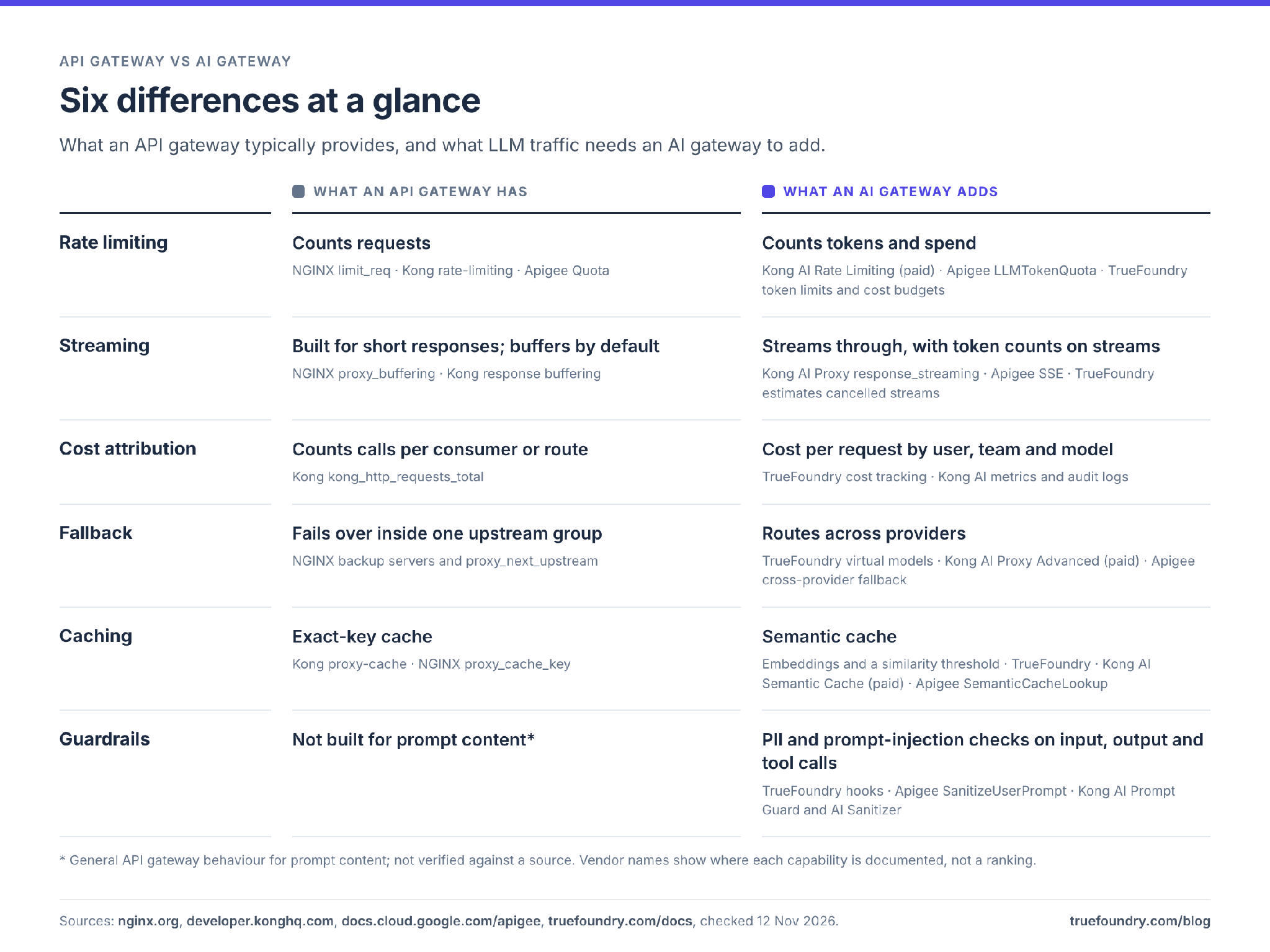
Your API gateway today. It counts requests. NGINX limits "the request processing rate per a defined key," Kong's rate-limiting plugin limits "how many HTTP requests can be made," and Apigee's Quota "tallies incoming requests."
What LLM traffic needs. A limit that understands tokens, and ideally spend, per user or team. With a request limit, a 50-token call and a 20,000-token call use the same allowance.
What an AI gateway adds. Limits on tokens and on spend. TrueFoundry keeps the two apart: "Rate limits control throughput, not spend," and budgets set "cost boundaries per tenant or team." Kong's AI rate limiting counts tokens or cost, and Apigee has token policies, LLMTokenQuota and PromptTokenLimit, both generally available since December 2025.
Worth knowing. A gateway only learns how many tokens a call used after the model replies. So a token limit works like a running tab: one very large request can push you past the limit before it's counted. Leave some headroom when you set limits.
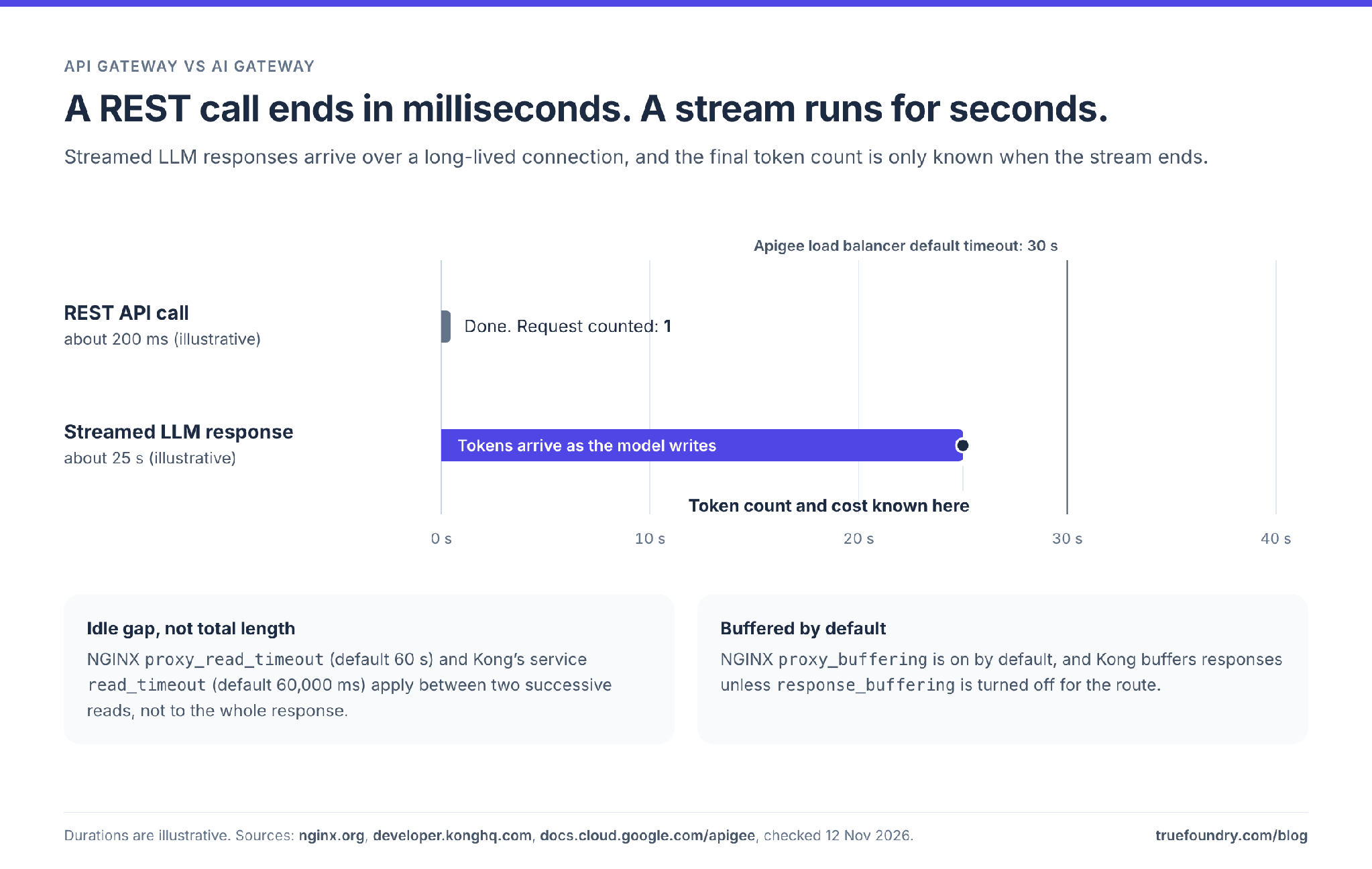
Your API gateway today. It expects short request-and-reply pairs. NGINX and Kong both buffer responses by default, which holds back a streamed reply, and both have a 60-second default timeout between reads.
What LLM traffic needs. Replies that stream for a while, a final token count that is only known once the stream ends, and checks that work on partial text.
What an AI gateway adds. Proxying that handles streams, and token counting on them. Apigee supports streamed (server-sent event) responses, with limits on which policies run on them and a 30-second default timeout on its load balancer. TrueFoundry estimates output tokens when a stream is cancelled, because "the provider never reports them."
Worth knowing. A streamed reply is checked as it arrives, not as one finished answer, so some checks behave differently. In TrueFoundry today, input checks run on streamed requests but output checks don't (per our docs, updated 10 Nov 2026). Whatever gateway you use, ask how output checks behave when you stream.
Your API gateway today. It counts calls per app or route. Kong's Prometheus metric, for example, reports "HTTP status codes per Consumer/Service/Route."
What LLM traffic needs. The cost of each call, worked out from the tokens in, the tokens out and the model's price, tied to a user, team or app so you can charge it back.
What an AI gateway adds. Cost recorded on every request, tagged with who made it and which model answered. TrueFoundry ties each request to "a user, team, virtual account, model, and any metadata you attach."
Worth knowing. Cost figures are estimates. They're built from token counts and a price list, and price lists change, so someone has to keep them current. Use them for budgets and chargeback, and check them against the provider's invoice each month.
Your API gateway today. It spreads traffic across identical copies of one service. NGINX's failover stays inside one group of servers, and only "if nothing has been sent to a client yet." It doesn't retry POST requests by default.
What LLM traffic needs. If one provider is rate-limited or down, send the request to another. Providers have different APIs and model names, so the request often has to be translated too.
What an AI gateway adds. Routing across providers by priority, weight or speed, with fallback on set error codes. TrueFoundry's virtual models move unhealthy targets to the end of the list, and fall back on codes that include 429 and 5xx by default. Kong's AI Proxy Advanced lets you "mix providers freely, for example OpenAI and Mistral."
Your API gateway today. It caches on an exact key. Kong's proxy-cache builds its key from the method, request, query and headers, and "can't be modified." NGINX's default key is scheme, host and URI.
What LLM traffic needs. "What's your refund policy?" and "How do refunds work?" should return the same answer. An exact key treats them as different requests.
What an AI gateway adds. Matching on meaning, using embeddings and a similarity threshold. TrueFoundry compares the last message by meaning and requires every other setting to match exactly. Apigee has SemanticCacheLookup and SemanticCachePopulate, which Google's September 2025 release notes list as generally available.
Worth knowing. Finding a "similar" question takes an extra step on every lookup. A lower similarity threshold gives more hits but a looser match, so start strict (TrueFoundry's docs suggest 0.9) and watch the hit rate. Keep answers specific to one user out of shared caches.
Your API gateway today. It checks who is calling and how often, and filters known attack patterns.
What LLM traffic needs. Checks for personal data and prompt-injection attempts on the prompt, on the reply, and on any tool calls an agent makes.
What an AI gateway adds. Guardrails at each of those points. TrueFoundry's run on the LLM input, the LLM output, and before and after an MCP tool call (MCP is a standard way for agents to call tools). Its PII check runs at all four points and always redacts. Apigee's SanitizeUserPrompt screens prompts for injection, jailbreaks and sensitive data. Kong's AI Prompt Guard uses regex lists, and its PII redaction runs through a separate PII service.
Worth knowing. Check where each guardrail runs: on the prompt, on the reply, and on the tool calls an agent makes. Products differ, and a check on the prompt alone won't catch a problem in the reply or in a tool's result.
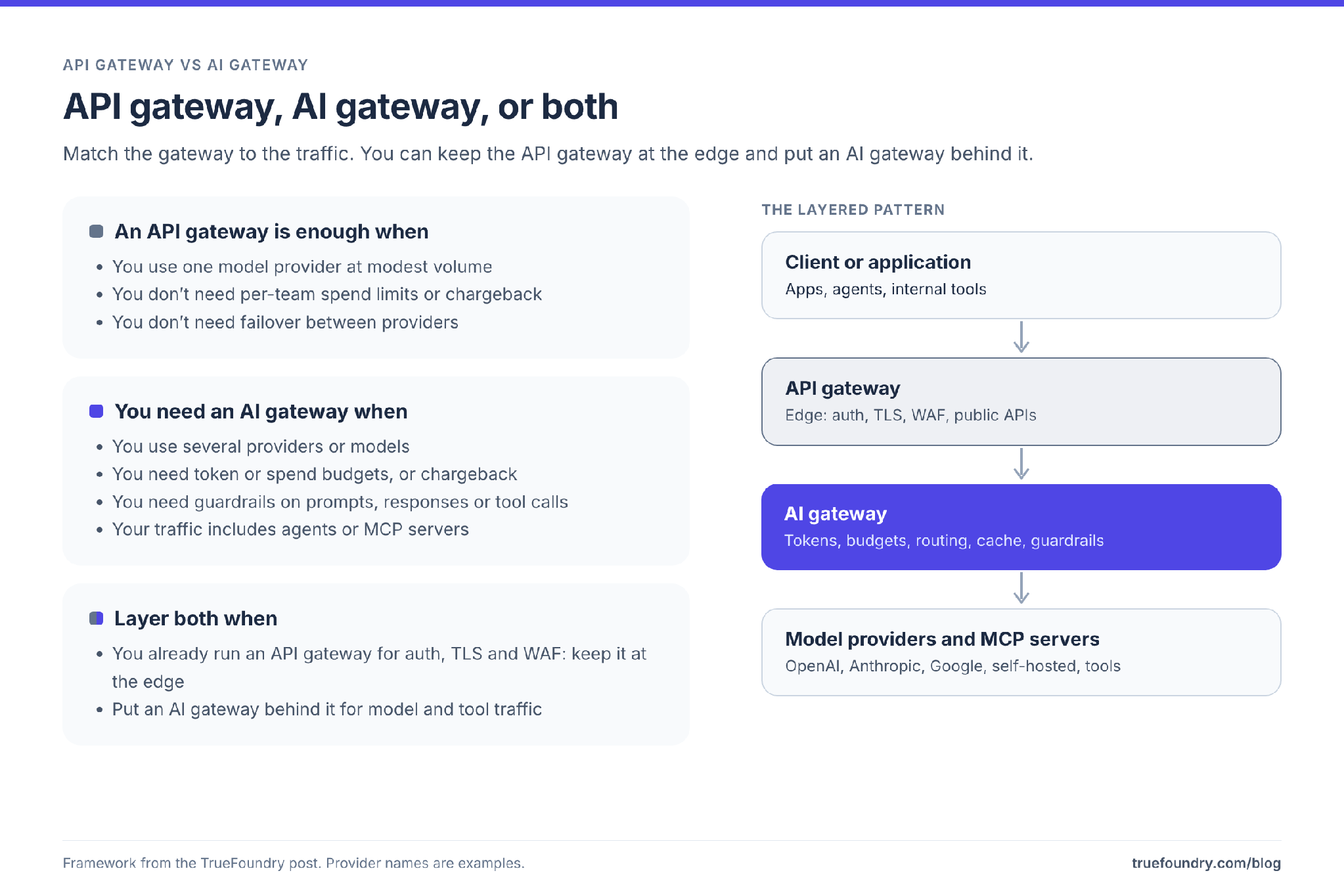
Keep your API gateway when:
Add an AI gateway when:
Use both when:
If you already run an API gateway, go through the six areas above and mark which ones you need. That list tells you whether you can stay on your current gateway or need a layer on top.
TrueFoundry AI Gateway offre une latence d'environ 3 à 4 ms, gère plus de 350 RPS sur 1 processeur virtuel, évolue horizontalement facilement et est prête pour la production, tandis que LiteLM souffre d'une latence élevée, peine à dépasser un RPS modéré, ne dispose pas d'une mise à l'échelle intégrée et convient parfaitement aux charges de travail légères ou aux prototypes.



Les dernières nouvelles, articles et ressources envoyés dans votre boîte de réception