


November 5, 2026
|
5 minutos de lectura


Obtenga acceso instantáneo a un entorno TrueFoundry en vivo. Implemente modelos, dirija el tráfico de LLM y explore la plataforma completa: su sandbox estará listo en segundos, sin necesidad de tarjeta de crédito.



.png)
¡Una forma increíblemente rápida de crear, rastrear e implementar sus modelos!
SAML es el lenguaje de marcado de aserción de seguridad (Security Assertion Markup Language). La versión 2.0 fue ratificada por OASIS en 2005 y ha sido el pilar fundamental del SSO web empresarial desde entonces.
La mecánica es sencilla una vez que se elimina el XML. Un usuario accede a tu aplicación —el proveedor de servicios (SP)—, la cual desconoce quién es, por lo que redirige el navegador al proveedor de identidad (IdP). El IdP autentica al usuario y genera una aserción: un documento XML firmado que declara quién es el usuario, qué atributos posee y cuánto tiempo es válido. El navegador lo envía mediante un POST a la URL del servicio consumidor de aserciones (ACS) del SP, y el SP verifica la firma con el certificado X.509 del IdP.
De esto se derivan tres propiedades que explican la mayoría de los aspectos que a la gente le gustan o no:
OpenID Connect es una capa ligera de identidad sobre OAuth 2.0, publicada por la OpenID Foundation en 2014. OAuth 2.0 resolvió la autorización delegada y omitió deliberadamente cualquier información sobre quién es el usuario. OIDC añade esa capa de nuevo.
El flujo es el flujo de código de autorización de OAuth con un ámbito (scope) adicional: openid. La aplicación redirige al endpoint de autorización del IdP, el usuario se autentica y el IdP responde con un código de autorización de corta duración. A continuación, la aplicación llama al endpoint de token a través de un canal secundario (back-channel) y intercambia ese código por un token de acceso, opcionalmente un token de refresco, y un ID token.
El ID token es lo que lo convierte en OIDC: un JSON Web Token firmado con JWS, habitualmente RS256, que contiene sub, iss, aud, exp y, por lo general, email. Se verifica mediante una clave del endpoint JWKS del IdP.
Destacan dos propiedades:
La perspectiva realista que omiten las páginas de comparativas de proveedores:
Para autenticar usuarios en una aplicación empresarial basada en navegador, cualquiera de las dos opciones funciona y la diferencia en términos de seguridad es mínima. Ambas son soluciones maduras y firmadas. Nadie ha sufrido una brecha de seguridad por elegir SAML en lugar de OIDC.
La decisión suele venir predeterminada. Si tu equipo de IdP gestiona cuarenta aplicaciones SAML y dispone de un procedimiento operativo establecido, añadir la aplicación número cuarenta y uno lleva veinte minutos, mientras que configurar la primera aplicación OIDC requiere coordinar una reunión. Sigue el estándar existente.
La diferencia en términos de ingeniería solo resulta evidente en los casos límite, aunque dichos aspectos son significativos:
Dónde sigue siendo superior SAML: funciona cuando el SP y el IdP no pueden comunicarse entre sí, ya que el navegador transporta toda la información (el caso clásico es un AD FS on-premises ubicado detrás de un firewall).
Tratar la elección del protocolo como una decisión de seguridad. Los equipos dedican semanas a debatir entre SAML y OIDC y apenas diez minutos a verificar si el claim del grupo se rellena correctamente. Lo segundo determina qué acciones puede realizar cada usuario; lo primero solo define qué pantalla de configuración se debe completar.
Asumir que los grupos se incluyen por defecto. La mayoría de los IdPs no emiten un claim de grupos a menos que se configure explícitamente, y varios lo emiten bajo un nombre con espacio de nombres como http://schemas.xmlsoap.org/ws/2005/05/identity/claims/groups. El SSO se completa correctamente, todos los usuarios quedan asignados al rol por defecto y nadie se percata durante una semana.
Ignorar el destino del tráfico de autenticación. Independientemente del protocolo seleccionado, un componente recibe la aserción o el ID token. Si ese componente se sitúa fuera de tu perímetro, la elección del protocolo deja de ser el aspecto crítico.
TrueFoundry admite OIDC y SAML 2.0 por igual, ofreciendo guías para Entra ID, Okta, Google Workspace, JumpCloud, OneLogin, Auth0, Keycloak, AD FS, PingOne y Rippling, además de SAML personalizado y OIDC personalizado.
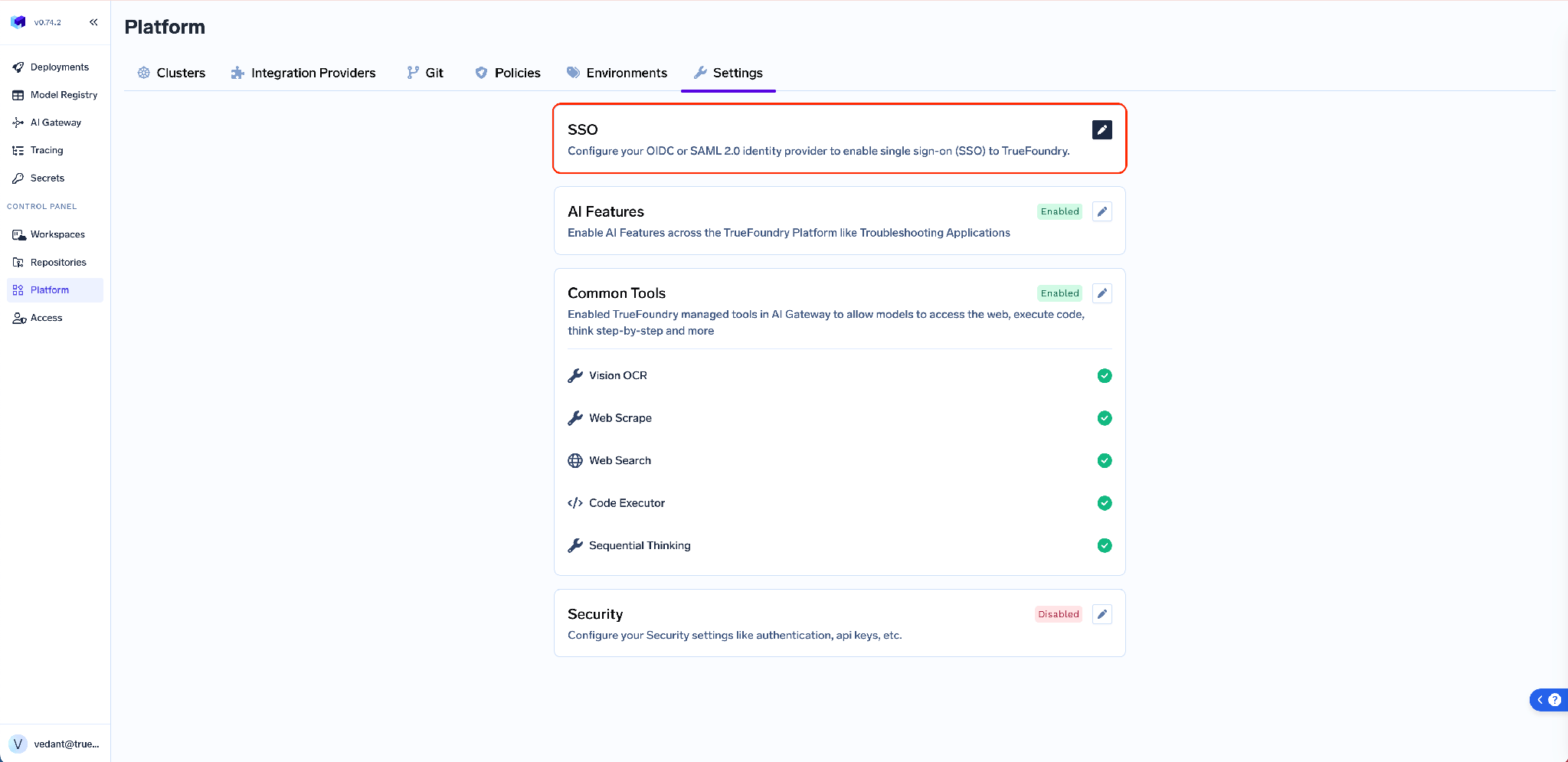
Configúralo en Platform → Settings → SSO: activa Enabled, selecciona tu SSO Provider y luego elige OIDC o SAML v2.
Antes de definir el protocolo, determina por dónde debe fluir el tráfico de autenticación.
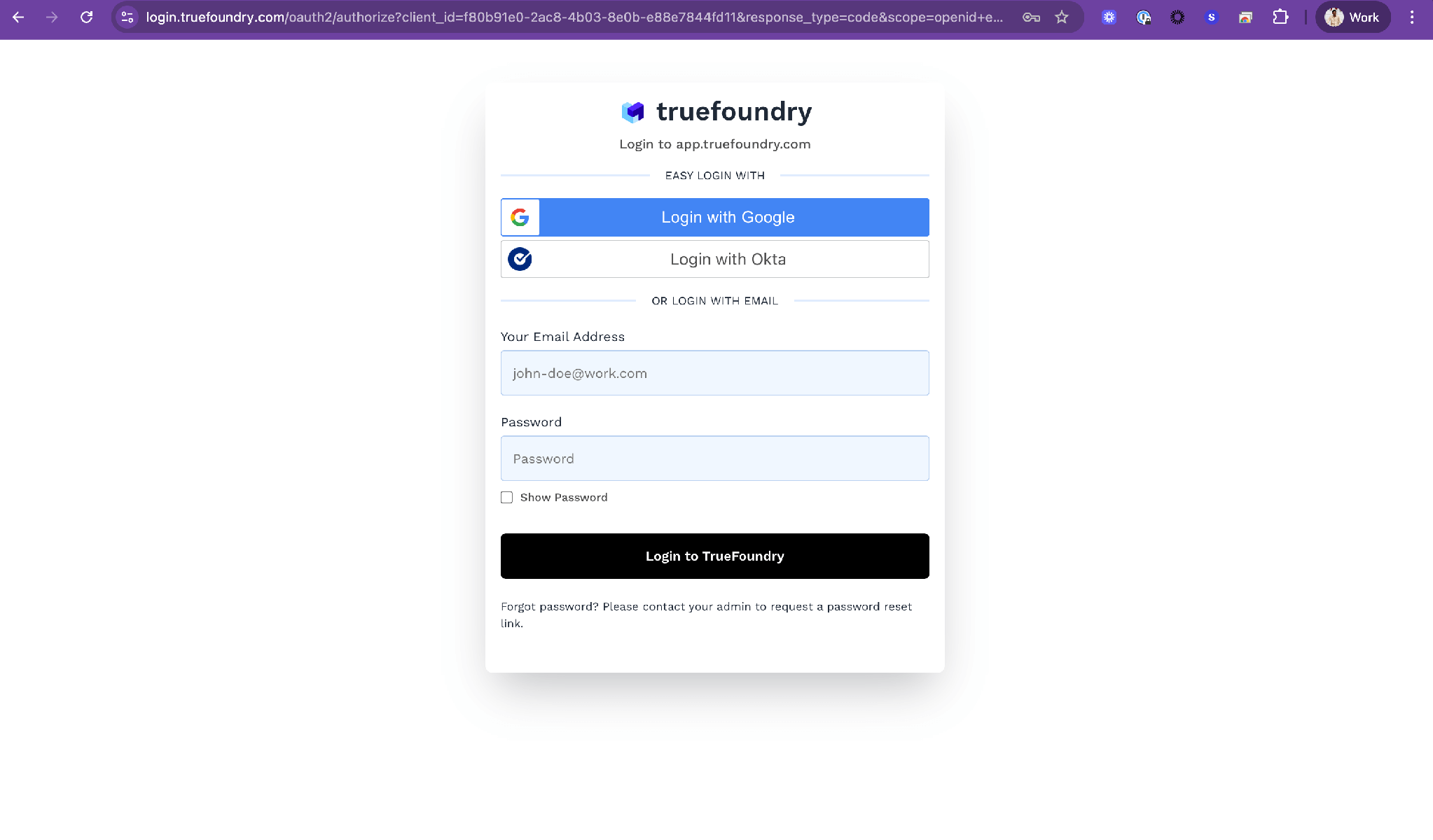
Opción 1: TrueFoundry Auth Server junto con tu IdP. Opción predeterminada en SaaS y on-prem. El servidor de autenticación en login.truefoundry.com se sitúa entre tu plano de control y tu IdP: el plano de control se conecta con el servidor de autenticación, este se comunica con tu IdP, valida la respuesta, crea o actualiza el registro del usuario y devuelve los tokens.
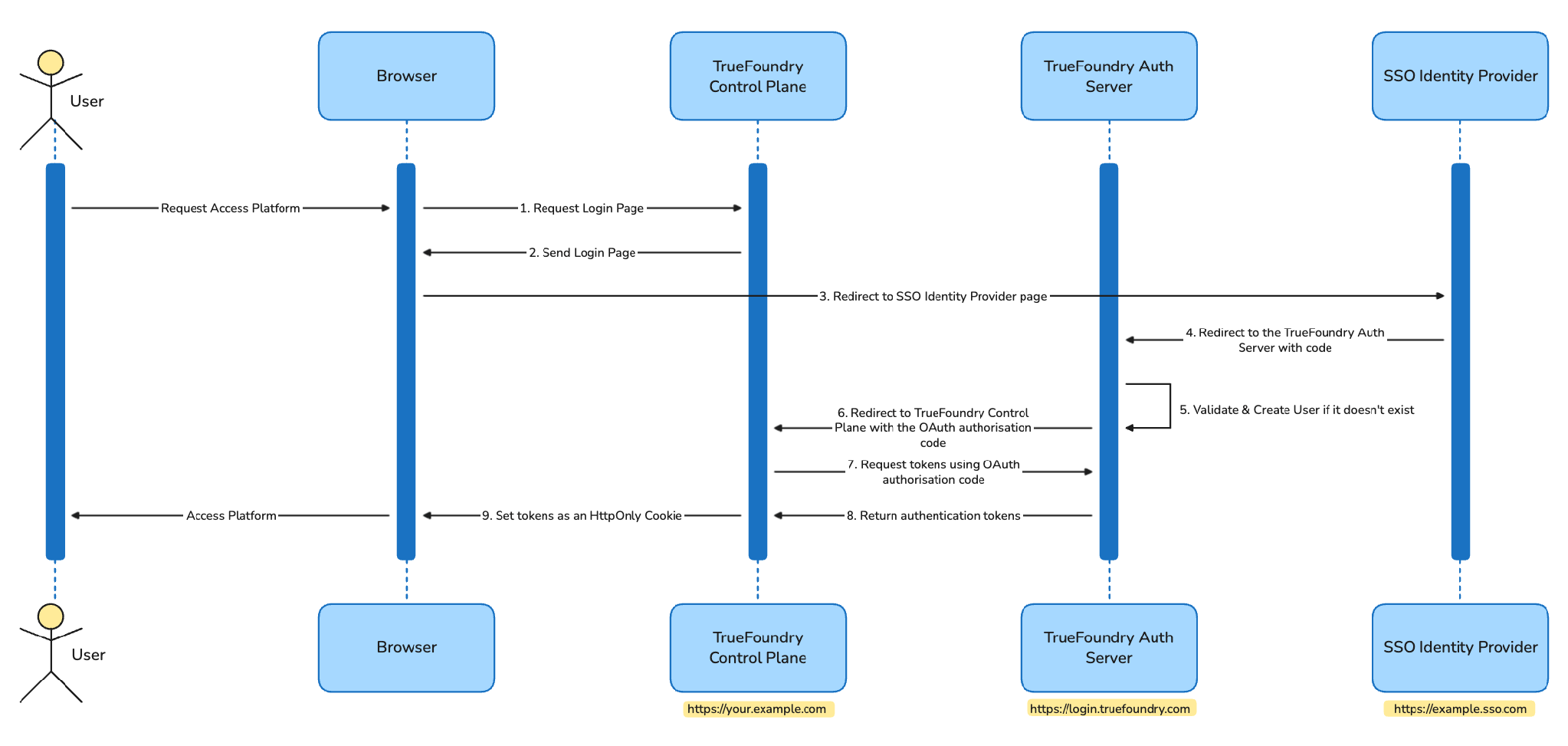
Solo el correo electrónico del usuario y un recuento de peticiones llegan a login.truefoundry.com, con fines de licenciamiento y enrutamiento de tenants. A cambio, TrueFoundry gestiona de forma centralizada las particularidades de OIDC y SAML, la rotación de claves y los endpoints SCIM, lo que permite cambiar de IdP sin necesidad de realizar un nuevo despliegue. Las peticiones dirigidas al IdP se firman con un par de claves RS256 y la aserción de destino SAML permanece activada.
Opción 2: integración directa con el IdP. Disponible únicamente para instalaciones on-prem dentro del plan Enterprise de nivel superior. El plano de control se comunica directamente con tu IdP. login.truefoundry.com no interviene en el flujo, de modo que ni los correos de los usuarios ni los recuentos de peticiones salen de tu red. El plano de control se configura durante la instalación especificando el emisor OIDC de tu IdP o los metadatos de SAML en los valores de Helm, mientras que los tokens se firman localmente mediante un valor INTERNAL_JWT_JWKS proporcionado por el equipo de soporte.
Ambas opciones son compatibles con los mismos IdPs y los mismos dos protocolos. La única diferencia radica en si el tráfico de autenticación atraviesa tu perímetro de red, siendo este el aspecto relevante a consultar con el equipo de seguridad, por encima de la elección entre XML y JWT.
De TrueFoundry a tu IdP existe un único valor, idéntico para todos los clientes:
https://login.truefoundry.com/oauth2/callback
Establécelo como el Redirect URI, Sign-in redirect URI o Reply URL en la aplicación de tu IdP.
De tu IdP a TrueFoundry:
Ese conmutador refleja la ventaja concreta de OIDC. Al mantenerlo activo, TrueFoundry consulta directamente los endpoints de autorización, token, userinfo y JWKS. Si se desactiva —necesario únicamente si tu IdP no publica un documento de descubrimiento—, se deberán introducir manualmente los cuatro campos.
SAML requiere un intercambio bidireccional, razón por la cual es necesario guardar la configuración inicialmente y ajustar el IdP a continuación.
De tu IdP a TrueFoundry:
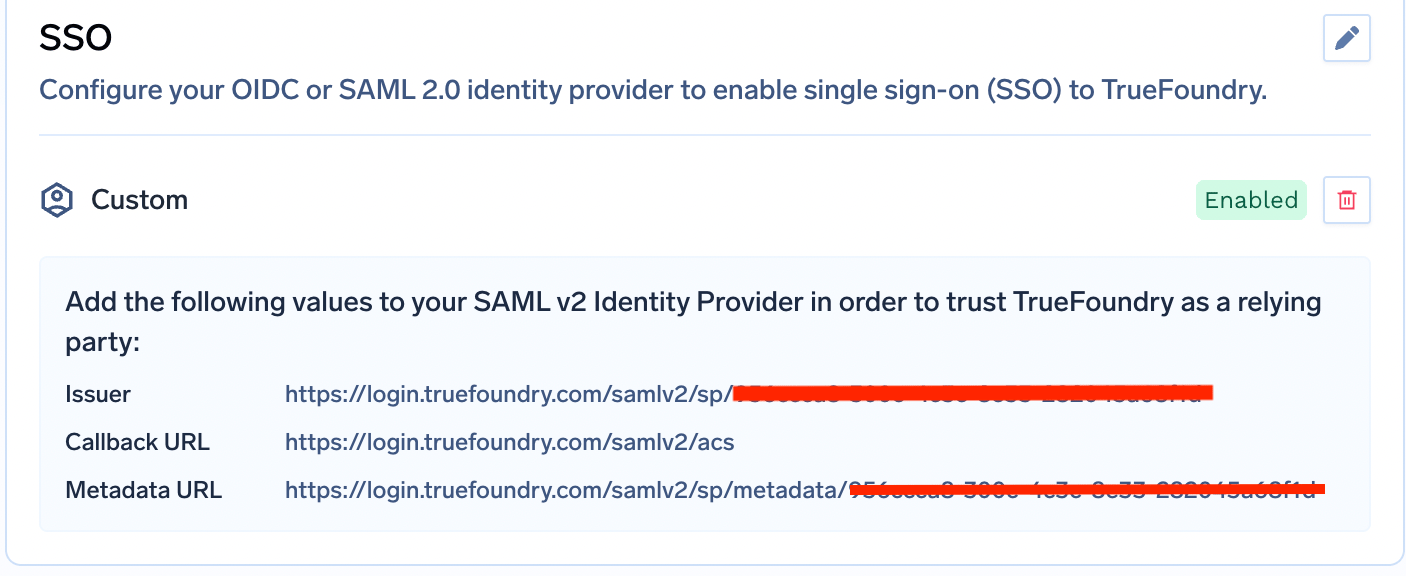
Este proceso resume la diferencia entre ambos sistemas. OIDC requiere una sola URL de callback fija. SAML requiere cuatro valores transferidos en ambas direcciones, además de un certificado cuya fecha de caducidad exige un seguimiento manual.
Independientemente del protocolo seleccionado, TrueFoundry procesa los mismos atributos. Los valores predeterminados son email y sub, modificables en Show advanced fields como Email Claim y Unique ID Claim. El claim groups se utiliza para la gestión de RBAC.
En lugar de modificar los nombres de los claims en TrueFoundry, se recomienda definir alias en el IdP para que los valores predeterminados funcionen correctamente:
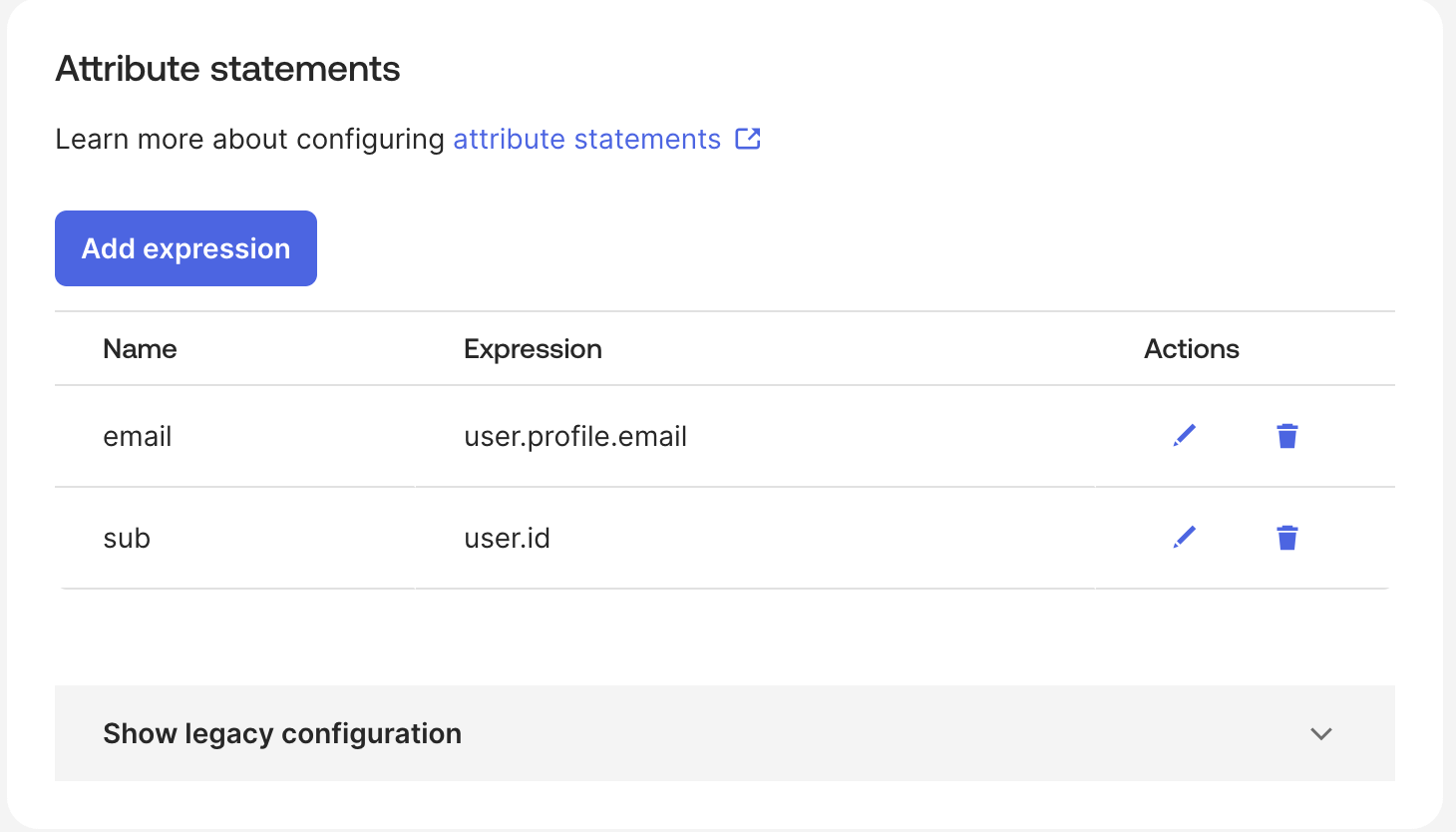
Al configurar este paso correctamente, la integración se completa automáticamente. El valor de un claim se asigna a un equipo mediante los campos Identity Provider FQN y Claim Value del equipo: si tu IdP utiliza groups como claim de equipo y el token contiene ml-platform, se debe introducir ml-platform en este apartado.
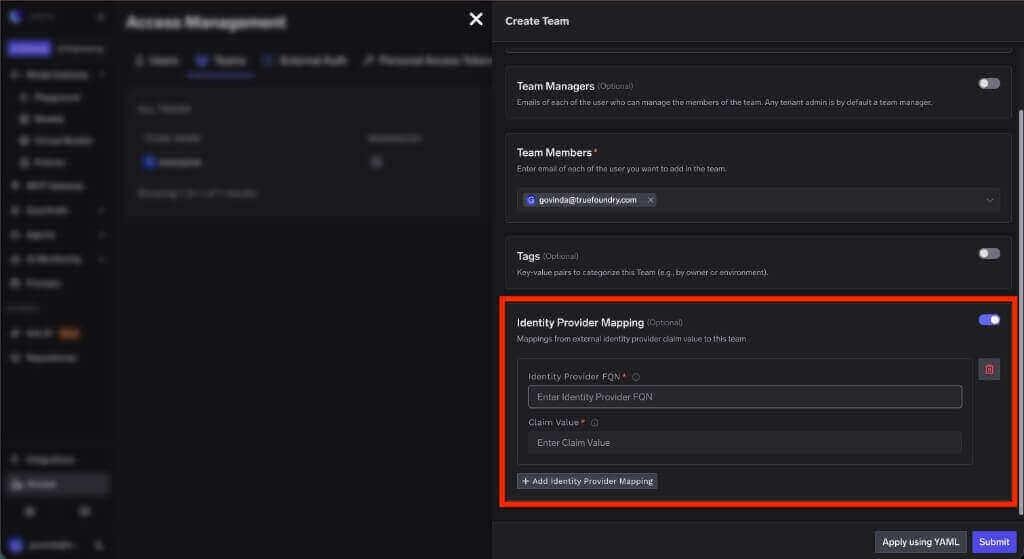
Ese equipo incluye roles asociados: al asignarle un rol de tenant, todos sus miembros lo heredan; alternativamente, se puede asignar un rol de recurso desde la página de Access Control de un recurso específico.
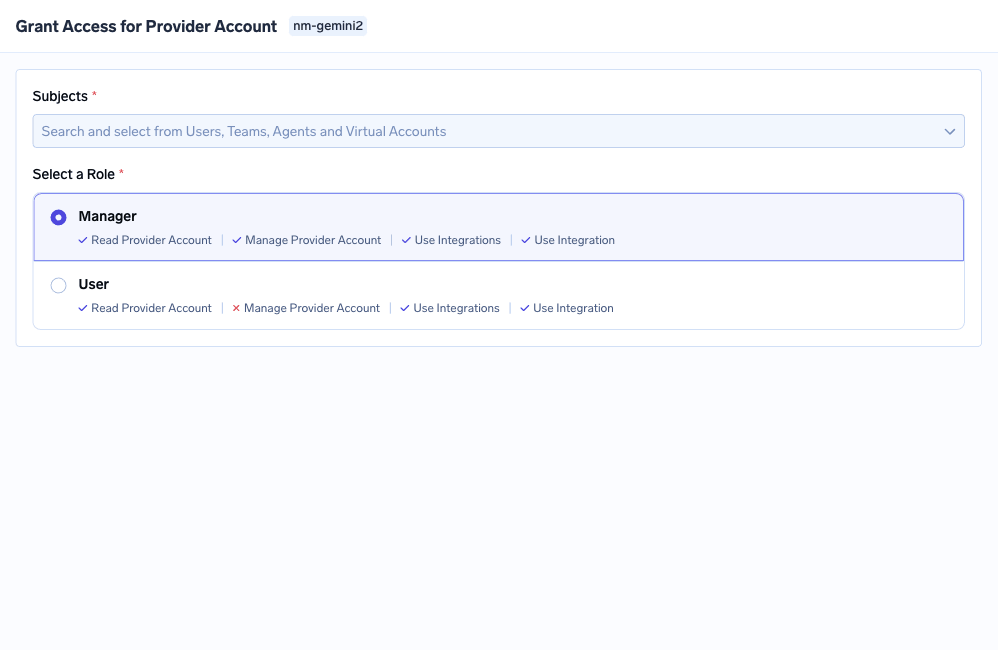
Panel Grant Access que muestra la selección de sujetos y los roles disponibles para un recurso
Esta vinculación se ejecuta de forma idéntica en ambos protocolos. Para profundizar en el modelo de roles, consulta API auth and RBAC in the gateway, y para el caso de herramientas específicas, MCP access control.
En este escenario, el intercambio de campos se traslada a values.yaml, en servicefoundryServer.env. Ambos protocolos requieren además INCLUDE_TRUEFOUNDRY_MANAGED_JWKS: "false", INTERNAL_JWT_SERVICE_ENABLED: "true", el valor INTERNAL_JWT_JWKS proporcionado por soporte, y ENABLE_EXTERNAL_OAUTH: "true" en el gateway.
OIDC: OAUTH_PROVIDER_TYPE: "EXTERNAL" junto con EXTERNAL_OAUTH_ISSUER, EXTERNAL_OAUTH_CLIENT_ID y EXTERNAL_OAUTH_CLIENT_SECRET. La URI de redirección pasa a ser <CONTROL_PLANE_URL>/auth/callback, el descubrimiento debe estar activo en <ISSUER_URL>/.well-known/openid-configuration, y los ámbitos (scopes) predeterminados son openid email profile offline_access.
SAML: OAUTH_PROVIDER_TYPE: "EXTERNAL_SAML" junto con EXTERNAL_SAML_IDP_ENDPOINT y una clave EXTERNAL_SAML_CERTIFICATE codificada en base64. La URL del ACS es <CONTROL_PLANE_URL>/api/svc/v1/saml/acs y el Default Relay State es <CONTROL_PLANE_URL>. Los claims se pueden sobrescribir mediante EXTERNAL_SAML_EMAIL_CLAIM, EXTERNAL_SAML_UNIQUE_ID_CLAIM y EXTERNAL_SAML_GROUPS_CLAIM, utilizando EXTERNAL_SAML_ROLE_MAPPING_TENANT_ADMIN_GROUPS para definir qué grupos reciben permisos de administración del tenant. Se recomienda almacenar las credenciales en secretos de Kubernetes.
El cierre de sesión presenta la mayor divergencia. Con OIDC, TrueFoundry detecta tu end_session_endpoint automáticamente; el único requisito es registrar <CONTROL_PLANE_URL> como URI de redirección posterior al cierre de sesión, devolviendo el IdP un error HTTP 400 si se omite. Con SAML, Single Logout exige generar un par de claves de firma de SP con openssl, codificar la clave privada en base64 en EXTERNAL_SAML_SP_PRIVATE_KEY, cargar el certificado correspondiente y orientar la URL de Single Logout del IdP hacia <CONTROL_PLANE_URL>/api/svc/v1/saml/slo.
Tras el intercambio de credenciales, el plano de control establece los tokens de acceso y refresco como cookies HttpOnly, incluyéndose en cada petición posterior para autenticación y autorización.
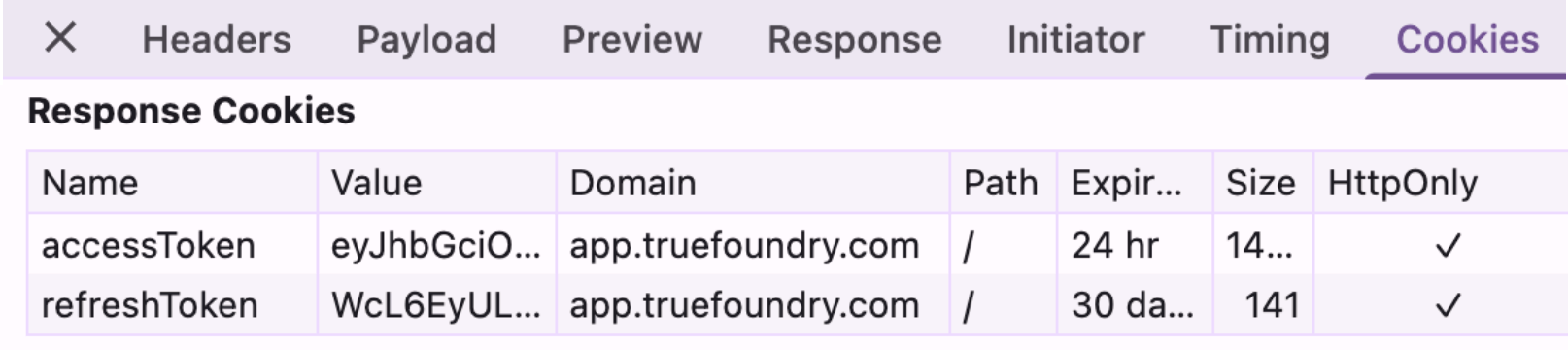
La duración predeterminada en la Opción 1 es de 1 día para el token de acceso y 7 días para el token de refresco, pudiendo modificarse mediante el soporte técnico. En la Opción 2 con SAML, EXTERNAL_SAML_ACCESS_TOKEN_EXPIRY_SECONDS define la caducidad del token de acceso, fijada por defecto en 3600 segundos. Los usuarios desactivados se rechazan durante el flujo de autenticación, donde la respuesta del IdP se vincula a un usuario por su correo electrónico.
Considerando un entorno con Okta, donde el equipo de seguridad ha estandarizado el uso de SAML, y el grupo ml-platform debe administrar los clusters mientras que el resto de los usuarios mantiene un acceso de solo lectura.
El proceso no varía sustancialmente al utilizar OIDC: los pasos 1 a 3 se simplifican en una única URL de callback fija y tres valores de campo, mientras que los pasos 4 a 6 se mantienen idénticos. Esta es la dimensión real de la elección del protocolo.
Para aprovisionar usuarios y equipos automáticamente en lugar de hacerlo durante el primer inicio de sesión, activa SCIM en Settings → Security & Access → Provisioning, copia la SCIM Base URL, genera un token Bearer e introduce ambos datos en Okta.
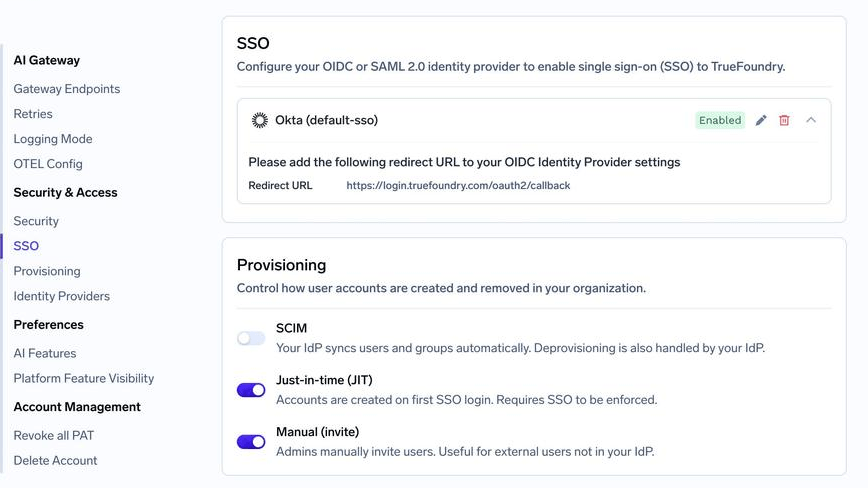
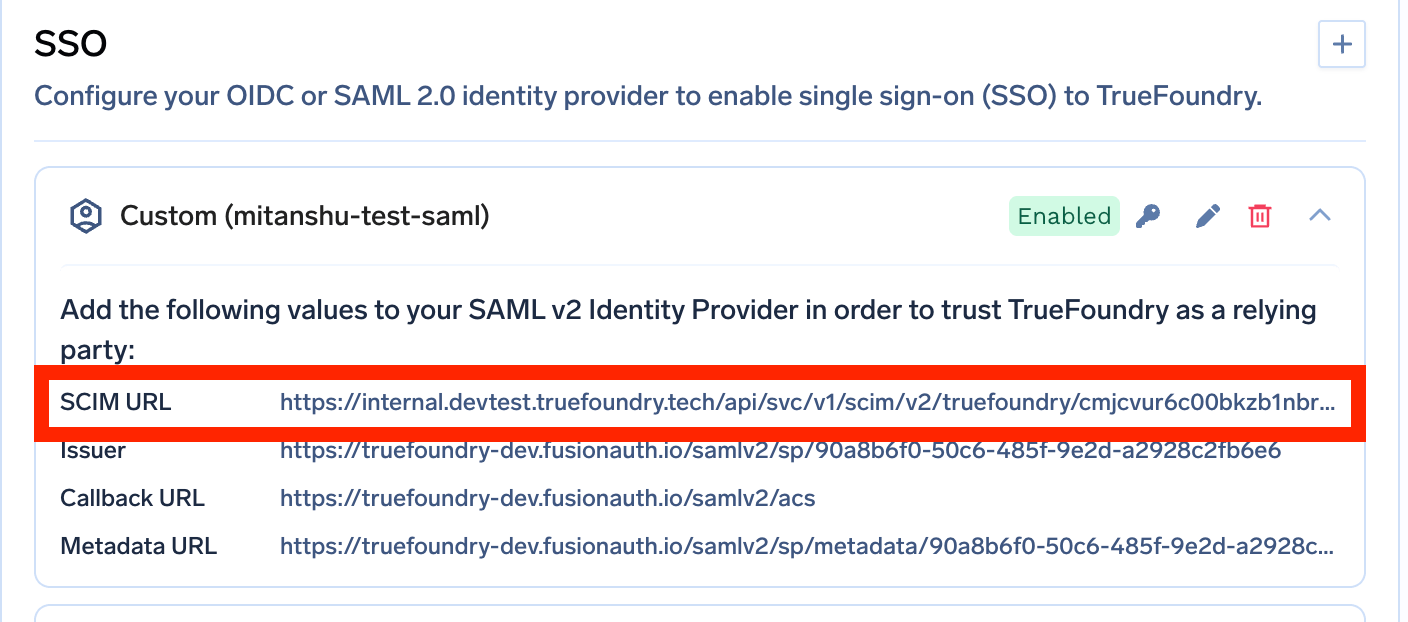
En Entra ID y Okta, SCIM requiere SAML. Este representa el único caso donde la elección de protocolo tiene un impacto determinante en TrueFoundry. Si utilizas cualquiera de estos IdPs y requieres aprovisionamiento automatizado, debes seleccionar SAML, tomando esta decisión antes de crear la aplicación OIDC.
Nombres de grupos SCIM restringidos. El nombre del grupo en el IdP se asigna directamente como nombre del equipo: solo admite caracteres alfanuméricos, guiones y guiones bajos, con un límite de 36 caracteres. Una denominación como ML Platform (EMEA) no se procesará correctamente.
La eliminación de una configuración de SSO puede fallar mostrando un error que indica que la configuración no está sincronizada con el servidor de autenticación central. Se debe reintentar la eliminación añadiendo force=true en la API de configuración, requiriéndose el permiso Manage Settings en el tenant.
Single Logout en SAML suele fallar por dos motivos predecibles. Un certificado que no corresponda al par público de EXTERNAL_SAML_SP_PRIVATE_KEY genera el error "Invalid Signature"; un SP Entity ID que no coincida exactamente con <CONTROL_PLANE_URL> devuelve el error "Issuer does not match".
La elección entre SAML y OIDC representa una decisión de menor alcance de lo que su volumen de búsquedas sugiere. Ambos protocolos autentican a los usuarios de forma segura y cuentan con soporte generalizado, por lo que se recomienda seguir el estándar que tu equipo de IdP ya gestione. Es aconsejable optar por OIDC cuando se trabaje con clientes móviles o single-page (SPA), se requieran tokens de API o se busque evitar la gestión manual de la caducidad de certificados. Conviene mantener SAML cuando la organización ya opere sobre esta infraestructura, cuando el SP y el IdP no puedan comunicarse directamente entre sí o cuando una funcionalidad específica dependa exclusivamente de esta vía.
El aspecto que requiere mayor atención es la ruta que sigue el tráfico de autenticación. En TrueFoundry ambos protocolos funcionan de forma idéntica en cualquier modelo de despliegue, pero solo uno mantiene todos los inicios de sesión dentro de tu red local. En entornos regulados, este es el criterio que evalúan las auditorías, independientemente de la tecnología XML utilizada.
TrueFoundry AI Gateway ofrece una latencia de entre 3 y 4 ms, gestiona más de 350 RPS en una vCPU, se escala horizontalmente con facilidad y está listo para la producción, mientras que LitellM presenta una latencia alta, tiene dificultades para superar un RPS moderado, carece de escalado integrado y es ideal para cargas de trabajo ligeras o de prototipos.




SAML 2.0 envía una aserción XML firmada a través del navegador a su URL de ACS, verificada con un certificado X.509 fijado. OIDC es una capa de identidad sobre OAuth 2.0 que devuelve un ID token JWT firmado, verificado con claves obtenidas en tiempo real del endpoint JWKS del IdP. Ambos autentican usuarios en aplicaciones web; OIDC cubre además aplicaciones móviles, SPA y tokens de acceso a API.
No de forma inherente. Ambos están firmados y son maduros. OIDC tiene una superficie de implementación menor, y JWKS elimina el fallo por caducidad de certificados que está detrás de la mayoría de las caídas reales de SAML. Configurados correctamente, ambos ofrecen las mismas garantías.
Use el que su IdP y su equipo de seguridad ya operen a escala. Para el SSO basado en navegador, ambos son funcionalmente equivalentes, así que los factores decisivos son operativos: los runbooks existentes, si necesitan autenticarse clientes que no son navegadores y si alguna función que necesita está disponible solo en una de las dos vías. En TrueFoundry con Entra ID u Okta, SCIM requiere SAML.
Sí. TrueFoundry se ejecuta en su VPC, on-prem, en entornos air-gapped o híbridos, de modo que los prompts y las respuestas nunca salen de su dominio, incluso cuando enruta entre muchos proveedores.
Sí. Incluye un MCP Gateway, un Agent Gateway y un MCP & Agents Registry con control de acceso a nivel de herramienta. Los agentes creados con LangGraph, CrewAI, AutoGen o un framework propio pueden gobernarse de forma centralizada.
Sí. La pasarela es compatible con OpenTelemetry y se integra con Grafana, Datadog, Prometheus o tu pila preferida. Rastrea cada solicitud desde la instrucción (prompt) hasta la ejecución de la herramienta y el modelo, así obtienes un registro unificado sin tener que reemplazar lo que ya tienes en funcionamiento.



Las últimas noticias, artículos y recursos enviados a tu bandeja de entrada

.png)
.png)
.webp)
.webp)
.png)
.png)
.png)
.png)
.webp)
.webp)

.png)
.png)
.png)


