


.png)
November 4, 2026
|
5 minutos de lectura


Obtenga acceso instantáneo a un entorno TrueFoundry en vivo. Implemente modelos, dirija el tráfico de LLM y explore la plataforma completa: su sandbox estará listo en segundos, sin necesidad de tarjeta de crédito.



¡Una forma increíblemente rápida de crear, rastrear e implementar sus modelos!
Un único bucle de llamada a herramientas funciona bien para una tarea que termina en cuatro pasos. Pero se desmorona en trabajos que duran una hora. El modelo pierde el hilo de lo que estaba haciendo, el historial de la conversación supera la ventana de contexto y un resultado de una herramienta pesada contamina todo lo que viene después.
Lo que separa una demo de un agente funcional es el harness: planificación para que el agente pueda descomponer y realizar un seguimiento de su propio trabajo, un lugar donde almacenar el estado intermedio que no sea el historial de mensajes, delegación para que las subtareas tengan un contexto limpio y compactación para que las ejecuciones largas no se desplomen. LangGraph Deep Agents es la respuesta empaquetada de LangChain para estos cuatro puntos.
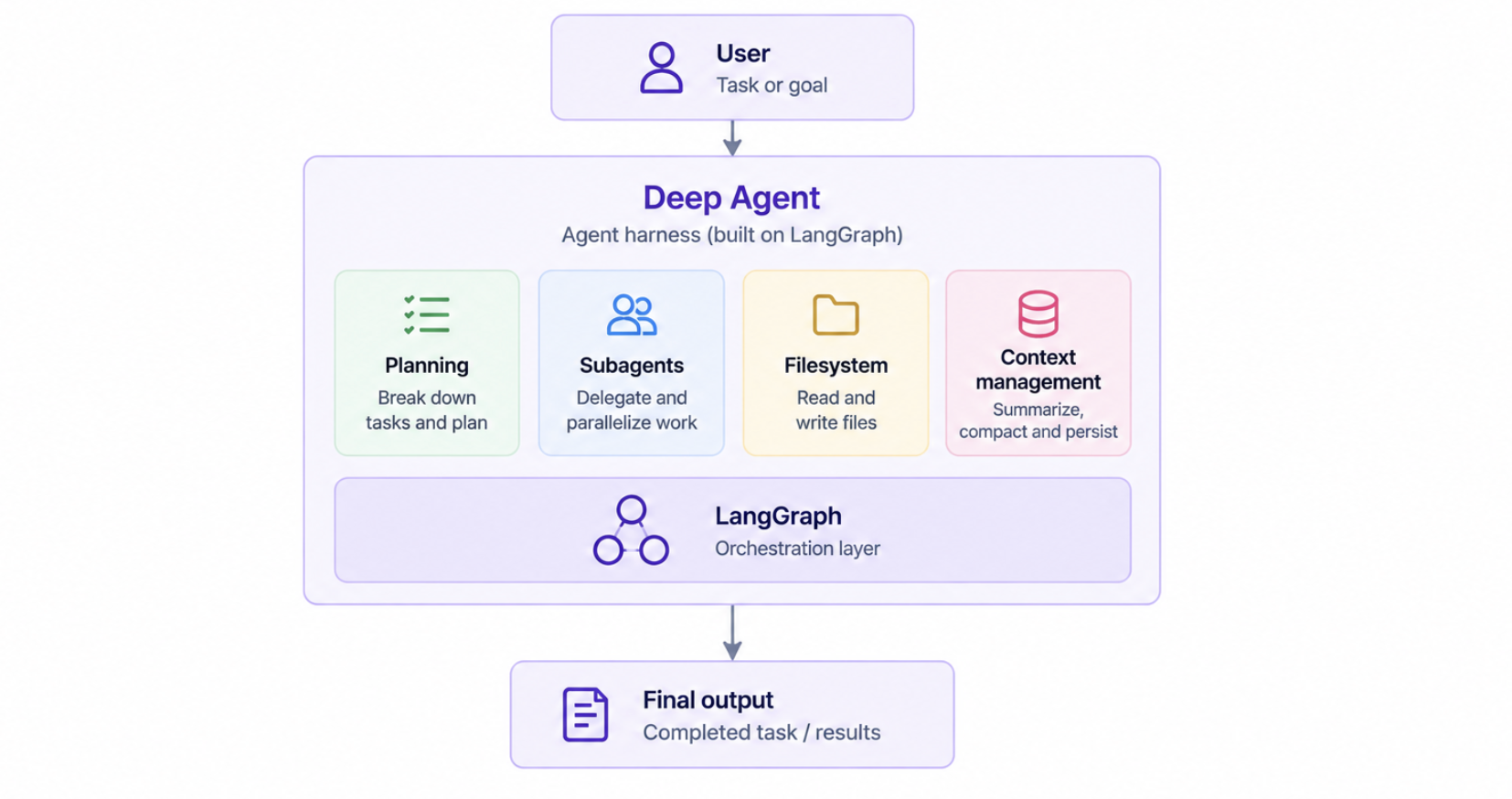
Deep Agents es un harness de agentes de código abierto con licencia MIT del equipo de LangChain, distribuido como el paquete deepagents en Python y deepagents en npm para JavaScript y TypeScript. Ha acumulado aproximadamente 15 000 estrellas en GitHub desde su lanzamiento.
El punto de entrada es una única función:
Esa llamada devuelve un grafo de LangGraph compilado, listo para invocar o desplegar. Detrás, el harness ya ha adjuntado una herramienta de planificación, acceso al sistema de archivos, capacidad de subagente, resumen y un prompt del sistema integrado que indica al modelo cómo utilizar todo ello. Tú proporcionas el modelo y tus herramientas de dominio; el harness proporciona la estructura.
El paquete de JavaScript publica puntos de entrada específicos para cada entorno (deepagents para Node, deepagents/browser para un uso seguro en el navegador) y declara los paquetes de tiempo de ejecución de LangChain como dependencias del mismo nivel, de modo que tu aplicación controla sus versiones y todo se resuelve en una única copia compartida.
Deep Agents está ensamblado a partir de middleware. Cada pieza adjunta herramientas e instrucciones de prompt al agente, y puedes anular o eliminar cualquiera de ellas. Entender el conjunto predeterminado es la forma más rápida de comprender lo que estás obteniendo.
Añade una herramienta write_todos . El agente desglosa un objetivo en tareas, las registra y actualiza el progreso a medida que avanza. Esto parece trivial, pero no lo es: un plan explícito y editable es lo que permite a un modelo recuperar su posición después de veinte llamadas a herramientas en lugar de ir a la deriva.
Añade ls,read_file,write_file,edit_file,glob,grepydelete, además de una herramienta opcional execute cuando el backend lo permite. El sistema de archivos es la memoria de trabajo del agente. En lugar de cargar con un volcado de 40.000 tokens en el historial de mensajes, el agente lo escribe en un archivo y utiliza grep para extraer la parte que necesita más adelante.
Añade una herramienta task para delegar trabajo a subagentes, cada uno ejecutándose con una ventana de contexto aislada. El agente principal recibe un resultado en lugar de toda la exploración que lo generó, lo cual es la forma más eficaz de control de contexto disponible.
También existe soporte para subagentes asíncronos a través del Protocolo de Agentes, donde los subagentes responden inmediatamente con un ID de tarea y el agente principal continúa trabajando mientras estos se ejecutan. Dichos IDs de tarea se conservan en el estado del agente bajo async_tasks, por lo que sobreviven a la compactación y descarga de contexto. Funciona con LangGraph Platform o cualquier servidor autohospedado que implemente la especificación del Protocolo de Agentes.
Condensa el historial de mensajes cuando una conversación supera el límite de contexto. Esta es la parte que la mayoría de los equipos implementan mal manualmente, normalmente truncando desde el principio y perdiendo silenciosamente las instrucciones originales.
Reduce automáticamente el procesamiento redundante de tokens en los modelos de Anthropic. En una ejecución larga de un agente, donde el prompt del sistema y las definiciones de herramientas se reenvían en cada paso, esto supone un ahorro directo en la factura.
Repara el historial de mensajes cuando las llamadas a herramientas se interrumpen o cancelan antes de devolver resultados. Una solución poco vistosa para un tipo de fallo que, de otro modo, provocaría errores de validación por parte del proveedor a mitad de la ejecución.
Se añaden dos más cuando utilizas las funciones correspondientes: MemoryMiddleware persiste el contexto entre sesiones, cargando la memoria del agente desde archivos AGENTS.md , y SkillsMiddleware habilita habilidades personalizadas.
El sistema de archivos merece su propia sección porque gran parte del resto depende de él. Las habilidades, la memoria, la ejecución de código y la gestión del contexto leen y escriben a través del mismo sistema de archivos virtual, y lo mismo pueden hacer tus propias herramientas y middleware personalizados.
Es conectable. Los backends incluyen estado en memoria, disco local, el almacén de LangGraph, enrutamiento compuesto a través de varios backends y backends en sandbox para una ejecución aislada. Cambiar de backend modifica dónde residen físicamente los archivos sin alterar el código del agente, lo que permite que el mismo agente pueda ejecutarse en un notebook, en CI y en producción.
El entorno también admite reglas de permisos declarativas que controlan qué archivos y directorios puede leer o escribir el agente. Las reglas se pasan como una lista al crear el agente, se evalúan en el orden de declaración con una semántica de "la primera coincidencia gana" y se aplican a las herramientas integradas del sistema de archivos. Cabe destacar para quienes diseñen agentes con privilegios mínimos: los subagentes declarativos no heredan las restricciones del sistema de archivos del padre. Debes proporcionar a cada subagente su propia instancia de FilesystemMiddleware para restringirlo de forma independiente.
Aquí es donde la mayoría de la cobertura sobre el tema se equivoca, por lo que merece la pena aclararlo. Buscar "deep agents vs langgraph" implica elegir entre dos opciones. No existe tal elección. create_deep_agent() devuelve un grafo de LangGraph. Deep Agents es LangGraph con un entorno preensamblado encima.
LangChain describe tres capas de la misma pila:
create_agent cuando quieras un entorno más ligero sin el middleware incluidoLas capas se complementan en lugar de competir. Cualquier CompiledStateGraph de LangGraph puede integrarse como un subagente dentro de un Deep Agent, por lo que la orquestación personalizada encaja junto a los valores predeterminados del entorno. Puedes empezar con create_deep_agent(), encontrarte con un flujo de trabajo que el bucle estándar no gestiona bien, desarrollar esa parte específica como un grafo de LangGraph y asignársela al entorno como un subagente. No se desperdicia nada.
Si aún estás tratando de entender dónde se sitúa LangGraph respecto al ecosistema más amplio de LangChain, nuestro análisis comparativo entre LangChain y LangGraph cubre esa capa.
La decisión no depende tanto de la capacidad como de cuánto control quieras tener sobre el entorno. Cada valor predeterminado que aceptas es algo que no tienes que construir, pero también algo que no puedes cambiar sin bajar un nivel.
Utiliza Deep Agents cuando el trabajo sea a largo plazo y de final abierto: investigaciones que abarcan decenas de fuentes, cambios de código en múltiples archivos o generación de documentos donde el agente necesita un lugar para guardar borradores. Úsalo también cuando quieras tener un agente fiable funcionando esta semana en lugar del mes que viene.
Utiliza create_agent cuando sepas exactamente qué herramientas necesitas y la tarea se complete en unos pocos pasos. Cargar una herramienta de planificación y un sistema de archivos virtual en un agente de clasificación de tres pasos solo añade sobrecarga de prompts y latencia innecesaria.
Utiliza LangGraph directamente cuando el flujo de control sea el problema principal: ramificaciones explícitas, enrutamiento determinista, puntos de aprobación humana en nodos específicos o ciclos que no sean un simple bucle de llamada a herramientas. Si sientes que estás luchando contra el entorno para expresar tu flujo, es que lo has superado. Para los patrones multiagente que van más allá de un solo agente, nuestra guía sobre orquestación multiagente cubre el territorio.
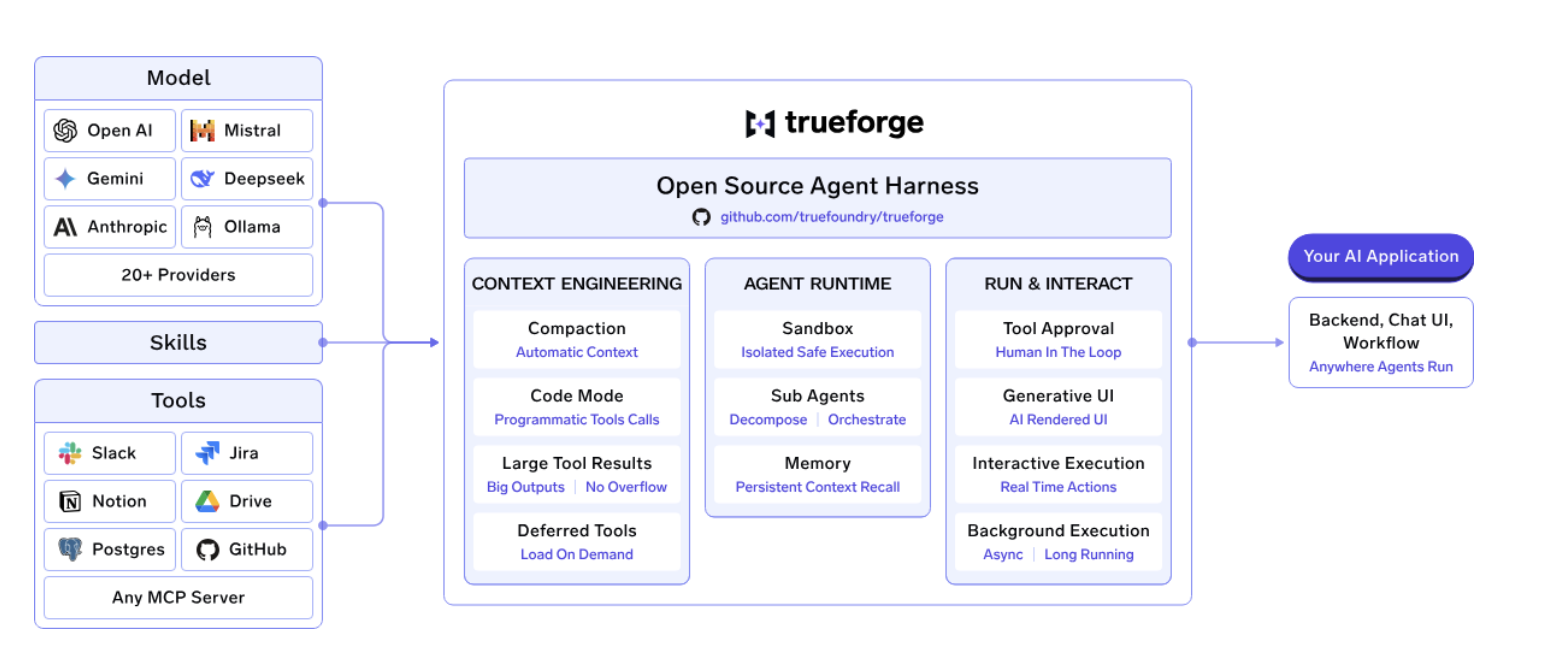
LangChain Deep Agents resuelve gran parte del trabajo complejo dentro de un agente individual, incluyendo la planificación, los subagentes, las herramientas de sistema de archivos, las habilidades, la memoria y la ejecución de larga duración. Pero una vez que gestionas agentes en varios equipos, el problema deja de ser la creación del agente y pasa a serla gestión de la flota.
TrueForgees el entorno de ejecución de agentes de código abierto y neutral de TrueFoundry para esa capa de tiempo de ejecución. Gestiona el bucle del agente en torno al modelo, incluyendo la planificación, las llamadas a herramientas, la gestión del contexto, las aprobaciones y el estado de la sesión, permitiéndote utilizar tus propios modelos, servidores MCP y proveedores de sandbox.
Puede ejecutarlo localmente connpx @truefoundry/trueforge, o despliega el mismo entorno para un equipo utilizando Docker Compose o Helm.Consulta la documentación de TrueForge.
TrueForge también ofrece varios mecanismos para controlar la cantidad de contexto y datos de herramientas que recibe el modelo.
Carga diferida de herramientassignifica que los esquemas de herramientas MCP se cargan bajo demanda en lugar de llenar la ventana de contexto desde el principio. El modo de código permite al agente encadenar varias llamadas a herramientas dentro de un único script en un entorno aislado (sandbox), de modo que solo el resumen impreso entra en el contexto, en lugar de cada resultado intermedio.Las respuestas de herramientas demasiado grandes se descargana un archivo en el entorno aislado y se reemplazan por una ruta y una vista previa. La compactación se activa al 80% de la longitud del contexto del modelo y sustituye el historial antiguo por un resumen estructurado, que es la respuesta directa para la reproducción. Los subagentes se ejecutan con su propio contexto limpio y solo devuelven el resultado.
El modelo de entorno aislado es la otra palanca. La mayoría de los sistemas envuelven toda la sesión en un contenedor. TrueForge trata el entorno aislado como una herramienta y lo inicia solo cuando el agente realmente necesita ejecutar código, por lo que un servidor puede ejecutar muchos agentes a la vez y los turnos que no tocan código siguen siendo económicos.
TrueForge también está estructurado como un tiempo de ejecución (runtime) en lugar de ser solo una interfaz de biblioteca.
ElEl servidor centralejecuta el bucle del agente y proporciona streaming, puertas de aprobación, delegación de subagentes, compactación y sesiones persistentes. UnaAPI HTTP y SDK de TypeScript(@truefoundry/trueforge-sdk) exponen las mismas capacidades mediante programación. Unainterfaz de chat y un SDK de interfaz de usuario(@truefoundry/trueforge-ui) pueden utilizarse directamente, personalizarse con temas o integrarse en otro producto.
Esto ofrece a los equipos una superficie de despliegue más allá de la propia definición del agente en Python: el mismo tiempo de ejecución puede impulsar una aplicación, una API o una experiencia de agente integrada.
Los modelos, los servidores MCP y los proveedores de entornos aislados son de libre elección. Cuando sale un modelo más económico, simplemente lo apuntas en lugar de reescribir el agente; así es como la misma prueba de rendimiento ejecutada en GLM-5.2 resolvió las mismas ~11 de 14 tareas por 2,90 $ por ejecución.
La diferencia entre un marco de trabajo para agentes y un tiempo de ejecución para agentes se vuelve más clara cuando los comparas con las mismas cargas de trabajo. TrueFoundry evaluóTrueForge y Deep Agentsen el Enterprise-Bench de DevRev, que consta de 14 tareas empresariales intersistémicas. Cada tarea requiere que el agente planifique, invoque herramientas MCP a través de un CRM, un gestor de proyectos y un almacén de documentos, combine los resultados y devuelva una respuesta que cumpla con la rúbrica de evaluación. Ambos entornos ejecutaron las mismas tareas con los mismos servidores MCP, y las respuestas fueron puntuadas por un juez LLM a ciegas.
ConOpus 4.8 como constante, ambos entornos produjeron una precisión de tarea similar, pero sus costes de ejecución fueron diferentes:
El benchmark muestra una diferencia relativamente pequeña en la precisión de las tareas, pero una diferencia mucho mayor en el coste de ejecución. TrueForge utilizómenos de una cuarta parte de los tokensutilizados por Deep Agents y fue aproximadamente2,5 veces más barato por ejecucióncon el mismo modelo.
La diferencia proviene en gran medida de cómo gestionan la orquestación y el contexto ambos entornos de ejecución. Deep Agents ofrece capacidades como planificación, un sistema de archivos virtual y subagentes, pero estos también pueden añadir más orquestación y contexto a cada turno. TrueForge adopta un enfoque más ligero, utilizando llamadas a herramientas específicas y compactación de contexto para evitar enviar repetidamente grandes historiales y respuestas de herramientas al modelo. Esto es importante porqueel coste de un agente no viene determinado únicamente por el precio del modelo. Dos sistemas de agentes que ejecutan el mismo modelo pueden tener un consumo de tokens muy diferente dependiendo de cómo implementen la planificación, el uso de herramientas, la gestión del contexto y los subagentes.
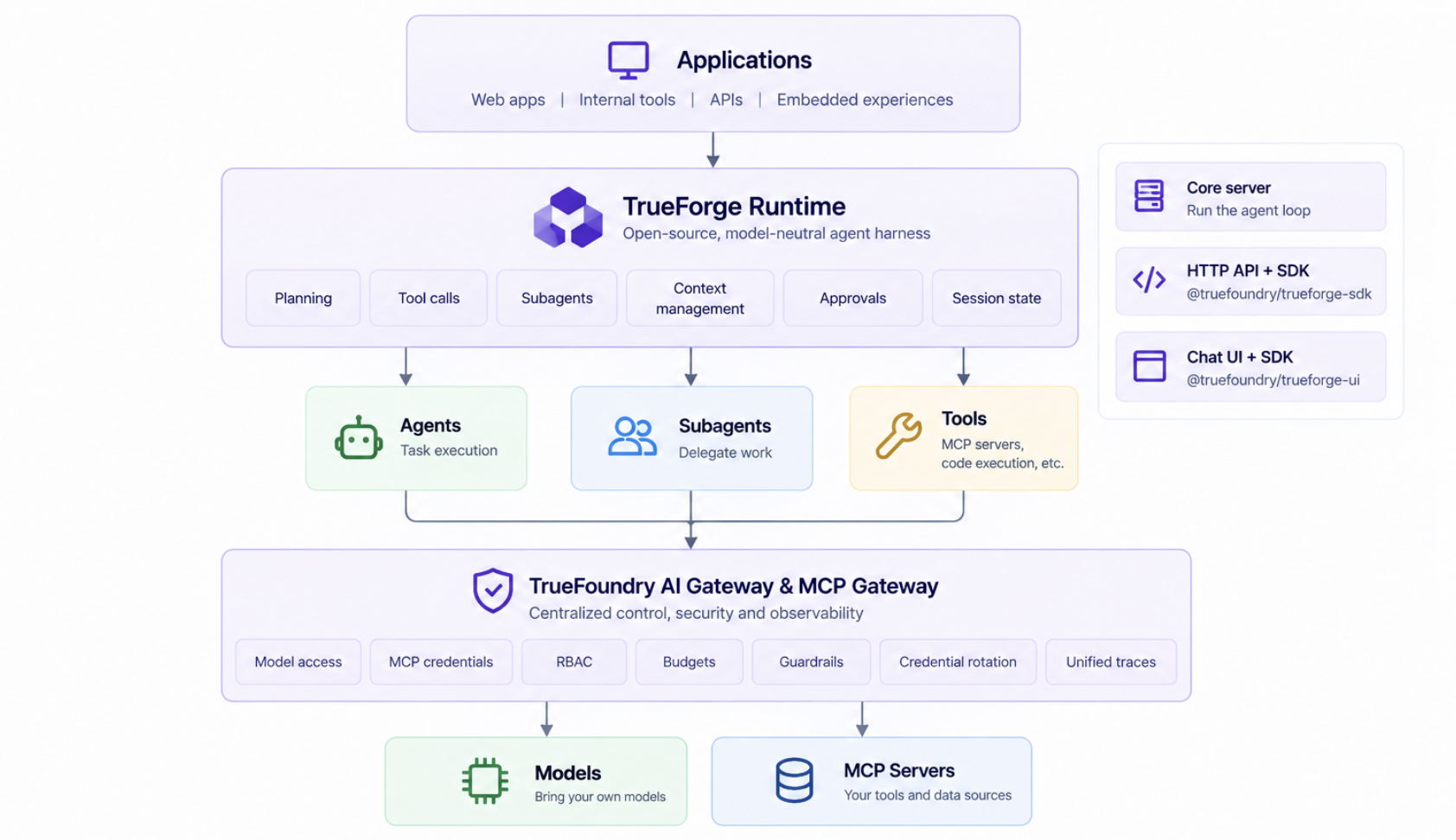
TrueForge también puede conectarse a la AI Gateway y a la MCP Gateway de TrueFoundry para proporcionar los controles que cobran importancia una vez que los agentes dejan de ser proyectos aislados, incluyendoacceso centralizado a modelos, credenciales MCP, RBAC, presupuestos, barreras de seguridad, rotación de credenciales y trazas unificadas. Esto traslada esas preocupaciones de las definiciones individuales de los agentes a una capa de plataforma compartida.
Para los equipos que evalúan Deep Agents para producción, el benchmark es un recordatorio útil de que el framework es solo una parte de la pila tecnológica. Laarquitectura del entorno de ejecución en torno al agente puede tener un impacto significativo en el uso de tokens, la latencia y el coste. TrueForge está diseñado para proporcionar esa capa de ejecución manteniendo abiertas las opciones de modelo e infraestructura.
Deep Agents, create_agenty LangGraph se sitúan en diferentes niveles de abstracción dentro del stack de agentes de LangChain. create_agent ofrece un bucle de agente ligero, mientras que LangGraph proporciona las primitivas de grafo subyacentes para los desarrolladores que necesitan definir el flujo de ejecución por sí mismos. Deep Agents se basa en LangGraph para ofrecer un entorno de agente más completo con capacidades de planificación, subagentes, gestión de contexto y sistema de archivos.
La elección, por tanto, depende de cuánto control quieras tener sobre el tiempo de ejecución del agente. Si un bucle de agente estándar y las capacidades integradas son suficientes, Deep Agents reduce la cantidad de infraestructura que necesitas construir. Si necesitas un bucle ligero, create_agent proporciona un punto de partida más sencillo. Cuando el flujo de ejecución es el requisito principal, LangGraph te ofrece las primitivas para diseñarlo de forma explícita.
Para los equipos que buscan más allá del ecosistema de LangChain, TrueForge adopta otro enfoque: un entorno de agente de código abierto y neutral respecto al modelo, que proporciona la capa de ejecución manteniendo el modelo y la infraestructura subyacente bajo tu control.
P: ¿Qué son los Deep Agents de LangGraph?
R: Deep Agents es el entorno de agente de código abierto de LangChain, con licencia MIT, construido sobre LangGraph. Al llamar a create_deep_agent() se obtiene un grafo de LangGraph compilado que ya incluye planificación, un sistema de archivos virtual, delegación de subagentes, resumen y almacenamiento en caché de prompts como middleware. Existe para que los equipos no tengan que construir manualmente la estructura que necesitan los agentes de larga ejecución.
P: ¿Es Deep Agents un reemplazo para LangGraph?
R: No. Deep Agents está construido sobre LangGraph y devuelve un grafo de LangGraph. Son capas del mismo stack, no opciones que compitan entre sí. Utiliza Deep Agents cuando la estructura predeterminada del agente se ajuste a tu tarea, y recurre a LangGraph cuando necesites un flujo de control personalizado. Cualquier grafo de LangGraph puede integrarse en un deep agent como subagente.
P: ¿Qué middleware incluye un deep agent por defecto?
R: Seis componentes: TodoListMiddleware para la planificación, FilesystemMiddleware para operaciones de archivos, SubAgentMiddleware para delegación con contexto aislado, SummarizationMiddleware para compactación de contexto, AnthropicPromptCachingMiddleware para ahorro de tokens en modelos de Anthropic, y PatchToolCallsMiddleware para reparar llamadas a herramientas interrumpidas. MemoryMiddlewareySkillsMiddleware adjuntar cuando utilice memoria o habilidades.
P: ¿Es compatible TrueFoundry con MCP y agentes de IA?
Sí. TrueFoundry incluye una puerta de enlace MCP, una puerta de enlace de agentes y un registro de MCP y agentes con control de acceso a nivel de herramienta. Los agentes creados en Deep Agents, LangGraph, CrewAI, AutoGen o marcos de trabajo personalizados pueden implementarse y gestionarse de forma centralizada.
P: ¿Puedo desplegar TrueFoundry en mi propia VPC o de forma local (on-prem)?
Sí. TrueFoundry se ejecuta en su VPC, de forma local (on-prem), en entornos aislados (air-gapped), híbridos o en múltiples nubes, y ningún dato sale de su dominio. Esta es la razón principal por la que las empresas reguladas lo eligen frente a las puertas de enlace exclusivamente SaaS.
P: ¿Se integra con mi pila de observabilidad actual?
Sí. La puerta de enlace es compatible con OpenTelemetry y se integra con Grafana, Datadog, Prometheus o cualquier herramienta que ya utilice, rastreando cada solicitud desde el prompt hasta la ejecución de la herramienta y el modelo.
TrueFoundry AI Gateway ofrece una latencia de entre 3 y 4 ms, gestiona más de 350 RPS en una vCPU, se escala horizontalmente con facilidad y está listo para la producción, mientras que LitellM presenta una latencia alta, tiene dificultades para superar un RPS moderado, carece de escalado integrado y es ideal para cargas de trabajo ligeras o de prototipos.





Las últimas noticias, artículos y recursos enviados a tu bandeja de entrada
.png)
.webp)
.webp)
.png)
.png)
.png)
.png)
.webp)
.webp)

.png)
.png)
.png)


