


November 5, 2026
|
5 minutos de lectura


Obtenga acceso instantáneo a un entorno TrueFoundry en vivo. Implemente modelos, dirija el tráfico de LLM y explore la plataforma completa: su sandbox estará listo en segundos, sin necesidad de tarjeta de crédito.



.png)
¡Una forma increíblemente rápida de crear, rastrear e implementar sus modelos!
Kubernetes RBAC is the authorization mode that decides whether an authenticated request to the API server is allowed. It ships in the rbac.authorization.k8s.io/v1 API group and is enabled on essentially every managed cluster.
Authentication and authorization are separate steps. The API server first works out who you are – from a client certificate, OIDC token, ServiceAccount token, or cloud IAM identity – then asks RBAC whether that identity may perform this verb on this resource. RBAC never decides identity, only permission.
An RBAC rule matches on a small set of request fields:
Two properties matter more than any syntax detail.
RBAC is additive. There is no deny. If any binding grants a permission you have it, and the only way to remove it is to remove every binding that grants it. Hence the classic ticket: “I removed their admin role but they can still delete pods.”
RBAC is default-deny. A verb nobody granted is refused. So the practical risk is almost never a missing rule – it is a rule far broader than intended.
A Role is a namespaced object. It grants permissions on namespaced resources, and only inside the namespace it lives in.
apiVersion: rbac.authorization.k8s.io/v1
kind: Role
metadata:
  name: pod-reader
  namespace: team-alpha
rules:
  - apiGroups: [""]              # "" is the core API group
    resources: ["pods", "pods/log"]
    verbs: ["get", "list", "watch"]
A ClusterRole is not namespaced. It exists once for the whole cluster and expresses three things a Role cannot:
apiVersion: rbac.authorization.k8s.io/v1
kind: ClusterRole
metadata:
  name: node-viewer
rules:
  - apiGroups: [""]
    resources: ["nodes"]          # cluster-scoped
    verbs: ["get", "list", "watch"]
  - nonResourceURLs: ["/healthz"]
    verbs: ["get"]
The k8s Role vs ClusterRole question is usually asked as if it were about power. It is really about scope and reuse:
Four default ClusterRoles are worth knowing before you write your own: view (read most namespaced resources, deliberately excluding Secrets), edit (read/write most, including Secrets), admin (edit plus creating Roles and RoleBindings in the namespace), and cluster-admin (* on *, everywhere).
view, edit, and admin are aggregated ClusterRoles: the controller fills their rules from any ClusterRole labelled to match their aggregationRule. That is the supported way to extend them for your own CRDs.
A Role or ClusterRole on its own grants nothing. A binding attaches it to subjects.
A RoleBinding is namespaced and grants its roleRef to its subjects within its own namespace.
apiVersion: rbac.authorization.k8s.io/v1
kind: RoleBinding
metadata:
  name: alpha-pod-readers
  namespace: team-alpha
subjects:
  - kind: Group
    name: team-alpha-engineers
    apiGroup: rbac.authorization.k8s.io
roleRef:
  kind: Role
  name: pod-reader
  apiGroup: rbac.authorization.k8s.io
The most useful thing to know about RoleBinding in Kubernetes is that its roleRef may point at a ClusterRole, and permissions stay confined to the RoleBinding’s namespace. Define the capability once; grant it namespace by namespace:
apiVersion: rbac.authorization.k8s.io/v1
kind: RoleBinding
metadata:
  name: alpha-viewers
  namespace: team-alpha
subjects:
  - kind: ServiceAccount
    name: reporting
    namespace: team-alpha
roleRef:
  kind: ClusterRole
  name: view                     # scoped to team-alpha by this binding
  apiGroup: rbac.authorization.k8s.io
A ClusterRoleBinding removes that boundary, granting a ClusterRole everywhere – every namespace, plus all cluster-scoped resources in the role.
Three rules that catch people out:
RBAC recognises exactly three subject kinds, and what separates them is where they come from.
There is no User resource – you cannot kubectl create user. Kubernetes matches whatever username and group list the authenticator asserts against bindings as plain strings, so a typo in a subject name silently grants nothing, with no error at apply time.
ServiceAccounts are the identity your workloads use. A pod that does not name one runs as its namespace’s default account, which holds no permissions but whose token is still mounted and still authenticates – so set automountServiceAccountToken: false wherever a pod never calls the API server.
Kubernetes also synthesises groups you should never bind lightly: system:authenticated (every authenticated identity), system:serviceaccounts (all of them cluster-wide), and system:masters, which a default binding maps straight to cluster-admin.
The upstream guidance is short, and almost all of it is about scope.
Prefer namespaced Roles. Reach for a Role and RoleBinding first. Use a ClusterRole when the resource is genuinely cluster-scoped or you want one reusable definition – and even then bind it with a RoleBinding unless the subject truly needs every namespace.
Do not hand out cluster-admin. It is * on * including the RBAC objects themselves, so a holder can grant themselves anything permanently. Reserve it for break-glass.
Avoid wildcards. resources: ["*"] silently covers CRDs installed months later, and verbs: ["*"] includes deletecollection. Enumerate.
Bind groups, not individual users. A binding per person becomes a leaver-process problem. Map your IdP groups into the cluster and bind those, so team changes need no YAML edit.
Treat list on Secrets as read access to Secrets. list returns full object bodies, so it is no weaker than get. Secret reads also expose that namespace’s ServiceAccount credentials.
Know the escalation verbs. create on pods lets the holder run a pod as any ServiceAccount in the namespace and inherit its permissions. escalate and bind lift the guardrail that stops you granting permissions you do not hold. impersonate lets you act as another identity.
Audit with the tool, not the YAML. Because grants are additive and arrive from several bindings, only the API server has the real answer:
kubectl auth can-i delete pods --namespace team-alpha
kubectl auth can-i --list --namespace team-alpha
kubectl auth can-i list secrets \
--as=system:serviceaccount:team-alpha:reporting -n team-alpha
--as requires impersonation permission, which admins typically have. Apply RBAC manifests with kubectl auth reconcile, which merges rules and subjects rather than replacing them.
Reaching for ClusterRoleBinding when a RoleBinding would do. The most common real mistake. Someone needs view in their own namespace, the ClusterRole already exists, and a ClusterRoleBinding is one line shorter – and also grants read across every namespace, including wherever Secrets live.
Assuming namespaces isolate more than they do. A namespace is the scoping unit for RBAC and nothing else – not a network, node, or resource boundary. “They only have access to their namespace” is a claim about the API server, not the cluster.
Binding to system:authenticated for convenience. It looks like “everyone on the team.” It means every identity that can authenticate, including every ServiceAccount in every namespace.
Believing cluster RBAC covers the platform running on the cluster. A data scientist with zero Kubernetes permissions may still deploy a service, call a model, or read a secret, because those actions go through a platform API that cluster RBAC never sees.
Kubernetes RBAC answers one question precisely: who may perform this verb on this Kubernetes object? It has no opinion about a second question that matters just as much on an AI platform: who may deploy this model, use this provider account, call this MCP tool, or read this secret group? Those are not Kubernetes objects. They live in a control plane, reached through a platform API, and no Role or RoleBinding governs them.
TrueFoundry is Kubernetes-native – the compute plane is one or more of your own EKS, GKE, AKS, OpenShift, or on-prem clusters, connected outbound to the control plane by a lightweight tfy-agent. Both layers are present at once, so it pays to be exact about which is which.
The two models share a vocabulary, and not by coincidence. In TrueFoundry’s key concepts, a Cluster is an actual Kubernetes cluster and a Workspace is a Kubernetes namespace. Grant someone Workspace Member and you are scoping them to the same object a RoleBinding would.
What you are not doing is writing a RoleBinding. Platform roles and cluster RBAC objects are configured independently, in different places, and the docs describe no mechanism that generates, syncs, or translates one into the other. Two layers, one shared boundary. The docs draw the same line for audit: platform audit logs cover platform activity and explicitly do not replace infrastructure-level audit logs from Kubernetes or your cloud.
The model is subject + resource + role = role binding, which will look familiar. A subject is a user, team, virtual account, or agent; a resource is a cluster, workspace, repository, secret group, provider account, or MCP server. Grants start from the resource – open its three-dot menu and choose Access Control:

Then pick subjects and a role. The drawer lists the actions each role includes:
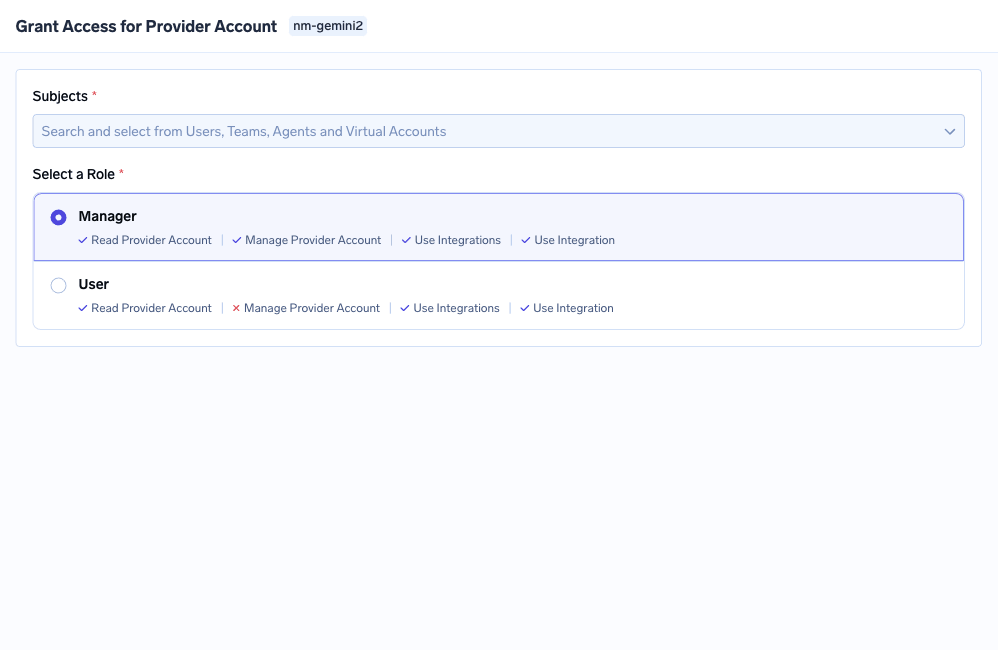
The roles offered depend on the resource type: Cluster Admin / Member / Viewer on a cluster, Workspace Admin / Member / Viewer on a workspace, Manager / User / Approver on an MCP server. Underneath, permissions are keys shaped resource:Action – cluster:ReadCluster, workspace:ManageWorkspace, secret-group:ReadData. Same rule shape as Kubernetes, different objects:
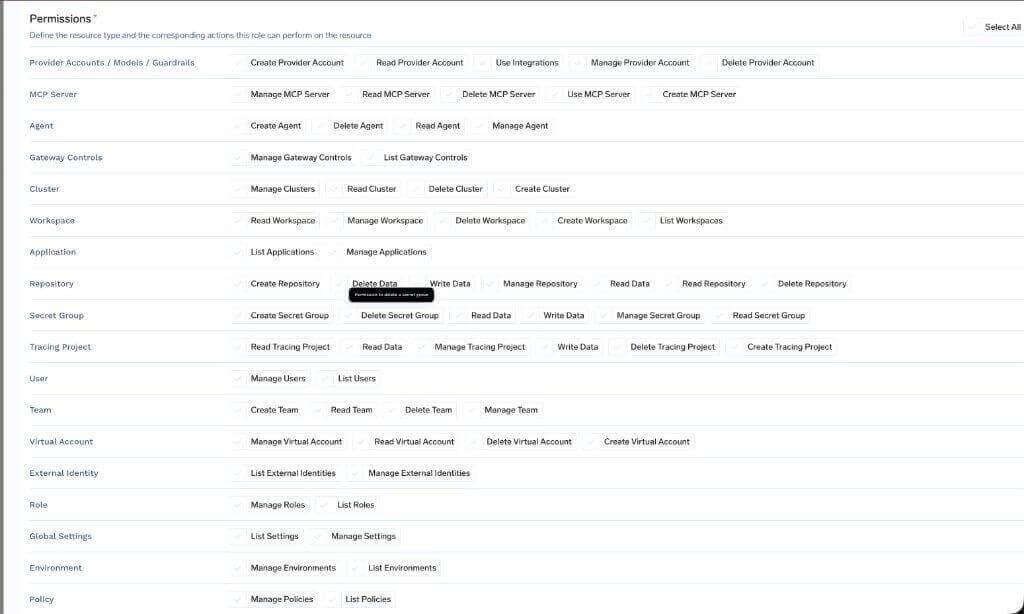
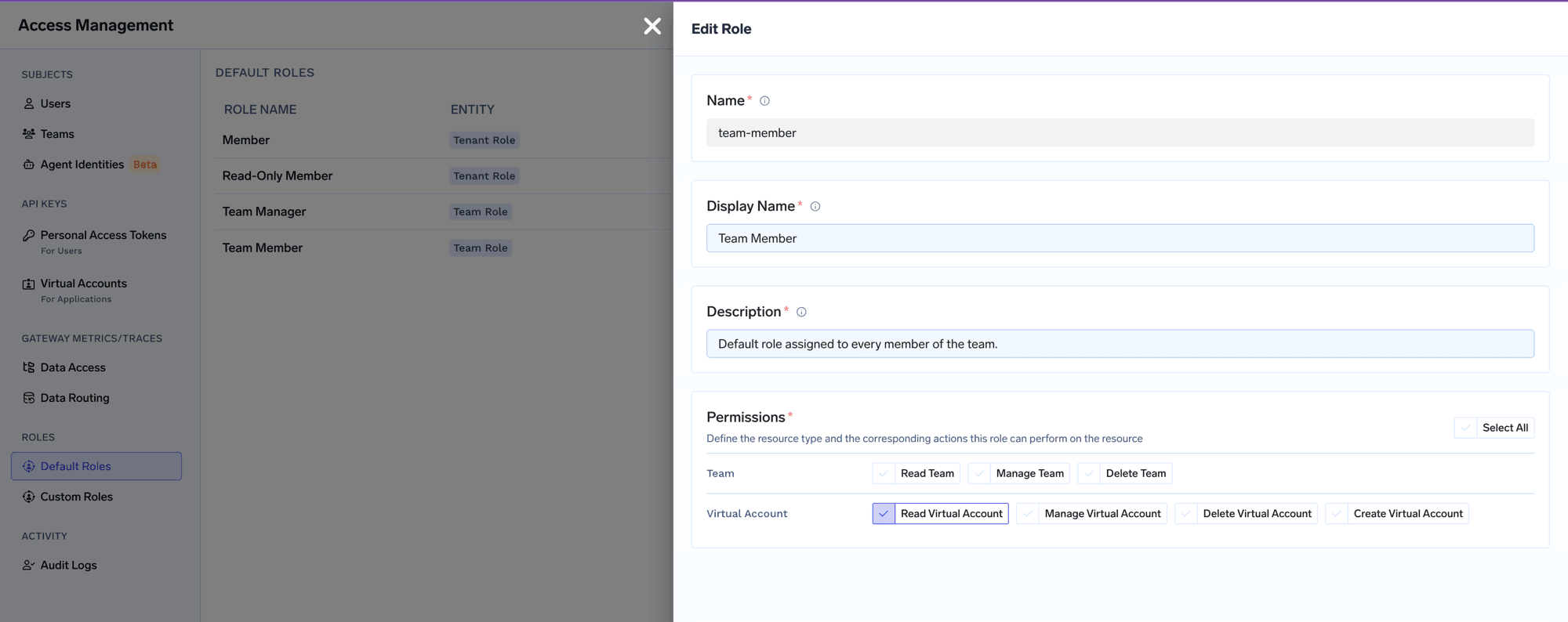
Tenant-wide roles are the platform analogue of a ClusterRoleBinding and carry the same warning. Admin and Read-Only Member cannot be edited. Member, the editable baseline every user gets, is deliberately thin – cluster:ReadCluster, user:ListUsers, agent:CreateAgent and a few more – reaching no individual workspace, model, or MCP server.
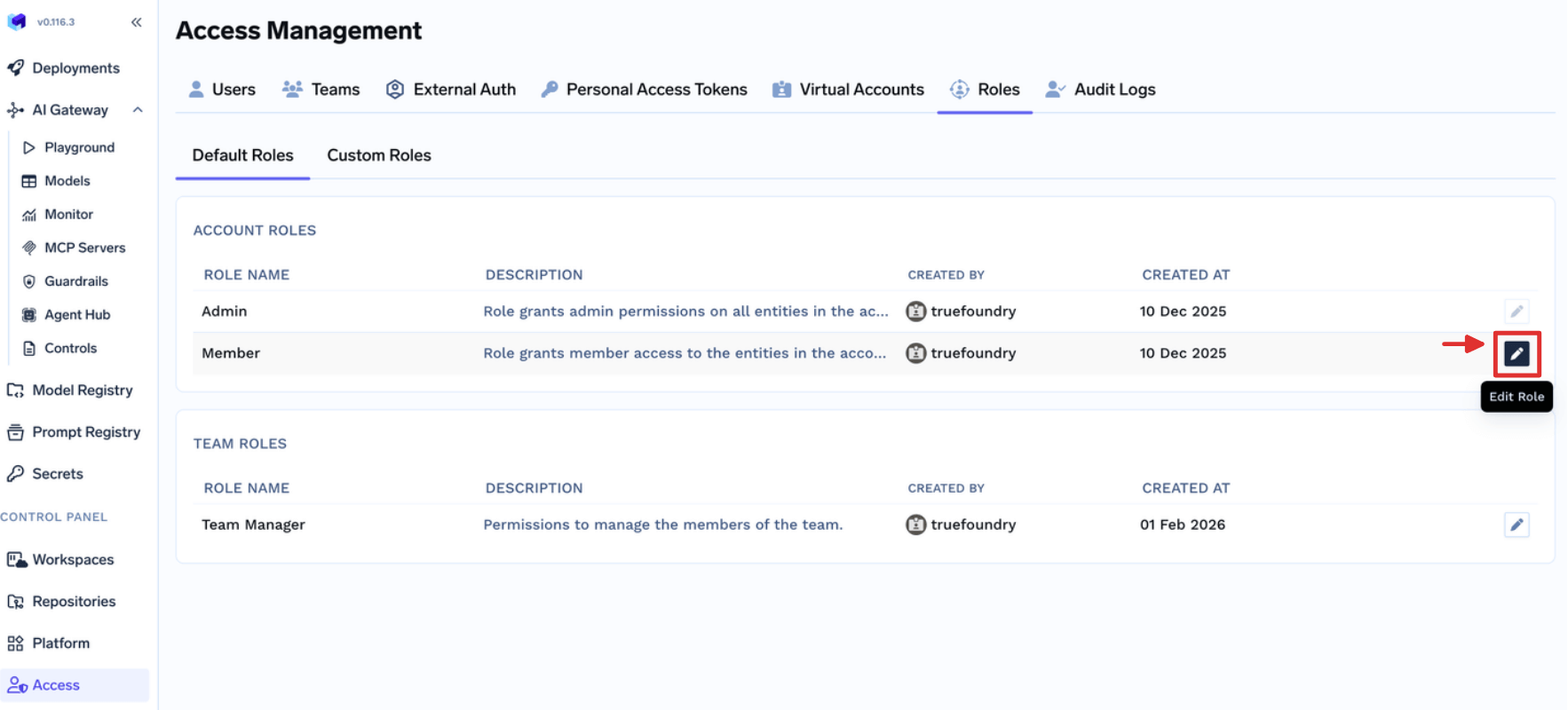
Team roles parallel a RoleBinding scoped by ownership: Team Member carries virtual-account:ReadVirtualAccount, limited to Virtual Accounts owned by teams the user belongs to.
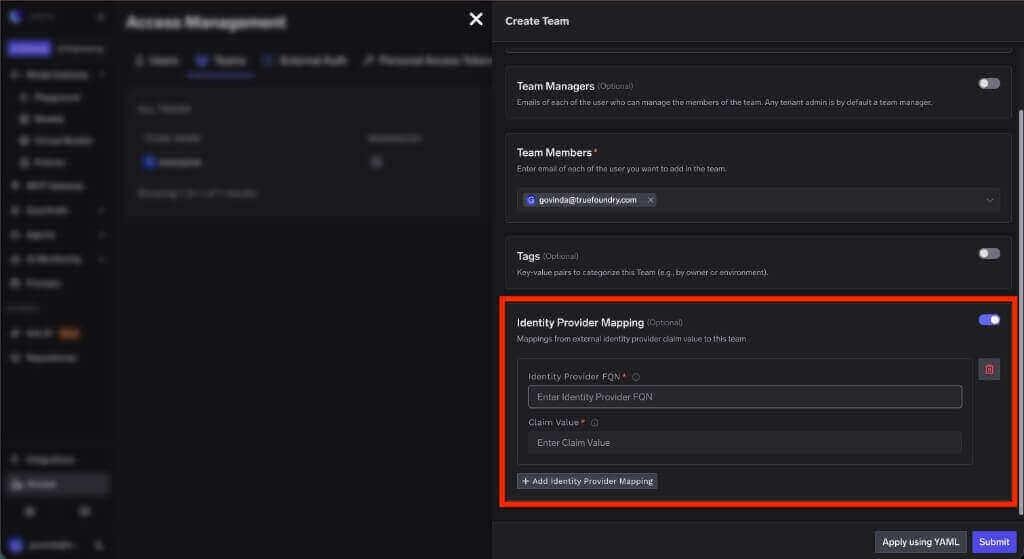
And the best practice about binding groups rather than users carries over intact. An IdP claim value maps to a TrueFoundry team, so the same directory group that drives your cluster bindings drives platform membership:
A realistic ask: let the ML team ship to their own namespace and stand up an MCP server, without making anyone a cluster admin or a tenant admin.
In Kubernetes. The namespace is ml-prod. Bind edit into that one namespace with a RoleBinding whose subject is the IdP-backed group:
apiVersion: rbac.authorization.k8s.io/v1
kind: RoleBinding
metadata:
  name: ml-team-edit
  namespace: ml-prod
subjects:
  - kind: Group
    name: ml-engineers
    apiGroup: rbac.authorization.k8s.io
roleRef:
  kind: ClusterRole
  name: edit
  apiGroup: rbac.authorization.k8s.io
Verify it, and check the blast radius in the negative direction too:
# --as-group must be paired with --as
kubectl auth can-i create deployments -n ml-prod \
  --as=priya --as-group=ml-engineers
kubectl auth can-i create deployments -n payments \
  --as=priya --as-group=ml-engineers
Note that edit includes Secrets in that namespace. If the team should not read them, bind a narrower custom ClusterRole.
In the platform. None of that lets anyone create an MCP server, because MCP servers are not Kubernetes objects. The instinct is to hand out Admin. Instead build a custom role from Access > Custom Roles holding exactly mcp-server:CreateMcpServer:
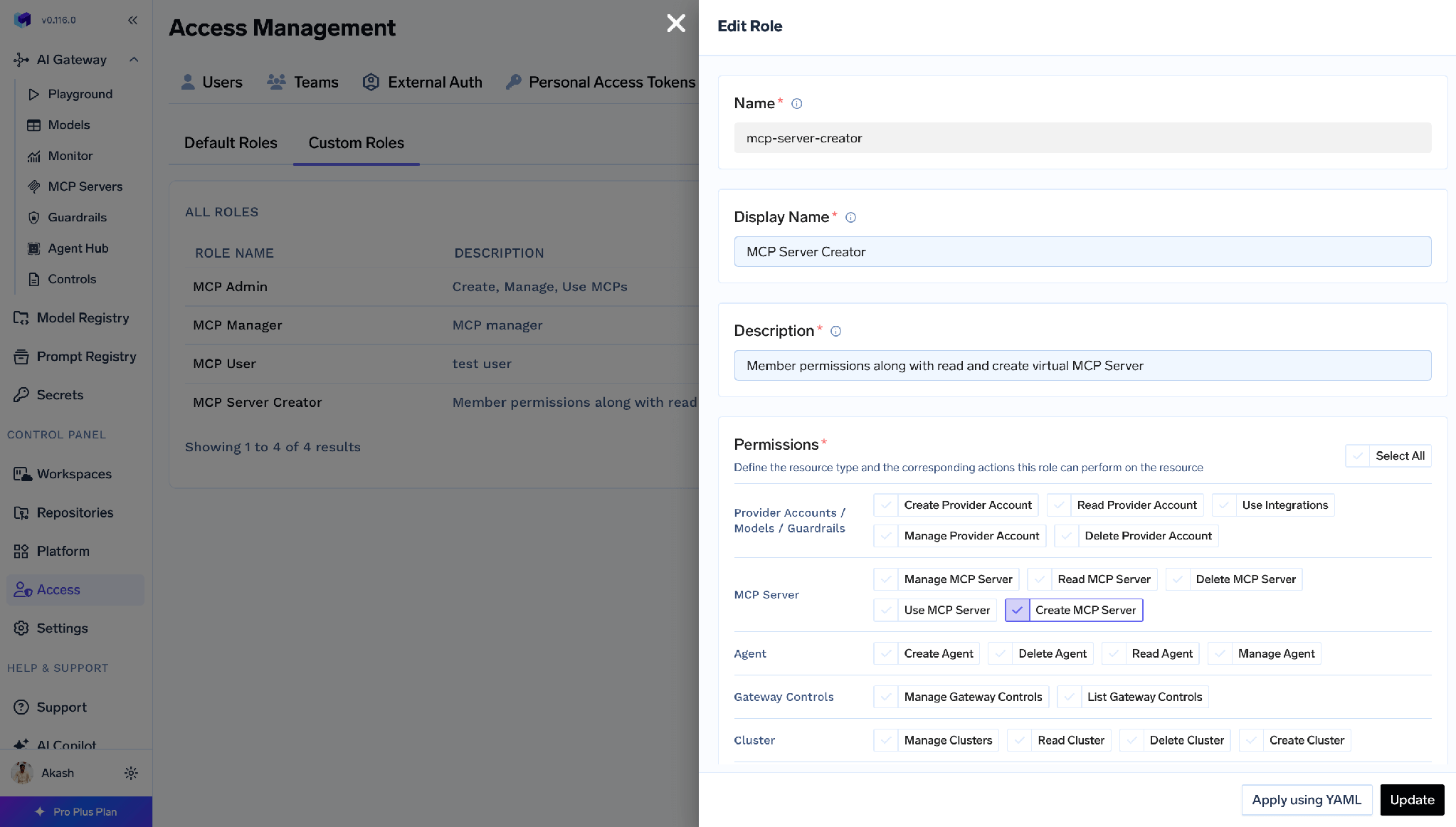
Then assign it from Access > Users or Access > Teams.
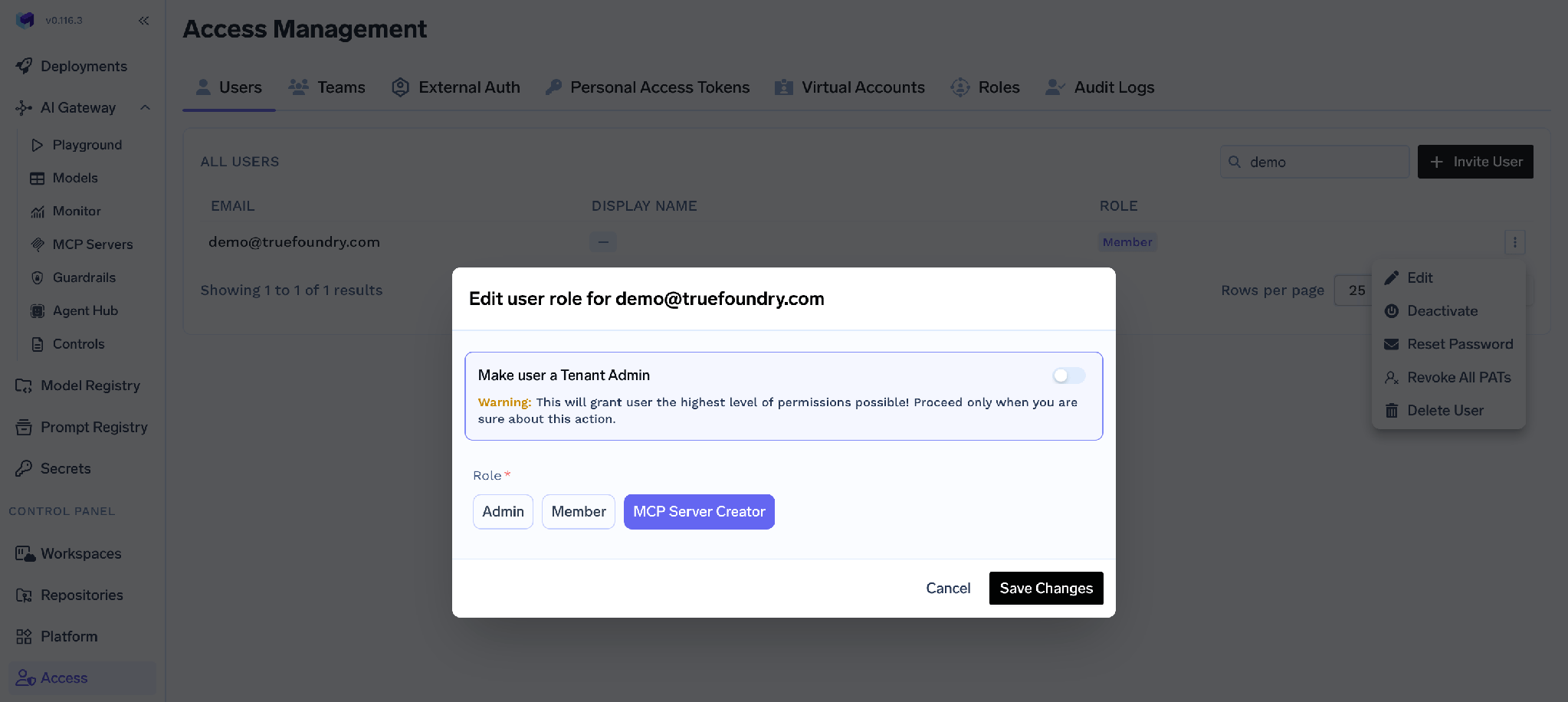
The behaviour mirrors Kubernetes precisely. Create MCP Server allows creating a new server and grants nothing on existing ones – exactly as create on a Kubernetes resource grants nothing on objects that already exist. The owner then grants themselves MCP Server Manager from that server’s own Access Control page, and MCP access control governs which tools the agent may call.
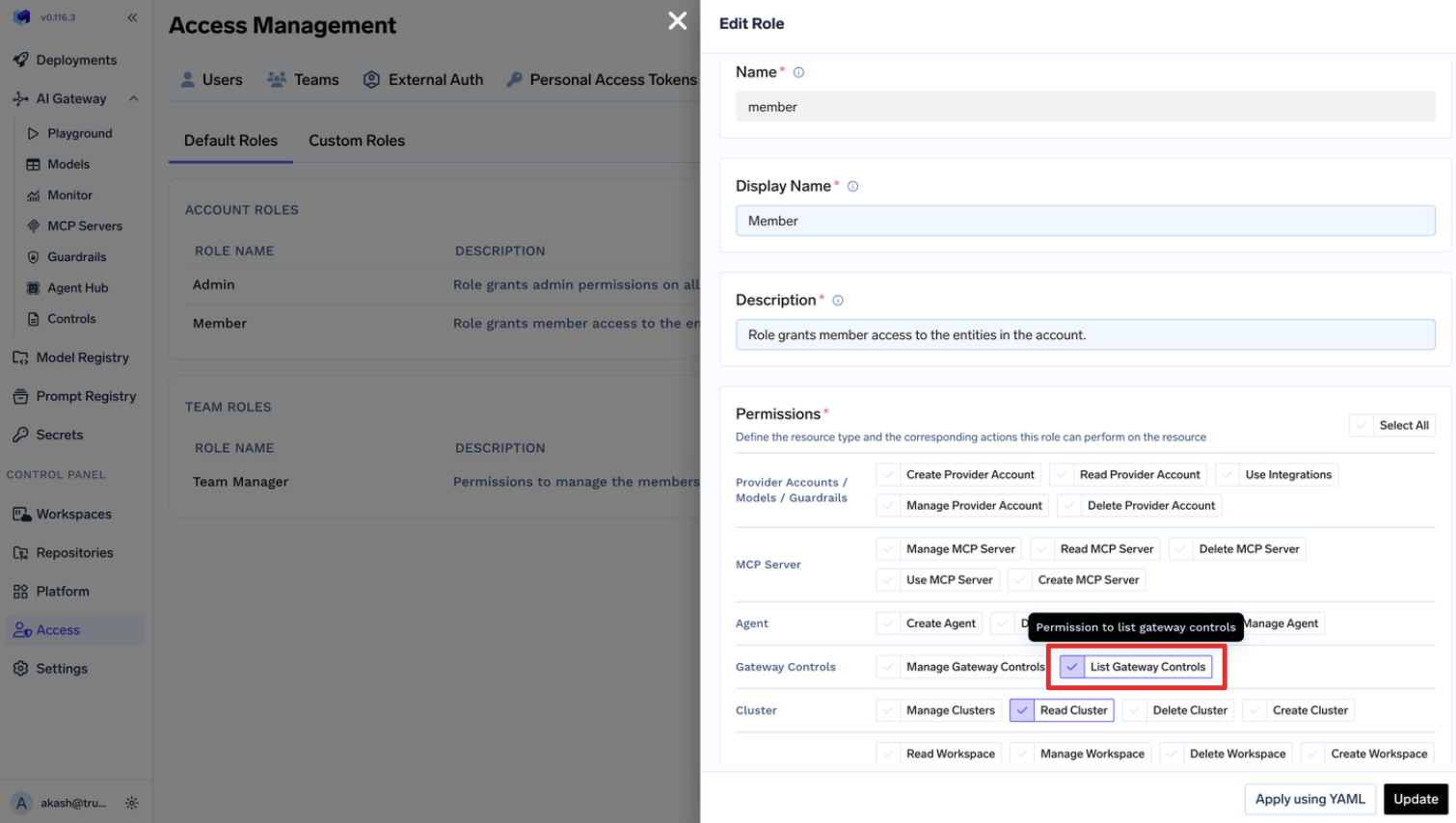
One more parallel: custom-role permissions apply across all resources of the selected type, the way a ClusterRoleBinding applies across all namespaces. For one resource, use that resource’s Access Control page. The same holds when widening the baseline – adding gateway-controls:ListGatewayControls to Member gives it to every user:
The platform’s own agent is a Role vs ClusterRole case study. tfy-agent needs a ClusterRole and ClusterRoleBinding to run informers, because Kubernetes informers cannot watch a subset of namespaces – so it is read-only and filters client-side. tfy-agent-proxy, which actually writes, is the one you can narrow: config.allowedNamespaces switches it to per-namespace RoleBindings, and tfyAgentProxy.clusterRole.strictMode: true cuts it to a minimum permission set. That is the general rule in miniature.
Grants combine on both layers, and removing one does not remove the other. In Kubernetes, effective access is the union of every matching binding. In TrueFoundry, a subject can hold access directly and inherit it from a team. Check every source before concluding a removal failed.
Editing a platform default team role changes it for every team. Team Member and Team Manager are edited under Access > Default Roles, and the edit is global. Adding virtual-account:ManageVirtualAccount so one team can retrieve tokens grants it in every team. Kubernetes has the same hazard in different clothes: editing a shared ClusterRole changes it for every binding that references it.
Most Kubernetes RBAC problems are scope problems, not syntax problems. Two object kinds describe permissions and two hand them out; the skill is choosing the narrow one when the broad one is easier to type. Namespaced Role first, ClusterRole bound by RoleBinding when you need reuse, ClusterRoleBinding only when a subject genuinely needs the whole cluster. Bind groups, avoid wildcards, verify with kubectl auth can-i.
What is easy to miss is that all of this answers one question only. Everything your teams do through a platform API – deploying a model, calling an MCP tool, reading a secret group – is invisible to cluster RBAC and needs its own answer.
On TrueFoundry those are two layers over the same infrastructure: sharing a boundary because a workspace is a namespace, configured independently because they govern different objects. A platform engineer needs both. The failure mode is assuming either covers the other.
TrueFoundry AI Gateway ofrece una latencia de entre 3 y 4 ms, gestiona más de 350 RPS en una vCPU, se escala horizontalmente con facilidad y está listo para la producción, mientras que LitellM presenta una latencia alta, tiene dificultades para superar un RPS moderado, carece de escalado integrado y es ideal para cargas de trabajo ligeras o de prototipos.




Es el modo de autorización que decide si una identidad autenticada puede ejecutar un verbo sobre un recurso a través del API server. Usted escribe los permisos en un Role (con namespace) o en un ClusterRole (para todo el clúster) y luego los asocia a sujetos con un RoleBinding (solo ese namespace) o un ClusterRoleBinding (todo el clúster). Las reglas son aditivas, sin denegaciones, y todo lo que no se concede se rechaza.
Un Role pertenece a un namespace y solo puede conceder permisos sobre recursos con namespace dentro del suyo. Un ClusterRole tiene alcance de clúster y además puede conceder permisos sobre recursos de ámbito de clúster, como nodos y volúmenes persistentes, y sobre URL que no son recursos, como /healthz. La diferencia práctica es la reutilización: un ClusterRole se define una vez y puede vincularse a cualquier namespace concreto con un RoleBinding.
Sí, y es el patrón recomendado. Los permisos quedan limitados al namespace del RoleBinding, de modo que usted define una capacidad una sola vez y la concede equipo por equipo. Lo contrario no está permitido: un ClusterRoleBinding nunca puede hacer referencia a un Role.
Sí. TrueFoundry se ejecuta en su VPC, on-prem, en entornos air-gapped o híbridos, de modo que los prompts y las respuestas nunca salen de su dominio, incluso cuando enruta entre muchos proveedores.
Sí. Incluye un MCP Gateway, un Agent Gateway y un MCP & Agents Registry con control de acceso a nivel de herramienta. Los agentes creados con LangGraph, CrewAI, AutoGen o un framework propio pueden gobernarse de forma centralizada.
Sí. La pasarela es compatible con OpenTelemetry y se integra con Grafana, Datadog, Prometheus o tu pila preferida. Rastrea cada solicitud desde la instrucción (prompt) hasta la ejecución de la herramienta y el modelo, así obtienes un registro unificado sin tener que reemplazar lo que ya tienes en funcionamiento.



Las últimas noticias, artículos y recursos enviados a tu bandeja de entrada

.png)
.png)
.webp)
.webp)
.png)
.png)
.png)
.png)
.webp)
.webp)

.png)
.png)
.png)


