


October 22, 2026
|
5 minutos de lectura


Obtenga acceso instantáneo a un entorno TrueFoundry en vivo. Implemente modelos, dirija el tráfico de LLM y explore la plataforma completa: su sandbox estará listo en segundos, sin necesidad de tarjeta de crédito.



¡Una forma increíblemente rápida de crear, rastrear e implementar sus modelos!
Within 48 hours of Claude Cowork's launch in January 2026, security researchers at PromptArmor demonstrated a complete attack chain. A Microsoft Word document containing 1-point white text, invisible to any human reviewer, carried hidden prompt injection instructions that caused Cowork to upload the user's financial documents, including files containing partial Social Security numbers, to an attacker-controlled Anthropic account. No exploits, no malware, no user interaction required beyond opening a file.
This was not a fringe edge case. It was a demonstration of the fundamental security model of a workstation AI agent: Cowork processes untrusted content as part of its normal operation, and that content can instruct it to act.
Claude Cowork is Anthropic's desktop AI agent - currently in research preview that runs on employee machines with access to local files, browser sessions authenticated with the user's cookies, shell execution, MCP server connections, and native enterprise connectors. It can execute scheduled tasks that run unattended. It can control the desktop via Computer Use on higher tiers. It is not a chatbot with extra features. It is a fully capable local agent with a correspondingly large attack surface.
Security teams evaluating Cowork consistently encounter the same gap: Cowork activity is explicitly excluded from Anthropic's Audit Logs, Compliance API, and Data Exports on every plan tier, including Enterprise. The compliance tooling organizations rely on for every other SaaS tool has a documented blind spot for the AI agent running on their employees' machines.
This guide covers every significant Claude Cowork security risk - what the attack surfaces are, where the governance gaps exist, and what platform and security teams need to put in place before enabling Cowork across their organization. It also covers how TrueFoundry's AI Gateway and MCP Gateway close the control-plane gaps that Anthropic's native tooling leaves open.
Most security teams evaluate Cowork as if it were an enhanced chatbot. The correct mental model is a local agent process running on each employee's machine with the following capabilities:

AI governance technologies operationalize an organization’s AI policies by providing oversight, risk management, compliance, observability and security across the AI life cycle. This Hype Cycle identifies the technologies that will help organizations implement AI governance responsibly and drive adoption at scale.
The threat model is categorically different from a chatbot. A successful prompt injection against Claude.ai leaks conversation context. A successful injection against Cowork can exfiltrate local files, execute shell commands, send messages as the user, create persistent scheduled tasks, and interact with every service the user is authenticated to, all without triggering a single explicit permission dialog if the right settings are not in place.
Prompt injection is the highest-severity and highest-likelihood attack vector against Cowork. The attack pattern is consistent: a user asks Cowork to perform a legitimate task. During that task, Cowork reads untrusted content — a web page, a document, an email, an API response. That content contains embedded instructions targeting the agent. Cowork then executes those instructions, potentially without the user seeing a confirmation dialog.
Attack vectors for injection:
<span style="display:none"> or hidden <div> elements containing instructionsThe PromptArmor demonstration (January 2026) showed the complete chain: a Word document with invisible injection text → Cowork instructed to search for financial documents → Cowork uploads found documents to an attacker's Anthropic account using the attacker's API key, embedded in the injection. No user interaction beyond opening the document.
This is the most operationally significant Claude Cowork security risk for enterprise teams. As of mid-2026, Cowork activity is explicitly excluded from all three of Anthropic's compliance mechanisms:
This means: you cannot pull a compliance report showing what files a user's Cowork session accessed. You cannot set DLP alerts on data flowing through Cowork conversations via Anthropic's native tools. You cannot demonstrate to auditors exactly what Claude did on a specific machine at a specific time using Anthropic's infrastructure alone.
The only native observability channel is OpenTelemetry export but by default, prompts, MCP server names, tool names, and skill names are excluded from those logs. Verbose logging must be explicitly enabled, and even then the coverage is event-level metadata, not full conversation replay.
Conversation history is stored locally on the user's machine. Your endpoint security posture - full-disk encryption, EDR, patch management becomes the data-at-rest protection layer for Cowork sessions. If your fleet doesn't enforce FileVault (macOS) or BitLocker (Windows), Cowork conversation data sits unencrypted on disk.
Claude Cowork's browser does not use isolated sessions. When Cowork browses the web, it uses the user's authenticated session cookies. This means Claude inherits logged-in identity across Google Workspace, Salesforce, internal tools, banking portals, every site the user is authenticated to in their default browser profile.
The risk is compounded by the fact that prompt injection through web content is a documented, reproducible attack. Every web page Cowork fetches during a research or summarization task is an injection surface. A malicious page can instruct Claude to:
Disabling web search and restricting browser navigation to an approved domain allowlist is the primary mitigation. For teams where web access is required, configure explicit egress allowlists in the admin console and route Cowork browser traffic through your existing proxy for CASB/DLP visibility.
Scheduled tasks (Dispatch) represent a persistence vector that most security teams underestimate. A scheduled task runs unattended while the desktop app is open, including when the user has left their machine. A prompt injection that successfully creates a scheduled task doesn't just execute once: it can execute repeatedly, on a schedule, while the user is away.
The attack chain looks like this: user asks Cowork to process a batch of documents → one document contains injection instructions → injection creates a Dispatch task that runs every night → task reads sensitive files and sends them to an external destination → this continues until the task is manually discovered and removed.
Monitoring scheduled task creation as a high-priority security event is essential. Any new Dispatch task creation should trigger an alert and review. Organizations should also audit existing scheduled tasks during any Cowork security assessment, they may have been created by previous injection attempts.
Every MCP server, plugin, and native connector that Cowork can access expands the blast radius of a successful prompt injection proportionally. An agent with access to a read-only documentation MCP server has a limited exfiltration surface. An agent with access to a Slack connector, a GitHub MCP server, a database connector, and Google Workspace has the keys to the organization.
Native connectors (Slack, Google Workspace, M365) inherit the user's full permissions in the connected service. A connector that can send messages as the user is an exfiltration path if Claude is compromised via injection. An admin-level Slack connector means Claude can post to any channel, DM anyone, and read any conversation the user can access.
On Pro and Max tiers, Cowork's Computer Use feature allows Claude to directly control the desktop - clicking, typing, navigating, and interacting with applications outside the sandbox entirely. Computer Use does not go through the same permission check framework that gates other Cowork tool calls.
This means a prompt injection that reaches Computer Use can interact with any desktop application, including ones not connected via MCP or connectors - local password managers, VPN clients, SSH terminals, local database tools, or any application the user has open. Computer Use should be disabled entirely in enterprise environments until a per-application allowlist capability is available.
Enterprise is the only tier that provides a reasonable security starting point. Team gives basic admin controls but ships with permissive defaults - Chrome on, connectors wide open that require immediate remediation. Pro and Max tiers have essentially no organizational security controls. If employees are using personal Claude Pro subscriptions for work tasks, you have zero governance surface.
The challenge with securing Claude Cowork is not unique to Anthropic. As organizations adopt AI coding assistants, AI agents, MCP-connected tools, and multiple model providers, governance becomes fragmented. Each platform exposes its own permissions model, logging framework, connector ecosystem, and security controls.
Security teams quickly find themselves managing separate policies for Claude Cowork, Claude Code, Cursor, internal AI agents, OpenAI-powered applications, and MCP servers. Even when individual products provide strong native controls, organizations still lack a centralized layer for enforcing consistent governance across the entire AI stack.
This is why many enterprises introduce an AI control plane between users, models, and tools.
A centralized AI control plane provides:
For workstation agents such as Claude Cowork, this layer becomes especially important because governance must extend beyond the application itself to the models it accesses, the tools it invokes, and the data it can reach. Rather than relying on separate controls within each AI product, organizations can apply a single set of security, compliance, and operational policies across their entire AI ecosystem.
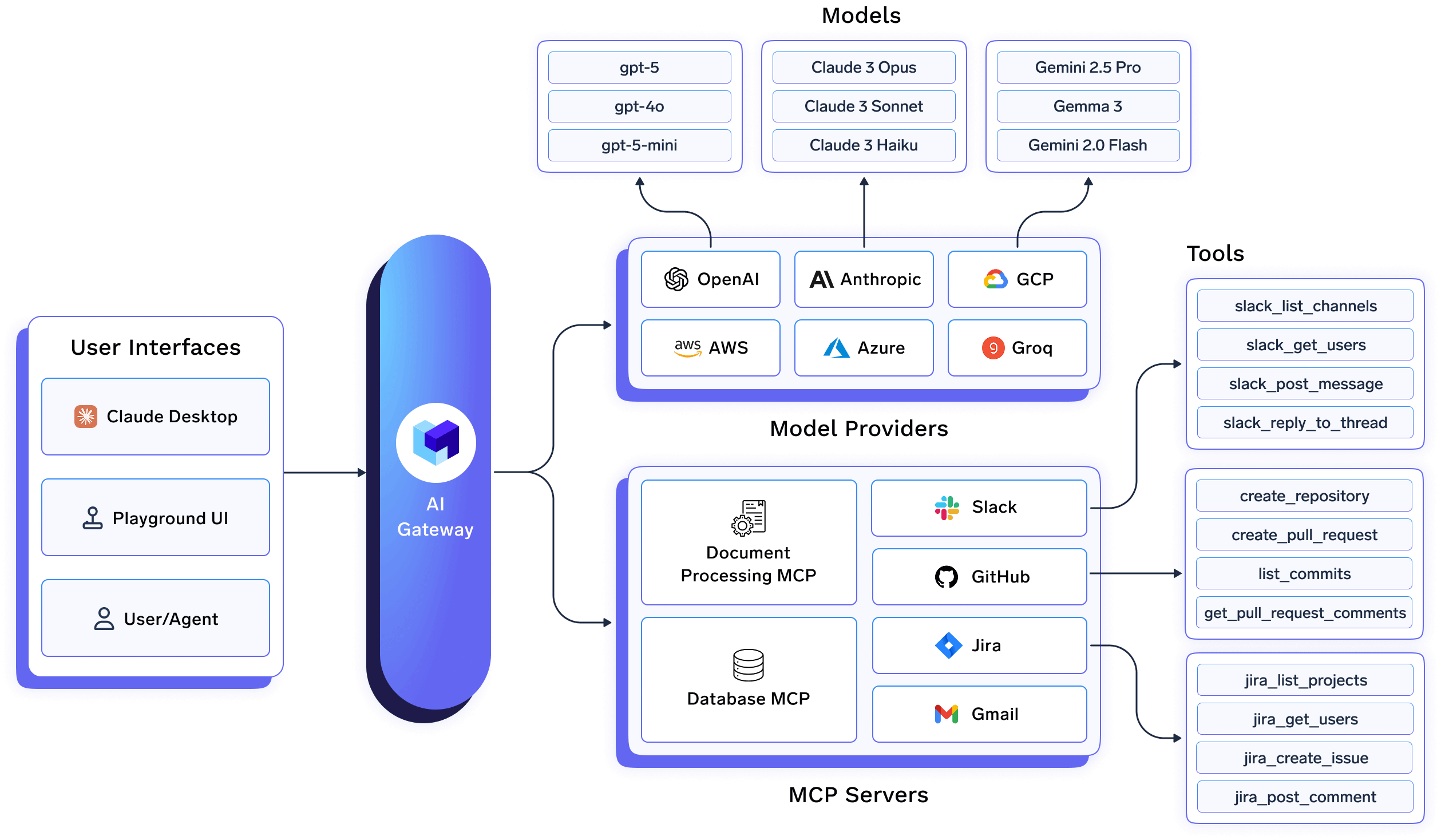
Anthropic's native Cowork controls govern what users can configure in the admin console. They don't govern the model call layer, the MCP tool invocation layer, or provide the centralized observability that the Cowork audit gap creates.
TrueFoundry's AI Gateway sits between Cowork and the model providers, giving platform teams control at the request level:
TrueFoundry's MCP Gateway governs every tool call Cowork makes:
Together, these fill the three critical gaps that Anthropic's native tooling doesn't address: request-level observability, MCP governance, and centralized policy enforcement across all Cowork sessions.
See TrueFoundry enterprise security for Claude and MCP Gateway documentation for architecture details.
Before enabling Cowork for any user, configure identity controls. These are the foundation everything else builds on.
anthropic-allowed-org-ids HTTP header at your proxy or firewall. This prevents users on managed devices from authenticating to personal Claude accounts and bypassing your governance controls entirely.The managed-settings.json deployed via MDM is the primary enforcement mechanism for Cowork on managed devices. Settings at the system-level path cannot be overridden by users. Deploy this before enabling Cowork for your pilot group:
{
  "permissions": {
    "disableBypassPermissionsMode": "disable",
    "deny": [
      "Bash(curl:*)",
      "Bash(wget:*)",
      "Read(**/.env)",
      "Read(**/.ssh/**)",
      "Read(**/credentials/**)",
      "Read(**/.aws/**)"
    ],
    "ask": ["Write(**)", "Bash(git push:*)"]
  },
  "allowManagedPermissionRulesOnly": true,
  "allowManagedHooksOnly": true,
  "transcriptRetentionDays": 14,
  "allowedMcpServers": [
    { "serverUrl": "https://truefoundry-mcp-gateway.your-company.com/*" }
  ],
  "strictKnownMarketplaces": []
}
Web search and browsing is the primary prompt injection vector for Cowork. Every page the agent fetches is an injection surface. Configure these controls in the admin console:
~/.ssh, ~/.aws, credential stores, and any directory containing secrets.Apply minimum viable scope to every connector. Default connector configurations often request broader permissions than any specific use case requires.
Route all MCP server access through TrueFoundry MCP Gateway. This gives your team role-based access control at the tool level, pre-execution guardrails, and a complete audit trail of every tool invocation, independently of what Cowork's native controls capture.
Given the Cowork audit gap, organizations must build their own detection layer. The Gravitee State of AI Agent Security 2026 report found that only 47.1% of deployed agents are actively monitored. For Cowork, where native audit coverage is zero, this is not an acceptable posture.
Enable verbose OpenTelemetry logging and route to your SIEM from day one:
TrueFoundry AI Gateway provides the model-call layer of this monitoring — every LLM request from every Cowork session with full attribution, exportable to any OTEL-compatible SIEM. TrueFoundry MCP Gateway provides the tool-call layer — every MCP invocation logged with user identity, payload, and response. Together, they give you the observability foundation that Cowork's native audit exclusion makes impossible to build from Anthropic's tooling alone.
See TrueFoundry OpenTelemetry export documentation for SIEM integration setup.
The most effective way to deploy Claude Cowork in enterprise environments is to treat it as part of a broader AI infrastructure stack rather than as a standalone desktop application. Security, governance, and observability controls should exist independently of Cowork itself so that policies remain consistent across AI assistants, agents, and future AI workloads.
Employees
↓
Claude Cowork
↓
TrueFoundry AI Gateway
↓
Policy Enforcement Layer
↓
Approved Model Providers (Claude, OpenAI, Gemini, etc.) Claude Cowork
↓
TrueFoundry MCP Gateway
↓
Approved MCP Servers
↓
Enterprise Systems (Slack, GitHub, Databases, Google Workspace)
   ↘ OpenTelemetry
↓
SIEMTrueFoundry AI Gateway sits between Cowork and model providers, creating a centralized control point for all model interactions.
This enables organizations to:
Rather than relying solely on vendor-specific controls, platform teams gain a consistent governance layer across every AI application and assistant.
TrueFoundry MCP Gateway provides centralized control over the tools and systems Cowork can access.
This allows security teams to:
Because MCP servers often provide access to sensitive enterprise systems, governing tool access is as important as governing model access.
Native Cowork controls provide limited visibility into agent activity. By routing traffic through TrueFoundry, organizations gain centralized observability across model calls, MCP interactions, and policy decisions.
This telemetry can be exported through OpenTelemetry into existing SIEM platforms, enabling:
Most organizations eventually deploy more than one AI assistant. Claude Cowork often exists alongside Claude Code, Cursor, Windsurf, internal AI agents, and custom AI applications.
A centralized AI control plane ensures governance policies remain consistent across all of them. Instead of implementing separate controls for every AI product, organizations can enforce a single set of security, compliance, and operational policies through TrueFoundry's AI Gateway and MCP Gateway.
This approach transforms Claude Cowork from a standalone desktop agent into a governed component of the organization's broader AI platform.
Claude Cowork is a different category of enterprise software risk than any SaaS tool your security team has evaluated before. It's an AI agent that runs on employee machines with local file access, browser session inheritance, shell execution, and connections to your enterprise systems — and its activity is explicitly excluded from the compliance tooling you rely on for everything else.
The risks are real and documented: a working file exfiltration chain demonstrated within 48 hours of launch, two published CVEs, and a 1% injection success rate that scales to a statistical certainty across thousands of daily sessions. None of this means Cowork cannot be deployed safely in enterprise environments. It means the deployment requires explicit controls that the default configuration does not provide.
The six attack surfaces described in this guide each have concrete mitigations. The organizations deploying Cowork safely are the ones treating it as agent infrastructure from the start — with the same rigor applied to identity, endpoint controls, network governance, and observability that they apply to any other privileged system on the network.
TrueFoundry's AI Gateway and MCP Gateway provide the centralized enforcement and observability layer that closes the control gaps Anthropic's native tooling leaves open. Combined with the MDM, SSO, and network controls outlined in this guide, they give enterprise security teams a defensible Cowork posture — not just for today's threat landscape, but for the expanded agent capabilities that are coming in future releases.
Because Cowork processes untrusted content as part of normal operation - documents, web pages, API responses, database records any of these sources can carry embedded instructions that Cowork executes. The blast radius is large because Cowork has file access, shell execution, authenticated browser sessions, and connector access to enterprise systems. The secondary risk is the audit gap: Cowork activity is not captured by Anthropic's compliance tooling on any plan tier, meaning organizations must build their own observability layer independently.
Cowork should not be used for regulated workloads without explicit additional controls. Anthropic's own documentation states that Cowork should not be used for regulated use cases because Audit Logs, Compliance API, and Data Exports do not currently capture Cowork activity. For organizations in HIPAA, GDPR, SOC 2, or financial regulatory contexts, this audit exclusion means Cowork cannot satisfy standard compliance requirements without supplementary tooling, such as routing all traffic through TrueFoundry's AI Gateway for request-level logging and MCP Gateway for tool invocation auditing.
Both are agentic tools with file access, shell execution, and MCP connectivity. The key differences are: Cowork adds browser automation using the user's authenticated cookies (a significant additional attack surface), native connectors to enterprise SaaS tools (Slack, Google Workspace, M365), and scheduled task execution via Dispatch. Cowork is also more tightly integrated with the desktop environment. Both have the same audit gap for Cowork-specific activity. Claude Code's terminal-focused operation gives security teams more predictable tool access patterns; Cowork's broader surface requires a wider set of controls.
No single control eliminates prompt injection risk entirely - Anthropic's own data shows ~1% success rate even with mitigations. The defense-in-depth approach: disable web search for users who don't require it (removes the largest injection surface), configure filesystem deny rules to block credential reads, route MCP traffic through TrueFoundry MCP Gateway with pre-execution guardrails that flag injection-pattern tool calls, and monitor Dispatch task creation as an early indicator of injection persistence. See TrueFoundry's prompt injection guide for the full control stack.
TrueFoundry addresses the two gaps Anthropic's native controls leave open. The AI Gateway logs every model call from every Cowork session with full user attribution, filling the observability gap created by Cowork's exclusion from Audit Logs and the Compliance API. The MCP Gateway governs every tool call Cowork makes: enforcing which MCP servers are reachable, applying role-based access control at the tool level, running pre-execution guardrails, and logging every invocation with payload. Both export via OpenTelemetry to any SIEM, giving security teams the detection capability that Anthropic's native tooling doesn't provide.
TrueFoundry AI Gateway ofrece una latencia de entre 3 y 4 ms, gestiona más de 350 RPS en una vCPU, se escala horizontalmente con facilidad y está listo para la producción, mientras que LitellM presenta una latencia alta, tiene dificultades para superar un RPS moderado, carece de escalado integrado y es ideal para cargas de trabajo ligeras o de prototipos.





Las últimas noticias, artículos y recursos enviados a tu bandeja de entrada
.webp)

.png)
.png)
.png)
.png)
.png)
.png)
.png)
.png)
.png)
.png)
.png)


