


September 22, 2026
|
5 min read


Published: September 11, 202612
Blazingly fast way to build, track and deploy your models!
Eight out of ten Fortune 10 companies now use Claude, and over 300,000 businesses run it in production. Two CVEs in the past year proved that a cloned repo is all it takes to exfiltrate API keys or execute code before a trust dialog even appears.
Claude ships across three interfaces — web, desktop, and CLI — and each one has a different attack surface. The web version runs in a browser sandbox, the desktop app connects to local tools, and Claude Code sits in your developers' terminals with the same permissions as their user accounts. It can read files, run bash commands, and connect to external services.
Most enterprise security guides treat these interfaces as one thing, but they are not. Governing Claude well means applying the right controls to each surface, rather than blanket policies that over-restrict developers or leave gaps. The sections below walk through how to do it.
SSO should be live before you hand Claude to a single developer — not after, and certainly not "soon."
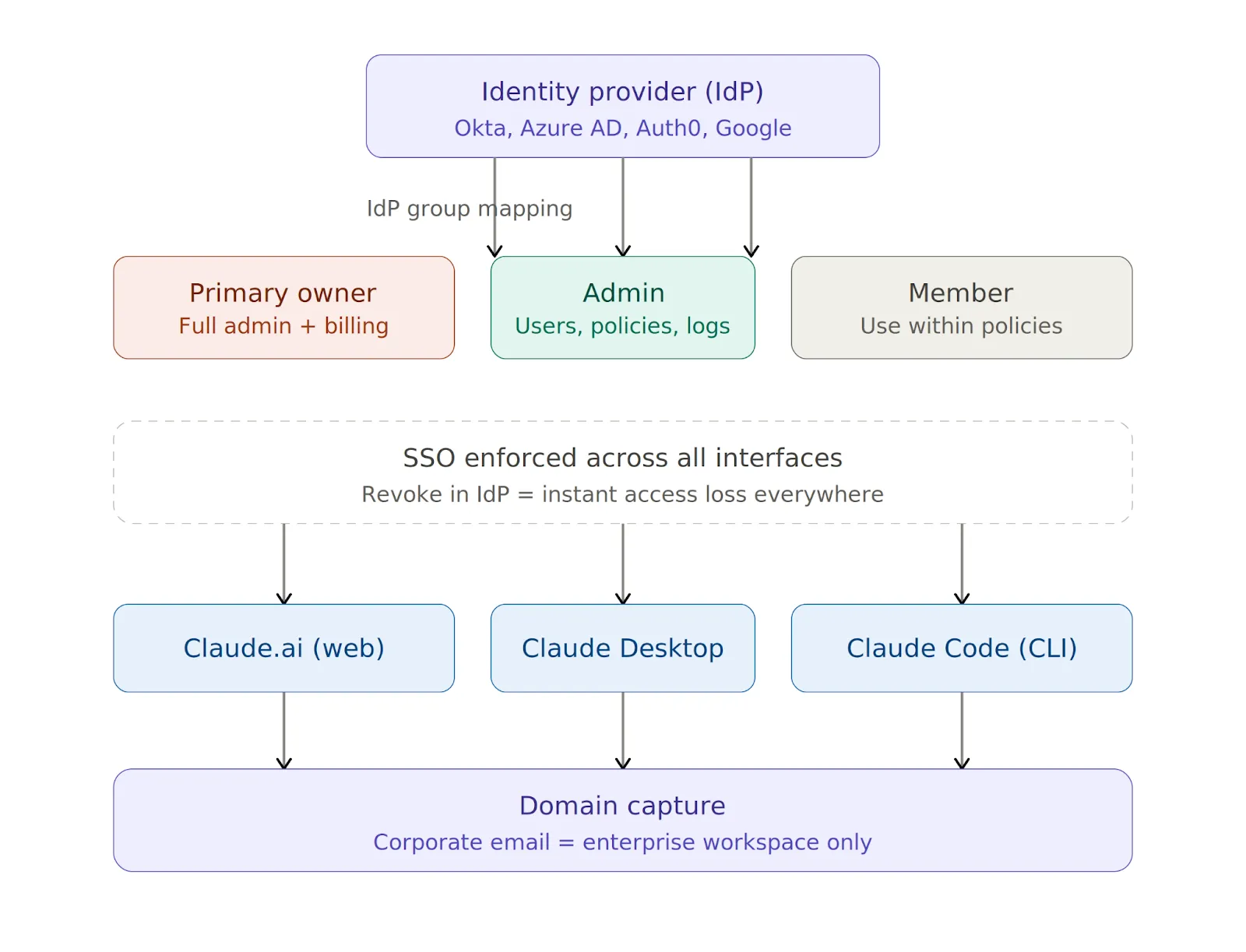
Claude supports SAML 2.0 and OIDC with Okta, Azure AD (Entra ID), Auth0, and Google Workspace, and you can manage all of it from the Claude Admin Console (see the setup guide). Three settings matter most at this stage.
Revoking someone in your IdP drops their access across web, desktop, and CLI instantly.
SSO handles interactive logins, while API keys handle everything else — Claude Code sessions, CI/CD pipelines, and any automation hitting the API outside a browser.
You should issue keys through the Admin Console because developers should never use personal keys in a corporate context. Store them in AWS Secrets Manager, HashiCorp Vault, or Azure Key Vault, rotate them quarterly, and revoke them immediately on suspected compromise or when someone leaves the team.
After identity, the next layer is model access and traffic routing. You need answers to two questions: which models can developers use, and where does their Claude traffic actually flow?
A simple allowlist in the Admin Console stops developers from switching to higher-cost or unapproved models:
{
  "allowedModels": ["claude-sonnet-4-5", "claude-haiku-4-5"]
}
Routing Claude traffic through your own LLM gateway lets you inspect, log, and govern requests at the network layer. You can set these environment variables on developer machines to get started:
export ANTHROPIC_BASE_URL=https://your-gateway.internal.corp
export HTTPS_PROXY=https://proxy.your-company.com:8080
One important detail is that these variables apply only to Claude Code and Claude Desktop. Web routing is controlled at the organization level through the Admin Console.
Setting variables on one machine is easy, but doing it across 100 machines and ensuring nobody changes them is the real challenge.
You can enforce routing policies across developers’ machines in three ways:
Instead of configuring each provider one by one, TrueFoundry AI Gateway gives you a single proxy layer between Claude Code and all your model providers. You can point Claude Code at it with one variable:
export ANTHROPIC_BASE_URL=https://<your-truefoundry-gateway-url>From there, you add provider accounts in the Gateway dashboard, and Claude Code reaches all of them — Anthropic, Bedrock, Vertex — via a single endpoint. Virtual Models let you create a single model identifier that routes across providers with weight-based or latency-based logic, and you can switch providers without touching any client configuration.
The Gateway also enforces rate limits, budget limits, and access control on every request before it reaches the provider.
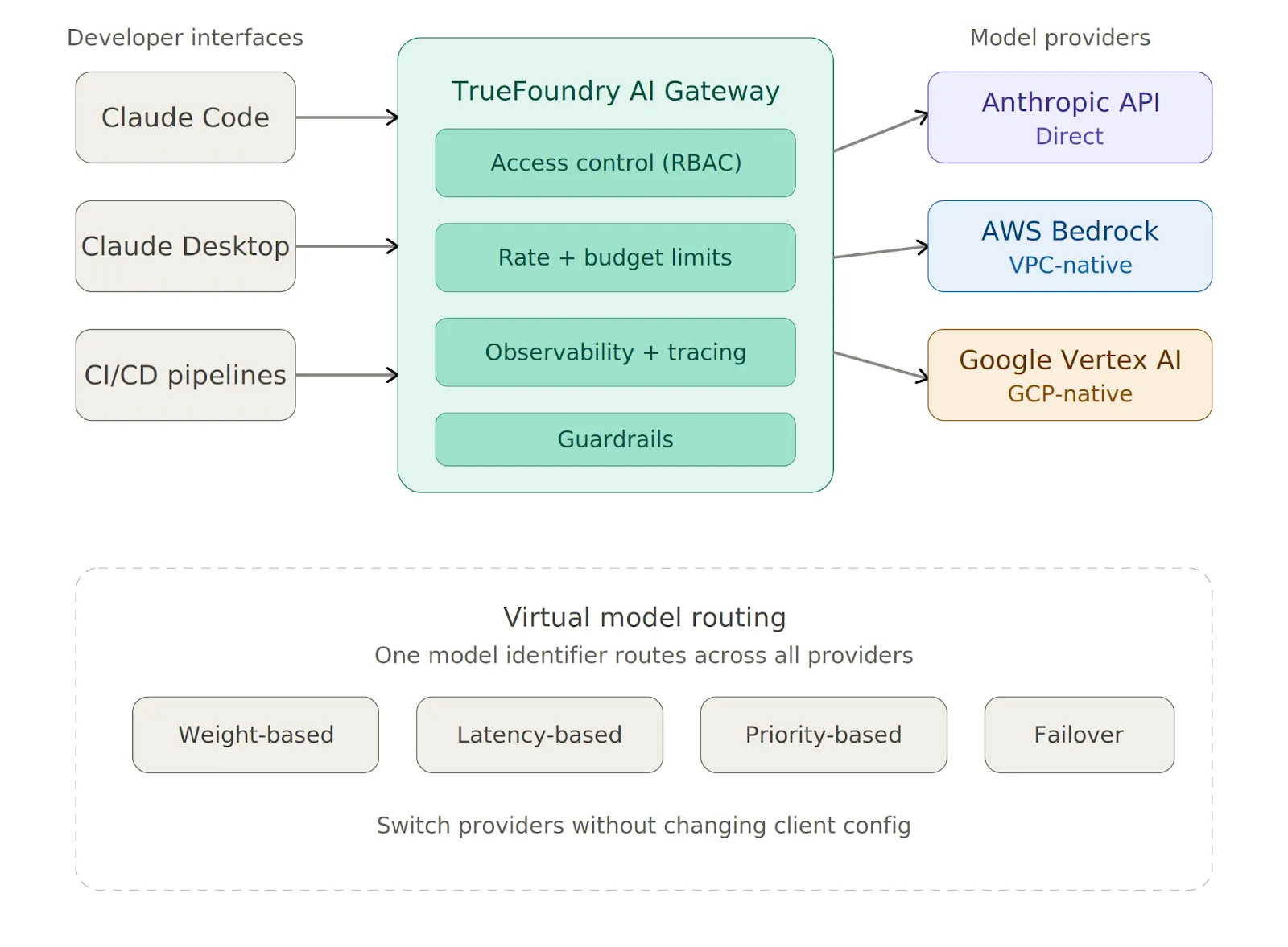
The mistake most teams make is treating all three interfaces the same, even though they are fundamentally different in what they can touch.
The web interface has no local code execution, so the primary risks are data exfiltration through prompts and shadow IT from personal accounts. Domain capture solves the second problem.
For the first, classify Claude.ai as a third-party SaaS tool in your data loss prevention (DLP) and AI security tooling and apply the same controls you would to Google Docs or Notion. The Admin Console also lets you restrict file uploads, disable Artifacts, and control conversation retention.
The desktop app does not run arbitrary shell commands by default, but local tool integrations let developers connect Claude to scripts, file systems, and other resources. You should review each tool before approval and require explicit human confirmation before execution for anything with write access. Keeping the app current via MDM-enforced auto-update is also essential.
Claude Code has the broadest attack surface of the three interfaces. It can read .env files, SSH keys, and credentials, run arbitrary bash commands in the developer's user context, and send code and context to Anthropic's servers for processing.
The following baseline managed-settings.json blocks the most dangerous operations:
{
  "permissions": {
    "disableBypassPermissionsMode": "disable",
    "deny": [
      "Bash(curl:*)", "Bash(wget:*)",
      "Read(**/.env)", "Read(**/.env.*)",
      "Read(**/secrets/**)", "Read(**/.ssh/**)",
      "Read(**/credentials/**)"
    ],
    "ask": ["Bash(git push:*)", "Write(**)"]
  },
  "allowManagedPermissionRulesOnly": true,
  "allowManagedHooksOnly": true,
  "transcriptRetentionDays": 14
}
Here is what each key setting does:
One more thing worth emphasizing: Claude Code should never run as root under any circumstances.
Claude Code's native sandbox enforces filesystem and network isolation at the OS level, using Seatbelt on macOS and bubblewrap on Linux. Anthropic's own internal testing found that sandboxing reduces permission prompts by 84% while maintaining stronger execution boundaries. You should enable it for all developers:
{
  "sandbox": {
    "enabled": true,
    "network": { "httpProxyPort": 8080, "socksProxyPort": 8081 }
  }
}
The sandbox prevents modification of system-level files, blocks contact with domains you have not allowed, and limits the blast radius of prompt injection attacks. You should also set "allowUnsandboxedCommands": false to close the escape hatch that would otherwise let commands run outside the sandbox.
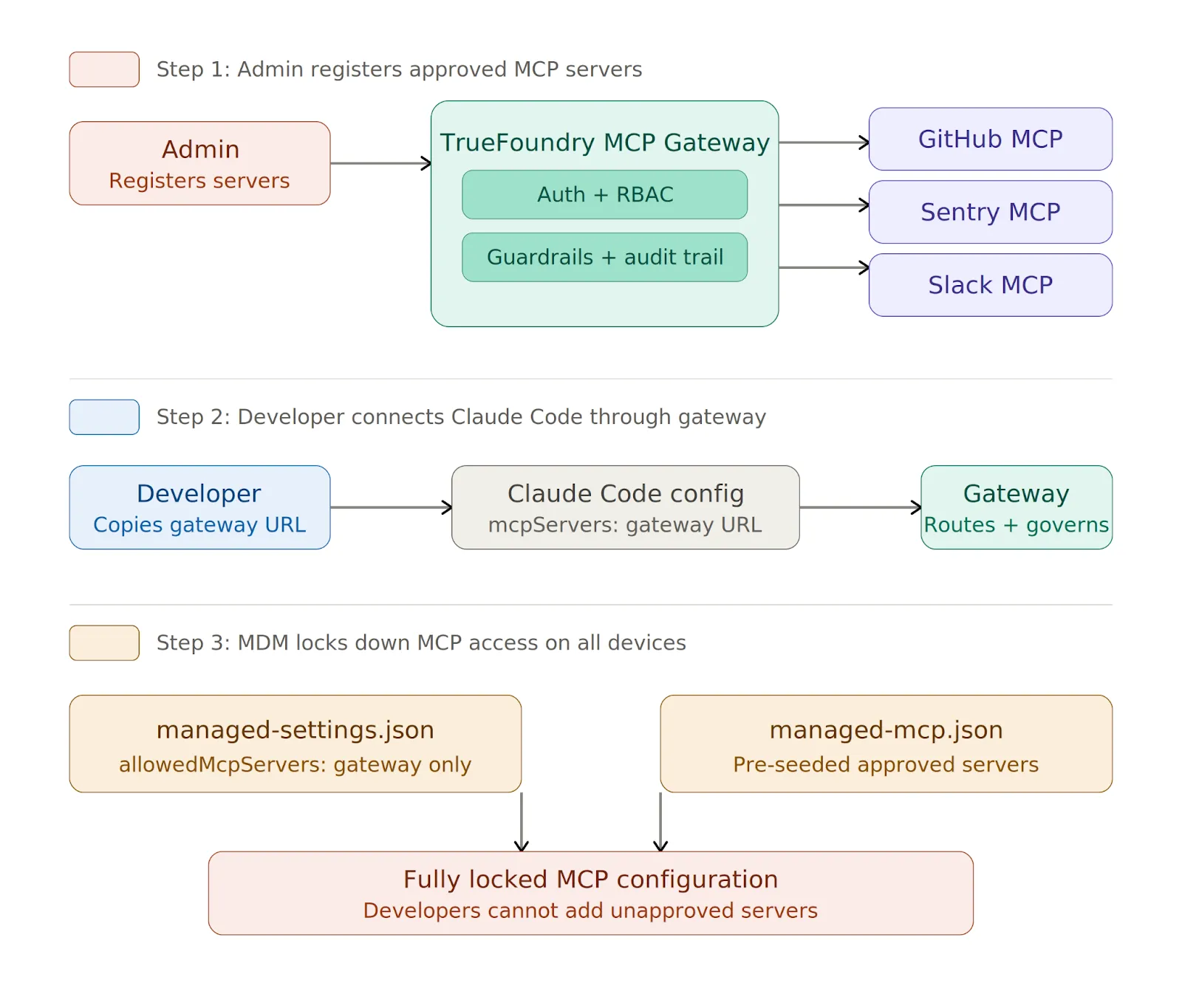
MCP servers connect Claude to external databases, APIs, and SaaS tools, and every new server a developer adds expands the attack surface. Without centralized control, you end up with credential sprawl, unvetted public servers running on developer machines, and no audit trail of which tools were called or what data returned.
The solution is to route all MCP access through a centralized gateway and allowlist only that gateway URL.
TrueFoundry MCP Gateway handles enterprise MCP governance through a single control plane:
You can lock it down in managed-settings.json:
{
  "allowedMcpServers": [
    { "serverUrl": "https://truefoundry-mcp-gateway.your-company.com/*" }
  ],
  "strictKnownMarketplaces": []
}
The empty strictKnownMarketplaces array blocks all marketplace-sourced MCP installations. On managed devices, you can deploy a managed-mcp.json via MDM to pre-seed machines with approved servers, and once deployed, developers cannot add servers beyond those defined in the file.
Anthropic may retain prompts and outputs by default for safety and quality improvement, but you have three levers to control retention.
For Claude.ai, you can set retention to a maximum of 30 days at Organization Settings > Data and Privacy. For Claude Code, use the transcriptRetentionDays setting in managed-settings.json with a value of 7-14 days as a sensible default.
For regulated workloads, you should request ZDR through your Claude account team. ZDR prevents Anthropic from storing prompts or outputs beyond what is needed to serve the request, but it requires a contractual addendum. You should not process PHI or other regulated data until the addendum is signed and confirmed active.
You should export audit logs to your SIEM on a regular schedule and retain them for a minimum of 90 days for SOC 2 or longer for regulated industries. What to capture varies by interface:
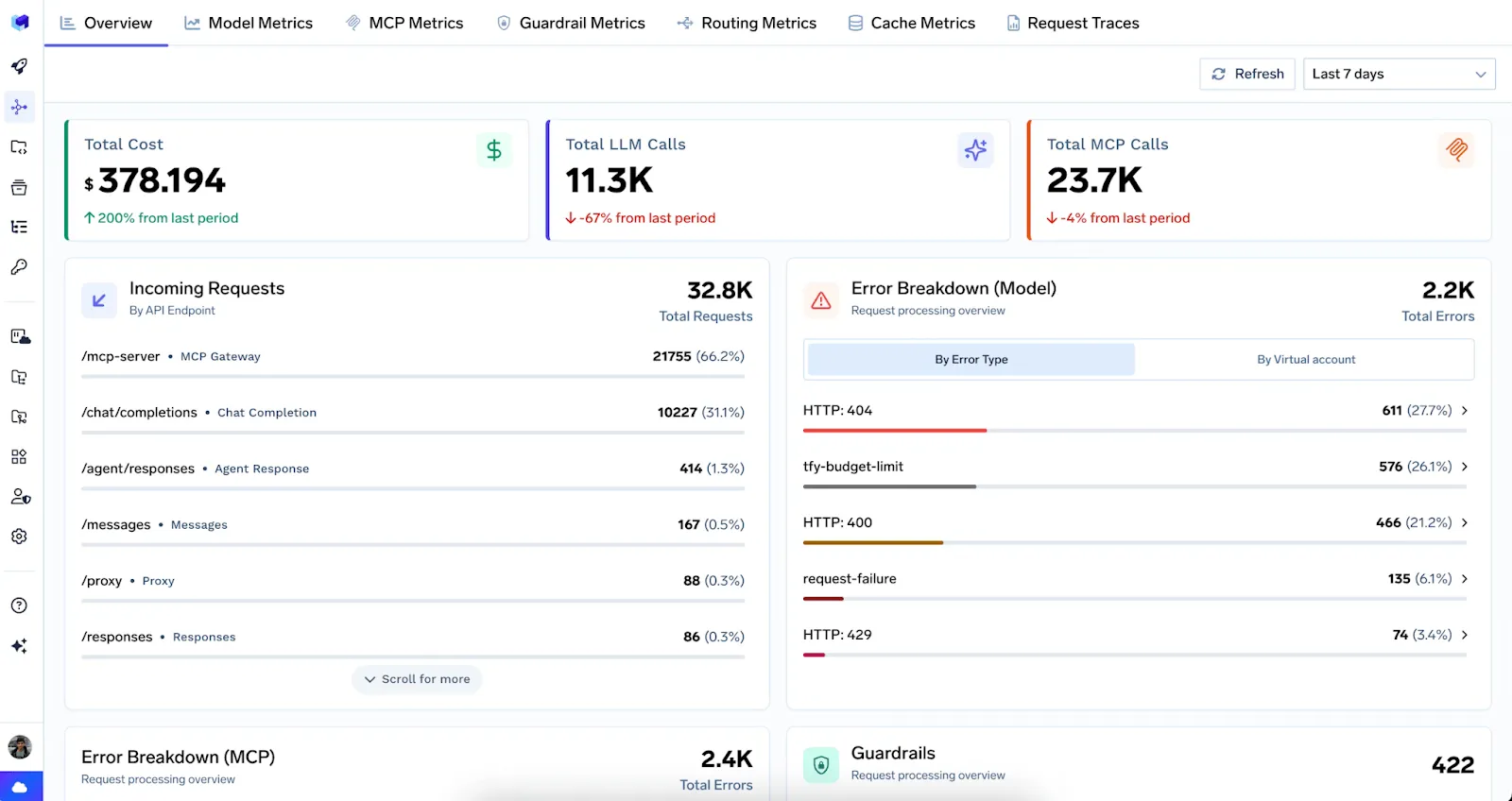
When Claude traffic flows through TrueFoundry AI Gateway, every request is traced with full user attribution across both LLM and MCP requests. A unified dashboard provides real-time metrics, and all traces export to Grafana, Datadog, or Splunk via OpenTelemetry.
Administrators can also configure OpenTelemetry settings natively in the managed settings file for direct telemetry export from Claude Code.
For costs, set hard monthly spending limits per user and per team in the Admin Console. Without these caps, a misconfigured pipeline can burn through your budget overnight. Per-user and per-model breakdowns are useful for chargeback reporting, anomaly detection, and broader AI cost observability.
Here's The Evaluation Framework
| Criteria | What should you evaluate ? | Priority | TrueFoundry |
|---|---|---|---|
| Identity, Access Control & Secret Protection | |||
| Central authentication | Does every model and tool request go through SSO, workload identity, service accounts, or scoped gateway keys? | Must have | ✅ Supported: SSO, workload identity, and scoped gateway keys. |
| SSO and IdP integration | Does the platform integrate with SAML, OIDC, Okta, Azure AD, or Google Workspace and sync roles from the IdP? | Must have | ✅ Supported: SAML, OIDC, IdP role sync. |
| Role-based access control | Can RBAC restrict models, providers, tools, environments, and logs by user, team, and application? | Must have | ✅ Supported: fine-grained RBAC at every resource level. |
| Virtual API keys | Can API keys be generated and scoped to individual apps with configurable expiration and access controls? | Must have | ✅ Supported: scoped virtual keys with expiration policies. |
| Provider key isolation | Can applications call models without receiving raw provider keys, and can keys be rotated without app redeploys? | Must have | ✅ Supported: centralized provider keys, zero-downtime rotation. |

Securing Claude is not one decision but a stack of them — identity, model routing, sandboxing, MCP governance, data retention, audit logging, and cost controls — each applied differently depending on the interface. The web version needs DLP controls and domain capture. The desktop app needs a tool-by-tool review. Claude Code needs a locked-down managed-settings.json deployed via MDM with native sandboxing enabled.
The common thread across all three is that you should route traffic and MCP access through a centralized gateway you control. One endpoint, one policy set, and one audit trail. TrueFoundry AI Gateway provides that layer for both LLM traffic and MCP server governance, with built-in access control, rate limiting, guardrails, and observability.
Start with SSO and domain capture today, then enforce managed settings across your fleet, and route everything through a gateway you control. The CVEs are real, and the exposure grows with every developer who opens Claude Code.

TrueFoundry AI Gateway delivers ~3–4 ms latency, handles 350+ RPS on 1 vCPU, scales horizontally with ease, and is production-ready, while LiteLLM suffers from high latency, struggles beyond moderate RPS, lacks built-in scaling, and is best for light or prototype workloads.




Anthropic maintains SOC 2 Type II compliance for its Claude API and enterprise offerings. However, SOC 2 compliance for a deployment using Claude Code also depends on how the operator configures their own infrastructure, data handling, and logging practices. Enterprises typically layer their own compliant controls on top of Anthropic's baseline.
Claude can be deployed in a HIPAA-compliant manner when the surrounding infrastructure meets the required safeguards. Anthropic offers Business Associate Agreements (BAAs) for qualifying enterprise customers. Organizations must ensure that PHI (Protected Health Information) is not inadvertently included in prompts or stored without proper controls.
Yes, Claude is available for commercial use through Anthropic's API. Businesses can integrate Claude into products and services under Anthropic's usage policies. Commercial usage requires agreement to Anthropic's terms of service, and certain use cases such as high-risk domains may require additional review.
Anthropic pursues leading security certifications for its infrastructure, and Claude's enterprise API is backed by robust security controls. Organizations considering ISO 27001 alignment should verify the current certification status directly with Anthropic, as certification scope and renewal timelines can change.
Claude Code itself is not inherently a security risk, but its agentic nature means it can execute code, modify files, and make network requests all of which introduce risk if not properly scoped. Running Claude Code in sandboxed environments, restricting filesystem access, and maintaining permission prompts are essential practices for minimizing exposure.
Yes, Anthropic provides a fully documented REST API that developers and enterprises can use to access Claude programmatically. The API supports text generation, vision, tool use, and multi-turn conversations, and it is available across multiple Claude model tiers.
Claude API compliance refers to the set of security standards, certifications, and usage policies that govern how the Claude API is operated and accessed. This includes SOC 2 Type II, data retention policies, content filtering controls, and Anthropic's acceptable use guidelines all of which together define the compliance posture of any system built on Claude.
Anthropic publishes its compliance documentation, security overview, and usage policies publicly on its website and trust portal. Developers can review these materials at no cost. Accessing formal compliance reports (such as SOC 2 audit reports) typically requires signing an NDA and requesting them through Anthropic's enterprise sales process.
The Claude API is stateless by design each API request is independent and does not retain session state between calls. Conversation history must be explicitly passed in each request. This stateless architecture simplifies compliance by limiting the persistence of user data, though operators remain responsible for how they store and handle conversation content on their own infrastructure.



The latest news, articles, and resources sent to your inbox




.png)
.png)
.png)
.png)
.png)
.png)
.png)
.png)
.png)
.png)
.png)


