



October 29, 2026
|
Lesedauer: 5 Minuten


Erhalten Sie sofortigen Zugriff auf eine TrueFoundry-Live-Umgebung. Stellen Sie Modelle bereit, leiten Sie den LLM-Verkehr weiter und erkunden Sie die gesamte Plattform — Ihre Sandbox ist in Sekundenschnelle einsatzbereit, ohne dass eine Kreditkarte erforderlich ist.


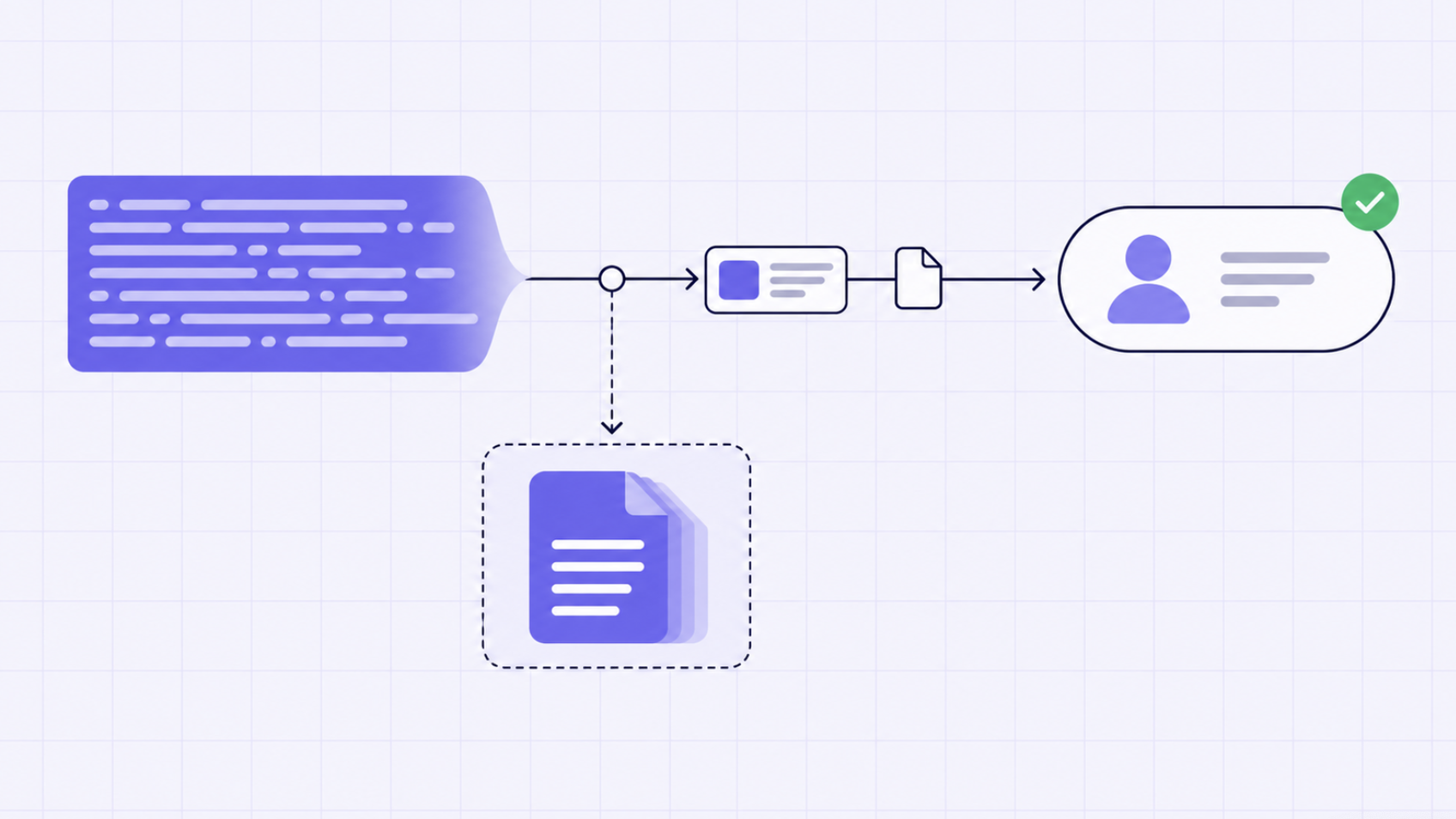
Unglaublich schnelle Methode zum Erstellen, Verfolgen und Bereitstellen Ihrer Modelle!
Ein Tool kann die richtigen Daten in einer für die Modelllogik ungeeigneten Form zurückgeben. Die Handhabung großer Antworten trennt den Besitz der Datenmenge von der unmittelbaren Verarbeitung jedes einzelnen Bytes.
Ein MCP-Tool kann erfolgreich antworten und dennoch den Ablauf stören. Eine Repository-API liefert möglicherweise Hunderte von Pull Requests mit langen Beschreibungen. Ein Metrik-Tool gibt eventuell jede Zeitreihe aus. Eine CRM-Suche fügt jedem Konto verschachtelte Historien hinzu. Die Datenmenge ist prinzipiell relevant, aber das Modell benötigt vielleicht nur drei Felder.
Wenn das vollständige Ergebnis in den Kontext gelangt, geschieht Folgendes: Der Input wächst, die nachfolgende Logik übernimmt die Datenlast, wichtige Fakten konkurrieren mit irrelevanten Feldern und Folgeaufrufe können den Ablauf an die Kapazitätsgrenze des Modells bringen. Es ist vorzuziehen, das Tool um weniger Daten zu bitten, sofern dessen API Projektion, Paginierung oder Filterung unterstützt. Die Laufzeitumgebung benötigt dennoch einen Fallback, da viele Tools keine ausreichenden Steuerungsmöglichkeiten bieten.
Die dokumentierte Antwortverarbeitung von TrueForge schreibt ein zu großes Ergebnis in eine Sandbox-Datei und platziert eine kurze Vorschau sowie den Dateipfad im Kontext. Der Agent behält den Zugriff, ohne gezwungen zu sein, die gesamte Datenmenge zu verarbeiten.
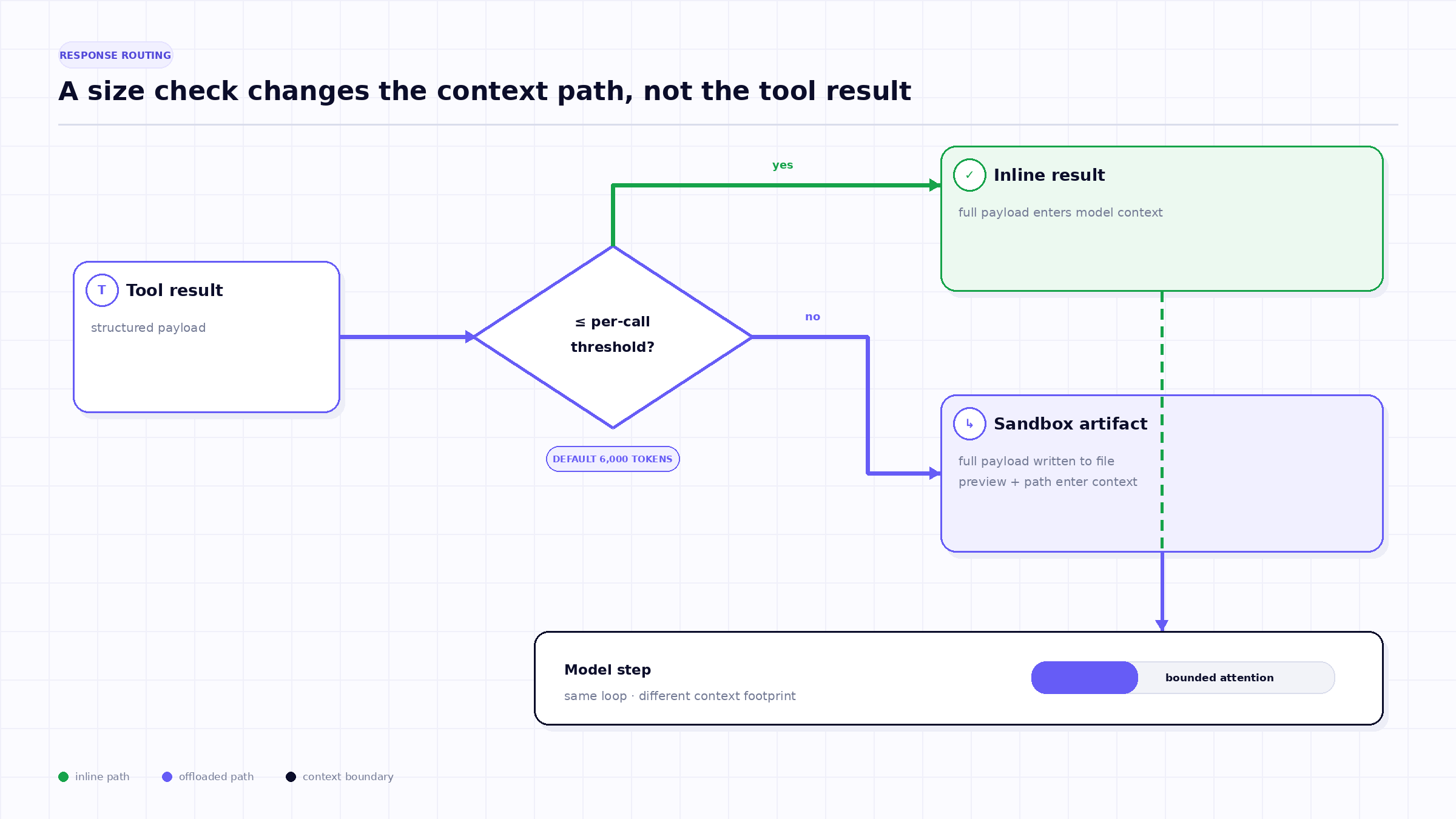
Die erste Regel gilt für ein einzelnes Tool-Ergebnis. Wenn die geschätzte Antwort den konfigurierten Schwellenwert pro Aufruf überschreitet, schreibt TrueForge das vollständige Ergebnis in die Sandbox. Der Kontext erhält einen Hinweis, den Dateipfad und eine begrenzte Vorschau. Der aktuelle Standardschwellenwert liegt bei 6.000 Token; die aktuelle Standardvorschau enthält die ersten und letzten 100 Zeichen.
Die Vorschau dient der Navigation, nicht der Zusammenfassung. Randzeichen können den Objekttyp, Top-Level-Keys, die Gesamtzahl oder abschließende Metadaten offenbaren, aber sie können die exakten Datensätze auslassen, die für die Aufgabe erforderlich sind. Ein kompetenter nächster Schritt besteht darin, die Struktur zu untersuchen, nach einem Ziel zu suchen oder einen kleinen Parser auszuführen – nicht darin, den vollständigen Inhalt aus der Vorschau abzuleiten.
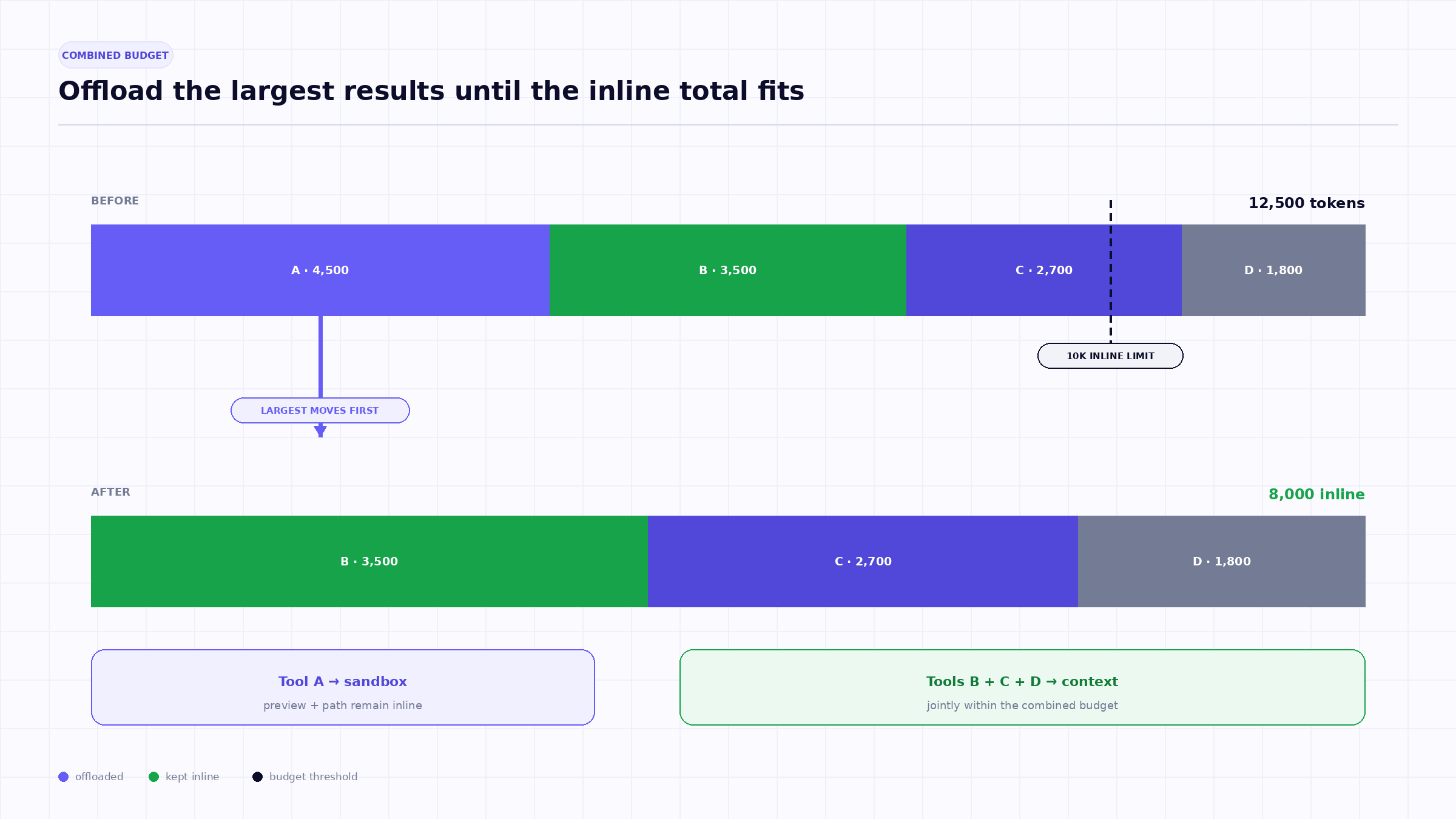
Limits pro Aufruf reichen nicht aus, wenn ein Agent Tools gleichzeitig ausführt. Vier Ergebnisse mit jeweils 4.000 Token bestehen zwar einzeln die 6.000-Token-Prüfung, speisen aber zusammen 16.000 Token in einen Modellschritt ein.
TrueForge dokumentiert daher einen zweiten Schwellenwert für den kombinierten Inhalt von Tool-Aufrufen, die gemeinsam zurückgegeben werden. Der aktuelle Standardwert liegt bei 10.000 Token. Wenn die Summe dieses Limit überschreitet, lagert das System die Antworten nacheinander aus, beginnend mit der größten, bis der verbleibende Inline-Inhalt unter dem Schwellenwert liegt.
Diese „Größte-zuerst“-Richtlinie bewahrt mehr kleine Ergebnisse inline, während die größten Beitragszahler schnell entfernt werden. Es handelt sich um eine Kontext-Heuristik, nicht um eine Relevanzbewertung. Die größte Antwort könnte die wichtigsten Beweise enthalten; der Dateipfad sorgt dafür, dass sie abrufbar bleibt.
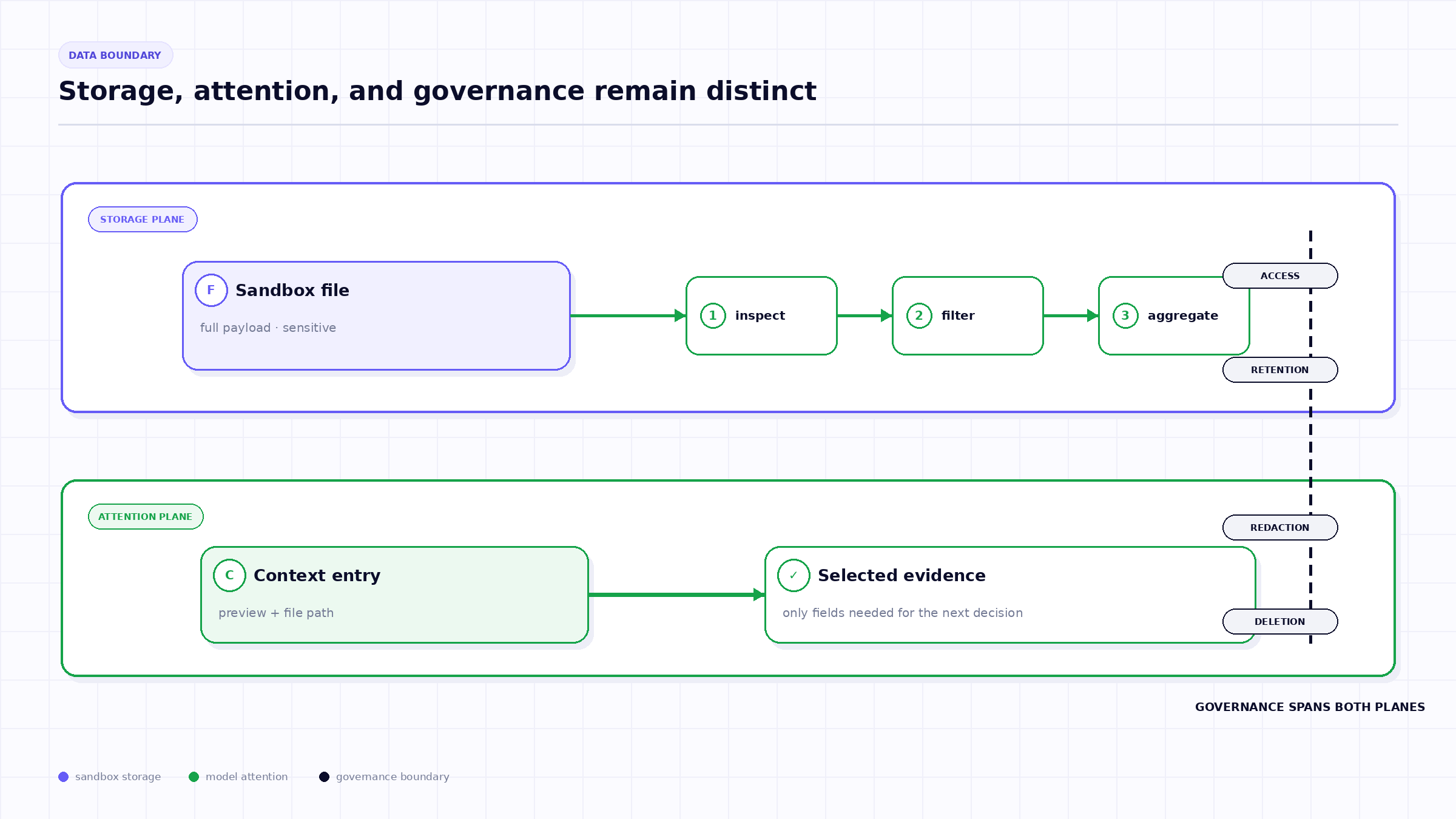
Die vollständige Datenmenge benötigt eine dauerhafte Ausführungsumgebung, die der Agent untersuchen kann. Die Funktion von TrueForge ist standardmäßig aktiviert, erfordert jedoch, dass die Sandbox des Agenten aktiviert ist, da das ausgelagerte Ergebnis als Sandbox-Datei gespeichert wird.
Die Sandbox ist nicht der Ort, an dem die gesamte Agenten-Schleife abläuft. Die TrueForge-Dokumentation beschreibt sie als isolierte Umgebung für Code-, Datei- und Shell-Arbeiten, die bei Bedarf bereitgestellt wird. Das Modell erhält einen Pfad und kann Sandbox-Operationen nutzen, um die Datei zu untersuchen oder zu transformieren.
Dieses Design bietet eine nützliche Trennung: Das Harness steuert den Ablauf und die Anmeldedaten, während die Sandbox die Verarbeitung der Nutzlast übernimmt. Dies wirft jedoch Fragen zum Lebenszyklus auf. Wenn die Aufgabe, der Benutzer oder die Aufbewahrungsrichtlinie sensibel sind, müssen Teams wissen, wie lange die Datei gespeichert bleibt, wer sie herunterladen kann, welche Telemetriedaten darauf verweisen und wie die Löschung erfolgt.
Sobald eine Antwort ausgelagert wurde, sollte der Agent sie gezielt eingrenzen:
Die Dokumentation von TrueForge verbindet dieses Muster explizit mit dem Code-Modus. Ein Skript kann die ausgelagerte Datei lesen, ein Ergebnis berechnen und nur die ausgegebenen Zeilen an den Modellkontext zurückgeben.
TrueFoundry AI Gateway bietet eine Latenz von ~3—4 ms, verarbeitet mehr als 350 RPS auf einer vCPU, skaliert problemlos horizontal und ist produktionsbereit, während LiteLM unter einer hohen Latenz leidet, mit moderaten RPS zu kämpfen hat, keine integrierte Skalierung hat und sich am besten für leichte Workloads oder Prototyp-Workloads eignet.





Die neuesten Nachrichten, Artikel und Ressourcen werden in Ihren Posteingang gesendet

.webp)
.png)
.png)
.png)
.png)
.png)
.png)
.png)

.png)
.png)
.png)
.png)




