


October 31, 2026
|
Lesedauer: 5 Minuten


Erhalten Sie sofortigen Zugriff auf eine TrueFoundry-Live-Umgebung. Stellen Sie Modelle bereit, leiten Sie den LLM-Verkehr weiter und erkunden Sie die gesamte Plattform — Ihre Sandbox ist in Sekundenschnelle einsatzbereit, ohne dass eine Kreditkarte erforderlich ist.



.png)
Unglaublich schnelle Methode zum Erstellen, Verfolgen und Bereitstellen Ihrer Modelle!
Der Atlassian MCP-Server ist der Rovo MCP-Server von Atlassian: ein Remote- Model Context Protocol -Endpunkt, der Jira, Confluence und Compass als Werkzeuge bereitstellt, die von einem KI-Agenten aufgerufen werden können. Er ist unter https://mcp.atlassian.com/v1/mcp erreichbar und authentifiziert sich über OAuth2.
Er umfasst drei Produkte:
Die Dokumentation beschreibt die Schnittstelle eher anhand von Suchvorgängen für Vorgänge, dem Lesen von Seiten und dem Erstellen von Tickets als durch die Benennung einzelner Tool-Funktionen. Die maßgebliche Liste ist diejenige, die auf dem Tools -Tab nach der Autorisierung angezeigt wird, da das Gateway die aktuelle Liste des Upstream-Dienstes widerspiegelt.
Da es sich um einen Remote-Dienst handelt, muss lokal nichts ausgeführt werden – kein Docker-Container, kein npx-Prozess pro Laptop. Sie verweisen einen MCP-Client auf eine URL und authentifizieren sich; genau das ist der Vorteil von Remote-MCP-Servern im Allgemeinen.
Die interessanten Anwendungsfälle verknüpfen Werkzeuge produktübergreifend:
Die entscheidende Trennung ist nicht nur Lesen versus Schreiben – es ist öffentlich versus vertraulich. Ein Jira-Issue zu lesen ist harmlos. Eines zu erstellen ist korrigierbar. Das Lesen von Confluence erfordert jedoch höchste Aufmerksamkeit: Dort speichern Unternehmen Board-Präsentationen, Gehaltsbänder, Postmortems mit namentlicher Nennung von Mitarbeitern und Sicherheitsarchitekturen. Ein schreibgeschützter Agent mit uneingeschränktem Confluence-Zugriff hat einen größeren Wirkungsradius als ein schreibfähiger Agent, der auf ein einzelnes Jira-Projekt beschränkt ist.
Diese Asymmetrie ist spezifisch für Atlassian und der Grund, warum der Rat „Deaktiviere die Schreib-Tools“ hier unvollständig ist.
Wenn ein einzelner Entwickler dies in Cursor einbindet, ist das in Ordnung. Bei dreißig Entwicklern plus einem Support-Agenten und einem Dokumentations-Agenten sieht das Problem jedoch anders aus.
Die Zulassungsliste ist eine unternehmensweite Entscheidung. Sie wird pro Organisation festgelegt, nicht pro Team. Wer auch immer in admin.atlassian.com die Organisationsverwaltung innehat, entscheidet, ob diese Integration überhaupt existiert. Wer Tools ad hoc verbindet, sammelt zugelassene Domains an, die niemand überprüft.
Kein Audit-Trail für Absichten. Atlassian protokolliert, dass ein API-Aufruf über das Konto eines Benutzers erfolgt ist. Es protokolliert jedoch nicht, dass dein Triage-Agent ihn aufgrund einer Aufforderung aus einem Slack-Thread ausgeführt hat. Wenn ein Ticket auftaucht, dessen Erstellung niemandem bekannt ist, gibt es keine Kette, die man nachvollziehen könnte.
Der Lesezugriff auf Confluence umfasst „alles, was der Benutzer sehen kann“. Benutzerbasierte Berechtigungen sind das richtige Konzept, aber die meisten Mandanten haben aufgrund historischer Gegebenheiten zu freizügige Confluence-Berechtigungen. Was ein Benutzer sehen kann, ist meist weit mehr, als für eine Aufgabe erforderlich ist, und der Agent kann hier nicht unterscheiden.
Prompt-Injection findet hier einen Nährboden. Jira-Beschreibungen und Confluence-Seiten sind Texte, die ein Agent liest und die von jemand anderem geschrieben wurden. Ein Ticket, das von einem externen Nutzer über ein Service-Desk-Portal eingereicht wurde und Anweisungen enthält, die während der Triage gelesen werden, während gleichzeitig ein Confluence-Zugriff in derselben Sitzung aktiv ist – das ist ein Pfad von nicht vertrauenswürdiger Eingabe zu sensibler Ausgabe. Das Problem ist nicht, dass der Agent sich falsch verhalten hat, sondern dass seine Berechtigungen über seine eigentliche Aufgabe hinausgingen.
Nichts davon ist ein Grund, den Server zu meiden. Es sind Gründe, eine Steuerungsebene davorzuschalten – genau dafür ist ein MCP-Gateway da.
Dies ist der Schritt, der Teams oft aufhält, daher steht er an erster Stelle. Es handelt sich um eine Voraussetzung auf Atlassian-Seite, für die es keine Einstellung in TrueFoundry als Ersatz gibt.
Sie benötigen: Berechtigungen zum Hinzufügen von MCP-Servern in TrueFoundry, eine Atlassian Cloud-Organisation mit Jira, Confluence oder Compass sowie Organisations-Administratorrechte unter admin.atlassian.com.
Wählen Sie in der Atlassian-Administration Ihre Organisation aus und öffnen Sie Apps → KI-Einstellungen → Rovo MCP-Server. Fügen Sie unter Zulässige DomainsIhre TrueFoundry-Control-Plane-Domain hinzu:
https://<tfy-control-plane-base-url>/**
Es muss kein OAuth-Client erstellt werden. Atlassian übernimmt die dynamische Client-Registrierung für Domains auf der Whitelist. Bei den meisten selbst registrierten Remote-MCP-Servern müssten Sie eine OAuth-App im Portal des Anbieters erstellen, eine Redirect-URI festlegen und eine Client-ID sowie ein Secret speichern. Hier ist das nicht nötig – der Whitelist-Eintrag ist die Vertrauensbeziehung.
Die Zulassungsliste ist Ihr Not-Aus-Schalter. Das Entfernen der Domain widerruft neue OAuth-Verbindungen. Das Stoppen dieser Integration für die gesamte Organisation ist eine einzige Änderung in der Atlassian-Administration, unabhängig vom Gateway. Nur wenige Integrationen bieten eine so saubere Kontrolle; notieren Sie sich, wo diese zu finden ist.
Ein netzwerktechnischer Hinweis: Wenn die Atlassian-IP-Zulassungsliste aktiviert ist, erlauben Sie auch den Datenverkehr von der Umgebung, in der TrueFoundry eine Verbindung zum Remote-MCP-Server herstellt.
Schritt 1 – Öffnen Sie die Auswahl. Öffnen Sie in TrueFoundry das MCP-Gateway, klicken Sie auf MCP-Server hinzufügenund wählen Sie Atlassianaus.
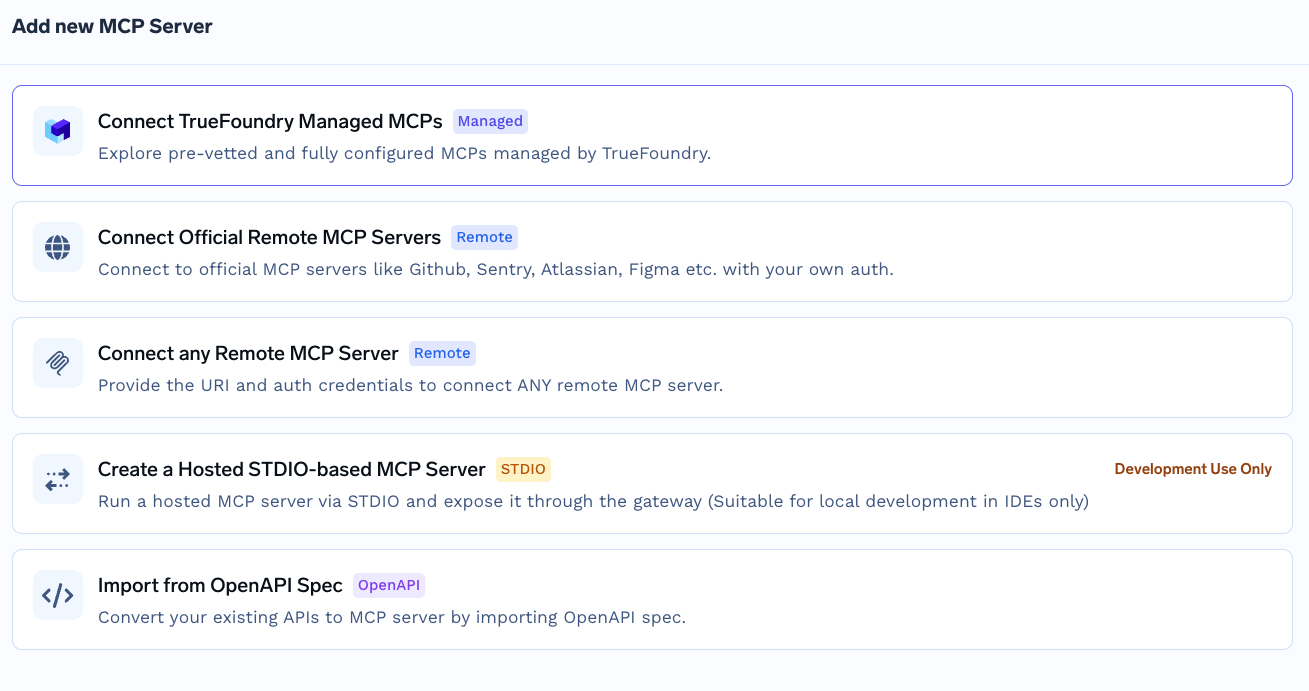
Auswahlmenü „MCP-Server hinzufügen“ mit den verfügbaren Registrierungspfaden, einschließlich offizieller Remote-Server, beliebiger Remote-MCP-Server, von TrueFoundry verwalteter MCPs, gehostetem STDIO und Import aus OpenAPI-Spezifikation.
Dies ist nicht der Katalog-Workflow für von TrueFoundry verwaltete MCPs, bei dem Sie nur einen Namen angeben und die Plattform alle Felder verwaltet. Atlassian erfordert explizite Werte, da die Vertrauensbeziehung über die Zulassungsliste und nicht über plattformseitig gespeicherte Anmeldedaten hergestellt wurde.
Schritt 2 – Konfigurieren Sie den Server. Verwenden Sie diese Werte:
Feld
Wert
Name
atlassian
Beschreibung
Atlassian ist eine Plattform für Softwareentwicklung
URL
https://mcp.atlassian.com/v1/mcp
Authentifizierung
OAuth2
Aktivieren Sie Authentifizierungsdaten und wählen Sie den Tab OAuth2 aus. Da Ihre Domain auf der Zulassungsliste steht, benötigen Sie keine Client-ID und kein Secret – lassen Sie diese Felder leer.
Schritt 3 – Mitarbeiter hinzufügen. Fügen Sie die Benutzer oder Teams hinzu, die die Atlassian-Tools nutzen sollen. Weisen Sie MCP Server Manager Administratoren zu und MCP-Server-Benutzer für Endnutzer.
Schritt 4 – Speichern und autorisieren. Klicken Sie auf MCP-Server hinzufügen. Jeder Benutzer öffnet daraufhin den Bereich Tools und klickt auf Jetzt verbinden , um die Atlassian-OAuth abzuschließen. Die Tools erscheinen anschließend und können im Agent Playgroundgetestet werden.
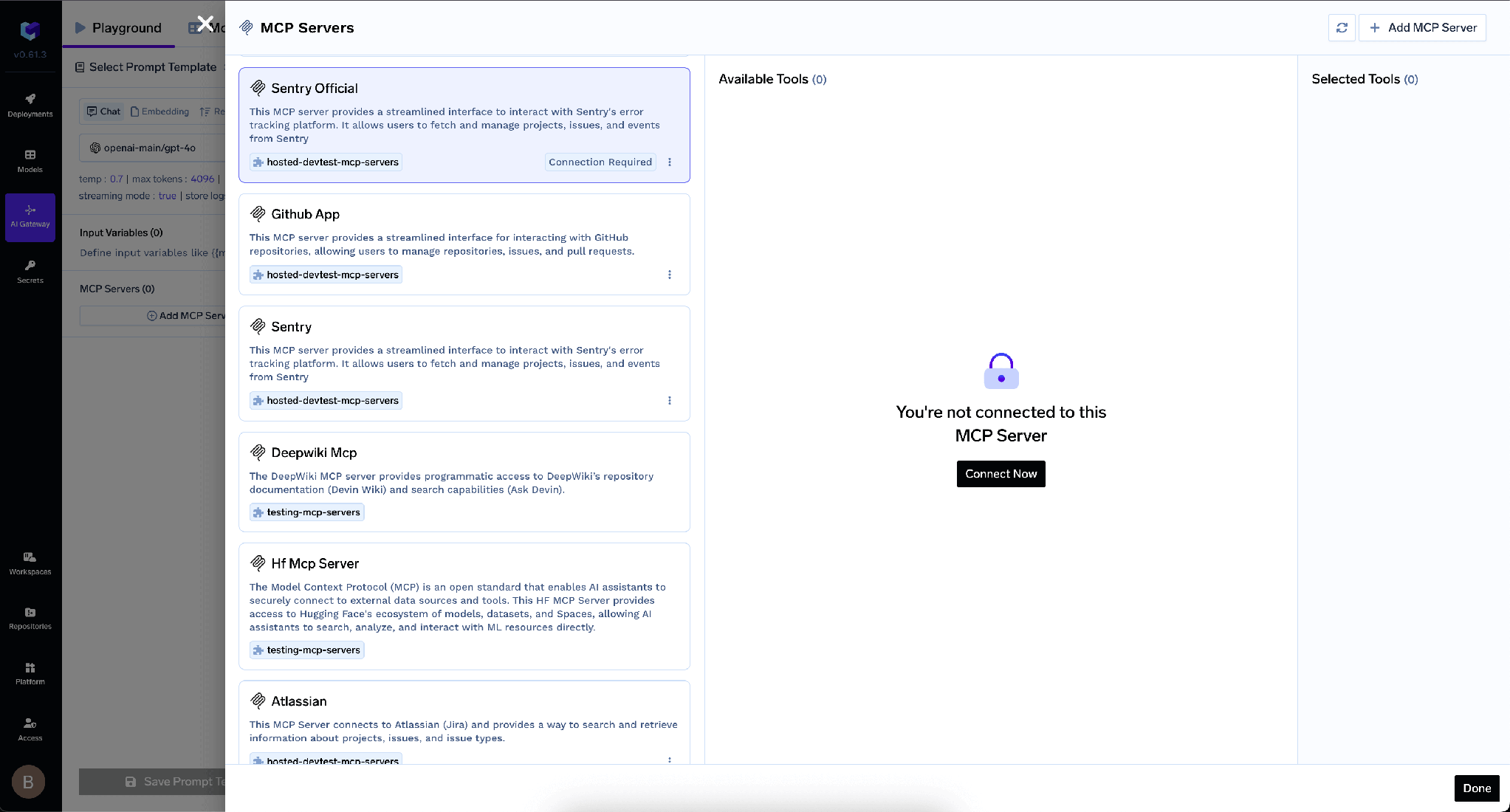
MCP-Server-Bereich, der einen nicht autorisierten Server im Status „Sie sind nicht mit diesem MCP-Server verbunden“ mit einer Schaltfläche „Jetzt verbinden“ anzeigt
TrueFoundry trennt die eingehende Authentifizierung – wie sich ein Client gegenüber dem Gateway ausweist – von der ausgehenden, also wie sich das Gateway gegenüber Atlassian ausweist. Die Ebenen sind unabhängig voneinander.
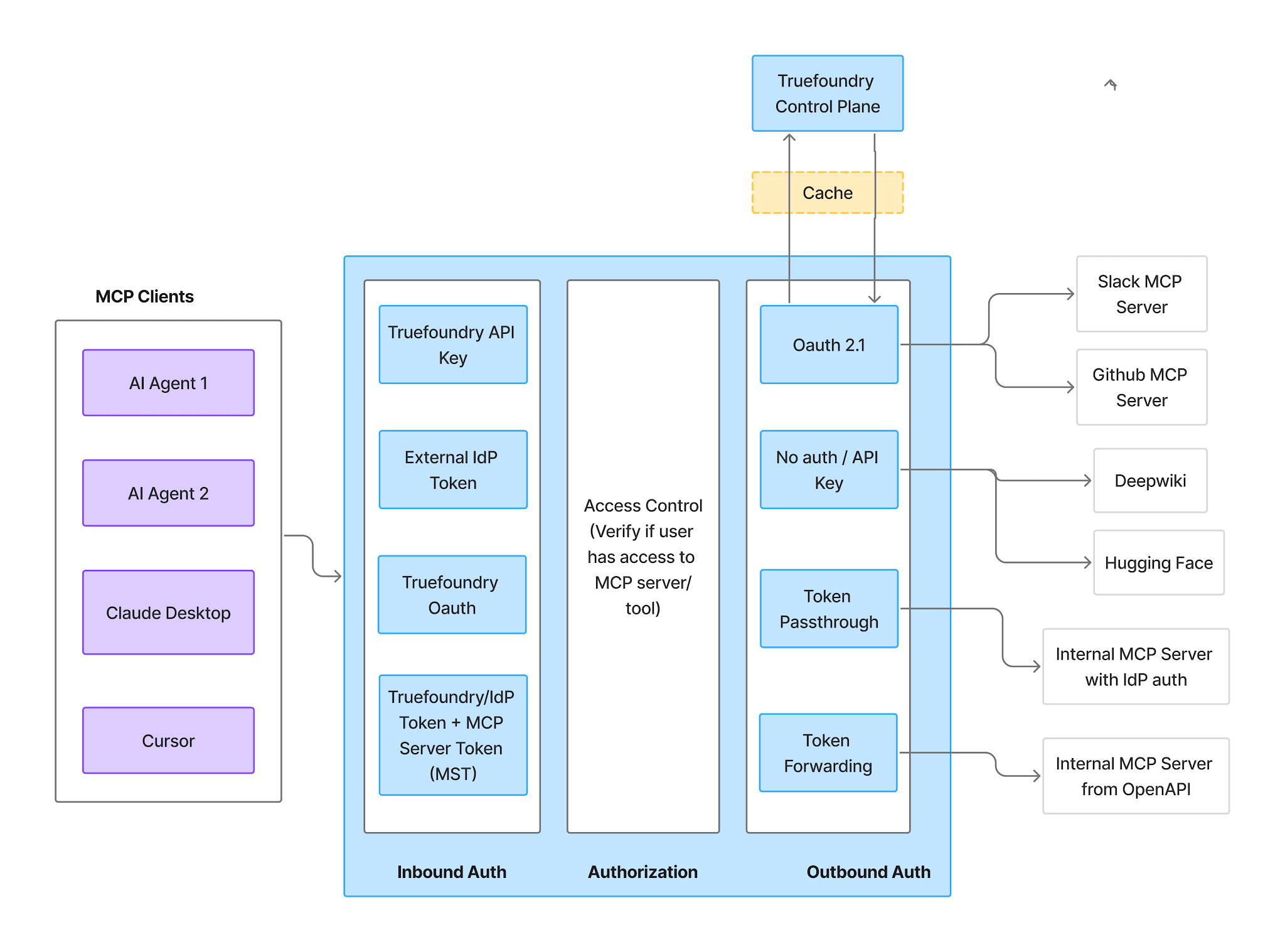
Authentifizierungs- und Autorisierungsablauf des MCP-Gateways, der eingehende Authentifizierung, Zugriffskontrolle und ausgehende Authentifizierung als drei getrennte Phasen darstellt
Eingehend – vier unterstützte Methoden:
TrueFoundry AI Gateway bietet eine Latenz von ~3—4 ms, verarbeitet mehr als 350 RPS auf einer vCPU, skaliert problemlos horizontal und ist produktionsbereit, während LiteLM unter einer hohen Latenz leidet, mit moderaten RPS zu kämpfen hat, keine integrierte Skalierung hat und sich am besten für leichte Workloads oder Prototyp-Workloads eignet.




Der Rovo-MCP-Server von Atlassian – ein Remote-Server für das Model Context Protocol unter https://mcp.atlassian.com/v1/mcp, der Jira, Confluence und Compass als Tools bereitstellt, die ein Agent aufrufen kann: Issues suchen, Seiten lesen, Tickets erstellen. Er verwendet OAuth2, und ein Org-Admin muss Ihre verbindende Domain zuvor auf die Allowlist setzen.
In zwei Phasen. Ein Org-Admin fügt die Domain Ihrer TrueFoundry Control Plane unter Apps → AI settings → Rovo MCP server → Allowed domains hinzu. Öffnen Sie anschließend in TrueFoundry MCP Gateway → Add MCP Server → Atlassian, setzen Sie die URL auf https://mcp.atlassian.com/v1/mcp und die Authentifizierung auf OAuth2 (ohne Client ID oder Secret), fügen Sie Mitwirkende hinzu, speichern Sie und lassen Sie jeden Nutzer auf Connect Now klicken.
Ja. Jeder Nutzer arbeitet mit seinen bestehenden Berechtigungen für Jira, Confluence und Compass; ein Agent, der für jemanden handelt, sieht also genau das, was diese Person sehen kann. Das ist die Untergrenze, nicht die Obergrenze – grenzen Sie weiter ein mit Schaltern pro Tool und Freigaberichtlinien.
Ja. TrueFoundry läuft in Ihrer VPC, On-Prem, Air-Gapped oder hybrid, sodass Prompts und Antworten Ihre Domäne nie verlassen, auch wenn Sie über viele Anbieter hinweg routen.
Ja. Es umfasst ein MCP Gateway, ein Agent Gateway und eine MCP & Agents Registry mit Zugriffskontrolle auf Tool-Ebene. Agenten auf Basis von LangGraph, CrewAI, AutoGen oder einem eigenen Framework lassen sich alle zentral steuern.
Ja. Das Gateway ist OpenTelemetry-kompatibel und lässt sich in Grafana, Datadog, Prometheus oder Ihren bevorzugten Stack integrieren. Es verfolgt jede Anfrage vom Prompt bis zur Ausführung von Tools und Modellen, sodass Sie eine einheitliche Protokollierung erhalten, ohne Ihre bestehenden Systeme entfernen zu müssen.



Die neuesten Nachrichten, Artikel und Ressourcen werden in Ihren Posteingang gesendet
.webp)

.png)
.png)
.png)
.webp)
.webp)

.png)
.png)
.png)
.png)
.png)
.png)
.png)

.png)


