October 9, 2026
|
Lesedauer: 5 Minuten


Erhalten Sie sofortigen Zugriff auf eine TrueFoundry-Live-Umgebung. Stellen Sie Modelle bereit, leiten Sie den LLM-Verkehr weiter und erkunden Sie die gesamte Plattform — Ihre Sandbox ist in Sekundenschnelle einsatzbereit, ohne dass eine Kreditkarte erforderlich ist.



Published: October 9, 2026

Unglaublich schnelle Methode zum Erstellen, Verfolgen und Bereitstellen Ihrer Modelle!
Anthropic has shipped the third model in the Claude 5.5 family. Claude Haiku 5.5 went out on Wednesday, October 7, and it is already in the TrueFoundry AI Gateway model catalog with pricing, context limits and capabilities filled in.
You call it from the same OpenAI-compatible endpoint you use for everything else. No new SDK, no separate integration, no waiting on a gateway release. Change the model string to claude-haiku-5-5 and you are on the new model.
Try Claude Haiku 5.5 on the TrueFoundry AI Gateway →
Anthropic built Haiku 5.5 for high-volume, latency-sensitive work: classification, routing, extraction, summaries, context compaction and subagent tasks. The numbers that matter for a production budget:
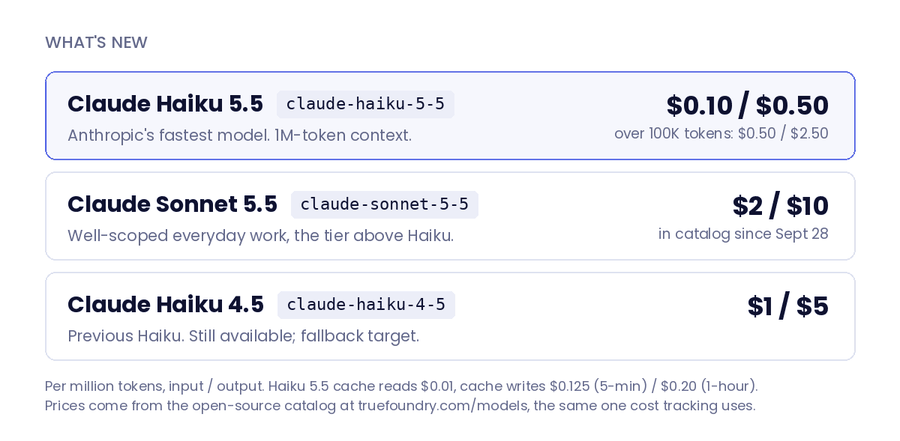
Haiku upgrades usually trade capability for price. On Anthropic's published results this one gains a lot of capability at a lower price. On Terminal-Bench 4.0, Haiku 5.5 scores 39.2% against 0.0% for Haiku 4.5 and 16.4% for GPT-6 Luna, which lists at the same $0.10 / $0.50. On OSWorld 2.1 (offline subset) it reaches 72.4% against 15.7% and 48.9%, and on GDPval-AA v2.1 it scores 1620 Elo to Haiku 4.5's 735 and Luna's 1437.
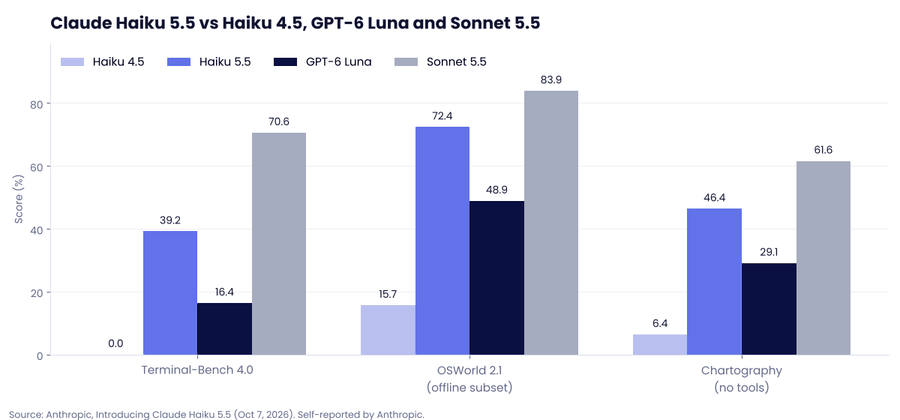
Two caveats. These are Anthropic's own numbers, and Sonnet 5.5 remains well ahead on agentic coding (70.6% on Terminal-Bench 4.0) and on long knowledge work. Run your own evals on your own traffic before you move a workload.
Put the current models side by side: GPT-6 Luna and Haiku 5.5 at $0.10 per million input tokens, Haiku 4.5 at $1, Sonnet 5.5 at $2, Opus 5.5 at $4, Claude Fable 5.1 at $10. Haiku 5.5 shares the bottom rung with Luna and, on Anthropic's comparison, scores above it on every benchmark both were run on.
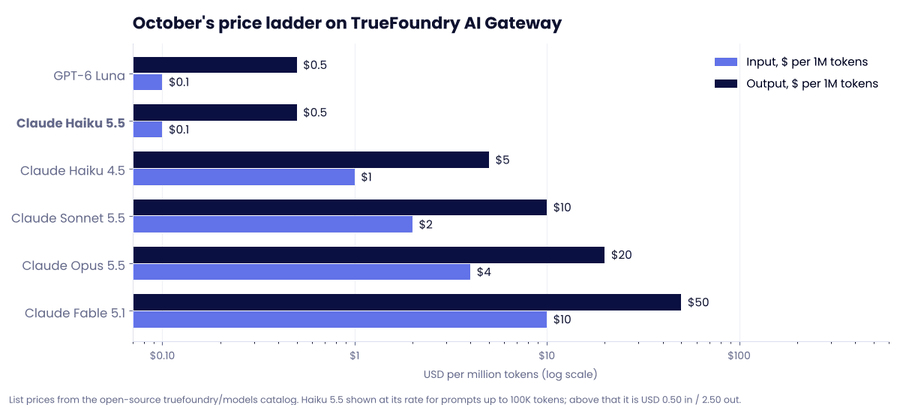
That is the argument for treating model choice as gateway config rather than application code. Most production traffic is a large number of short, simple requests and a small number of hard ones. If the simple majority goes to Haiku 5.5 and the rest goes to Sonnet 5.5 or Opus 5.5, the blended bill looks nothing like an all-Sonnet bill. That only works when switching is a config change, which is what the AI Gateway is for.
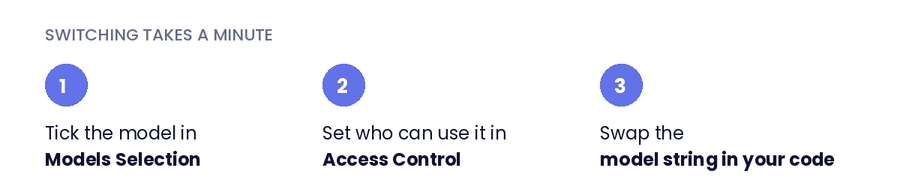
Step 1: Enable the model in your provider account. In the gateway, open Models → your Anthropic account → Models Selection, search for claude-haiku-5-5 and tick it. Pricing shows inline ($0.10 input / $0.50 output per 1M tokens) because it comes straight from the catalog. Then set Access Control so the model is scoped to the right teams and virtual keys from day one.
If you run Claude through a cloud, those paths are in the catalog too: AWS Bedrock (global, US, EU, Japan and Australia profiles), Google Vertex AI, Microsoft Foundry, OpenRouter and Perplexity. Regional and data-zone endpoints list at $0.11 / $0.55. Don't see the model in your list yet? + Add Model at the bottom of the list adds it by hand.
Step 2: Call it. Open the Playground, pick the model, and copy the generated snippet in whichever SDK you use. The OpenAI Python version:
from openai import OpenAI

client = OpenAI(
    api_key="<your-truefoundry-api-key>",
    base_url="https://gateway.truefoundry.ai",  # or your self-hosted gateway URL
)

# Model IDs are <provider-account>/<model>. Swap the string, keep everything else.
r = client.chat.completions.create(
    model="anthropic-prod/claude-haiku-5-5",
    messages=[{"role": "user", "content": "Classify this ticket as billing, bug or feature request: ..."}],
    max_tokens=2048,  # thinking tokens count toward this limit
    extra_headers={"X-TFY-METADATA": '{"team": "support", "feature": "ticket-triage"}'},
)
print(r.choices[0].message.content)
Model IDs are namespaced as <your-provider-account>/<model>, so anthropic-prod/claude-haiku-4-5 and anthropic-prod/claude-haiku-5-5 are a one-line swap. The X-TFY-METADATA header tags each call so spend shows up per team or per feature in the metrics view.
Step 3 (optional): Put it behind a virtual model. Create a virtual model and pick Auto Routing. The gateway classifies each request as simple, medium or complex and sends it to the target you assign to that tier. Haiku 5.5 for simple, Sonnet 5.5 for medium, Opus 5.5 for complex, with Haiku 4.5 as a fallback while launch-week rate limits settle, is a sensible starting map. In our benchmarks this kind of routing cut cost 50–70% at about 98% of quality. Your application calls one model name throughout.
Haiku 5.5 is the model for the bulk of your traffic: the classifications, extractions, routing calls and subagent steps that run thousands of times a day. Running it through TrueFoundry means the decision about which requests it handles lives in gateway config, where you can change it without a deploy.
Try Claude Haiku 5.5 on the TrueFoundry AI Gateway →
TrueFoundry AI Gateway bietet eine Latenz von ~3—4 ms, verarbeitet mehr als 350 RPS auf einer vCPU, skaliert problemlos horizontal und ist produktionsbereit, während LiteLM unter einer hohen Latenz leidet, mit moderaten RPS zu kämpfen hat, keine integrierte Skalierung hat und sich am besten für leichte Workloads oder Prototyp-Workloads eignet.





Die neuesten Nachrichten, Artikel und Ressourcen werden in Ihren Posteingang gesendet
.png)


.png)
.png)
.png)
.png)




.png)