


November 6, 2026
|
5 min read


.png)
Blazingly fast way to build, track and deploy your models!
Ask three teams what their LLM router does and you get three answers that do not overlap. One runs GPT-4o on both Azure and OpenAI and wants traffic to survive an outage. One got their bill and wants the easy 70% of requests served by something cheaper. One has a German subsidiary whose prompts must not leave the EU. All three need different configuration, and two of the three would get nothing from what the others built.
The taxonomy is worth stating precisely, because it is what most llm routing content skips:
The tell is what each reads to decide. Load balancing reads infrastructure state, model selection reads the request body, data routing reads metadata and identity. Three inputs, so three features — and they compose rather than compete.
This is the oldest and least interesting sense of the word, which is why it is also the most reliable. You have several ways to reach the same capability — azure/gpt-4o and openai/gpt-4o, or two deployments in different regions — and you want requests spread across them so no single failure is your failure.
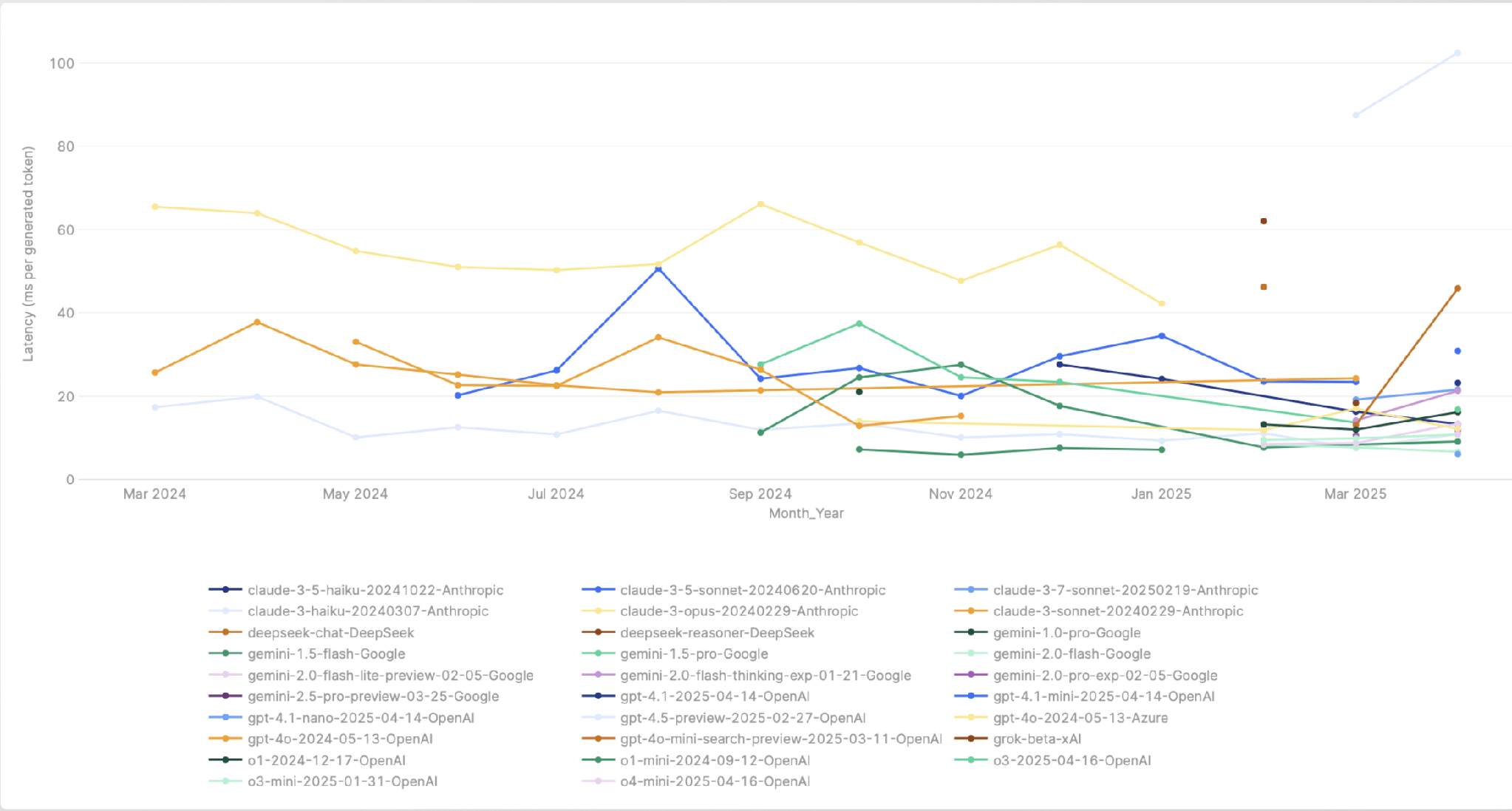
The premise is that every target is equivalent for correctness. Any could serve the request; you are choosing on availability, capacity, and speed. That is what makes llm load balancing safe to automate. And provider latency is not stable enough to ignore — it varies by model, region, provider, and hour:
TrueFoundry configures this on a virtual model — a name your application calls, like my-group/production-chat, with one routing strategy and a list of real targets behind it. Three strategies qualify as load balancing:
Two details separate these from a naive round robin.
Latency-based routing is sticky by design. The gateway measures each target’s time per output token over the last 20 minutes, then picks a target per caller that stays fixed for a 10-minute epoch. Across many callers traffic distributes in inverse proportion to latency, but any one caller keeps hitting the same target long enough for prompt caching to pay off. You do not configure this; it is how the strategy works.
Health is tracked continuously. A target returning 5xx, 429, 401, or 403 twice in a rolling two-minute window is marked unhealthy and moved to the end of the list, recovering once those errors age out. Priority-based routing adds an optional SLA cutoff: a time-per-output-token or time-to-first-token threshold that demotes the target when its three-minute rolling average breaches it.
Rules can also be written at the tenant level as YAML, evaluated in order, first match winning:
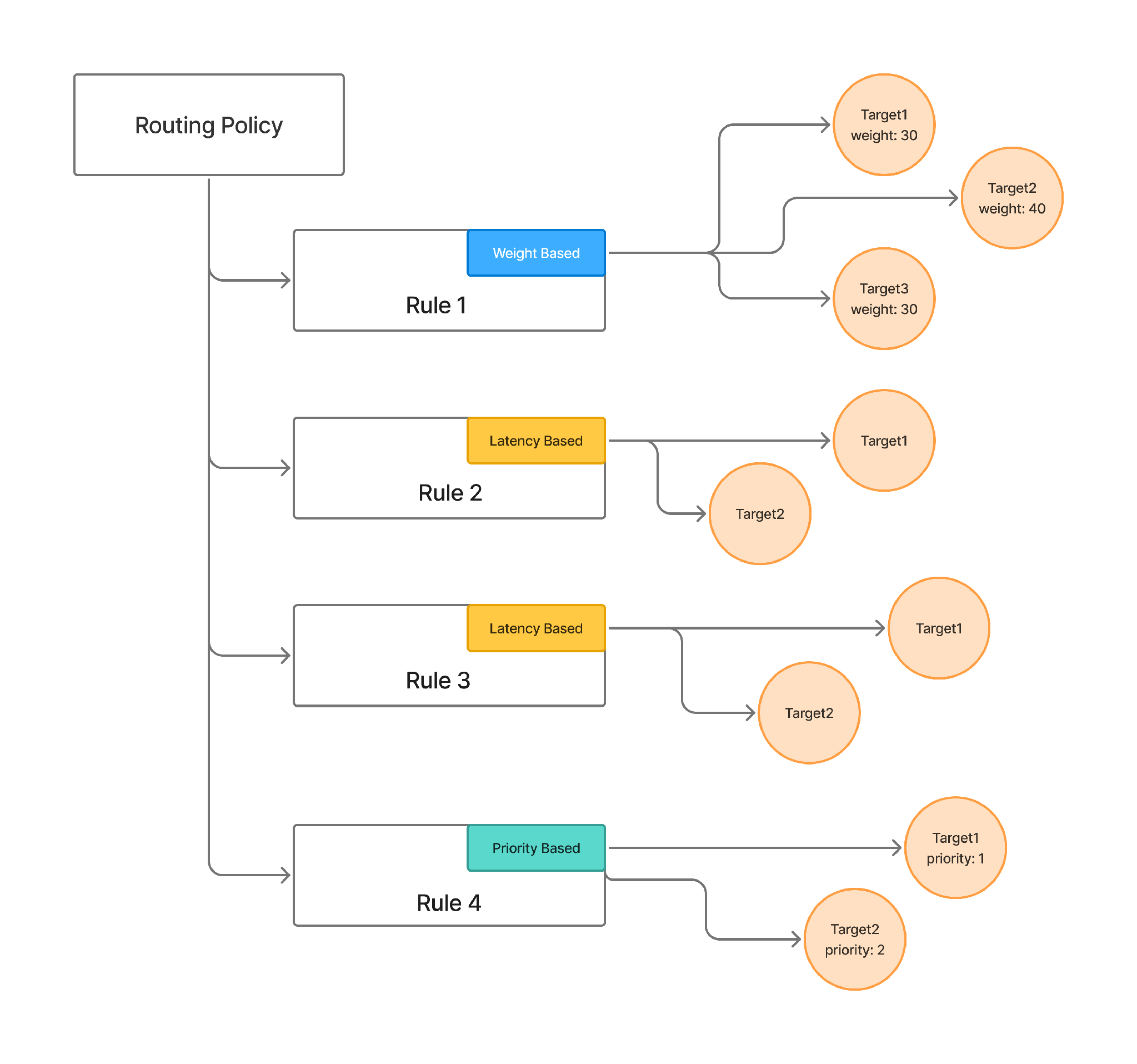
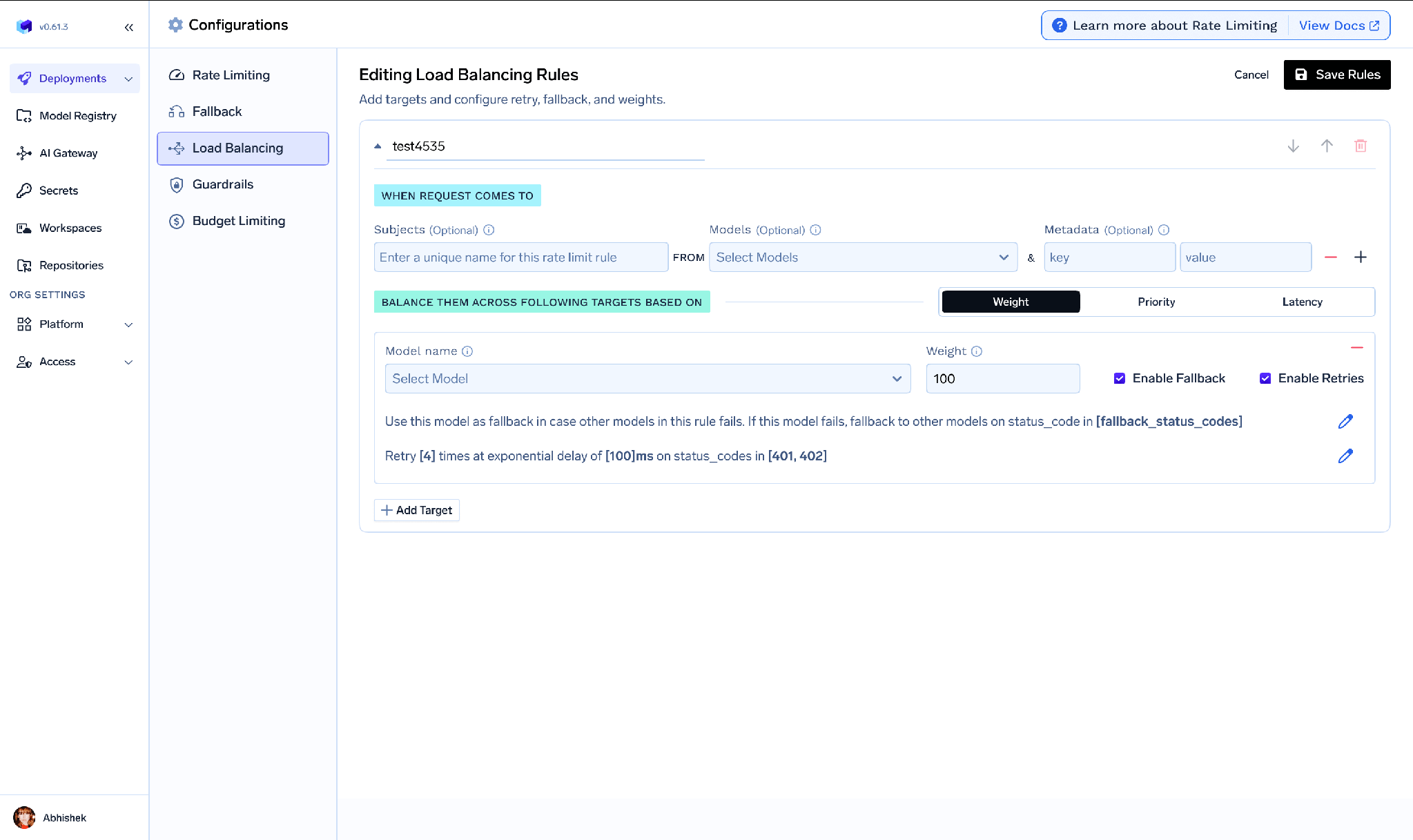
A priority chain that fails over on rate limits:
rules:
  - id: priority-rate-limit
    type: priority-based-routing
    when:
      models: [gpt-4]
    load_balance_targets:
      - target: azure/gpt4
        priority: 0
        fallback_status_codes: ["429"]
      - target: openai/gpt4
        priority: 1
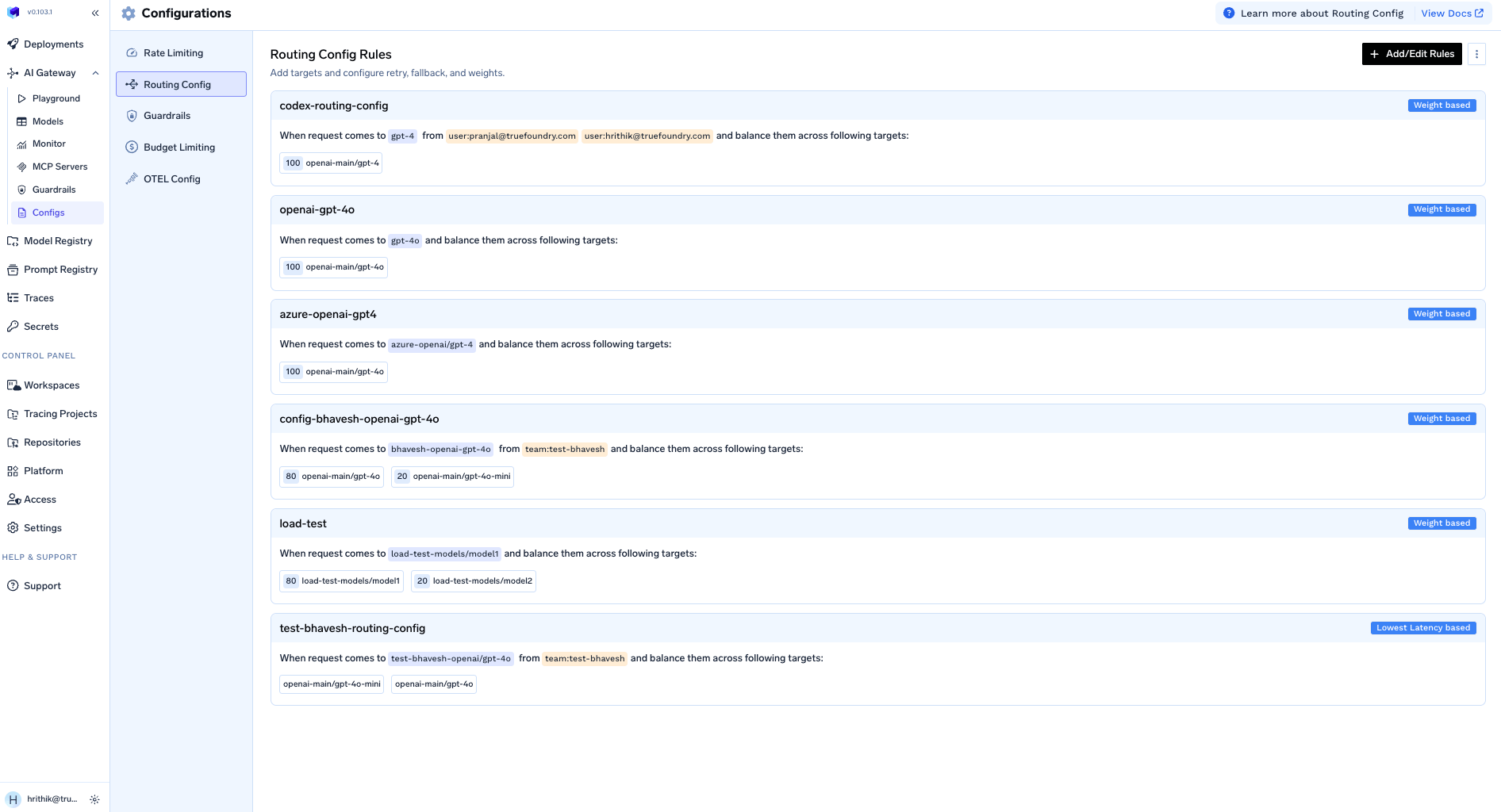
This YAML lives under AI Gateway → Configs → Routing Config and can be kept in Git and applied with tfy apply, so routing changes get PR review. One caveat: for new setups TrueFoundry recommends virtual models instead. The YAML stays functional for existing deployments, but virtual models give clearer ownership and access control.
This is the sense that makes people search for the best llm router, and it is a genuinely different problem. The targets here are not interchangeable: a cheap model and a frontier model will both answer, but not equally well. The router is making a quality judgment, not a capacity one.
The economics are hard to argue with. Production traffic is not uniformly difficult — a greeting, a factual lookup, and a request to design a distributed rate limiter all arrive on the same endpoint, and serving all three on your most capable model means paying top-tier prices for the easy majority.
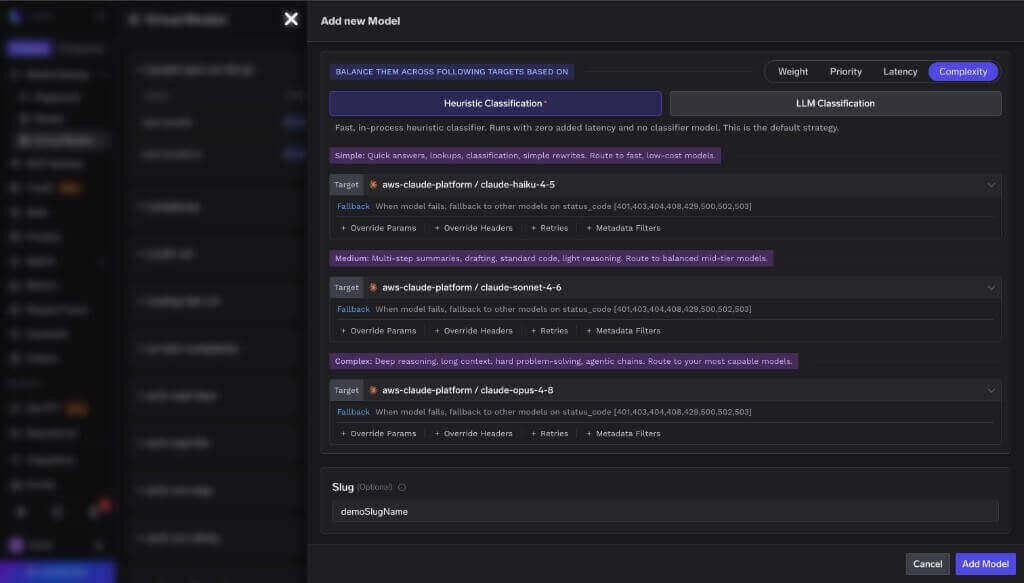
TrueFoundry’s Auto Routing classifies each request into one of three tiers and sends it to the target you configured for that tier. Your application keeps calling one virtual model name.
You choose Complexity as the routing type when creating the virtual model:
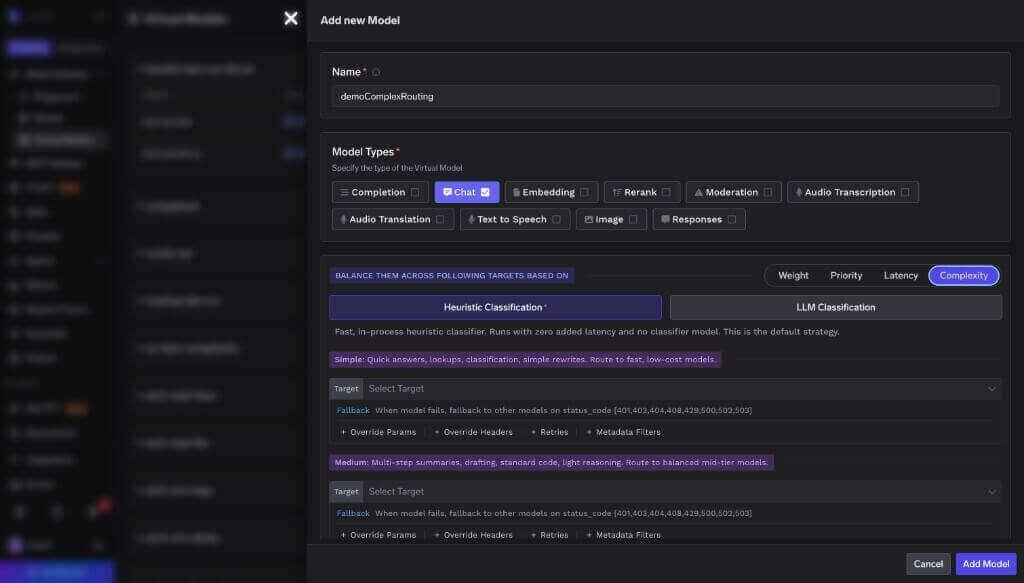
Then pick how requests get classified. Heuristic is the default: in-process, free, no added latency, fully deterministic. It scores a fixed set of signals — code keywords, reasoning phrases like “step by step”, technical vocabulary, prompt length, multi-step structure. Two distinct reasoning phrases always route to complex, whatever else matched.
The LLM classifier calls a small fast model instead, for traffic where difficulty is not signalled by vocabulary:
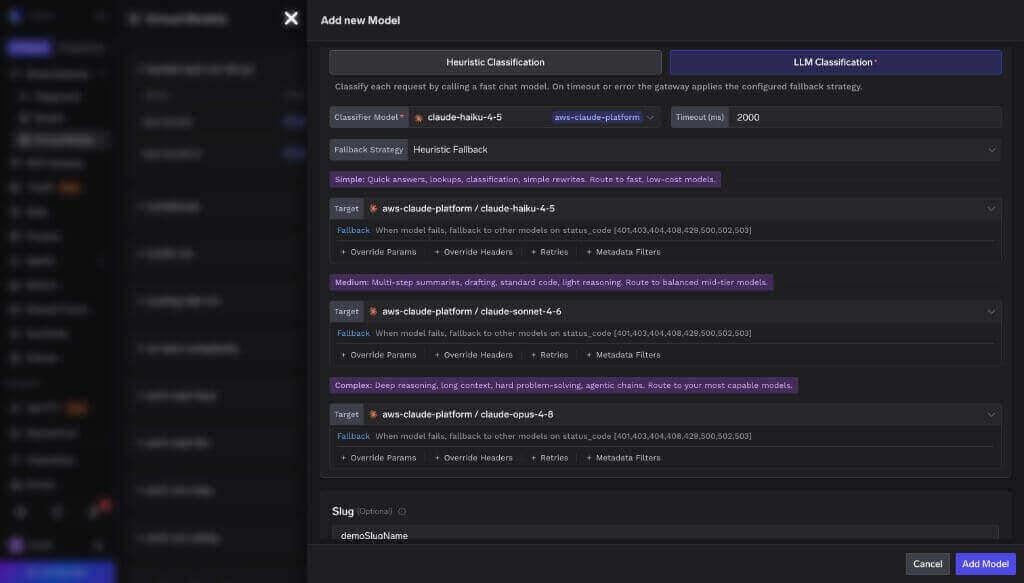
Be clear-eyed about that cost. Each classifier call is a billable gateway request. It shows up in your logs, its tokens are attributed to the same tenant and subject as the triggering request, and it adds a hop before the real model is called. The heuristic is free but coarse; the classifier is more accurate on ambiguous prompts and you pay for it twice, in cents and in milliseconds. A fallback_strategy is required so a classifier timeout never fails the request.
Finally, assign a model to each tier:
TrueFoundry benchmarked Auto Routing against sending every request to one top-tier model. Answers were graded deterministically — generated code run against unit tests, math and multiple choice matched to answer keys.
Mean latency fell from roughly 7.6s to 4.0s, since most requests skip the top-tier reasoning model. [VERIFY — latency figures are not in the public docs, which state only that Auto Routing was “faster on average”.]
Read the 98% honestly. It is not a claim that routing down-tier is free. It is the measured size of what you give up: two percent of a graded pass rate, bought for roughly two thirds of the bill. On some workloads that is an obvious trade and on others it is not, which is why the number is published rather than rounded to “no quality loss.” Against a prior-generation top model the savings are closer to 50%, and the free heuristic gives up accuracy on short-but-hard prompts. Measured August 2026.
The third sense has nothing to do with cost or throughput. A request from a German subsidiary may need to be served by an EU deployment, and the record of it may need to stay in an EU bucket. No amount of weight tuning expresses that. Two things both get called data routing, and TrueFoundry implements them with different features:
For processing, targets carry a metadata_match block, and a target stays eligible only when every pair matches the request’s resolved metadata. On the SaaS gateway every request is auto-tagged with tfy_gateway_region and tfy_gateway_zone from whichever of the 12-plus regions handled it, so the client sends nothing:
routing_config:
  type: priority-based-routing
  load_balance_targets:
    - target: azure-us/gpt-4o
      priority: 0
      metadata_match: { tfy_gateway_region: US }
    - target: azure-eu/gpt-4o
      priority: 0
      metadata_match: { tfy_gateway_region: EU }
    - target: openai/gpt-4o      # catch-all
      priority: 1
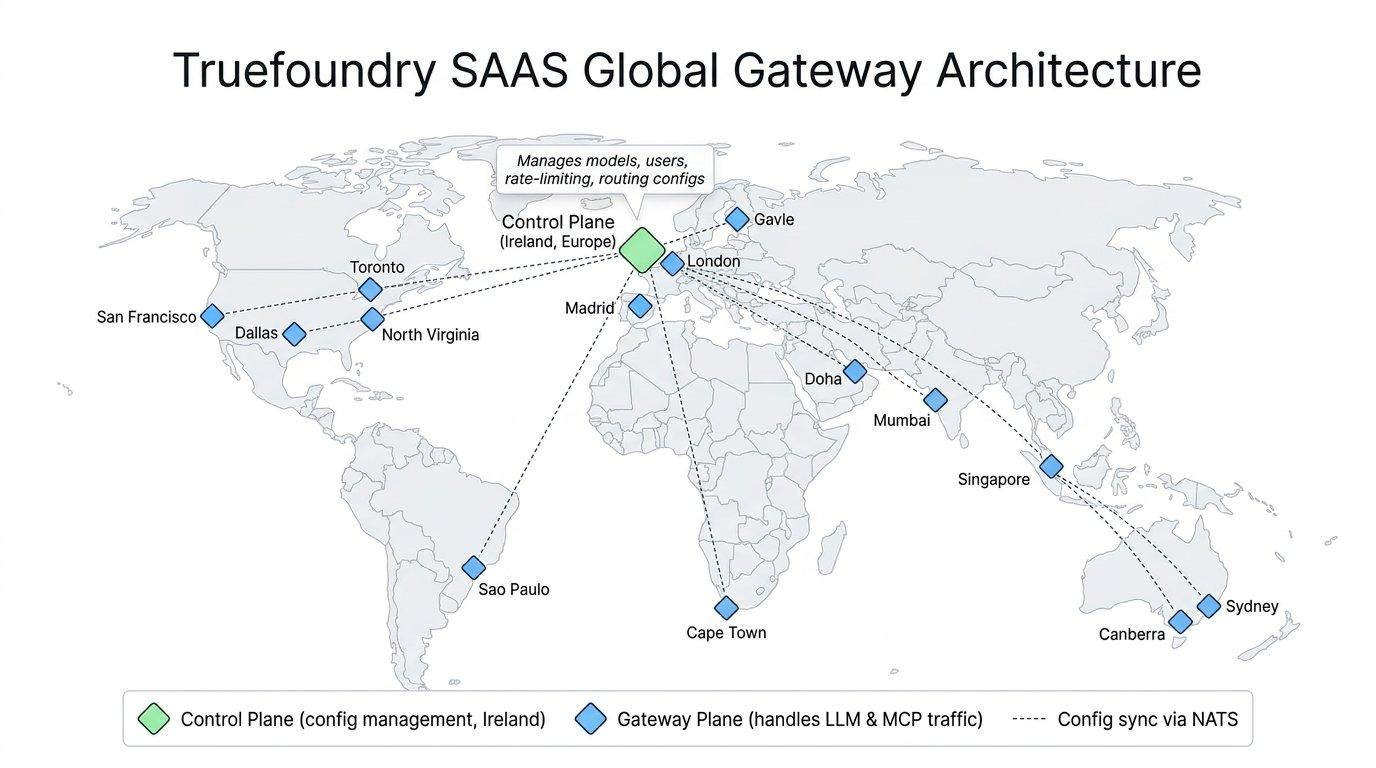
Filtering happens before load balancing order is computed, so a non-matching target never participates. That ordering is the point: data routing constrains the candidate set, load balancing picks within it.
For storage, there is a separate Data Routing page under AI Gateway → Controls → Data Routing:
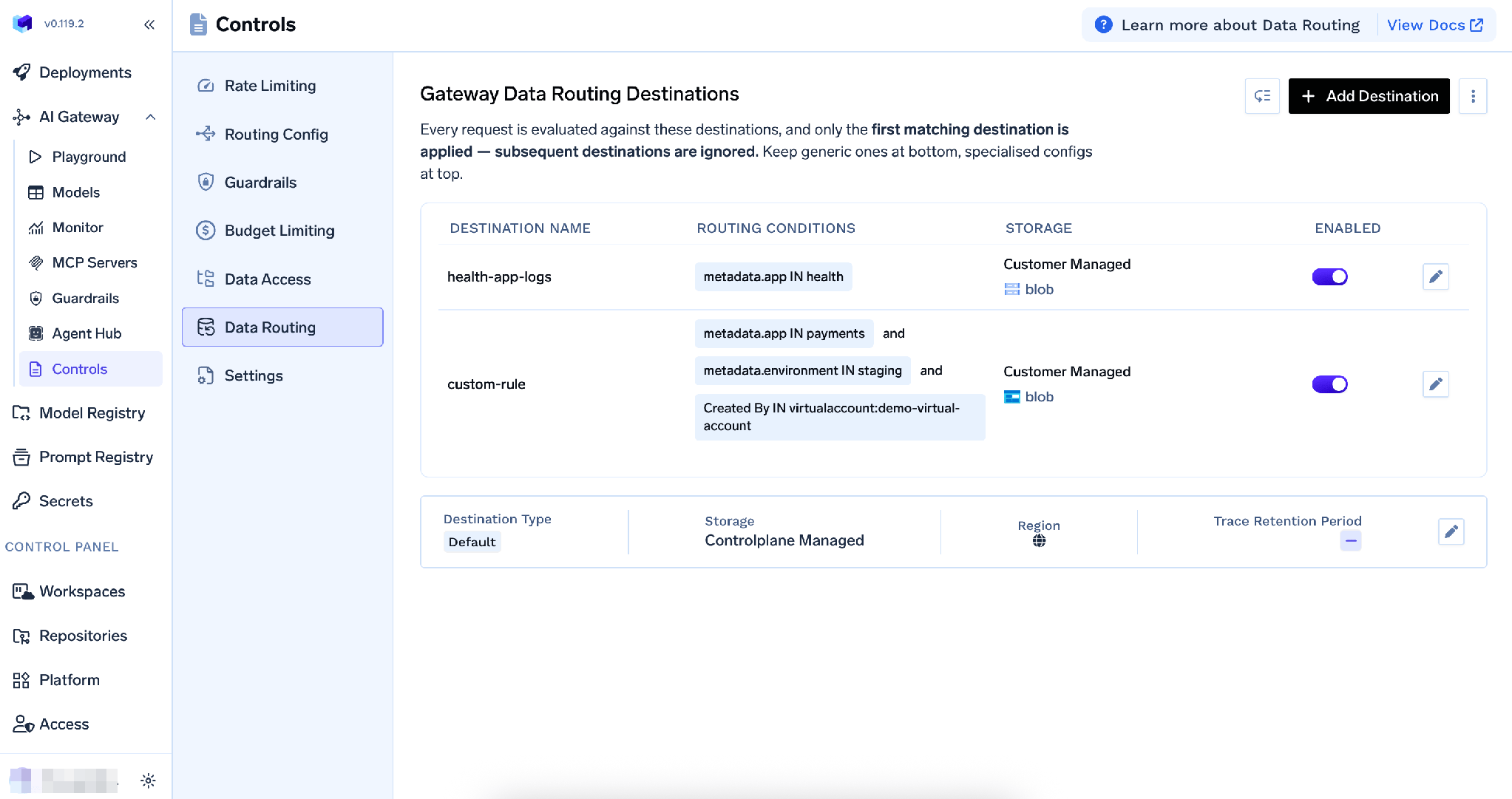
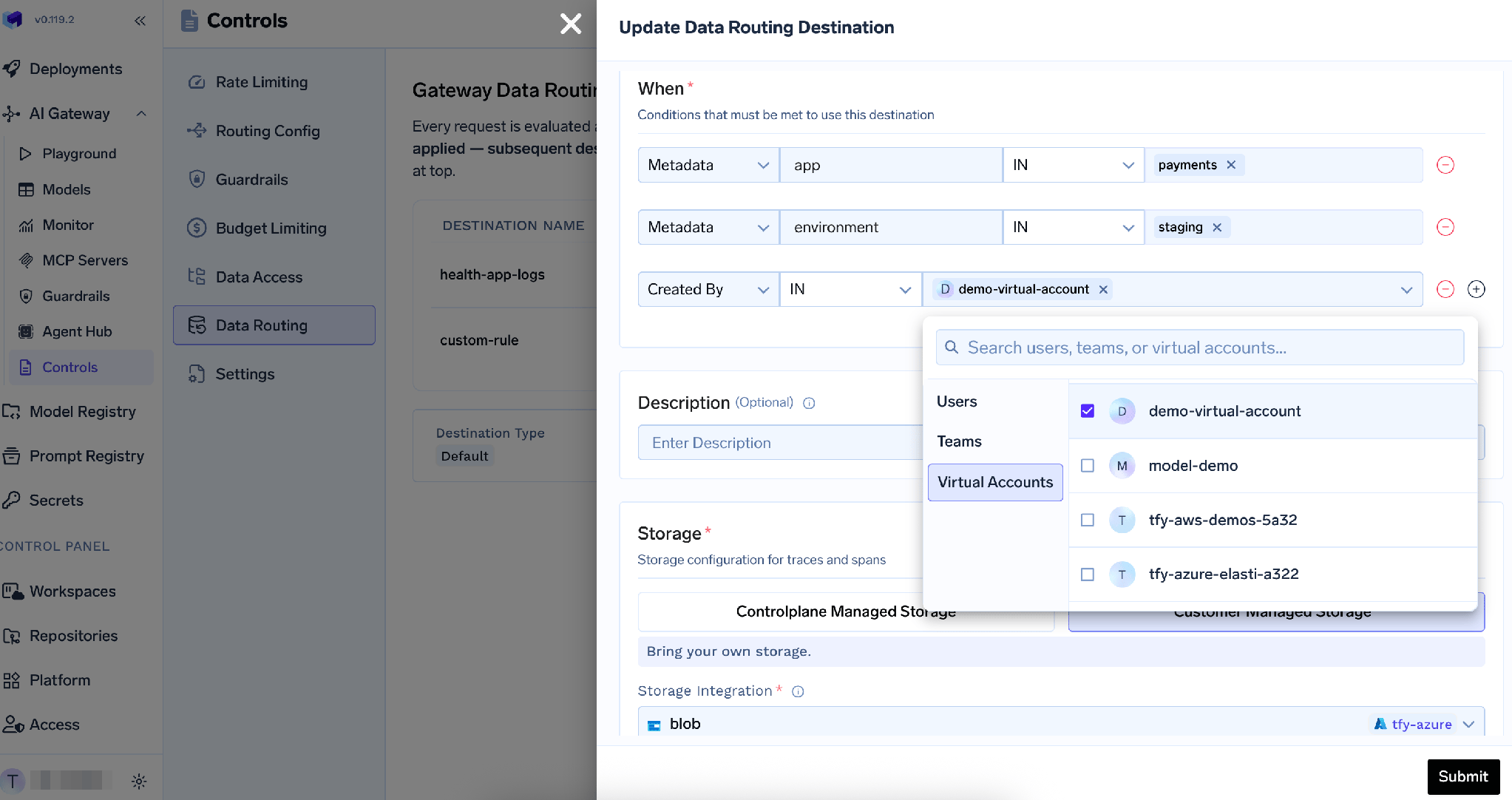
Custom destinations are an Enterprise feature and route traces on conditions — user-defined metadata such as metadata.app, or who created the request. Destinations evaluate top to bottom, first match wins, so keep specific rules above generic ones:
Each destination is either control-plane managed storage, with a region selectable on SaaS for data residency, or your own S3, GCS, or Azure Blob bucket:
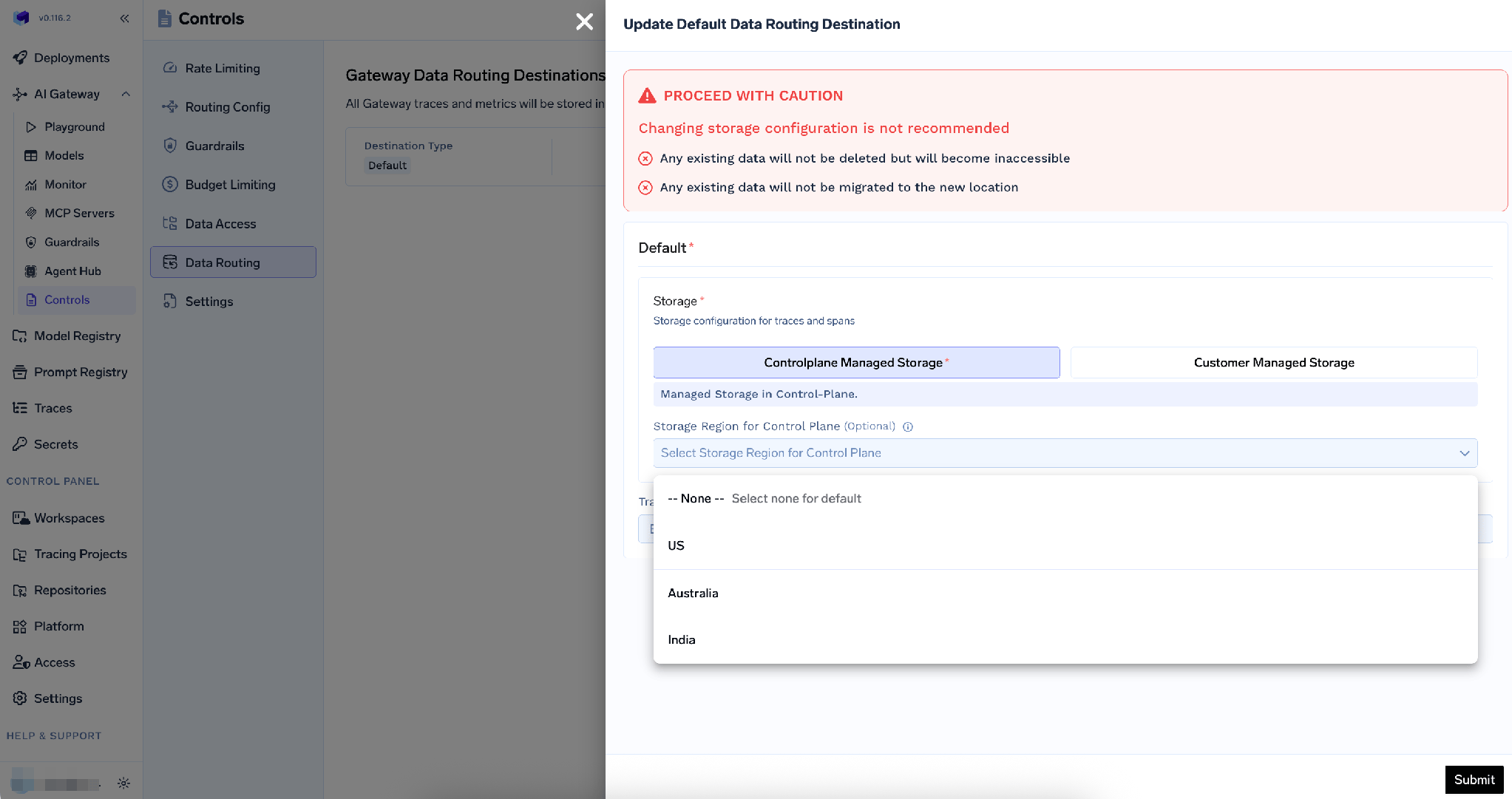
Two limits to design around. Metrics always go to the default destination and are kept forever — only traces can be custom-routed. And changing a storage configuration migrates nothing: existing data is not deleted, but becomes inaccessible from the new location.
Solving the wrong one. A team worried about spend builds a weighted split across three providers. Weights do not know which requests are hard, so the bill barely moves. A team worried about outages turns on complexity routing and is surprised when a provider incident still takes them down. Name the problem before picking the mechanism.
Assuming health demotion is universal. Under weight, priority, and latency routing, a failing target is demoted to the end of the list. Under Auto Routing it is not — target order is always tier order, and the escalation chain is the failover path. Per-target retries, fallback status codes, rate limits, and budgets still apply; the cooldown behaviour does not.
Treating a classifier as free. The heuristic genuinely is. The LLM classifier is a second model call on every unpinned turn, billed and traced like any other request. Often worth it — but it belongs in your cost model, not in your invoice as a surprise.
Routing without a spend ceiling. Cost aware routing lowers average cost per request; it does not cap total spend. One runaway agent loop undoes a quarter of savings. Model routing is the slope, budget rules are the ceiling, and you want both.
A support product sends everything to a frontier model. The bill is uncomfortable, one provider had a bad week last month, and legal is asking where EU customer conversations are processed. All three kinds, one application.
Step one: model selection. Create a virtual model support/assistant with Complexity routing. Point simple at a small fast model, medium at a mid-tier model, complex at the frontier model, and leave the heuristic classifier on. The application changes one string — the model name.
Multi-turn behaviour needs no configuration. Each turn is classified, and the pin ratchets upward only: if turn four is harder the conversation moves up; if turn five is “thanks” it stays there. A pin survives ten minutes of inactivity and refreshes on every turn. Once a conversation reaches complex, later turns skip classification entirely.
Step two: load balancing inside a tier. Give the complex tier a second target on a different provider. Same-tier targets are attempted in declaration order before escalating, so the frontier model has a peer to fail over to. The dashboard allows one target per tier, so this shape needs tfy apply or the API.
Step three: data routing. Add metadata_match: { tfy_gateway_region: EU } to an EU-deployed target with a catch-all below it, then a Data Routing destination sending traces where metadata.region is eu to an EU bucket.
Step four: the ceiling. A budget rule scoped to the virtual model id caps spend regardless of how routing behaves:
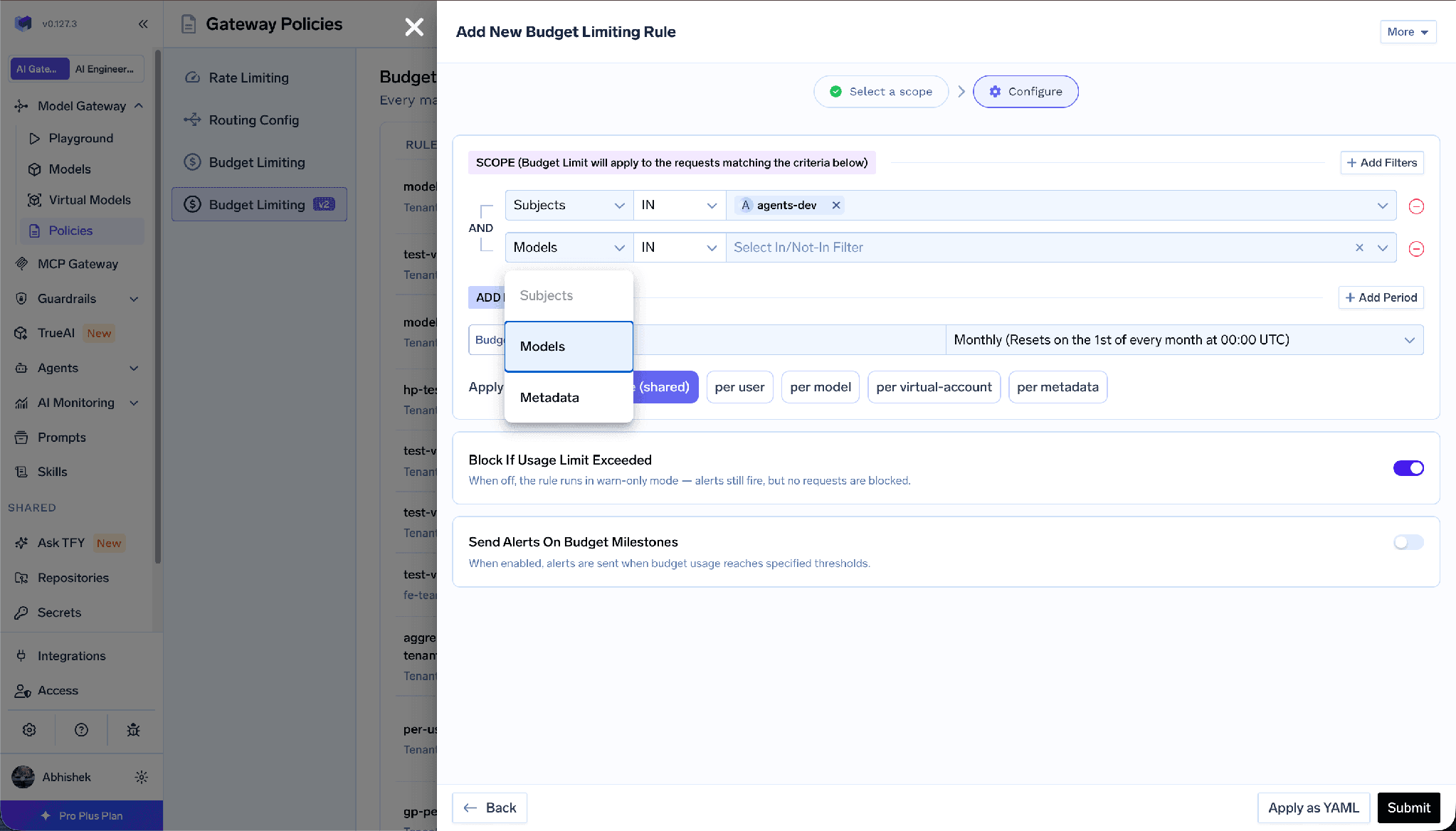
Budget rule scope filters with Subjects, Models, and Metadata conditions
Such a rule matches both the virtual model id and the concrete target it resolves to, and the two behave very differently. A breached virtual model budget in enforce mode blocks the whole request before any backend runs, and fallback targets are not tried. A breached concrete target budget skips only that target, and the virtual model falls back to another. Same feature, opposite blast radius.
Step five: verify. Every response carries x-tfy-applied-rules with the tier served, the cause, and the full ordered chain, plus x-tfy-resolved-model naming the model that answered. The counter ai_gateway_complexity_routing_decisions_total breaks down by decided_tier, resolved_tier, and cause — multiply each tier’s traffic share by the price difference for your real saving, not a brochure figure.
Auto Routing is virtual-model only. It is not a valid rule type in the tenant-level routing YAML, and it is rejected for embedding, image, audio, rerank, and moderation model types — only chat, completion, and responses. Mixed lists fail too: declaring both chat and embedding is rejected at save time.
Escalation covers tiers you never configured. With only simple and complex targets, anything classified medium escalates to complex and the header reports it. That is a supported two-tier setup — but if decided_tier and resolved_tier keep diverging for a reason other than session_pin, a tier is missing or misconfigured.
The classifier reads two messages only. The last user message and the last system or developer message, capped at 8,000 and 2,000 characters. Earlier turns, assistant replies, and tool messages are ignored. Consistency across a conversation comes from pinning, not from reading history.
“LLM router” feels like a vague category because it is three categories wearing one label. Load balancing is an availability tool and the targets are interchangeable. Model selection is a cost tool and the targets emphatically are not. Data routing is a compliance tool, and it constrains the set before either of the others gets a vote.
Separated, each is a short decision. Are you losing requests to outages, paying too much for easy requests, or answering a question about where data goes? The first wants a priority chain, the second complexity tiers, the third metadata matching and a storage destination. Most teams need one badly and the others eventually.
And when you reach for the cost one, take the published number at face value in both directions. Sixty-nine percent off is real. So is the two percent it cost.
TrueFoundry AI Gateway delivers ~3–4 ms latency, handles 350+ RPS on 1 vCPU, scales horizontally with ease, and is production-ready, while LiteLLM suffers from high latency, struggles beyond moderate RPS, lacks built-in scaling, and is best for light or prototype workloads.




An LLM router sits between your application and your models and decides which model or deployment serves each request. The term covers three distinct jobs: load balancing across interchangeable targets for throughput and failover, model selection between a cheaper and a stronger model, and data routing constraining where a request may be processed and where its logs land. Each reads different inputs, so the first question is which one you need.
Model selection routing does; load balancing and data routing generally do not. TrueFoundry’s Auto Routing benchmarked at 69% cost savings with 98% of quality retained across 550 graded prompts, and up to 80% on production-shaped traffic. Savings depend on your traffic mix: break the routing decisions metric down by resolved tier and multiply each tier’s share by the price gap.
Complexity-based routing on one virtual model with the free heuristic classifier, because it needs no application change and no classifier spend. Add a priority chain across two providers once an outage has cost you something. Add data routing when someone asks where the data goes.
Yes — VPC, on-prem, air-gapped, hybrid, or across multiple clouds, with no data leaving your domain.
Roughly 3-4 ms of overhead, handling 350+ RPS on a single vCPU, across 1,000+ supported LLMs. The exception is the optional LLM classifier, which adds a real model call before the request is forwarded.
Yes. The gateway is OpenTelemetry-compliant and plugs into Grafana, Datadog, or Prometheus. Each LLM classifier call produces its own span, so classifier latency is visible separately from the served model’s.



The latest news, articles, and resources sent to your inbox



.png)
.png)
.png)
.png)
.png)
.webp)
.webp)
.png)


