November 9, 2026
|
5 min read



Blazingly fast way to build, track and deploy your models!
Portkey is a capable AI gateway, and for a team that fits inside its tiers it works well. The difficulty many teams run into is not capability in the abstract, it is where each capability sits in the pricing structure. The thing you need next, SSO, a longer log window, a VPC deployment, PII anonymization, tends to live one tier up from where you are, and the top tier is custom-priced and opaque.
That tiering is what turns a Portkey evaluation into a migration conversation. A team on the Pro plan discovers that SSO is not available at their tier at all, that 30-day log retention is not enough for an incident investigation or a compliance audit, and that running the data plane inside their own VPC requires Enterprise. At that point the question becomes whether to negotiate an opaque enterprise contract for features that should arguably be standard, or to move to a gateway where governance and deployment flexibility are not gated behind the highest tier.
This is a migration guide for teams in that position. It describes Portkey's tiering reality fairly, names the specific reasons teams move, and lays out a step-by-step migration to TrueFoundry that is low-risk because both gateways speak the OpenAI-compatible API. In most cases the client change is a single base URL.
Want SSO, VPC, and deep cost governance without tier cliffs? Book a demo.
To plan a migration you need an honest map of what Portkey gives you at which tier, because the whole decision turns on it.

The open-source core does routing only. Portkey's OSS gateway handles routing, fallback, and load balancing. It does not include observability, caching, virtual keys, or RBAC. If you adopted Portkey OSS expecting the full product, you got the request-routing layer and nothing else.
The hosted product adds the operational layer. Logs and traces, virtual keys, caching, and prompt management come with the hosted (managed) product, not the OSS core. This is where most teams actually run Portkey.
Enterprise gates the governance and deployment features. SSO, compliance features, VPC/private tenancy, PII anonymization, and a BAA are Enterprise-only, custom-priced. The capabilities most relevant to a regulated enterprise sit behind the tier with no public price.
The Pro plan's specific caps. The published tiers make the ceiling concrete:
| Portkey tier | Price | Requests | Log retention | SSO | VPC / compliance |
|---|---|---|---|---|---|
| Dev | Free | ~10K/month | 3 days | No | No |
| Pro | $49/month | ~100K/month | 30 days | No | No |
| Enterprise | Custom | Custom | Custom | Yes | Yes (VPC, PII, BAA) |
The jump from Pro to Enterprise is not incremental. There is no middle tier where you can buy just SSO or just 90-day retention. The moment you need any Enterprise-gated feature, you are in a custom-pricing negotiation, which is exactly the friction that sends teams to evaluate alternatives.
The reasons are specific, and they line up with the tiering above.
TrueFoundry is positioned for exactly this: a unified OpenAI-compatible gateway with routing (latency, weight, priority), fallback with in-request retries, exact and semantic caching, budgets and rate limits per user/team/model, per-request observability with cost attribution, inline guardrails, plus RBAC, SSO, SCIM, and audit, and an MCP gateway, all in one control plane that deploys SaaS, in-VPC, on-prem, or air-gapped with the data plane staying in your network. The governance is not a tier; it is the product. For the general selection framing, see how to choose an AI gateway.
See how TrueFoundry consolidates gateway, governance, and observability in one plane. Book a demo.
The migration is incremental and reversible. You do not flip everything at once, and because both gateways speak the OpenAI-compatible API, the client-side change is minimal.
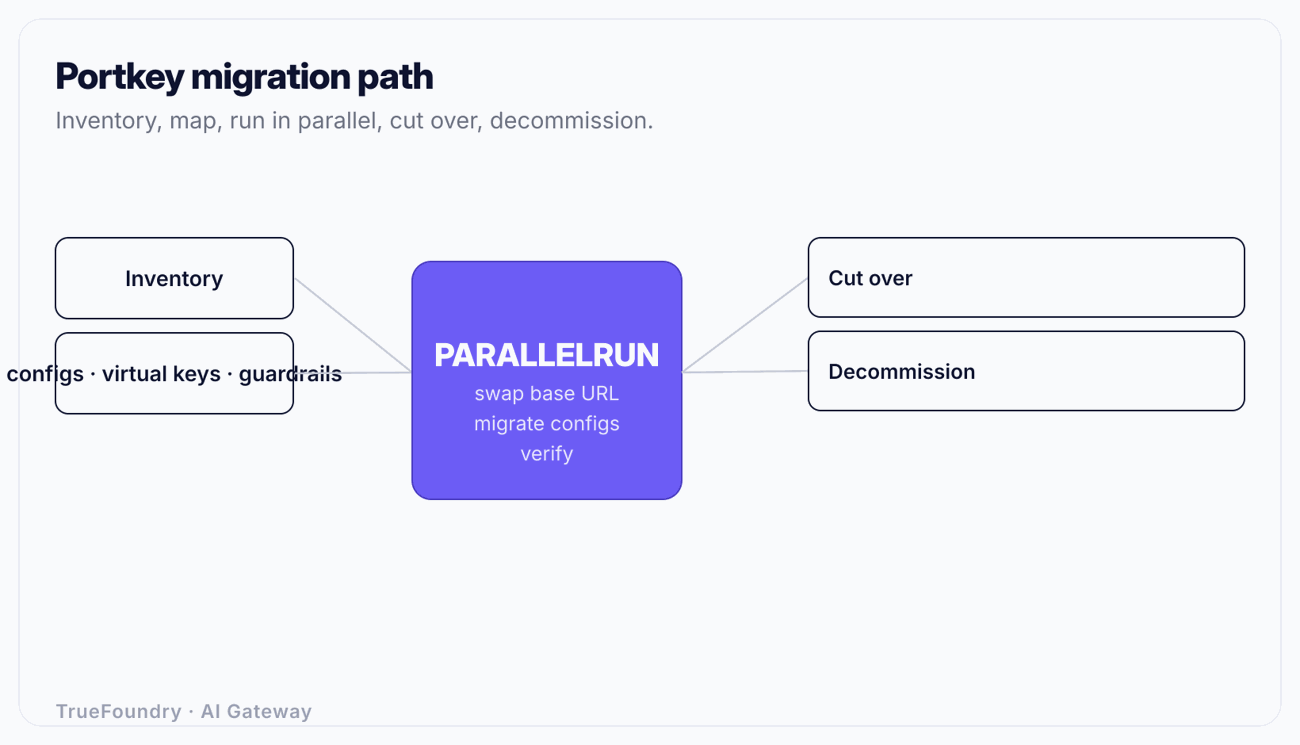
Catalog what Portkey is doing for you:
Capture the retention and compliance expectation explicitly. One reason you are migrating is likely that 30 days is not enough, so define the target (say 180 or 365 days) now, as a migration requirement.
Translate Portkey concepts to their TrueFoundry equivalents. The capabilities overlap, so this is reframing, not rebuilding.
| Portkey concept | TrueFoundry equivalent |
|---|---|
| Virtual key (scoped API key) | Identity-tied access via RBAC + per-user/team/model budgets and rate limits |
| Config (routing/fallback/retry) | Declarative policy: routing plus fallback with in-request retries, under version control and audit |
| Caching (hosted) | Exact and semantic caching |
| Hosted logs (30-day on Pro) | Per-request observability with retention you set, tagged by user/team/model |
| Guardrails | Inline guardrails in the request path (PII, prompt injection, secrets) |
| Prompt management | Prompt management assets |
| SSO/PII/VPC (Enterprise-gated) | RBAC, SSO, SCIM, audit, and VPC/on-prem/air-gapped deployment as standard |
| Scattered provider keys | Centrally held, scoped, rotated secrets |
This is what makes the migration safe. Portkey and TrueFoundry both expose an OpenAI-compatible API, so the only change a client needs is the base URL. No SDK change, no request-shape rewrite, no response-parsing change.
Stand up TrueFoundry alongside Portkey. Point one low-risk service at the new base URL and verify: responses match, observability shows the traffic with correct cost attribution, budgets and guardrails behave as configured, and caching hits as expected. Because both endpoints are live, you compare them directly and revert a service to Portkey's base URL in seconds if anything is off.
A concrete example: if your service reads its endpoint from OPENAI_API_BASE, migrating that service is changing one environment variable and restarting, and rolling back is changing it back. That is the full client-side blast radius when both gateways speak the same API.
This step is specific to the Portkey migration because retention is often the reason you are moving. Before you cut over production traffic, confirm that TrueFoundry's observability captures what Portkey's logs did, per-request tokens, latency, model, and cost, and that retention is set to your target window rather than a tier-imposed 30 days. Validate that cost attribution tags by team the way FinOps needs, because moving from aggregate hosted logs to team-tagged per-request observability is one of the concrete gains you are migrating for. Our overview of LLM observability tools covers what good per-request observability should include.
Migrate traffic in waves, by team or application:
Per-team cutover gives a clean rollback boundary and lets you define budgets and access correctly per team as you go, rather than porting a tangle of shared virtual keys in one risky jump.
Once every caller points at TrueFoundry and has baked long enough to trust, decommission Portkey: stop routing to it, remove provider secrets from its configs, and rotate those provider credentials so the old copies are dead. Confirm no job, notebook, or CI step still points at the old endpoint before you turn it off. The migration is complete when there is one governed path to every model and no orphaned Portkey config holding live keys.
The structural difference, and the reason the migration is worth it for the teams it suits, is where governance lives.
| Capability | Portkey | Unified control plane (TrueFoundry) |
|---|---|---|
| Routing / fallback / load balancing | OSS core and up | Standard |
| Observability, virtual keys, caching, prompt mgmt | Hosted product | Standard |
| SSO, SCIM, audit | Enterprise-only | Standard |
| VPC / private tenancy | Enterprise-only | VPC, on-prem, or air-gapped; data plane in your network |
| PII handling / compliance (BAA) | Enterprise-only | Inline guardrails + governance standard |
| Log retention | 3 days (Dev), 30 days (Pro), custom (Ent) | You set it |
| Cost governance | Per-key limits | Budgets + rate limits per user/team/model, cost attribution by team |
| MCP governance | Separate concern | MCP gateway in the same control plane |
| Pricing transparency for governance | Custom (Enterprise) | Governance not gated behind an opaque tier |
The point is not that Portkey lacks these features, its Enterprise tier has many of them. The point is that for a team that needs SSO, VPC, and real retention, those are standard in a unified control plane rather than reasons to enter a custom-pricing negotiation. For teams also governing MCP tool access, consolidating that into the same plane is covered in enterprise MCP governance.
Migrating before defining the retention target. The whole reason many teams leave Portkey is the 30-day log cap, yet they migrate without writing down the retention they actually need. Set the target window as an explicit migration requirement so you validate it during parallel run, not after cutover.
Porting shared virtual keys as-is. Portkey deployments accumulate shared virtual keys. Recreating them one-for-one rebuilds ungoverned access in the new system. Use the cutover to define RBAC per team against your identity provider, which is a core reason you are moving.
Treating the base-URL swap as the migration. The OpenAI-compatible API makes the client change trivial, but the value is the governance: SSO, RBAC, budgets, audit, and retention you control. Swapping URLs without configuring the governance leaves you with a different gateway and the same gaps.
Forgetting to rotate secrets at decommission. If you shut down Portkey but leave the provider keys it held un-rotated, those credentials are live in a decommissioned, unmonitored system. Rotate every credential the old gateway held as part of decommission.
Big-bang cutover. Flipping the whole org at once removes your rollback boundary. Parallel run and team-by-team cutover keep any problem contained to one team and reversible with a single base-URL revert.
Migrating off Portkey is rarely about capability in the abstract; it is about where capability sits in the pricing structure. When SSO, VPC, PII handling, and real log retention all live in a custom-priced Enterprise tier, a team that needs those features faces a choice between an opaque negotiation and a move to a platform where governance and deployment flexibility are standard.
The move itself is low-risk. Both gateways speak the OpenAI-compatible API, so the client change is usually one base URL. Inventory your configs and virtual keys, map them to RBAC, policy, and observability, validate retention during a parallel run, cut over team by team, and decommission with a full secret rotation. Done that way, you consolidate gateway, governance, observability, and MCP into one control plane, deployed in your own network, without a rewrite.
Move from Portkey to a unified control plane. Book a demo.
TrueFoundry AI Gateway delivers ~3–4 ms latency, handles 350+ RPS on 1 vCPU, scales horizontally with ease, and is production-ready, while LiteLLM suffers from high latency, struggles beyond moderate RPS, lacks built-in scaling, and is best for light or prototype workloads.


Usually because the capability they need next is gated behind a higher tier: SSO, compliance, VPC, and PII anonymization are Enterprise-only, and the Pro plan caps log retention at 30 days with no SSO. Teams that want those as standard, plus deeper cost governance and a single control plane spanning gateway, observability, and MCP, move to a unified platform.
Typically one line: the base URL. Both expose an OpenAI-compatible API, so clients keep the same SDK, request shape, and response parsing. You point them at the new endpoint and verify, which is why you can run both in parallel and cut over gradually.
Routing, fallback, and load balancing only. Observability, virtual keys, caching, and prompt management are in the hosted product, not the OSS core, and SSO, compliance, VPC, and PII anonymization are Enterprise-only. Knowing this prevents the surprise of adopting the OSS gateway expecting the full platform.
Yes, they map across. Portkey's caching maps to exact and semantic caching, and its guardrails map to inline guardrails (PII, prompt injection, secrets) in the request path. You translate the configuration rather than rebuilding the behavior, which keeps the migration low-risk.
You set it. One common reason to leave Portkey is the fixed 30-day retention on Pro; on a unified control plane you configure retention to your compliance requirement. Define the target window as a migration requirement and validate it during the parallel-run step before cutting over production traffic.



The latest news, articles, and resources sent to your inbox