November 9, 2026
|
5 min read



Blazingly fast way to build, track and deploy your models!
Mcp-Method and Mcp-Name headers that make it far easier to put behind a gateway and a load balancer.The Model Context Protocol gives an LLM a standard way to call tools, read context, and reuse prompts across any compliant client. Building a server that speaks it is not hard; building one that is correct, safe to expose, and pleasant for a model to use takes a few more decisions than the quickstart tutorials cover. This guide walks the full path: what a server exposes, which transport to pick and why, how to define a tool the model will actually use well, how to authenticate a remote server, how to test it, and what changes when you move from a laptop to production.
The running examples are structural pseudocode in a Python-ish style. They show the correct shape (names, schemas, handler signatures) without pinning you to a specific SDK version, because the shape is what transfers. If you want the conceptual grounding first, what is an MCP server covers the model; this post is the build.
Built an MCP server? Put it behind a gateway for auth, registry, and audit. Book a demo.
An MCP server offers three kinds of capability to a client. Getting the distinction right at design time saves you from the most common mistake, which is cramming everything into tools.
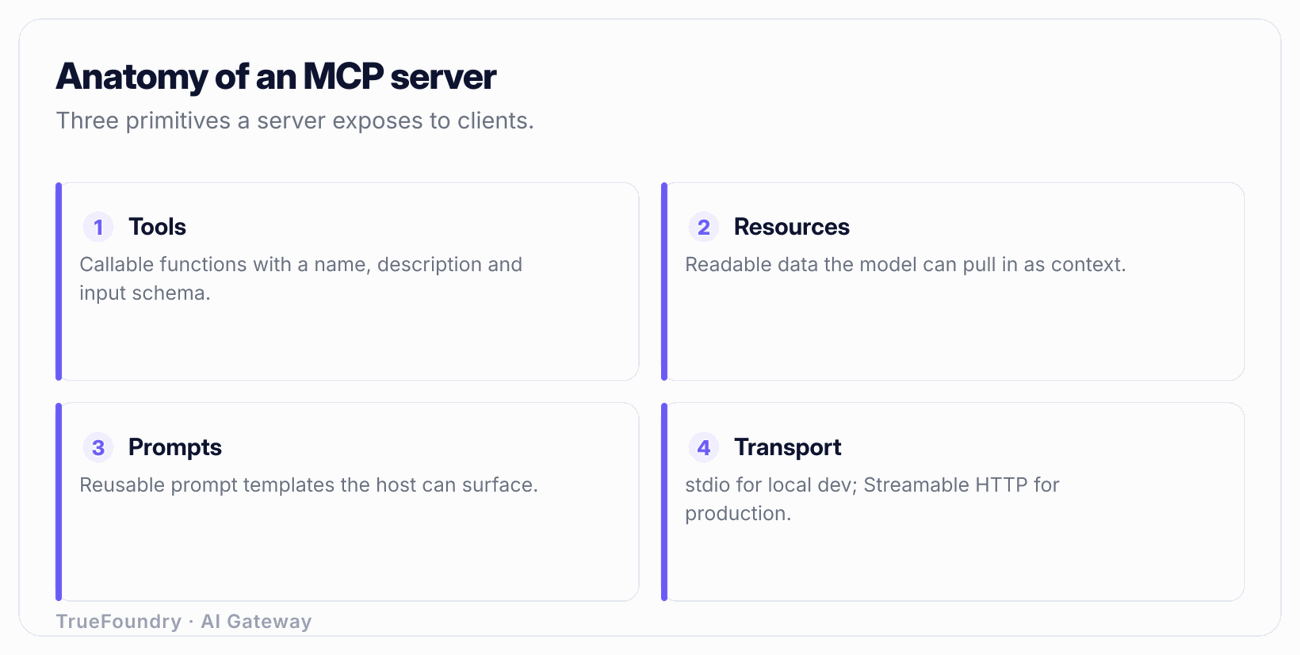
Tools are model-invoked functions. The model decides, during a conversation, to call a tool to get something done: query a database, create a ticket, send a request to an internal API. Tools can have side effects. They are the primitive you reach for when the model needs to act. A tool has a name, a description, and a JSON Schema for its inputs, and it returns structured content.
Resources are application-controlled, read-only context identified by a URI. A resource is data the client can read and hand to the model as context: a file, a configuration document, the current contents of a record. The key difference from a tool is control and intent. A resource is read-only and is typically selected by the application or the user ("attach this document"), not invoked by the model mid-reasoning to cause an effect. If the thing you are exposing never changes state and is really "here is some context to read," it is a resource, not a tool.
Prompts are user-invoked templates. A prompt is a reusable, parameterized message (or message sequence) that a user explicitly triggers, often surfaced in a client as a slash command or a menu item. "Summarize this PR in our house style" with a pr_url parameter is a prompt. Prompts are controlled by the user, not chosen autonomously by the model.
| Primitive | Who controls invocation | Side effects | Typical use |
|---|---|---|---|
| Tool | The model, autonomously, mid-conversation | Yes, allowed | Query an API, write to a database, create a ticket, run a calculation |
| Resource | The application or user selects it | No, read-only | Attach a file, a record, a config document as context |
| Prompt | The user invokes it explicitly | Via the tools it triggers | A reusable templated instruction, often a slash command |
A practical rule: if the model should decide when to use it, build a tool. If the user or app decides what context to load, build a resource. If the user wants a repeatable canned instruction, build a prompt. Most servers legitimately ship only tools, but a server that exposes, say, your internal runbooks is better modeled with resources than with a get_runbook tool the model has to guess how to call.
The protocol defines how a client and server exchange JSON-RPC messages. Two transports matter, and the choice drives almost everything about how you deploy.
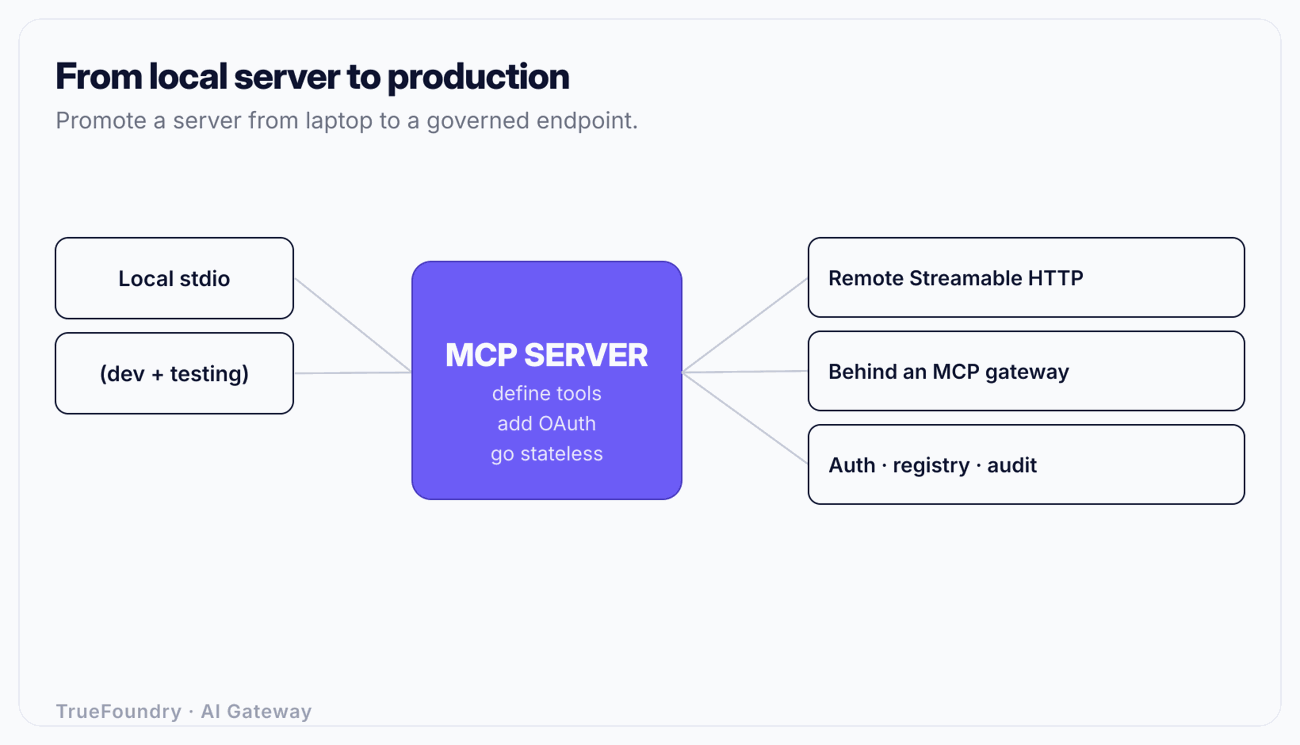
Local stdio runs the server as a subprocess of the client and exchanges messages over standard input and output. It is the right choice for development and for desktop clients like an IDE or a local assistant, where the server runs on the same machine as the user. There is no network, no auth to configure, and the client manages the process lifecycle. For running local servers inside a coding client specifically, see MCP servers in Claude Code. The limitation is obvious: stdio serves exactly one local user and cannot be shared, load-balanced, or reached over a network.
Remote Streamable HTTP runs the server as a network service that clients reach over HTTP, with server-to-client streaming for notifications and progress. This is the transport for anything multi-user, anything hosted, anything production. The 2026-07-28 protocol revision matters here: Streamable HTTP supports a stateless mode, where the server does not have to pin a client to a long-lived session on one instance. Stateless operation is what lets you run many identical replicas behind a load balancer and scale horizontally without sticky sessions, which is the single most important property for production hosting. The same revision standardized the Mcp-Method and Mcp-Name headers on requests, which expose the JSON-RPC method and the tool or resource name at the HTTP layer. That sounds minor; it is not. It means a gateway, proxy, or load balancer can route, rate-limit, authorize, and log per tool without parsing the JSON-RPC body, which is exactly what you need to govern a server at scale.
| Consideration | Local stdio | Remote Streamable HTTP |
|---|---|---|
| Where it runs | Subprocess on the user's machine | Network service, hosted |
| Users served | One, local | Many, concurrent |
| Auth | None (local trust) | Required: OAuth 2.1 with resource indicators |
| Scaling | Not applicable | Horizontal, stateless mode avoids sticky sessions |
| Lifecycle | Client spawns and kills the process | You operate it like any service |
| Routing/governance | N/A | Mcp-Method / Mcp-Name headers enable per-tool routing and limits |
| Best for | Development, desktop/IDE clients | Production, shared, multi-user servers |
Build and debug on stdio; ship on Streamable HTTP. Writing your server so the transport is a thin outer layer (handlers that do not care how they were reached) lets you move between them without rewriting logic.
A tool definition has three parts, and the model's behavior is governed by all three. This is where most "my server does not work" problems actually originate.
# Structural pseudocode — shape, not a specific SDK version.

@server.tool()
def search_orders(
    customer_id: str,        # required
    status: str = "any",     # enum: open | shipped | cancelled | any
    limit: int = 20,         # 1..100
) -> list[Order]:
    """Search a customer's orders by status.

    Use this when the user asks about the state, history, or
    contents of orders for a known customer_id. Returns up to
    `limit` orders, newest first. Does NOT create or modify
    orders. If the customer_id is unknown, ask the user for it
    rather than guessing.
    """
    ...
The three parts:
Name. Short, verb-led, unambiguous. search_orders, not orders or do_order_stuff. The model reads the name first when deciding among dozens of available tools.
Description. This is the most important text you will write, and it is prompt engineering, not documentation. The model decides whether to call the tool and how to fill its arguments almost entirely from the description. State what the tool does, when to use it, when not to use it, what it returns, and how to handle missing inputs. The example above tells the model it is read-only ("Does NOT create or modify") and gives it a fallback behavior ("ask the user rather than guessing"). Vague descriptions produce a model that calls the wrong tool, calls the right tool with wrong arguments, or calls it when it should not. Treat every description as a mini system prompt.
Input schema. A precise JSON Schema. Mark required fields required. Use enums for closed sets (status is one of four values) so the model cannot invent "in_progress". Set bounds (limit between 1 and 100). Give each field a description. A tight schema both constrains the model and lets the server, or a gateway in front of it, validate inputs before any handler runs.
Two gotchas that bite everyone:
create_refund) must tolerate being called twice with the same inputs without doubling the effect. Accept an idempotency key or make the operation naturally idempotent. Design for at-least-once delivery, because that is what you will get.A local stdio server inherits the user's machine trust and needs no auth. The moment you expose a server over HTTP, it needs real authentication, and the protocol is specific about what "real" means.
The MCP authorization model builds on OAuth 2.1. Two pieces matter in particular. First, the server is an OAuth-protected resource: clients obtain an access token from an authorization server and present it as a bearer token. Second, and easy to skip, the spec calls for resource indicators (RFC 8707) so that a token is bound to the specific MCP server it was issued for (the resource) rather than being a general-purpose token. Without resource indicators, a token minted for server A can be replayed against server B that trusts the same authorization server, a confused-deputy problem. With them, the authorization server issues a token scoped to the intended resource, and each server rejects tokens not meant for it.
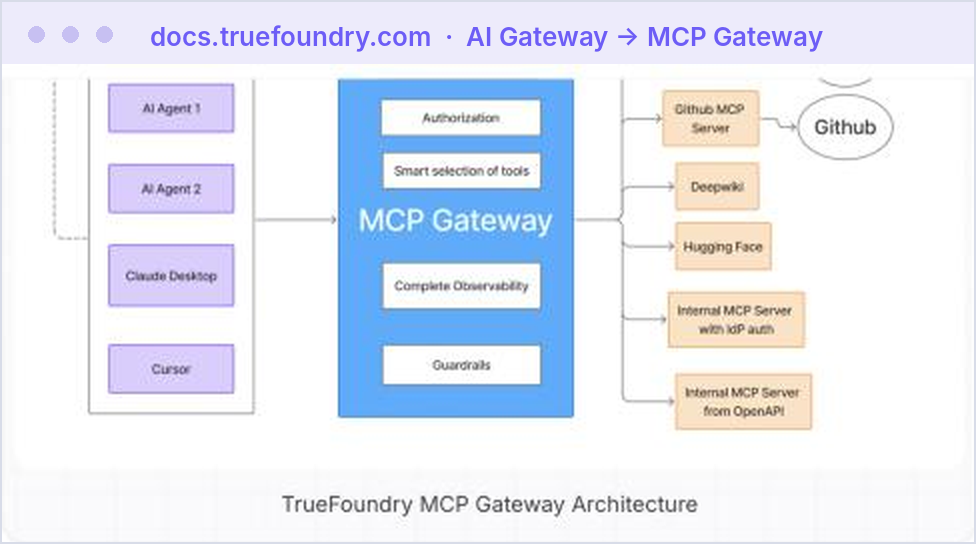
In practice you do not hand-roll this. You put the server behind something that terminates OAuth correctly and validates the audience of every token. That is one of the jobs of an MCP gateway. The deeper mechanics, token validation, scopes, and the confused-deputy failure mode, are covered in MCP authentication. The rule for this guide: a remote MCP server guarded by a static shared API key is not authenticated, it is obfuscated. Use OAuth 2.1 with audience-bound tokens.
See how TrueFoundry hosts and governs your remote MCP servers. Book a demo.
Before you expose anything, exercise the server through an MCP client and watch the actual message exchange.
The model-driven test in step 3 is the one teams skip and the one that matters most. A server that is technically correct but describes its tools badly will fail in exactly the way that is hardest to debug from logs: the model simply uses it wrong.
A server that runs on your laptop over stdio and a server that is safe to expose to real traffic are different artifacts. Here is what the gap contains.
Hosting and lifecycle. The server becomes a service you deploy, monitor, roll out, and roll back. It needs health checks, resource limits, and a deployment target. MCP server hosting covers the options and trade-offs.
Stateless scaling. To run multiple replicas behind a load balancer, keep the server stateless per request, which the 2026-07-28 Streamable HTTP stateless mode is designed for. Any session state should live in a shared store, not in instance memory, or a client's follow-up request routed to a different replica will fail.
Authentication and authorization. OAuth 2.1 with resource indicators for authentication, and then authorization: which users and which agents may call which tools. Treat the agent as a first-class identity, not just the human behind it; AI agent identity and fine-grained, per-tool authorization are what keep a capable server from becoming a liability.
Discovery via a registry. Clients and platform teams need to find the server, know what version it is, and know what it exposes. A registry is the catalog that makes servers discoverable and governable across an organization; see what is an MCP registry. Without one, every team rediscovers and reconfigures the same servers by hand.
Observability. You need per-call visibility: who called which tool, with what arguments, how long it took, whether it errored, what it cost. Raw servers emit none of this in a standard way.
Guardrails. Tool inputs and outputs may carry PII, secrets, or prompt-injection payloads smuggled through returned content. Inspecting them is a cross-cutting concern you do not want to reimplement in every server.
The pattern that makes this tractable is to not rebuild that layer per server. Build your server to do its one job well over Streamable HTTP, and put it behind an MCP gateway that provides authentication, authorization, the registry, observability, and guardrails uniformly. That is the difference between exposing a raw server and operating a fleet of them. What is an MCP gateway lays out the model, and enterprise MCP governance covers the control, audit, and access requirements that come with it. TrueFoundry provides this as an MCP gateway and registry with access control (RBAC, SSO, SCIM) and guardrails, deployable in SaaS, in-VPC, on-prem, or air-gapped so the data plane stays in your network.
They make everything a tool. Read-only context gets jammed into get_* tools the model has to guess how to call, when it should be a resource the application attaches. Repeated canned instructions get hard-coded, when they should be prompts the user invokes. Model the three primitives deliberately.
They write thin tool descriptions. A one-line description leaves the model to guess when and how to call the tool, and it guesses wrong. The description governs behavior; write it like a system prompt, including when not to use the tool.
They ship a remote server behind a shared key. A static API key is not authentication. Remote servers need OAuth 2.1 with audience-bound tokens (resource indicators) so a token for one server cannot be replayed against another. Skipping this creates a confused-deputy hole.
They ignore idempotency. Clients, networks, and gateway fallback all retry. A side-effecting tool that is not idempotent will double-charge, double-create, or double-send under perfectly normal retry conditions. Design for at-least-once delivery.
They treat "it runs" as "it is production." A working server is the start. Hosting, stateless scaling, auth, a registry, observability, and guardrails are the actual work of making it safe to expose, and rebuilding that per server is how organizations end up with dozens of ungoverned endpoints.
Building an MCP server is a short walk and a long tail. The walk is the quickstart: pick a transport, register a tool with a name, description, and schema, and test it with a client. You can have a working server in an afternoon. The tail is everything that makes it correct and safe: modeling tools versus resources versus prompts deliberately, writing descriptions the model can act on, making side-effecting tools idempotent, authenticating remote access with OAuth 2.1 and resource indicators, and scaling statelessly.
The step most teams underestimate is the jump from "runs on my laptop" to "exposed to real traffic." That jump is hosting, auth, authorization, discovery, observability, and guardrails, and the leverage is in not rebuilding that layer per server. Build the server to do its job over Streamable HTTP, put it behind an MCP gateway and registry for the governance, and you have something you can actually operate rather than a one-off endpoint nobody can secure or find.
Take your MCP server from local to production-governed. Book a demo.
TrueFoundry AI Gateway delivers ~3–4 ms latency, handles 350+ RPS on 1 vCPU, scales horizontally with ease, and is production-ready, while LiteLLM suffers from high latency, struggles beyond moderate RPS, lacks built-in scaling, and is best for light or prototype workloads.



Three primitives: tools (model-invoked functions that can have side effects, like querying an API or creating a record), resources (read-only context addressed by URI that the application or user attaches), and prompts (user-invoked templated instructions, often surfaced as slash commands). Choose tools when the model should decide to act, resources when the app or user supplies context, and prompts for reusable canned instructions.
Use local stdio for development and desktop or IDE clients, where the server runs on the user's machine and needs no network or auth. Use remote Streamable HTTP for anything multi-user or production; its stateless mode (standardized in the 2026-07-28 revision) lets you run many replicas behind a load balancer, and its Mcp-Method and Mcp-Name headers let a gateway route and govern per tool.
Treat it as prompt engineering, because the model decides whether and how to call the tool almost entirely from the description. State what the tool does, when to use it, when not to use it, what it returns, and how to handle missing inputs. Pair it with a tight JSON Schema using required fields, enums for closed sets, and bounds, so the model cannot invent invalid arguments.
Use OAuth 2.1, where clients present an access token obtained from an authorization server, and require resource indicators (RFC 8707) so each token is bound to the specific server it was issued for. This prevents a token minted for one server from being replayed against another. A static shared API key is not real authentication for a remote server.
Not to run one server for yourself, but you need the capabilities a gateway provides the moment the server is multi-user or production: OAuth termination with audience validation, per-tool authorization, a registry for discovery, observability, and guardrails for PII and prompt injection. A gateway supplies that layer uniformly so you do not rebuild it inside every server.



The latest news, articles, and resources sent to your inbox