November 6, 2026
|
5 min read



Blazingly fast way to build, track and deploy your models!
tools/list and tools/call request over JSON-RPC 2.0.initialize to negotiate capabilities, list tools and resources, then invoke and handle results. Skip a step and the server rejects you.Mcp-Name identity headers.The Model Context Protocol (MCP) gets described as "USB-C for AI," which is catchy and almost useless when you are actually wiring an agent to a database. The port metaphor hides the part that does the work: the thing on the cable that speaks the protocol. In MCP that thing is the client.
If you are building or operating AI agents, the client is the component you will debug at 2 a.m. when a tool call hangs, when an OAuth token expires mid-session, or when a server advertises a tool your host never surfaces to the model. Understanding exactly what the client does, and what it does not do, is the difference between treating MCP as magic and operating it as infrastructure.
This post defines the MCP client precisely: its role in the host/client/server triad, the connection lifecycle step by step, how clients authenticate, where clients actually run, and why at any serious scale you put a gateway between your clients and your servers.
Want one governed endpoint for every MCP client in your org instead of scattered configs? Book a demo.
MCP has three roles, and conflating them is the single most common source of confusion.
A host is the AI application the user interacts with. It owns the language model (or the connection to one), the conversation, and the decision about which tools to expose to the model and when. Claude Desktop is a host. Cursor is a host. A custom agent you wrote with an SDK is a host.
A client is a protocol connector that the host instantiates. Its single job is to maintain a connection to one server and translate between the host's internal world and the MCP wire protocol. The relationship is one-to-one: one client, one server. A host that connects to five servers runs five clients. Each client keeps its own session state, its own capability set, and its own credentials.
A server exposes capabilities, tools (functions the model can call), resources (readable data like files or rows), and prompts (reusable templates), over the protocol. A GitHub MCP server exposes create_issue and list_pull_requests. A Postgres server exposes a query tool and table resources.
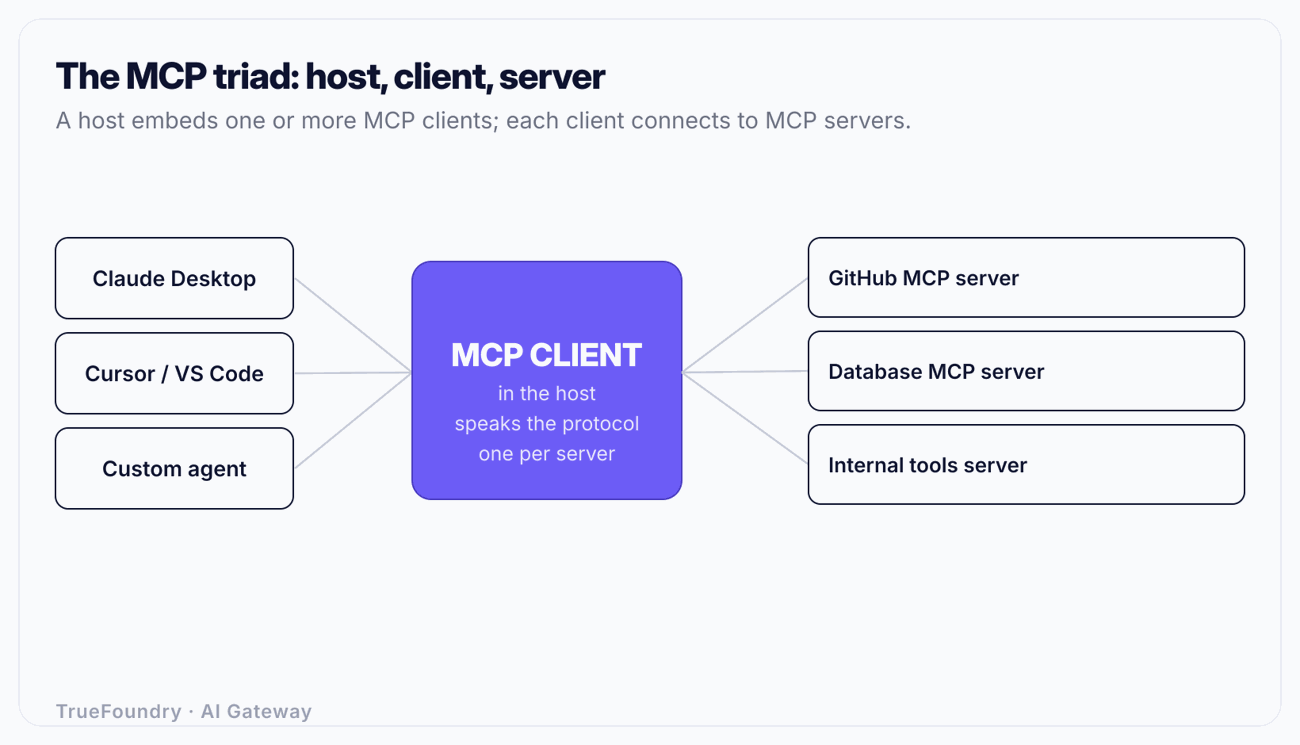
The division matters because responsibilities do not overlap. The host decides policy ("should the model be allowed to call delete_repo?"). The client enforces the protocol ("is this server initialized? is the capability advertised?"). The server does the work and returns a result. When something breaks, you fix it in the layer that owns it. A tool that never appears to the model is usually a host problem. A tool that appears but errors on invocation is usually a client-or-server problem.
The one-to-one rule is not an accident. Each MCP connection is a stateful session with negotiated capabilities. Server A might support resource subscriptions; server B might not. Server A authenticates with a GitHub OAuth token; server B uses a database credential. Giving each connection its own client keeps that state isolated, so a capability or an expired token on one connection cannot corrupt another. The host becomes the multiplexer: it fans a single user request out to whichever clients it needs, collects the results, and feeds them back to the model.
Strip away the metaphors and a compliant MCP client does five concrete things.
Transport. It establishes and holds the connection. MCP defines two standard transports: stdio, where the client launches the server as a subprocess and talks over standard input/output, and Streamable HTTP, where the client makes HTTP requests to a server URL and can receive a stream of server-sent events on the response. Local tools (a filesystem server on your laptop) typically use stdio. Remote tools (a hosted service) use HTTP.
Message framing. Every MCP message is JSON-RPC 2.0. The client builds request objects with an id, a method, and params, matches responses back to their requests by id, and routes server-initiated notifications. If you have ever watched raw MCP traffic, it is just a stream of JSON-RPC envelopes.
Capability negotiation. On connect, the client sends initialize with the protocol version it speaks and the capabilities it supports (for example, whether it can handle sampling requests or elicitation). The server replies with its own. From that handshake forward, both sides know what is allowed. A client that tries to use a capability the server never advertised is a bug.
Invocation. When the host decides the model should call a tool, the client sends tools/call with the tool name and arguments, waits for the result, and hands it back. It does the same for resources/read and prompts/get.
Lifecycle and cleanup. The client manages the session from handshake to shutdown, including token refresh, reconnection, and tearing the connection down cleanly when the host closes it.
Notice what is not in that list: deciding whether a tool call is safe, redacting secrets from a result, or stopping a runaway agent from calling the same tool 400 times. Those are host and governance concerns. The base protocol gives you the plumbing, not the policy. That gap is exactly where enterprise controls, discussed later, have to live.
A client connection moves through a fixed sequence. Understanding it turns most MCP failures into a quick "which step failed?" question.
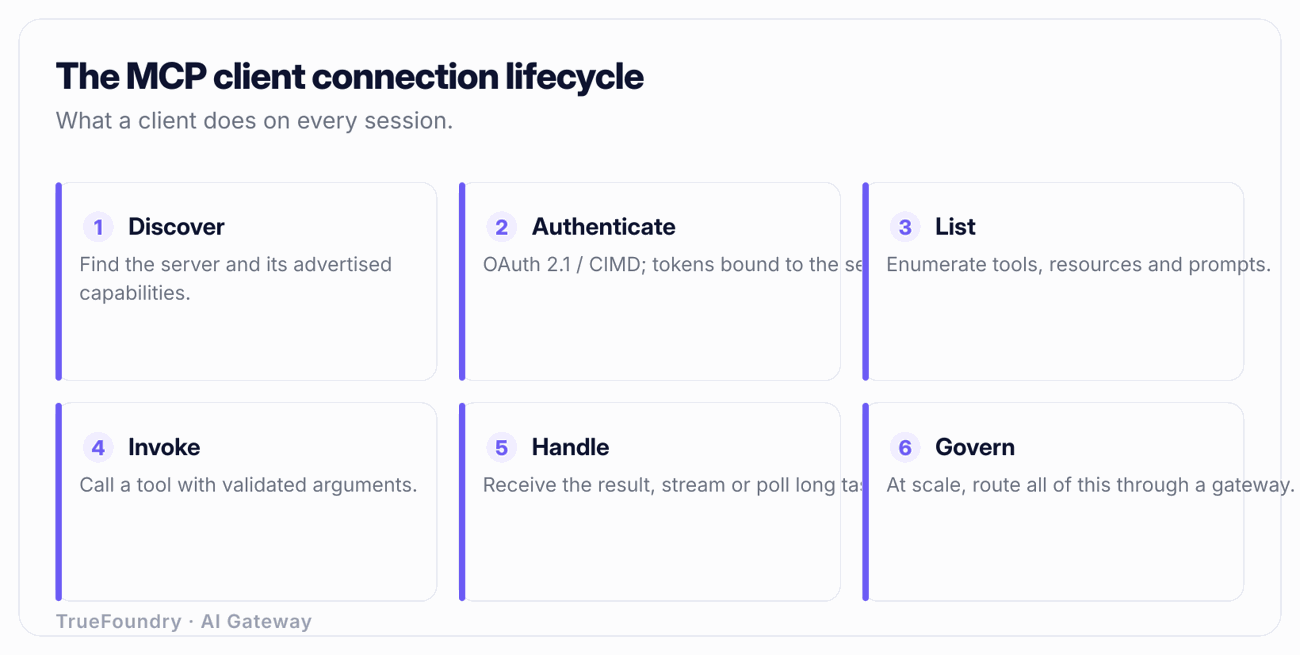
1. Discover. The client needs a server to connect to. For a local stdio server, "discovery" is a config entry: a command and arguments to launch. For a remote server, it is a URL. In larger deployments, discovery is dynamic: the client asks a registry or a gateway which servers exist and what their endpoints are, instead of hardcoding each one.
2. Authenticate. For remote HTTP servers, the client must prove who it is before the server will talk. MCP's authorization model is OAuth 2.1. The client discovers the authorization server from protected-resource metadata (RFC 9728), optionally registers itself dynamically (RFC 7591), runs the authorization-code flow with PKCE (RFC 7636), and attaches the resulting bearer token to every request. Local stdio servers usually inherit trust from the process boundary and skip this.
3. Initialize. The client sends the initialize request: its protocol version, client info, and capabilities. The server responds with its protocol version, server info, and capabilities. If versions are incompatible, the connection fails here, cleanly, which is far better than failing three tool calls later. The client then sends an initialized notification to confirm the session is live.
4. List capabilities. The client calls tools/list, and as needed resources/list and prompts/list. The server returns each tool's name, description, and JSON Schema for its input. This is the catalog the host will show the model. Servers can also send a listChanged notification later if their tool set changes, and a well-behaved client re-lists in response.
5. Invoke. The host picks a tool (usually because the model requested it) and the client sends tools/call with validated arguments. A long-running call can stream intermediate output. The client correlates the response to the request by id.
6. Handle the result. The client returns the tool result to the host, which formats it for the model. MCP results carry a flag distinguishing a tool-level error (the tool ran and failed, e.g. "repository not found") from a protocol-level error (the call itself was malformed). Treating those two the same is a frequent client bug: a "not found" is information for the model, while a protocol error is something your code must handle.
7. Shut down. When the host is done, the client closes the transport: terminating the subprocess for stdio, or ending the HTTP session for remote.
Imagine a coding agent asked to "open an issue titled 'Flaky CI' in the api repo." The sequence inside the host is:
tools/list; it includes create_issue with a schema requiring owner, repo, and title.create_issue({owner: "acme", repo: "api", title: "Flaky CI"}).tools/call, the server creates the issue, and returns {issue_number: 412, url: "..."} as a non-error result.Every one of those steps is a place something can go wrong: a stale token (step 1), a schema mismatch the model guessed wrong (step 3), a server-side permission failure that returns a tool error (step 4). Knowing the lifecycle tells you where to look.
Early MCP connections were mostly local stdio servers, where authentication was implicit. Remote servers changed that, and the protocol standardized on OAuth 2.1 rather than inventing anything new.
Concretely, a remote client:
The 2026-07-28 revision of the spec continued a clear direction of travel: toward stateless Streamable HTTP, where a server does not have to pin a long-lived session to a single process, and toward explicit server identity via Mcp-Name headers so clients and intermediaries can name and route to a specific server unambiguously. Stateless transport matters operationally because it lets servers scale horizontally behind a load balancer. If you want the deeper treatment of token flows, audience binding, and the failure modes, see our guide to MCP authentication.
The practical lesson: a client is only as secure as its token handling. A client that logs bearer tokens, that fails to validate the token audience, or that does not refresh cleanly will either leak credentials or break sessions. These are client responsibilities, and they are hard to get right in isolation, another reason centralized handling wins at scale.
"MCP client" sounds abstract until you realize you have probably used several. Here are the common ones and what, precisely, each is.
| Client / host | What it is | Where the client runs | Typical transport |
|---|---|---|---|
| Claude Desktop | Desktop host that connects to local and remote MCP servers | Inside the desktop app | stdio (local), Streamable HTTP (remote) |
| Cursor | AI code editor; connects to MCP servers for repo, docs, and tooling | Inside the editor | stdio and HTTP |
| VS Code (with MCP support) | Editor host; agent mode consumes MCP tools | Inside the editor / extension host | stdio and HTTP |
| Cline | Open-source coding agent extension that acts as an MCP host | In the VS Code extension host | stdio and HTTP |
| Custom SDK agent | Your own application using an MCP client library | Wherever you deploy it | Your choice |
The important nuance in that table: in every case the client is a library-level component inside the product. Claude Desktop is the host; the thing that actually speaks JSON-RPC to the GitHub server is a client object the host created. When you write a custom agent with an MCP SDK, you are instantiating that client object yourself, calling connect(), list_tools(), and call_tool() directly.
That also explains why the same server behaves slightly differently across hosts. The server is identical; the clients differ in how aggressively they re-list tools, how they surface tool errors to the model, and how they handle auth. "It works in Claude Desktop but not in my agent" is almost always a client-behavior difference, not a server one.
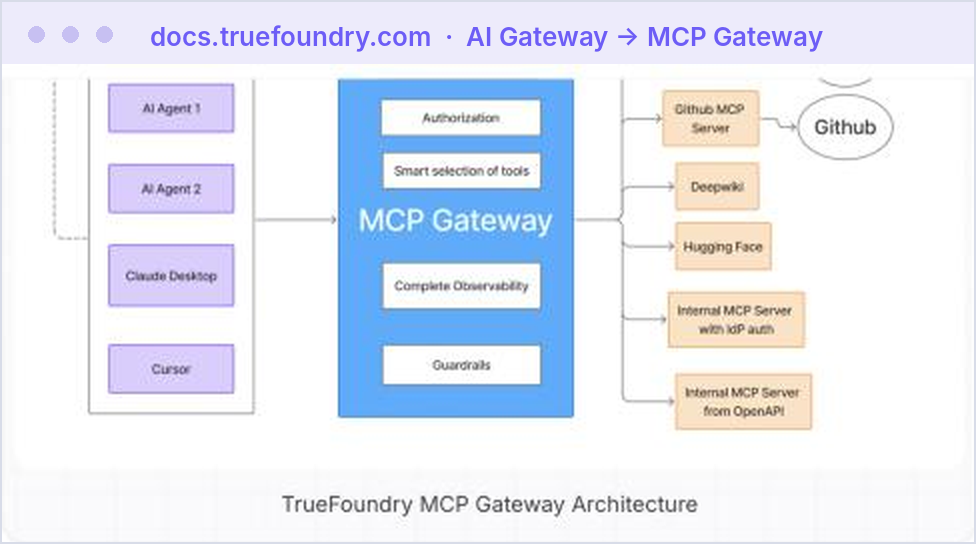
See how TrueFoundry centralizes auth, discovery, and audit for every agent and MCP client. Book a demo.
Point one client at one server and MCP is simple. Now make it real: 200 developers, 30 internal MCP servers, each host trying to hold its own OAuth tokens, each server reachable at its own URL, and a security team that wants to know who called which tool.
The direct-connection model breaks down fast:
The fix is the same pattern that fixed the equivalent mess for LLM APIs: put a gateway in the middle. An MCP gateway gives every client a single endpoint. The client authenticates once to the gateway; the gateway holds and rotates credentials for the downstream servers. Discovery becomes dynamic: the client asks the gateway's MCP registry what exists, instead of carrying a static list. And because every call flows through one place, you get governance, access control, rate limits, and audit, that the protocol itself does not provide.
Architecturally this mirrors an LLM proxy: one logical front door, many backends behind it, policy enforced in the middle. The client's job gets simpler, not harder: it connects to one well-known endpoint with one credential and lets the gateway deal with the fan-out.
For regulated environments, where the tools call internal systems holding sensitive data, this is not optional. You need enterprise MCP governance: per-team access control over which servers and tools are reachable, full audit of every tool invocation, and the ability to revoke access centrally. TrueFoundry's MCP gateway and registry provide exactly this: clients get one endpoint, authentication and RBAC are enforced centrally, every tool call is observable and tagged, and server discovery runs through a governed registry rather than scattered config files. If you are evaluating options, our rundown of the best MCP gateways covers the trade-offs, and MCP server hosting covers running the servers themselves.
Treating the host as the client. Teams say "Cursor is my MCP client." Cursor is the host; it contains clients. The distinction matters the moment you debug: a tool that never reaches the model is a host-side exposure decision, while a tool that errors on call is a client-or-server issue. Conflating the two sends you looking in the wrong layer.
Ignoring theinitializehandshake. Developers writing custom clients sometimes fire a tools/call before the capability negotiation completes, or assume a capability the server never advertised. The result is intermittent, confusing failures. The handshake is not ceremony; it is the contract. Honor it or expect flaky behavior.
Confusing tool errors with protocol errors. An MCP result flags whether the tool itself failed (a 404 the model should see and reason about) versus a malformed call (your code's problem). Clients that collapse these either hide useful signal from the model or crash on recoverable conditions.
Hardcoding server URLs and credentials in every client. It works for three servers and collapses at thirty. Static config means every rotation and every move is a fleet-wide change. Dynamic discovery through a registry is the only thing that scales.
Letting each client handle its own OAuth. OAuth 2.1 with PKCE and token refresh is easy to implement subtly wrong, leaked tokens in logs, missing audience validation, botched refresh. Centralizing auth at a gateway means you implement it once, correctly, instead of N times with N bugs.
The MCP client is the unglamorous component that makes agentic tool use work: it holds the connection, negotiates capabilities, authenticates, and marshals every tool call over JSON-RPC. Get the mental model right, host owns policy, client owns the wire, server does the work, and MCP stops being magic and becomes something you can operate and debug.
At one client and one server, the direct model is fine. At enterprise scale, with dozens of servers and hundreds of users, you stop pointing clients at servers directly and put a gateway in the middle: one endpoint, centralized auth and discovery, and governance over every tool call. That is the architecture that keeps a growing fleet of agents both useful and under control.
Give every MCP client one secure gateway to connect through. Book a demo.
TrueFoundry AI Gateway delivers ~3–4 ms latency, handles 350+ RPS on 1 vCPU, scales horizontally with ease, and is production-ready, while LiteLLM suffers from high latency, struggles beyond moderate RPS, lacks built-in scaling, and is best for light or prototype workloads.



The client is the connector inside your AI application that initiates and holds the connection; the server exposes the tools, resources, and prompts. One client talks to one server over JSON-RPC 2.0. The client asks; the server does the work and answers.
Claude Desktop is an MCP host. It contains one or more MCP clients, one per server it connects to. The host owns the model and the user interface; each client owns a single connection to a single server.
JSON-RPC 2.0 messages over one of two standard transports: stdio (the client launches the server as a local subprocess) or Streamable HTTP (the client makes HTTP requests to a remote server URL and can receive server-sent events on the response).
With OAuth 2.1: the client discovers the authorization server via protected-resource metadata (RFC 9728), optionally registers dynamically (RFC 7591), runs the authorization-code flow with PKCE (RFC 7636), and sends a bearer token with each request. Local stdio servers typically rely on process-level trust instead.
To get one endpoint instead of many, centralized credentials and rotation, dynamic discovery through a registry, and governance the protocol lacks: access control, rate limits, and audit of every tool call. It makes each client simpler and the whole fleet governable.



The latest news, articles, and resources sent to your inbox