November 10, 2026
|
5 min read


Blazingly fast way to build, track and deploy your models!
Enterprises rarely go looking for Cursor alternatives because the product is bad. They go looking because something operational broke the fit: a monthly bill that doubled without a clear cause, a procurement team that could not get predictable per-seat pricing, a security review that balked at source code leaving the network, or a platform lead who did not want 300 developers locked into one vendor's fork of VS Code. Those are governance and procurement problems, and they do not disappear by swapping one IDE for another.
This post does two things. First, it fairly describes Cursor and the specific, reported concerns that drive enterprise evaluations, then walks the credible alternatives with honest one-paragraph takes. Second — and this is the part most comparison posts miss — it covers the layer that makes the IDE choice far less load-bearing than it looks. If you route every coding agent through an AI gateway and govern their tools through an MCP gateway, you control cost attribution, budgets, guardrails, and audit regardless of which editor your developers settle on. The IDE war becomes a preference, not a risk.
A note on sourcing: Cursor's pricing, feature set, and user complaints below are reported figures and should be confirmed on cursor.com before you quote them. The alternative descriptions are general-knowledge summaries; verify current specifics with each vendor.
Whichever coding IDE wins internally, govern the spend and security from one layer. Book a demo.
Give the tool its due. Cursor is an agentic IDE — a VS Code-derived editor with a built-in coding agent that can read your repo, plan changes, edit multiple files, and run commands. Developers like it for a reason: the agent loop is tight, the context handling across a repository is good, and the "describe the change, watch it happen" workflow is genuinely productive for feature work and refactors.
On the enterprise side, reported capabilities (verify on cursor.com) include pooled usage across a team, SCIM provisioning, repository/model/MCP access controls, auto-run/browser/network controls to constrain what the agent may do, audit logs, service accounts, SSO via SAML/OIDC on Teams and above, and a privacy mode. That is a real enterprise feature set, not a toy. If you are evaluating Cursor, the question is not "is it capable" — it is "do its operating model and commercial terms fit how we buy and govern software."
Each of these is a reported concern. None is a reason to dismiss Cursor outright; all are reasons teams open an evaluation.
Usage-based bill unpredictability. Cursor's pricing blends per-seat subscriptions with usage-based charges for premium model requests. MAX-model requests are reported at $0.04–$2 each. For an individual that is noise; across hundreds of developers running agentic tasks it is a variable line item that finance cannot forecast. The complaint is not that it is expensive, it is that it is unpredictable — the same team can see very different bills month to month depending on how heavily developers lean on premium models.
Auto-renew and downgrade friction. Reported complaints include auto-renewal and difficulty downgrading a plan mid-term. For a procurement team that wants clean annual terms and the ability to right-size seats, that friction is a real evaluation input.
Quality-degradation and support complaints. There are reported complaints about perceived model/quality changes over time and about support responsiveness, reflected in a low Trustpilot score. Reported user sentiment is a weak signal on its own — verify current standing yourself — but it shows up often enough to belong on the list.
Code-egress and privacy concerns. Any cloud coding agent sends your source to a model provider. Cursor offers a privacy mode, but security teams in regulated environments often want a stronger guarantee: that code never leaves a network they control, or that every outbound request is inspected for secrets and PII first. That requirement pushes teams toward self-hostable tools or toward a gateway that enforces egress control centrally.
IDE lock-in. Cursor is its own editor. Standardizing on it means standardizing the whole development surface, not just an extension inside the editor developers already use. Some orgs prefer an assistant that lives inside existing VS Code or JetBrains installs so they are not migrating everyone's environment.
Security incidents. To be precise: there is no major Cursor security incident verified as of November 2026. Do not repeat a claim that there was one. Equally, "no publicly verified incident" is not a security guarantee — run your own diligence as you would for any vendor handling source code.
Here is the credible field as of November 2026. Verify current specifics with each vendor.
Claude Code (Anthropic). A terminal-first, agentic coding CLI with IDE integration. Its strength is large-context, long-horizon agentic work — multi-file refactors and tasks that run for minutes. Enterprise administration comes via Claude Enterprise. It is the natural alternative for teams that want strong agentic behavior without adopting a whole new editor, and it pairs cleanly with a gateway because it speaks to models you can route. See Cursor vs Claude Code for a direct comparison.
GitHub Copilot Enterprise. The deepest integration with GitHub and VS Code, plus organization policy controls, SSO, and SCIM. If your org already lives in GitHub, Copilot is the lowest-friction choice and the easiest to get through security, because it extends a vendor you already trust. The trade-off is that it is most at home in the GitHub/Microsoft ecosystem.
Windsurf (formerly Codeium). An agentic IDE built around a "Cascade" agent, with self-hosting options that appeal to teams with strict data-residency requirements. It competes with Cursor most directly on the agentic-IDE experience while offering more deployment flexibility for enterprises that cannot send code to a multi-tenant cloud.
Cline. An open-source VS Code agent that uses a bring-your-own-key model. Because you supply the model credentials, it is a strong fit for teams that want to route through their own gateway and keep full control of which models are used and how spend is tracked. No vendor sits between you and the model provider.
Zed. A fast, native (non-Electron) editor with built-in AI features. The pitch is performance and a clean editing experience. For teams that find Electron-based editors heavy, Zed is the responsiveness-first option, with AI as an integrated feature rather than the whole product.
Sourcegraph Cody. Built on Sourcegraph's code-intelligence and enterprise code-search backbone. Its differentiator is context: it can ground answers in a large, multi-repository codebase. For big orgs with sprawling monorepos or many services, that code-graph context is the reason to look at Cody specifically.
Tabnine. Privacy- and self-hosting-focused, with options to run models in your own environment. It targets exactly the regulated, air-gapped-leaning buyer who cannot accept code egress to a third-party cloud. Capability tiers differ from the frontier-model tools, but the deployment story is the draw.
Amazon Q Developer. AWS's coding assistant, integrated with the AWS toolchain. For shops standardized on AWS, it is the option that fits existing identity, billing, and governance rails without adding a new vendor relationship.
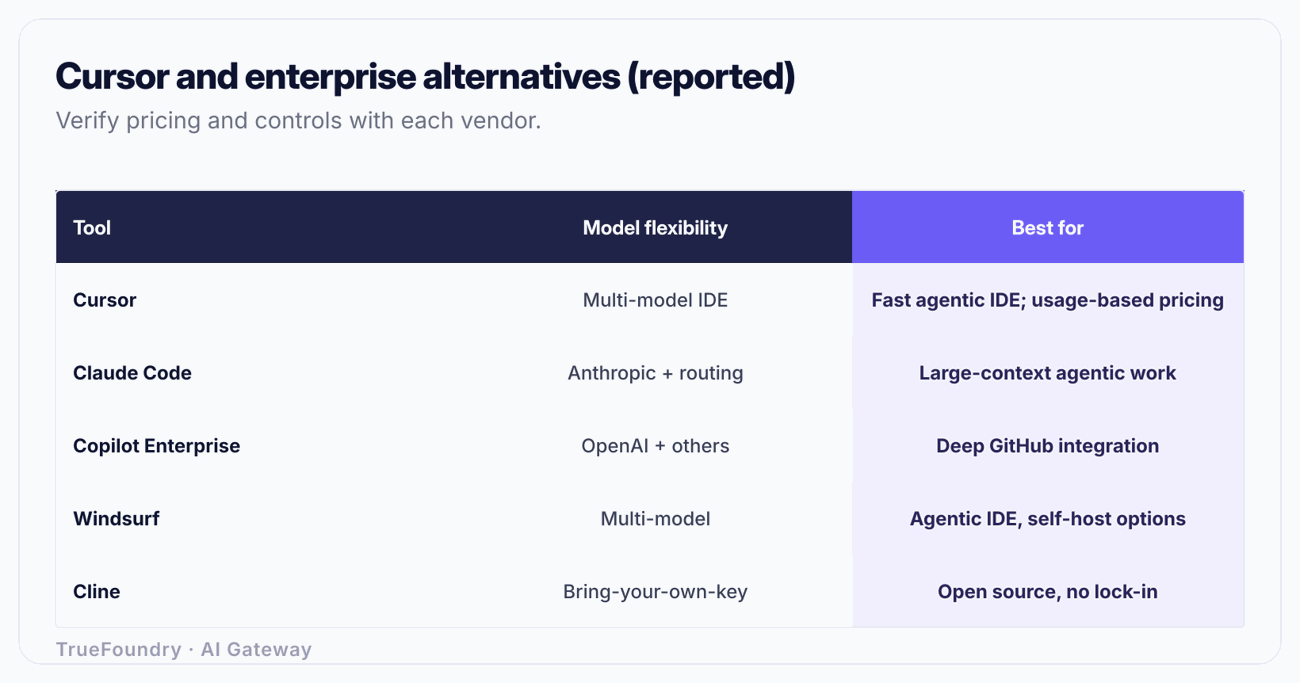
| Tool | Model flexibility | Enterprise controls | Deploy / privacy | Best for |
|---|---|---|---|---|
| Cursor | Multiple models incl. premium (usage-based) | SCIM, SSO (Teams+), audit, access controls (reported) | Cloud + privacy mode (reported) | Agentic-IDE experience, feature velocity |
| Claude Code | Claude family; routable via gateway | Admin via Claude Enterprise | Cloud; data-plane control via gateway | Long-horizon agentic refactors in-terminal |
| Copilot Enterprise | Curated models | Org policy, SSO, SCIM | Cloud (GitHub/Microsoft) | GitHub-centric orgs, easy security sign-off |
| Windsurf | Multiple models | Enterprise admin | Cloud + self-host options | Agentic IDE with data-residency needs |
| Cline | Bring-your-own-key (any) | Via your own stack/gateway | Local + your gateway | Teams that want full routing/key control |
| Zed | Integrated AI, multiple models | Lighter enterprise tooling | Native app | Performance-first editing |
| Sourcegraph Cody | Multiple models | Enterprise code search, SSO | Cloud + self-host | Large multi-repo context |
| Tabnine | Self-hostable models | Privacy-focused admin | Self-host / air-gap-leaning | Regulated, egress-sensitive orgs |
| Amazon Q Developer | AWS-curated | AWS IAM/governance | AWS cloud | AWS-standardized shops |
Caveat: all rows are reported or general-knowledge summaries as of November 2026, including Cursor's. Features, tiers, and deployment options change — confirm current specifics with each vendor before deciding.
Notice the pattern in that table. Every tool makes a different trade between integration depth and control, and none of them solves your two hardest enterprise problems: who spent what, and did any code or secret leak. Those are not IDE features. They are gateway features. Which is why the IDE choice, while it feels like the big decision, is the smaller one.
Think about the realistic end state. You will not get 300 developers to agree on one editor, and you should not try. Some will want Cursor's agentic flow, some Claude Code in the terminal, some Copilot because they live in GitHub. If your governance depends on everyone using the same tool, you have already lost. If your governance lives in a layer below the tools, the tool choice becomes a developer preference and your cost and security posture stays intact.
See how TrueFoundry tracks cost and enforces guardrails across every coding agent. Book a demo.
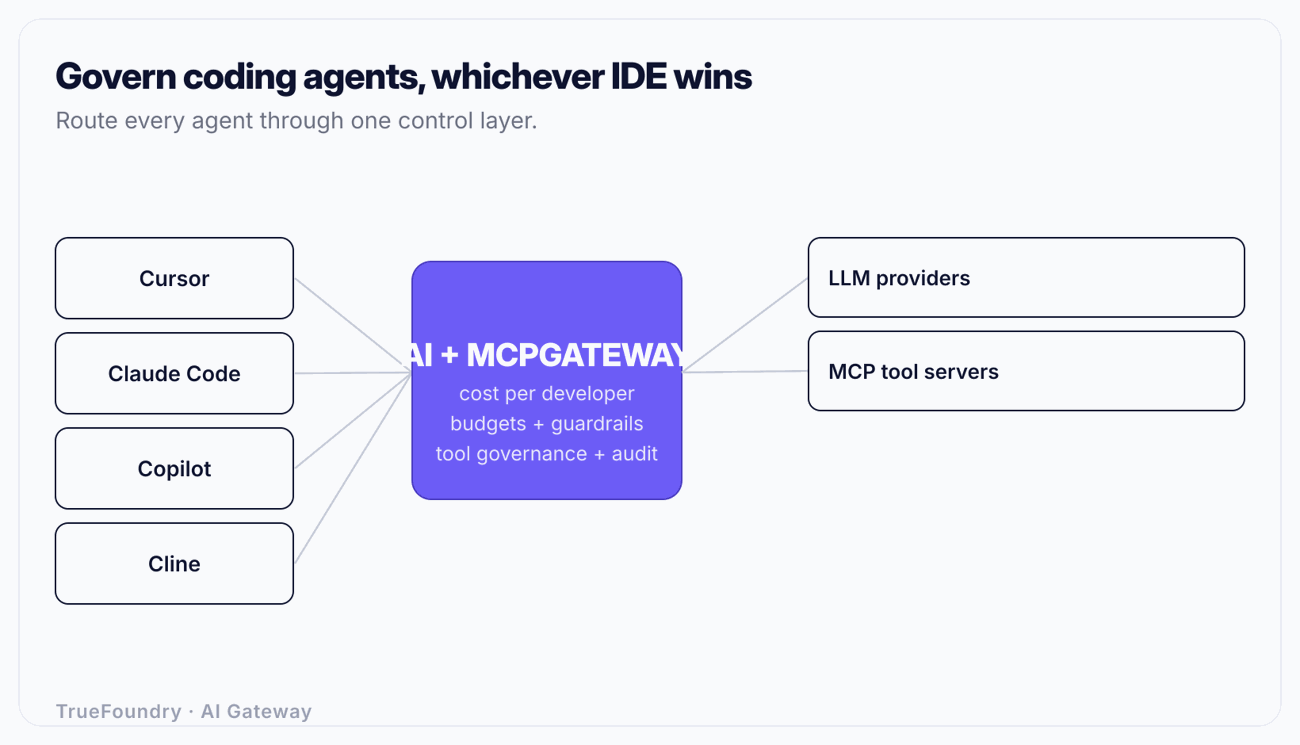
Two pieces of infrastructure make the IDE choice safe to decentralize: an AI gateway for the model traffic, and an MCP gateway for the tools the agents reach.
Point every coding agent — Cursor, Claude Code, Copilot, Cline, whatever — at one OpenAI-compatible endpoint instead of at each model vendor directly. That single AI gateway gives you four things no IDE gives you across tools:
TrueFoundry's AI gateway provides this as a unified OpenAI-compatible API with latency/weight/priority routing, automatic fallback and in-request retries, exact and semantic caching, per-user/team/model budgets and rate limits, full per-request observability, and PII/secret/prompt-injection guardrails. Critically for the egress concern, it deploys SaaS, in-VPC, on-prem, or air-gapped, so the data plane carrying your source code stays inside your network.
Modern coding agents do not just generate text — they call tools through the Model Context Protocol (MCP): reading files, querying databases, hitting internal APIs, running shell commands. That is where the real blast radius lives. An agent that can reach a production database or an internal deployment API is a far bigger risk than one that writes a bad function.
An MCP gateway governs which MCP servers and tools each agent and developer may reach, with its own access control, audit, and secret handling. It is the control point for enterprise MCP governance — you decide that the frontend team's agents can reach the design-system MCP server but not the production database, and you have an audit trail of every tool call. If your developers use Claude Code, the practical mechanics of wiring tools are covered in MCP servers in Claude Code.
When you compare Cursor against any alternative, score each on the criteria that actually determine enterprise fit — not just the demo experience.
| Criterion | What to check | Why it matters |
|---|---|---|
| Pricing predictability | Per-seat vs usage-based; can you cap spend? | Usage-based premium requests make bills hard to forecast |
| Cost attribution | Per-developer / per-team visibility across tools | You cannot manage spend you cannot attribute |
| Model flexibility | Which models; can you bring your own / route? | Avoids lock-in to one vendor's model choices |
| Data egress control | Does code leave your network? Is it inspected? | Core security-review question for source code |
| Secret / PII guardrails | Outbound scanning and redaction | Source files carry credentials and customer data |
| Deployment options | SaaS / VPC / on-prem / air-gapped | Regulated orgs often cannot use multi-tenant cloud |
| Identity | SSO (SAML/OIDC), SCIM provisioning | Clean onboarding/offboarding at scale |
| Tool (MCP) governance | Which tools can agents reach; is it audited? | The real blast radius is tool access, not text |
| Audit trail | Per-request log across all tools | Needed for incident response and compliance |
| Procurement terms | Renewal, downgrade, annual commitments | Friction here stalls or kills rollouts |
Run every candidate through this grid and a useful thing happens: the rows that separate the winners are mostly the gateway rows — attribution, egress control, guardrails, tool governance, audit. The IDE experience rows tend to be close. That is the signal that you are buying an IDE for developer preference and a gateway for enterprise control, and that the two decisions are separable.
Treating the IDE choice as the governance decision. Teams spend months choosing between Cursor and an alternative, then discover they still have no cross-tool cost attribution or egress control. The IDE is a productivity choice; governance belongs in the layer below it.
Mandating one tool to get control. Forcing everyone onto a single IDE to centralize governance backfires — developers route around it, and you still lack control over the tools they use on the side. Decentralize the tool, centralize the gateway.
Confusing privacy mode with egress control. A per-tool privacy toggle is not the same as a policy that inspects every outbound request for secrets and PII across all tools. The first is a setting a developer can forget; the second is enforced infrastructure.
Ignoring MCP tool access. Most evaluations score code quality and miss the bigger risk: what the agent can do through its tools. An agent with unaudited access to internal systems is the real exposure. Govern MCP, not just model traffic.
Repeating unverified security claims. As of November 2026 there is no verified major Cursor breach. Do not let a comparison rest on a rumor; evaluate on operating model, terms, and your own diligence.
Cursor is a capable agentic IDE, and the reasons enterprises evaluate alternatives are mostly about operating model and commercial terms rather than product quality — unpredictable usage-based bills, renewal friction, code-egress worries, and lock-in. The field of alternatives is real: Claude Code, Copilot Enterprise, Windsurf, Cline, Zed, Sourcegraph Cody, Tabnine, and Amazon Q Developer each make a defensible trade between integration depth and control. Pick the one that fits how your developers already work.
But do not mistake the IDE choice for the governance decision. The problems that sent you looking — forecastable spend, attribution, egress control, tool access, audit — live in the layer below the editor. Route every coding agent through an AI gateway and govern their tools through an MCP gateway, and the IDE becomes a preference your developers can win or lose without putting your cost or security posture at risk. That is how you let the IDE war play out internally while keeping the parts that matter firmly under your control.
Govern every coding agent from one gateway. Book a demo.
TrueFoundry AI Gateway delivers ~3–4 ms latency, handles 350+ RPS on 1 vCPU, scales horizontally with ease, and is production-ready, while LiteLLM suffers from high latency, struggles beyond moderate RPS, lacks built-in scaling, and is best for light or prototype workloads.





It depends on your existing stack. Claude Code suits teams wanting strong terminal-based agentic coding; GitHub Copilot Enterprise is easiest for GitHub-centric orgs; Windsurf and Tabnine fit teams needing self-hosting. There is no universal winner — pick on integration fit, then govern all of them through one AI gateway.
Mostly operational reasons, all reported: usage-based bill unpredictability (MAX-model requests reported at $0.04–$2 each), auto-renew and mid-term downgrade friction, code-egress/privacy concerns, and IDE lock-in. These are procurement and governance issues, so swapping tools alone does not fully resolve them.
There is no major Cursor security incident verified as of November 2026, and it offers enterprise controls like SSO, SCIM, audit logs, and a privacy mode (reported). "No verified incident" is not a guarantee — for source-code-handling tools, add your own egress controls and diligence regardless of the vendor.
Copilot Enterprise wins on GitHub/VS Code integration depth and ease of security sign-off if you already live in GitHub. Cursor wins on agentic-IDE experience. For a large org the deciding factor is often governance, which you solve the same way for both: route through an AI gateway and govern tools with an MCP gateway.
Route every tool through a single AI gateway that tags each request by developer, team, and model, enforces per-team budgets and per-developer rate limits (returning HTTP 429 on breach), and gives you one audit log. That solves cost attribution and bill predictability no matter which IDE each developer uses.



The latest news, articles, and resources sent to your inbox