


September 19, 2026
|
5 min read


Published: September 11, 2026

Blazingly fast way to build, track and deploy your models!
AI-assisted coding is rapidly moving beyond autocomplete and chat-based suggestions. Tools like Cursor AI code editor and Claude Code represent a new category: AI coding agents that can understand entire codebases, make coordinated changes, and assist across the full development lifecycle.
But while both are often grouped together, they take fundamentally different approaches.
This difference matters.
As teams move from experimentation to production use of AI in development workflows, the choice of tool impacts:
In this guide, we’ll break down Cursor vs Claude Code from a practical, workflow-first perspective, focusing not just on features, but on how each tool fits into modern software development.
Cursor is an AI-powered code editor built to integrate AI deeply into the developer experience. Unlike traditional IDE plugins, Cursor is designed from the ground up to let developers write, edit, and navigate code with AI as a core interface.
At its core, Cursor extends familiar IDE workflows with capabilities like:
What makes Cursor particularly effective is its human-in-the-loop design. The developer remains in control, using AI as an assistant rather than delegating full execution.
A typical Cursor workflow looks like:
This makes Cursor especially strong for:
Because it operates inside an editor environment, Cursor fits naturally into existing developer habits. It behaves less like an autonomous agent and more like an intelligent collaborator embedded in your IDE.
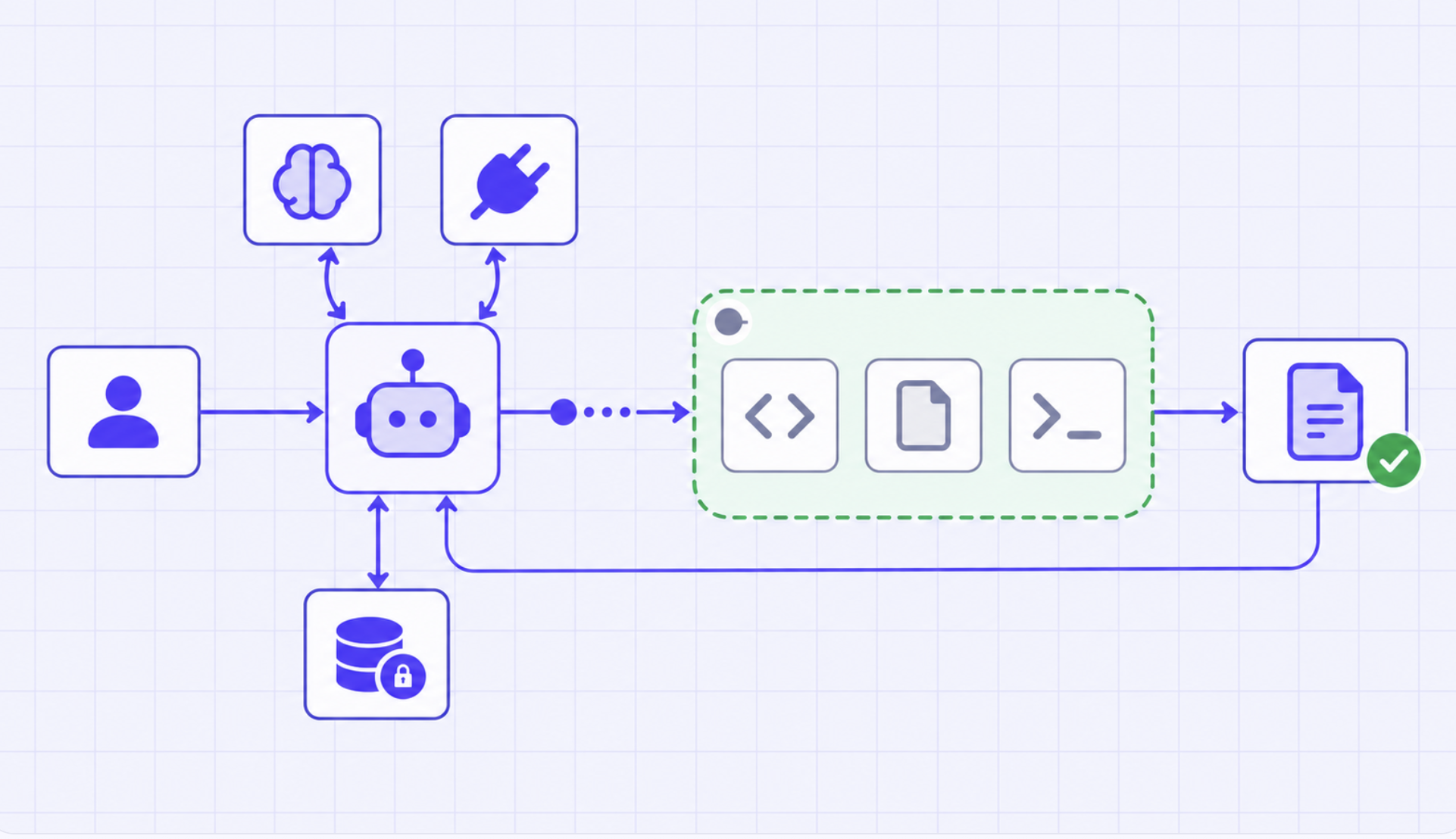
Claude Code is a terminal-based AI coding agent designed to operate more autonomously across your development environment. Instead of living inside an IDE, it runs in the command line and can read, modify, and reason over entire codebases while executing real tasks.
Unlike traditional assistants, Claude Code is built around task execution rather than inline assistance.
It can:
This enables a very different interaction model.
A typical Claude Code workflow looks like:
This makes Claude Code particularly strong for:
Compared to Cursor, Claude Code shifts more responsibility to the AI. The developer acts less like a direct editor and more like a supervisor of an autonomous agent.
The differences between Cursor and Claude Code go beyond features, they represent two fundamentally different approaches to AI-assisted development.
Cursor is designed to enhance the developer’s workflow inside the IDE, while Claude Code is built to execute development tasks as an autonomous agent.
This shift from assistance to execution is what defines how these tools behave in real-world environments.
At a high level, the distinction is simple but important:
In practical terms:
This difference becomes critical when moving from experimentation to production engineering workflows, where autonomy, control, and reliability all matter.
The biggest difference between Cursor and Claude Code becomes clear when you look at how developers actually use them day-to-day.
This isn’t just a tooling difference, it’s a workflow shift.
Cursor is designed around an interactive development loop, where the developer stays in control and AI assists incrementally.
A typical workflow looks like:
This creates a tight feedback loop:
Prompt → Suggestion → Review → Refine
Because of this, Cursor works best when:
It feels like an extension of your IDE - AI is always present, but never fully in charge.
Claude Code introduces a different model: task-oriented, agent-driven workflows.
Instead of guiding every step, you define the outcome—and the agent handles execution.
A typical workflow looks like:
This creates a different loop:
Define task → Plan → Execute → Validate → Iterate
This approach is powerful when:
Here, the developer shifts from being an editor to a supervisor of the agent.
The contrast between the two can be summarized as:
Cursor keeps the developer tightly involved in every change.
Claude Code abstracts execution, allowing developers to operate at a higher level.
Choosing between Cursor and Claude Code isn’t about which tool is “better”—it’s about which workflow fits your use case.
Both tools solve different problems, and in many cases, they can even be used together.
Cursor is best suited for interactive, day-to-day development work, where developers need control and fast feedback.
Use Cursor when you are:
Because Cursor operates inside an IDE, it fits naturally into existing workflows. You can guide the AI, review outputs instantly, and make incremental changes without losing context.
Claude Code is better suited for larger, task-driven workflows, where automation and scale matter more than granular control.
Use Claude Code when you are:
Because it can plan and execute tasks end-to-end, Claude Code reduces the need for constant developer intervention.
Tools like Cursor AI code editor and Claude Code are powerful in local development. But as teams start using them beyond experimentation, a new set of challenges emerges.
The shift from AI-assisted coding → AI-driven execution introduces complexity that traditional developer tooling wasn’t designed for.
Cursor keeps developers in control, changes are reviewed and applied incrementally.
Claude Code, on the other hand, can:
As autonomy increases, so does risk.
Teams need to define:
Without clear boundaries, autonomous agents can introduce:
MCP integrations allow AI agents to interact with:
This is powerful but also risky without proper controls.
Key questions teams need to answer:
In production environments, unrestricted access is not an option.
Agents need to operate within well-defined, secure boundaries.
When AI agents start executing tasks across systems, visibility becomes critical.
Unlike traditional development:
Teams need to track:
This level of observability is essential for:
Both Cursor and Claude Code rely on underlying models to function.
As usage scales, teams must handle:
Without centralized management, this quickly becomes difficult to optimize.
While tools like Cursor and Claude Code improve how developers interact with code, they don’t solve how these workflows are managed in production.
This is where infrastructure platforms like TrueFoundry come in.
TrueFoundry provides a layer to operationalize AI agents in real-world systems, enabling teams to:
Instead of stitching together custom scripts and ad-hoc controls, teams can use a platform like TrueFoundry to standardize how AI agents run in production environments.
The shift from copilots to agents is redefining how software gets built. Tools like Cursor AI code editor and Claude Code represent two distinct approaches one focused on enhancing developer productivity within the IDE, and the other on enabling autonomous, task-driven execution across the codebase. For most teams, the choice isn’t strictly one or the other. Cursor excels in interactive, day-to-day development, while Claude Code unlocks efficiency for larger, multi-step workflows. Together, they signal a broader transition toward AI-native development.
However, as these tools move from experimentation to production, the challenge shifts from what AI can do to how it is managed. This is where platforms like TrueFoundry play a critical role. By providing the infrastructure to securely connect tools, enforce guardrails, manage model usage, and monitor agent behavior, TrueFoundry enables teams to adopt AI coding agents in a way that is reliable, scalable, and production-ready. Ultimately, the future of development will not just depend on smarter tools, but on the systems that allow them to operate safely and effectively at scale.
TrueFoundry AI Gateway delivers ~3–4 ms latency, handles 350+ RPS on 1 vCPU, scales horizontally with ease, and is production-ready, while LiteLLM suffers from high latency, struggles beyond moderate RPS, lacks built-in scaling, and is best for light or prototype workloads.




The better choice between Cursor and Claude Code depends on the workflow. Cursor excels as an IDE-integrated assistant for real-time, line-by-line coding help within a familiar editor interface. Claude Code is stronger for autonomous, long-horizon tasks such as refactoring entire modules, writing tests, or executing multi-file changes where deep agentic capability matters more than IDE integration
Claude Code is a command-line agentic tool that operates autonomously across an entire codebase, executing multi-step tasks with minimal human input. Cursor is an AI-enhanced IDE built on VS Code that provides inline suggestions, chat, and code completions within the editor. The key difference is that Claude Code acts as an autonomous agent, while Cursor functions as an intelligent coding co-pilot inside an editor.
Claude Code is not bundled with Cursor. Cursor uses its own AI backend and model integrations, and while it supports various models, Claude Code is a separate product from Anthropic that operates as a standalone CLI tool. Users can run both tools independently but they are not packaged together.
Claude Code tends to be more efficient for complex, autonomous tasks because it can handle multi-step workflows, execute shell commands, and manage large codebases without requiring constant user input. Cursor is more efficient for tasks that benefit from tight IDE integration such as quick inline edits, navigating unfamiliar code, or getting real-time completions.
Token consumption in both tools varies with usage patterns. Cursor includes the codebase context it indexes with each request, which can result in significant token usage depending on the size of the project. Claude Code also sends extensive context when working on large files, so token costs in both tools are heavily influenced by the scope of the task and the amount of context shared.
Claude Code is not an IDE. It is a command-line interface (CLI) tool that allows developers to interact with Claude in an agentic, terminal-based workflow. Cursor, by contrast, is a full-featured IDE built on VS Code, offering a graphical coding environment with AI capabilities embedded throughout.
Claude Code is billed based on API token consumption through Anthropic's pricing tiers, with costs scaling with usage volume. Cursor offers subscription plans starting at a fixed monthly rate, with a free tier available for limited use. For heavy users, Claude Code's token-based pricing can become significant, whereas Cursor's subscription model offers more predictable costs.
For light usage, Cursor's free tier makes it the cheaper option. For power users performing extensive autonomous tasks, Claude Code's API-based pricing may result in higher costs. The most cost-effective choice depends on the volume and complexity of tasks Cursor suits IDE users on a budget, while Claude Code suits teams that need deep agentic automation and are willing to pay for it.



The latest news, articles, and resources sent to your inbox
.png)
.png)
.png)
.png)
.png)
.png)
.png)
.png)
.png)
.png)
.png)


