


September 25, 2026
|
5 min read


Obtenha acesso instantâneo a um ambiente TrueFoundry ao vivo. Implante modelos, direcione o tráfego de LLM e explore a plataforma completa — seu sandbox estará pronto em segundos, sem necessidade de cartão de crédito.



Published: September 25, 2026
Blazingly fast way to build, track and deploy your models!
Getting the first AI model into production is rarely the hard part. The operational burden shows up when the second or third team asks for access, a monthly budget and the same controls as everyone else.
Both TrueFoundry and Kong Gateway can route the model call. The difference is what your platform team must build and maintain around it. TrueFoundry treats team access and budgets as first-class controls. Kong Gateway assembles the same outcome from gateway entities, plugins and pricing configuration. That difference compounds as AI adoption grows.
TrueFoundry gives you direct controls for model access, team budgets and approved tools. With Kong, you assemble those controls through gateway settings and plugins, which is a 3-5x more effort for your platform team. If you’re comparing TrueFoundry vs Kong Gateway, look beyond the feature list: someone has to maintain that configuration long after the demo ends.
Assume the model is already connected. In TrueFoundry, you grant the team access and set its budget. With Kong, you connect the team’s gateway identity to the model route and configure a spending-limit plugin. You also supply the model prices it needs to track dollar usage, then check that the settings cover the team’s requests. None of this is unmanageable. It is, however, work your platform team takes on.
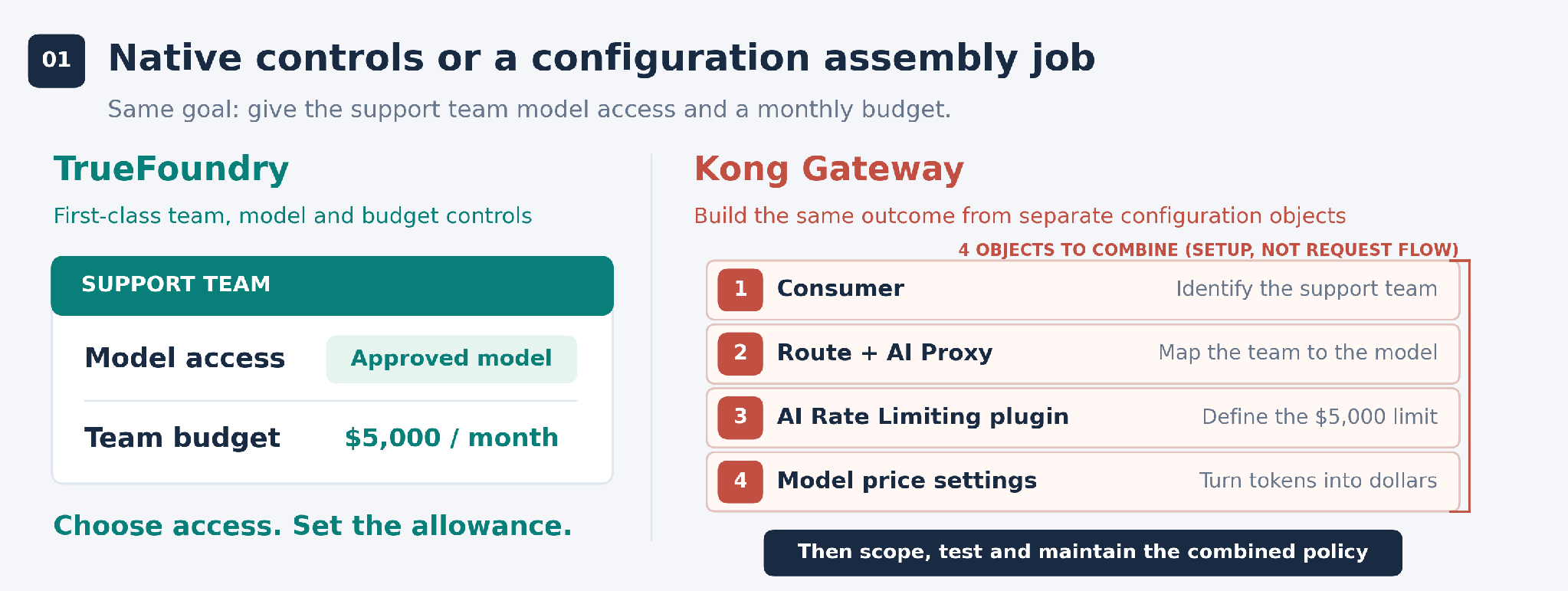
Figure 1. TrueFoundry exposes the team’s model access and budget as first-class controls. In Kong Gateway, the platform team combines identity, routing, rate-limiting and price configuration, then scopes and tests the resulting policy. Existing configuration can be reused.
Support is up and running. Then sales asks for a larger budget, and another team needs customer details removed from prompts. Before changing a shared setting, your engineers need to know which teams it will affect.
In TrueFoundry, you manage budgets by team and apply safety policies to the relevant AI traffic. Team managers can adjust their own budgets, with administrators retaining company-wide controls. That gives routine budget changes a clear owner.
With Kong, engineers decide where each safety plugin applies and check it against the existing setup. There are ways to reduce the effort: Kong supports shared configuration and automated deployment. Those are useful, particularly if your team already runs Kong. You still need to maintain the configuration and the tests around it, so budget for that engineering time too.
A monthly budget sounds simple until the price of a model changes. In a fully self-hosted, on-premises Kong deployment, the spending-limit plugin uses model prices supplied in configuration. If those prices are out of date, the usage counter can fall behind the actual bill. Someone on your team needs to update them or build automation that does.
Kong does offer an automatically updated price catalog through Konnect Metering & Billing, but that separate service is not available on-premises. It should not be confused with the configured prices used by the gateway plugin.
TrueFoundry updates public prices automatically for supported models. You still need custom pricing for negotiated rates. The example below shows what happens if a public rate doubles and Kong keeps using the old price: finance sees $10 of usage where the provider charges $20.
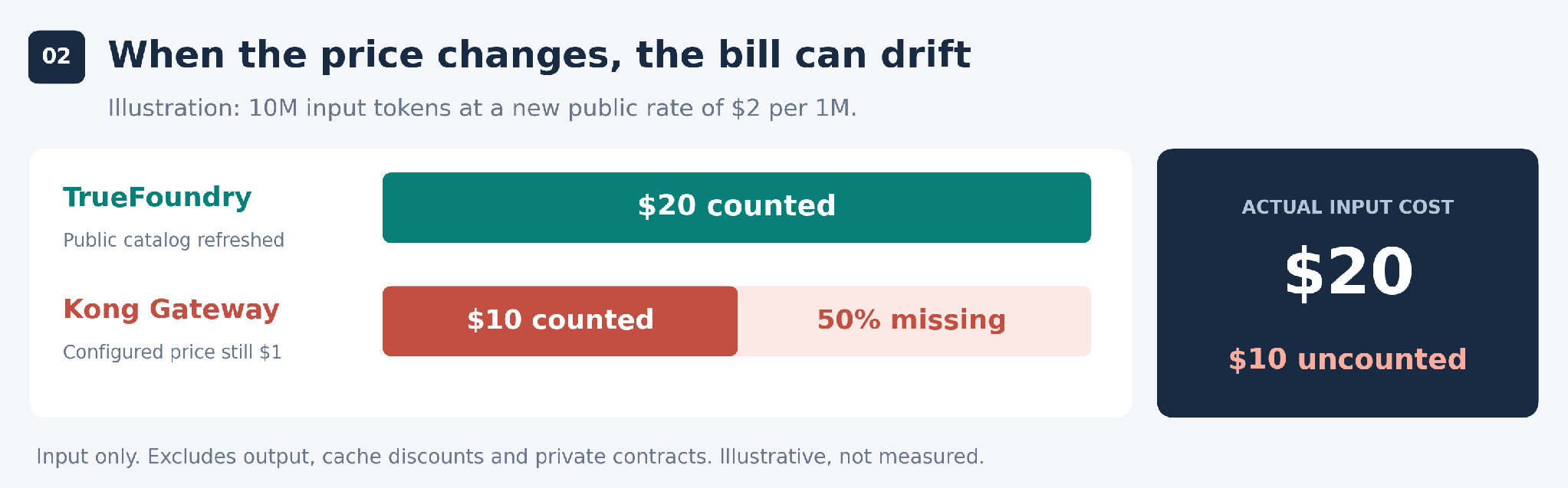
Figure 2. An illustrative example for Kong’s on-premises plugin setup, not a reported incident. TrueFoundry’s catalog has refreshed; Kong’s configured price has not been updated.
For a FinOps team, that gap matters. A spending limit is hard to trust if keeping it accurate depends on a pricing update someone might miss.
Once the support assistant is useful, the next request is predictable: let it look up an order and check a customer record. Those actions live in two existing APIs. You want to expose just those tools to the agent.
MCP is the protocol that lets agents use tools. With TrueFoundry, you can import the API specifications, generate tools and choose which ones to expose together. You still have to decide what the agent is allowed to do, but you don’t have to define every tool by hand.
Kong’s documented API-to-MCP workflow involves configuring access to each API, defining its tools and labeling them so they can be discovered. You then set up a shared endpoint to bring those tools together. Each additional API brings another set of settings to look after.
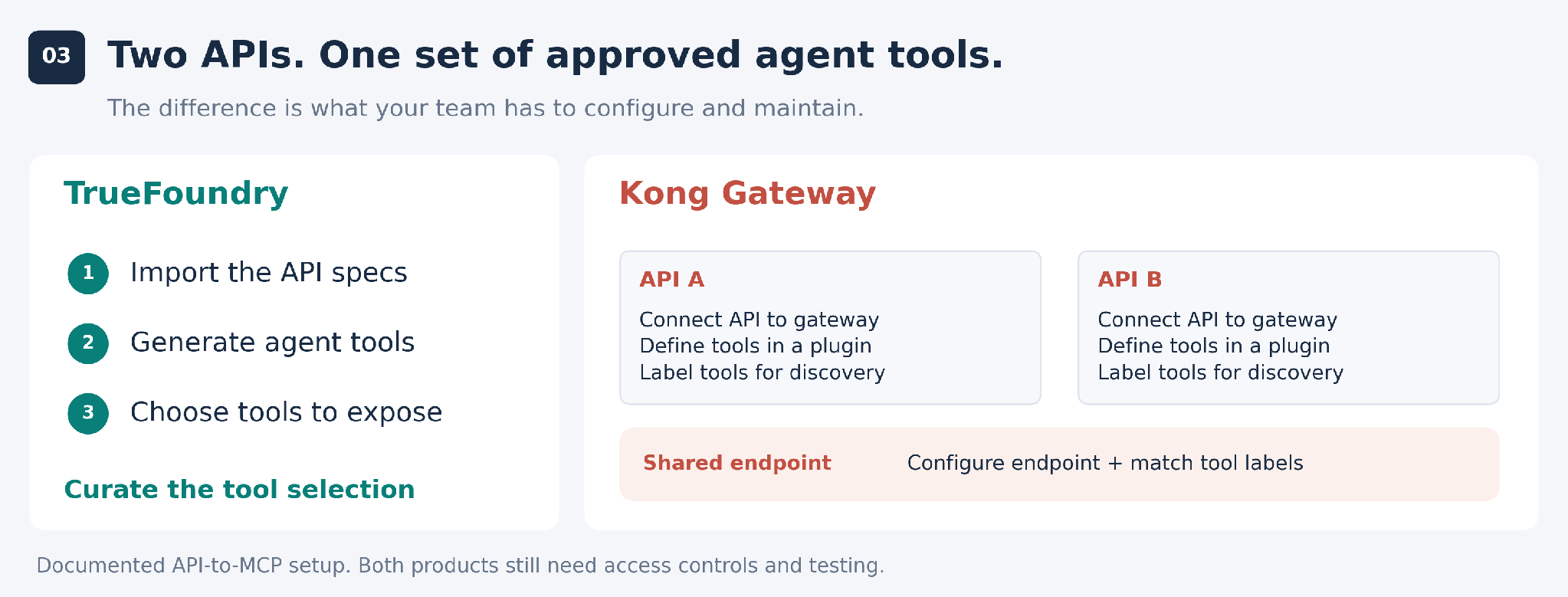
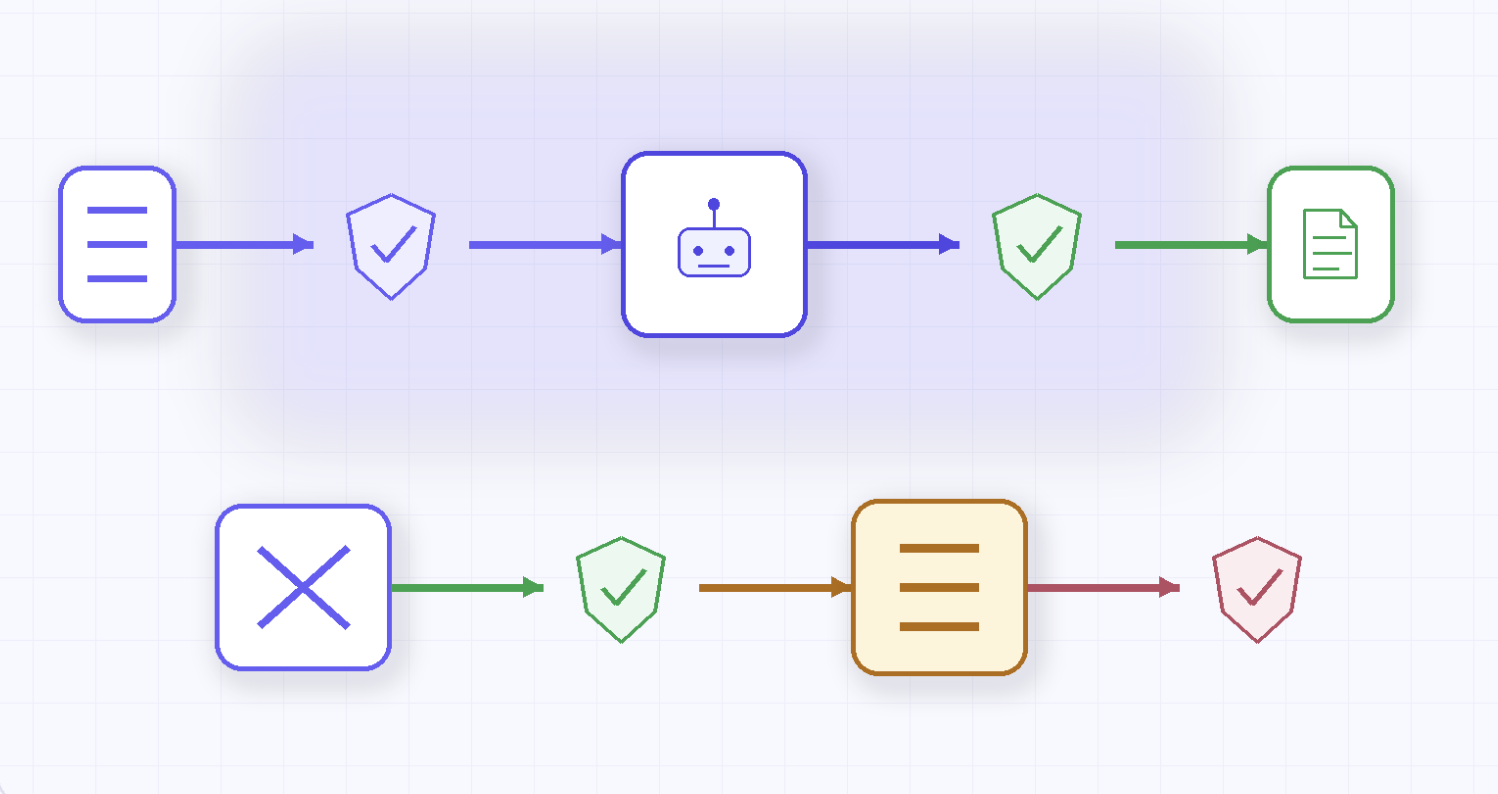
Figure 3. TrueFoundry uses existing API specifications to generate tools. Both products still require access controls and testing.
Eventually, the assistant will stop answering and someone will ask why. It might be an exhausted budget, a safety check or a provider outage. The person investigating needs enough context to tell the difference.
TrueFoundry provides request logs in the AI Gateway interface. Kong sends AI usage data through a configured logging plugin. Try tracing a failed request in both products during your evaluation. See what you can explain from the available logs and where you need help from someone who knows the gateway setup.
If that person is needed every time, they become the default support desk for application teams, security and finance. It’s a dependency worth spotting before adoption grows.
TrueFoundry AI Gateway delivers ~3–4 ms latency, handles 350+ RPS on 1 vCPU, scales horizontally with ease, and is production-ready, while LiteLLM suffers from high latency, struggles beyond moderate RPS, lacks built-in scaling, and is best for light or prototype workloads.



Yes. The useful comparison is how much work it takes to set them up and keep them correct as teams and models change.
No. Both products need model connections, access controls, policies and testing. TrueFoundry reduces the gateway configuration involved; it doesn’t remove the need to run things carefully.
No. Kong’s AI Rate Limiting Advanced plugin requires configured input and output prices for cost-based limits; that requirement is not documented as exclusive to on-premises. Fully self-hosted customers also lack Konnect Metering & Billing’s automatically updated catalog. That is the deployment distinction behind the example.
Konnect Metering & Billing has an automatically updated LLM cost database for its cost calculations. The gateway’s spending-limit plugin separately requires configured prices. The documentation does not establish that the catalog automatically updates those plugin settings, so check which pricing source your enforcement actually uses.
Yes. Shared configuration and deployment tools can reduce repetitive work. Your team still has to build and maintain the templates, keep model prices current and test changes. If you already have that automation, include it in the comparison rather than assuming every setup starts from scratch.
Public price lists will not match your contract. TrueFoundry supports custom pricing, and Konnect Metering & Billing supports price overrides. For Kong’s plugin-based limits, configure the agreed rates in the gateway. In either case, compare tracked usage with the provider’s bill before relying on the budget.



As últimas notícias, artigos e recursos enviados para sua caixa de entrada


.webp)
.webp)
.webp)
.webp)
.webp)
.webp)
.png)
.png)
.png)
.png)
.png)
.png)
.png)


