



October 1, 2026
|
5 min read


Published: July 4, 2026

Blazingly fast way to build, track and deploy your models!
2020年から2023年の間に、次のようなファンデーションモデルがあります GPT-3 そして GPT-4 大規模な言語モデルは人間のようなテキストを生成し、コードを書き、文書を要約し、複雑な質問に答えることができることが証明されました。しかし、これらのモデルは ステートレス そして サンドボックス化、社内のシステム、データベース、アプリにアクセスできず、実際にアクションを取る方法もありませんでした。
モデルに尋ねることができます:
」MongoDB クエリを記述して、コンプライアンスデータベースのすべてのコレクションを一覧表示します。」
次のような出力が生成されます 見た 有効なMongoDBクエリのようですが、
それがすべてだった 当て推測 — と フィードバックループなし。
これを修正するために、開発者はLLMを中心にレイヤーを構築し始めました。
これらは巧妙な修正でしたが メンテナンスが難しい。
のようなフレームワーク ラングチェーン、 ラマインデックス、および セマンティックカーネル これらのワークフローを整理するために登場しました。これらのツールは物事を整理するのに役立ちましたが、問題は解決しませんでした。モデルは未だに幻覚的な世界であり、プロンプト・インジェクションに陥り、検証をスキップし、定義された実際の関数を実行する標準的な方法もありませんでした。新しいユースケースはどれも、やはり車輪の再発明のように感じられました。
本当のターニングポイントは、開発者が次のことに気付いたときでした。
」コマンドを推測するのにモデルは必要ありません。フロントエンドアプリがバックエンド API を呼び出すのと同じように、実際の関数を呼び出す必要があります。」
2023年半ば頃、オープンAIが導入されました 関数呼び出し、モデルが構造化された状態に戻ることを可能にする JSON 実際の関数呼び出しに直接マップされた出力。
モデル統合で可能だったことを再定義しました
関数呼び出しにより、次のことが台頭しました。 道具 そして エージェント — アクションを連鎖させ、ワークフローに従い、実際のシステムと相互作用できるモデル
しかし...
1。すべての実装は ベンダー固有。
2。共有はありませんでした 標準フォーマット ツールがどのように記述されたか、または呼び出されたかについて。
ここは MCP (モデルコンテキストプロトコル)が登場 — として提案 汎用のオープンプロトコル モデルと外部ツール間の構造化された通信用。MCP では、ツール API を各 LLM アプリにハードコーディングする代わりに、 AI ツール接続用ユニバーサル充電器 — 好き OpenAPI、 アントロピック などはLLM呼び出しツール用です。以下に基づいています。 JSON-RPC 2.0は、JSON を使用したリモートプロシージャコール (RPC) をサポートする、広く使用されている仕様です。
MCPは、モデルとツールの間のAPI契約だと考えてください。標準プロトコルがなければ、あらゆる統合に 個別のエンジニアリング が必要となり、コストがかかり、エラーが発生しやすく、反復的でした。MCPは、 共通の言語を生み出すことで、ツール統合を完全に簡素化しました。しかし、MCPとは一体何なのか、そして実際にどのように機能するのでしょうか?詳しく見ていきましょう。
MCP(モデルコンテキストプロトコル) は 軽量なプロトコル であり、 AIモデル と 外部ツールの間で構造化された通信を行うために特別に構築されました。
MCPの核となるのはJSON-RPC 2.0です。これは、構造化された入出力でリモートプロシージャを呼び出すための実績あるプロトコルであり、LLMの出力を現実世界のツール呼び出しに変換するのに最適です。
では、 なぜ別のプロトコルを開発するのでしょうか?
既存の選択肢としては、 REST あるいは GraphQL は、AIファーストのワークフローには、汎用性が高すぎたり、冗長すぎたり、あるいは単に脆すぎたりします。MCPは、明確な構造、最小限のオーバーヘッド、そしてAI中心のワークフローへの明確な焦点を当てることで、このギャップを埋めます。これは既存のAPIを置き換えるものではなく、モデルがAPIを安全に、繰り返し、予測可能に利用できるようにするためのものです。
サーバーは通常、以下を公開します。
オプションとして、サーバーは以下も公開できます。
MCPはトランスポート非依存であり、2つのモードをサポートします。
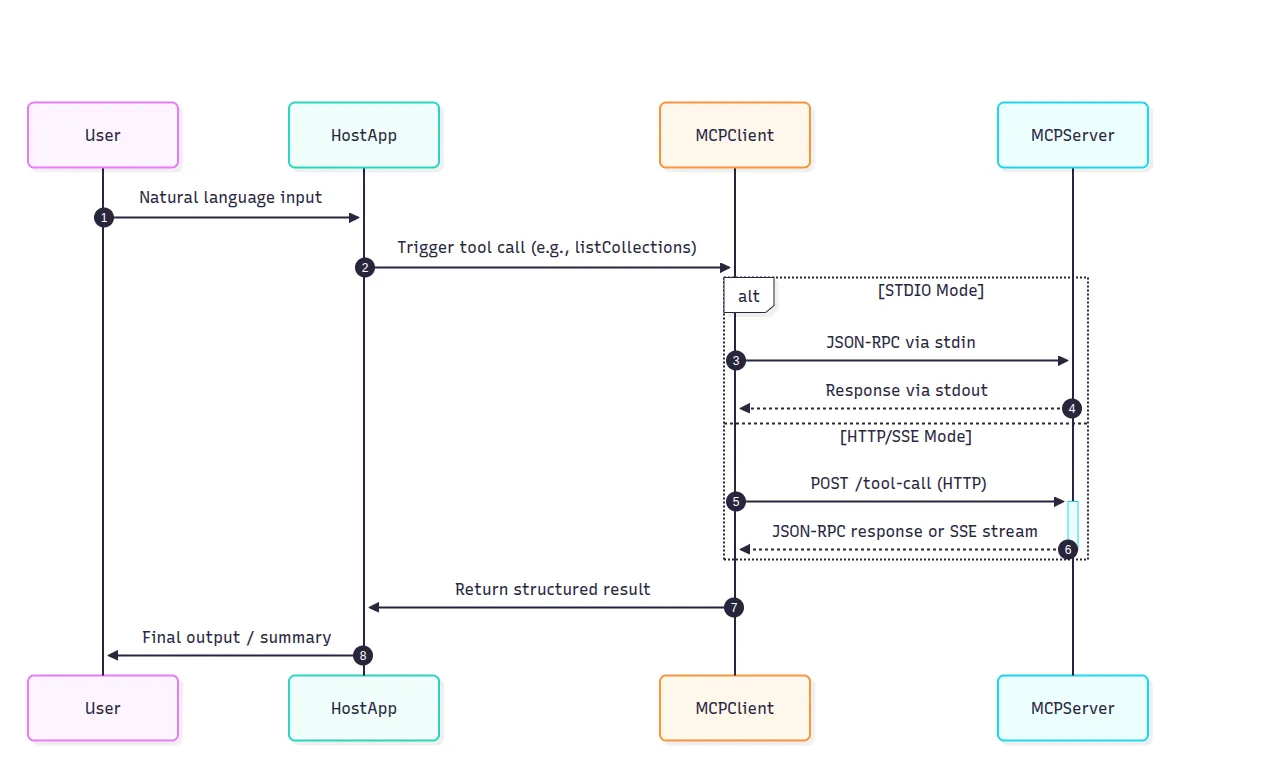
どちらのトランスポートも同じJSON-RPC形式に従うため、ロジックを書き換えることなくトランスポートを切り替えることができます。
これがMCPの大きなアイデアです。脆弱なプロンプトの接着剤なしで、モデルがツールを呼び出すための最小限かつクリーンな方法を提供します。幻覚的なコマンドも、手動でのコンテキスト詰め込みもありません。ただ明確な入力と出力があるだけです。しかし、実際のアプリケーションではどのように機能するのでしょうか?MongoDBを活用したコンプライアンスアシスタントの例を見てみましょう。
GRC(ガバナンス、リスク、コンプライアンス)アシスタントを構築していると想像してみてください。
このアシスタントは以下のことを行う必要があります。
従来のセットアップでは、RESTコールやPythonスクリプトを使用してこのロジックをハードコードし、スキーマや認証情報をプロンプトテンプレートに詰め込むことになります。その結果、すべての統合がカスタムで、かつ脆弱なものとなるでしょう。
MCPを使用すると、MongoDB、Slack、GitHubといった各ツールがファーストクラスの関数プロバイダーとなり、以下のような明確に定義されたメソッドを公開します。
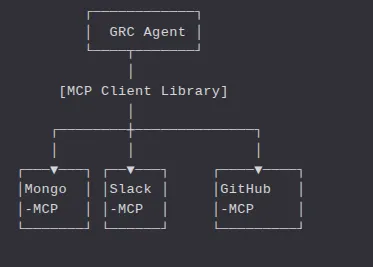
GRCエージェント(当社のホストアプリ)は、MCPのJSON-RPCスキーマを使用してこれらのツールを呼び出すだけです。
シナリオ:ポリシー違反の検出と報告 ユーザー指示:「今日のポリシー違反についてコンプライアンスデータベースを確認し、Slackでチームに通知してください。」
1. ユーザー入力 → ホストアプリ → LLM GRCエージェント(ホストアプリ)はユーザーメッセージをモデルに送信します。モデルはツールを認識し、次のように応答します。
{
  "tool_calls": [
    {
      "name": "listCollections",
      "arguments": {
        "database": "compliance"
      }
    }
  ]
}
2. ホストアプリがMCPクライアント経由でMongo-MCPを呼び出す このツール呼び出しはJSON-RPCリクエストに変換されます。
{
  "jsonrpc": "2.0",
  "method": "listCollections",
  "params": {
    "database": "compliance"
  },
  "id": "req-001"
}
3. Mongo-MCPが関数を実行 Mongo-MCPはこの呼び出しを以下にマッピングします。
def listCollections(database: str) -> List[str]:
    return mongo_client[database].list_collection_names()
関数を実行し、結果を取得して、次のように応答します。
{
  "jsonrpc": "2.0",
  "result": [
    "audit_logs",
    "policy_violations",
    "user_sessions"
  ],
  "id": "req-001"
}
4. エージェントが次の呼び出しを連鎖:runAggregation モデルは、利用可能なコレクションに基づいて後続の呼び出しを生成します。
{
  "tool_calls": [
    {
      "name": "runAggregation",
      "arguments": {
        "database": "compliance",
        "collection": "policy_violations",
        "pipeline": [
          { "$match": { "timestamp": { "$gte": "2025-08-05" } } },
          { "$group": { "_id": "$severity", "count": { "$sum": 1 } } }
        ]
      }
    }
  ]
}
これにより、Mongo-MCPへの別のJSON-RPC呼び出しが行われ、サーバーは次を返します。
{
  "jsonrpc": "2.0",
  "result": [
    { "_id": "high", "count": 5 },
    { "_id": "medium", "count": 12 }
  ],
  "id": "req-002"
}
エージェントはこの結果を、次のようなプロンプトとともにモデルに渡します。
「このポリシー違反データを平易な英語で要約してください。」
モデルは次のように返答します。
「今日、コンプライアンスデータベースで重大度が高いポリシー違反が5件、中程度の重大度のポリシー違反が12件ありました。”
5. モデルがSlack-MCPを呼び出してチームに通知 エージェントは最終的な構造化ツール呼び出しを発行します。
{
  "tool_calls": [
    {
      "name": "sendMessage",
      "arguments": {
        "channel": "#compliance-alerts",
        "message": "5 high and 12 medium policy violations detected today. Please review."
      }
    }
  ]
}
Slack-MCPサーバーがメッセージを送信し、ワークフローが完了します。これらすべては、文字列操作やプロンプトエンジニアリングではなく、構造化されたJSON呼び出しを通じて行われました。

Mongo-MCPのデモはすっきりしています。モデルは構造化されたツール呼び出しを行いました。各機能は期待通りに動作しました。ハルシネーションはありません。壊れやすい文字列テンプレートもありません。しかし、それは理想的なケースに過ぎません。実際のシステムは、単に動作するだけでなく、大規模な環境で安全に、信頼性高く、監視可能に動作することが求められます。
本番環境では、生のMCPにはいくつかの重要な点で不十分な点があります。
1. アクセス制御(RBAC)なし 生のMCPには、誰が何を呼び出せるかを制限する組み込みの方法がありません。.
実際の組織では、RBAC(ロールベースアクセス制御)は不可欠です。特にモデルが機密性の高いツールに接続されている場合はなおさらです。
2. 認証またはAPIキーなし 生のMCPは以下を処理しません
これは、mcpサーバーにアクセスできる人なら誰でも任意のツールを呼び出せることを意味します。そして、監査証跡も残りません。
3. 監視可能性なし 見えないものは修正できません。
With raw MCP, you don’t have dashboards, logs, or traces. You’re flying blind.
4. No Guardrails LLMs are creative — sometimes too creative.
Raw MCP has:
Without guardrails, one prompt bug can lead to thousands of Slack messages or accidental data wipes.
5. No Retry, Throttling, or Quotas In production
In production, tools don’t always behave perfectly — they can fail, time out, or respond slowly. Without safeguards, even well-behaved models can:
The raw MCP protocol assumes everything just works — a “happy path” world. But real-world infrastructure is messy. You need smart retry logic, caching, rate limiting, and access control to stay sane at scale.
This is exactly what the TrueFoundry Gateway provides.
In the first half of this article we learned what the Model-Context-Protocol is and used a Mongo mcp server to automate a legacy GRC platform. That toy example is great for a hack-day, but it quickly runs into real-world friction:
TrueFoundry’s AI Gateway packages the missing plumbing—an MCP registry, central auth, RBAC, guard-rails, and rich observability—so teams can move from “hello-world agent” to production safely and repeatedly.
TrueFoundry positions one of the best MCP gateway as a control-plane that sits between your agents (or Chat UI) and every registered MCP server and LLM provider.
Key capabilities include:
Think of it as the API gateway + service mesh + secret store for the emerging MCP environment. “As noted in the MCP Server Authentication guide, the Gateway handles credential storage and token lifecycle automatically.”
The very first step in the UI is to create a group—e.g. dev-mcps or prod-mcps. Groups let you attach different RBAC rules and approval flows to different environments.
“You can follow the TrueFoundry MCP Server Getting Started guide for detailed steps.”
AI Gateway ➜ MCP Servers ➜ “Add New MCP Server Group
name: prod-mcps
   access control:
       - Manage: SRE-Admins
- User : Prod-Runtime-Service-AccountsYou can just as easily add:
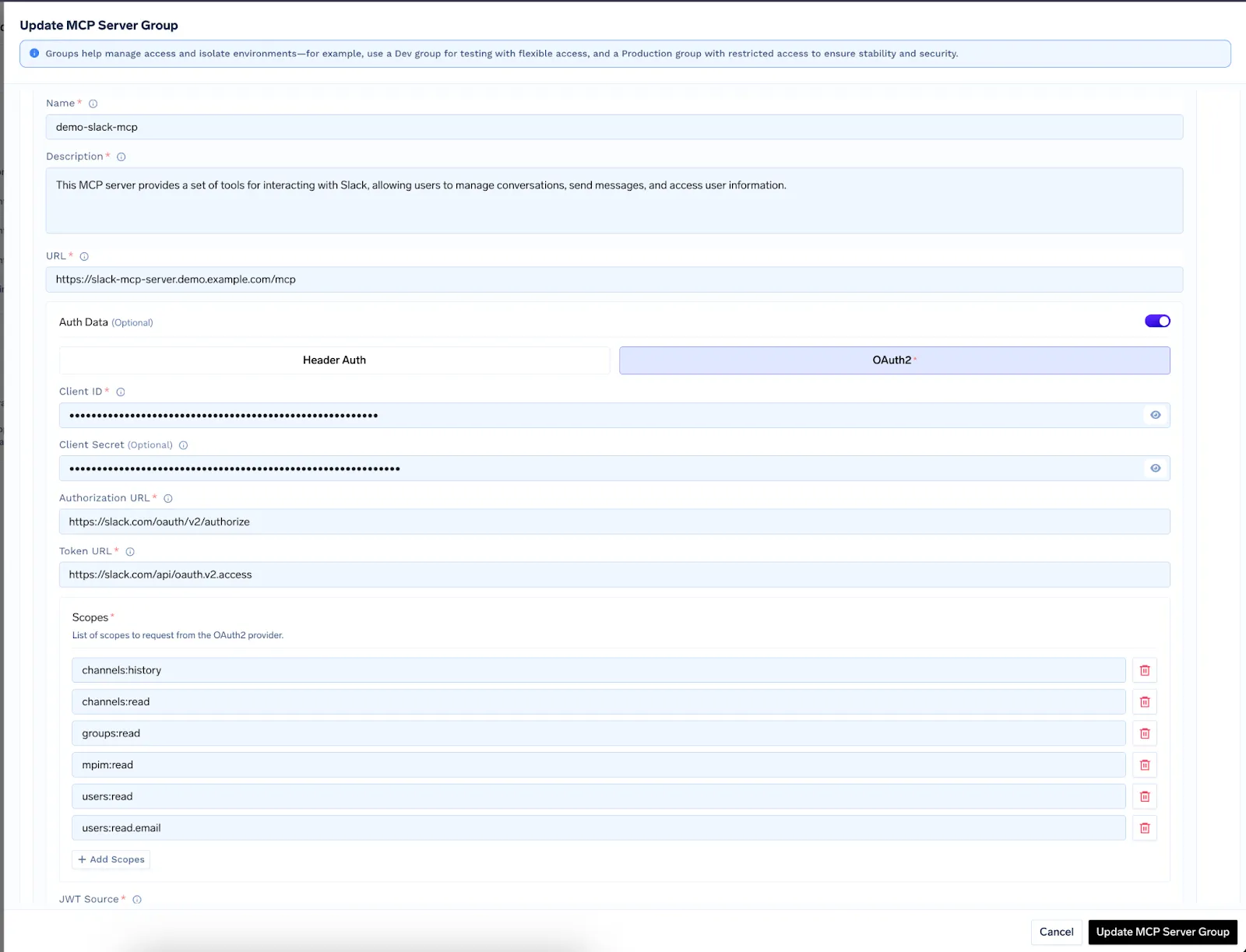
Behind the scenes the Gateway stores credentials in its secret store and handles token refresh.
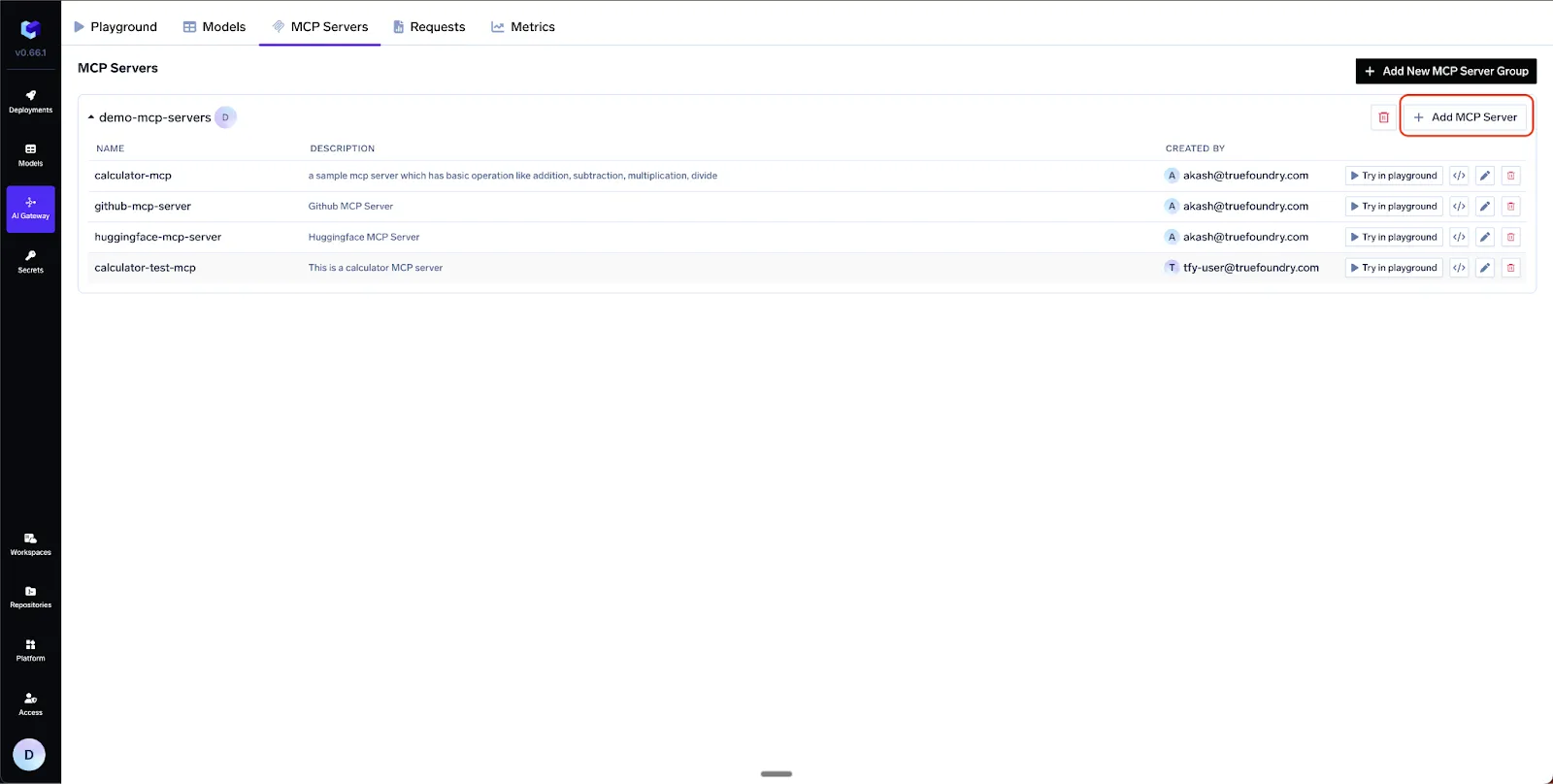
TrueFoundry supports three auth schemes per MCP server :
“These modes are described in more detail in the MCP Server Authentication documentation.”
Once a server is registered you don’t hand raw tokens to every developer. Instead they authenticate once to the Gateway and receive:
The Gateway checks the calling token against:
If any check fails the request is rejected before it hits your Slack workspace.
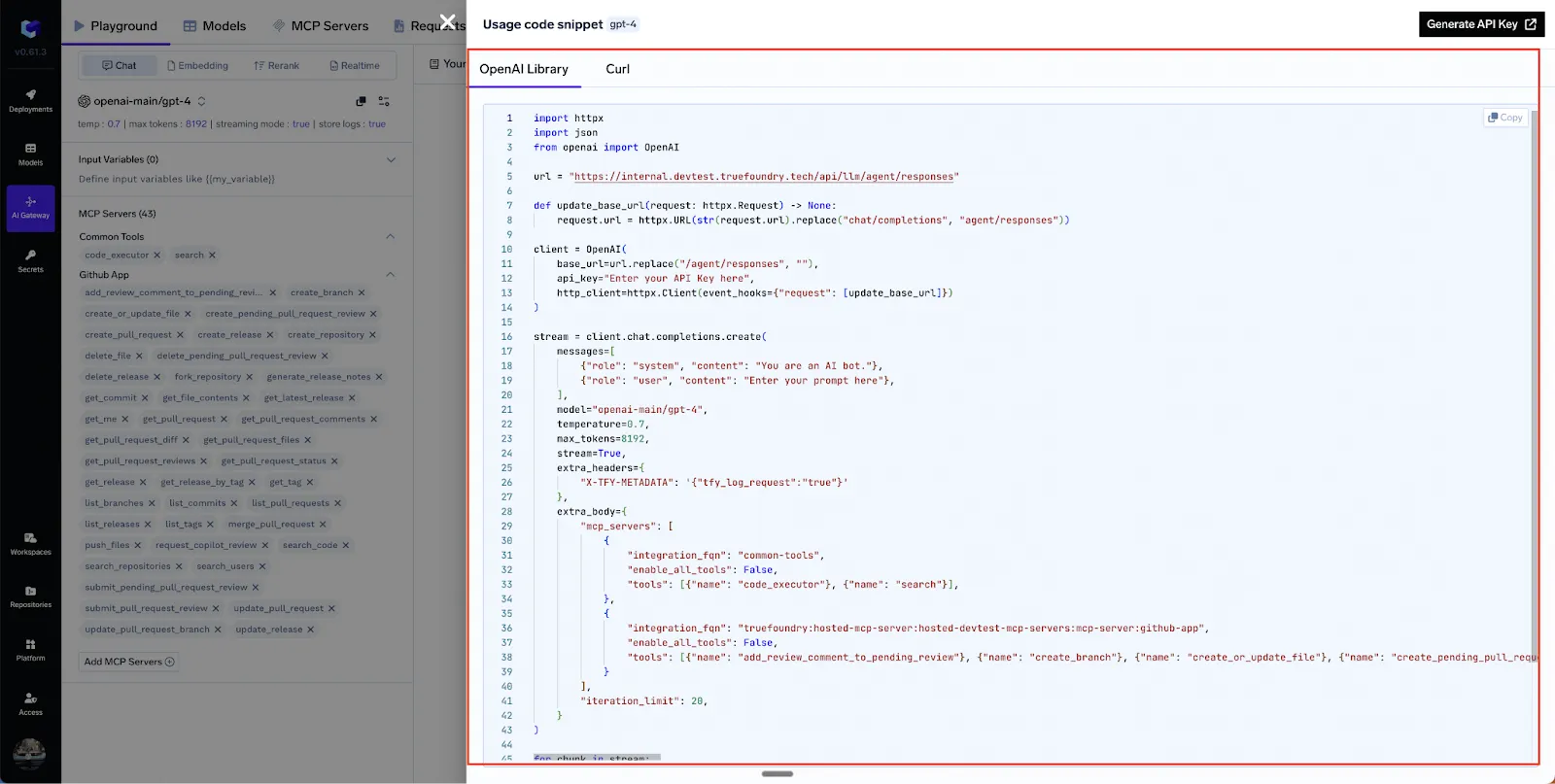
After experimenting in the UI you can click “API Code Snippet” to generate working Python, JS, or cURL examples .Below is a trimmed JSON body that wires three servers together (GitHub, Slack, Calculator):
POST/api/llm/agent/responses
{
  "model": "gpt-4o",
  "stream": true,
  "iteration_limit": 5,
  "messages": [
    {
      "role": "user",
      "content": "Summarize open PRs on repo X and DM me the top blockers."
    }
  ],
  "mcp_servers": [
    {
      "integration_fqn": "truefoundry:prod-mcps:github-mcp",
      "tools": [ {"name": "listPullRequests"}, {"name": "createComment"} ]
    },
    {
      "integration_fqn": "truefoundry:prod-mcps:slack-mcp",
      "tools": [ {"name": "sendMessageToUser"} ]
    },
    {
      "integration_fqn": "truefoundry:common:calculator-mcp",
      "tools": [ {"name": "add"} ]
    }
  ]
}
“You can find a similar example in the Use MCP Server in Code Agent guide, which also includes complete Python and JS snippets.”
The streaming response interleaves:
This lets you build reactive UIs that show each step of the agentic loop in real time.
Even a “hello world” agent can cost real money and do real damage. TrueFoundry ships first-class observability:
All metrics come out of the box; no side-car agents or custom exporters required.
Many open-source servers still speak stdio (stdin/stdout) instead of HTTP. TrueFoundry recommends wrapping them with mcp-proxy and deploying as a regular service
# wrap a Python stdio server
mcp-proxy --port 8000 --host 0.0.0.0 --server stream python my_server.py
Ready-made templates exist for Notion and Perplexity servers, plus K8s manifests for Node or Python images. Once proxied, registration is identical to any other HTTP MCP endpoint.
“TrueFoundry’s MCP Server STDIO guide covers this proxying approach and provides deployment templates.”
Let’s return to our legacy GRC scenario but crank the ambition up:
“Keep our compliance evidence up-to-date. If a policy file changes in GitHub, store the diff in MongodB, create a Jira ticket, and post a summary in Slack.”
Because MCP is just JSON-RPC over HTTP or stdio, any internal service can expose tools, here is a small example :
その時点から、 あらゆる 社内のエージェントは、SlackやGitHubとまったく同じ操作性でコンプライアンス管理について推論できます。
「このシートは、 TrueFoundry MCP概要を基に作成されました。これらのガイドラインは、安全で信頼性の高いデプロイメントを確実にするのに役立ちます。」
MCPにより、大規模言語モデル(LLM)はツールと同じ言語を話すことができますが、エンタープライズレベルでのセキュリティ、検出、ガバナンスといった機能は扱えません。そこでTrueFoundryのAIゲートウェイが登場します。これは、完全な MCPレジストリ、組み込み認証、ロールベースアクセス制御(RBAC)、詳細な可観測性、そしてこれらすべてを連携させる強力なエージェントAPIなど、チームが必要とするあらゆる機能をすぐに利用できる形で提供します。
MCPレジストリは、利用可能なモデルコンテキストプロトコル(MCP)サーバーとその特定の機能を保存・管理する一元化されたカタログです。AIエージェントが検索可能なディレクトリとして機能し、ツールやリソースを動的に検出できるようにします。このレジストリにより、モデルは複雑な多段階タスクを実行するために必要な適切なサービスを特定できます。
MCPレジストリがツールの受動的なディレクトリであるのに対し、AIゲートウェイはトラフィックを管理する能動的な強制レイヤーです。レジストリはシステムにどのようなリソースが存在するかを伝えますが、ゲートウェイは、モデルリクエストの実際の実行中に、アクセスを制御し、認証を処理し、PIIマスキングやレート制限などのセキュリティポリシーを適用します。
AIゲートウェイは、静的構成を使用すればMCPレジストリなしでも機能しますが、動的なツール検出の柔軟性が失われます。レジストリがない場合、開発者はすべてのサーバー接続を手動でハードコードする必要があり、システムの拡張性や保守が困難になります。レジストリを統合することで、新しいツールがエコシステムに追加されるたびに、ゲートウェイが自動的に適応できるようになります。
AIゲートウェイは、MCPレジストリからメタデータとガバナンスルールを取得し、リアルタイムで受信リクエストを検証します。レジストリで定義されたユーザー権限とセキュリティ要件を相互参照し、適切なサーバーにトラフィックをルーティングします。これにより、すべてのやり取りが組織の標準およびデータレジデンシープロトコルに準拠していることが保証されます。
TrueFoundry AI Gateway delivers ~3–4 ms latency, handles 350+ RPS on 1 vCPU, scales horizontally with ease, and is production-ready, while LiteLLM suffers from high latency, struggles beyond moderate RPS, lacks built-in scaling, and is best for light or prototype workloads.



.png)



.png)
.png)
.png)

.png)
.png)
.png)
.png)
.png)
.png)
.png)





