Learn how to create MCP Server Groups, add MCP servers, and use them in the TrueFoundry AI Gateway Playground.
This guide will walk you through the steps to add an MCP server to the TrueFoundry AI Gateway, and then use it in the Playground, or through
Cursor/VSCode/Claude, or in your coding agents.
1
Add an MCP Server
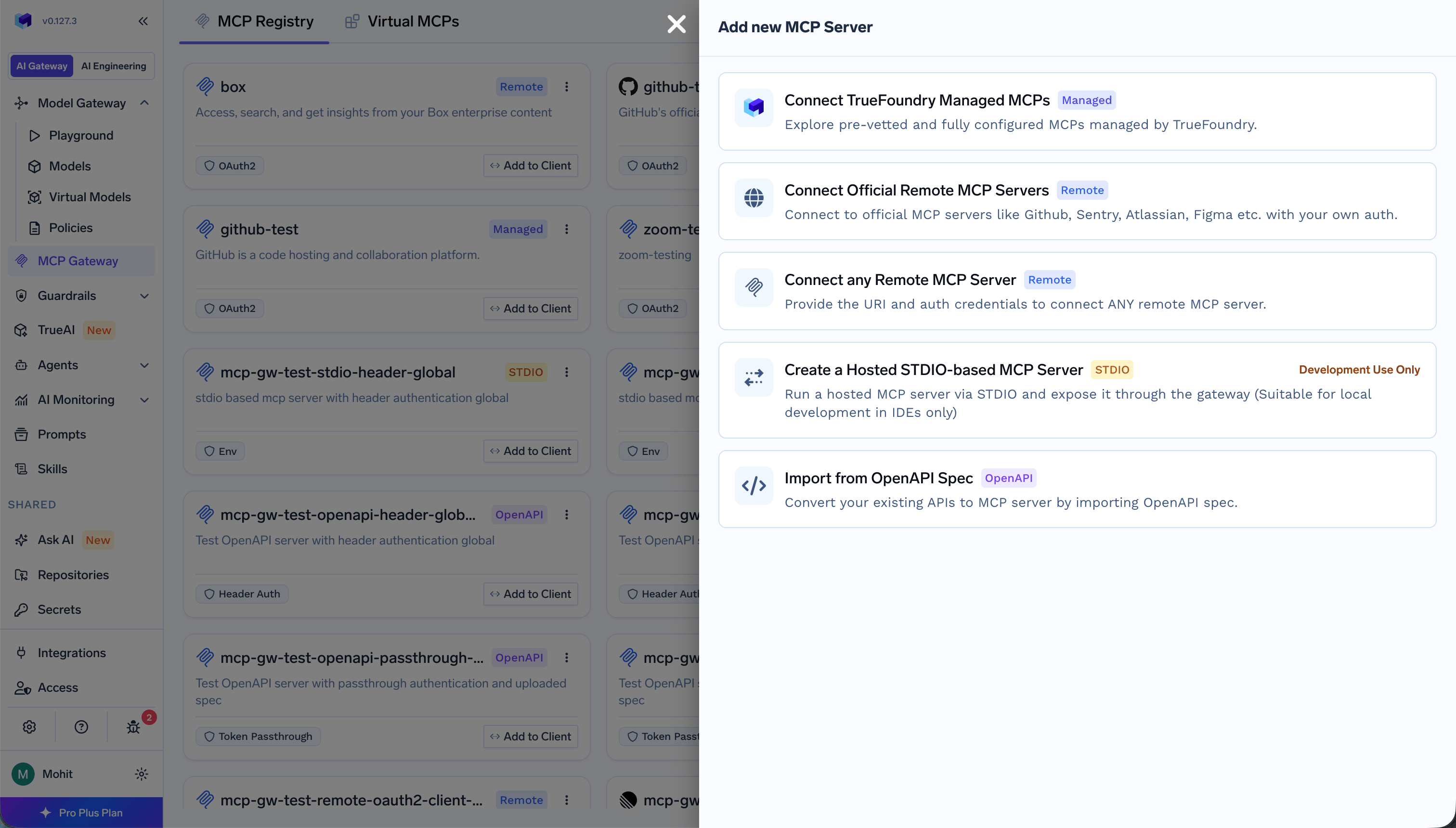
Navigate to MCP Gateway in the left sidebar, and click the Add Server button. You will see the following options:
Option
Description
Connect TrueFoundry Managed MCPs
Provision a pre-vetted MCP server from the TrueFoundry catalogue with just a name; URLs, auth, and credentials are managed by the platform. See TrueFoundry Managed MCPs.
Connect Official Remote MCP Servers
Connect to official MCP servers like GitHub, Sentry, Atlassian, Figma, etc. with your own auth.
Connect any Remote MCP Server
Provide the URI and auth credentials to connect any remote MCP server.
Create a Virtual MCP Server
Combine multiple MCPs (from different MCP servers) into a bundle so each user or team gets access to exactly the tools they need.
Import from OpenAPI Spec
Convert your existing APIs to MCP server by importing OpenAPI spec.
If you want to build an MCP server from scratch, you can follow the Create Calculator MCP Server tutorial.To add a custom Remote MCP server, click Connect any Remote MCP Server, and provide the following details:
Field
Description
Name
Unique identifier for the MCP server (lowercase letters, numbers, and hyphens). Used in URLs and API references.
Display Name
Optional human-readable label shown on the MCP registry page - instead of the internal name. If omitted, Name is shown. You can also set this later when editing the server.
Description
Short purpose of the server.
URL
The URL of the MCP server
Collaborators
Users and teams that have access to this MCP server
Auth Data
How the AI Gateway authenticates to the upstream MCP server
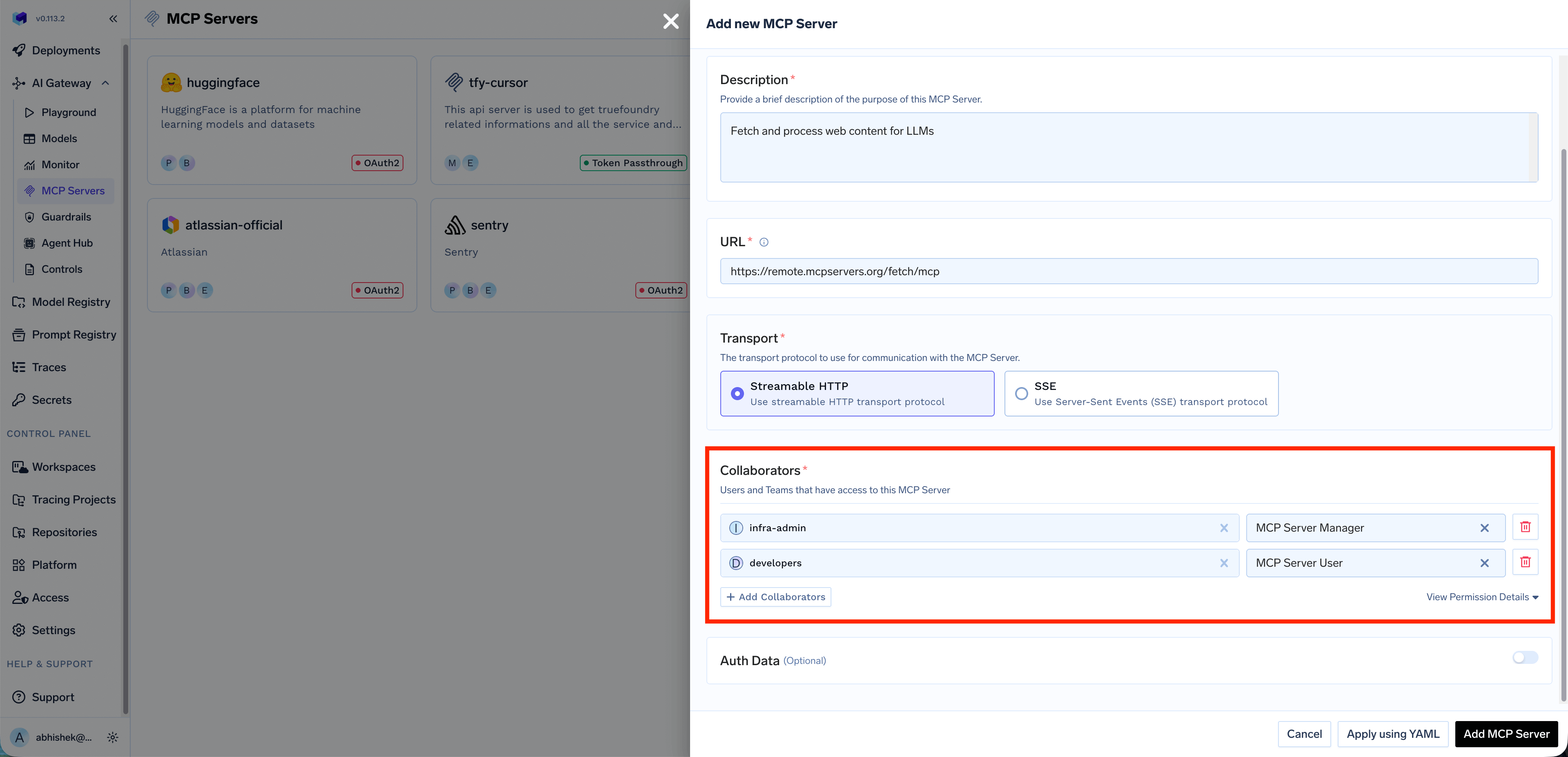
The Collaborators section allows you to control who can access and manage this MCP server. You can add individual users or entire teams and assign them specific roles:
Role
Description
MCP Server Manager
Full access to manage the MCP server, including editing configuration, managing collaborators, and deleting the server
MCP Server User
Can use the MCP server’s tools in the Playground and IDEs, but cannot modify server settings
Click + Add Collaborators to add more users or teams. You can also click View Permission Details to see the complete list of permissions for each role.
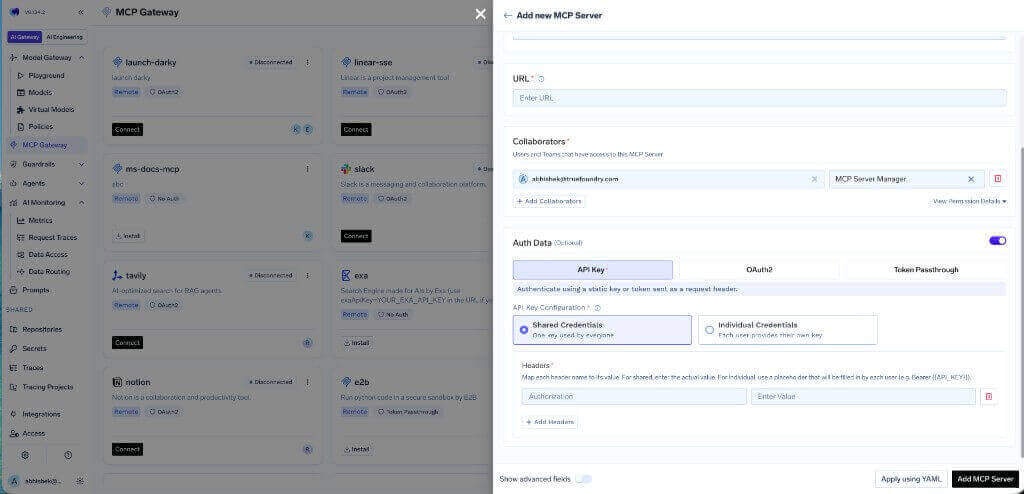
When registering an MCP server, choose the authentication type that determines how requests are authenticated with the upstream MCP server. You can select from: API Key, OAuth2, AWS SigV4, or Token Passthrough.
API Key
Authenticate using a static API key or token sent as a request header. When you select API Key, you need to choose between two credential modes:
Shared Credentials
One key is used by everyone. All users share the same downstream API key. Configure the header name (e.g., Authorization) and the corresponding value.
Use shared credentials for MCP servers where all users should have the same level of access, such as shared knowledge bases or read-only APIs.
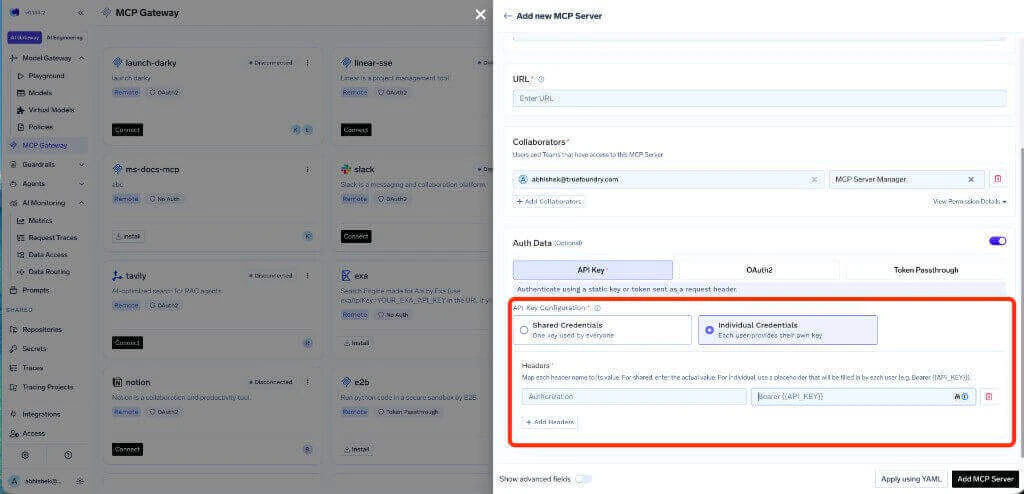
Individual Credentials
Each user provides their own key. When Individual Credentials is selected, configure the header name and use a placeholder like Bearer {{API_KEY}} in the value field. Each user will need to provide their own API key before they can use the MCP server.When individual credentials are configured, users can supply their API key through the Auth Overrides tab on the MCP server detail page. See Auth Overrides for details.
Use individual credentials when the upstream MCP server requires user-specific API keys, for example, when each user has their own API key for a third-party service.
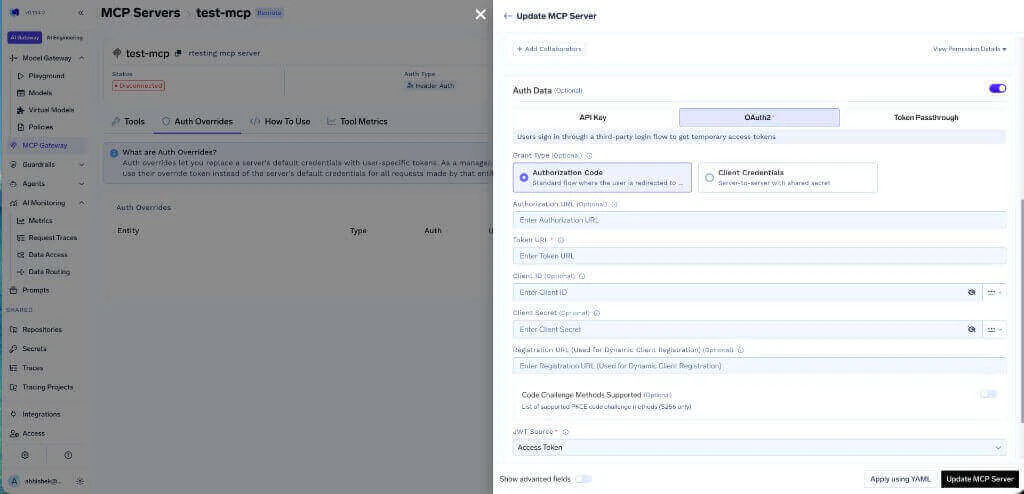
OAuth2
Users sign in through a third-party login flow to get temporary access tokens. OAuth2 is supported by popular services like Slack, GitHub, Atlassian, Google, and more.
Recommended for production. OAuth2 allows you to configure scopes (e.g., read-only), users can revoke their own authorization, and access is limited to resources each user is permitted to use.
When you select OAuth2, you need to choose a Grant Type:
Authorization Code
Standard flow where the user is redirected to the provider to authorize. This is the most common OAuth2 flow for user-facing applications.
Field
Description
Authorization URL
The URL where users are redirected to authorize (optional)
Token URL
The URL used to exchange the authorization code for an access token
Client ID
The client ID from your OAuth2 app (optional)
Client Secret
The client secret from your OAuth2 app (optional)
Registration URL
Used for Dynamic Client Registration (optional)
Code Challenge Methods Supported
List of supported PKCE code challenge methods, S256 only (optional)
JWT Source
Where to extract the JWT from - Access Token or ID Token
Client Credentials
Server-to-server flow with shared secret. No user interaction is required. This is suitable for backend services that need to authenticate without user involvement.
Field
Description
Token URL
The URL used to obtain the access token
Client ID
The client ID for the service
Client Secret
The client secret for the service
1
Create an OAuth2 app in your provider's developer portal
Replace <tfy-control-plane-base-url> with your TrueFoundry control plane URL. Note your OAuth2 App ID, Secret, and required scopes.
2
Register the MCP Server in the AI Gateway
Navigate to MCP Gateway in the left sidebar and click Add MCP Server
Select Connect any Remote MCP Server
Provide the MCP server URL and select OAuth2 as the authentication type
Choose the appropriate grant type (Authorization Code or Client Credentials)
Fill in the required OAuth2 fields
Store OAuth2 credentials in the TrueFoundry secrets store and reference their FQN for enhanced security.
3
Connect and authorize
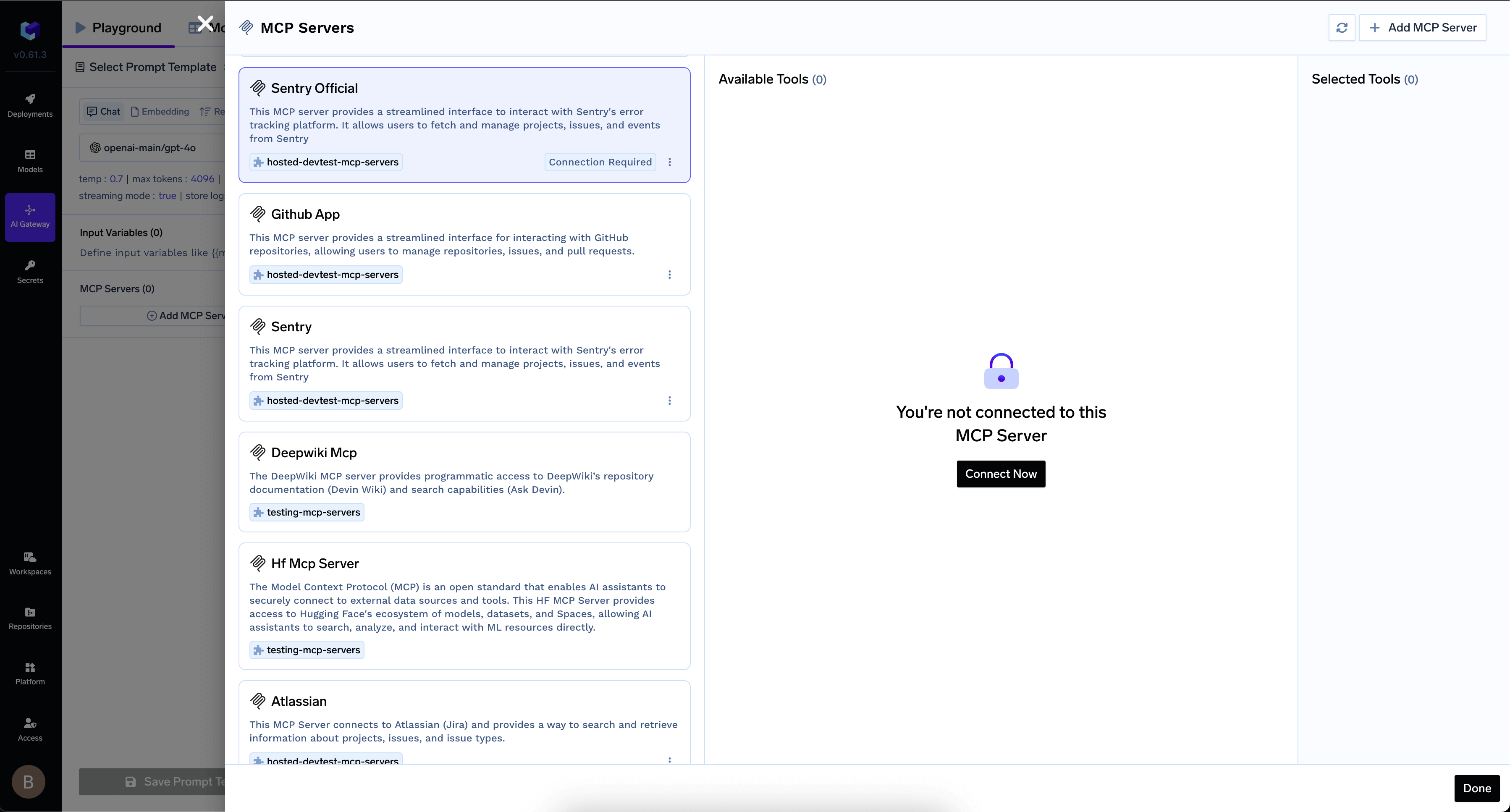
Click Add Tool/MCP Servers in the AI Gateway UI
For OAuth2 MCP Servers using Authorization Code flow, click Connect Now to authorize
Authorize your MCP Server in AI Gateway
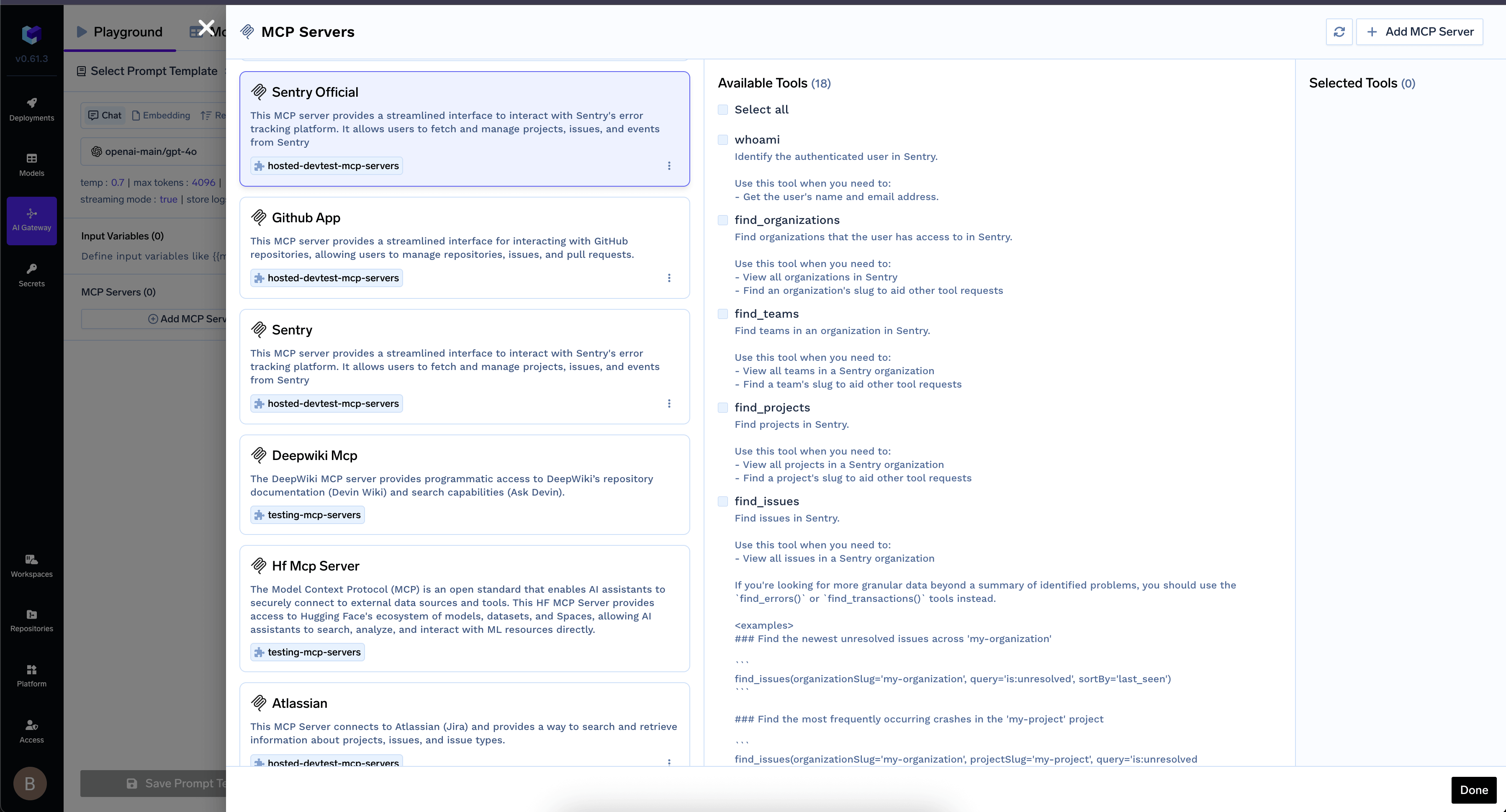
Once authorized, the MCP Server’s tools appear in the list
MCP Server tools available after authentication
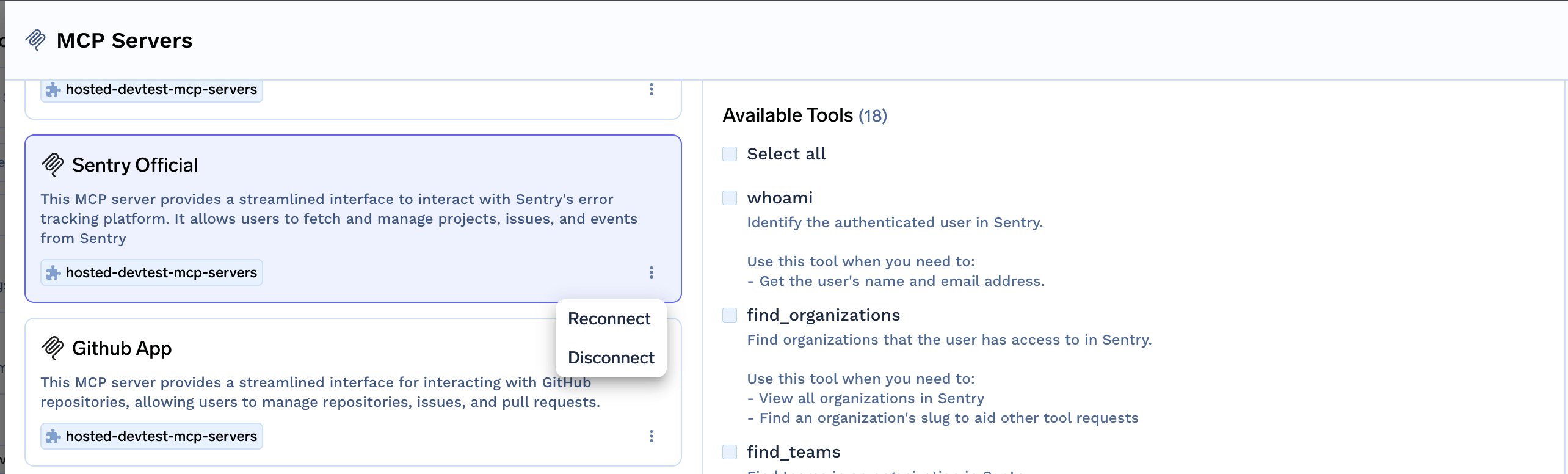
You can revoke authorization at any time:
Revoke your OAuth2 authorization
Token Passthrough
The AI Gateway passes the user’s JWT directly to the MCP server without transformation. The MCP server validates the token itself.Configuration:
Register the MCP server with Token Passthrough authentication type
Configure an Identity Provider to allow your IdP tokens
The user’s JWT is automatically forwarded to the MCP server
With Token Passthrough, the MCP server is responsible for validating the token. Make sure the MCP server is configured to trust your IdP.
2
Use MCP Server in Your IDE
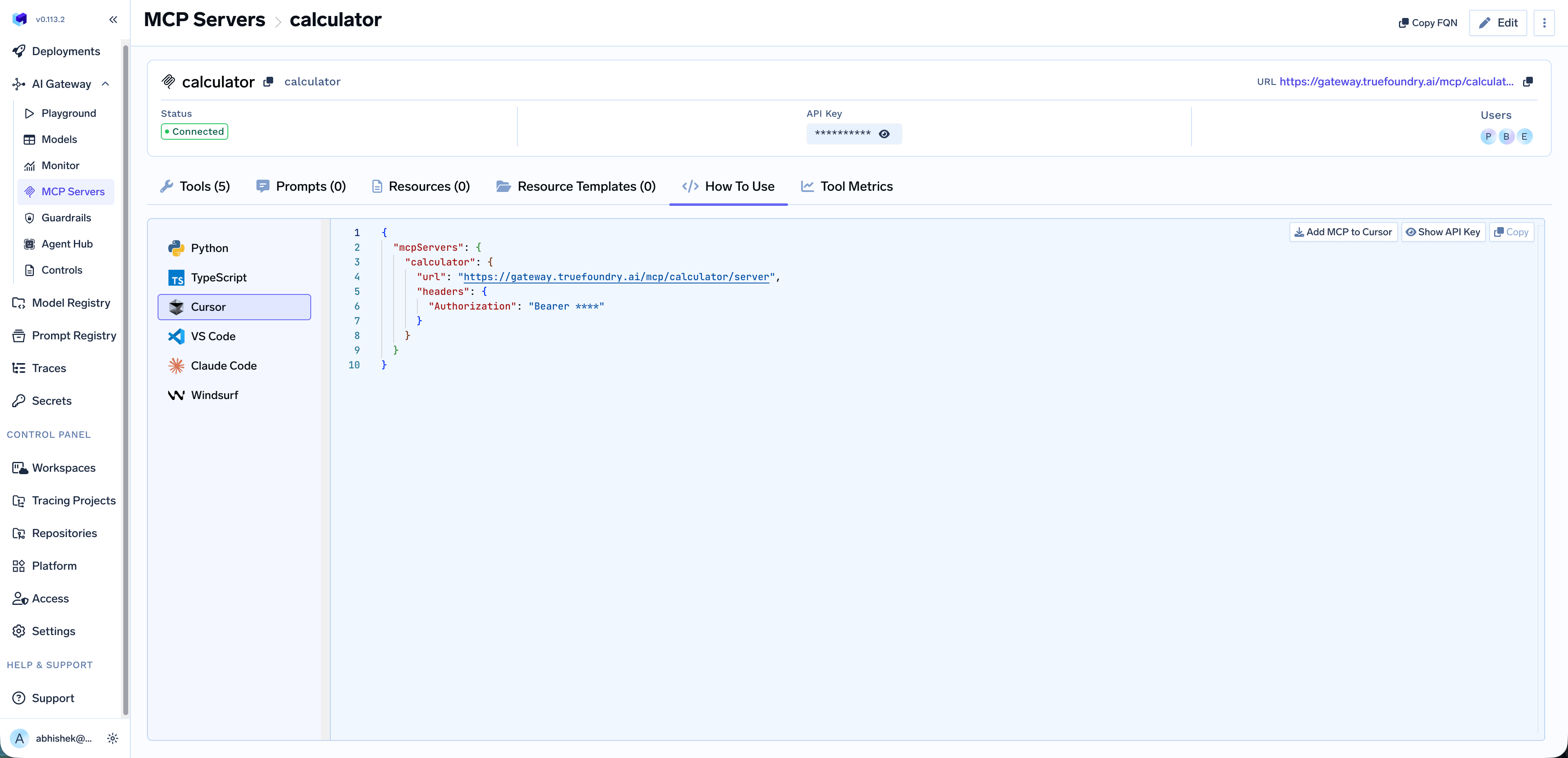
Once you’ve added an MCP server, you can easily integrate it with your favorite IDE or AI coding assistant. Navigate to the MCP server details page and click on the How To Use tab.
Use the Add MCP to Cursor button to automatically add the MCP server configuration to your Cursor IDE. You can also click Show API Key to reveal the full authorization token, or Copy to copy the configuration to your clipboard.
If no API key is shown in your code snippet, your version of the platform supports OAuth flow for obtaining the key. Cursor will automatically handle the OAuth flow when you use the MCP server.
3
Use MCP Servers in Playground
You can select the MCP servers from the Playground, select the tools, and send your prompt to see which tools are being called.