


.webp)
November 3, 2026
|
5 min read


Obtenha acesso instantâneo a um ambiente TrueFoundry ao vivo. Implante modelos, direcione o tráfego de LLM e explore a plataforma completa — seu sandbox estará pronto em segundos, sem necessidade de cartão de crédito.



.png)
Blazingly fast way to build, track and deploy your models!
The Snowflake MCP server is a Snowflake-managed MCP endpoint that runs inside a Snowflake account. Model Context Protocol is the open standard that lets an AI agent discover and call tools on an external system, and Snowflake’s implementation turns Cortex features and raw SQL into callable tools.
The structural difference from a hosted SaaS MCP server: you define the tool surface. The server is created with CREATE MCP SERVER ... FROM SPECIFICATION, where the spec is YAML listing each tool, its type, and its config. Nothing appears in tools/list that you did not write into it.
Five tool types are supported:
A minimal spec is small: one SYSTEM_EXECUTE_SQL entry with read_only: true, a timeout, and a warehouse name, and you have a working data warehouse MCP server. Cortex tool types need prerequisites, either an existing Cortex Search service or a semantic view.
Three limits worth remembering: a maximum of 50 tools per server, responses truncated at 250 KB, and MCP server objects are not replicated in failover groups.
The uses that matter chain tools rather than firing one query:
The read-versus-write split looks different here. On a warehouse, reads are the dangerous side. A wrong write usually breaks one table you can restore. A wrong read can quietly return every customer’s PII, and cost hundreds of dollars in compute before anyone notices.
One analyst pointing an MCP client at their own account is fine. Thirty is a different problem.
Compute cost is now an agent decision. Snowflake bills warehouse compute by the second while the warehouse runs, with a minimum charge each resume. An agent writing its own SQL decides, unsupervised, whether to scan a partition or a petabyte, and a missing WHERE clause on a large fact table is a one-line mistake with a four-figure bill attached. Agents also retry: a call that times out at 600 seconds and is retried five times is five full scans, with nothing in the protocol telling it to stop. This is the one server where tool metrics and rate limits are a budget control, not an ops nicety.
Breadth of read. A warehouse is the one system where all the sensitive data has already been joined together. Your repository has secrets; your ticket system has customer names. Your warehouse has orders joined to users joined to payments, in a schema a broad role can reach. A single over-scoped SELECT is a bigger exposure than anything an agent could do in Git or Jira, and it leaves no trace of damage. The data just leaves.
Shared credentials destroy attribution. If every agent authenticates as one service user with one role, every row in Snowflake’s query history has the same actor. You cannot answer “which agent, acting for whom, read the payments table at 2am,” and per-user policy is impossible because there is only one user.
Nobody owns the spec. Two teams will write two versions, one careful and one with read_only: false and no timeout, and nobody governs which production agents hit.
That is an argument for a control plane in front of it, which is what an MCP gateway is for.
Snowflake is not a one-click catalogue entry. The endpoint lives inside your account and its URL is account-specific, so you do the Snowflake-side setup first and then register the resulting URL through Connect any Remote MCP Server.
You need a Snowflake account on a paid tier, since SQL execution is blocked on trials, plus ACCOUNTADMIN or global CREATE INTEGRATION, a resumable warehouse, your account URL written with hyphens rather than underscores, and a TrueFoundry MCP Server Group.
Step 1: create the MCP server object. In a Snowsight SQL Worksheet (Projects > Worksheets, not the ingestion screen), run CREATE OR REPLACE MCP SERVER with your tool spec. The SQL database, schema, and server name become part of the connector URL, so pick a writable, non-system schema and avoid $ in names.
Step 2: create the OAuth security integration. Only ACCOUNTADMIN can. Use TYPE = OAUTH, OAUTH_CLIENT = CUSTOM, OAUTH_CLIENT_TYPE = 'CONFIDENTIAL' so the secret stays server-side, OAUTH_ISSUE_REFRESH_TOKENS = TRUE, a refresh-token validity in seconds, and OAUTH_ENFORCE_PKCE = TRUE. The redirect URI is the callback shown on TrueFoundry’s Add MCP Server form:
https://<tfy-control-plane-base-url>/api/svc/v1/llm-gateway/mcp-servers/oauth2/callback
One trap: do not add a BLOCKED_ROLES_LIST containing ACCOUNTADMIN or SECURITYADMIN. OAUTH_ADD_PRIVILEGED_ROLES_TO_BLOCKED_LIST already blocks them by default, so listing them throws an error. Retrieve credentials with SYSTEM$SHOW_OAUTH_CLIENT_SECRETS('<INTEGRATION_NAME>'), uppercase.
Step 3: create a non-admin role and grant access. Admin roles are blocked for OAuth, so the user must land on a non-privileged default role. Grant USAGE on the warehouse, database, schema, and the MCP server, then grant per-tool privileges separately, such as USAGE ON CORTEX SEARCH SERVICE or SELECT ON SEMANTIC VIEW. Access to the server does not grant access to its tools. Set DEFAULT_ROLE and DEFAULT_WAREHOUSE on the user; the OAuth session will not initialize without them.
Step 4: allow gateway egress. If network policies are enabled, allowlist TrueFoundry’s egress IPs. The gateway connects server-to-server from TrueFoundry infrastructure, not the user’s browser, so a working browser session proves nothing. On PrivateLink accounts, register the public account URL and keep the token endpoint public.
Step 5: register in TrueFoundry. In your MCP Server Group, click Add MCP Server and choose Connect any Remote MCP Server.
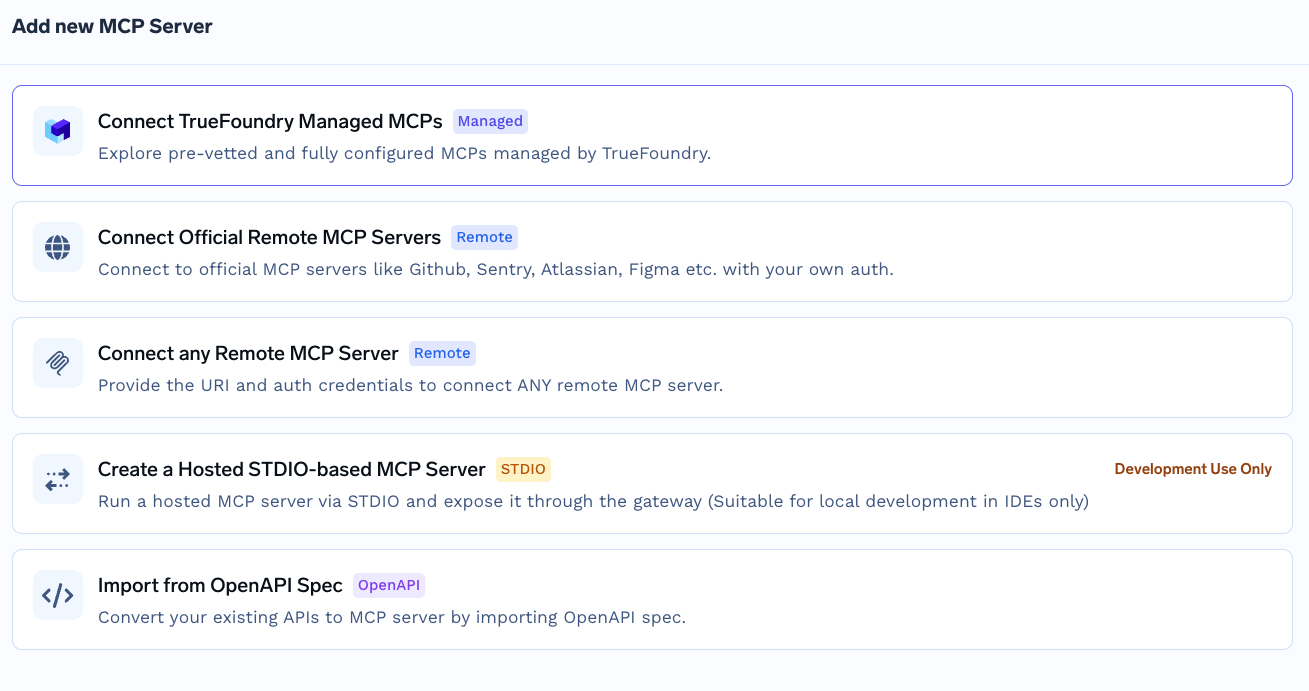
Enter the MCP server URL, which follows this shape:
https://<account_url>/api/v2/databases/<database>/schemas/<schema>/mcp-servers/<server_name>
Select OAuth2 with grant type Authorization Code, then fill in the authorization URL https://<account_url>/oauth/authorize, the token URL https://<account_url>/oauth/token-request, your client ID and secret, Code Challenge Methods Supported S256, JWT Source Access Token, and Scopes refresh_token. Set access control, then Save. Store the client ID and secret in the TrueFoundry secrets store and reference the FQN rather than inlining them.
On scopes: keep refresh_token, because without it sessions expire roughly every ten minutes. Drop the other option, session:role:<role>: the server ignores it, since it resolves the role from DEFAULT_ROLE, and it adds a case-sensitivity failure mode.
TrueFoundry keeps inbound authentication, how a client proves itself to the gateway, separate from outbound, how the gateway proves itself to Snowflake. The two layers are independent.
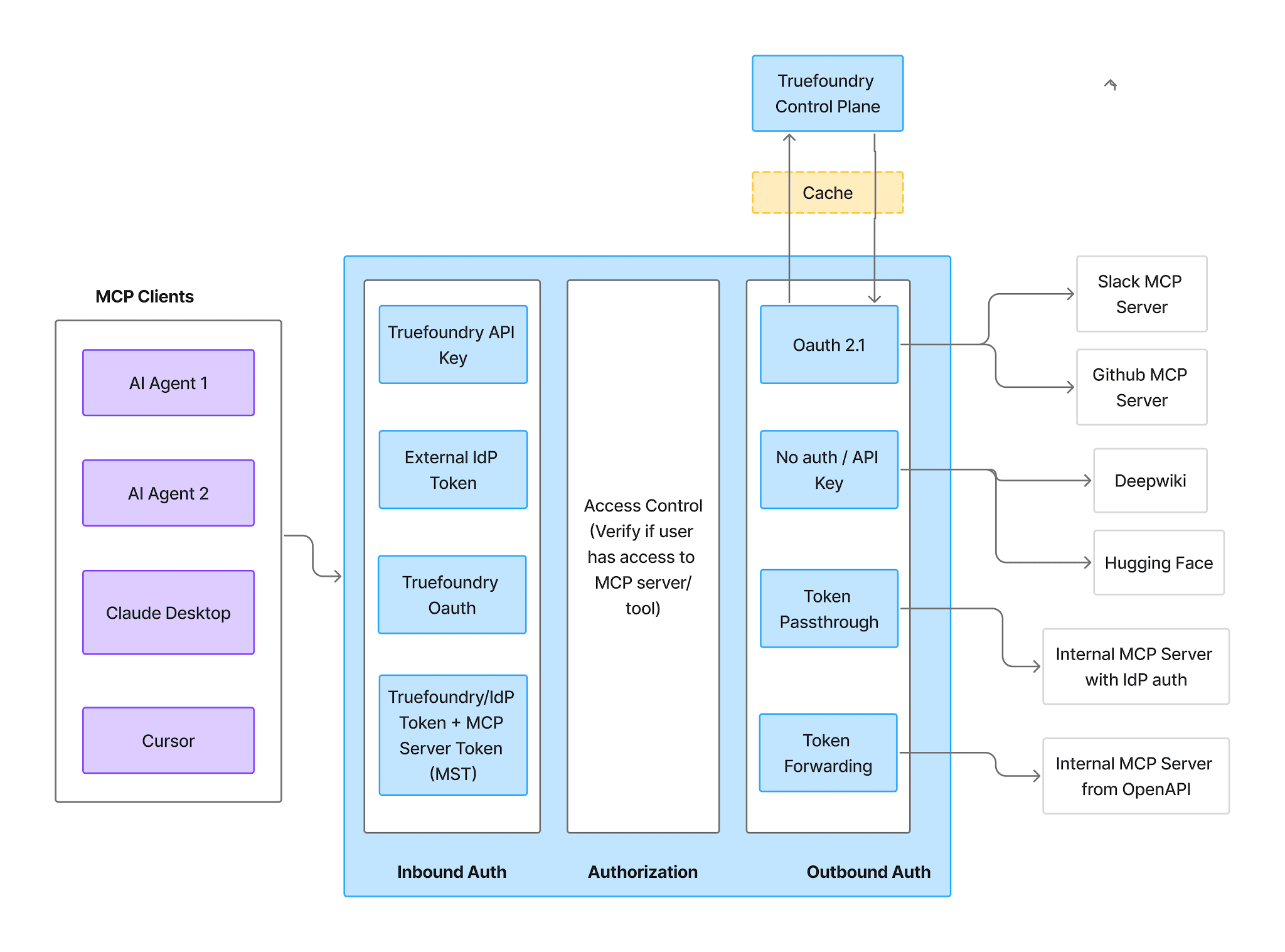
Inbound supports four methods:
Virtual Account tokens give every request identical access, so they are unusable here. For a warehouse, where the whole safety argument rests on each person inheriting their own role, use a PAT or an IdP token inbound.
Outbound is Snowflake OAuth against the integration you created. To authorize, open the server’s Tools section, or Add Tool/MCP Servers in the Playground, and click Connect Now. You are redirected to Snowflake to consent, and TrueFoundry never sees your credentials.
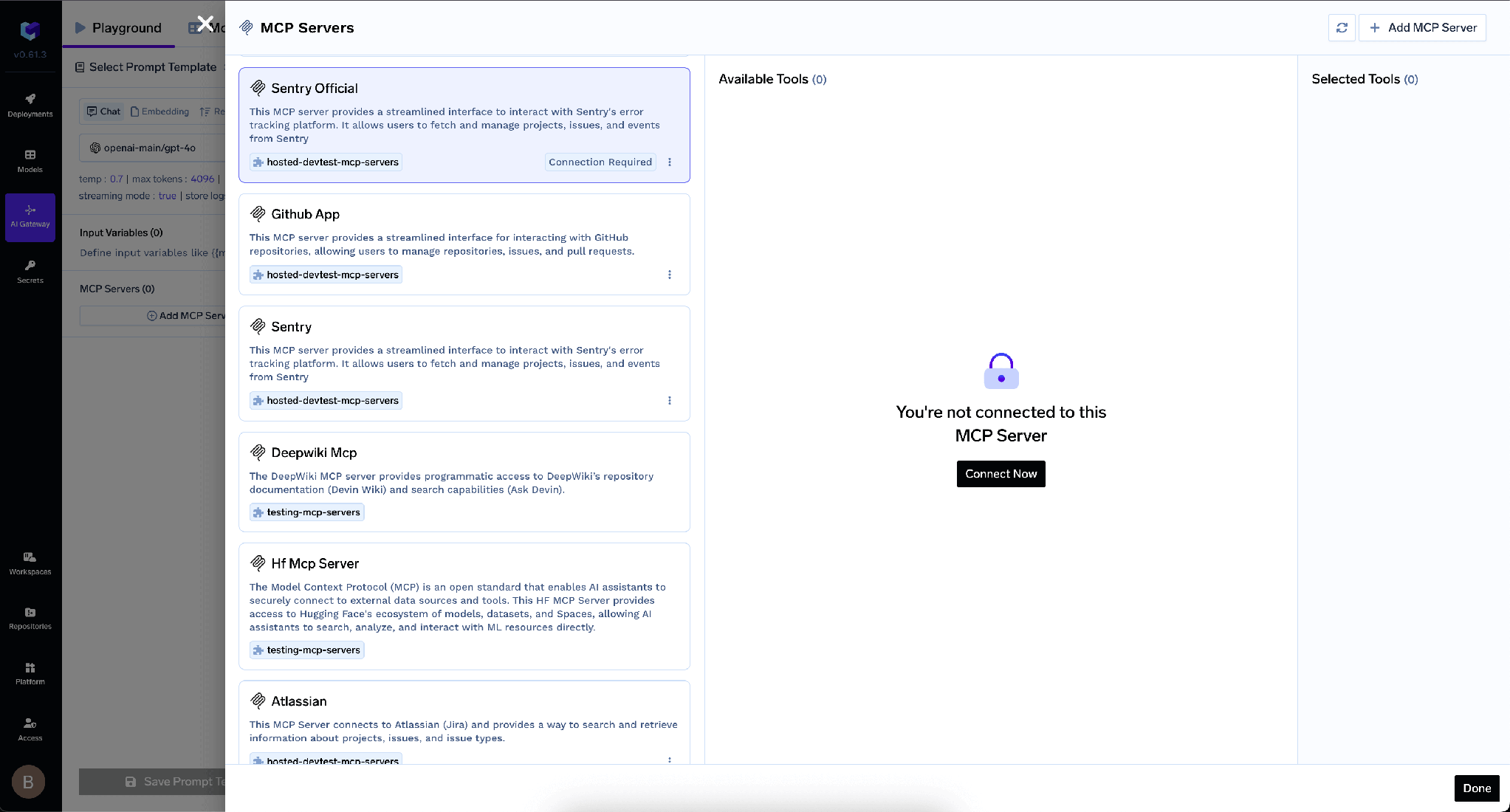
This is the part that protects your data. Each user operates under their own Snowflake RBAC permissions, resolved through their DEFAULT_ROLE. The gateway is not deciding which rows you can see. Snowflake is. Everything you have already built there applies unchanged: role grants on databases, schemas and tables, plus row access policies and dynamic data masking if you use them, both of which require Snowflake Enterprise Edition or higher [VERIFY]. An agent acting for a junior analyst sees exactly what that analyst sees.
Get the division of labour straight: the gateway enforces which tools exist, Snowflake enforces what rows come back. Disabling a tool cannot un-leak a table a role was already allowed to read, and tightening a role cannot stop an agent calling a write tool you left enabled. See MCP authentication for more on the two layers.
If each customer has its own Snowflake account, one client ID cannot span them, so you register a separate entry per account.
Once connected, the Tools tab lists everything the server exposes.
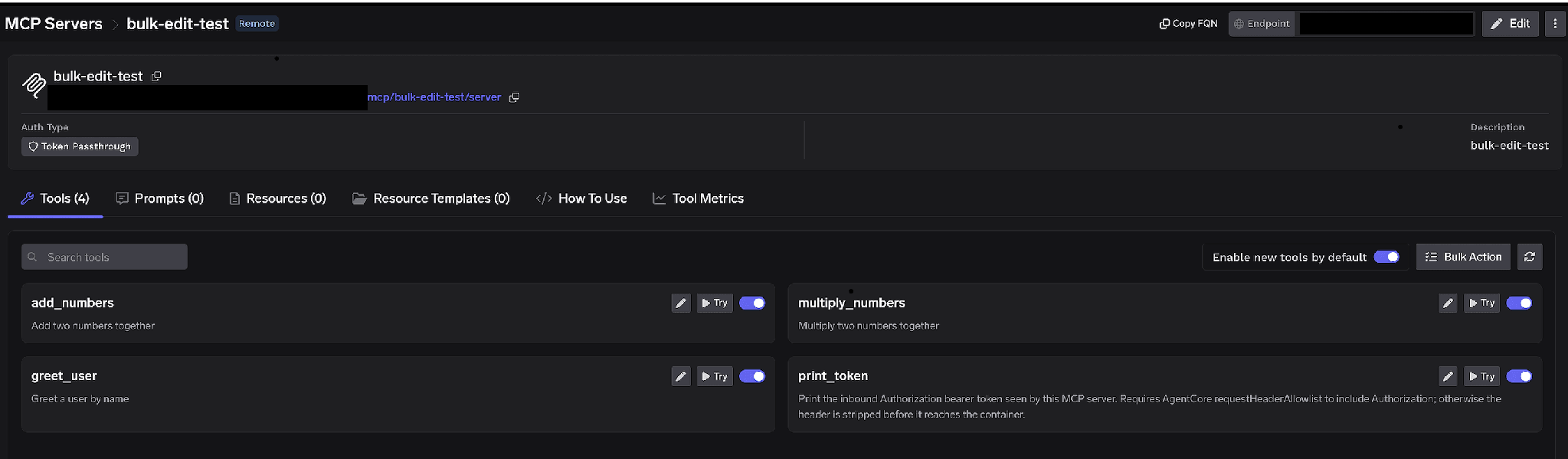
Per-tool toggles. Turn a tool off and it is omitted from tools/list entirely. Clients never see it and it cannot be invoked; this is not prompt-layer filtering. The common warehouse pattern is to leave Cortex Analyst and Cortex Search on while disabling raw SYSTEM_EXECUTE_SQL. Analysts keep natural-language querying through a semantic view you curated, and the agent loses the ability to compose arbitrary SQL against arbitrary tables. That is both cheaper and safer.
Enable new tools by default. Left on, tools added to the Snowflake spec reach agents automatically. Turned off, only tools you explicitly enabled are reachable. Since the spec is edited by whoever holds Snowflake privileges rather than whoever owns the gateway, off is the right answer: a spec change cannot then silently widen what production agents can do. Bulk Action turns every row into a checkbox so you can flip many at once.
Click the pencil on any tool to override how it is presented to the model:
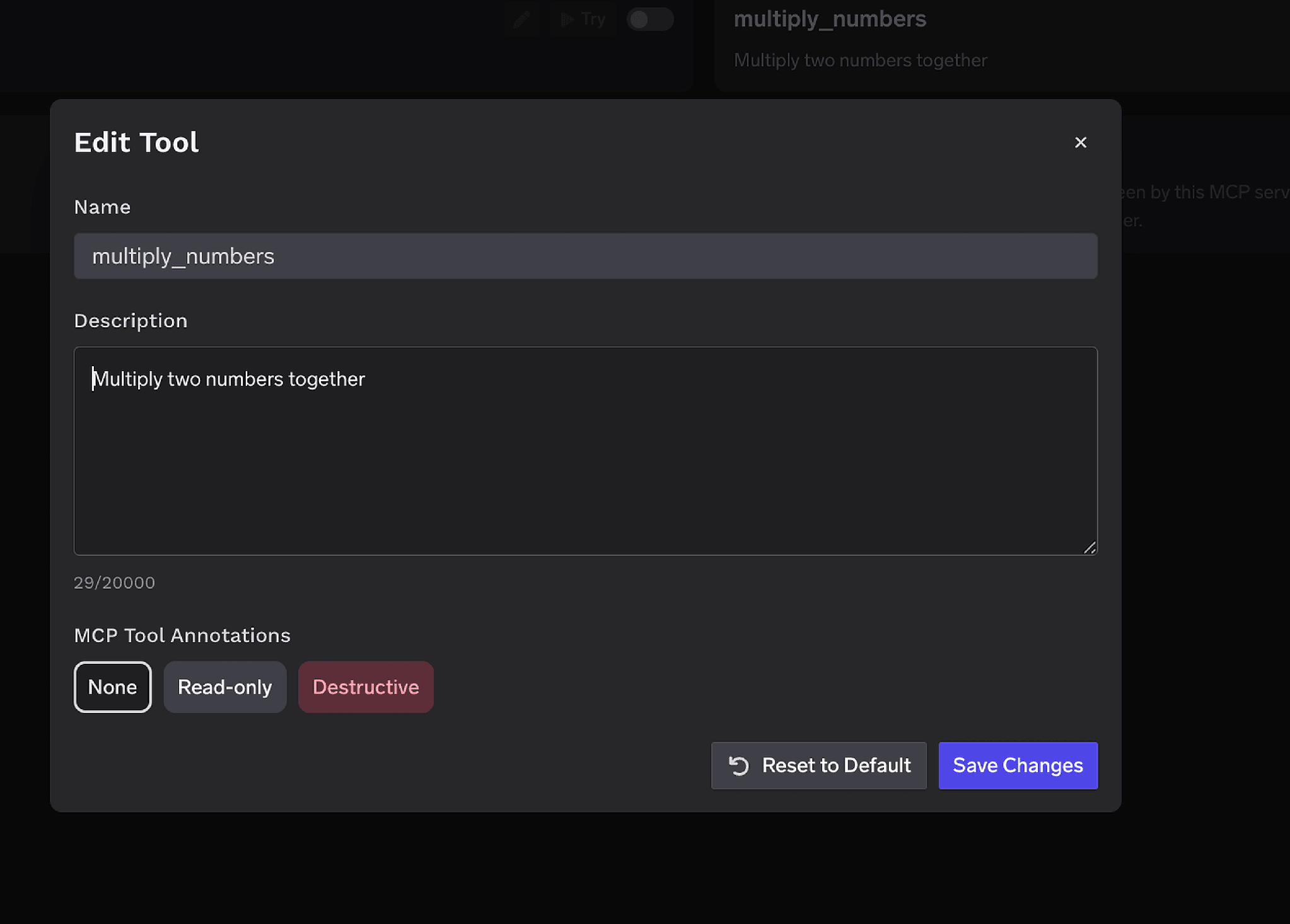
The Description override, up to 20,000 characters, is unusually valuable here. Snowflake tool descriptions are whatever you typed into the spec, and a vague one makes a model reach for SYSTEM_EXECUTE_SQL when a curated analyst tool would have answered the question. MCP Tool Annotations mark a tool Read-only or Destructive, setting readOnlyHint or destructiveHint, and feeding the approval policies below.
Access control attaches to users, teams, or virtual accounts, on two dimensions: which servers an identity can reach, and which tools it can invoke.
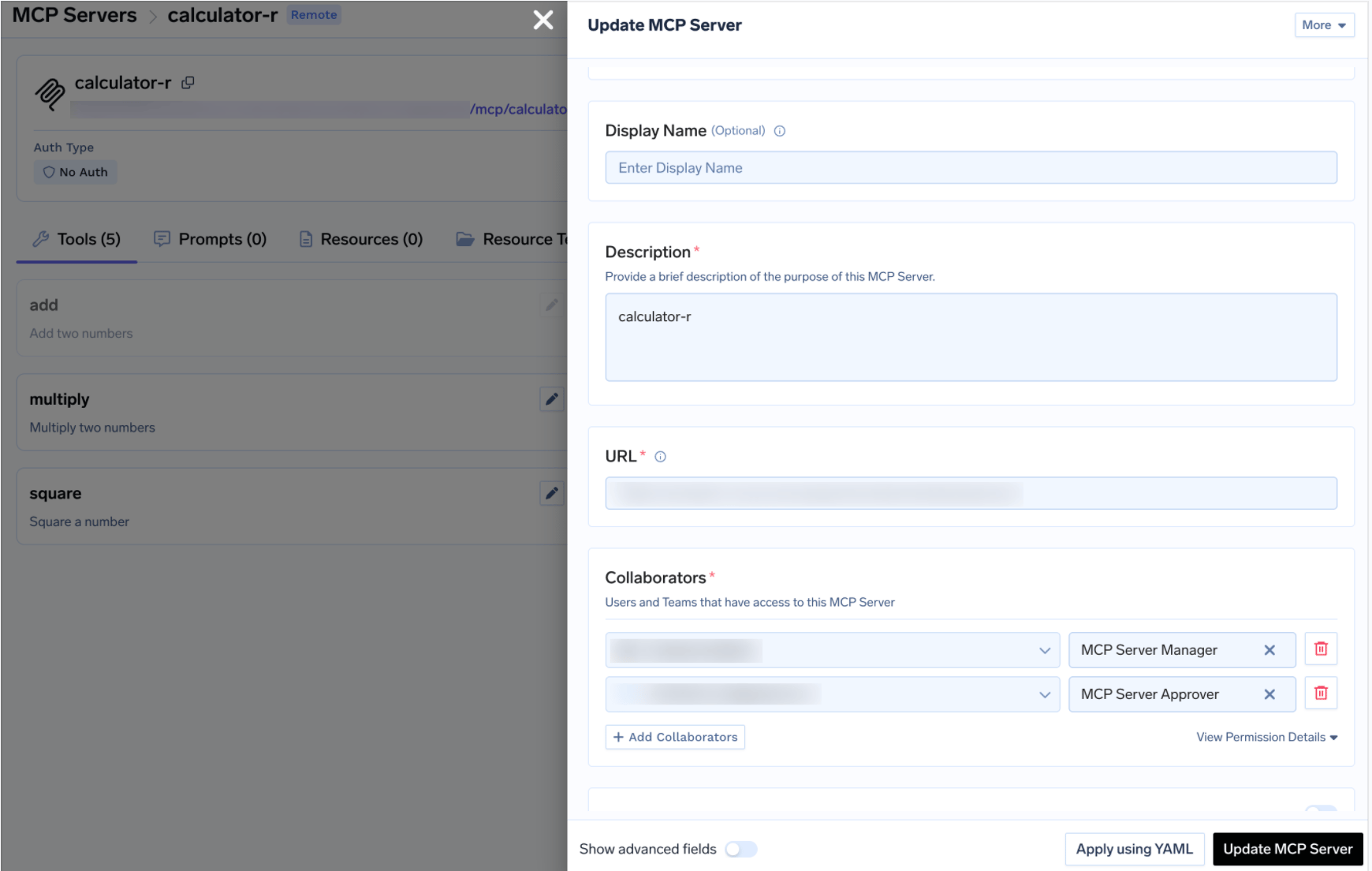
The platform team holds Manager, analytics teams hold User, a governance owner holds Approver. It is the same MCP access control model used across every server in the registry.
Disabling tools is the blunt instrument. Sometimes you want an agent to write to a table or run an unbounded query, just not unattended. When a gated tool is called, the call is held, an approval request is created, and approvers are notified. Once a human approves, calls succeed for a configurable window. Create a policy under AI Gateway > Policies > MCP Tool Approval, marked Beta in the console:
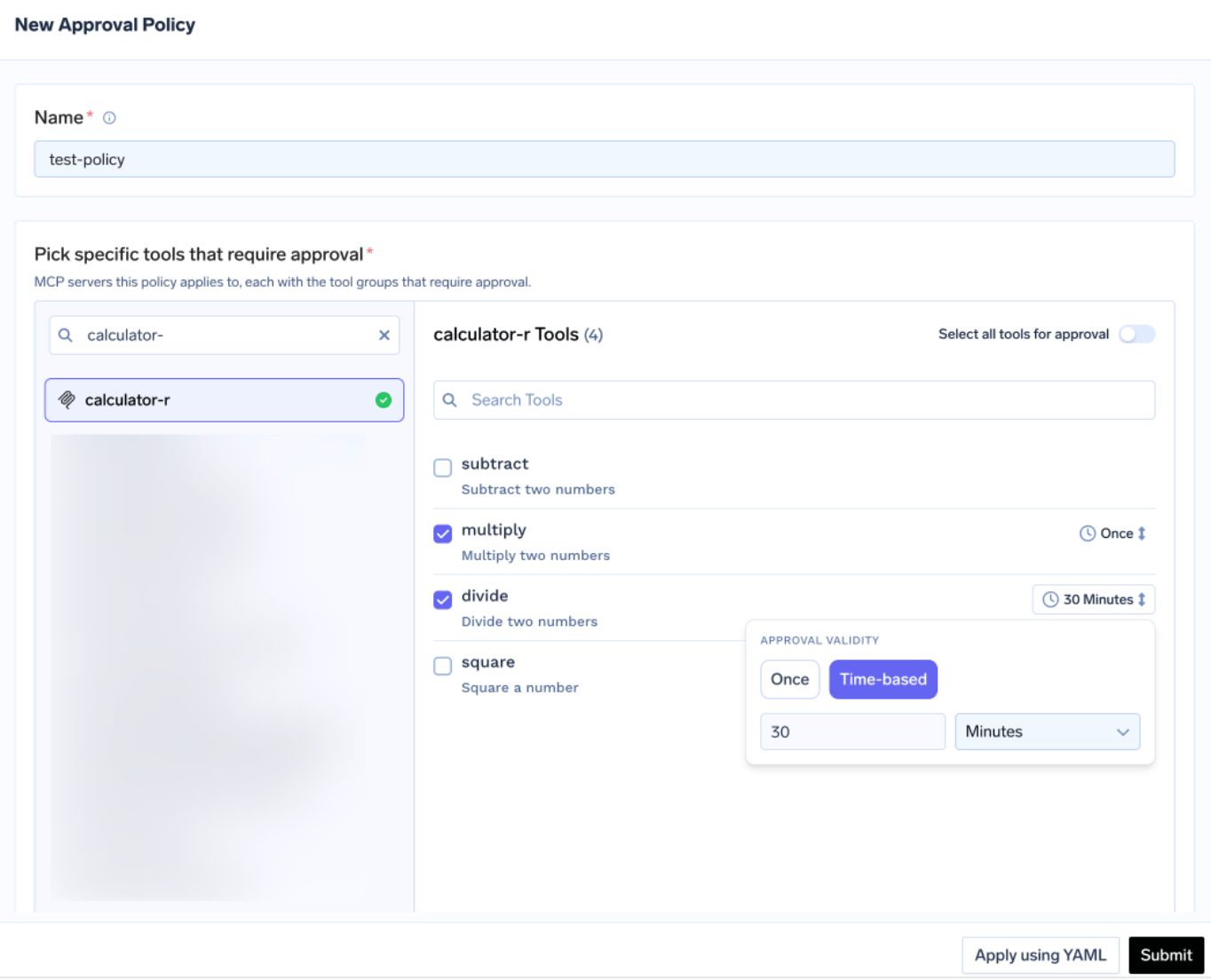
Each policy names the servers it gates and picks an approval scope:
For Snowflake, named on the SQL execution tool is usually right: keep the curated Cortex tools flowing and hold every raw SQL call for a human. When scopes overlap the most specific wins: named beats destructive beats all. Validity is either Once or time-based in minutes, and when policies conflict the most restrictive wins, so Once beats a 10-minute window beats a 30-minute window.
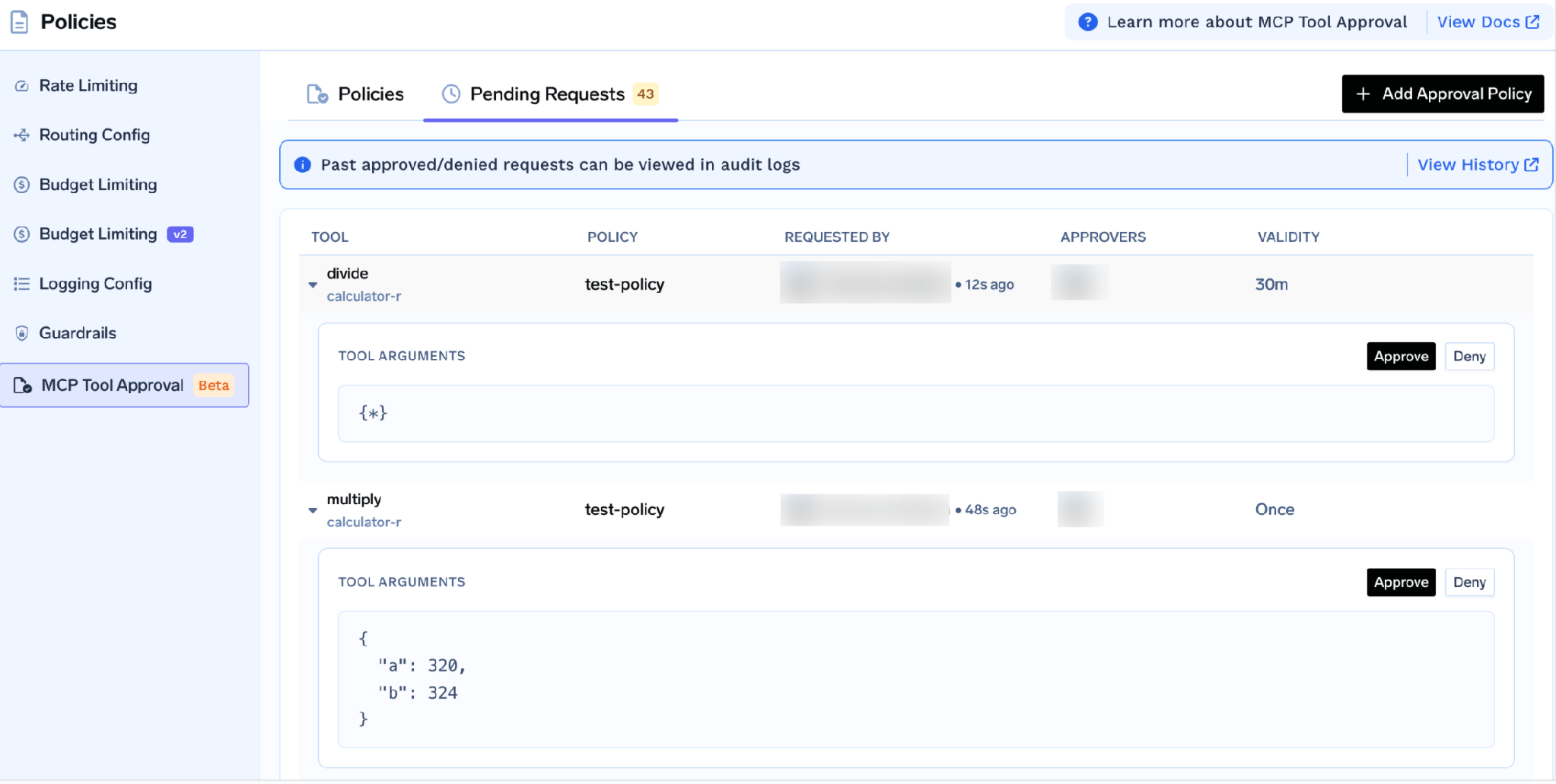
Approvers are notified over Email, Slack, PagerDuty, or MS Teams, and each request shows the tool, the policy, the requester, and the actual tool arguments. On a warehouse that last part is the feature: an approver reads the literal SQL string before it runs, so an unbounded cross-join gets caught by a human rather than by next month’s invoice. While pending, the caller receives a JSON-RPC result carrying _meta.approval_status: "pending" rather than an error, so a well-behaved agent waits instead of crashing.
Grants are scoped per requester, so approving for one analyst does not approve the team.
Before pointing an agent at it, run the tools by hand. Click Try next to a tool, fill in the parameters, and Execute Tool to read the raw JSON. Try is disabled for tools you have turned off.
This is where setup mistakes surface cheaply. A tool that errors is almost always a missing grant, since USAGE ON MCP SERVER buys discovery and not execution. A tool that hangs usually means no default warehouse, or one that cannot resume.
Open the How To Use tab for your tenant-specific Gateway URL and ready-to-paste snippets.
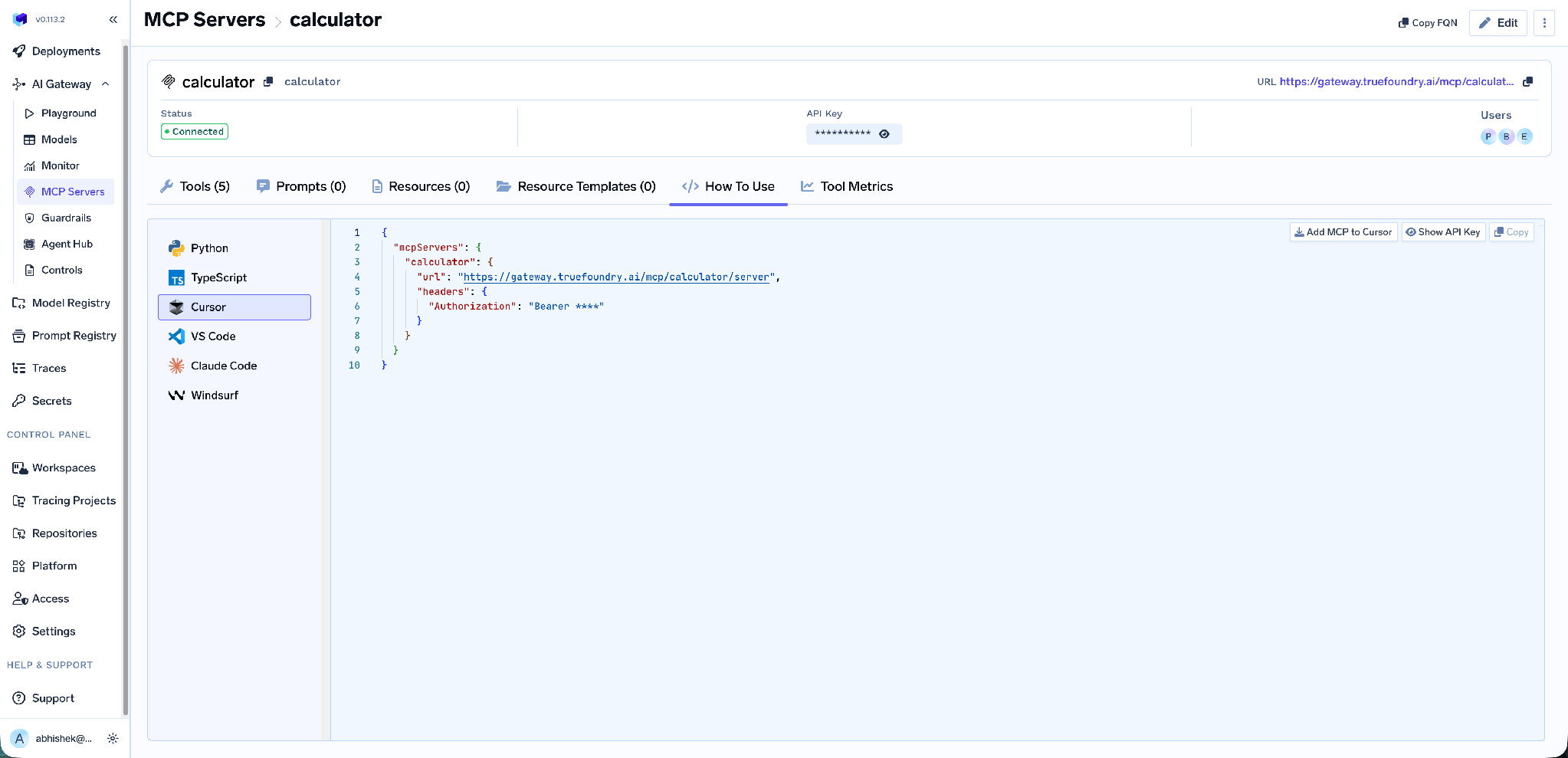
It covers Claude Code, VS Code, Claude Desktop, Cursor, Windsurf, Codex, and the Python and TypeScript MCP SDKs. Take the URL from this tab rather than assembling it yourself; a hand-built endpoint is the most common cause of a client that connects but lists no tools.
On a warehouse the operational layer is how you find out what your agents are costing you.
Tool-level metrics. The MCP Metrics dashboard breaks down requests per second, latency at P50/P75/P90/P99, failure rate by error type, and a ranked request count per tool.
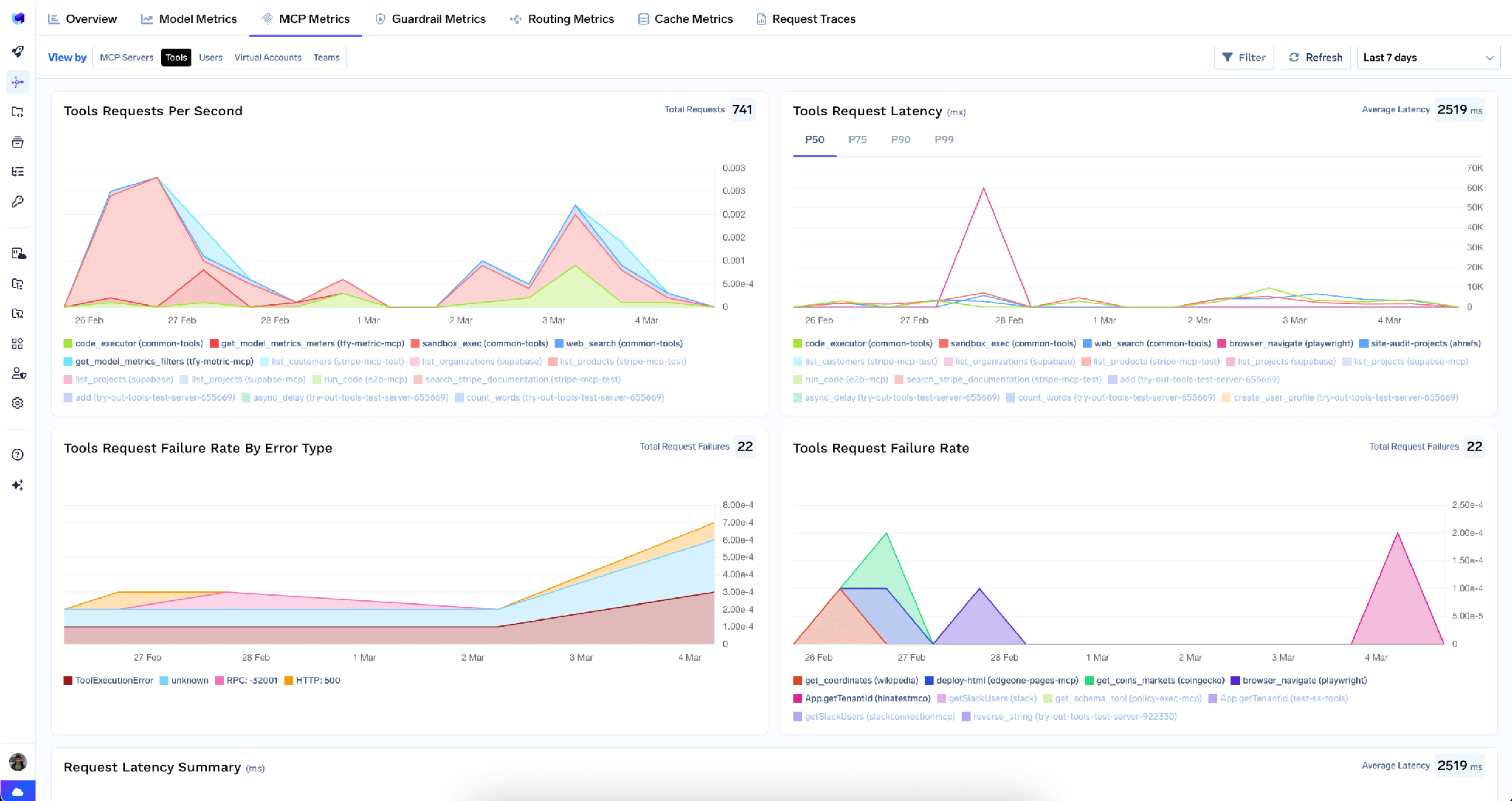
Read this as a spend dashboard, not a latency dashboard. P99 latency on a SQL tool is a proxy for how much compute a long tail of queries is consuming, and a rising failure rate paired with a rising call count is the signature of a retry loop grinding through credits. None of this replaces Snowflake’s own controls: keep a resource monitor on the warehouse the tools use, and keep query_timeout tight.
Full-request observability. Every tool call is traced with caller identity, tool name, inputs, and latency, exported over OpenTelemetry into Grafana, Datadog, or Prometheus. Because outbound auth is per-user OAuth, the caller identity lines up with the user in Snowflake’s query history, so “who ran this” has one answer.
Guardrails. Pre-tool and post-tool guardrails run policy on tool calls, which here means inspecting a result set for PII patterns before it reaches the model.
Low overhead. The gateway adds roughly 3-4 ms of latency and handles 350+ RPS on a single vCPU. Against a query measured in seconds, that is noise.
One registry. Once several servers are registered you can bundle a curated subset of tools behind one endpoint with a Virtual MCP Server, so a reporting agent gets one Snowflake analyst tool and one Slack posting tool.
Tenant admins can wipe every stored credential on the server in one action, from the three-dot menu next to Edit:
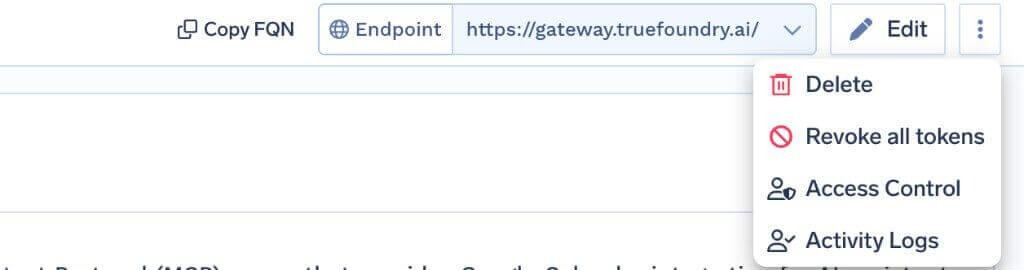
Revoke all tokens deletes every auth override and stored OAuth token for all users and virtual accounts on that server, takes effect on the next request, and is recorded in Activity Logs. It is irreversible, and only tenant admins see it.
The limit matters: this clears tokens at the gateway only, not the grant in Snowflake. During a real incident, also disable the security integration and rotate the client secret.
Trial accounts cannot run SQL. The SQL-execution tool is blocked on trial accounts. If your proof of concept is on a trial and the tool appears but never executes, that is why.
Server access is not tool access. GRANT USAGE ON MCP SERVER lets a role connect and discover tools. Running them needs the underlying grants: USAGE on the Cortex Search service, SELECT on the semantic view, table privileges for SQL.
Semantic views, not semantic models. CORTEX_ANALYST_MESSAGE accepts a semantic view identifier. Pointing it at a semantic model will not work, and the error is not obvious.
The Snowflake MCP server is the most powerful thing you can hand an agent and the one with the most expensive failure modes. Most servers in a registry risk an embarrassing write. This one risks a large bill and a broad read of data already joined together for convenience.
You are not starting from scratch on the second risk. Snowflake’s RBAC, row access policies and masking policies are the primary control, and per-user OAuth is what makes an agent inherit them instead of bypassing them with a shared service account. The gateway’s job is the other half: decide which tools exist, hold the dangerous ones for a human, and give you a call log and a metrics view so cost stops being a surprise.
TrueFoundry AI Gateway delivers ~3–4 ms latency, handles 350+ RPS on 1 vCPU, scales horizontally with ease, and is production-ready, while LiteLLM suffers from high latency, struggles beyond moderate RPS, lacks built-in scaling, and is best for light or prototype workloads.



Um endpoint de Model Context Protocol gerenciado pelo Snowflake e hospedado dentro da sua própria conta. Você o cria com CREATE MCP SERVER e uma especificação YAML que lista as ferramentas que ele expõe. Os agentes o acessam por uma URL específica da conta e se autenticam com Snowflake OAuth.
As que você declarar, até 50 por servidor, em cinco tipos: SYSTEM_EXECUTE_SQL, CORTEX_ANALYST_MESSAGE, CORTEX_SEARCH_SERVICE_QUERY, CORTEX_AGENT_RUN e GENERIC para UDFs. No TrueFoundry, a lista resolvida aparece na aba Tools após o OAuth, onde cada ferramenta pode ser ativada, desativada, redescrita ou anotada.
Use camadas. Prefira ferramentas selecionadas do Cortex Analyst a SQL bruto e desative SYSTEM_EXECUTE_SQL onde puder. Caso contrário, defina um query_timeout apertado, coloque um resource monitor no warehouse, condicione a ferramenta de SQL a uma política de aprovação para que uma pessoa leia a consulta antes e acompanhe, no painel de métricas, o padrão característico de loops de novas tentativas.
Sim. O TrueFoundry é executado na sua VPC, on-prem, em ambiente air-gapped ou híbrido, de modo que os prompts e as respostas nunca saem do seu domínio, mesmo quando você roteia entre muitos provedores.
Sim. Ele inclui um MCP Gateway, um Agent Gateway e um MCP & Agents Registry com controle de acesso em nível de ferramenta. Agentes criados com LangGraph, CrewAI, AutoGen ou um framework próprio podem ser governados de forma centralizada.
Sim. O gateway é compatível com OpenTelemetry e se integra com Grafana, Datadog, Prometheus ou a sua stack preferida. Ele rastreia cada requisição, do prompt à execução da ferramenta e do modelo, para que você obtenha logs unificados sem precisar remover o que você já usa.



As últimas notícias, artigos e recursos enviados para sua caixa de entrada



.png)
.png)
.png)
.png)
.png)
.png)
.webp)
.webp)

.png)
.png)
.png)
.png)
.png)


