


.png)
November 3, 2026
|
5 min read


Obtenha acesso instantâneo a um ambiente TrueFoundry ao vivo. Implante modelos, direcione o tráfego de LLM e explore a plataforma completa — seu sandbox estará pronto em segundos, sem necessidade de cartão de crédito.



.png)
Blazingly fast way to build, track and deploy your models!
OO servidor MCP do HubSpot é um servidor MCP remoto operado pelo HubSpot. Model Context Protocol é o padrão aberto que permite a um agente descobrir e chamar ferramentas em um sistema externo; a implementação do HubSpot transforma registros de CRM em ferramentas chamáveis.
A documentação da TrueFoundry é específica: o servidor “fornece acesso de leitura a objetos de CRM, como contatos, empresas, negócios, tickets, faturas e orçamentos”. Isso é mais restrito do que a maioria das pessoas imagina ao ouvir “servidor MCP de CRM”, e é o fato mais importante aqui.
A documentação descreve o acesso por família de objetos em vez de nomear funções de ferramentas individuais, então faremos o mesmo. A lista oficial é o que aparecer na aba Ferramentas do seu servidor após a autorização — não crie um agente baseado no nome de uma ferramenta que você leu em um post de blog, incluindo este. E, por ser remoto, não há contêiner para executar nem processo local por laptop, razão pela qual ele se alinha aos outros servidores MCP remotos que as equipes estão padronizando.
Os fluxos de trabalho úteis encadeiam leituras entre famílias de objetos:
Cada um é um motivo legítimo para conectar o servidor — e cada um significa que um agente lê os registros de várias centenas de pessoas reais em uma única execução e os coloca na janela de contexto de um modelo.
Sobre a divisão entre leitura e escrita. Para a maioria dos servidores MCP, é aqui que separaríamos leituras inofensivas de gravações perigosas. Neste caso, a superfície documentada é somente leitura, o que elimina uma grande classe de riscos antes mesmo de você configurar qualquer coisa: um agente não pode atualizar um contato, alterar o estágio de um negócio ou disparar um envio de marketing. Se ferramentas com capacidade de escrita ou envio de comunicações aparecerem, o cálculo muda drasticamente — um agente com permissões excessivas que pode enviar e-mails alcança clientes reais, e esse incidente não pode ser revertido. Verifique na aba Ferramentas em vez de presumir. [VERIFICAR: se o servidor MCP remoto do HubSpot expõe atualmente qualquer ferramenta de escrita ou envio de e-mail além do acesso de leitura descrito na documentação da TrueFoundry.]
Uma pessoa conectando o HubSpot à sua IDE é uma escolha pessoal. Uma organização de vendas fazendo isso é uma questão de governança.
Dados pessoais entram no contexto de um modelo, e ninguém registrou isso. Um registro de contato é um dado pessoal sobre um ser humano identificado que concordou com os termos do HubSpot e com sua política de privacidade — não com a leitura de seu registro por uma LLM e, possivelmente, por um provedor de inferência de terceiros. Quando um agente puxa duzentos contatos para um prompt, isso é um evento de processamento de dados, e o GDPR e a CCPA se preocupam com quais dados pessoais você processa, por que e para quem foram divulgados. Não somos advogados e este não é um aconselhamento jurídico, mas a consequência de engenharia é inequívoca: se você não consegue dizer qual identidade leu quais registros, quando e por meio de qual modelo, você não consegue responder à pergunta quando ela for feita. Conexões MCP brutas não produzem nenhum desses registros.
Credenciais compartilhadas apagam o modelo de permissão. A documentação é explícita ao afirmar que o HubSpot “determina o acesso disponível a partir das permissões do usuário no HubSpot e das ferramentas solicitadas pelo servidor MCP”. Uma credencial compartilhada anula isso: o agente de um representante júnior e o agente de um vice-presidente veem dados idênticos.
Proliferação de segredos. Este fluxo requer um Client Secret real. Colado em configurações locais por toda a equipe, ele acaba em arquivos de configuração (dotfiles), no histórico do shell e, eventualmente, em um repositório.
Injeção de prompt com carga útil de CRM. Registros de CRM estão cheios de textos editáveis por atacantes: envios de formulários, corpos de tickets, campos de notas. Um agente que faz a triagem de tickets lê tudo o que foi enviado, incluindo instruções. Com ferramentas somente leitura, o dano é a exfiltração em vez da mutação — direcionar o agente para registros sobre os quais ele não foi consultado e expô-los onde o atacante possa ver. Isso ainda é uma violação.
Nada disso é um argumento contra a conexão com o HubSpot. É um argumento a favor de um plano de controle à frente dele, que é o que um gateway de MCP é.
O HubSpot é não provisionado a partir do catálogo de MCP gerenciado da TrueFoundry. Você o registra como um servidor remoto com credenciais que você cria — um passo extra no lado do HubSpot e um URI de redirecionamento diferente do que os servidores gerenciados usam. Você precisará de permissão para adicionar servidores MCP na TrueFoundry, uma conta HubSpot com Desenvolvimento acesso e a URL base do seu plano de controle.
Passo 1 — Crie o aplicativo de autenticação MCP do HubSpot. No HubSpot, abra Desenvolvimentoe escolhaAplicativos de Autenticação MCP. Clique em Crie um aplicativo de autenticação MCP, dê a ele um nome reconhecível, como TrueFoundry, e defina a URL de redirecionamento como:
https://<tfy-control-plane-base-url>/api/svc/v1/llm-gateway/mcp-servers/oauth2/callback
Substitua <tfy-control-plane-base-url> pela URL do seu próprio plano de controle. Este é o URI de redirecionamento autorregistrado — não https://auth.truefoundry.com/mcp/oauth2/callback, que se aplica apenas a servidores de catálogo gerenciados. Errar isso é a causa mais comum de falhas de incompatibilidade de redirecionamento.
Passo 2 — Copie as credenciais. Copie o ID do ClienteeSegredo do Cliente da página de detalhes do aplicativo.
Passo 3 — Registre o servidor. No TrueFoundry, vá para MCP Gateway, clique emAdicionar Servidor MCPe selecioneConectar qualquer servidor MCP remoto.
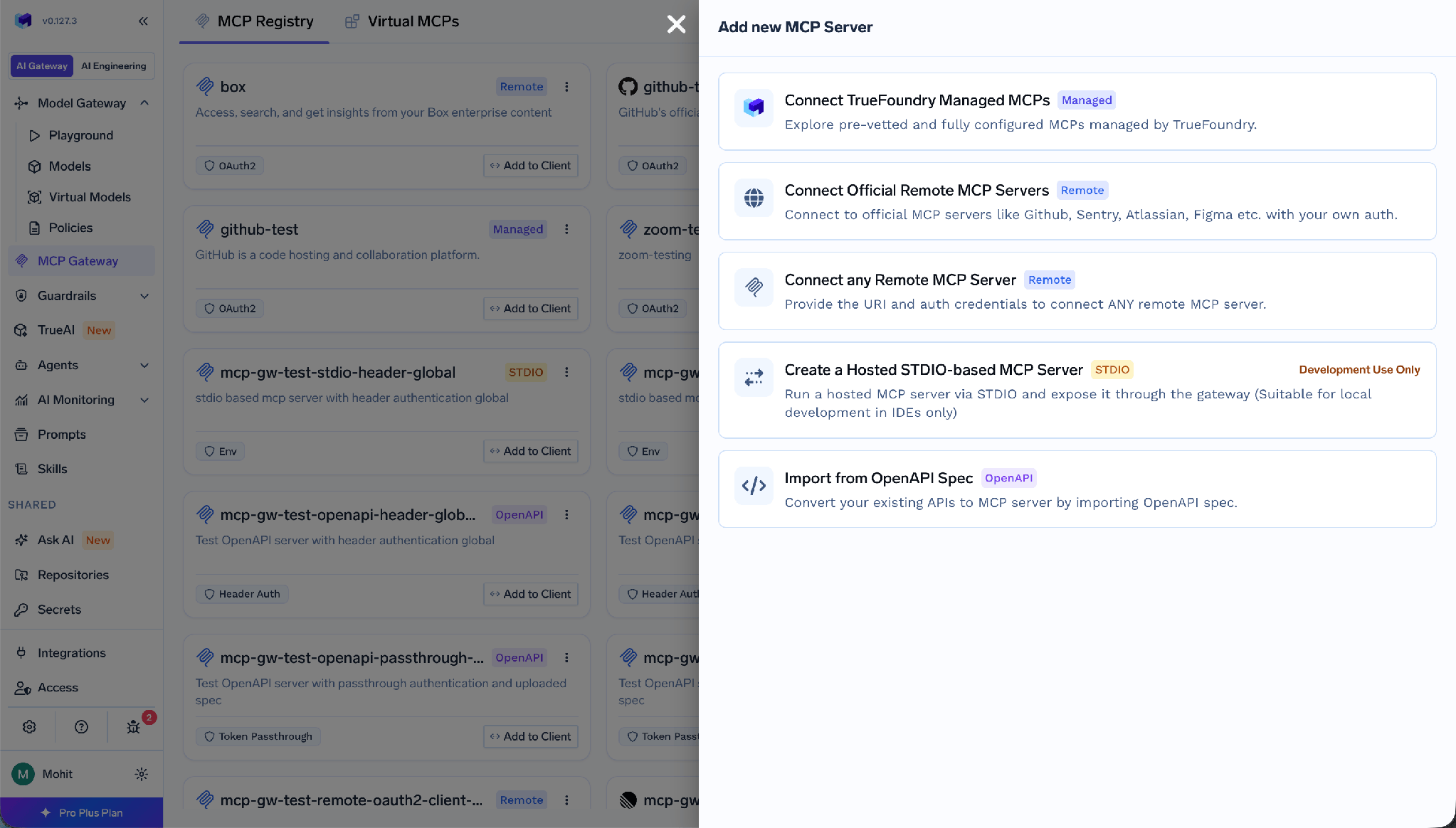
Preencha o formulário da seguinte forma:
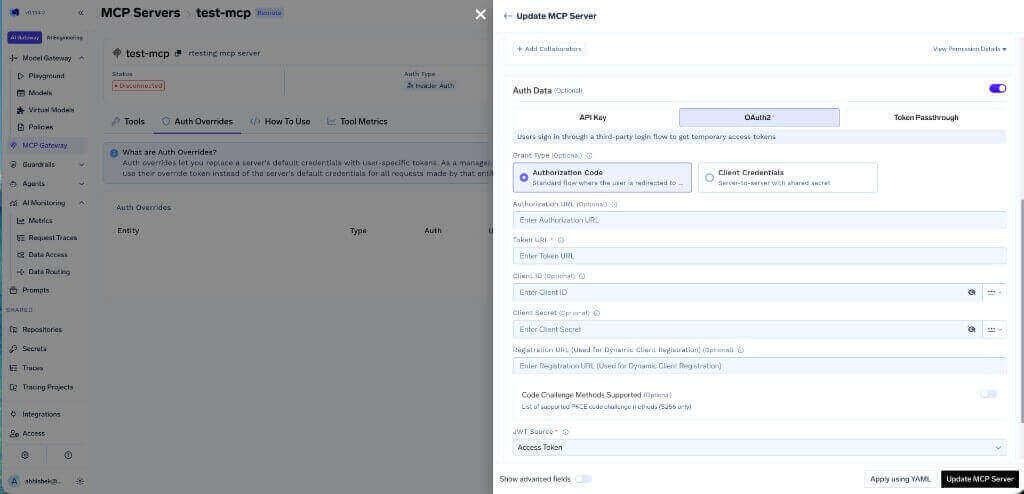
Fonte JWT: Token de Acesso é importante — ele informa ao gateway qual token usar como credencial upstream, e o Token de ID produz falhas que parecem um problema de permissões em vez de um problema de configuração. Em vez de colar o Segredo do Cliente no formulário, armazene-o no cofre de segredos do TrueFoundry e referencie seu FQN.
Passo 4 — Adicione colaboradores e salve.
Passo 5 — Cada usuário conecta sua própria conta. Os usuários abrem a seção Ferramentas do servidor e clicam em Conectar AgoraApós o sucesso do OAuth, as ferramentas do HubSpot aparecem e podem ser testadas a partir do Playground de Agentes.
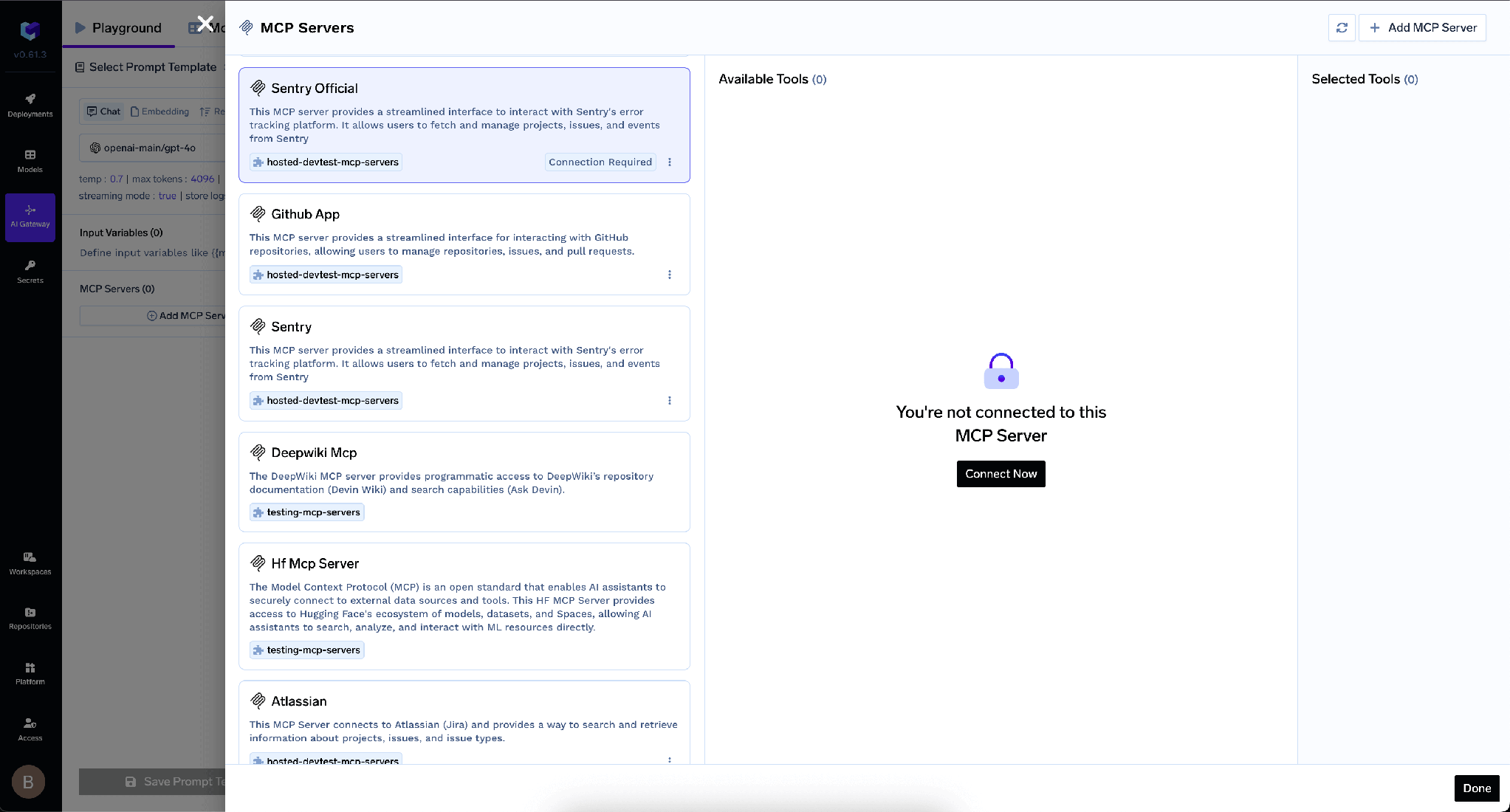
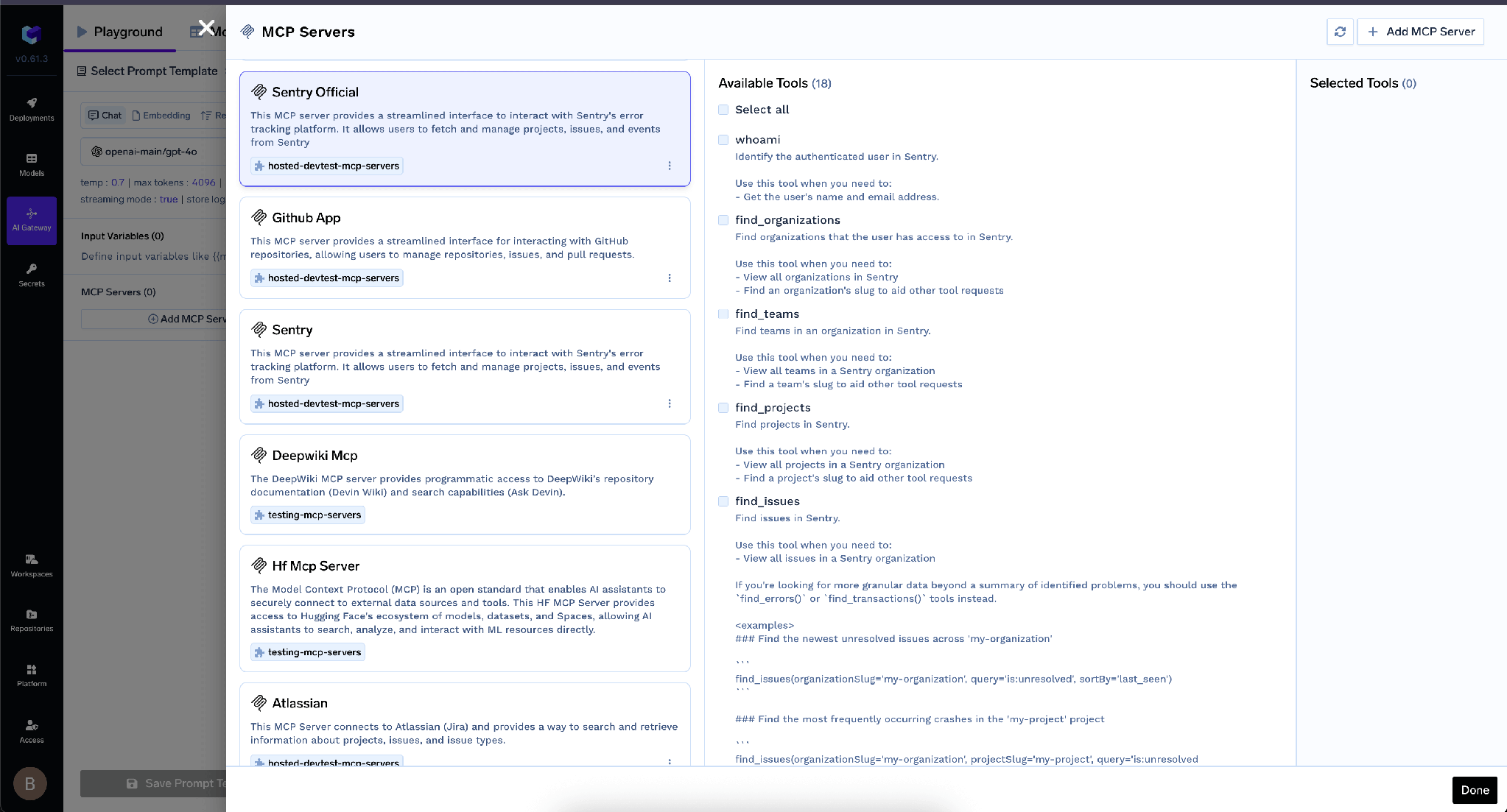
Essa última etapa cuida da privacidade, e é feita individualmente por pessoa.
O TrueFoundry separa aautenticação de entrada— como um cliente se autentica no gateway — daautenticação de saída, como o gateway se autentica no HubSpot. Confundi-los é onde a maioria das configurações feitas por conta própria falha.
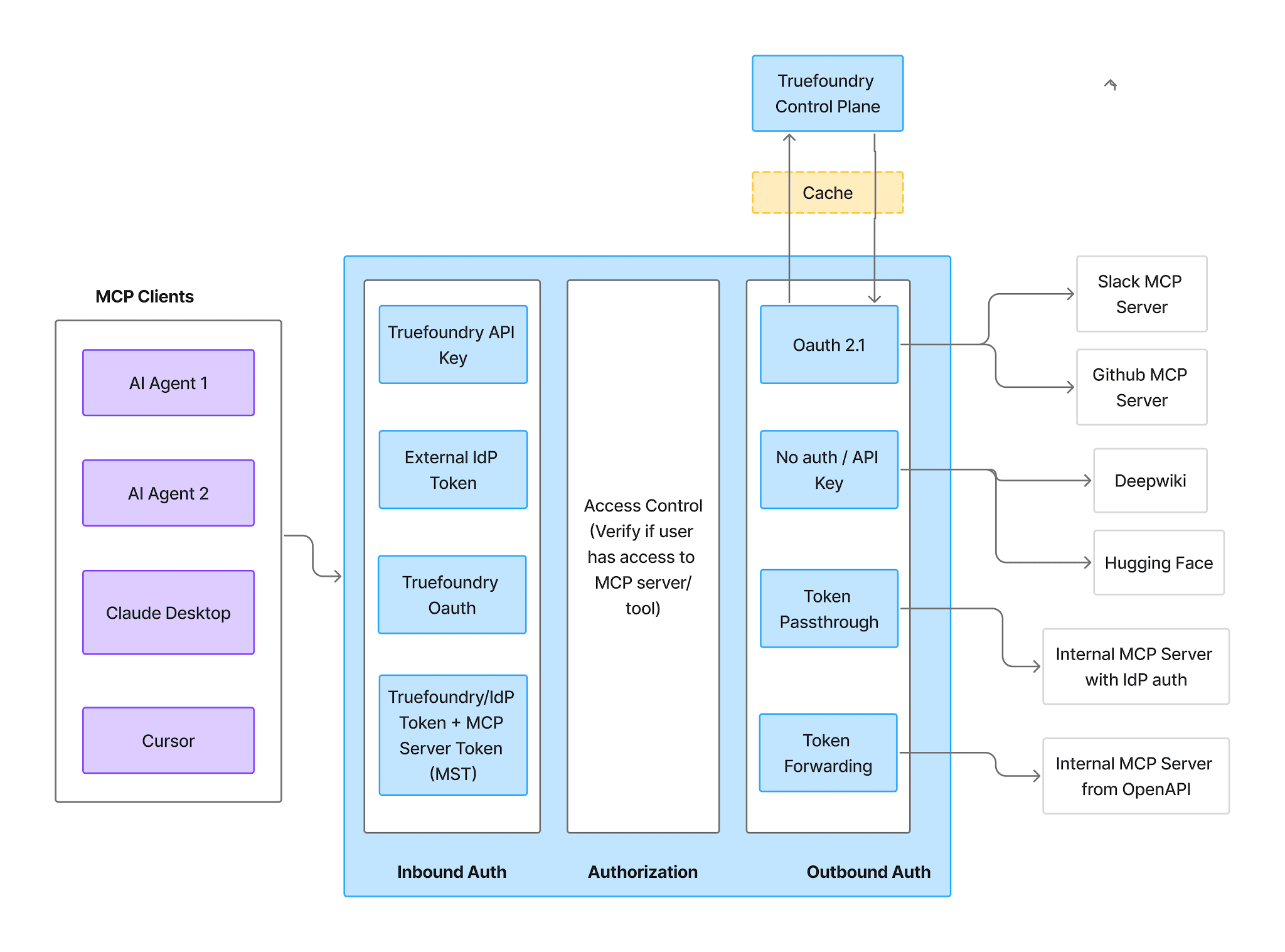
Entrada— quatro métodos suportados:
Tokens de Conta Virtual concedem acesso idêntico a todas as solicitações, portanto, não conseguem expressar permissões de CRM por usuário — se você rotear o HubSpot por meio de um deles, terá recriado o problema de credenciais compartilhadas dentro do gateway.
Saída — Código de Autorização OAuth2 para o aplicativo de autenticação que você criou. Cada usuário autoriza sua própria conta HubSpot; a TrueFoundry gerencia o consentimento, o armazenamento e a atualização, injeta o token do usuário correto em cada chamada e nunca tem acesso à senha do HubSpot.
O resultado é a propriedade que você deseja de um servidor MCP de CRM: um agente que atua em nome de um representante vê os registros que esse representante pode ver. Restrições de território, visibilidade de equipe e permissões em nível de objeto ainda se aplicam, porque o acesso é decidido a partir das permissões do próprio usuário somadas às ferramentas solicitadas pelo servidor. Os usuários se autenticam duas vezes, no gateway e no HubSpot; é isso que torna possível a atribuição por usuário. Veja autenticação MCP para o design mais amplo.
Uma vez autorizado, a aba Ferramentas lista o que o servidor expõe — onde você decide o que os agentes podem ler.
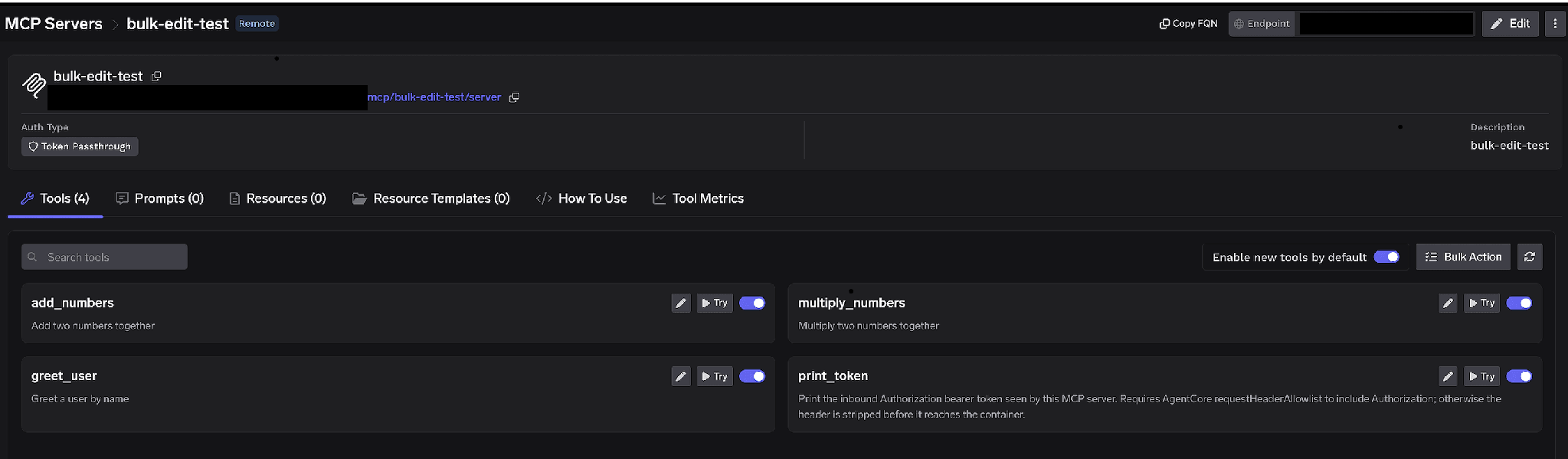
Alternâncias por ferramenta. Desative uma ferramenta e ela será omitida inteiramente das respostas de tools/list — os clientes nunca a verão e ela não poderá ser invocada. A estratégia útil aqui é a minimização da família de objetos: um agente de previsão de pipeline precisa de negócios e empresas, e não tem motivos para ler registros de contatos. Desative os contatos e a família mais sensível ficará inacessível.
Habilitar novas ferramentas por padrão. Se deixada ativada, qualquer ferramenta que o HubSpot disponibilizar aparecerá automaticamente e o alcance do seu agente sobre os dados do cliente crescerá sem que ninguém decida. Se desativada, apenas as ferramentas que você habilitou estarão disponíveis — a configuração defensável para um servidor que contém dados pessoais.
Ação em lote.Alterna todas as linhas para caixas de seleção comSelecionar tudo para criar uma lista de permissões de uma só vez.
Você também pode clicar no lápis em qualquer ferramenta para alterar como ela é apresentada ao modelo:
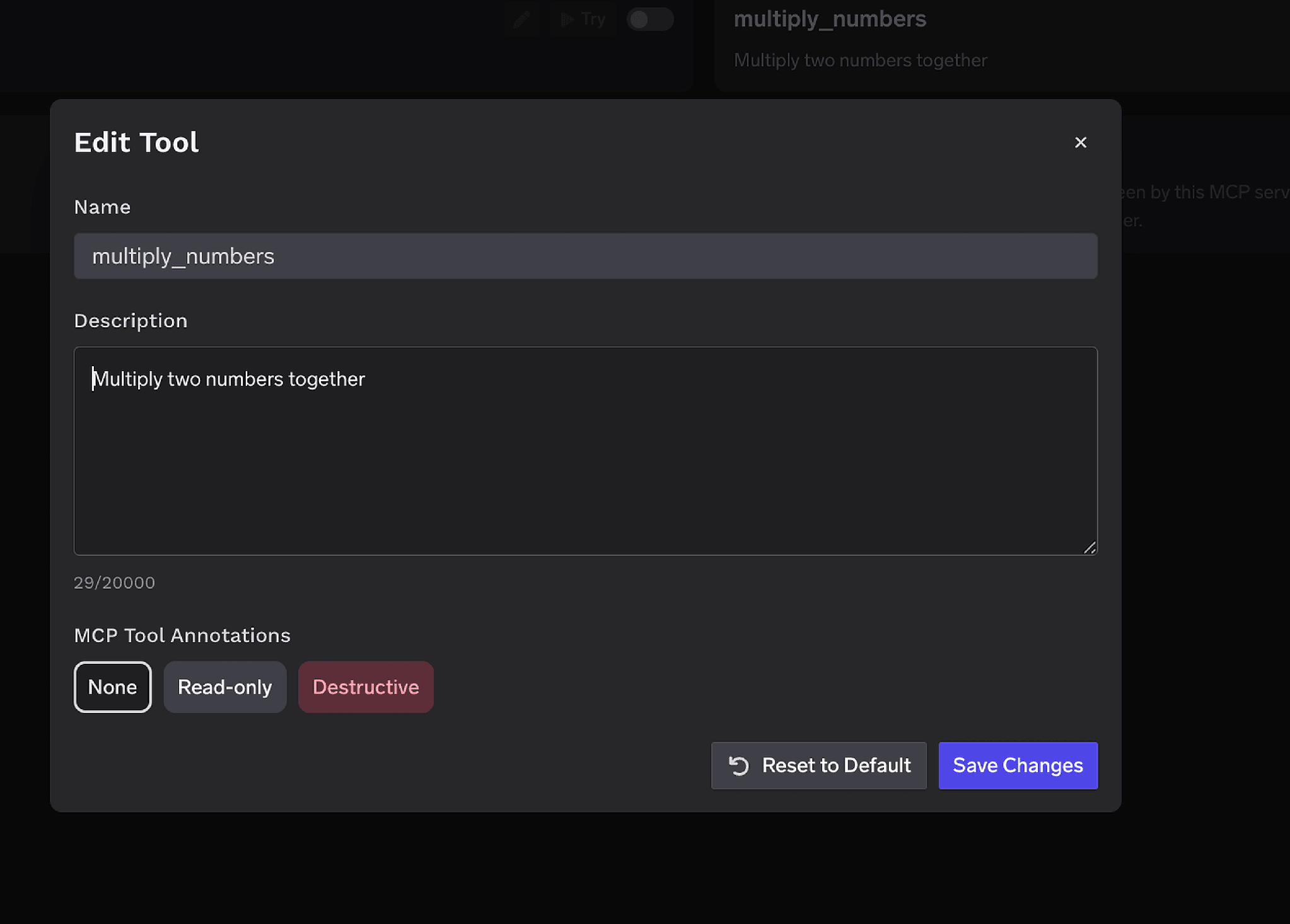
ODescrição a substituição (até 20.000 caracteres) direciona a seleção da ferramenta — e, para um CRM, é onde você define as regras de manuseio no local que o modelo realmente lê, como resumir em vez de reproduzir detalhes de contato. Anotações de ferramenta MCPmarca uma ferramentaSomente leituraouDestrutivo, definindo readOnlyHint ou destructiveHint.
O controle de acesso é vinculado a usuários, equipes ou contas virtuais em duas dimensões: quais servidores uma identidade alcança e quais ferramentas dentro de um deles ela pode invocar.
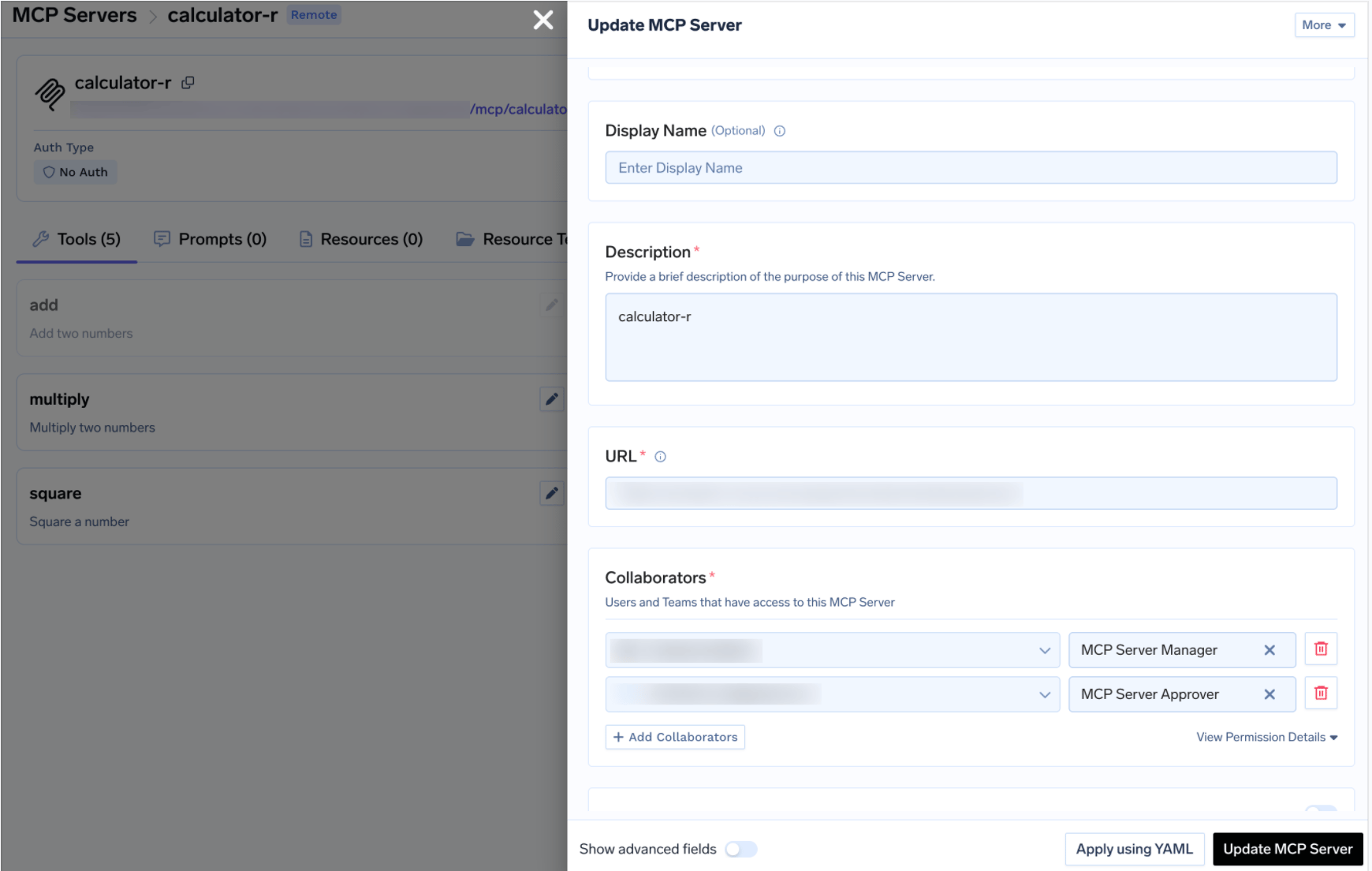
Desativar ferramentas é uma medida drástica. Às vezes, você deseja que uma funcionalidade esteja disponível, mas não sem supervisão — uma leitura em massa de registros de contatos é o exemplo clássico. A documentação cita "enviar comunicações externas" e "excluir registros" como os casos que as políticas de aprovação existem para controlar.
Uma chamada tools/call restrita é retida em vez de executada, uma solicitação pendente é criada e os aprovadores são notificados. Uma vez aprovada, a mesma chamada do mesmo solicitante é executada até que a permissão expire. Crie uma política em AI Gateway → Policies → MCP Tool Approval (Beta):
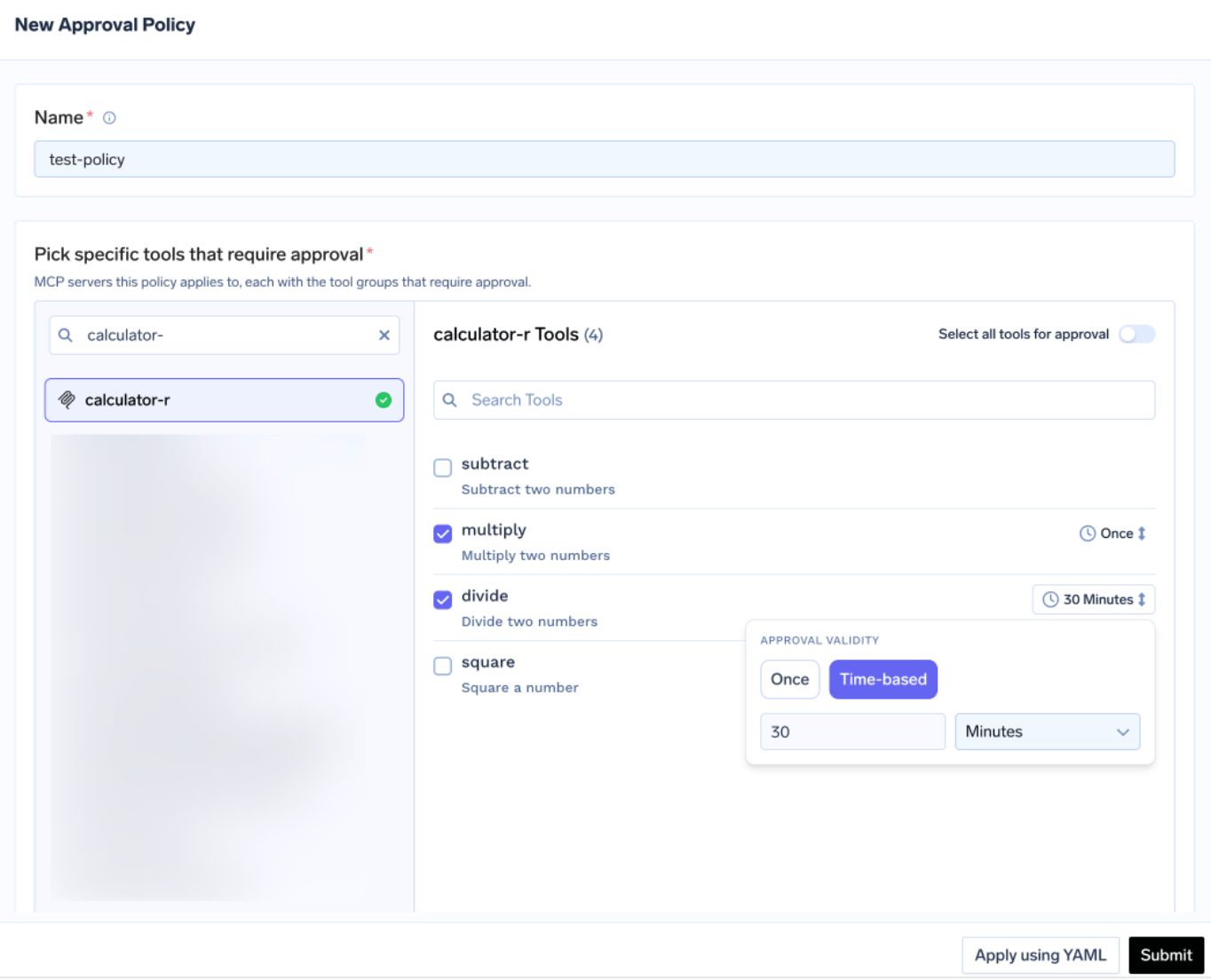
Cada política nomeia os servidores que ela controla e um escopo de aprovação:
Quando os escopos se sobrepõem, o mais específico prevalece: nomeado > destrutivo > todos. Validade é Uma vez ou baseada em tempo em minutos; quando as políticas entram em conflito, a mais restritiva vence — Uma vez supera 10 minutos, que supera 30.
Os aprovadores são notificados por e-mail, Slack, PagerDuty ou MS Teams, e revisam as solicitações no console:
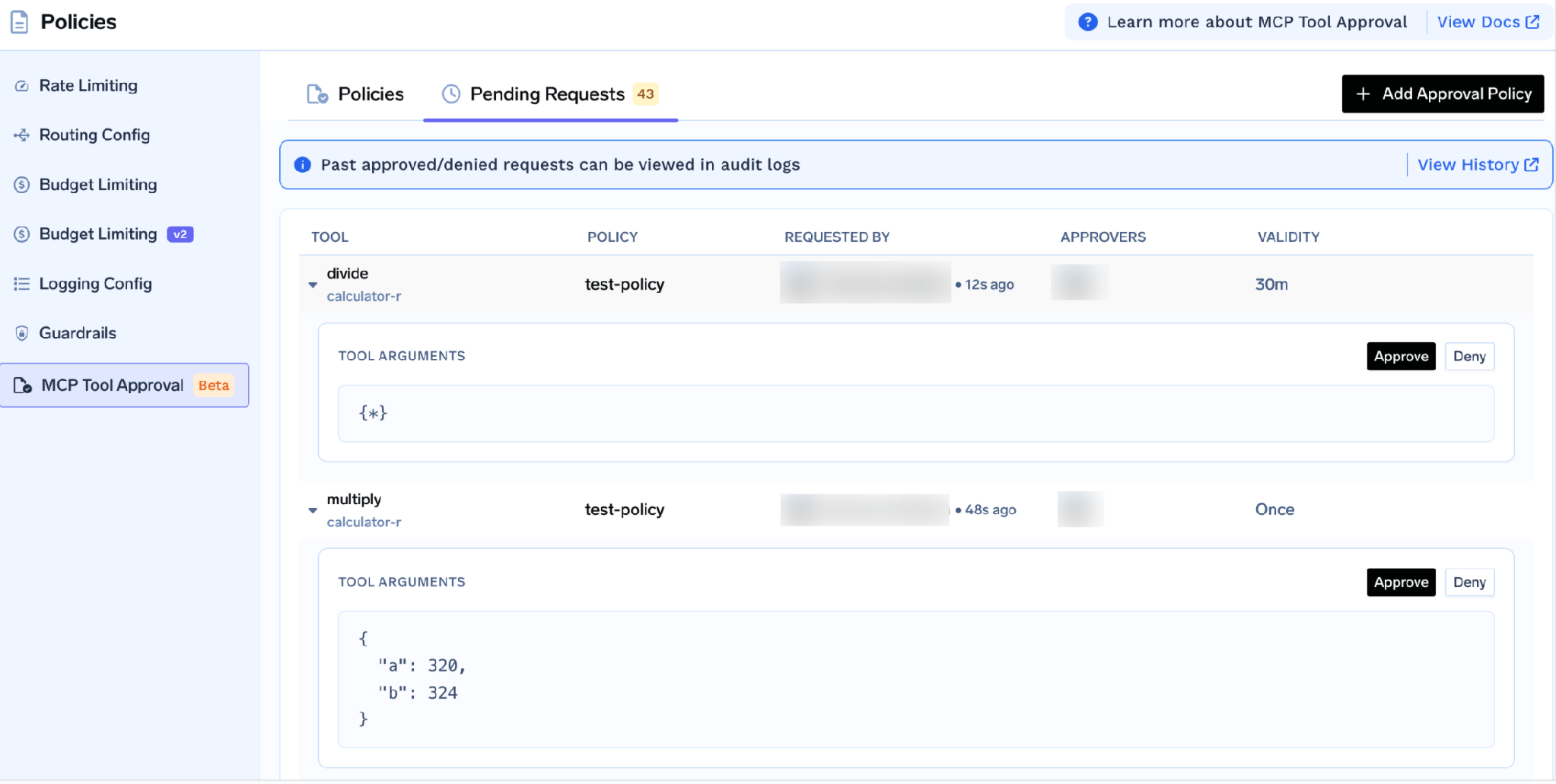
Cada solicitação mostra os argumentos da ferramenta, para que o aprovador veja a consulta real antes de autorizá-la. Enquanto pendente, o solicitante recebe um resultado JSON-RPC contendo _meta.approval_status: "pending" em vez de um erro, para que um agente bem comportado aguarde e tente novamente. As concessões são definidas por solicitante, e uma negação não é permanente.
As políticas são criadas e excluídas apenas por administradores do tenant e, se o servidor de uma política não tiver colaboradores com a função de Aprovador, apenas os administradores do tenant podem agir sobre suas solicitações — portanto, em um servidor de CRM, atribua aprovadores criteriosamente.
Um controle é específico para esta classe de servidor: o recurso integrado da TrueFoundry de Detecção de PII/PHI guardrail, alimentado pela Detecção de PII do Azure AI Language na infraestrutura gerenciada pela TrueFoundry, sem chaves de terceiros.
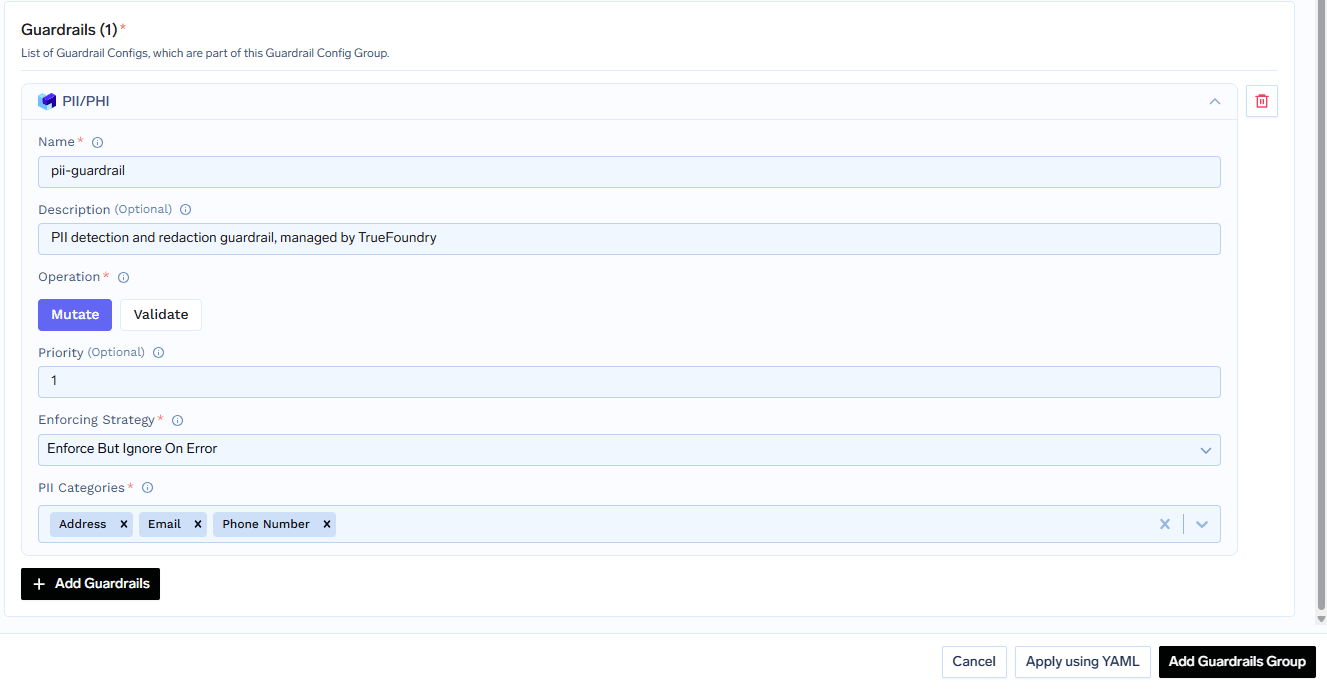
Ele se aplica a quatro ganchos — Entrada de LLM, Saída de LLM, MCP Pre Tool, eMCP Post Tool. O último é o mais importante aqui: o MCP Post Tool redige entidades detectadas na saída da ferramenta, a resposta do CRM que retorna para o modelo. As entidades tornam-se asteriscos com o texto ao redor preservado, então support@contoso.com é lido como *******************. O guardrail é executado apenas no modo de mutação e você escolhe as categorias de entidade.
Um agente que analisa a estrutura de um pipeline não precisa dos e-mails e números de telefone anexados aos registros de contato. Redigi-los após a ferramenta significa que o modelo recebe a estrutura e não os identificadores — uma pegada de dados menor alcançada via configuração, em vez de instruções de prompt. Este é um controle técnico, não uma declaração de conformidade; se o seu uso do servidor atende a qualquer padrão regulatório é uma questão para o seu próprio departamento jurídico.
Experimente as ferramentas manualmente primeiro. Clique em Testar ao lado de qualquer ferramenta, preencha os parâmetros e leia a resposta JSON; Testar está desativado para ferramentas que você desativou.
Faça isso com uma conta cujas permissões você conhece: autorize como um usuário restrito, execute uma leitura e confirme se você recebe apenas o que aquele usuário deveria ver. Se uma conta restrita retornar todo o banco de dados de contatos, a cadeia de autenticação está incorreta.
Abra a abaComo Usar aba para a URL do Gateway específica do seu tenant e snippets de cliente.
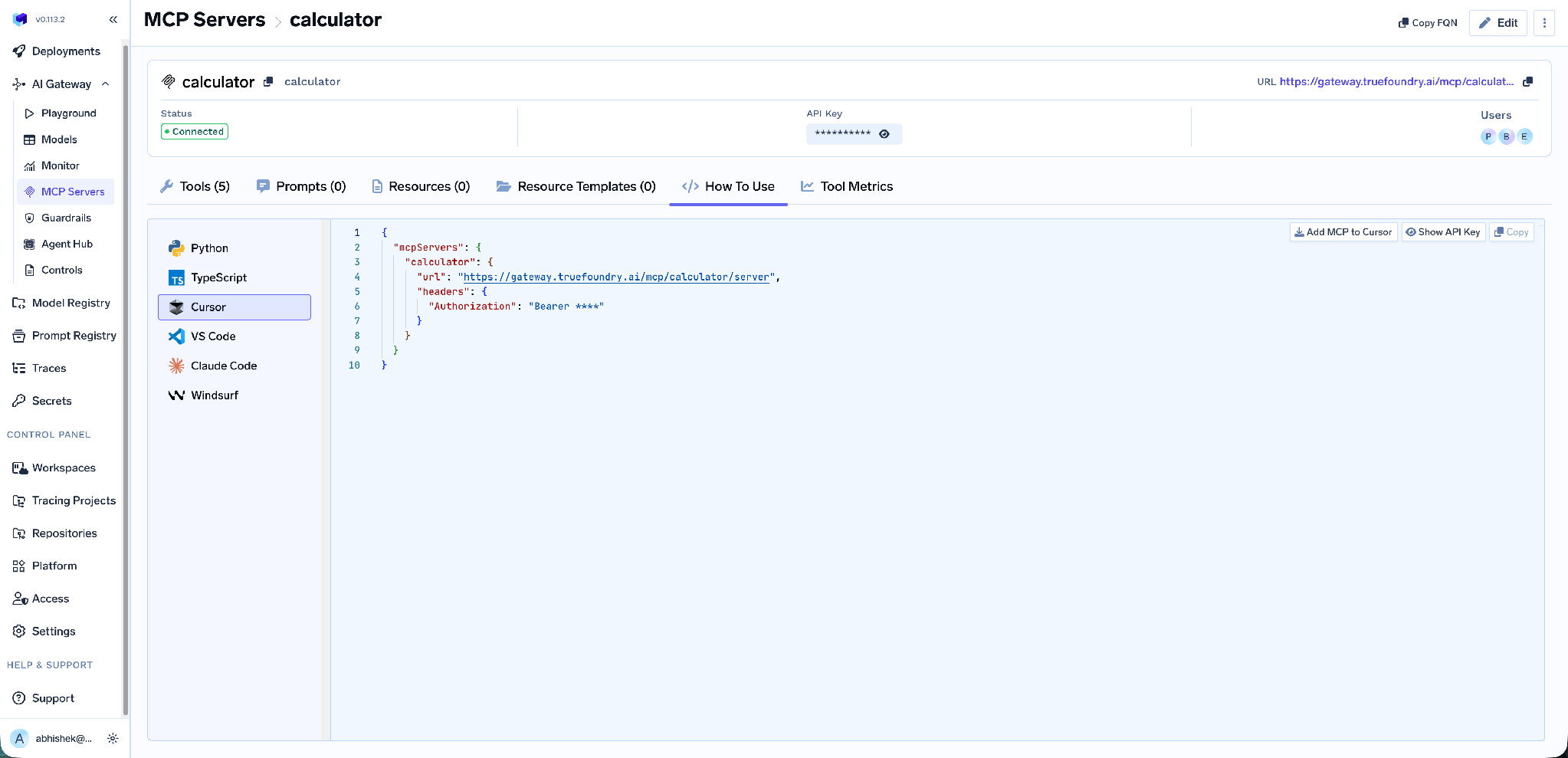
Ele abrange Claude Code, VS Code, Claude Desktop, Cursor, Windsurf, Codex e os SDKs MCP para Python e TypeScript, e Adicionar MCP ao Cursor escreve a configuração para você. Use a URL desta aba em vez de montá-la manualmente — ela é específica do tenant, e um endpoint montado manualmente é a causa comum de um cliente que se conecta, mas não lista nenhuma ferramenta.
Métricas em nível de ferramenta. O painel de Métricas MCP detalha solicitações por segundo, latência em P50/P75/P90/P99, taxa de falha por tipo de erro e uma contagem de solicitações classificada por ferramenta.
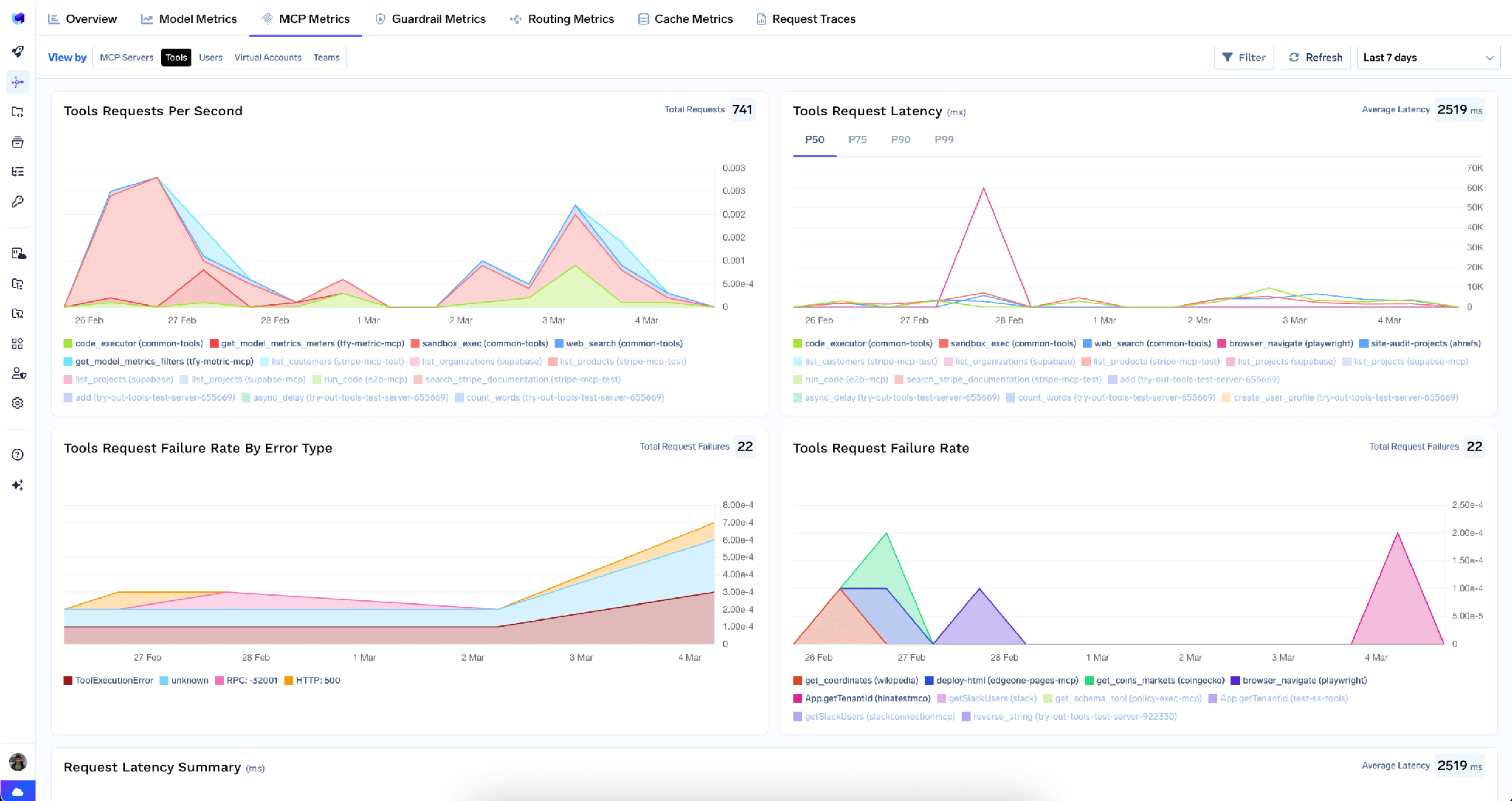
Observabilidade completa da requisição. Cada chamada de ferramenta é rastreada com identidade do chamador, nome da ferramenta, entradas e latência, exportando via OpenTelemetry para Grafana, Datadog ou Prometheus. Isso transforma "um agente leu alguns registros de clientes" em "esta identidade leu estes registros neste momento através deste modelo" — e torna possível uma revisão de acesso.
Baixa sobrecarga.O gateway adiciona aproximadamente3–4 msde latência e processamais de 350 RPS em uma única vCPU.
Um registro único. Assim que vários servidores estiverem registrados, um Servidor MCP Virtual agrupa um subconjunto selecionado de suas ferramentas atrás de um único endpoint — para que um agente de revisão de pipeline receba ferramentas específicas do HubSpot e Slack e nada mais.
Os administradores do tenant podem limpar todas as credenciais armazenadas no menu de três pontos ao lado deEditar:
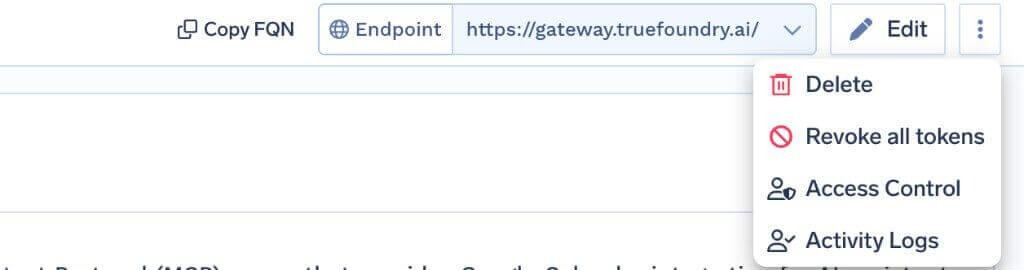
Revogar todos os tokens exclui todas as substituições de autenticação e tokens OAuth armazenados para todos os usuários e contas virtuais nesse servidor, entra em vigor na próxima solicitação e é registrado nos Logs de Atividade. É irreversível e visível apenas para administradores do tenant.
O limite é importante: ele limpa os tokens apenas no gateway e não revoga a permissão do lado do HubSpot. Em caso de incidente, revogue também a autorização do aplicativo de autenticação no HubSpot e renove o Client Secret.
Não é um MCP gerenciado, portanto, não use o URI de redirecionamento gerenciado. O fluxo documentado é Conectar qualquer servidor MCP remoto com seu próprio aplicativo de autenticação, portanto, a URL de redirecionamento é https://<tfy-control-plane-base-url>/api/svc/v1/llm-gateway/mcp-servers/oauth2/callback. Colar https://auth.truefoundry.com/mcp/oauth2/callback no aplicativo do HubSpot falhará. [VERIFICAR: se o HubSpot também pode ser provisionado a partir do catálogo de MCP Gerenciado da TrueFoundry na sua versão da plataforma — a página de documentação descreve apenas o fluxo de servidor remoto.]
Os Aplicativos de Autenticação MCP são independentes. A seção Desenvolvimento → Aplicativos de Autenticação MCP do HubSpot é distinta da interface geral de desenvolvedor de aplicativos; em uma tela de aplicativo público ou privado, os campos não corresponderão.
Somente leitura é uma propriedade do servidor atual, não uma garantia. Defina o escopo como se ferramentas de escrita pudessem aparecer: mantenha Habilitar novas ferramentas por padrão desativado para que nenhum lançamento do fornecedor conceda silenciosamente ao seu agente a capacidade de alterar registros de CRM.
O servidor MCP do HubSpot é uma das integrações mais úteis que uma equipe de receita pode oferecer a um agente, e uma das poucas em que a pergunta não é "isso poderia quebrar algo", mas "um modelo deveria estar lendo isso?". Os registros pertencem a pessoas reais, o consentimento que elas deram não previa um LLM, e uma interface somente leitura não faz nada para reduzir a questão da divulgação.
O que o torna defensável é específico: OAuth por usuário para que o modelo de permissão do HubSpot permaneça em vigor, escopo por ferramenta para que registros de contato fiquem inacessíveis a agentes que não precisam deles, mascaramento de PII para que identificadores nunca entrem no contexto do modelo e um log de chamadas rastreado para que você possa responder quem leu o quê. Registre-o uma vez como um servidor remoto e você obtém todos os quatro.
TrueFoundry AI Gateway delivers ~3–4 ms latency, handles 350+ RPS on 1 vCPU, scales horizontally with ease, and is production-ready, while LiteLLM suffers from high latency, struggles beyond moderate RPS, lacks built-in scaling, and is best for light or prototype workloads.



É o servidor remoto de Model Context Protocol do HubSpot, em https://mcp.hubspot.com, que expõe os dados do CRM como ferramentas que um agente de IA pode chamar. Segundo a documentação do TrueFoundry, ele oferece acesso de leitura a objetos do CRM, incluindo contatos, empresas, negócios, tickets, faturas e orçamentos, via OAuth2.
Em duas partes. No HubSpot, vá em Development → MCP Auth Apps, crie um aplicativo, defina a URL de redirecionamento como https://<tfy-control-plane-base-url>/api/svc/v1/llm-gateway/mcp-servers/oauth2/callback e copie o Client ID e o Secret. No TrueFoundry, use Add MCP Server → Connect any Remote MCP Server com https://mcp.hubspot.com, OAuth2, Authorization Code, suas credenciais e JWT Source Access Token.
A documentação descreve a superfície por família de objetos do CRM — contatos, empresas, negócios, tickets, faturas e orçamentos — com acesso de leitura. A lista exata é a que o HubSpot retorna ao seu servidor, visível na aba Tools, onde cada ferramenta pode ser ativada, desativada, redescrita ou anotada.
Sim. O TrueFoundry é executado na sua VPC, on-prem, em ambiente air-gapped ou híbrido, de modo que os prompts e as respostas nunca saem do seu domínio, mesmo quando você roteia entre muitos provedores.
Sim. Ele inclui um MCP Gateway, um Agent Gateway e um MCP & Agents Registry com controle de acesso em nível de ferramenta. Agentes criados com LangGraph, CrewAI, AutoGen ou um framework próprio podem ser governados de forma centralizada.
Sim. O gateway é compatível com OpenTelemetry e se integra com Grafana, Datadog, Prometheus ou a sua stack preferida. Ele rastreia cada requisição, do prompt à execução da ferramenta e do modelo, para que você obtenha logs unificados sem precisar remover o que você já usa.



As últimas notícias, artigos e recursos enviados para sua caixa de entrada
%20(28).webp)
.png)
.png)
.png)
.png)
.png)
.webp)
.webp)

.png)
.png)
.png)
.png)
.png)


