


.png)
November 1, 2026
|
5 min read


Obtenha acesso instantâneo a um ambiente TrueFoundry ao vivo. Implante modelos, direcione o tráfego de LLM e explore a plataforma completa — seu sandbox estará pronto em segundos, sem necessidade de cartão de crédito.



.png)
Blazingly fast way to build, track and deploy your models!
The MongoDB MCP server exposes a MongoDB deployment as tools an AI agent can call. Model Context Protocol is the open standard that lets agents discover and invoke tools on external systems; this server turns database operations into those tools.
TrueFoundry’s docs describe it by capability rather than by function name, so that is how we’ll describe it:
The structural difference from a GitHub or Notion MCP server matters. Those wrap a SaaS API with its own permission model and undo affordances. This wraps a database driver connection: whatever the connection string can do, the tools can do. MongoDB is also not in TrueFoundry’s managed catalogue, so mongodb mcp setup is a harder job than the one-click integrations.
The valuable uses chain tools together:
Notice something: all four are read-only. That is the whole argument. On most MCP servers the read-write split is a judgement call about convenience versus risk. Here the read side covers nearly all the value, and the write side covers work a human should be doing deliberately anyway.
One engineer pointing a local MCP client at staging is fine. The same pattern in production is not.
Write tools have no undo. If an agent drops a warehouse table, you rerun the pipeline. If it drops a collection MongoDB is serving live traffic, you restore from backup, accept the data loss since the last snapshot, and explain the outage. Dropping an index is subtler and worse short-term: nothing errors, and the application quietly falls off a performance cliff.
An agent writing its own queries is a performance risk. Agents do not know your indexes. Asked “how many users signed up last quarter,” a model will happily filter on an unindexed field, and MongoDB will scan the collection to answer. On a small collection that is a rounding error. On a large one, on a cluster sized for production traffic, it competes with real requests for IOPS and working set. A bad warehouse query costs a line on an invoice. Here it costs user-facing latency.
The connection string is the permission model. No consent screen, no per-user scoping, no grant to revoke — one credential used by every call. If it has write access, every agent request has write access.
Prompt injection reaches further than usual. An agent that reads documents and holds write tools can be steered by those documents. A user-supplied field containing instructions is read during a debugging task, and the agent asked to explain a record modifies one instead. The mistake was write tools on a connection doing read work.
None of this argues against connecting MongoDB. It argues for a control plane in front of it — an MCP gateway.
The docs describe a self-run server registered as a remote MCP — four steps.
Step 1 — Create a dedicated Atlas connection string. In Atlas, open Database → Connect → Drivers and copy it. Create a dedicated database user under Database Access with the minimum role. The docs are explicit about what minimum means for agent work: read-only access for exploration workflows. This is the highest-leverage control in the setup, because MongoDB enforces it rather than the agent stack — a read-only user cannot drop a collection even if every gateway control fails.
Step 2 — Run the MCP server. Deploy it on TrueFoundry or your own infrastructure with the connection string set as MDB_MCP_CONNECTION_STRING. For a hosted stdio version, set the same variable and keep the credential in a secret store, not inline.
Step 3 — Allow network access. Atlas blocks unknown sources, so add your deployment’s egress IP under Security → Network Access. A server that starts cleanly but times out on every call is almost always this.
Step 4 — Register the URL. In MCP Gateway, click Add Server and choose Connect any Remote MCP Server.
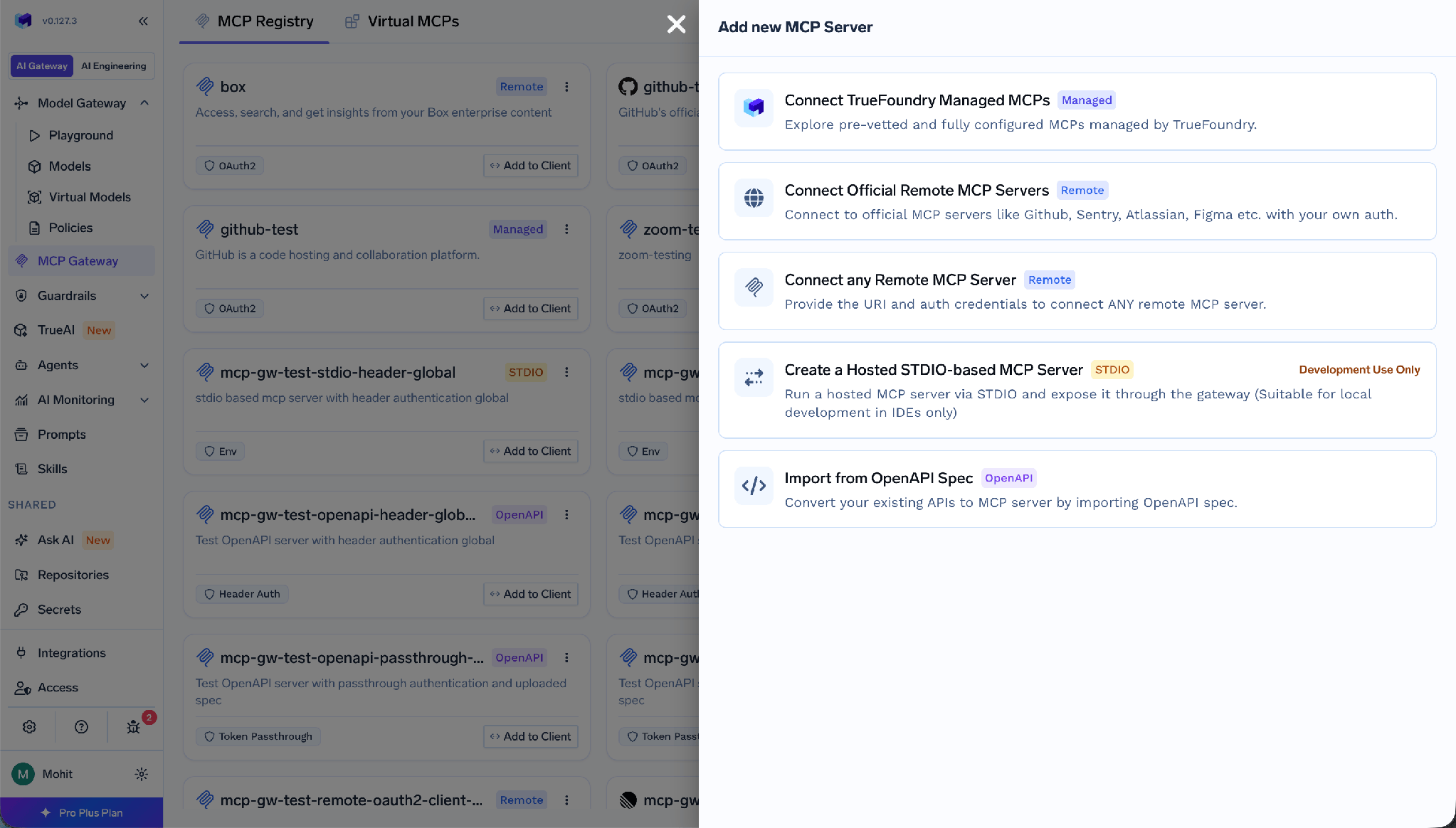
Fill in a Name (lowercase, numbers, hyphens — it appears in URLs), an optional Display Name, a Description, the URL of your running server, Collaborators, and Auth Data.
Worth being precise, because MongoDB does not follow the OAuth pattern most MCP posts assume. TrueFoundry separates inbound auth (how a client proves itself to the gateway) from outbound auth (how the gateway proves itself upstream).
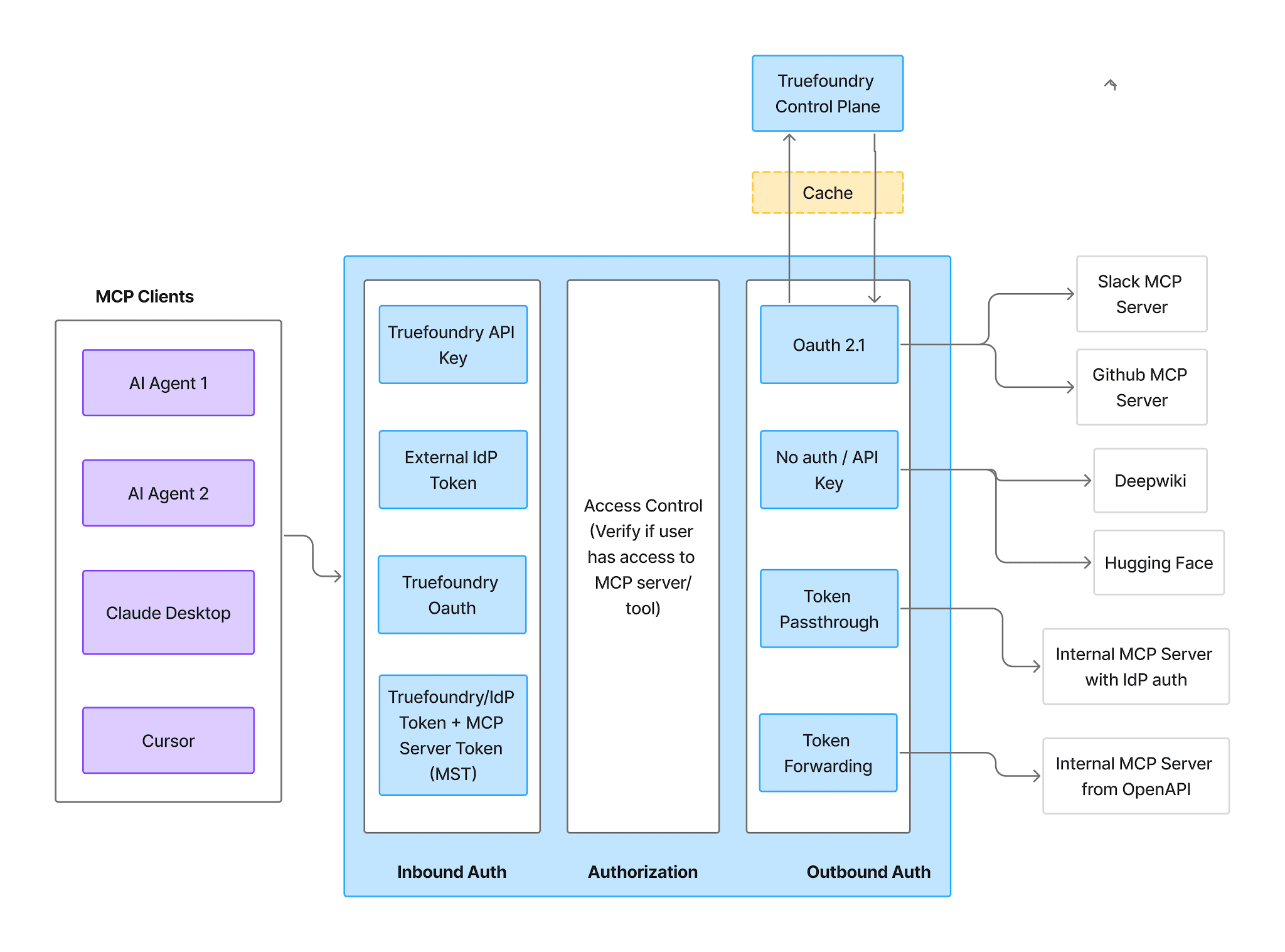
Inbound — four methods:
Outbound — here MongoDB differs from a managed MCP. Because the database credential lives in the MCP server’s own environment as MDB_MCP_CONNECTION_STRING, there is no OAuth authorization-code flow and no redirect URI to register. Nobody clicks Connect Now, there is no consent screen, and there is no user-side grant to revoke.
For the gateway-to-server hop the auth types are API Key, OAuth2, AWS SigV4, and Token Passthrough. API Key is the practical choice for a self-run server.
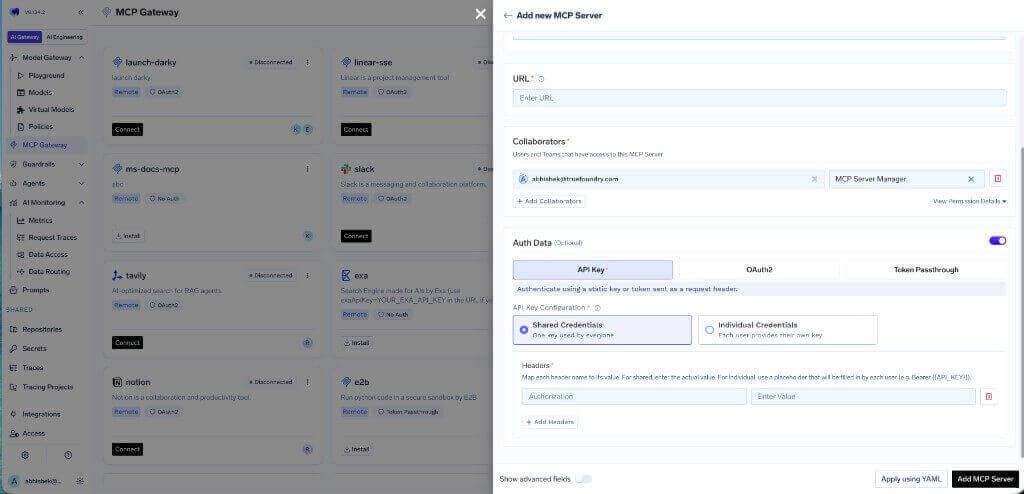
Two modes. Shared Credentials — one key for everyone, set as a header:
Individual Credentials — each user supplies their own via a Bearer {{API_KEY}} placeholder and the Auth Overrides tab:
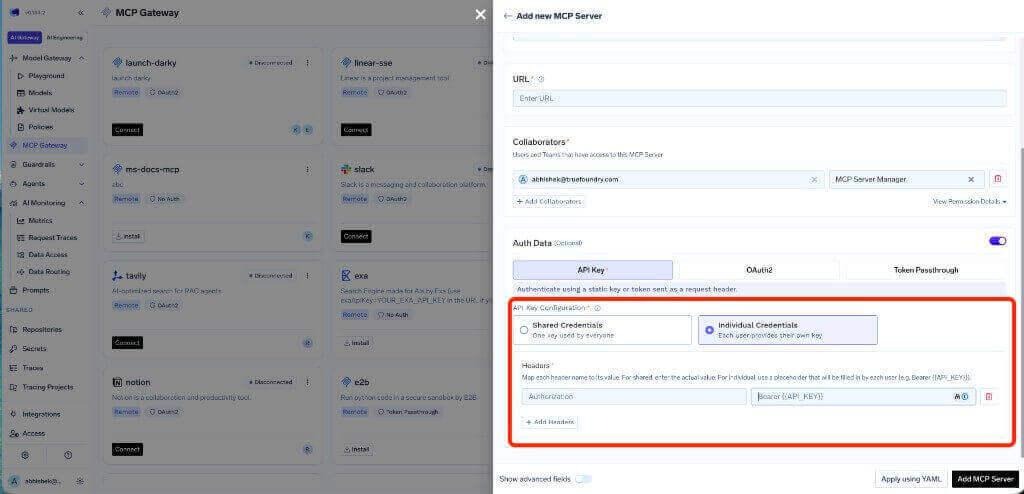
Individual credentials buy distinct inbound identities — useful for attribution and per-user tool scoping — but not per-user database permissions. Every request still lands on the same connection string with the same Atlas role. For genuinely separate data access, run separate server instances with separate Atlas users.
The Tools tab lists everything the server exposes. For MongoDB it is the most important screen in the console.
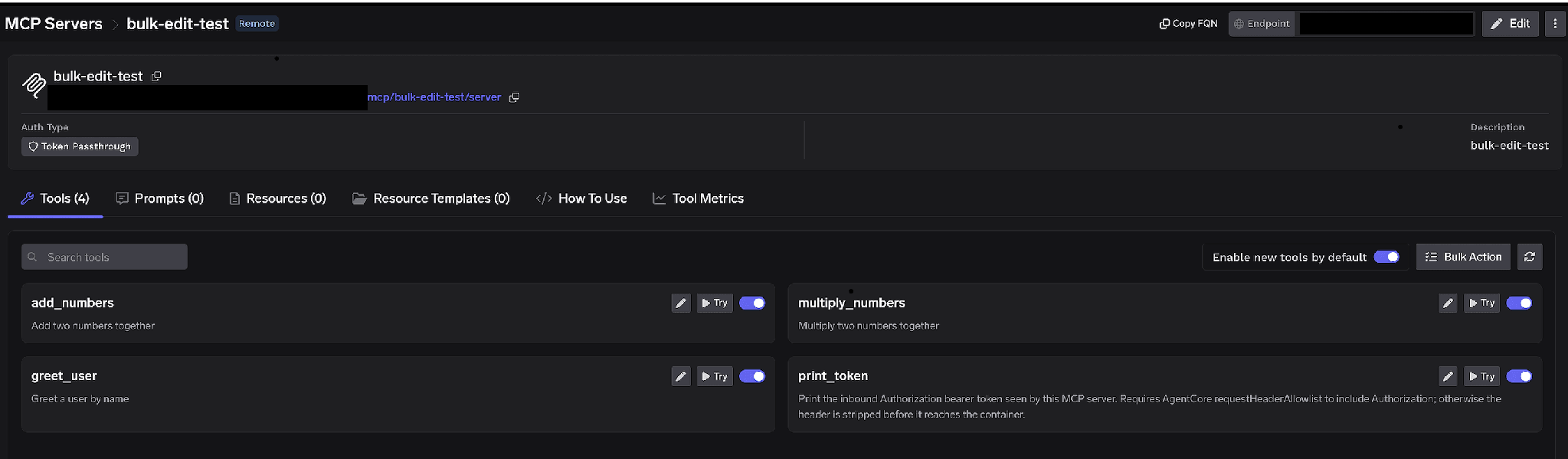
MCP server Tools tab with per-tool toggles, Try and Edit controls, Enable new tools by default, and Bulk Action
Per-tool toggles. Turn a tool off and it is omitted from tools/list entirely — clients never see it and it cannot be invoked. Not prompt-layer filtering; the tool is gone.
Our recommendation here is blunter than for most servers: disable collection and index management outright. Not approval-gated — disabled. Approval gates suit operations legitimately part of the workflow that need a second pair of eyes. Dropping a production collection is not part of any agent workflow we would ship. An agent that cannot call a drop tool cannot be talked into it, cannot be steered into it by a poisoned document, and cannot reach it because an approver clicked through a request at 2am.
If you need a write path, do not enable it on the shared server. Build a separate Virtual MCP Server with only those tools and grant it narrowly. TrueFoundry’s MongoDB security notes say the same: expose write-capable tools only through curated virtual MCP servers.
Enable new tools by default. Left on, upstream additions appear automatically. Turn it off. A new write tool silently appearing on a server your agents already use is the last surprise you want on a live database.
Bulk Action. Switches rows to checkboxes so you can flip many tools at once. Fastest route to read-only: select all, deselect the query and inspection tools, save.
Click the pencil on a tool to override how it is presented:
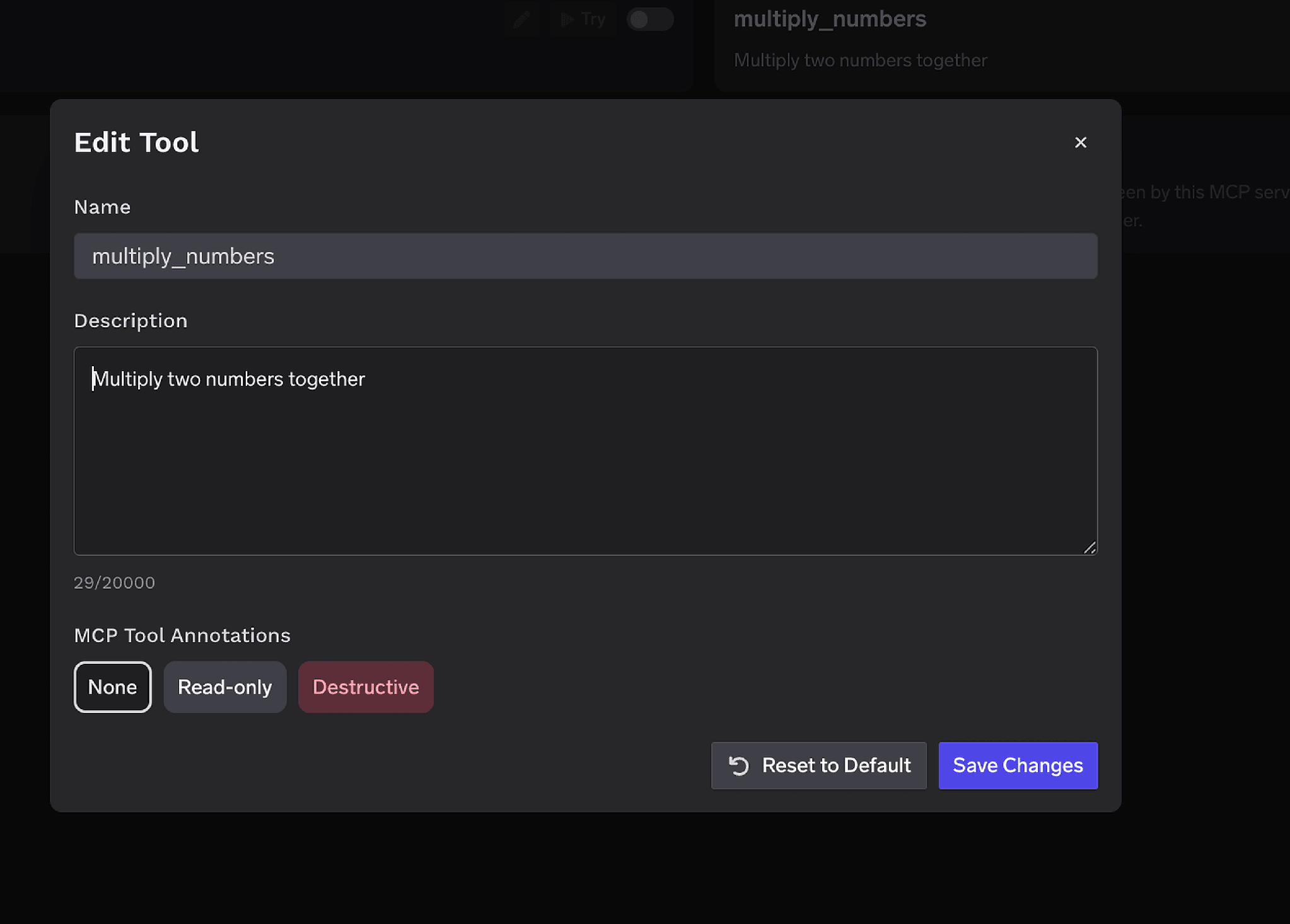
Edit Tool modal with a Description override field and an MCP Tool Annotations selector for Read-only or Destructive
The Description override (up to 20,000 characters) is unusually valuable here: tell the model which collections are large and which fields are indexed, so it filters on them. That is the cheapest mitigation for the index-less-scan problem. MCP Tool Annotations mark a tool Read-only or Destructive, setting readOnlyHint or destructiveHint for clients that respect them.
Access control attaches to users, teams, or virtual accounts on two dimensions: which servers an identity reaches, and which tools it can invoke.
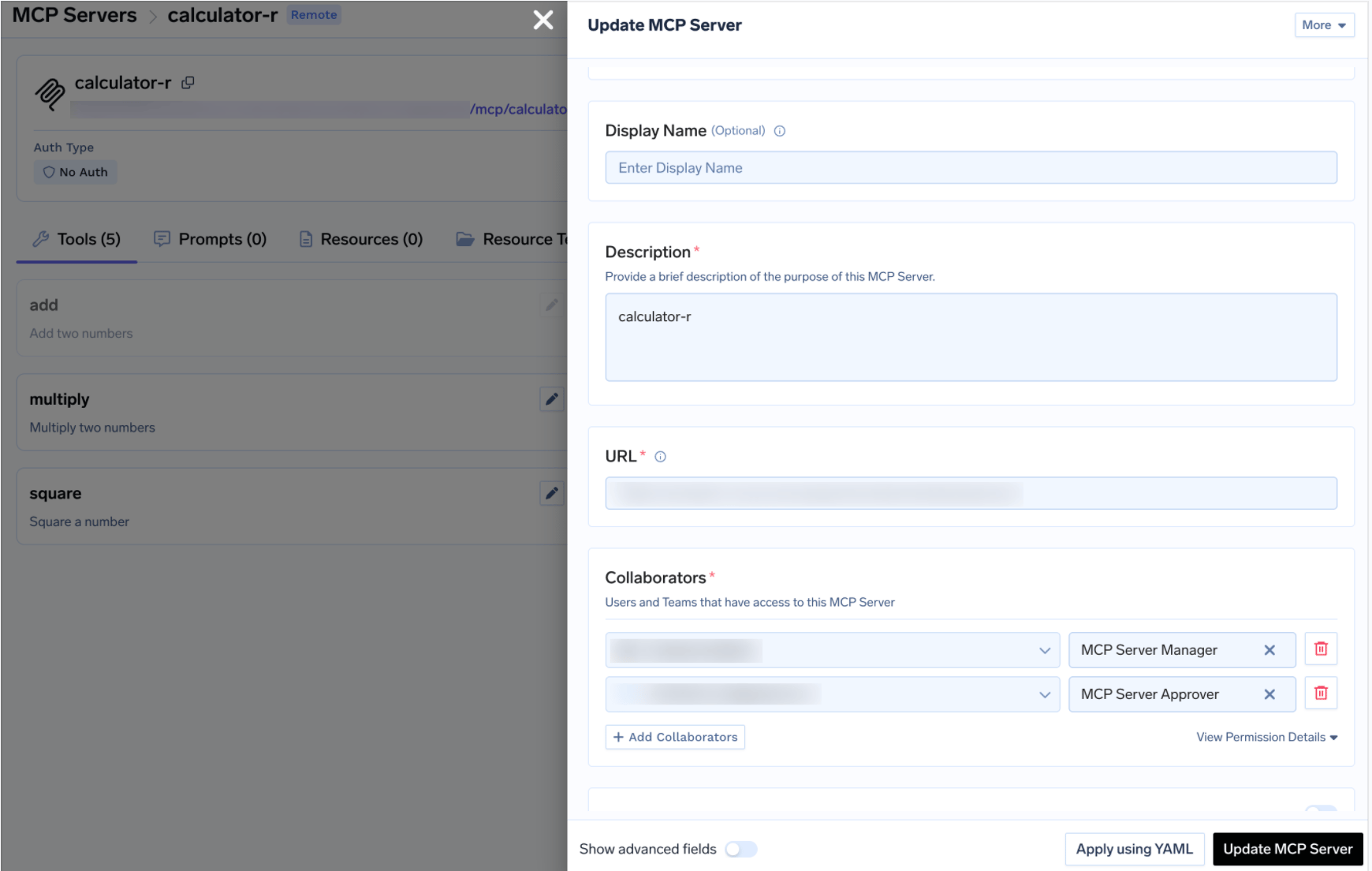
Update MCP Server drawer showing Collaborators with MCP Server Manager and MCP Server Approver roles
TrueFoundry AI Gateway delivers ~3–4 ms latency, handles 350+ RPS on 1 vCPU, scales horizontally with ease, and is production-ready, while LiteLLM suffers from high latency, struggles beyond moderate RPS, lacks built-in scaling, and is best for light or prototype workloads.



Um servidor MCP que expõe uma implantação do MongoDB como ferramentas que um agente pode chamar — consultar bancos de dados, inspecionar esquemas e gerenciar coleções e índices. No TrueFoundry, você mesmo o executa com uma string de conexão do Atlas dedicada, definida como MDB_MCP_CONNECTION_STRING, e depois registra a URL dele no MCP Gateway.
Quatro áreas de capacidade: consulta de dados, inspeção de esquemas, gerenciamento de coleções e gerenciamento de índices. A lista completa aparece na aba Tools depois do registro, e cada ferramenta pode ser ativada, desativada, redescrita ou anotada como read-only ou destructive.
Sim, como uma integração somente leitura. Os riscos são um agente alterar o estado em produção e uma consulta sem índice degradar um cluster sob carga. Ambos são tratados da mesma forma: um usuário do Atlas somente leitura, o gerenciamento de coleções e índices desativado no gateway, qualquer caminho de escrita atrás de um Virtual MCP Server selecionado e todas as chamadas rastreadas.
Sim. O TrueFoundry é executado na sua VPC, on-prem, em ambiente air-gapped ou híbrido, de modo que os prompts e as respostas nunca saem do seu domínio, mesmo quando você roteia entre muitos provedores.
Sim. Ele inclui um MCP Gateway, um Agent Gateway e um MCP & Agents Registry com controle de acesso em nível de ferramenta. Agentes criados com LangGraph, CrewAI, AutoGen ou um framework próprio podem ser governados de forma centralizada.
Sim. O gateway é compatível com OpenTelemetry e se integra com Grafana, Datadog, Prometheus ou a sua stack preferida. Ele rastreia cada requisição, do prompt à execução da ferramenta e do modelo, para que você obtenha logs unificados sem precisar remover o que você já usa.



As últimas notícias, artigos e recursos enviados para sua caixa de entrada
.png)
.png)
.png)
.png)
.webp)
.webp)

.png)
.png)
.png)
.png)
.png)
.png)
.png)


