


.png)
November 1, 2026
|
5 min read


Obtenha acesso instantâneo a um ambiente TrueFoundry ao vivo. Implante modelos, direcione o tráfego de LLM e explore a plataforma completa — seu sandbox estará pronto em segundos, sem necessidade de cartão de crédito.



.png)
Blazingly fast way to build, track and deploy your models!
OO servidor MCP do dbt é um servidor MCP remoto operado pela dbt Labs como parte do dbt Cloud. Model Context Protocol é o padrão aberto que permite a um agente descobrir e chamar ferramentas em um sistema externo, e a implementação do dbt expõe seu projeto do dbt Cloud como ferramentas chamáveis. De acordo com a documentação da TrueFoundry, ele pode consultar métricas através da Camada Semântica, inspecionar metadados de modelos e executar SQL.
A maioria dos servidores MCP de dados fornece a um agente dados — o Snowflake fornece linhas, o Postgres fornece linhas. O servidor MCP do dbt fornece o mapa: quais modelos existem, a partir do que são construídos, o que cada coluna significa, quais testes os protegem e como sua organização define uma métrica.
Uma nota de transparência: a documentação descreve áreas de capacidade, não uma lista de funções, e nomeia uma ferramenta, execute_sql. Leia qualquer coisa além das famílias acima na aba Ferramentas . [VERIFICAR] A página de documentação não descreve ferramentas de disparo de jobs ou orquestração de execuções, portanto, não reivindicamos nenhuma.
Este é o modo de falha que toda equipe de análise reconhece. Alguém pergunta a um agente: “qual foi a retenção de receita líquida no último trimestre?”. O agente possui credenciais do data warehouse. Ele vê fct_subscriptions, dim_customers e quarenta colunas com nomes como mrr_amt e mrr_amount_usd. Então, ele escreve uma consulta. Um número é retornado. Ele está errado, e nada indica isso.
O agente não falhou no SQL. Ele falhou na definição. Ele adivinhou o que cada coluna significava, como o churn deveria ser tratado, se deveria incluir downgrades, e produziu uma resposta confiante baseada em quatro suposições. O servidor MCP do dbt elimina as suposições de duas maneiras.
Linhagem e contexto de coluna. Um agente pode perguntar a partir do que fct_subscriptions é construído, o que cada coluna significa e quais testes são aprovados nela — o contexto que um analista humano possui e uma conexão direta com o data warehouse não.
Métricas nomeadas. Se a retenção de receita líquida estiver definida na Camada Semântica, o agente não a compõe de forma alguma. Ele chama a métrica pelo nome com uma granularidade e uma dimensão, e o dbt compila o SQL. A definição reside no controle de versão, revisada por seus proprietários. É por isso que MCP de camada semântica é seu próprio termo de pesquisa: ele separa um agente que escreve consultas daquele que lê suas respostas acordadas.
Este é o argumento para conectar o dbt antes de um data warehouse. Um agente de texto para SQL sem uma camada semântica é uma máquina de alucinação com permissões de consulta. Com o dbt à frente, ele possui um dicionário.
Os fluxos de trabalho úteis encadeiam ferramentas em vez de chamar apenas uma:
Três desses quatro precisam apenas de metadados, e é por isso que essa integração é fácil de tornar segura.
Seremos mais específicos aqui do que para um servidor de data warehouse; inflar o risco seria desonesto.
Ler metadados é de baixo risco. Nomes de modelos, descrições de colunas, arestas de linhagem e resultados de testes não são dados de clientes. Nada vaza e nada custa dinheiro.
execute_sql é onde as consequências começam. A documentação é explícita: desative-o, a menos que os agentes precisem de execução direta de SQL. Ele exige um ID de ambiente de desenvolvimento e um ID de usuário para funcionar, o que já é um sinal de alerta. Um agente que entra em loop em uma tabela grande gera custos de warehouse e, dependendo do alcance do token, pode se tornar um caminho de exfiltração de dados.
Consultas na Camada Semântica são a segunda área. São mais seguras que SQL bruto porque a definição é fixa, mas não são gratuitas. Uma consulta de métrica é compilada em processamento de warehouse, e um agente que a distribui por todas as dimensões ao longo de três anos de dados diários gera uma varredura cara.
O escopo do token multiplica ambos. Um Token de Acesso Pessoal (PAT) herda as permissões do usuário; um token de serviço usa conjuntos de permissões atribuídos. Um PAT pertencente a um Administrador de Conta, colado na configuração de um agente, dá a esse agente acesso de administrador. A documentação recomenda um token de serviço para acesso de leitura compartilhado, o padrão correto para qualquer processo autônomo. Além disso, três cabeçalhos mais um token, copiados no laptop de cada analista, tornam a auditoria impossível em equipes de quinze pessoas.
Nada disso é um argumento contra a conexão do dbt. É um argumento a favor de um plano de controle à frente dele, que é o que um gateway de MCPserve.
O dbt é não uma opção de um clique no catálogo de MCPs Gerenciados. Ele é acessado através de Conectar qualquer servidor MCP remoto, porque ele precisa de um token que você cria e de cabeçalhos que só você conhece.
Pré-requisitos: uma conta dbt Cloud nos planos Starter, Team ou Enterprise; acesso de Administrador de Conta; um ambiente de produção, além de um ambiente de desenvolvimento para execute_sql; recursos de IA do dbt ativados.
Passo 1 — Crie um token do dbt. Use um Token de Acesso Pessoal para acesso individual ou quando precisar de execute_sql; um token de serviço para acesso de leitura compartilhado. Copie-o imediatamente.
Passo 2 — Colete os IDs numéricos, a partir das URLs do dbt Cloud:
Passo 3 — Abra o seletor.EmMCP Gateway, clique emAdicionar servidor e escolha Conectar qualquer servidor MCP remoto.
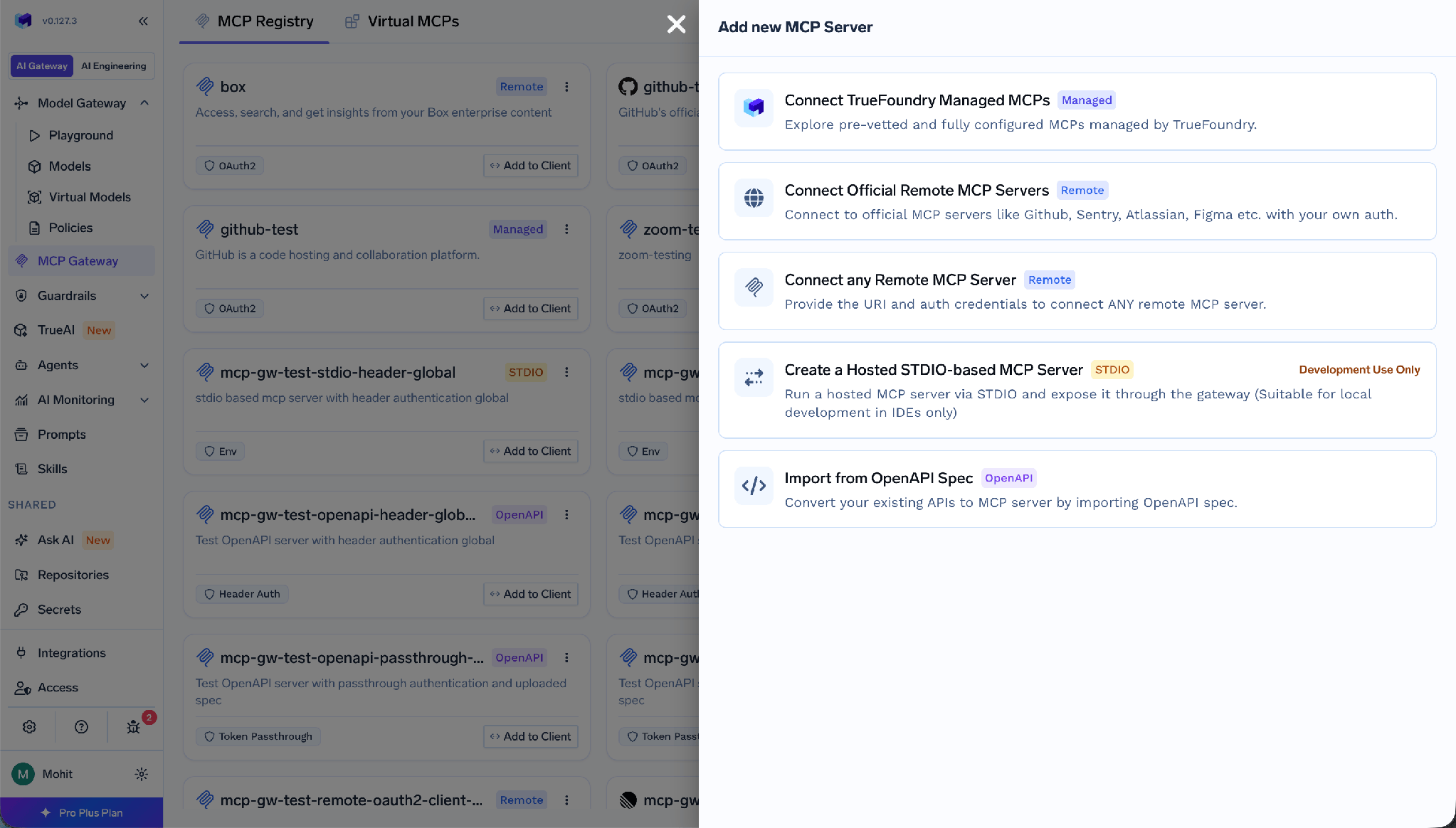
Passo 4 — Preencha o servidor. Forneça um Nome,Descrição,URL,ColaboradoreseDados de autenticação. A URL é o endpoint MCP padrão do dbt:
https://cloud.getdbt.com/api/ai/v1/mcp/
Para contas com múltiplas células, use o nome de host da sua célula, por exemplo, https://abc123.us1.dbt.com/api/ai/v1/mcp/.
Passo 5 — Configure a autenticação e os cabeçalhos. Adicione autenticação por token bearer, configure o token do dbt e defina os cabeçalhos x-dbt-*. Para ocultar ferramentas de risco na própria conexão, adicione x-dbt-disable-toolsets ou x-dbt-disable-tools — dois locais independentes para remover uma ferramenta, o que garante uma defesa em profundidade.
O TrueFoundry separa aautenticação de entrada autenticação, como um cliente se identifica para o gateway, a partir de autenticação de saída, como o gateway se identifica para o dbt.
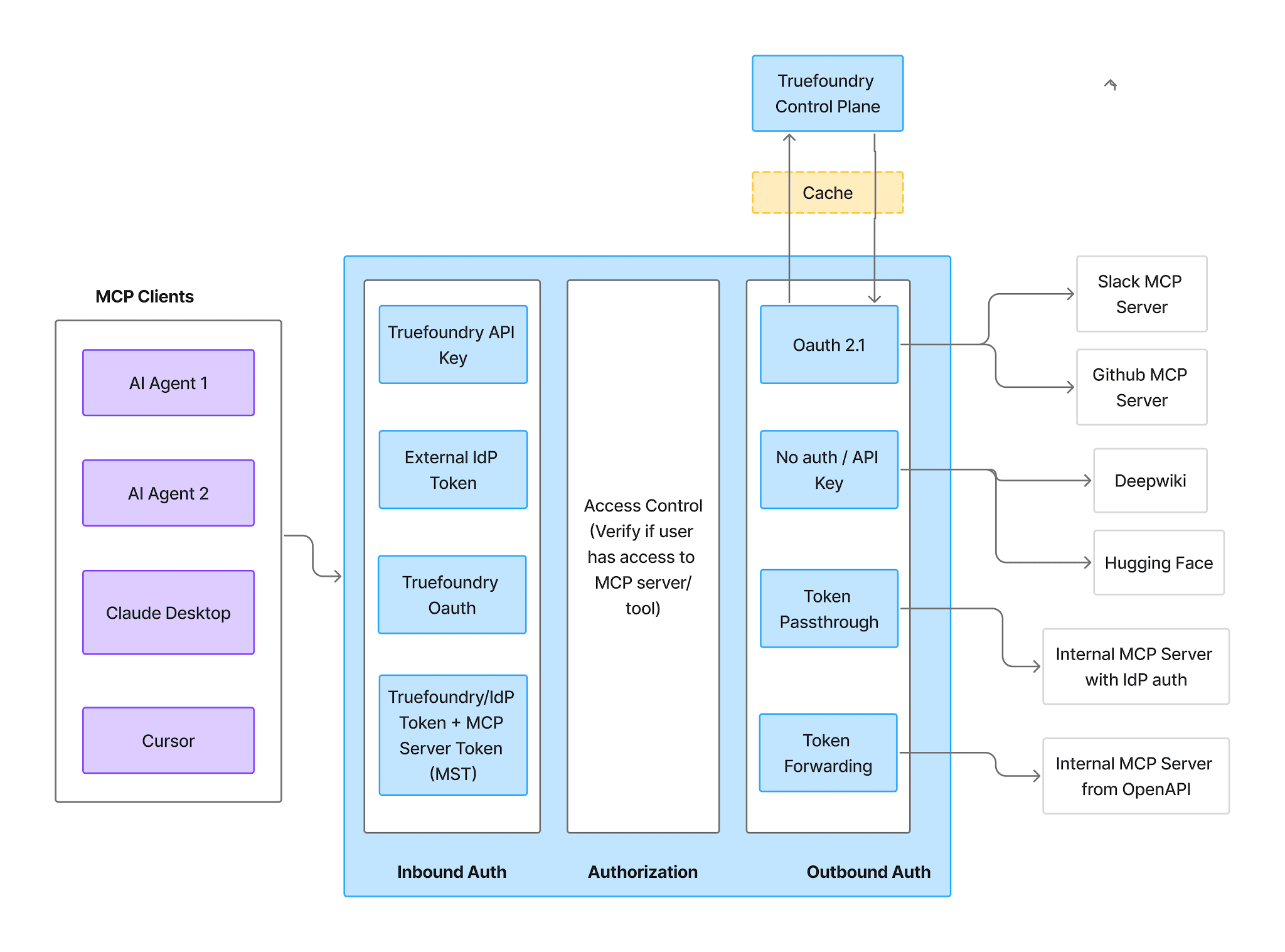
Entrada suporta chaves de API do TrueFoundry, tokens de Conta Virtual para chamadores de serviço para serviço, tokens de Provedor de Identidade para JWTs do seu próprio IdP (Okta, Entra, Auth0, Cognito) e OAuth do TrueFoundry para ferramentas de IDE. Uma ressalva: tokens de Conta Virtual concedem acesso idêntico a todas as solicitações, portanto, não podem expressar o alcance por usuário.
Saída para dbt é o Chave de API tipo, com dois modos de credenciais.
Credenciais Compartilhadas significa uma única chave para todos: configure o nome e o valor do cabeçalho uma vez. Este é o modo para um token de serviço com escopo limitado a metadados de leitura.
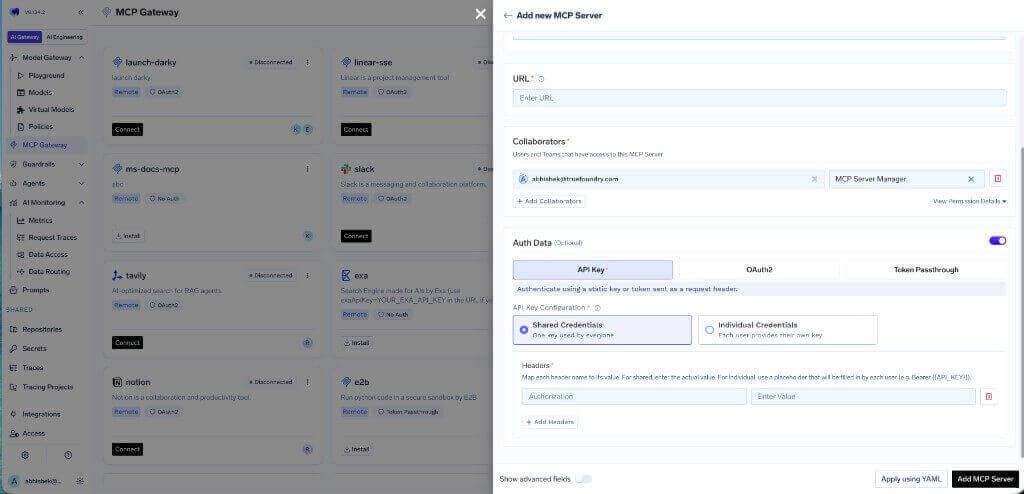
Credenciais Individuais significa que cada usuário fornece sua própria chave: configure o cabeçalho com um marcador como Bearer {{API_KEY}}, e cada pessoa adiciona seu token através da aba Substituições de Autenticação .
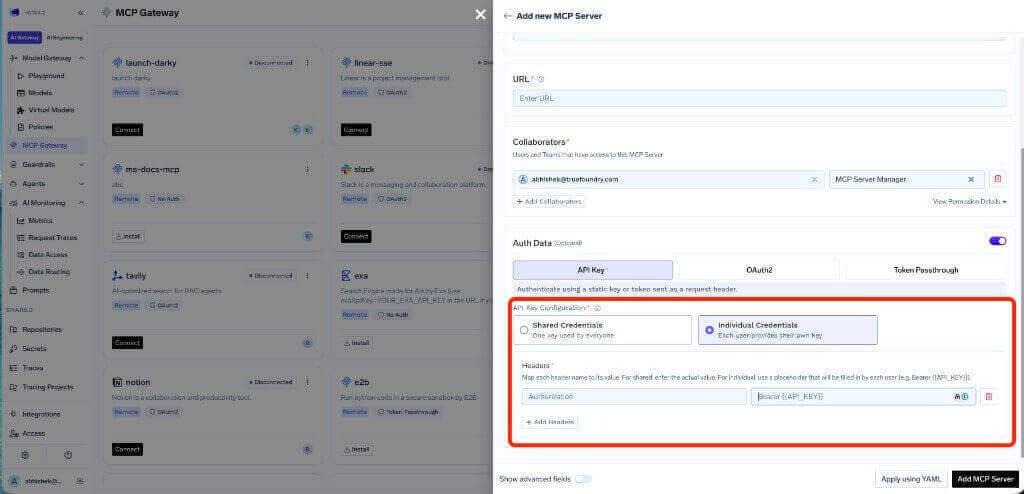
O mapeamento é direto: Credenciais Compartilhadas combinam com um token de serviço; Credenciais Individuais combinam com PATs, e é a opção ideal se execute_sql estiver habilitado, já que mantém a execução de SQL vinculada à pessoa que a iniciou.
Como o dbt usa autenticação por token bearer, não há tela de consentimento OAuth ou URI de redirecionamento aqui. Se você configurar o OAuth2 em um servidor remoto autorregistrado, a URI de redirecionamento é o callback do seu plano de controle, https://<tfy-control-plane-base-url>/api/svc/v1/llm-gateway/mcp-servers/oauth2/callback, e não o callback auth.truefoundry.com usado por MCPs Gerenciados.
OFerramentas aba é onde você decide o que os agentes podem fazer — para o dbt, os cinco minutos mais valiosos da configuração.
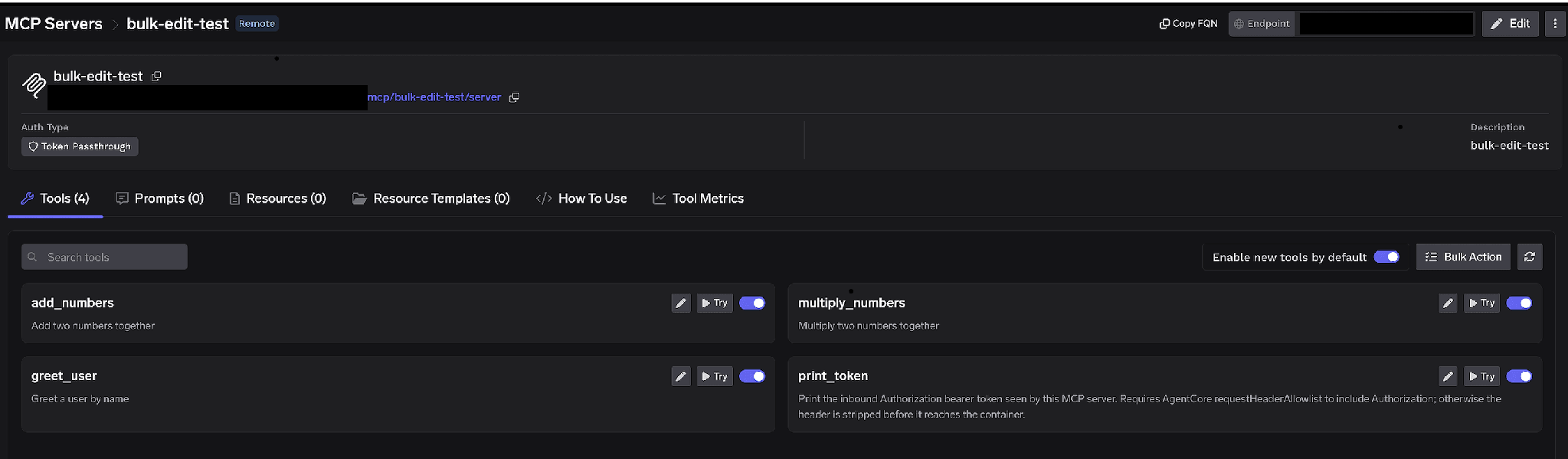
Alternâncias por ferramenta. Desative uma ferramenta e ela será omitida de tools/list completamente; os clientes nunca a verão e ela não poderá ser invocada. Isso não é filtragem na camada de prompt. A configuração recomendada para o dbt é simples: deixe as ferramentas de metadados e descoberta ativadas, e desative execute_sql, a menos que um agente específico precise dela. Um agente que não pode chamar execute_sql não pode ser induzido a executar uma consulta descontrolada.
Habilitar novas ferramentas por padrão. Se deixado ativado, novas ferramentas upstream aparecem automaticamente. Se desativado, apenas as ferramentas que você habilitou ficam disponíveis, garantindo que uma futura versão do dbt não amplie silenciosamente o que os agentes podem fazer.
Ação em lote. Alterna cada linha para uma caixa de seleção, permitindo que você altere várias ferramentas de uma só vez.
Clique no lápis em uma ferramenta para substituir como ela é apresentada ao modelo:
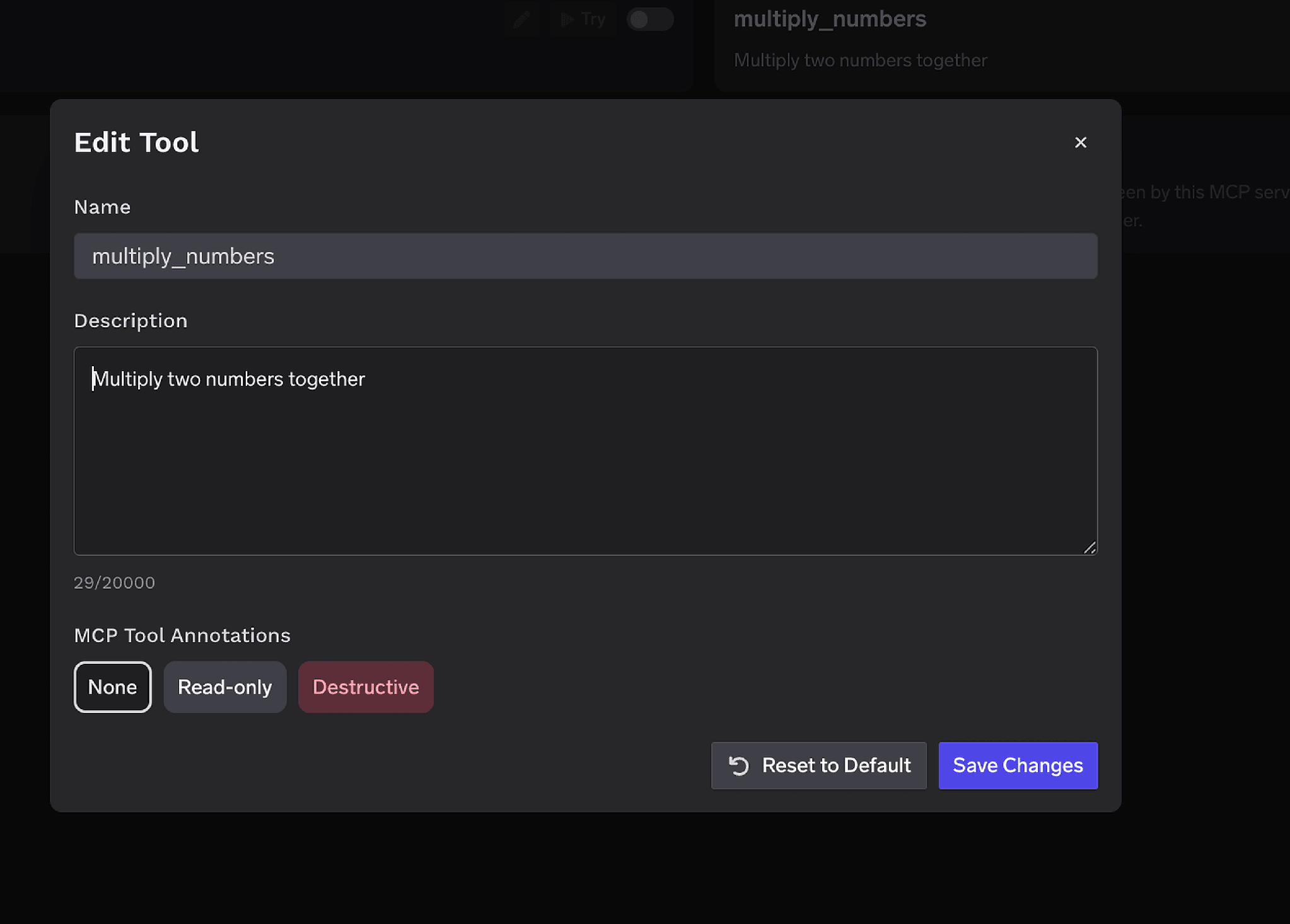
ODescrição substituição, de até 20.000 caracteres, direciona a seleção da ferramenta. Reescreva uma ferramenta de consulta de métricas para dizer “sempre chame isto em vez de compor SQL para uma métrica conhecida” e você direcionará o modelo para a definição que você controla. Anotações de ferramenta MCPmarca uma ferramentaSomente leituraouDestrutivo, definindo readOnlyHint ou destructiveHint.
O controle de acesso é aplicado a usuários, equipes ou contas virtuais em duas dimensões: quais servidores uma identidade pode acessar e quais ferramentas dentro de um servidor ela pode invocar.
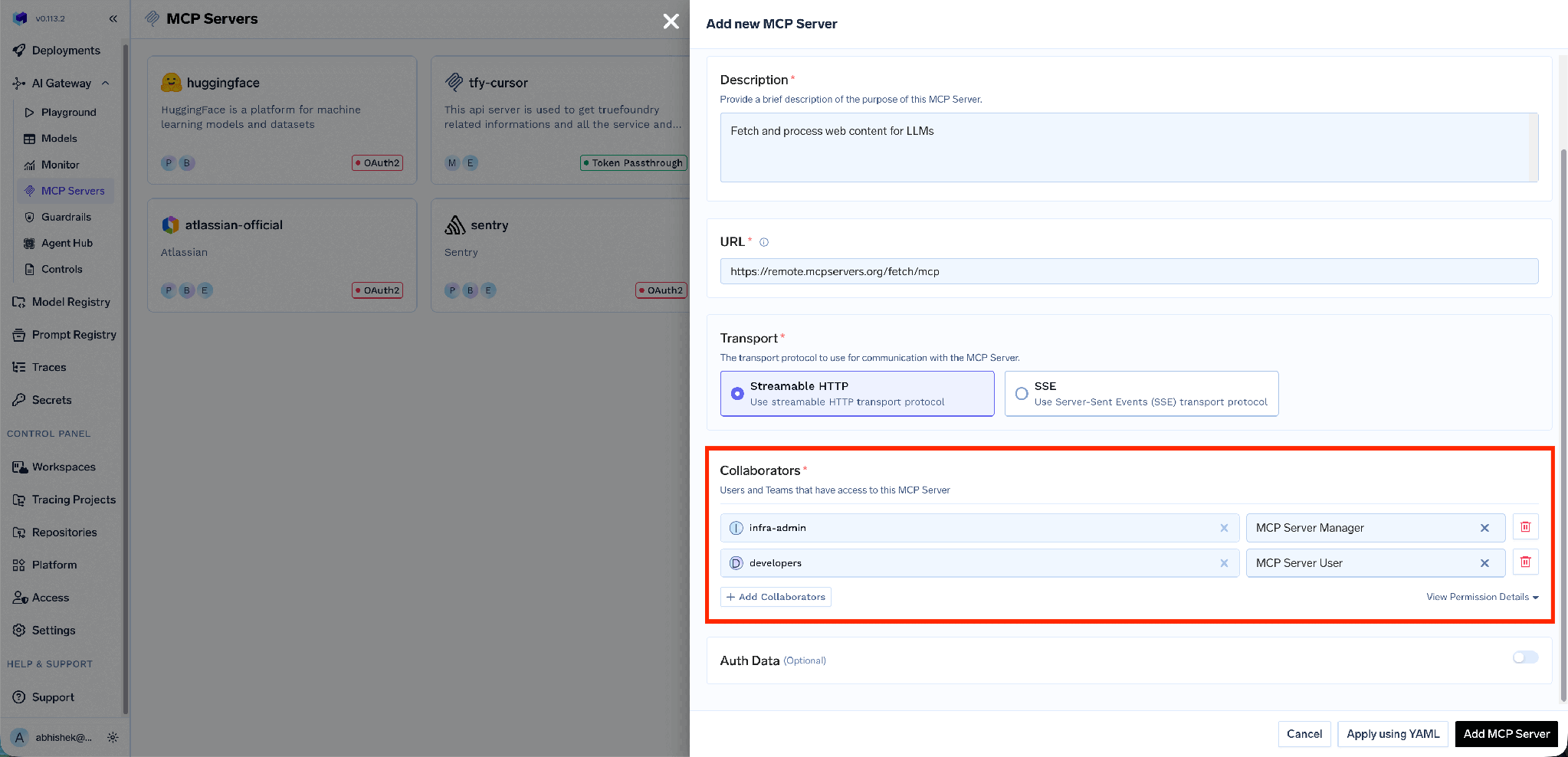
Portanto, a equipe de plataforma é responsável por quais ferramentas dbt existem e as outras equipes as consomem — o mesmo Controle de acesso MCP modelo aplicado em todo o seu registro.
Desativar o execute_sql é uma medida drástica. Às vezes, você quer que um agente execute SQL ou dispare uma consulta de métrica pesada, apenas não sem supervisão. É para isso que servem as políticas de aprovação de ferramentas, e elas se encaixam bem no dbt porque o conjunto restrito é pequeno.
Quando uma ferramenta restrita é chamada, a chamada é pausada, uma solicitação é criada e os aprovadores são notificados. Após a aprovação, as chamadas são bem-sucedidas por um período configurável, após o qual uma nova aprovação é necessária.
Crie uma política em AI Gateway → Policies → MCP Tool Approval, atualmente marcada como Beta:
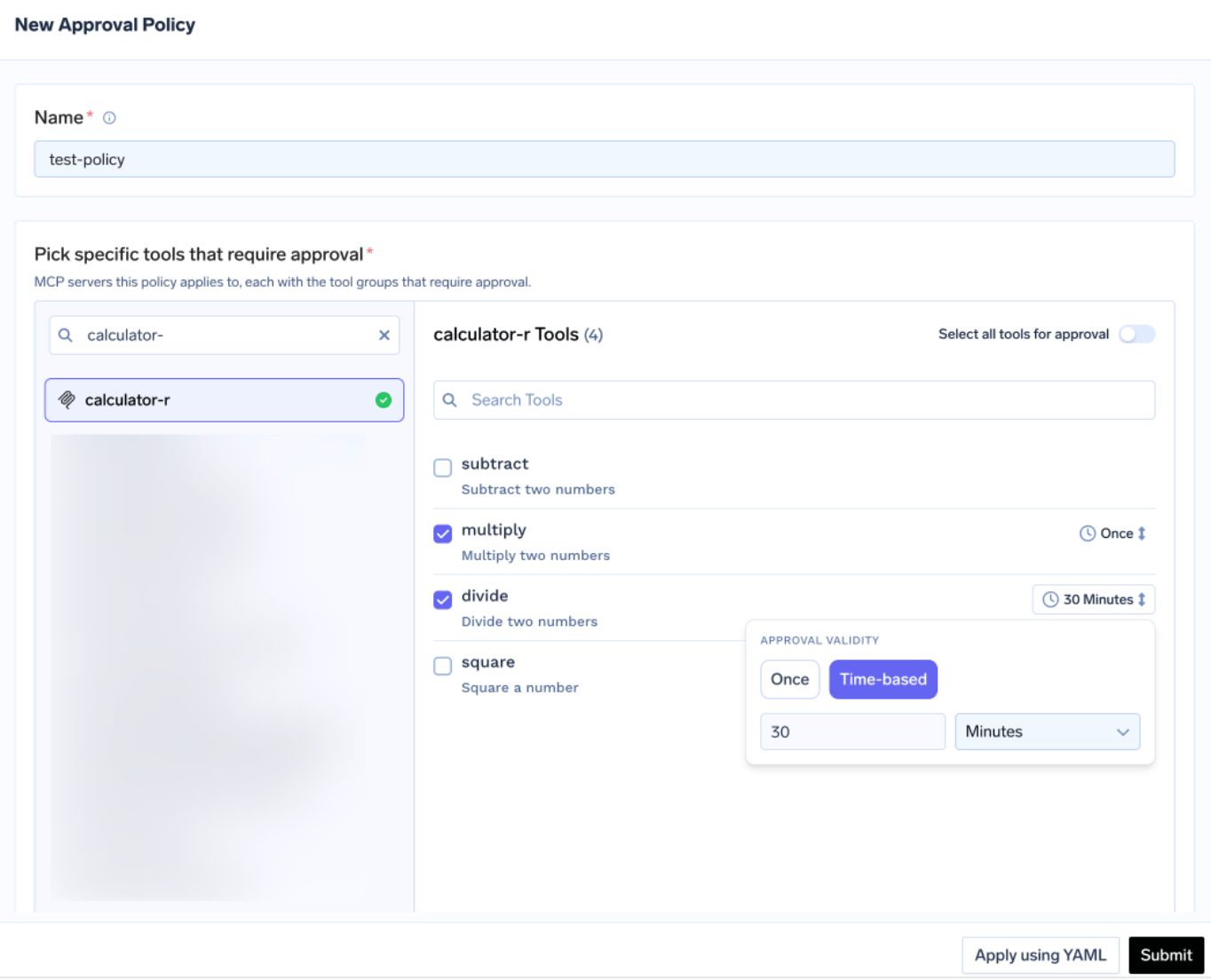
Cada política nomeia os servidores que ela restringe e escolhe umescopo de aprovação: nomeado restringe apenas as ferramentas que você listar, destrutivo restringe todas as ferramentas marcadas com destructiveHint: true, tudo restringe tudo. Quando os escopos se sobrepõem, o mais específico vence: nomeado > destrutivo > tudo. Para o dbt, nomeado geralmente é a escolha mais sensata: dois ou três nomes de ferramentas cobrem a exposição real, e restringir tudo faria com que os aprovadores tivessem que clicar em cada leitura de linhagem.
Validadeé definida comoUma vez, uma única execução, ou baseada em tempo, uma duração em minutos. Quando as políticas entram em conflito, a mais restritiva vence: Uma vez supera uma janela de 10 minutos, que supera uma janela de 30 minutos. Os aprovadores são notificados por e-mail, Slack, PagerDuty ou MS Teams:
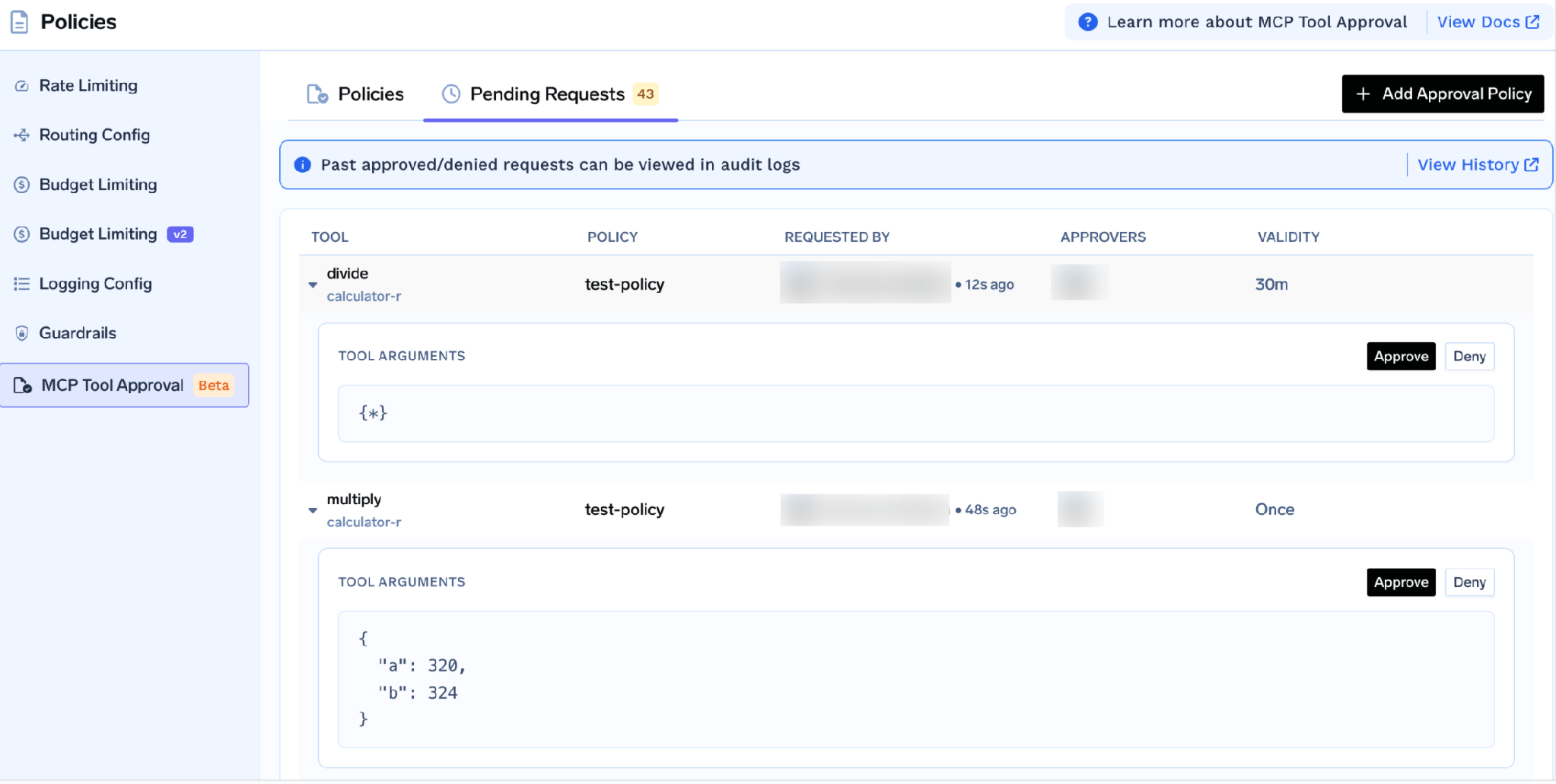
Cada solicitação mostra a ferramenta, a política, o solicitante e os argumentos reais, para que um aprovador possa ler o SQL antes de autorizá-lo. Enquanto pendente, o chamador recebe um resultado JSON-RPC contendo _meta.approval_status: "pending" em vez de um erro, para que um agente bem comportado aguarde e tente novamente. As concessões são definidas por solicitante, e uma negação não bloqueia ninguém permanentemente — para fazer isso, desative a ferramenta ou remova o usuário.
Teste manualmente primeiro. Na página de detalhes do servidor, clique em Testar ao lado de uma ferramenta, preencha os parâmetros e leia o JSON; Testar está desativado para ferramentas que você desligou. Isso detecta falhas simples do dbt antecipadamente: um ID de ambiente incorreto, recursos de IA do dbt não ativados ou um token expirado.
Abra a abaComo Usar aba para a URL do Gateway específica do seu tenant e snippets.
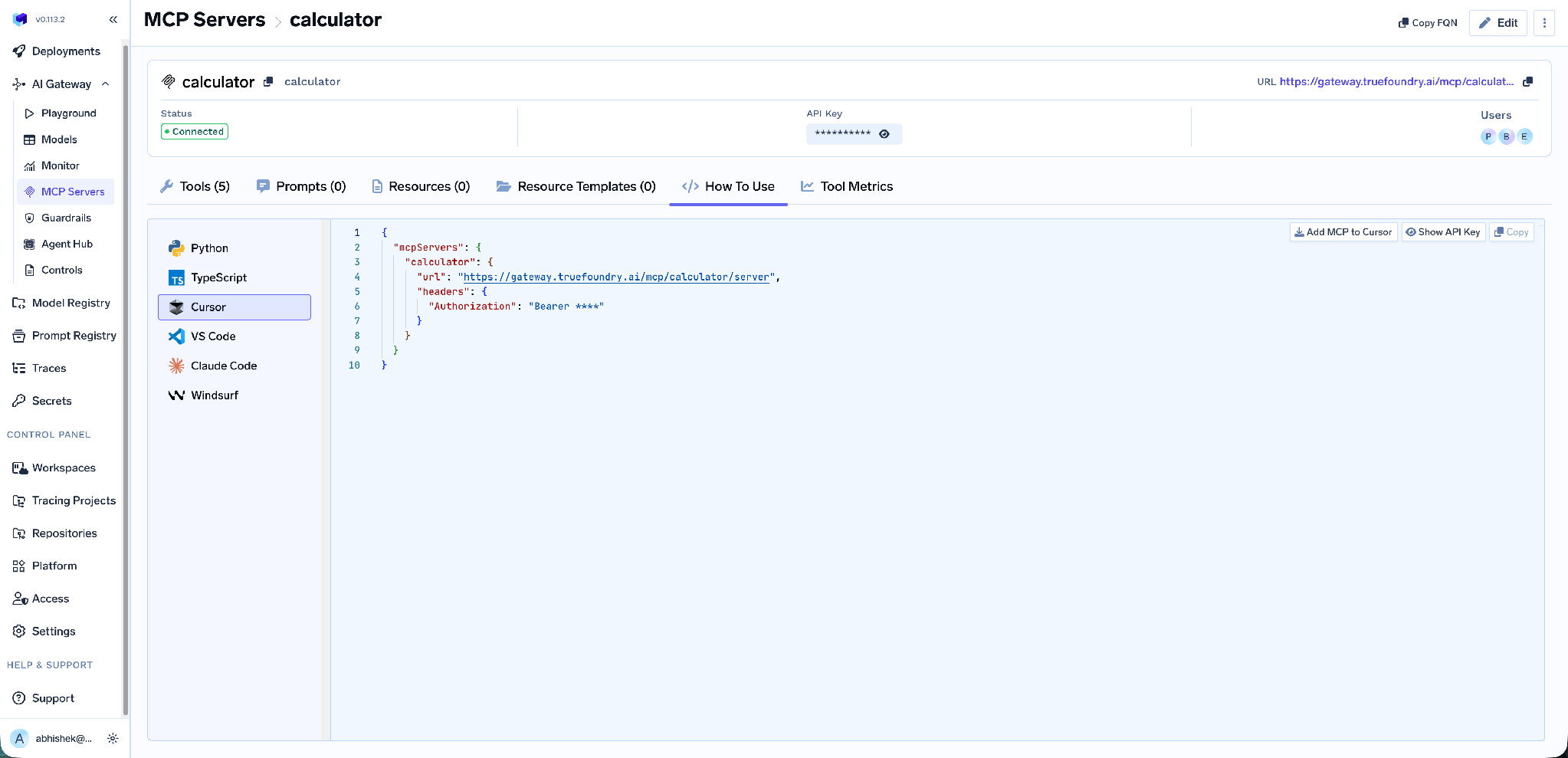
Abrange Claude Code, VS Code, Claude Desktop, Cursor, Windsurf, Codex e os SDKs MCP para Python e TypeScript. Adicionar MCP ao Cursor escreve a configuração; Exibir chave de API revela o token.
Use a URL desta aba em vez de montá-la manualmente — ela é específica do tenant, e um endpoint criado manualmente é a causa mais comum de um cliente que se conecta, mas não lista nenhuma ferramenta. O efeito colateral é importante: os analistas configuram um endpoint da TrueFoundry, para que a credencial do dbt nunca chegue a um laptop.
Métricas em nível de ferramenta. O painel detalha as solicitações por segundo, latência de P50 a P99, taxa de falha por tipo de erro e contagem de solicitações por ferramenta.
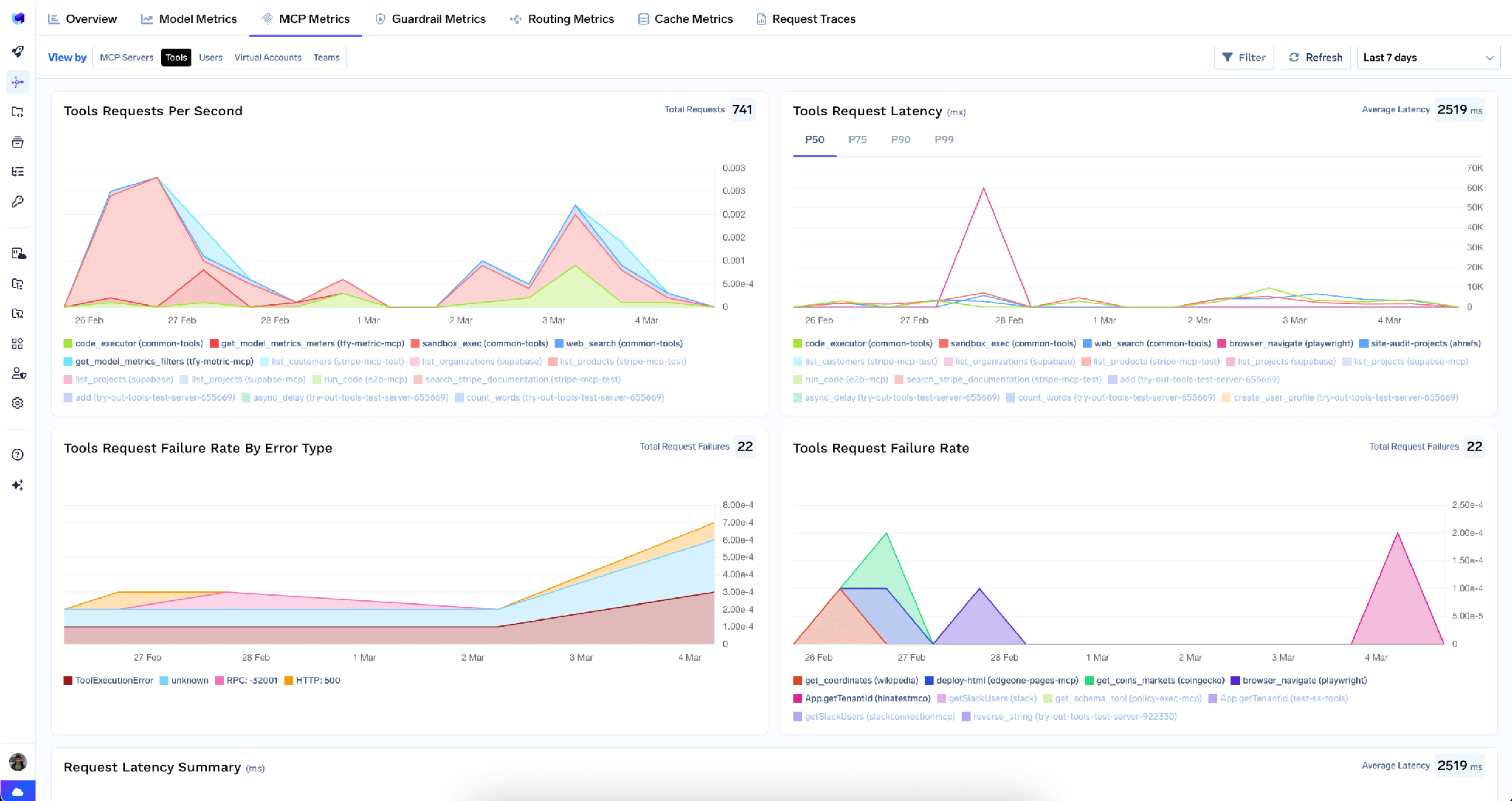
Para um servidor de dados, isso é controle de custos, não apenas um painel: é como você descobre que um agente chama uma consulta de métrica duzentas vezes por execução.
Observabilidade completa da requisição. Cada chamada de ferramenta é rastreada com identidade do chamador, nome da ferramenta, entradas e latência, exportada via OpenTelemetry. "Qual agente executou aquela consulta, para quem e com quais argumentos" torna-se uma consulta simples, não uma investigação.
Diretrizes de segurança. Guardrails pré e pós-ferramenta executam políticas em chamadas de ferramentas MCP.
Baixa sobrecarga.O gateway adiciona aproximadamente3-4 msde latência e processamais de 350 RPS em uma única vCPU, juntamente com Mais de 1.000 LLMs.
Um registro único. Assim que vários servidores estiverem registrados, você pode agrupar um subconjunto selecionado de ferramentas atrás de um único endpoint com um Servidor MCP Virtual — ferramentas de metadados do dbt mais uma ferramenta de leitura de data warehouse, nada mais. Esse é o formato de um agente de análise confiável: o dbt fornece as definições, o warehouse fornece as linhas.
Os administradores do tenant podem limpar todas as credenciais armazenadas no menu de três pontos ao lado de Editar:
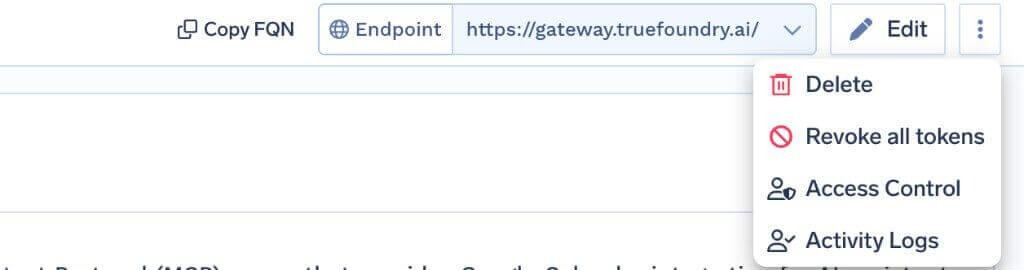
Revogar todos os tokens exclui todas as substituições de autenticação e tokens armazenados para todos os usuários e contas virtuais nesse servidor, entra em vigor na próxima solicitação e é registrado nos Logs de Atividade. É irreversível, todos precisam fornecer as credenciais novamente depois, e apenas administradores do tenant podem ver essa opção. Um limite é importante: ele limpa os tokens apenas no gateway, não no dbt Cloud, portanto, durante um incidente, rotacione o token do dbt lá também.
Os cabeçalhos são a configuração. A maioria das primeiras tentativas que falham ocorre por um ID x-dbt-* ausente ou incorreto, não por um problema de autenticação. O ID do ambiente de desenvolvimento e o ID do usuário só são necessários para ferramentas de SQL e Fusion, portanto, uma conexão parece saudável até a primeira chamada SQL.
É necessário ser Administrador da Conta para configurar, não para usar. Você precisa de privilégios de Administrador da Conta no dbt Cloud para criar o token e ler os IDs. Isso não significa que o agente deva ter acesso de administrador — crie-o como administrador e, em seguida, forneça ao agente um token de serviço com escopo limitado.
Os metadados são tão bons quanto o seu projeto. Um agente que lê a linhagem de um projeto sem documentação obtém um mapa sem rótulos.
O servidor MCP do dbt é a integração mais subestimada na pilha de dados, justamente porque não parece impressionante. Ele não retorna dados. Ele retorna definições, linhagem e documentação — o contexto que separa um agente que responde a uma pergunta de negócios corretamente daquele que escreve um SQL plausível baseado em colunas que ele adivinhou.
Também é excepcionalmente fácil torná-lo seguro. O risco se concentra em execute_sql e consultas caras da Camada Semântica, e ambos podem ser resolvidos em minutos: um token de serviço com escopo limitado em vez de um PAT de administrador, alternâncias por ferramenta que deixam os metadados abertos e o SQL fechado, portões de aprovação e um log de chamadas rastreadas.
TrueFoundry AI Gateway delivers ~3–4 ms latency, handles 350+ RPS on 1 vCPU, scales horizontally with ease, and is production-ready, while LiteLLM suffers from high latency, struggles beyond moderate RPS, lacks built-in scaling, and is best for light or prototype workloads.



É o servidor remoto de Model Context Protocol do dbt Cloud. Ele permite que um agente consulte métricas pelo Semantic Layer, inspecione os metadados e a linhagem dos modelos e execute SQL em um projeto do dbt Cloud. O valor dele está nos metadados: o seu grafo de modelos e as suas definições de métricas, e não as linhas brutas.
Três áreas de capacidade, segundo a documentação: consultas de métricas do Semantic Layer, inspeção de metadados de modelos e execução de SQL por meio de execute_sql. O dbt também agrupa as ferramentas em toolsets que você pode ocultar com os cabeçalhos x-dbt-disable-toolsets e x-dbt-disable-tools. A sua lista exata aparece na aba Tools.
Registre-o como um servidor MCP remoto com https://cloud.getdbt.com/api/ai/v1/mcp/, autenticação por token Bearer e os cabeçalhos x-dbt-*. Use um token de serviço com escopo limitado em vez de um PAT de administrador, desative execute_sql a menos que um agente precise dele e aplique uma política de aprovação às ferramentas que mantiver.
Sim. O TrueFoundry é executado na sua VPC, on-prem, em ambiente air-gapped ou híbrido, de modo que os prompts e as respostas nunca saem do seu domínio, mesmo quando você roteia entre muitos provedores.
Sim. Ele inclui um MCP Gateway, um Agent Gateway e um MCP & Agents Registry com controle de acesso em nível de ferramenta. Agentes criados com LangGraph, CrewAI, AutoGen ou um framework próprio podem ser governados de forma centralizada.
Sim. O gateway é compatível com OpenTelemetry e se integra com Grafana, Datadog, Prometheus ou a sua stack preferida. Ele rastreia cada requisição, do prompt à execução da ferramenta e do modelo, para que você obtenha logs unificados sem precisar remover o que você já usa.



As últimas notícias, artigos e recursos enviados para sua caixa de entrada
.png)
.png)
.png)
.png)
.webp)
.webp)

.png)
.png)
.png)
.png)
.png)
.png)
.png)


