.png)
September 28, 2026
|
5 min read


Obtenha acesso instantâneo a um ambiente TrueFoundry ao vivo. Implante modelos, direcione o tráfego de LLM e explore a plataforma completa — seu sandbox estará pronto em segundos, sem necessidade de cartão de crédito.



Published: September 28, 2026
.png)
Blazingly fast way to build, track and deploy your models!
Classic API rate limiting assumes requests are fungible: a GET /users/42 costs about what the next one costs, so counting requests is a decent proxy for load. Every rate limiter you have configured is built on that.
LLM traffic breaks it. Same endpoint, same minute, same user: “summarise this in one line” is maybe 50 tokens round trip; a 150-page contract sent to a reasoning model is close to 200,000. Both are one request, and a limit of 1,000 requests per minute permits either.
That variance is the normal shape of production traffic once agents are involved, because an agent turn carries the whole conversation plus tool results plus retrieved context back into the prompt on every step. Request counts stay flat while token counts climb an order of magnitude — the mechanic behind the agentic token explosion in CI/CD.
So change the unit. Count tokens, because tokens are what you buy. Request counts still matter — they protect the gateway and the provider connection — so run both.
Most confusion here is vocabulary. Four problems, four mechanisms, and teams routinely install one believing they installed another:
Rate limits are an availability control; budgets are a financial control. They fail differently and have different owners — platform owns the first, finance the second.
The common mistake is installing a token rate limit and calling it cost control. 20,000 tokens per minute on a cheap model is a few dollars a day; on a frontier reasoning model it is a very different number, and it moves whenever a provider reprices. Token throughput is not money.
Provider limits deserve a warning, because teams lean on them without meaning to. Your OpenAI or Anthropic org limit is one shared pool: when a batch job saturates it, your customer-facing product is throttled by a system that cannot express “the assistant always wins”. Hence a gateway you control.
The algorithm decides how much burst gets through — no small detail for agents.
For human chat traffic, fixed window is fine — people do not coordinate. Agents do, accidentally. They retry on failure, fan out in parallel and run on schedules, so many callers hit the same wall-clock instant, and the doubling case stops being theoretical. Sliding windows fix that by having no reset moment. Token bucket answers a different question — it suits traffic where you want short bursts — at the price of another number to tune.
Downgrading is the most under-used: if a model-level limit is hit, a fallback chain can serve from a second provider rather than 429-ing a person — the failover mechanism in our piece on LLM routers, where 429 is a triggering status code. A budget breach is different: if the money is gone it is gone, and quietly spending it somewhere cheaper is not what finance asked for.
Generic rule above the specific one. Under first-match-wins enforcement, a broad rule near the top swallows traffic that should have matched a narrower rule below it. The narrow rule never fires.
Treating one shared counter as a per-user limit. “20,000 tokens per minute” with no scoping is one counter for everyone. The first caller spends it.
Assuming failed requests are free. For request-based limits they are not — and for token limits the answer is different.
Two policy objects, deliberately separate: rate limiting governs throughput, budgets govern money.
Rate limit rules accept six units — the complete set:
requests_per_minute · requests_per_hour · requests_per_day · tokens_per_minute · tokens_per_hour · tokens_per_day
There is no per-second unit; a single LLM request can take tens of seconds, so per-second limits would measure noise. Configuration lives in the Config tab:
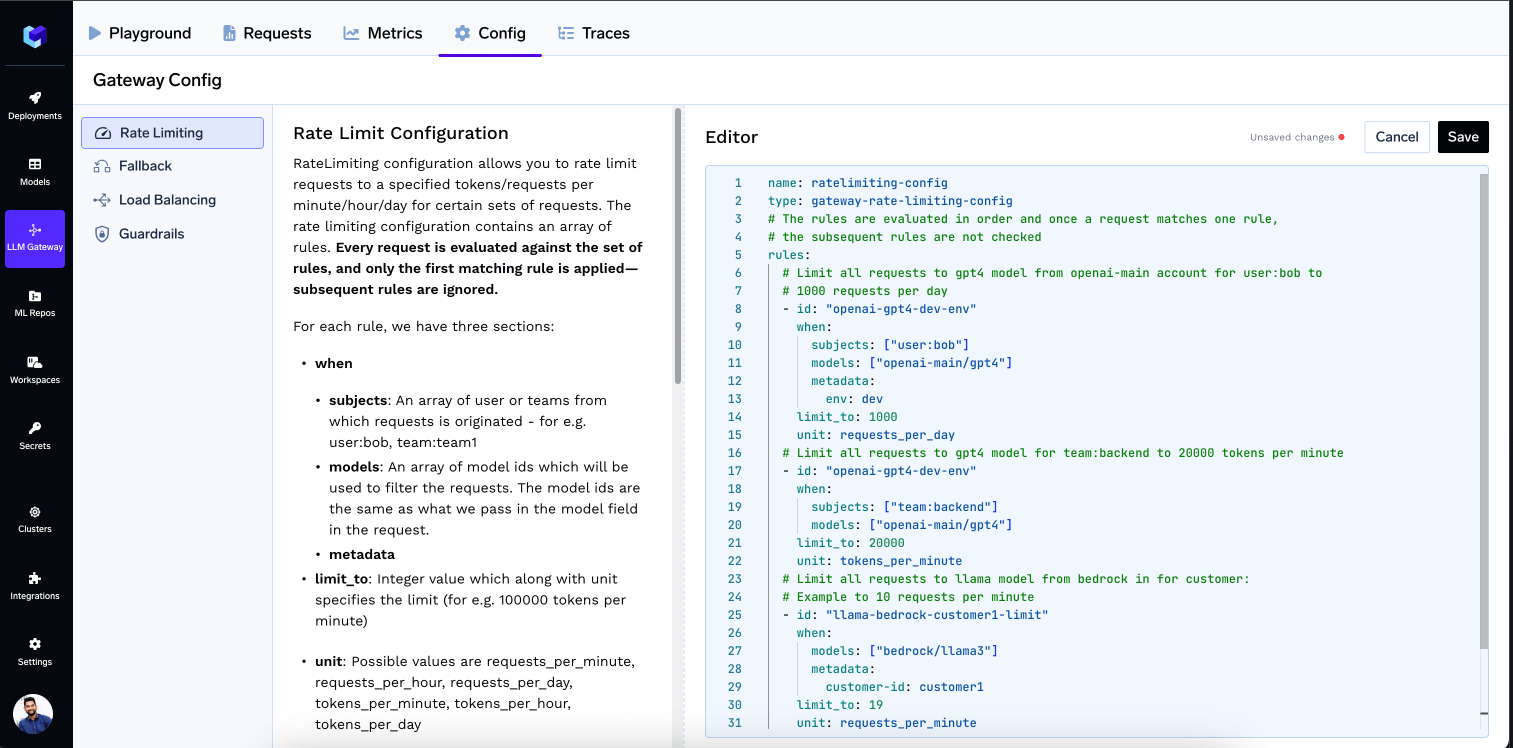
A rule set is type: gateway-rate-limiting-config with a list of rules. Each rule has a static id, a when block whose subjects, models and metadata conditions combine with AND, an integer limit_to, a unit, and optionally rate_limit_applies_per. Subjects are prefixed — user:, team:, virtualaccount: — and metadata reads the X-TFY-METADATA header.
Because the minimum unit is per-minute, the gateway maintains a 60-second window, keeps time-based buckets every 10 seconds for each user, model, team or custom segment, and sums the last 6 buckets to evaluate the counter. Older buckets drop out. Ten-second resolution is the number to internalise: a burst is smoothed across six sub-intervals rather than permitted twice at one reset boundary.
Without it, a rule is one shared counter for everything it matches. With it, the counter splits per entity. Allowed values are user, virtualaccount, model, and metadata.* with your own key. Maximum two values per rule.
type: gateway-rate-limiting-config
rules:
  - id: "backend-team-tpm"
    when:
      subjects: ["team:backend"]
      models: ["openai-main/gpt4"]
    limit_to: 20000
    unit: tokens_per_minute

  - id: "user-model-daily-limit"
    when: {}
    limit_to: 1000000
    unit: tokens_per_day
    rate_limit_applies_per: ['user', 'model']

  - id: "project-hourly-limit"
    when: {}
    limit_to: 50000
    unit: tokens_per_hour
    rate_limit_applies_per: ['metadata.project_id']
['user'] gives every user their own allowance and ['model'] every model its own. The last rule is the pattern most teams end up wanting: a per-project ceiling keyed off metadata the application already sends, with no rule edit when a new project appears.
This replaced a dynamic rule-ID format. Migration is mechanical — {user}-daily-limit becomes id: 'user-daily-limit' plus ['user'], and project-{metadata.project_id}-limit becomes id: 'project-limit' plus ['metadata.project_id']:
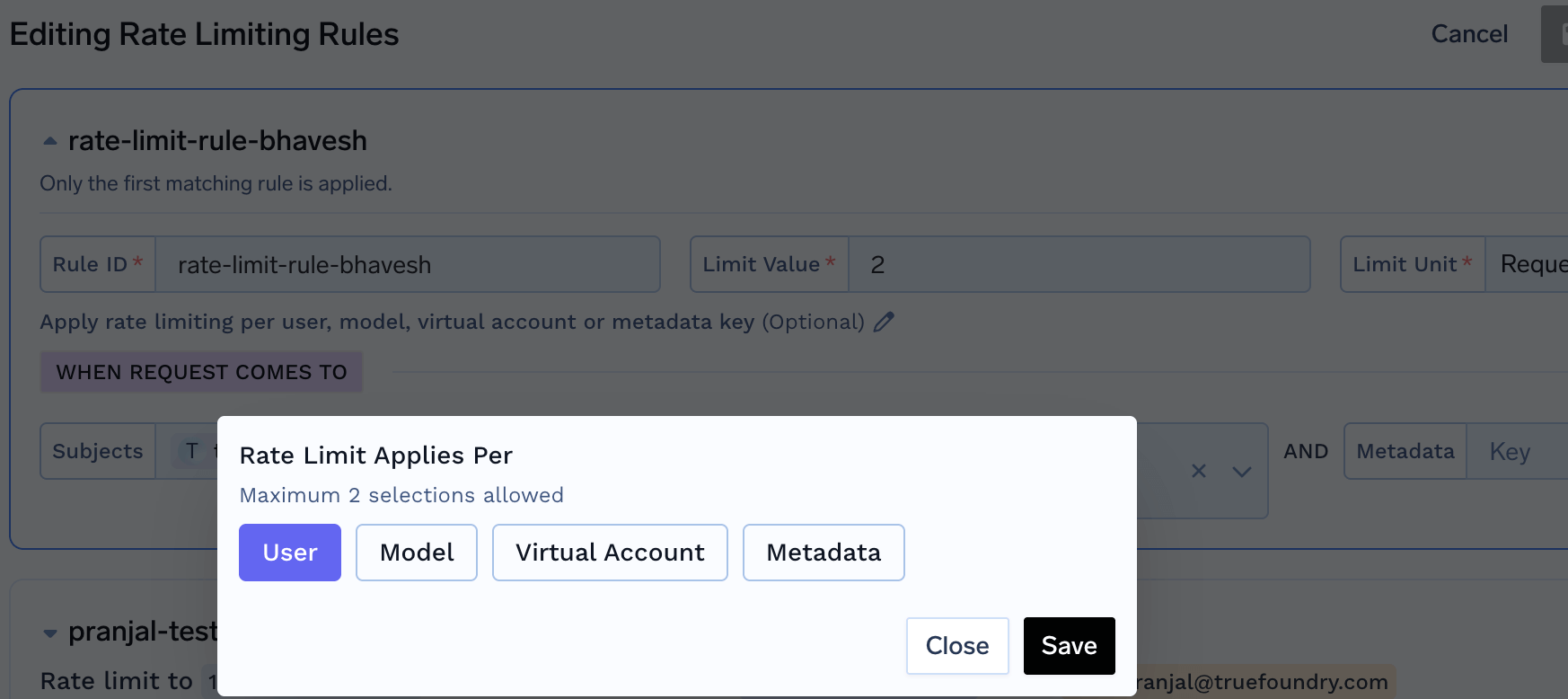
Every request is evaluated against every rule, but only the first matching rule is enforced. Later matches never block it. Usage, however, is counted against every rule the request matches.
So keep specialised rules at the top. The documented failure: put app-a-limit (10,000 rpm, virtualaccount:app-a) above tenant-wide-limit (5,000 rpm, when: {}), and app A’s traffic — counted against both — saturates the tenant counter alone. Everyone whose first match is the tenant rule then gets a 429 well under 5,000 rpm. The fix is not reordering but scoping: rate_limit_applies_per: ['user', 'virtualaccount'].
Any request the gateway rejects, or the provider fails with a 4XX/5XX, counts as one request against every requests_per_* rule it matched. One exception: a request already rejected with a 429 by rate limiting itself, so a retry storm does not dig its own hole deeper.
Token limits behave differently. Failed requests do not consume token quota, because a failed request reports no tokens. There is nothing to count. That is why a retry loop can exhaust your request budget while the token dashboard looks healthy.
A breach returns HTTP 429 with error.type: "RateLimitError" and error_origin_level: "rate_limit_budget", plus an x-tfy-applied-rules header naming the rule that fired.
Budgets are the money control, and they are cost-only, cost_per_* in USD. There is no token-denominated budget — if you want a token ceiling, that is a rate limit.
Budget V2 shipped in v0.158.0 and reverses the enforcement logic: every matching rule is checked and all must allow the request, an AND across budgets. Rate limiting is first-match-wins; budgets are all-must-pass. V1 used first-match-wins, so the migration is a semantic change, not a syntax one.
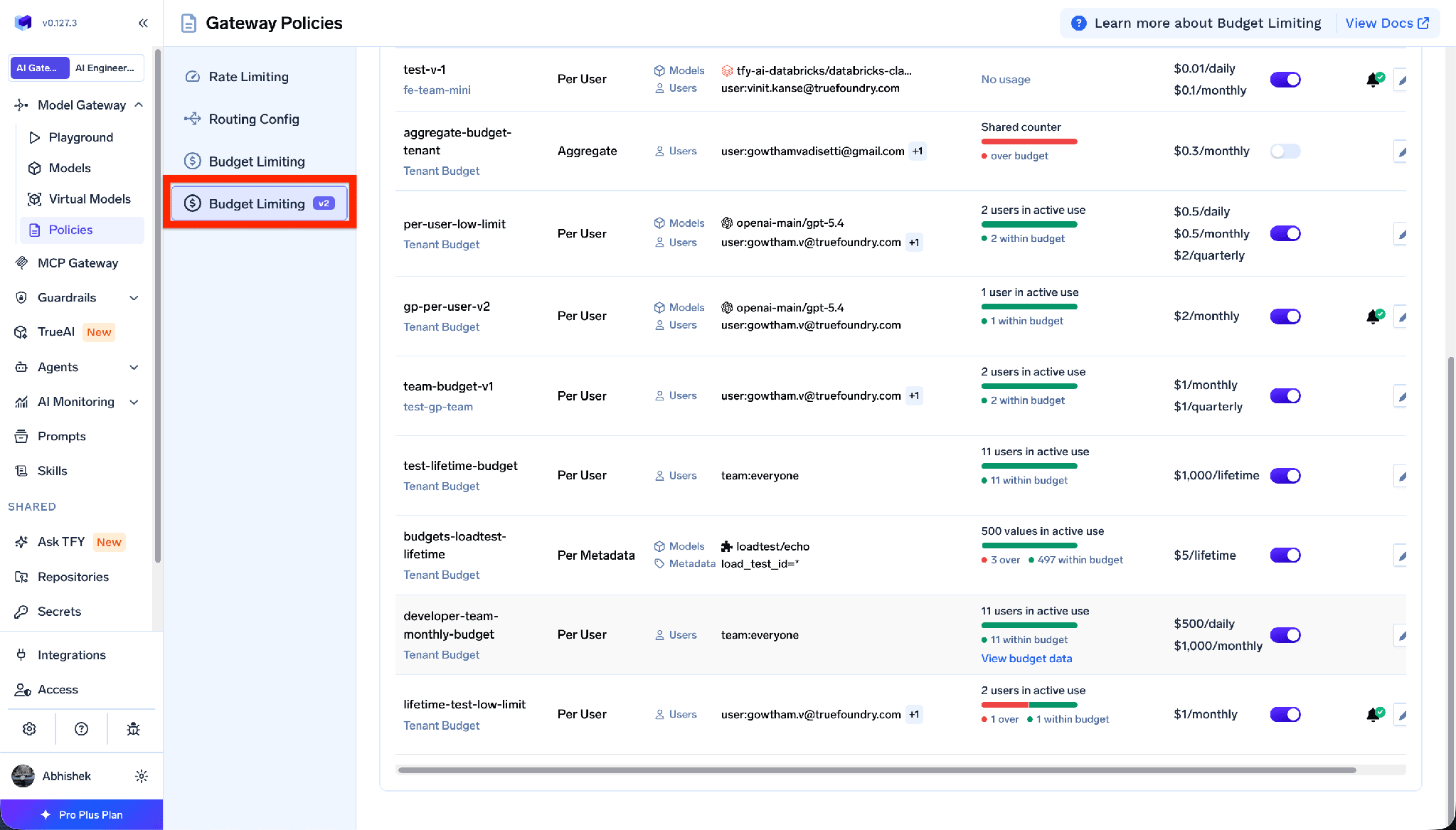
Rules live under AI Gateway → Policies → Budget Limiting → Add Rule, in two scopes: tenant (tenant-budget-config) or team (team-budget-config, with an RBAC-enforced team_name).
Five reset periods, all UTC: Daily (00:00), Weekly (Monday 00:00), Monthly (1st), Quarterly (Jan 1, Apr 1, Jul 1, Oct 1), and Lifetime, which never resets — the spend cap from the table above:
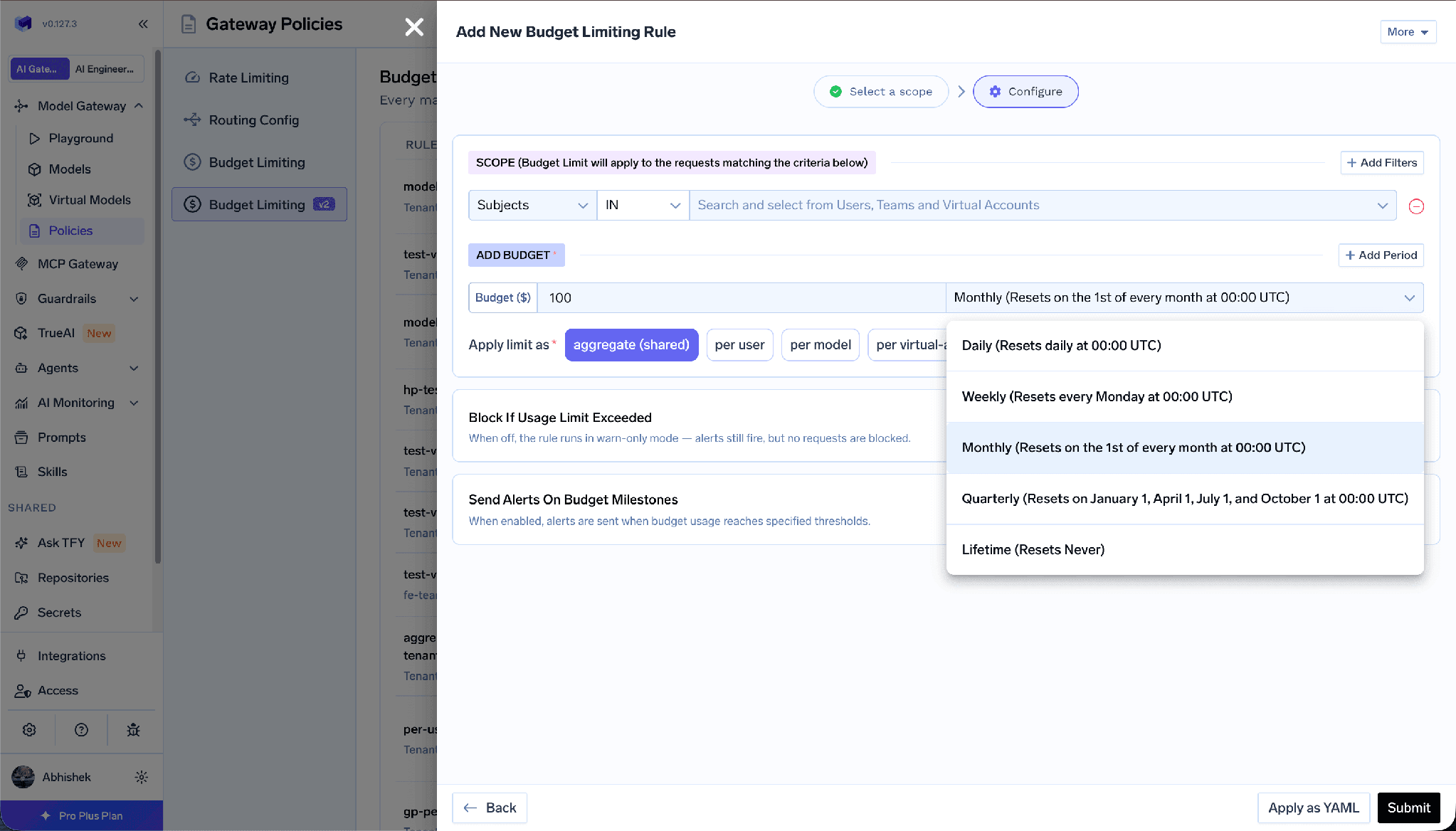
A single rule can enforce several periods at once, blocking if any one is exceeded — the docs’ multi-period-cap example sets cost_per_day: 0.5, cost_per_month: 0.5 and cost_per_quarter: 2 together. Scope filters — Subjects, Models, Provider accounts, Metadata — take IN/NOT IN and combine with AND:
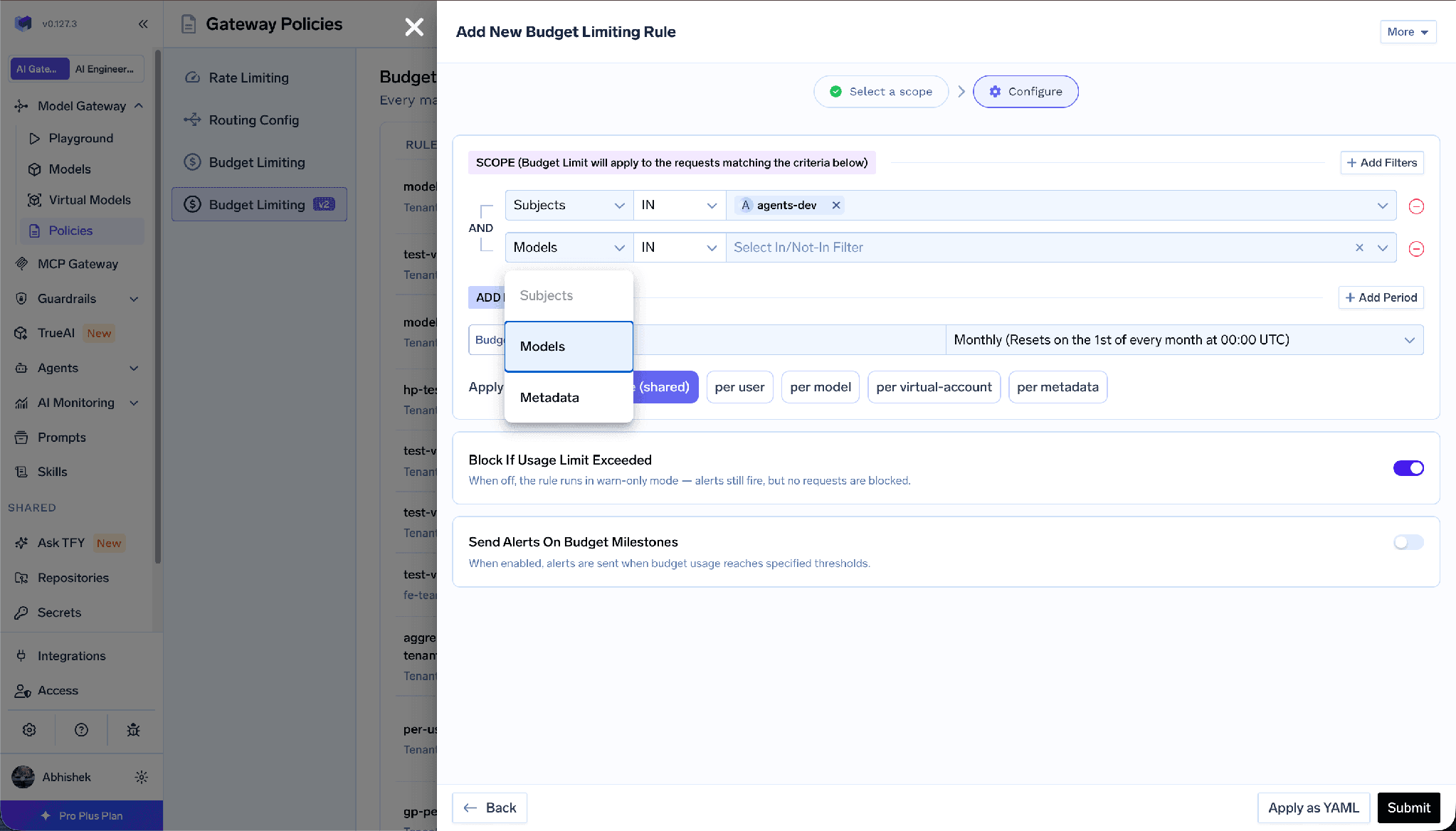
Apply limit as (applies_to.type) takes aggregate, per-user, per-model, per-virtual-account, or metadata with a key, and cannot be changed after creation. Per-entity rules support overrides for named users, models, virtual accounts or metadata values:
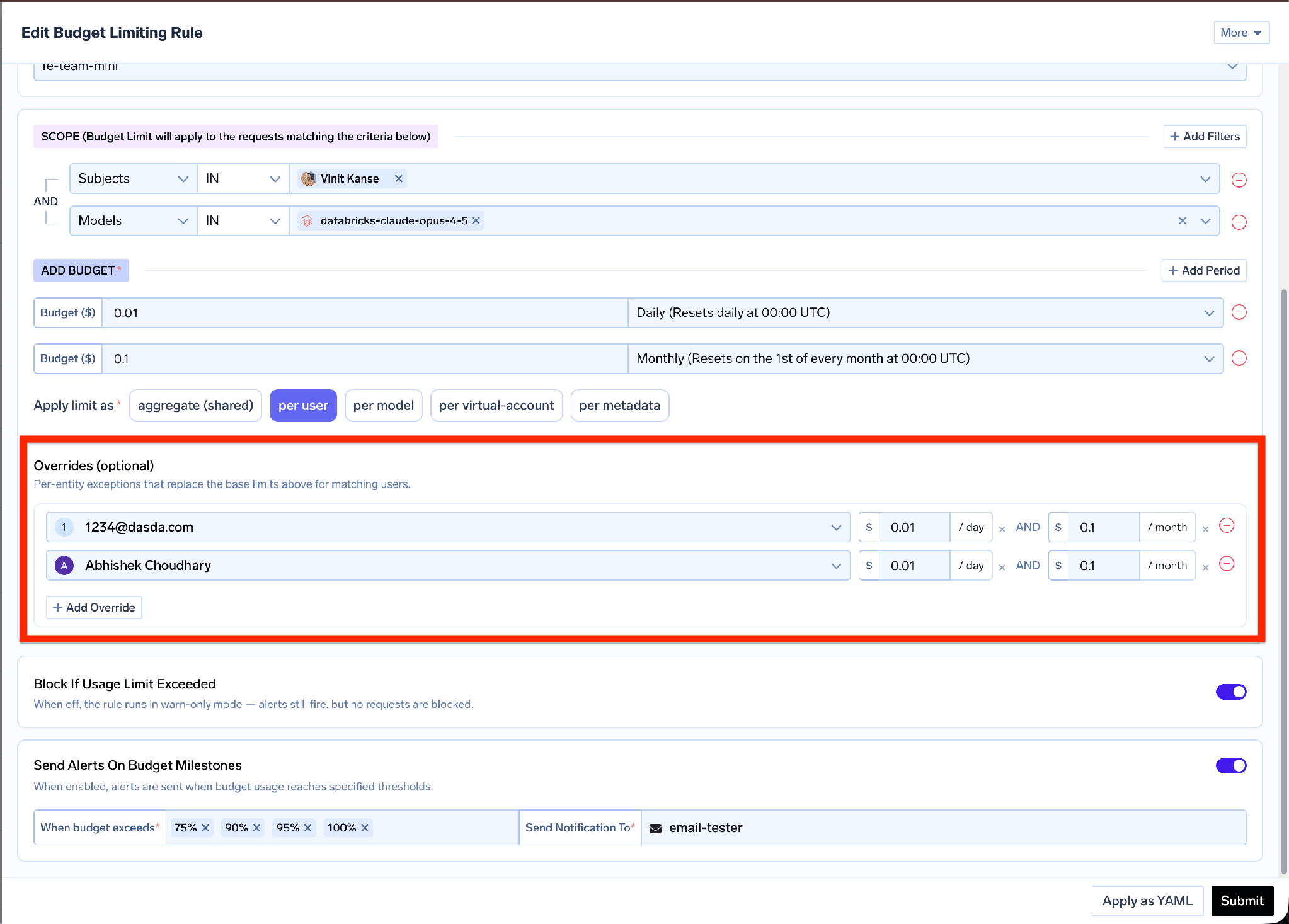
Budget rule per-entity overrides listing named users with their own limits
An override replaces all periods for that entity. If the base rule sets daily and quarterly caps and the override sets only a daily one, that entity has no quarterly cap at all. Include every period you want applied.
Three modes: enforce (default, reject), audit (allow through, still track, still alert), and soft_enforce — blocked only when no other matching budget can still allow it; if another has room the request passes and the breach is logged like an audit breach. A hard enforce breach anywhere wins.
Alerts fire at 75, 90, 95 and 100 percent, each once per budget period, separately for each entity on a per-entity budget; Lifetime budgets alert once per threshold, ever. Targets: email, slack-webhook, slack-bot, pagerduty, ms-teams-webhook, with {{user.email}} for per-user delivery.
One caveat: budget counters start at rule creation, not at the start of the period. Prior spending is not counted retroactively, so a rule created mid-month will not reconcile with your invoice that period.
Budgets are only as good as the pricing behind them, so that pricing is open. The catalog at github.com/truefoundry/models is the pricing database used for public cost tracking, browsable at truefoundry.com/models. Read the rate you are charged against; file a PR if it is wrong.
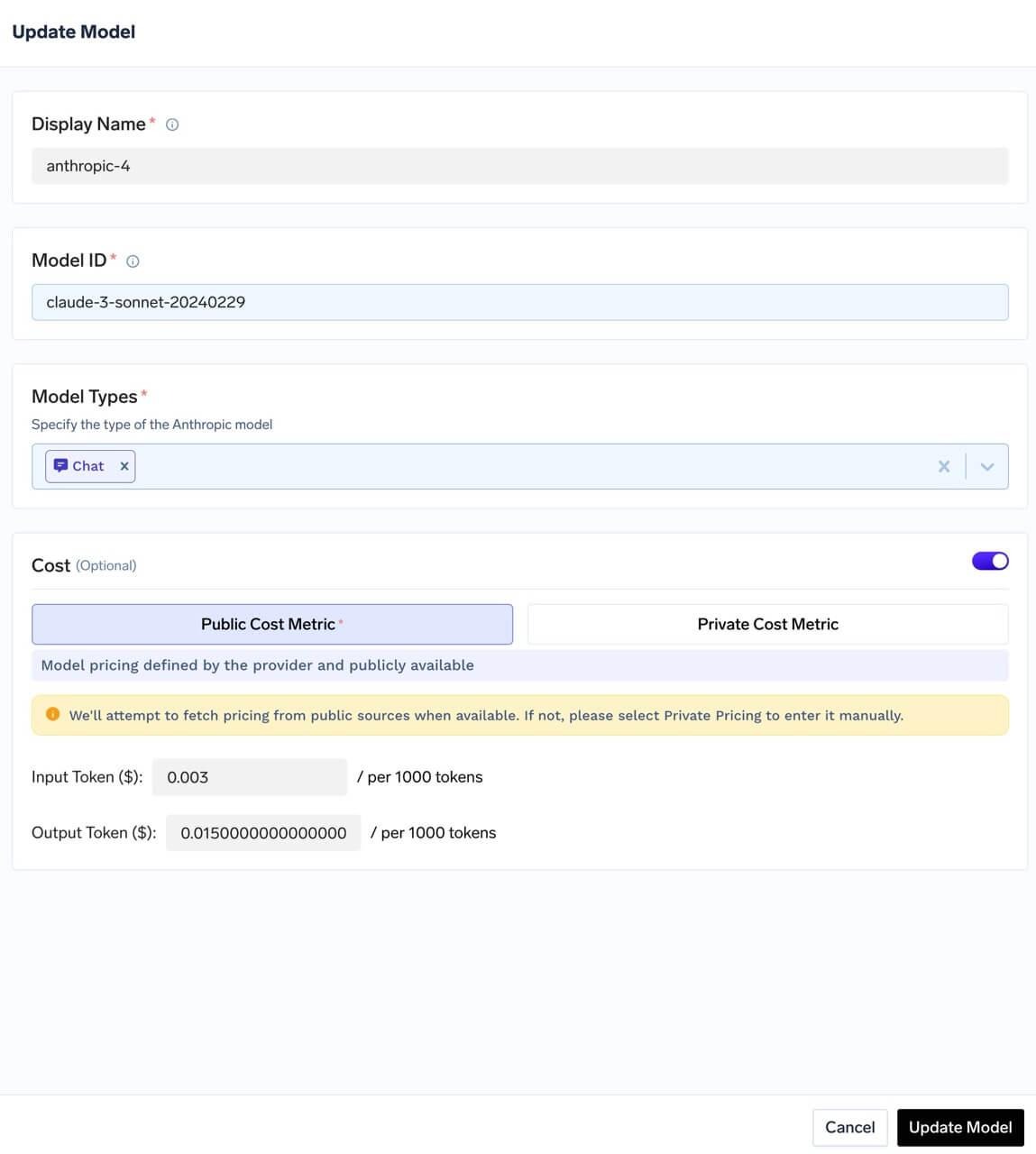
Public cost configuration for a model showing provider-published input and output rates
Two details matter. Region-wise pricing: providers/aws-bedrock/us.amazon.nova-lite-v1:0.yaml carries different input and output rates for us-west-2, us-west-1, eu-central-1 and eu-west-1, so multi-region traffic is not mispriced by a flat rate. Tiered pricing: providers/google-gemini/gemini-2.5-pro.yaml has base rates plus higher rates from 200K tokens, and gemini-1.5-flash.yaml tiers from 128K tokens. Long context is not priced linearly. Models with no public pricing use a Private Cost entry.
A per-user budget only works if requests are attributed reliably. Three mechanisms make that automatic rather than a matter of developer discipline:
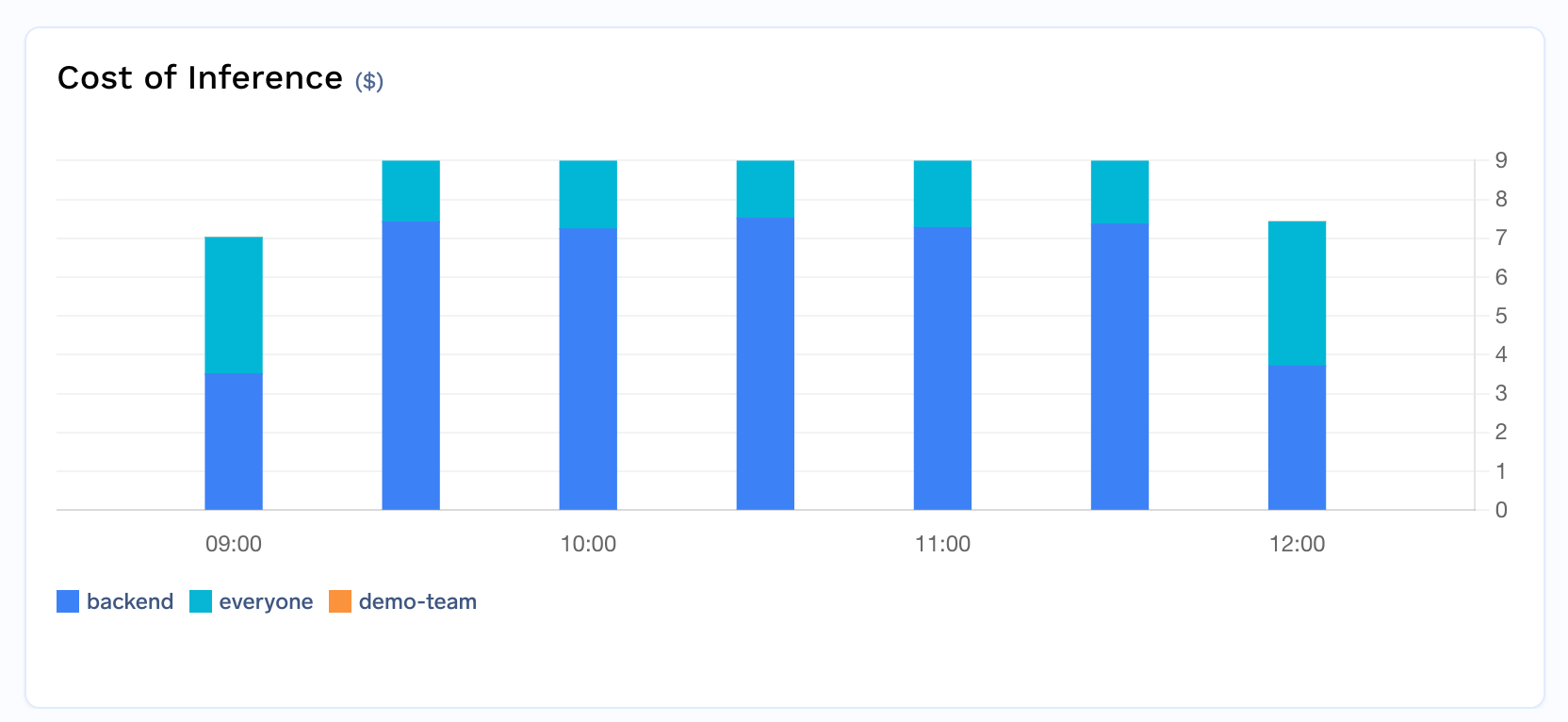
Gateway cost metrics broken down by team for chargeback reporting
Model Metrics tracks Total Input Tokens, Total Output Tokens and Total Cost of Tokens in USD, exportable via Metrics → 3 dots → Download Raw Data grouped by username, model_name or teams:
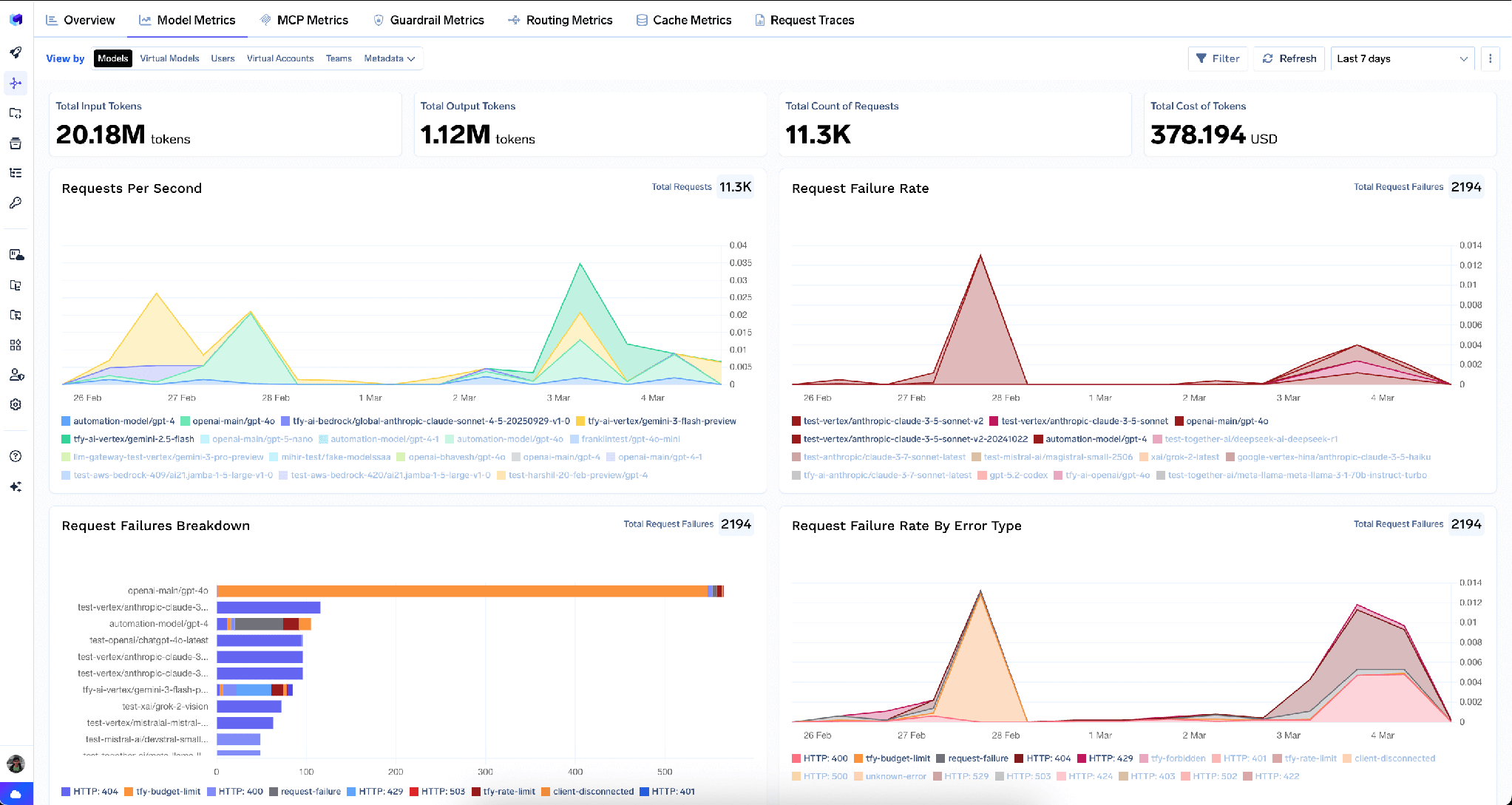
Model metrics dashboard showing input tokens, output tokens and cost broken down over time
One gateway, three groups: a customer-facing assistant, an internal coding agent, and a data team doing bulk extraction, all on one provider account. The coding agent had a bad afternoon last month and everyone else got 429s.
Stop the starvation. The problem was a shared counter, not a missing limit. Put a coding-agent-tpm rule (200,000 tokens_per_minute, subjects: ["virtualaccount:coding-agent"]) above a generic tenant-wide rule (500,000 tokens_per_minute, when: {}), and give the generic one rate_limit_applies_per: ['virtualaccount'] so the agent cannot drain everyone’s allowance by matching both. Add a requests_per_minute rule on the same subjects too: failed requests count against that one but not the token rule.
Add the money ceiling. A per-user monthly budget on the coding agent with one engineer overridden, plus a Lifetime cap on the extraction project:
TrueFoundry AI Gateway delivers ~3–4 ms latency, handles 350+ RPS on 1 vCPU, scales horizontally with ease, and is production-ready, while LiteLLM suffers from high latency, struggles beyond moderate RPS, lacks built-in scaling, and is best for light or prototype workloads.



Same idea — cap what a caller may consume in a window — but the unit changes. Classic API rate limiting counts requests, which works when requests cost roughly the same. LLM requests vary by orders of magnitude in tokens, so a token limit tracks real consumption far better. Run both: tokens govern spend rate, requests protect the connection from retry storms.
Both. A token limit is a throughput control on a rolling window: it stops one caller monopolising capacity right now. A budget is a financial control on a calendar period: it stops a team overspending this month. A token limit cannot express dollars, since the same token count costs different amounts on different models — and a budget says nothing about the current minute.
A failed request — rejected by the gateway, or failed by the provider with a 4XX or 5XX — counts as one request against every requests_per_* rule it matched. The one exception is a request already rejected with a 429 by rate limiting itself. Token limits are unaffected: a failed request reports no tokens.
Yes. TrueFoundry runs in your VPC, on-prem, air-gapped, or hybrid, so prompts and responses never leave your domain even as you route across many providers.
Roughly 3-4 ms of overhead, handling 350+ RPS on a single vCPU, across 1,000+ supported LLMs. The exception is the optional LLM classifier, which adds a real model call before the request is forwarded.
Yes. The gateway is OpenTelemetry-compliant and plugs into Grafana, Datadog, or Prometheus. Each LLM classifier call produces its own span, so classifier latency is visible separately from the served model’s.



As últimas notícias, artigos e recursos enviados para sua caixa de entrada
.png)
.png)
.png)
.png)
.webp)
.webp)

.webp)
.webp)
.webp)