


August 26, 2026
|
5 min read

Published: July 4, 2026
Blazingly fast way to build, track and deploy your models!
ChatGPTのような大規模言語モデルやStable Diffusionのような拡散モデルは、わずか1年足らずで世界を席巻しました。現在、ますます多くの組織が、既存のユースケースや刺激的な新しいユースケースのために生成AIを活用し始めています。OpenAI、Anthropic、Cohereなどの企業が提供するAPIを直接利用できる企業がほとんどですが、これらのAPIには高額なコストも伴います。長期的には、多くの企業がLlama、Flan-T5、Flan-UL2、GTP-Neo、OPT、Bloomなどの同等のオープンソースLLMの小規模から中規模のバージョンをファインチューニングしたいと考えています。 Alpaca や GPT4All プロジェクトが行ったように。
より大規模なモデルの出力を用いて小規模なモデルをファインチューニングすることは、いくつかの点で有用です。
これらすべてを可能にするために、GPUはこれらの基盤モデルを扱うあらゆる企業において不可欠な主力となっています。モデルのサイズが拡大し、数兆のパラメータに達するにつれて、複数のGPUにわたる分散学習が徐々に新たな標準となりつつあります。Nvidiaは、新しいAmpereおよびHopperシリーズのカードでハードウェア分野をリードしています。高速なNVLinkおよびInfinibandインターコネクトにより、最大256基のNvidia A100またはNvidia H100(スーパーポッドクラスターでは約4,000基)を接続し、これまで以上に大規模なモデルを記録的な速さで学習および推論することが可能になります。
ここでは、KubernetesでGPUを使用するために必要なコンポーネントについて説明します — 主にAWS EKSとGCP GKE(StandardまたはAutopilot)を対象としますが、ここで言及するコンポーネントは、どのK8sクラスターでも不可欠です。
クラウドプロバイダーはGPU VMを提供していますが、それらをK8sクラスターにどのように導入するのでしょうか?一つの方法は、固定サイズのGPUノードプールを手動で構成するか、または クラスターオートスケーラ 必要なときにGPUノードを投入し、不要なときに解放できます。しかし、これには依然として複数の異なるノードプールの手動設定が必要です。さらに良い解決策は、以下のような自動プロビジョニングシステムを設定することです。 AWS Karpenter または GCP Node Auto Provisionersこれらについては、以前の記事で解説しています。 主要3大クラウド向けクラスターオートスケーリング ☁️
apiVersion: karpenter.sh/v1alpha5
kind: Provisioner
metadata:
  name: gpu-provisioner
  namespace: karpenter
spec:
  weight: 10
  kubeletConfiguration:
    maxPods: 110
  limits:
    resources:
      cpu: "500"
  requirements: 要件
    - key: karpenter.sh/capacity-type
      operator: In
      values: 値
        - spot
        - on-demand
    - key: topology.kubernetes.io/zone
      operator: In
      values: 値
        - ap-south-1
    - key: karpenter.k8s.aws/instance-family
      operator: In
      values: 値
        - p3
        - p4
        - p5
        - g4dn
        - g5
  taints: テイント
    - key: "nvidia.com/gpu"
      effect: "NoSchedule"
  providerRef:
    name: default
  ttlSecondsAfterEmpty: 30
GCPノード自動プロビジョナー設定のサンプル
resourceLimits:
  - resourceType: 'cpu'
    minimum: 0
    maximum: 1000
  - resourceType: 'memory'
    minimum: 0
    maximum: 10000
  - resourceType: 'nvidia-tesla-v100'
    minimum: 0
    maximum: 4
  - resourceType: 'nvidia-tesla-t4'
    minimum: 0
    maximum: 4
  - resourceType: 'nvidia-tesla-a100'
    minimum: 0
    maximum: 4
autoprovisioningLocations:
  - us-central1-c
management:
  autoRepair: true
  autoUpgrade: true
shieldedInstanceConfig:
  enableSecureBoot: true
  enableIntegrityMonitoring: true
diskSizeGb: 100
ここで、プロビジョナーを構成して スポット タイプのインスタンスを使用することで、ステートレスなアプリケーションにおいて30~90%のコスト削減を実現できます。
仮想マシンがGPUを使用するには、そのドライバーがホストにインストールされている必要があります。幸いなことに、AWS EKSとGCP GKEのどちらにおいても、ノードには特定のバージョンのNvidiaドライバーが事前に構成されています。
各 新しいCUDAバージョンはより高い最小ドライバーバージョンを必要とするため、すべてのノードでドライバーバージョンを制御したいと考えるかもしれません。これは、ドライバーを含まないカスタムイメージでノードをプロビジョニングし、Nvidiaの gpu-operator install a specified version. However, this may not be allowed on all cloud providers, so be aware of the driver versions on your nodes to avoid compatibility headaches.
We talk about the gpu-operator later below.
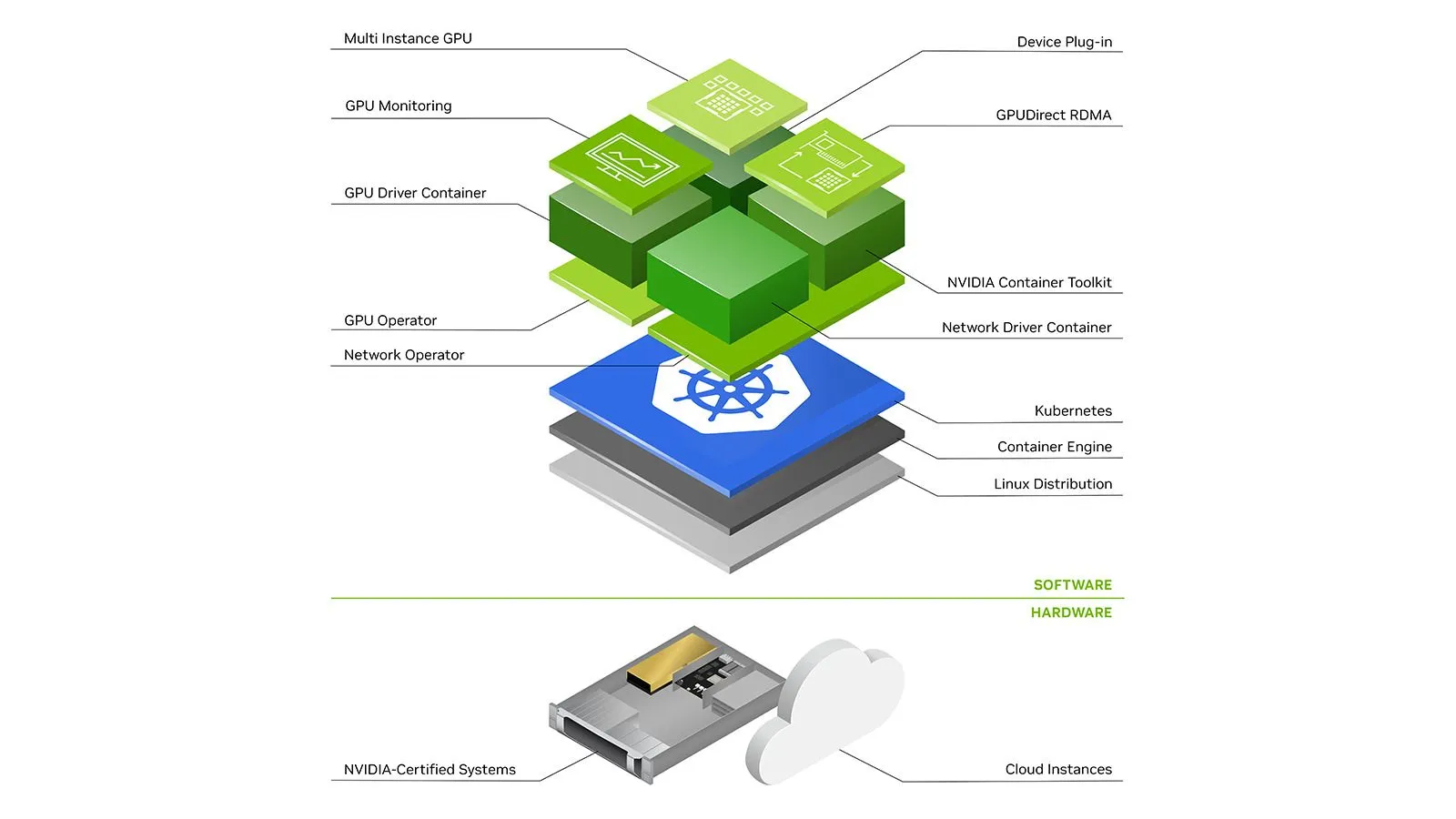
In Kubernetes since everything runs inside pods (a set of containers) just installing drivers on the host is not enough. Nvidia provides a standalone component called nvidia-container-toolkit that installs hooks to containerd runC to make the host's GPU drivers and devices available to the containers running on the node. See this article for a more detailed explanation.
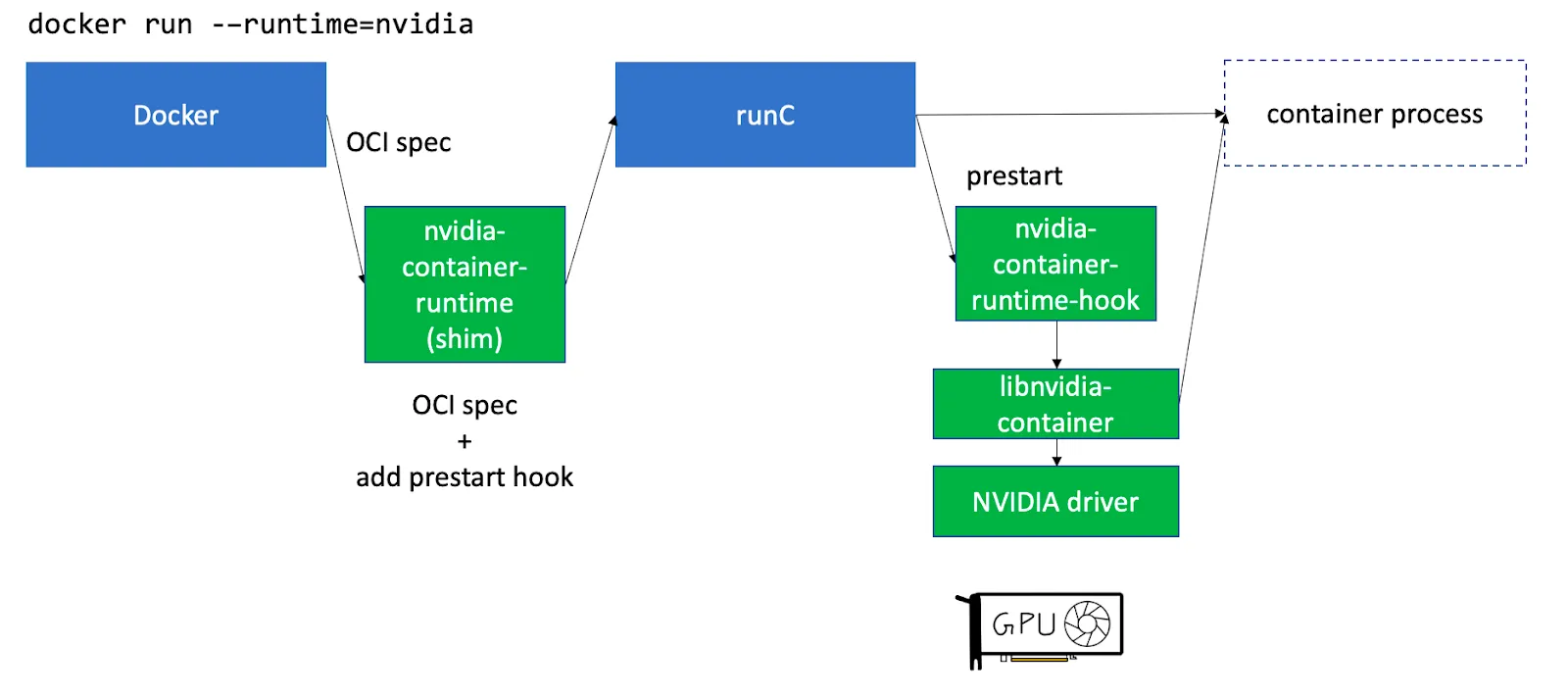
nvidia-container-toolkit can be installed to be run as Daemonset on the GPU nodes.
Having GPUs on the node is not enough, the Kubernetes scheduler needs to know which node has how many GPUs available. This can be done using a Device Plugin. A device plugin allows advertising custom hardware resources to the control plane e.g. nvidia.com/gpu . Nvidia has published a device plugin that advertises allocatable GPUs on a node. This plugin again can be run as a Daemonset.
Once the above components are configured we need to add a few things to the pod spec to schedule it on the GPU node - mainly resources , affinity and tolerations
E.g. on GCP GKE we can do:
spec:
  # We define how many gpus we want for the pod
  resources:
    limits:
      nvidia.com/gpu: 2
  # affinities help us place the pod on the GPU nodes
  affinity:
    nodeAffinity:
      requiredDuringSchedulingIgnoredDuringExecution:
        nodeSelectorTerms:
          - matchExpressions:
              # Specify which instance family we want
              - operator: In
                key: cloud.google.com/machine-family
                values:
                  - a2
              # Specify which gpu type we want
              - operator: In
                key: cloud.google.com/gke-accelerator
                values:
                  - nvidia-tesla-a100
              # Specify we want a spot VM
              - operator: In
                key: cloud.google.com/gke-spot
                values:
                  - "true"
tolerations:
  # Spot VMs have a taint, so we mention a toleration for it
  - key: cloud.google.com/gke-spot
    operator: Equal
    value: "true"
    effect: NoSchedule
  # We taint the GPU nodes, so we mention a toleration for it
  - key: nvidia.com/gpu
    operator: Exists
    effect: NoSchedule
resources.limits sectionNote that these configurations will differ based on what provisioning methods and cloud providers you use (e.g. Karpenter on AWS vs NAP on GKE)
Monitoring GPU metrics like Utilisation, Memory Usage, Power Draw, Temperature, etc is important to ensure things are working smoothly as well as to do further optimisations.
Fortunately, Nvidia has a component called dcgm-exporter that can run as Daemonset on GPU nodes and publish metrics at an endpoint. These metrics can then be scraped with Prometheus and consumed. Here is an example scrape config:
- job_name: gpu-metrics
  scrape_interval: 15s
  scrape_timeout: 10s
  metrics_path: /metrics
  scheme: http
  kubernetes_sd_configs:
  - role: endpoints
    namespaces:
      names:
      - <dcgm-exporter-namespace-here>
  relabel_configs:
  - source_labels: [__meta_kubernetes_pod_node_name]
    action: replace
    target_label: kubernetes_node
However, note that dcgm-exporter needs to run with hostIPC: true and privileged securityContext. EKSとGKE Standardでは問題ありません。しかし、GKE Autopilotではそのようなアクセスは許可されておらず、代わりに、 GKEはメトリクスを公開しています 事前設定された nvidia-device-plugin Daemonsetは、GCP Cloud Monitoringでスクレイピングまたは表示できます。
AWS EKSGCP GKE StandardGCP GKE AutopilotプロビジョニングKarpenter / 手動GCPノード自動プロビジョナー / 手動自動プロビジョニングドライバープリインストール済み / インストール元: gpu-operatorプリインストール済みプリインストール済みコンテナツールキットnvidia-container-toolkit経由 gpu-operator事前設定済み事前設定済みデバイスプラグインnvidia-device-plugin経由 gpu-operator事前設定済みDaemonset事前設定済みDaemonsetメトリクスnvidia-dcgm-exporter経由 gpu-operatorスタンドアロン nvidia-dcgm-exporter / カスタムスクレイピングCustom Scraping
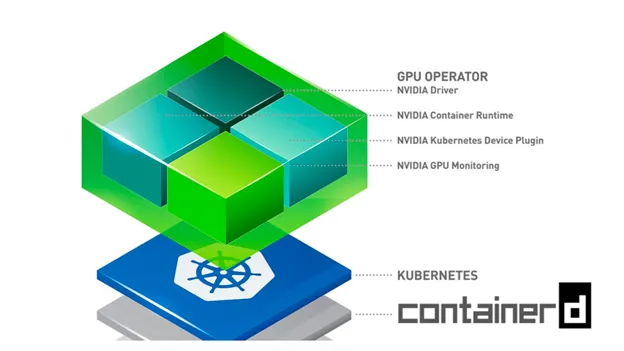
上記の gpu-operator は、AWS EKS上でのほとんどの部分において、ドライバー、コンテナツールキット、デバイスプラグイン、メトリクスエクスポーターなど、Nvidiaのスタンドアロンコンポーネントの集まりであり、これらすべてが単一のHelmチャートを介して組み合わされ、連携して使用されるように構成されています。この gpu-operator は、コントロールプレーン上でマスターポッドを実行し、クラスター内のGPUノードを検出できます。GPUノードを検出すると、ワーカーDaemonsetをデプロイし、さらにドライバー、コンテナツールキット、デバイスプラグイン、CUDAツールキット、メトリクスエクスポーター、バリデーターをオプションでインストールするためのポッドをスケジュールします。 こちらで詳細をご覧いただけます。
一般的に、ホストマシンにCUDAツールキットをインストールし、ボリュームマウントを介してポッドから利用できるようにすることは可能ですが、これは PATH や LD_LIBRARY_PATH 変数をいじる必要があるため、非常に不安定になりがちです。さらに、同じノード上のすべてのポッドが同じCUDAツールキットバージョンを使用しなければならないため、非常に制限的になる可能性があります。したがって、CUDAツールキット(またはその一部)をコンテナイメージ内に配置する方が良いでしょう。
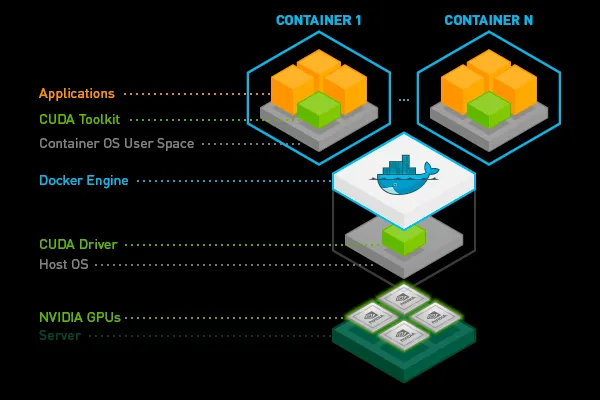
Nvidiaが提供する、すでに構築済みのイメージから始めることができます。 Nvidia またはあなたの お気に入りの深層学習 フレームワーク または Truefoundryプラットフォームで1行のコードで追加する
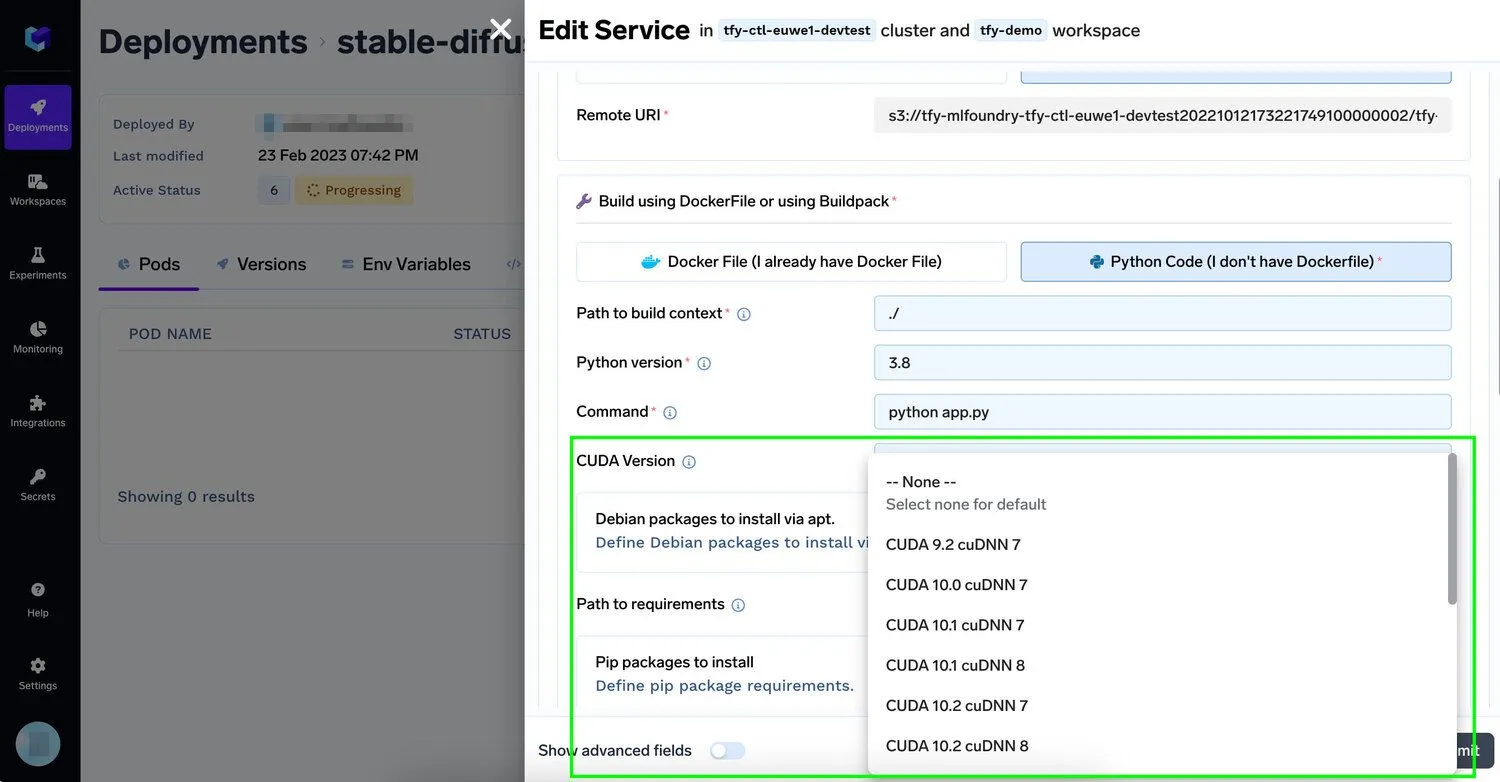
組織が既存のインフラ上で生成AIモデルをより迅速にファインチューニングし、デプロイできるようにするため、TrueFoundryプラットフォームは、開発者が最小限の労力で1つまたは複数のNvidia GPUをアプリケーションに追加することを可能にします。同時に、 最高のプロンプトエンジニアリングツール。開発者は、V100、P100、A100 40GB、A100 80GB(トレーニングに最適)、またはT4、A10(推論に最適)といった機械学習に最適なGPUのインスタンス数を指定するだけでよく、残りの作業は弊社が行います。詳細については、弊社の ドキュメント。GPUを活用したAIワークロードが本番環境に移行するにつれて、このようなインフラ制御は、より広範な AIセキュリティプラットフォームにおいて重要になります。そこでは、計算リソースの分離、アクセスガバナンス、ワークロードの可観測性が連携して機能する必要があります。
GPUは素晴らしい技術であり、これは私たちにとってまだ始まりに過ぎません。私たちは以下の課題に積極的に取り組んでいます。
もし少しでもご興味をお持ちいただけましたら、 ぜひ私たちと一緒に働きませんか 最高のMLOpsプラットフォームを構築するために。
TrueFoundry は、Kubernetes上で動作するMLデプロイメントPaaSです。開発者のワークフローを加速させ、モデルのテストとデプロイにおいて完全な柔軟性を提供しつつ、インフラチームには完全なセキュリティと制御を保証します。当社のプラットフォームを通じて、機械学習チームは モデルをデプロイし、監視する ことを、15分で、100%の信頼性、スケーラビリティ、そして数秒でのロールバック機能を備えて実現します。これにより、コストを削減し、モデルをより迅速に本番環境にリリースできるようになり、真のビジネス価値の実現を可能にします。
TrueFoundry AI Gateway delivers ~3–4 ms latency, handles 350+ RPS on 1 vCPU, scales horizontally with ease, and is production-ready, while LiteLLM suffers from high latency, struggles beyond moderate RPS, lacks built-in scaling, and is best for light or prototype workloads.







.png)



.png)
.png)
.png)

.png)
.png)
.png)
.png)
.png)
.png)
.png)





