


.png)
October 31, 2026
|
5 min read


.png)
Blazingly fast way to build, track and deploy your models!
The Atlassian MCP server is Atlassian’s Rovo MCP server: a remote Model Context Protocol endpoint that exposes Jira, Confluence, and Compass as tools an AI agent can call. It lives at https://mcp.atlassian.com/v1/mcp and authenticates over OAuth2.
It spans three products:
The docs describe the surface in terms of searching issues, reading pages, and creating tickets rather than naming tool functions. The authoritative list is whatever appears on the Tools tab after you authorize, since the gateway reflects the live upstream list.
Because it is remote, there is nothing to run locally — no Docker container, no npx process per laptop. You point an MCP client at a URL and authenticate, which is the appeal of remote MCP servers generally.
The interesting uses chain tools across products:
The split that matters is not just read versus write — it’s public versus sensitive. Reading a Jira issue is harmless. Creating one is recoverable. Reading Confluence deserves the most thought: it’s where companies put board decks, compensation bands, postmortems naming individuals, and security architecture. A read-only agent with unrestricted Confluence access has a wider blast radius than a write-capable agent limited to one Jira project.
That asymmetry is specific to Atlassian, and it’s why “disable the write tools” is incomplete advice here.
One engineer wiring this into Cursor is fine. Thirty engineers plus a support agent and a docs agent is a different problem.
The allowlist is an org-wide decision. It is set per organization, not per team. Whoever holds org admin in admin.atlassian.com decides whether this integration exists at all. Connect tooling ad hoc and you accumulate allowed domains nobody reviews.
No audit trail of intent. Atlassian logs that an API call happened against a user’s account. It does not log that your triage agent made it while acting on a prompt from a Slack thread. When a ticket appears nobody remembers filing, there’s no chain to reconstruct.
Confluence read scope is “everything the user can see.” Per-user permissions are the right design, but most tenants have permissive Confluence space permissions by historical accident. What a user can see is usually far more than what a task needs, and the agent cannot tell the difference.
Prompt injection has somewhere to land. Jira descriptions and Confluence pages are text an agent reads and someone else may have written. An issue filed by an external reporter through a service desk portal, containing instructions, read during triage with Confluence access live in the same session — that’s a path from untrusted input to sensitive output. The failure isn’t that the agent misbehaved; it’s that its permissions were wider than its task.
None of these are reasons to avoid the server. They’re reasons to put a control plane in front of it — which is what an MCP gateway is for.
This is the step that blocks teams, so it goes first. It is an Atlassian-side prerequisite and no TrueFoundry setting substitutes for it.
You need: permission to add MCP servers in TrueFoundry, an Atlassian Cloud org with Jira, Confluence, or Compass, and organization admin access in admin.atlassian.com.
In Atlassian Admin, select your organization and open Apps → AI settings → Rovo MCP server. Under Allowed domains, add your TrueFoundry control plane domain:
https://<tfy-control-plane-base-url>/**
There is no OAuth client to create. Atlassian handles dynamic client registration for allowlisted domains. For most self-registered remote MCP servers you’d create an OAuth app in the provider’s portal, set a redirect URI, and store a client ID and secret. Here you don’t — the allowlist entry is the trust relationship.
The allowlist is your kill switch. Removing the domain revokes new OAuth connections. Stopping this integration org-wide is one change in Atlassian Admin, independent of the gateway. Few integrations give you a control that clean; write down where it lives.
One networking caveat: if Atlassian IP allowlisting is enabled, also allow traffic from the environment where TrueFoundry connects to the remote MCP server.
Step 1 — Open the picker. In TrueFoundry, open MCP Gateway, click Add MCP Server, and select Atlassian.
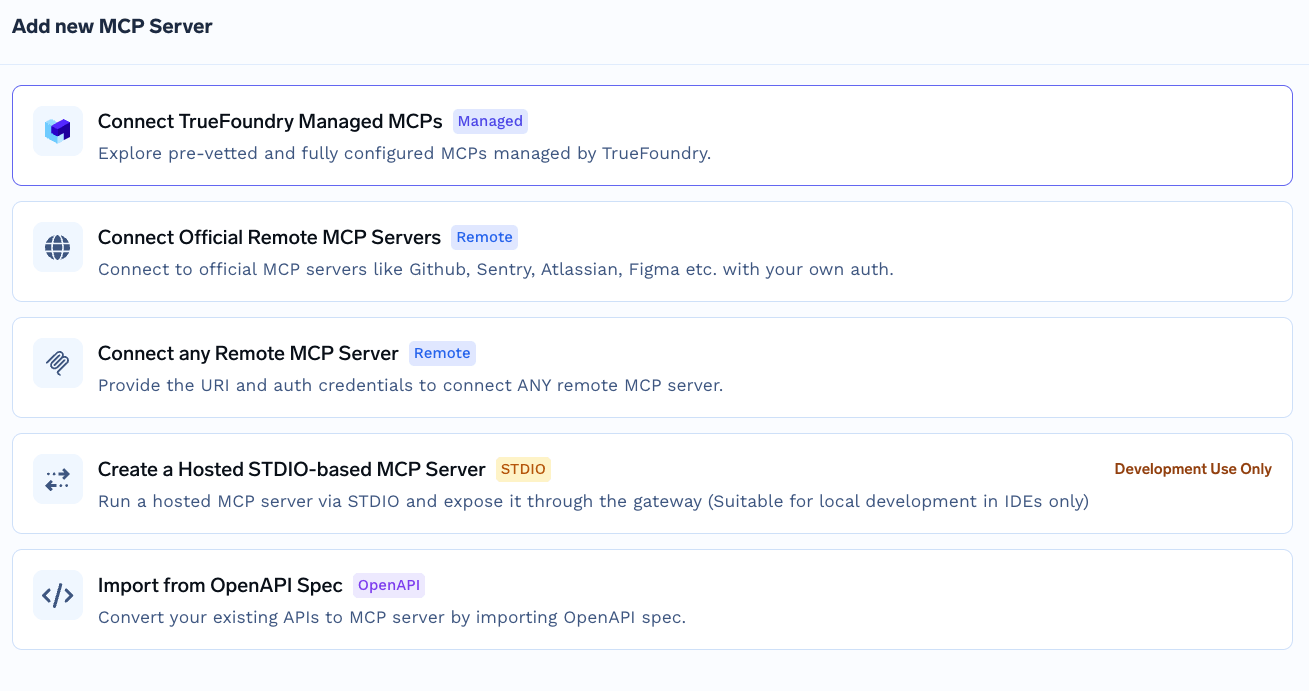
Add MCP Server picker showing the available registration paths including official remote servers, any remote MCP server, TrueFoundry Managed MCPs, Hosted STDIO, and Import from OpenAPI Spec
This is not the TrueFoundry Managed MCP catalogue flow, where you supply only a name and the platform owns every field. Atlassian takes explicit values, because the trust relationship came from the allowlist rather than from platform-held credentials.
Step 2 — Configure the server. Use these values:
Field
Value
Name
atlassian
Description
Atlassian is a software development platform
URL
https://mcp.atlassian.com/v1/mcp
Authentication
OAuth2
Turn on Auth Data and select the OAuth2 tab. Because your domain is allowlisted, you do not need a client ID or secret — leave them empty.
Step 3 — Add collaborators. Add the users or teams that should use Atlassian tools. Assign MCP Server Manager to administrators and MCPサーバーユーザー コンシューマーへ。
ステップ4 — 保存と承認 「 MCPサーバーを追加」をクリックします。その後、各ユーザーがサーバーの「 ツール 」セクションを開き、「 今すぐ接続 」をクリックしてAtlassian OAuthを完了させます。するとツールが表示され、「 エージェントプレイグラウンド」から試用できるようになります。
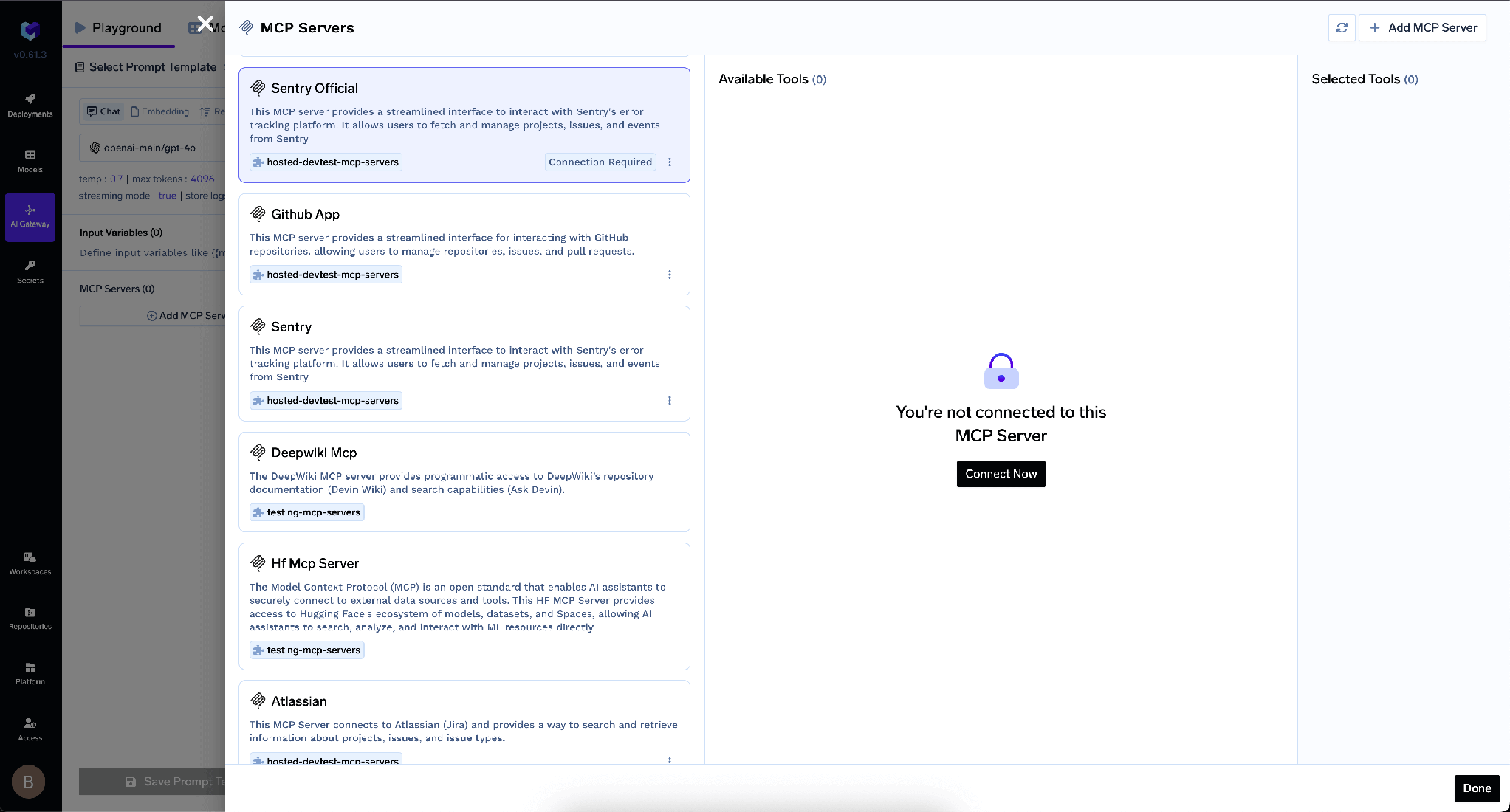
「このMCPサーバーに接続されていません」という未承認状態のサーバーと「今すぐ接続」ボタンが表示されているMCPサーバーパネル
TrueFoundryは、 インバウンド 認証(クライアントがゲートウェイに対して自身を証明する方法)と、 アウトバウンド認証(ゲートウェイがAtlassianに対して自身を証明する方法)を分離しています。これらのレイヤーは独立しています。
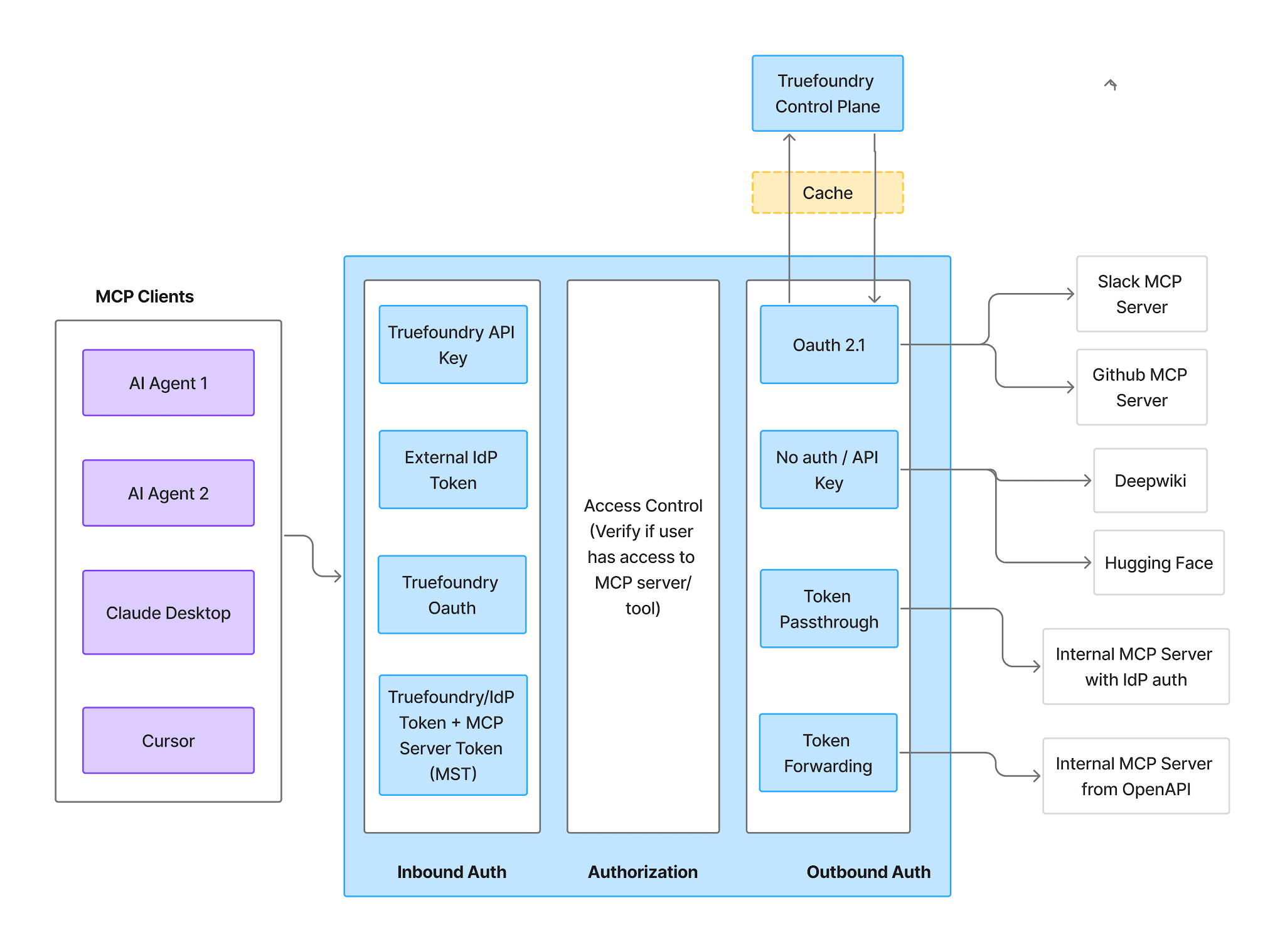
インバウンド認証、アクセス制御、アウトバウンド認証の3つの段階で構成されるMCPゲートウェイの認証および認可フロー
インバウンド — 対応している4つのメソッド:
TrueFoundry AI Gateway delivers ~3–4 ms latency, handles 350+ RPS on 1 vCPU, scales horizontally with ease, and is production-ready, while LiteLLM suffers from high latency, struggles beyond moderate RPS, lacks built-in scaling, and is best for light or prototype workloads.




AtlassianのRovo MCPサーバーのことで、https://mcp.atlassian.com/v1/mcpで提供されるリモートModel Context Protocolサーバーです。Jira、Confluence、Compassを、エージェントが呼び出せるツールとして公開し、課題の検索、ページの読み取り、チケットの作成が可能です。OAuth2を使用し、事前に組織の管理者が接続元のドメインを許可リストに追加する必要があります。
2段階で行います。まず、組織の管理者がApps → AI settings → Rovo MCP server → Allowed domainsで、TrueFoundryのコントロールプレーンのドメインを追加します。次に、TrueFoundryでMCP Gateway → Add MCP Server → Atlassianを開き、URLをhttps://mcp.atlassian.com/v1/mcpに、認証をOAuth2に設定し(client IDやsecretは不要)、コラボレーターを追加して保存し、各ユーザーにConnect Nowをクリックしてもらいます。
はい。各ユーザーは既存のJira、Confluence、Compassの権限で操作するため、誰かの代理で動作するエージェントは、その人が閲覧できるものだけを参照します。これは上限ではなく下限です。ツール単位の切り替えと承認ポリシーで、さらに絞り込んでください。
はい。TrueFoundryはお客様のVPC、オンプレミス、エアギャップ環境、ハイブリッド環境で動作するため、多数のプロバイダーにまたがってルーティングする場合でも、プロンプトとレスポンスがお客様のドメインの外に出ることはありません。
はい。MCP Gateway、Agent Gateway、そしてツール単位のアクセス制御を備えたMCP & Agents Registryが含まれています。LangGraph、CrewAI、AutoGen、または独自のフレームワークで構築されたエージェントを、すべて一元的に統制できます。
はい。ゲートウェイはOpenTelemetryに準拠しており、Grafana、Datadog、Prometheus、またはお好みのスタックに接続できます。プロンプトからツール、モデルの実行まで、すべてのリクエストを追跡するため、既存のシステムを大幅に変更することなく、統合されたロギングを実現できます。
.png)
.png)
.webp)
.webp)

.png)
.png)
.png)
.png)
.png)
.png)
.png)

.png)





