


.png)
October 15, 2026
|
5 minutos de lectura


Obtenga acceso instantáneo a un entorno TrueFoundry en vivo. Implemente modelos, dirija el tráfico de LLM y explore la plataforma completa: su sandbox estará listo en segundos, sin necesidad de tarjeta de crédito.



Published: October 7, 2026
¡Una forma increíblemente rápida de crear, rastrear e implementar sus modelos!
Cada pocas semanas aparecen nuevos proveedores de inferencia para modelos de pesos abiertos, cada uno prometiendo más tokens por segundo en el mismo puñado de modelos que todo el mundo ya utiliza. El problema para los equipos de ingeniería rara vez es si un proveedor es lo suficientemente rápido. El problema es lo que viene después: una nueva URL base, una nueva clave de API, una nueva configuración de observabilidad y un conjunto de rutas de código de aplicación que ahora deben probarse frente a otro esquema más. La llegada de Wafer a TrueFoundry AI Gateway elimina este segundo problema, dejando solo la primera cuestión: ¿es el modelo lo suficientemente rápido para la carga de trabajo?
TrueFoundry AI Gateway se sitúa entre las aplicaciones y todos los modelos que estas invocan, exponiendo una única interfaz compatible con OpenAI, independientemente del proveedor que esté sirviendo la solicitud. En lugar de que una aplicación mantenga un cliente diferente, una clave distinta y una política de reintento específica para cada proveedor, envía todas las solicitudes a un único punto de conexión y deja que el Gateway resuelva a dónde debe dirigirse realmente esa solicitud.
Esa resolución se produce a través de lo que TrueFoundry denomina Modelos Virtuales: identificadores lógicos de modelos que se asignan a uno o más proveedores físicos, con un enrutamiento basado en prioridad, peso o latencia. Los nuevos proveedores no requieren código de integración adicional en el lado de la aplicación. Se añaden como una cuenta de proveedor y un conjunto de modelos registrados, y cualquier aplicación que ya apunte al Gateway puede empezar a utilizarlos en el momento en que se activen.
Wafer es un proveedor de inferencia alojado diseñado específicamente para servir modelos de pesos abiertos con gran rapidez. Su propuesta no es un catálogo de modelos más amplio, sino una ejecución más veloz de los modelos que los equipos ya quieren utilizar, lograda mediante la optimización de toda la pila de inferencia para hardware específico en lugar de servir modelos sobre una pila genérica. A través de TrueFoundry, esa velocidad está disponible para GLM 5.2, servido como una finalización de chat serverless con streaming y llamadas a herramientas.
Wafer también trata el manejo de datos como una opción de primer nivel en lugar de un complemento empresarial. Las solicitudes pueden marcarse para una retención de datos cero caso por caso, y Wafer aísla el tráfico y ofrece un tiempo de actividad respaldado por SLA para las cargas de trabajo que necesitan esas garantías, sin requerir un nivel de contrato independiente solo para activar la opción.
Conectar ambos es cuestión de registrar a Wafer como una cuenta de proveedor dentro de la sección de Modelos del Gateway. El formulario de cuenta solicita una URL base, que por defecto es el punto de conexión pass.wafer.ai/v1 de Wafer, una clave de API y un interruptor para la retención de datos cero, que viene activado por defecto. Al activarlo, se indica al Gateway que adjunte una cabecera Wafer-ZDR: required en cada solicitud enviada a Wafer, de modo que el comportamiento de retención se aplique a nivel de solicitud en lugar de depender de una configuración global de la cuenta.
Una vez que la cuenta existe, los modelos de chat individuales se registran por su nombre para mostrar y su ID de modelo exacto de Wafer, como por ejemplo glm-5.2. Lo que hace que esta integración sea inusualmente ligera es que la API de Wafer ya utiliza de forma nativa el esquema de finalizaciones de chat de OpenAI. El adaptador de proveedor del Gateway, que normalmente traduce las solicitudes al formato propio de un socio, no tiene nada que traducir aquí. Pasa la solicitud prácticamente sin cambios, que es la misma razón por la que los clientes existentes compatibles con OpenAI pueden apuntar a Wafer directamente cambiando solo la URL base y la clave.
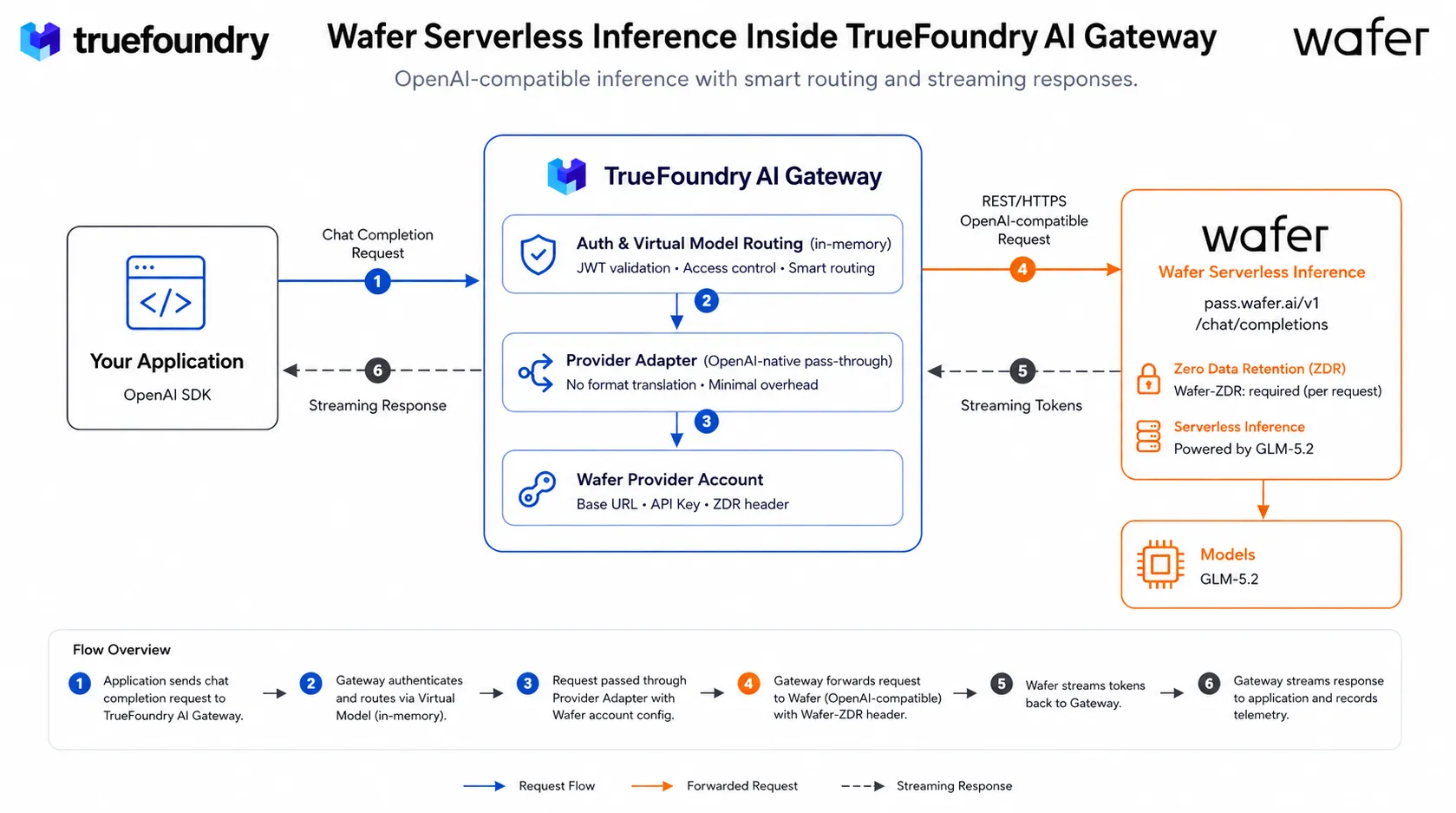
Una solicitud dirigida a un modelo respaldado por Wafer sigue la misma ruta que cualquier otro modelo en el Gateway:
1. Una aplicación llama al punto de conexión de finalizaciones de chat del Gateway con un identificador de modelo con el formato tu-cuenta-wafer/glm-5.2, utilizando el SDK estándar de OpenAI.
2. El Gateway valida el JWT de la solicitud frente a claves públicas en caché y comprueba el acceso del llamante frente a un mapa en memoria de usuarios a modelos, todo ello sin realizar una llamada externa.
3. El identificador del Modelo Virtual se resuelve en la cuenta de proveedor de Wafer registrada, incluyendo su URL base, clave de API y configuración de retención de datos cero.
4. La solicitud se reenvía a pass.wafer.ai/v1/chat/completions a través de HTTPS. Dado que Wafer ya utiliza el esquema de OpenAI, el adaptador de proveedor del Gateway no realiza cambios de formato, solo adjunta la cabecera Wafer-ZDR cuando la retención está configurada como requerida.
5. Wafer ejecuta la inferencia en el modelo GLM 5.2 solicitado y transmite los tokens a medida que se generan.
6. El Gateway transmite la respuesta de vuelta a la aplicación y publica de forma asíncrona el recuento de tokens, la latencia y el coste en su canal de telemetría, igual que lo haría para cualquier otro proveedor.
Ninguno de estos pasos es exclusivo de Wafer. Esa es la clave: un nuevo proveedor de inferencia rápida se convierte en un destino de enrutamiento en lugar de en una nueva superficie de integración, lo que permite que una cuenta de Gateway incorpore nuevos proveedores a medida que demuestran su valía sin que cada aplicación necesite un cambio de código.
Desde el panel de control de TrueFoundry, abre AI Gateway, ve a Models y selecciona Wafer para añadir una cuenta y registrar tus modelos de chat. Llámalos a través del Playground o directamente mediante el cliente compatible con OpenAI, configurando el modelo con el nombre de tu cuenta y el ID del modelo. Los pasos completos de configuración y los ejemplos de código se encuentran en la documentación de TrueFoundry AI Gateway para Wafer, junto con la guía de configuración del router de Wafer.
TrueFoundry AI Gateway ofrece una latencia de entre 3 y 4 ms, gestiona más de 350 RPS en una vCPU, se escala horizontalmente con facilidad y está listo para la producción, mientras que LitellM presenta una latencia alta, tiene dificultades para superar un RPS moderado, carece de escalado integrado y es ideal para cargas de trabajo ligeras o de prototipos.





Las últimas noticias, artículos y recursos enviados a tu bandeja de entrada
.png)
.webp)
.png)
.png)
.png)


.png)
.png)
.png)
.png)


