September 21, 2026
|
Lesedauer: 5 Minuten


Erhalten Sie sofortigen Zugriff auf eine TrueFoundry-Live-Umgebung. Stellen Sie Modelle bereit, leiten Sie den LLM-Verkehr weiter und erkunden Sie die gesamte Plattform — Ihre Sandbox ist in Sekundenschnelle einsatzbereit, ohne dass eine Kreditkarte erforderlich ist.



Published: September 11, 2026
.webp)
Unglaublich schnelle Methode zum Erstellen, Verfolgen und Bereitstellen Ihrer Modelle!
Fragen Sie Ihr Sicherheitsteam, wie viele MCP-Server derzeit in Ihrem Unternehmen laufen. Wenn sie diese Frage mit Zuversicht beantworten können, sind Sie den meisten Unternehmen voraus. Wenn nicht, haben Sie ein Governance-Problem, das bereits in Produktion ist.
Die Einführung von MCP ging schnell. Teams verbanden Agenten über MCP-Server mit GitHub, Slack, internen Datenbanken und Drittanbieter-APIs, oft ohne IT-Überprüfung, ohne Richtlinie für Anmeldeinformationen und ohne Möglichkeit für das Sicherheitsteam, zu sehen, worauf diese Server zugreifen konnten. Das Protokoll ist gerade deshalb nützlich, weil es Werkzeugverbindungen einfach macht. Diese Einfachheit ist es auch, die unkontrollierte MCP-Bereitstellungen zu einem echten Sicherheitsrisiko macht.
MCP-Server sind keine passiven APIs. Sie gewähren KI-Agenten direkten, programmatischen Zugriff auf sensible Systeme. Diese Agenten handeln auf der Grundlage autonomer Schlussfolgerungen, nicht auf überprüften Codepfaden. Wie ein führender Sicherheitsexperte bei Medtronic es ausdrückte: „MCP eröffnet viele Möglichkeiten, sehr schnell großen Schaden anzurichten.“ Gartner prognostiziert, dass 70 % der Softwareentwicklungsteams, die multimodale Anwendungen entwickeln, bis 2028 KI-Gateways nutzen werden, gegenüber 25 % im Jahr 2025. Die Teams, die jetzt Governance aufbauen, werden in der Lage sein, sicher zu skalieren.
Dieser Leitfaden behandelt, was MCP-Governance für Unternehmen erfordert, warum Standard-Sicherheitstools nicht ausreichen, wie man das Vier-Säulen-Framework aufbaut, auf das sich Compliance-Teams verlassen können, und wie TrueFoundry all dies in Ihrer eigenen Cloud implementiert.
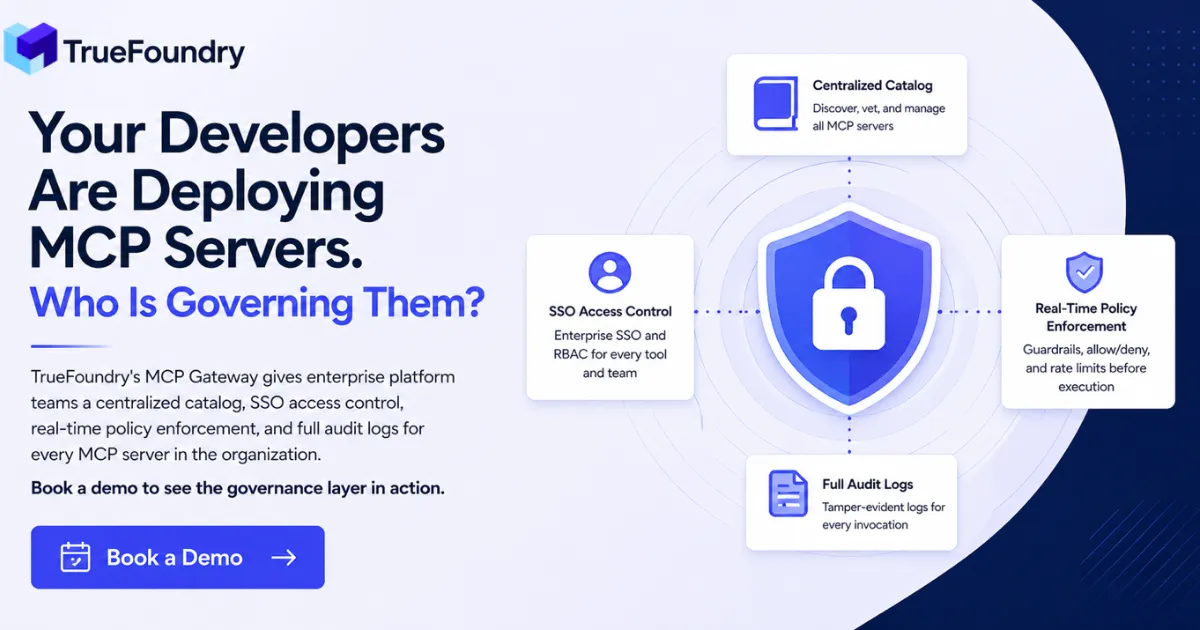
MCP-Governance für Unternehmen ist das vollständige operative Framework zur Verwaltung, welche MCP-Server in Ihrem Unternehmen existieren, wer darauf zugreifen kann, was sie tun dürfen und was bei ihrer Nutzung aufgezeichnet wird. Es ist kein Richtliniendokument. Es ist eine durchgesetzte Infrastruktur.
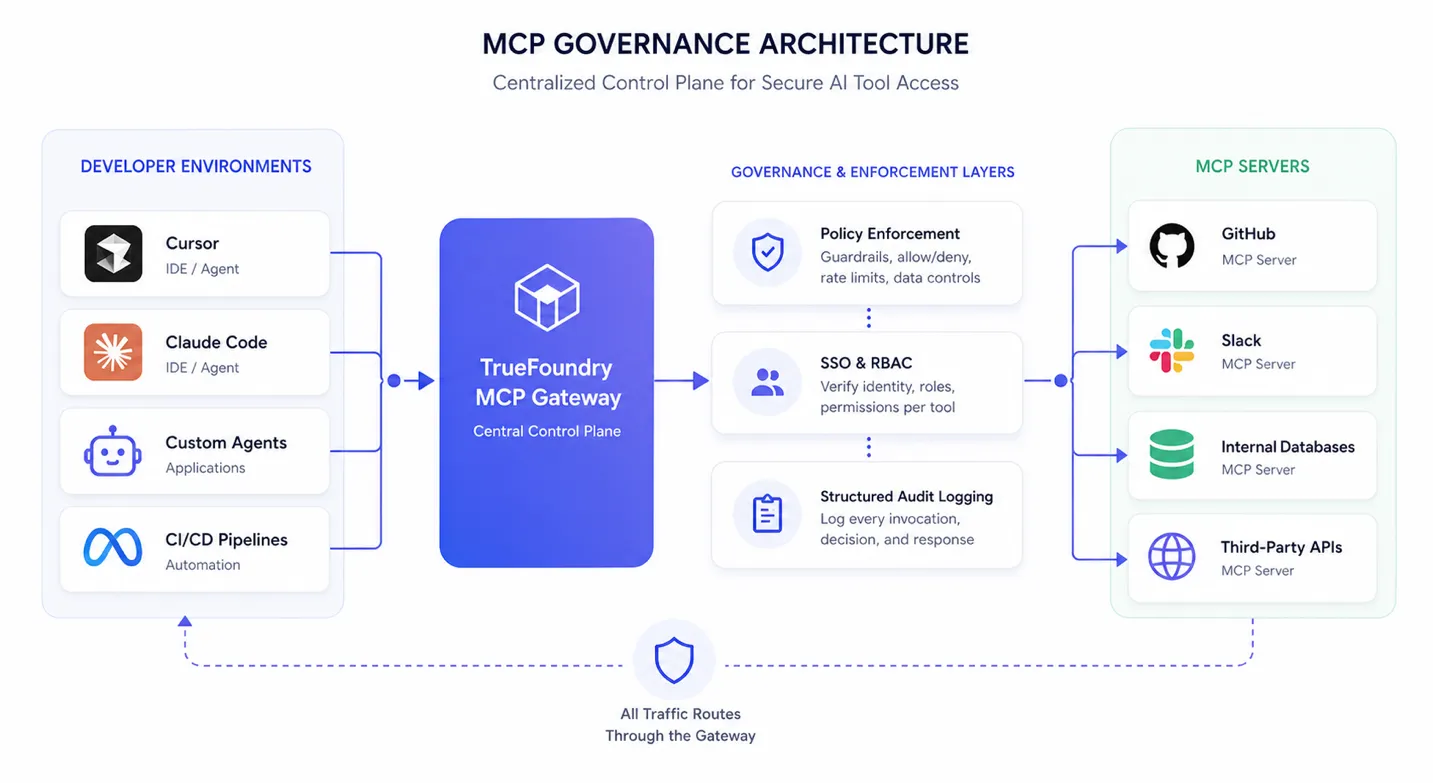
Die meisten Teams unterschätzen den Umfang. Governance umfasst jeden MCP-Server in der Umgebung: Drittanbieter-Tools, die Entwickler ohne IT-Überprüfung verbunden haben, interne Tools, die Produktteams entwickelt und bereitgestellt haben, und MCP-Server, die in IDE-Konfigurationen in Cursor, Claude Code und ähnlichen Tools eingebettet sind. Wenn ein MCP-Server ein Produktionssystem erreichen kann, fällt er in den Geltungsbereich.
MCP-Governance unterscheidet sich auch von der Standard-API-Governance in einer Weise, die für den Aufbau relevant ist. Ein REST-API-Aufruf führt einen deterministischen Codepfad aus, den ein Entwickler geschrieben und überprüft hat. Ein MCP-Tool-Aufruf ist eine autonome Entscheidung, die ein KI-Agent zur Laufzeit auf der Grundlage seiner Schlussfolgerungen trifft. Das Bedrohungsmodell, die Prüfanforderungen und die Kontrollen zur Aufrechterhaltung der Rechenschaftspflicht sind alle unterschiedlich. MCP wie eine konventionelle API-Integration zu behandeln, führt dazu, dass Unternehmen Prüflücken aufweisen, die sie einem Regulator nicht erklären können.
MCP-Server operieren innerhalb der Denklogik eines KI-Agenten. Ein traditioneller API-Aufruf wird deterministisch durch Anwendungscode ausgelöst. Ein MCP-Tool-Aufruf hingegen wird ausgelöst, wenn ein Agent zur Laufzeit feststellt, dass ein Tool für eine bestimmte Aufgabe geeignet ist. Diese Entscheidung wird durch die Modelllogik und nicht durch einen explizit definierten Kontrollfluss beeinflusst, was die Sichtbarkeit reduziert, die Entwickler normalerweise darüber haben, wie und warum ein Tool aufgerufen wird. In diesem Modell wird die Denklogik effektiv Teil des Kontrollpfads, ist aber nicht direkt über Standard-Anwendungssicherheitstools beobachtbar.
Sicherheitsforscher haben dies in der Produktion dokumentiert. Prompt-Injection-Angriffe, die über MCP-Tool-Beschreibungen erfolgen, lenken das Agentenverhalten um, ohne eine einzige Codezeile zu berühren. Die Offenlegung von Anmeldeinformationen durch schlecht konfigurierte MCP-Server schafft Zugriffspfade, für die Perimeterkontrollen nie ausgelegt waren. Dies sind keine theoretischen Angriffsszenarien aus Forschungsarbeiten. Es sind dokumentierte Vorfälle aus realen Unternehmensbereitstellungen.
Wenn Entwickler MCP-Server ohne IT-Prüfung bereitstellen oder sich mit ihnen verbinden, umgehen sie jede Kontrolle, die normalerweise für eine neue Systemintegration gilt: Anbieter-Sicherheitsbewertung, Datenzugriffsklassifizierung und Zugriffs-Bereitstellungs-Workflows. Der Server geht ohne die Dokumentation, Überwachung oder Einschränkungen in Produktion, die jedes andere Unternehmenssystem mit sich bringt.
Ohne ein zentrales Register gibt es keine zuverlässigen Antworten auf grundlegende Sicherheitsfragen. Welche MCP-Server sind aktiv? Welche Anmeldeinformationen besitzen sie? Welche Datenbanken können sie abfragen? Welche externen Dienste können sie aufrufen? Diese Unsichtbarkeit schließt diese Server vollständig von Schwachstellenanalysen, Anbieter-Risikobewertungen und Penetrationstests aus.
Ein einzelner nicht genehmigter MCP-Server mit Lesezugriff auf ein internes CRM oder Code-Repository ist ein ungeprüfter Datenpfad, den Perimeterkontrollen nicht erfassen werden. Der Datenverkehr stammt aus dem internen Netzwerk, von einem Entwicklerrechner, der dort sein soll.
Wenn ein Agent sich mit einem MCP-Server verbindet und tools/list aufruft, antwortet der Server mit Tool-Namen, Beschreibungen und Parameterschemata. Der Agent verwendet diese Metadaten, um zu entscheiden, welche Tools aufgerufen und wie sie verwendet werden sollen. Manipulieren Sie diese Metadaten, und Sie lenken das Verhalten des Agenten um, ohne eine Code-Schwachstelle auszunutzen.
Die Vergiftung von Tool-Beschreibungen bettet bösartige Anweisungen in Tool-Metadaten ein, die den Agenten dazu veranlassen, unbeabsichtigte Aktionen auszuführen: Daten zu exfiltrieren, Tools außerhalb ihres vorgesehenen Umfangs aufzurufen oder Sicherheitsprüfungen zu umgehen, während er scheinbar seine zugewiesene Aufgabe ausführt. Der bösartige Inhalt wird im HTTP-Antworttext vom MCP-Server übertragen, insbesondere innerhalb der tools/list-Nutzlast. Standard-Webanwendungs-Firewalls und API-Sicherheitstools haben zwar Einblick in HTTP-Antworttexte, können diesen Angriff jedoch nicht erkennen, da der bösartige Inhalt semantisch eingebettete natürliche Sprache ist und keine syntaktische Anomalie wie eine bekannte Exploit-Signatur oder ein fehlerhafter Header. Der Angriff ist auf der logischen Ebene erfolgreich, wo der Agent Tool-Beschreibungen als legitime Anweisungen interpretiert und entsprechend handelt.
Die MCP Pre Tool Guardrails von TrueFoundry prüfen Tool-Parameter und Aufrufargumente vor der Ausführung mithilfe einer modellbasierten Prompt-Injection-Erkennung. Wenn Tool-Aufrufargumente umgeleitete Anweisungen enthalten, wird die Ausführung blockiert, bevor das Tool ausgeführt wird, und die Erkennung wird im Anforderungs-Trace protokolliert.
MCP-Server, die gemeinsame API-Schlüssel oder Dienstkonto-Tokens verwenden, können nicht die zuordenbaren Audit-Datensätze erstellen, die Compliance-Frameworks erfordern. Wenn zehn Agenten einen Satz von Anmeldeinformationen teilen, gibt es keine Möglichkeit, einen bestimmten Tool-Aufruf einem bestimmten Benutzer, einer Agenteninstanz oder einem Team zuzuordnen. In einem regulierten Umfeld ist diese Lücke keine Unannehmlichkeit. Es ist ein direkter Compliance-Verstoß.
HIPAA verlangt Audit-Trails, die einem identifizierbaren Benutzer oder Dienst für jeden Zugriff auf geschützte Gesundheitsinformationen zugeordnet werden können. SOC2 CC6 erfordert Zugriffskontrollen mit Nachweis der Durchsetzung. Das Rechenschaftsprinzip der DSGVO verlangt von Organisationen, nachzuweisen, dass die Datenverarbeitung autorisiert und dokumentiert wurde. MCP-Bereitstellungen mit gemeinsamen Anmeldeinformationen können keine dieser Anforderungen erfüllen. TrueFoundry ersetzt gemeinsame Anmeldeinformationen durch Personal Access Tokens, die an einzelne Benutzer gebunden sind, und Virtual Account Tokens für den Zugriff auf Anwendungsebene, sodass jeder Tool-Aufruf eine überprüfbare Identität trägt.
Ein vollständiges Enterprise MCP-Governance-Framework erfordert vier zusammenwirkende Funktionen: einen zentralisierten Katalog, identitätsbasierte Zugriffskontrollen, strukturierte Audit-Protokollierung und Echtzeit-Richtliniendurchsetzung. Jede hängt von den anderen ab. Sie können Zugriffsrichtlinien nicht durchsetzen, bevor Sie wissen, welche Server existieren. Sie können keinen Audit-Trail ohne Identitätszuordnung erstellen. Und nachträgliche Audit-Protokolle ohne Echtzeit-Durchsetzung sind forensische Aufzeichnungen, keine Sicherheitskontrollen.
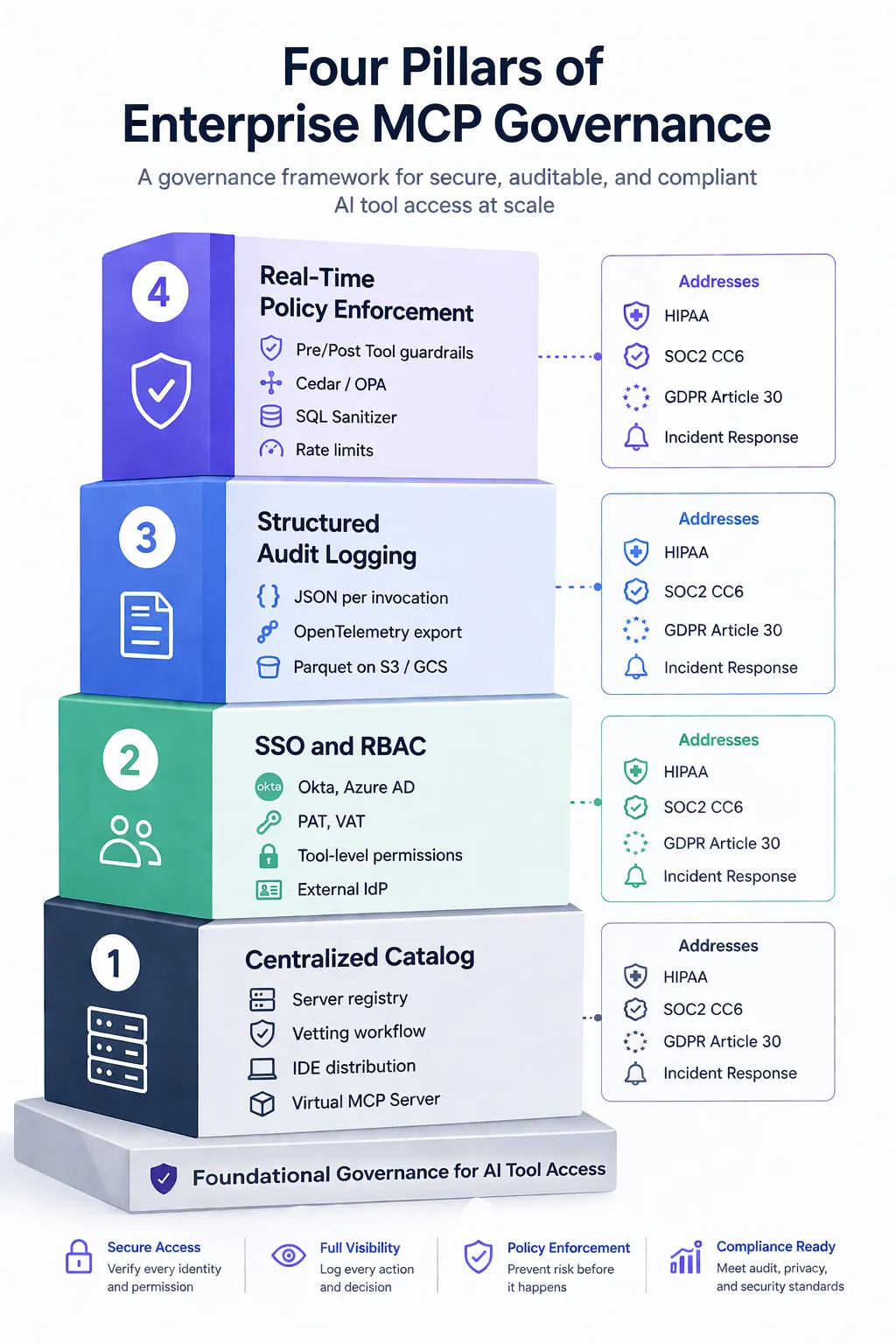
Vier Säulen: Kernfunktion, TrueFoundry-Implementierung und Compliance-Abdeckung
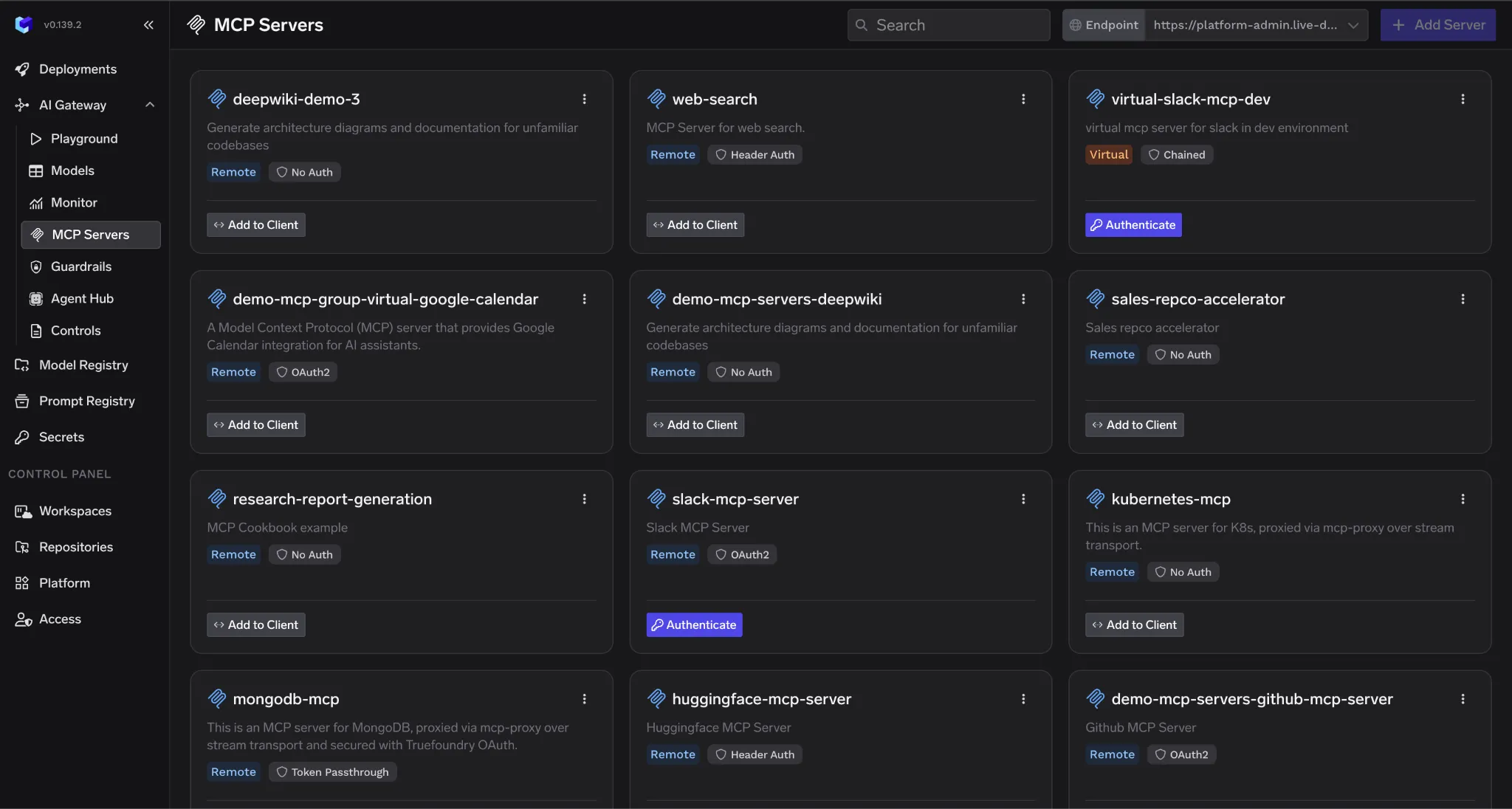
Der Katalog ist das maßgebliche Register aller genehmigten MCP-Server in Ihrer Organisation. Jeder Eintrag enthält die Informationen, die Sicherheitsteams zur Risikobewertung benötigen: Servername, Eigentümerteam, Datenzugriffsbereich, Authentifizierungsmethode, Genehmigungsstatus, Verbindungsparameter und alle Nutzungsbeschränkungen wie genehmigte Benutzergruppen oder Ratenbegrenzungen.
Neue Server durchlaufen einen Prüfungs-Workflow. Die Überprüfung der Tool-Beschreibung filtert Vergiftungsrisiken heraus, bevor der Server Entwicklerumgebungen erreicht. Eine Datenzugriffsbewertung bestimmt, worauf der Server zugreifen kann. Eine explizite Genehmigung steuert die Verteilung. Nichts davon erfordert Änderungen am MCP-Server selbst. Es geschieht auf der Katalogebene, und einzelne Serverimplementierungen bleiben unberührt.
Der Katalog übernimmt auch die Verteilung. Entwickler übernehmen vorab genehmigte Serverkonfigurationen direkt in ihre IDE-Integrationen, anstatt Server manuell zu konfigurieren. Nur vom Katalog genehmigte Server erreichen Entwicklerrechner. Die Virtual MCP Server-Funktion von TrueFoundry erweitert dies: Plattformteams stellen kuratierte Tool-Untergruppen aus mehreren registrierten Servern zusammen und legen nur das offen, was ein bestimmtes Team oder ein Anwendungsfall benötigt, ohne neue Infrastruktur bereitzustellen.
Der MCP-Zugriff muss über denselben Identitätsanbieter erfolgen, der alles andere in der Organisation regelt. TrueFoundry unterstützt OAuth2 Two-Legged- und Three-Legged-Flows, SAML 2.0 und die direkte Integration mit Okta, Azure Active Directory, Auth0, Cognito und jedem JWKS-kompatiblen IdP. Der MCP-Zugriff wird über dieselben Onboarding- und Offboarding-Workflows bereitgestellt und entzogen, die E-Mail, Repositories und Cloud-Konsolen abdecken. Wenn ein Entwickler das Unternehmen verlässt, wird der MCP-Zugriff automatisch entzogen.
Das Gateway unterstützt drei eingehende Authentifizierungsmethoden, je nachdem, wer den Aufruf tätigt. Personal Access Tokens (PATs) werden in der TrueFoundry UI unter Einstellungen > API-Schlüssel generiert, sind an einzelne Benutzer gebunden und die Standardwahl für Entwicklungs-Workflows. Virtual Account Tokens (VATs) sind Dienstkonten mit definierten Berechtigungen, geeignet für Produktionsagenten und Server-zu-Server-Workflows. Externe IdP-Tokens ermöglichen es Benutzern ohne TrueFoundry-Konten, sich über ihren eigenen Identitätsanbieter zu authentifizieren, was B2B SaaS und kundenorientierte Agenten-Bereitstellungen abdeckt.
Für die ausgehende Authentifizierung zu nachgelagerten MCP-Servern verwaltet TrueFoundry den gesamten Lebenszyklus der Anmeldeinformationen über sechs Muster hinweg. OAuth-Autorisierungscode-Flows regeln den benutzerbezogenen Zugriff auf Dienste wie GitHub und Slack, wobei das Gateway die Zustimmung, die Token-Speicherung und die automatische Aktualisierung verwaltet. OAuth-Client-Credentials-Flows regeln den Server-zu-Server-Zugriff. Gemeinsame und individuelle API-Schlüsselmodi decken einfachere Fälle ab, bei denen das Gateway die richtigen Anmeldeinformationen pro Anfrage injiziert. Token-Passthrough leitet das eingehende Token unverändert weiter, wenn der MCP-Server es direkt validieren kann. Die Token-Weiterleitung über den x-tfy-mcp-headers-Header behandelt Szenarien, in denen der MCP-Server ein separates Anmeldeinformationssystem verwendet.
MCP-Server-Zugriffskontrolle: Authentifizierungsmuster in gängigen Unternehmensszenarien
RBAC-Richtlinien legen fest, welche Teams oder Einzelpersonen welche Server und Tools aufrufen können. Diese Richtlinien befinden sich am Gateway, nicht auf einzelnen MCP-Servern, sodass eine Richtlinienaktualisierung sofort für alle Clients wirksam wird, ohne dass der Server neu bereitgestellt werden muss. Ein Data-Science-Team erhält Zugriff auf Analysetools, aber nicht auf Bereitstellungsserver. Ein Sicherheitsteam erhält Lesezugriff auf alle Server zu Prüfzwecken.
Jeder MCP-Tool-Aufruf benötigt einen Log-Eintrag, der den vollständigen Aufrufkontext erfasst: Zeitstempel, Anruferidentität, MCP-Server-Identifikator, Tool-Name, Eingabeparameter, Antwortzusammenfassung, Richtlinienentscheidung mit Begründung, Guardrail-Ergebnisse pro Hook mit Ausführungszeit und Ergebnissen sowie die Gesamt-Latenz. Diese Felder müssen als strukturiertes JSON vorliegen, damit SIEM-Systeme und Compliance-Reporting-Tools sie abfragen können.
TrueFoundry steuert die Protokollierung auf zwei Ebenen. Auf Anfrageebene erfasst der Header X-TFY-LOGGING-CONFIG mit enabled: true die vollständige Anfrage. Auf Gateway-Ebene bei selbst gehosteten Bereitstellungen legt die Umgebungsvariable REQUEST_LOGGING_MODE das globale Verhalten fest: ALWAYS protokolliert jede Anfrage unabhängig von Headern, was die richtige Einstellung für regulierte Produktionsumgebungen ist. HEADER_CONTROLLED berücksichtigt die Einstellungen pro Anfrage. NEVER unterdrückt die gesamte Protokollierung für Umgebungen, in denen dies angemessen ist.
Anfragelogs sind in der TrueFoundry-Benutzeroberfläche unter AI Gateway > Monitor > Requests sichtbar. Individuelle Guardrail-Ausführungsspannen erscheinen unter AI Gateway > Monitor > Request Traces und zeigen, welche Guardrails auf welchem Hook ausgeführt wurden, den Pass/Fail-Status, die Ausführungszeit und angewendete Mutationen. Für Organisationen, die Logs an ihre eigene Infrastruktur weiterleiten, exportiert TrueFoundry über OpenTelemetry an Grafana, Datadog, Splunk und jedes OTLP-kompatible Ziel. Bei selbst gehosteten Bereitstellungen werden Log-Daten in Ihrem eigenen AWS S3, GCS oder Azure Blob Storage im Parquet-Format gespeichert und sind über Spark, DuckDB oder Athena abfragbar.
HIPAA schreibt die Aufbewahrung sicherheitsrelevanter Dokumentation für sechs Jahre vor. In der Praxis werden Audit-Logs oft für eine ähnliche Dauer aufbewahrt, um Compliance und die Untersuchung von Vorfällen zu unterstützen. Viele Finanzunterlagen folgen einem siebenjährigen Aufbewahrungsstandard. Logs müssen manipulationssicher sein, mit Zugriffskontrollen, die eine Änderung durch die Teams, die sie generieren, verhindern. Die selbst gehosteten Bereitstellungsoptionen von TrueFoundry halten alle Log-Daten innerhalb des Cloud-Kontos des Kunden und unterstützen so sowohl die Aufbewahrungs- als auch die Manipulationssicherheitsanforderungen.
Zu protokollieren, was passiert ist, ist nicht dasselbe wie es zu verhindern. Die Richtliniendurchsetzung muss zum Zeitpunkt des Aufrufs erfolgen, bevor der Tool-Aufruf den MCP-Server erreicht, damit unbefugter Zugriff blockiert und nicht erst nachträglich dokumentiert wird.
Das Guardrail-System von TrueFoundry implementiert zwei Hooks pro Tool-Aufruf. MCP Pre-Tool-Guardrails werden ausgeführt, bevor das Tool ausgeführt wird. Wenn einer von ihnen fehlschlägt, wird das Tool niemals ausgeführt, wodurch Kosten, Nebenwirkungen und Datenexposition eines fehlerhaften Aufrufs vollständig vermieden werden. Integrierte Pre-Tool-Guardrails umfassen: SQL Sanitizer, der DROP, TRUNCATE, DELETE und UPDATE ohne WHERE sowie String-Interpolationsmuster, die ein Injektionsrisiko anzeigen, abfängt; Prompt-Injection-Erkennung mittels modellbasierter Analyse für Jailbreak- und Injektionsversuche in Tool-Aufrufparametern; Secrets Detection, die API-Schlüssel, AWS-Anmeldeinformationen, JWT-Token und private Schlüssel abfängt, bevor sie Backend-Dienste erreichen; sowie Cedar- und OPA-Richtlinien-Guardrails für deklarative, fein granulare Zugriffskontrolle bis hin zu spezifischen Tool-Argumenten.
MCP Post-Tool-Guardrails werden ausgeführt, nachdem das Tool zurückkehrt, bevor das Ergebnis den Agenten erreicht. Integrierte Post-Tool-Guardrails umfassen: Code Safety Linter, der eval, exec, os.system, Subprocess-Aufrufe und gefährliche Shell-Befehle in der Tool-Ausgabe kennzeichnet; PII-Erkennung, die persönliche Informationen mit konfigurierbaren Entitätskategorien findet und redigiert; und Regex-Musterabgleich für benutzerdefinierte Muster, die Zahlungskarten, interne Identifikatoren und domänenspezifische sensible Daten abdecken. Externe Anbieter wie AWS Bedrock Guardrail, Azure Content Safety, Azure Prompt Shield, CrowdStrike und Google Model Armor integrieren sich alle über dasselbe Hook-System.
Durchsetzungsstrategien sind pro Guardrail konfigurierbar. „Enforce“ blockiert bei Verstößen und bei Guardrail-Fehlern. „Enforce But Ignore On Error“ blockiert bei Verstößen, lässt aber Anfragen durch, wenn der Guardrail-Anbieter nicht verfügbar ist, was der empfohlene Standard für die Produktion ist. „Audit“ protokolliert Verstöße ohne zu blockieren, der richtige Modus während der ersten Einführung. Die empfohlene Reihenfolge ist zuerst Audit, dann Enforce But Ignore On Error und dann vollständiges Enforce, wenn das Vertrauen wächst.
MCP-Governance ist ein sequenzielles Programm. Jeder Schritt baut auf dem vorherigen auf. Sie können keine Zugriffsrichtlinien durchsetzen, bevor Sie wissen, welche Server existieren. Sie können keinen aussagekräftigen Audit-Trail erstellen, bevor die Identitätszuweisung erfolgt ist.
Beginnen Sie mit einer vollständigen Prüfung jedes laufenden MCP-Servers in Entwicklerumgebungen, CI/CD-Pipelines, Produktionsagenten-Bereitstellungen und IDE-Konfigurationen. Dies umfasst Server, die Entwickler lokal in Cursor oder Claude Code ohne Beteiligung der IT konfiguriert haben. Die Kombination aus automatisiertem Scannen von Cloud-Umgebungen und einem Selbstberichtsprozess für lokale Entwicklerkonfigurationen liefert das vollständigste Bild für große Organisationen.
Erfassen Sie für jeden Server: Name und Zweck, Eigentümerteam, Datenzugriffsbereich, Authentifizierungsmethode (falls vorhanden) und wie lange er bereits läuft. Ziel ist ein genaues Bild dessen, was vor der Einführung der Governance existierte, und keine kuratierte Liste bereits genehmigter Elemente.
Bevor Sie Server migrieren, definieren Sie das Metadaten-Schema und den Genehmigungsworkflow. Wichtige Entscheidungen: wer die Genehmigungsbefugnis für verschiedene Risikostufen hat, was die Prüfliste abdeckt und welche Ergebnisse die Katalogregistrierung blockieren. Legen Sie diese Kriterien fest, bevor Sie Server kategorisieren, damit sie konsistent angewendet werden.
Gehen Sie das Inventar durch und kategorisieren Sie jeden Server als für den Katalog genehmigt, zur Überprüfung ausstehend oder bis zur Behebung blockiert. Legen Sie einen festen Termin fest, bis zu dem alle Produktionsserver im Katalog registriert sein müssen, und kommunizieren Sie klar, dass nicht katalogisierte Server nach diesem Datum am Gateway blockiert werden. Die Frist schafft die Dringlichkeit, die Teams zum Handeln bewegt.
Leiten Sie den gesamten MCP-Verkehr über das Gateway, bevor Sie Blockierungsrichtlinien durchsetzen. Beginnen Sie mit REQUEST_LOGGING_MODE auf ALWAYS gesetzt. Der gesamte Verkehr wird durchgeleitet, alle Aufrufe werden aufgezeichnet, noch nichts wird blockiert. Der Betrieb in diesem Modus für zwei bis vier Wochen liefert Ihnen eine Basislinie der realen Verkehrsmuster, bevor die Durchsetzung beginnt.
Integrieren Sie das Gateway mit Ihrem Unternehmens-IdP über Zugriff > Externe Authentifizierung > Identitätsanbieter in der TrueFoundry-Benutzeroberfläche. Für Okta mit dem Standard-Autorisierungsserver lautet die JWKS-URI https://your-org.okta.com/oauth2/v1/keys. Organisationen, die einen benutzerdefinierten Okta-Autorisierungsserver verwenden, sollten stattdessen https://your-org.okta.com/oauth2/{authServerId}/v1/keys verwenden. Für Azure AD ist es https://login.microsoftonline.com/your-tenant-id/discovery/v2.0/keys, wobei die Tenant ID und Client ID als Issuer und Audience konfiguriert sind. Vergewissern Sie sich, dass jeder Aufruf im Audit-Log eine spezifische Benutzer- oder Agentenidentität anzeigt, bevor Sie zur Durchsetzung übergehen. Geteilte Dienstkonto-Identitäten in den Logs bedeuten, dass die Identitätszuordnung unvollständig ist.
Nach der Basislinienperiode aktivieren Sie die Richtliniendurchsetzung: Blockieren Sie nicht katalogisierte MCP-Server, aktivieren Sie RBAC-Richtlinien und wenden Sie Ratenbegrenzungen an. Teilen Sie den Entwicklerteams das Durchsetzungsdatum mit ausreichend Vorlaufzeit mit, um legitime Tools schnell durch die Katalogregistrierung zu bringen.
Richten Sie Benachrichtigungen für die exportierten OpenTelemetry-Daten bei anomalen Mustern ein: ungewöhnliche Anrufvolumen von einer einzelnen Agentenidentität, Zugriff auf hochsensible Tools außerhalb der genehmigten Zeiten, Richtlinienverstöße von Identitäten, die keinen MCP-Zugriff haben sollten. Die Guardrail-Ergebnisse unter AI Gateway > Monitor > Request Traces liefern Ihnen die Details, die Sie benötigen, um Schwellenwerte im Laufe der Zeit anzupassen. Überprüfen Sie die Alarmregeln vierteljährlich, wenn Ihre MCP-Bereitstellung wächst.
Drei Anforderungen treten in allen regulierten Umgebungen konsistent auf: zuordenbare Zugriffsaufzeichnungen, die mit verifizierten Identitäten verknüpft sind, Datenresidenzkontrollen, die sensible Daten innerhalb definierter Grenzen halten, und Anbieter-Risikodokumentation für die Governance-Infrastruktur selbst.
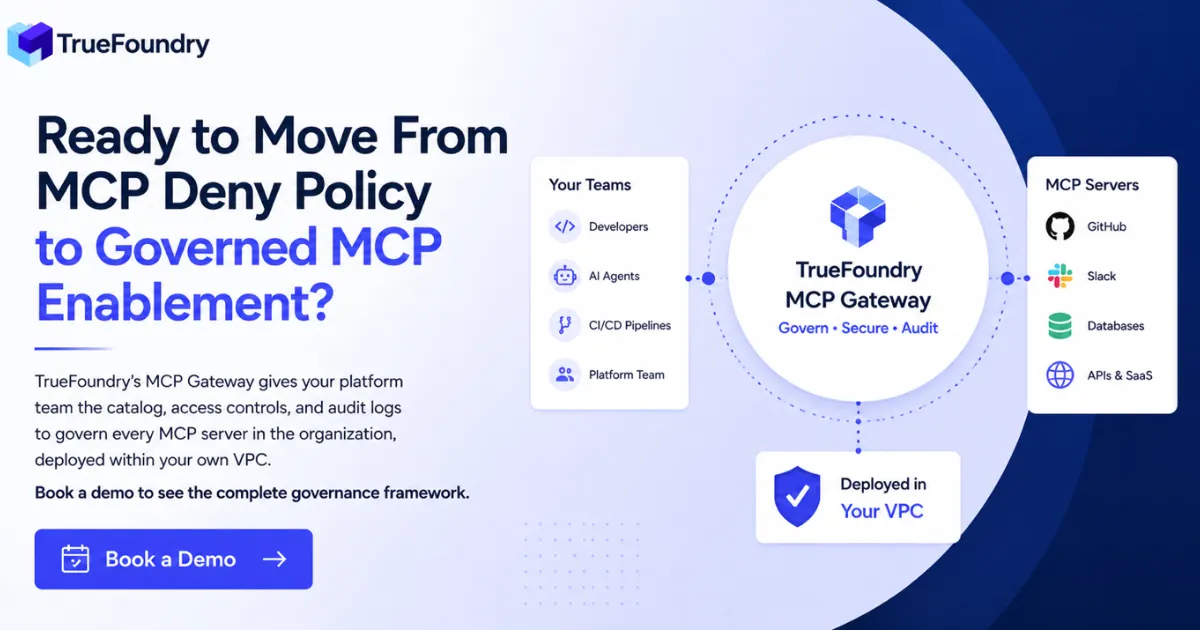
TrueFoundrys MCP Gateway bietet alle vier Governance-Säulen von einer einzigen Steuerungsebene aus, die im eigenen Cloud-Konto des Kunden bereitgestellt wird. Plattformteams verwalten den gesamten Governance-Stack über eine einzige Schnittstelle, ohne individuelle MCP-Server-Implementierungen ändern zu müssen. Kein MCP-Traffic verlässt die Unternehmensgrenzen.
Unternehmen wie NVIDIA, Zscaler, Siemens Healthineers und Automation Anywhere nutzen TrueFoundry, um von Ad-hoc-MCP-Bereitstellungen zu kontrollierten, regulierten Umgebungen überzugehen. Für Unternehmen, die KI-Agenten-Workloads in großem Umfang betreiben, haben die richtliniengesteuerten Kostenkontrollen, Budgetlimits und der Caching-Layer von TrueFoundry zu erheblichen Reduzierungen der monatlichen Ausgaben für Inferenz und Tool-Aufrufe geführt. Kontaktieren Sie TrueFoundry für fallspezifische Zahlen, basierend auf Ihrem tatsächlichen Aufrufvolumen und Modellmix.
TrueFoundry AI Gateway bietet eine Latenz von ~3—4 ms, verarbeitet mehr als 350 RPS auf einer vCPU, skaliert problemlos horizontal und ist produktionsbereit, während LiteLM unter einer hohen Latenz leidet, mit moderaten RPS zu kämpfen hat, keine integrierte Skalierung hat und sich am besten für leichte Workloads oder Prototyp-Workloads eignet.




Ein MCP-Proxy leitet Anfragen von Clients an Server mit minimaler Verarbeitung weiter. Er kann grundlegendes Routing oder Logging hinzufügen, erzwingt aber keine Zugriffsrichtlinien, verwaltet keinen Authentifizierungslebenszyklus, wendet keine Schutzmechanismen an und pflegt keinen Serverkatalog. Ein Gateway ist die vollständige Steuerungsebene: Es regelt, was geschehen darf, nicht nur, was geschehen ist.
Für den Unternehmenseinsatz ist ein Proxy nicht ausreichend. HIPAA, SOC2 und DSGVO erfordern alle erzwungene Zugriffskontrollen und zuordenbare Audit-Datensätze. Das MCP-Gateway von TrueFoundry arbeitet im Aggregator-Modus, bei dem ein einzelner Gateway-Endpunkt Anfragen an mehrere registrierte MCP-Server weiterleitet, oder im Proxy-Modus, bei dem es einzelnen Servern in verschiedenen Netzwerken vorgeschaltet ist. Die Governance-Funktionen sind bei beiden Bereitstellungsmustern konsistent.
Die Integration erfolgt über „Access > External Auth > Identity Provider“ in der TrueFoundry-Benutzeroberfläche. Klicken Sie auf „New Identity Provider“ und geben Sie Ihre JWKS-URI, den Issuer und optional die Audience für eine zusätzliche Token-Validierung ein. Für Okta: Die JWKS-URI ist https://your-org.okta.com/oauth2/v1/keys. Für Azure AD: https://login.microsoftonline.com/your-tenant-id/discovery/v2.0/keys, wobei die Tenant-ID als Issuer und die Client-ID als Audience dient.
Nach der Registrierung erstellen Sie eine externe Identität, die JWTs von Ihrem IdP dem TrueFoundry-Zugriff zuordnet, fügen Sie sie als Kollaborator auf den relevanten MCP-Servern mit der entsprechenden Berechtigungsstufe hinzu, und Entwickler authentifizieren sich mit ihrem bestehenden IdP-Token. Das Gateway validiert das Token, prüft die RBAC und verwaltet die gesamte nachgelagerte Authentifizierung. Entwickler benötigen niemals TrueFoundry-spezifische Anmeldeinformationen.
Ja. TrueFoundry registriert bestehende MCP-Server über Verbindungsparameter: die Server-URL und die Konfiguration für die ausgehende Authentifizierung. Es sind keine Änderungen an der Server-Implementierung erforderlich. Der Server läuft unverändert weiter. Das Gateway sitzt davor und wendet Governance-Kontrollen auf der Anforderungsebene an.
Der Migrationspfad: Jeden bestehenden Server im TrueFoundry-Katalog mit seinen Verbindungsparametern und dem Typ der ausgehenden Authentifizierung registrieren. Client-Verbindungen aktualisieren, sodass sie auf den Gateway-Endpunkt statt direkt auf den Server zeigen. Zunächst REQUEST_LOGGING_MODE: ALWAYS im Nur-Protokollierungsmodus aktivieren, um eine Verkehrs-Baseline zu erstellen. Entwickler ändern eine URL in ihrer IDE oder Agentenkonfiguration, und alles andere funktioniert weiterhin.
TrueFoundry erfasst: Zeitstempel, Aufruferidentität (Benutzer-ID, Team oder Name des virtuellen Kontos), MCP-Server-Identifikator, Tool-Name, Eingabeparameter, Antwortzusammenfassung, Richtlinienentscheidung mit Begründung, Guardrail-Ergebnisse pro Hook einschließlich der ausgeführten Guardrails, Erfolgs-/Fehlerstatus, Ausführungsverzögerung und angewendete Mutationen sowie die gesamte Aufrufverzögerung. Alles als strukturiertes JSON.
Für die SIEM-Integration exportiert TrueFoundry über OpenTelemetry, kompatibel mit Grafana, Datadog, Splunk, New Relic und jedem OTLP-Ziel. Bei selbst gehosteten Bereitstellungen werden Protokolle im Parquet-Format in S3, GCS oder Azure Blob geschrieben und sind über Spark, DuckDB oder Athena abfragbar. Der Header X-TFY-LOGGING-CONFIG steuert die Protokollierung pro Anfrage. REQUEST_LOGGING_MODE steuert das globale Verhalten auf Gateway-Ebene.
TrueFoundry begegnet Tool Description Poisoning durch den MCP Pre-Tool Guardrail-Hook, der vor jeder Werkzeugausführung ausgeführt wird. Der Prompt Injection Guardrail nutzt eine modellbasierte Erkennung, um manipulierte Anweisungen innerhalb von Werkzeugparametern und dem Aufrufkontext zu identifizieren. Wenn Aufrufargumente umgeleitete oder bösartige Anweisungen enthalten und die Durchsetzung aktiviert ist, wird die Ausführung blockiert, bevor das Werkzeug gestartet wird, und die Erkennung wird im Request-Trace mit einem detaillierten Befund aufgezeichnet.
Für die breitere Prompt-Injection-Angriffsfläche aus Dokumenten, E-Mails oder Webinhalten, die der Agent verarbeitet, scannen die LLM-Eingabe-Guardrails von TrueFoundry den Prompt, bevor er das Modell erreicht. Optionen umfassen Azure Prompt Shield, CrowdStrike und TrueFoundrys eigenen Prompt-Injection-Detektor. Der SQL Sanitizer Pre-Tool Guardrail fängt gezielt Injektionsversuche ab, die auf datenbankverbundene MCP-Server abzielen. Alle Guardrail-Ergebnisse erscheinen unter AI Gateway > Monitor > Request Traces.
Die Implementierung erfolgt in vier Phasen. Phase eins umfasst die Bestandsaufnahme und den Katalogaufbau über zwei bis drei Wochen: Prüfung bestehender MCP-Bereitstellungen, Definition des Katalogschemas und des Genehmigungsworkflows sowie Registrierung der gefundenen Server durch den Überprüfungsprozess. Phase zwei umfasst die Gateway-Bereitstellung und SSO-Integration über ein bis zwei Wochen: Bereitstellung von TrueFoundry im ALWAYS-Logging-Modus, Verbindung mit dem Unternehmens-IdP und Überprüfung, dass die Identitätszuweisung bei allen Aufrufen vollständig ist.
Phase drei läuft zwei bis vier Wochen im Nur-Logging-Modus: Erfassung realer Traffic-Muster, Ausführung von Guardrails im Audit-Modus, um zu sehen, was erfasst würde, bevor die Blockierung aktiviert wird, und Kommunikation des Durchsetzungszeitplans an die Entwicklerteams. Phase vier dauert etwa eine Woche: Umschalten der Guardrails von Audit auf Enforce But Ignore On Error, Aktivierung der RBAC-Blockierung für nicht katalogisierte Server und Einrichtung von Warnmeldungen für die exportierten Telemetriedaten. Der gesamte Zeitrahmen beträgt typischerweise sechs bis zehn Wochen für eine Organisation mit 500 Mitarbeitern, wobei die größte Variable die Größe des anfänglichen MCP-Serverbestands ist.



Die neuesten Nachrichten, Artikel und Ressourcen werden in Ihren Posteingang gesendet
.png)
.png)
.png)
.png)
.png)
.png)
.png)
.png)