
April 8, 2026
|
5 min read


Updated: April 7, 2026


Blazingly fast way to build, track and deploy your models!
If you use Databricks for data engineering and model training, you have Unity Catalog managing your data governance, MLflow tracking your experiments, and Mosaic AI handling fine tuning jobs. Databricks Model Serving works for basic use cases, but teams building multi model architectures with custom fine tuned models alongside commercial APIs, or teams deploying agents that need governed access to external tools, need a purpose built deployment layer.
This post walks through how TrueFoundry plugs into Databricks at five specific integration points: the MLflow model registry, the inference serving layer, the AI Gateway routing plane, the MCP tool governance layer, and the unified RBAC boundary. Each section includes working code and enough architectural detail that you should be able to evaluate whether this integration fits your stack.
The integration is a horizontal split across the model lifecycle. Databricks handles everything that needs proximity to your data: Delta Lake storage, Spark based feature engineering, Mosaic AI training runs, MLflow experiment tracking, and Unity Catalog governance over tables and model artifacts. TrueFoundry handles everything that needs proximity to your users: model serving on GPU optimized infrastructure, LLM hosting through vLLM or TGI or NVIDIA Dynamo, multi provider routing through an AI Gateway, MCP based agent orchestration, and inference level access control.

This is the most common entry point for teams adopting the integration. You train a model in Databricks, and you want it running as a production endpoint with autoscaling, GPU scheduling, and weight caching within the hour.
The Databricks side is standard MLflow workflow. You point MLflow at the Unity Catalog registry, run your training job, log the model artifact with a signature (required for Unity Catalog compatibility), and promote it using aliases.
Unity Catalog uses a three level namespace for models: catalog.schema.model_name. This replaces the legacy stages system (Staging, Production, Archived) with aliases like "champion" and "challenger" that you assign explicitly. The namespace also determines who has access. Unity Catalog permissions propagate from catalog down to schema down to model, so your existing data governance policies extend naturally to model artifacts.
import mlflow
import mlflow.sklearn
from sklearn.ensemble import RandomForestClassifier

# Point MLflow at Unity Catalog (not the legacy workspace registry)
mlflow.set_registry_uri("databricks-uc")
mlflow.set_experiment("/my-experiments/churn-model")

with mlflow.start_run():
    clf = RandomForestClassifier(n_estimators=100)
    clf.fit(X_train, y_train)

    # Signatures are required for Unity Catalog models.
    # Without a signature, Model Serving won't auto-generate
    # input examples, and AI function calls need explicit schemas.
    signature = mlflow.models.infer_signature(X_train, clf.predict(X_train))
    mlflow.sklearn.log_model(
        clf, "model",
        signature=signature,
        registered_model_name="prod.ml_models.churn_classifier"
    )

# Promote version 1 to "champion" alias.
# Downstream systems (including TrueFoundry) resolve this alias
# to pull the correct artifact version.
client = mlflow.MlflowClient()
client.set_registered_model_alias(
    "prod.ml_models.churn_classifier", "champion", "1"
)
A few things worth noting about this code. The databricks-uc registry URI tells MLflow to write to Unity Catalog rather than the legacy workspace model registry. If you're still on the workspace registry, you'll need to migrate before using this integration. Model aliases ("champion", "challenger") are mutable pointers. TrueFoundry resolves the alias at deployment time, so promoting a new version is just reassigning the alias, with no redeployment needed.
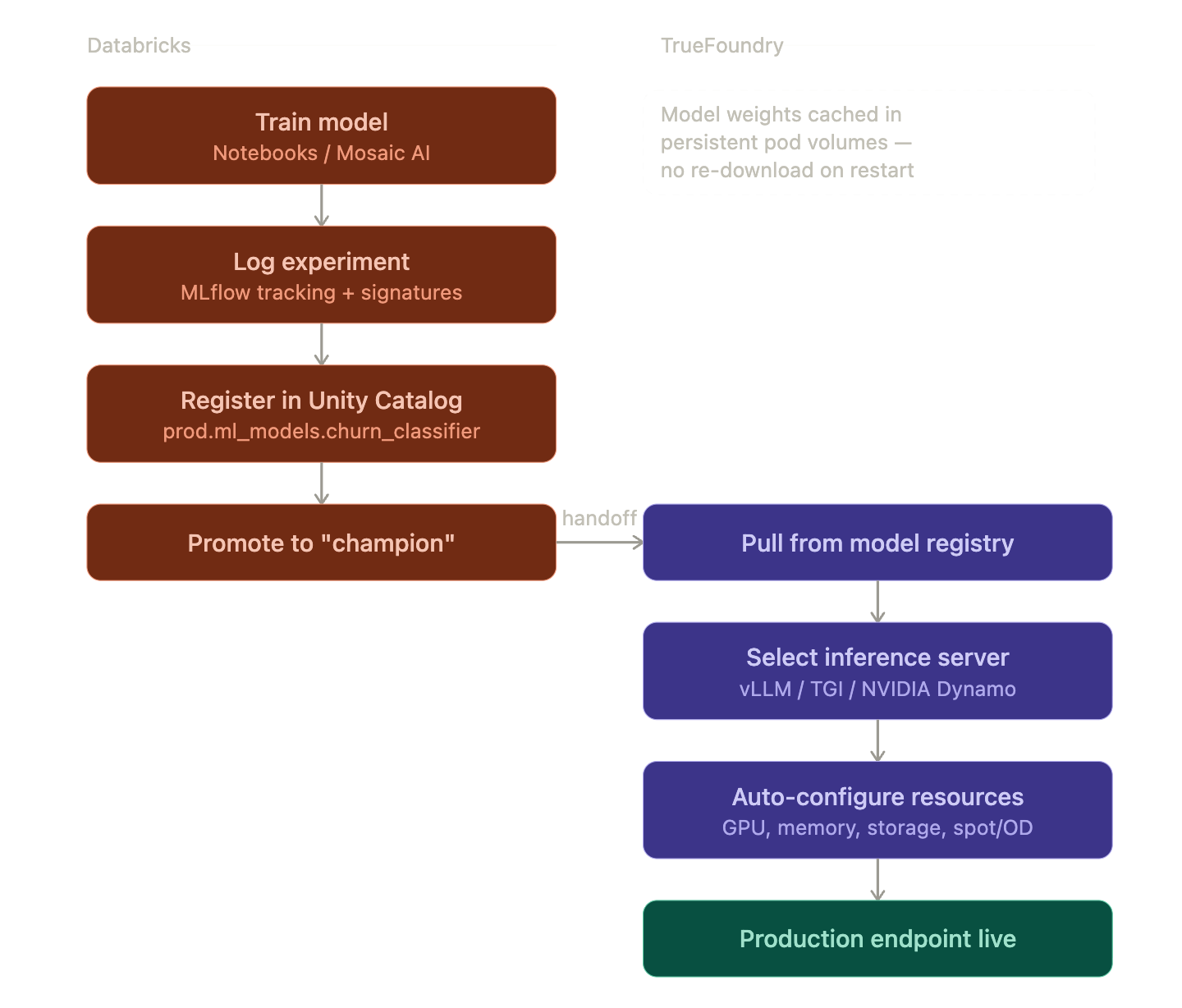
Once the model is registered, TrueFoundry takes over for production serving. Here's what actually happens under the hood when you deploy:
Model artifact pull. TrueFoundry authenticates to your Databricks workspace using a Service Principal (OAuth Client ID + Secret) and resolves the alias to a specific model version. It then pulls the .pkl or model directory from the Unity Catalog backed storage (typically S3, ADLS, or GCS depending on your cloud).
Inference server selection. You specify which serving framework to use. For LLMs, this is typically vLLM (best for throughput with continuous batching and PagedAttention), TGI (good for Hugging Face model compatibility), or NVIDIA Dynamo (for TensorRT LLM acceleration). For classical ML models, TrueFoundry wraps the MLflow model in a lightweight HTTP server. The inference command is pre filled based on the model type and framework.
GPU resource auto configuration. TrueFoundry reads your Kubernetes node pool configuration and auto selects the GPU type and resource allocations. If your cluster has A10G, A100, and H100 nodes, the platform picks based on the model's VRAM requirements and your cost preferences. CPU requests, memory limits, storage limits, and shared memory size are all pre filled. You can override any of them.
Weight caching. Model weights are stored in a persistent volume attached to the pod. When a pod restarts (due to spot eviction, scaling events, or node rotation), the weights are already on disk. This avoids the 5 to 20 minute cold start that comes with re downloading large model files from the registry. The cache persists across pod lifecycles and is only invalidated when you deploy a new model version.
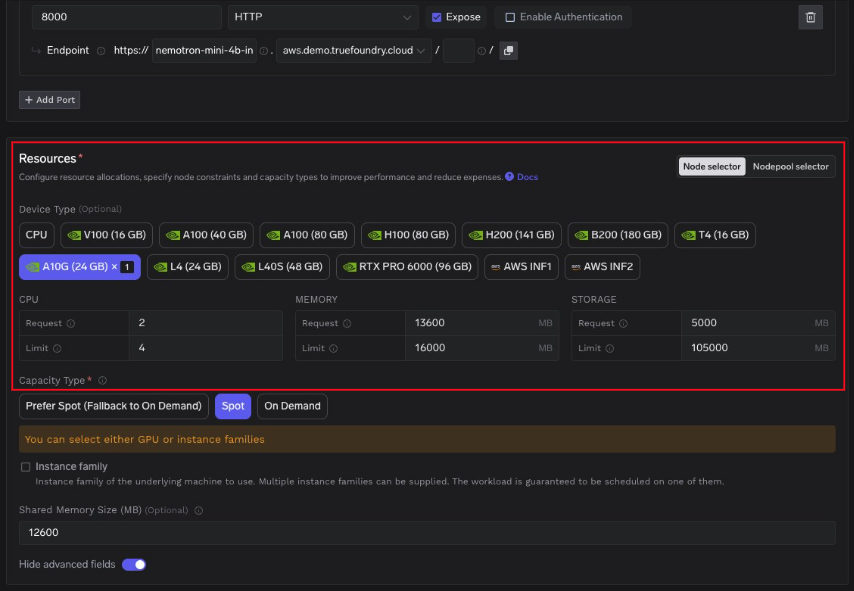
Capacity type selection. You choose between Spot instances, On Demand, or a "prefer Spot with On Demand fallback" policy. For batch inference workloads, Spot saves 60 to 70% on GPU costs. For latency sensitive production endpoints, On Demand with a Pod Disruption Budget is the safer choice.
The end result is a production endpoint with an HTTPS URL, autoscaling based on request concurrency or GPU utilization, and health checks built in. The entire process from "model registered in Unity Catalog" to "endpoint accepting traffic" typically takes 5 to 15 minutes depending on model size and GPU availability.
TrueFoundry's AI Gateway uses a split architecture: a control plane that manages configuration (models, users, routing rules, rate limits) and a gateway plane that processes actual inference requests. The configuration syncs from the control plane to the gateway pods via a NATS message queue, so updates propagate in real time without restarts.
The gateway plane is built on the Hono framework (an ultra fast, edge optimized HTTP framework) and performs all authentication, authorization, and rate limiting checks in memory. When a request hits the gateway:
The key design principle: there are no external calls in the request path except the actual LLM provider call (and optionally cache lookups). All checks for rate limits, load balancing, authentication, and authorization happen against in memory state.
You register Databricks Model Serving as a provider in the Gateway using Databricks Service Principal authentication. This uses OAuth 2.0 Client Credentials flow. You provide the Client ID and OAuth Secret (generated in Databricks workspace settings under "Service Principals"), along with the workspace base URL.
Once registered, any model served by Databricks (including custom fine tuned models from Mosaic AI, DBRX, or third party models accessible through Databricks) becomes routable through the same Gateway endpoint that handles your OpenAI and Anthropic traffic.

Single endpoint for all models. Application code hits one URL regardless of the underlying provider. The Gateway translates between the OpenAI compatible format and whatever the downstream provider expects.
from openai import OpenAI

client = OpenAI(
    base_url="https://your-truefoundry-gateway.com/api/llm",
    api_key="your-truefoundry-api-key"
)

# This request is routed through the Gateway to Databricks Model Serving.
# The application code doesn't know or care which provider serves it.
response = client.chat.completions.create(
    model="databricks-main/custom-finetuned-llama",
    messages=[{"role": "user", "content": "Analyze Q3 churn trends"}]
)
Virtual Models for multi provider routing. A Virtual Model is a logical model identifier that maps to multiple physical providers with routing rules. You can configure weight based distribution (80% to your Databricks hosted fine tuned model, 20% to Claude for comparison), priority based failover (try Databricks first, fall back to OpenAI if Databricks returns a 5xx), or latency based routing (route to whichever provider has the lowest p50 latency in the current sliding window).
# This hits a Virtual Model. The Gateway resolves it to the best
# physical provider based on your routing configuration.
response = client.chat.completions.create(
    model="production-assistant",  # Virtual Model identifier
    messages=[{"role": "user", "content": "Summarize this contract"}]
)
The failover logic works as follows: if a provider returns a non retriable error (401, 403, 5xx), the Gateway immediately retries on the next priority provider. If a provider accumulates a spike in errors, it is marked unhealthy and placed in a 5 minute cooldown window where no traffic is routed to it. After cooldown, the Gateway sends probe traffic to check recovery.
Observability across providers. Every request through the Gateway is traced with full attribution: which user, which model, which provider, request latency, token count, estimated cost. These traces export via OpenTelemetry to whatever observability stack you run (Grafana, Datadog, Splunk). You get a single dashboard for all providers rather than stitching together provider specific metrics.
Databricks launched MCP server support in mid 2025, enabling agents to securely access Unity Catalog tables and tools through the Model Context Protocol. This means an agent can query your data warehouse, read from Delta tables, or call SQL functions, all through a standardized tool interface.
The problem is governance. Without a control plane in front of MCP servers, every developer configures their own connections, manages their own credentials, and creates their own tool policies. There's no audit trail of which agent called which tool, no way to enforce least privilege access, and no central place to revoke access when someone leaves the team.
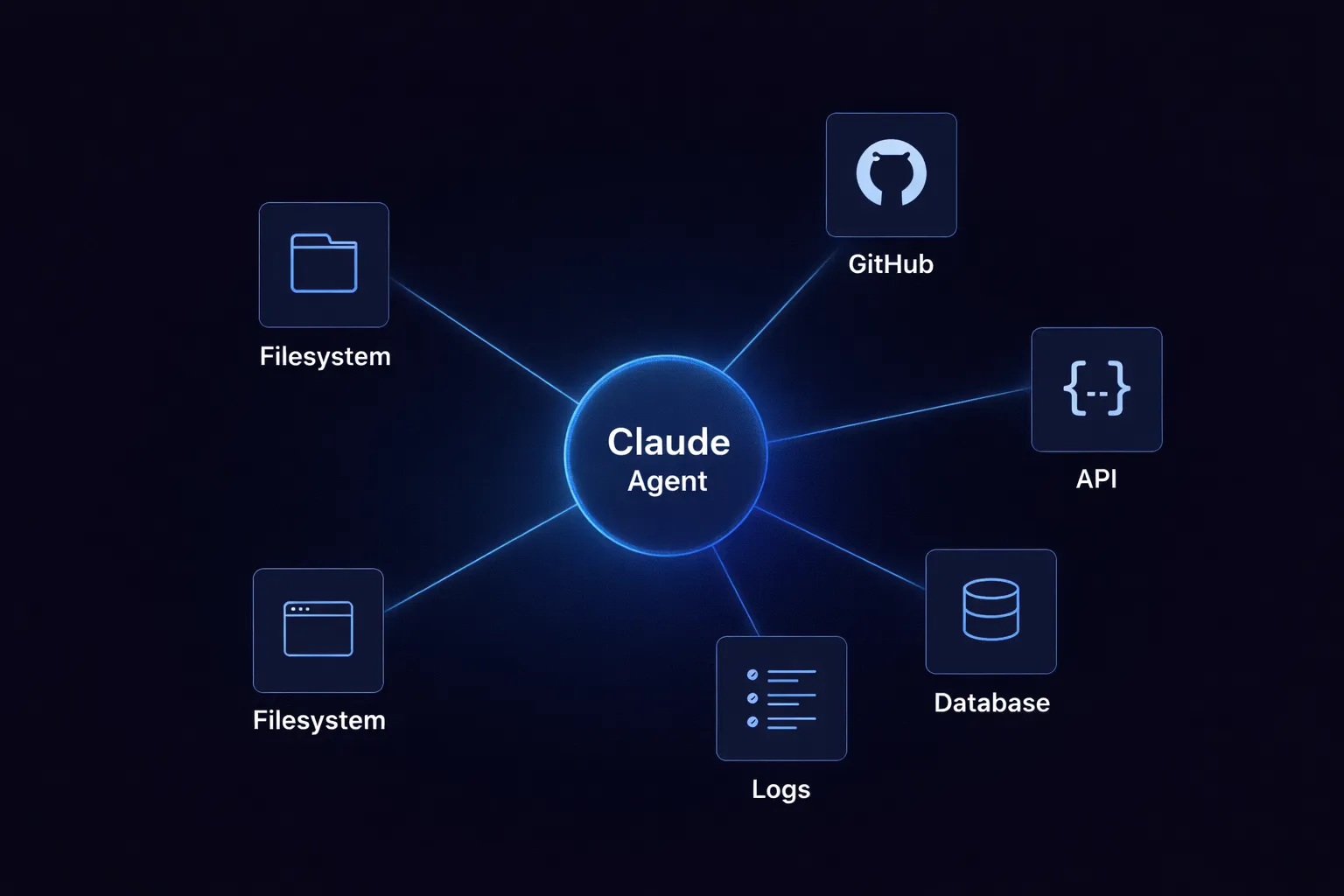
TrueFoundry's MCP Gateway sits between your agents (Claude Code, Claude Desktop, custom agent frameworks) and your MCP servers (including Databricks Unity Catalog). It acts as a reverse proxy with authentication, authorization, and audit logging.
Authentication flow. Agents authenticate once to the MCP Gateway using a TrueFoundry API key or an external IdP token (Okta, Azure AD, Auth0). The Gateway handles outbound authentication to each downstream MCP server. For Databricks, this means the Gateway holds the Service Principal OAuth credentials, and individual agents never touch raw Databricks credentials.
Tool level access control. Each MCP server exposes a set of tools (e.g., query_table, list_schemas, read_volume). The Gateway lets you selectively enable or disable individual tools per team. You can also aggregate tools from multiple MCP servers into a Virtual MCP Server that exposes only a curated subset. For example, your data science team might get access to query_table and read_volume from Databricks, plus search_messages from Slack, while your engineering team gets a different tool set.
Guardrails. The Gateway supports pre execution checks (validate the SQL query before it runs against Unity Catalog), real time blocking (reject queries that touch restricted columns), and post execution validation (scan results for PII before returning to the agent). You can also configure user approval workflows for high risk operations like writing to production tables.
Audit trail. Every tool invocation is traced with the calling user, the MCP server, the specific tool, request payload, response payload, and latency. This exports via OpenTelemetry alongside your LLM request traces, giving you one unified log of everything your agents do.
If your developers use Claude Code, you configure the MCP Gateway as a remote MCP server in Claude's settings. The managed-settings.json file (deployed via MDM on corporate devices) restricts Claude to only connect to your Gateway URL:
{
  "allowedMcpServers": [
    { "serverUrl": "https://mcp-gateway.your-company.com/*" }
  ],
  "strictKnownMarketplaces": [],
  "mcpServers": {
    "databricks-unity-catalog": {
      "type": "http",
      "url": "https://mcp-gateway.your-company.com/mcp/v1/databricks-uc/mcp"
    },
    "databricks-sql": {
      "type": "http",
      "url": "https://mcp-gateway.your-company.com/mcp/v1/databricks-sql/mcp"
    }
  }
}
Setting strictKnownMarketplaces to an empty array blocks all marketplace sourced MCP installations. Combined with allowedMcpServers, this creates a locked down configuration where agents can only access tools through your governed Gateway.
For a comprehensive guide on securing Claude Code in enterprise environments, including MDM deployment scripts, sandbox enforcement, and the full managed settings schema, see Enterprise Security for Claude.
This final integration point is specifically for teams that fine tune models on Databricks using Mosaic AI Training and want to serve them alongside commercial API models.
The technical setup is straightforward. You train and register the model in Databricks as described above. You configure Databricks as a provider in the AI Gateway. You create a Virtual Model with routing rules:
{
  "virtual_model": "production-assistant",
  "routing": {
    "strategy": "priority",
    "providers": [
      {
        "model": "databricks-main/custom-finetuned-llama-3",
        "priority": 1
      },
      {
        "model": "anthropic-main/claude-sonnet-4-5",
        "priority": 2
      }
    ],
    "fallback_on": ["5xx", "timeout", "rate_limit"]
  }
}
All traffic goes to your Databricks hosted custom model by default. If Databricks returns a server error, times out, or hits a rate limit, the Gateway automatically retries on Claude Sonnet. The application code never knows the failover happened. It just sees a successful response.
This pattern is useful during model evaluation. You can run both providers in parallel (weight based 50/50 split), log the responses, and compare quality before committing to the fine tuned model for all traffic. The Gateway's per request traces include the provider that served each response, so you can filter and analyze by provider in your observability stack.
For the full AI Gateway documentation, see TrueFoundry Docs. To evaluate the integration with your Databricks workspace, book a technical walkthrough.
TrueFoundry AI Gateway delivers ~3–4 ms latency, handles 350+ RPS on 1 vCPU, scales horizontally with ease, and is production-ready, while LiteLLM suffers from high latency, struggles beyond moderate RPS, lacks built-in scaling, and is best for light or prototype workloads.



The latest news, articles, and resources sent to your inbox
© 2025 All rights reserved.



.webp)
.webp)


.webp)
.webp)
.webp)

.webp)
