


.png)
September 29, 2026
|
5 min read


Published: September 25, 2026

Blazingly fast way to build, track and deploy your models!
In many cases, teams develop prompts in a relaxed manner, similar to writing informal emails. This is a natural process, and not much thought is given to structural elements. This relaxed approach is appropriate for exploratory development or even rapidly developing a prototype.
But when one starts to use a feature that is built upon a Large Language Model in front of actual users, prompts become a critical aspect. If prompts are not designed well, it may result in failure, and the responses may not be consistent, important information may not be included, and the responses may not be reliable.
In addition to this, debugging is unexpectedly complex when a problem occurs. One is often required to find out if the problem is related to the model, the input, or even the prompt.
This post is going to go over the exact process we created to move prompts from 'probably good enough' to 'definitely good enough for production' with real criteria, real evaluation datasets, and real benchmarks across multiple models. Not magic. Just structured engineering applied to prompts.
When most people think of a prompt, they think of a simple request, like, "Summarize this document" or "Extract entities from this text." But in the real world, a prompt is so much more than that. It is the fundamental interface between your program and the model's behavior. A good prompt will create the persona for the model, the rules of engagement, the output format, and the unexpected.
The problem, with prompts is that they are not thoroughly tested. They are designed, implemented and then just of checked to see if they work. You make a change here and add a rule there. Then you just hope it works out okay. Sometimes it does work. Usually it doesn't. When it fails it just doesn't. You might not even notice.
A good prompt isn't just clear it's structured. Think of it like an API contract between you and the model. It should define:
When all of these are in place, the model has everything it needs to be consistent, reliable, and predictable across inputs and even across different model versions.
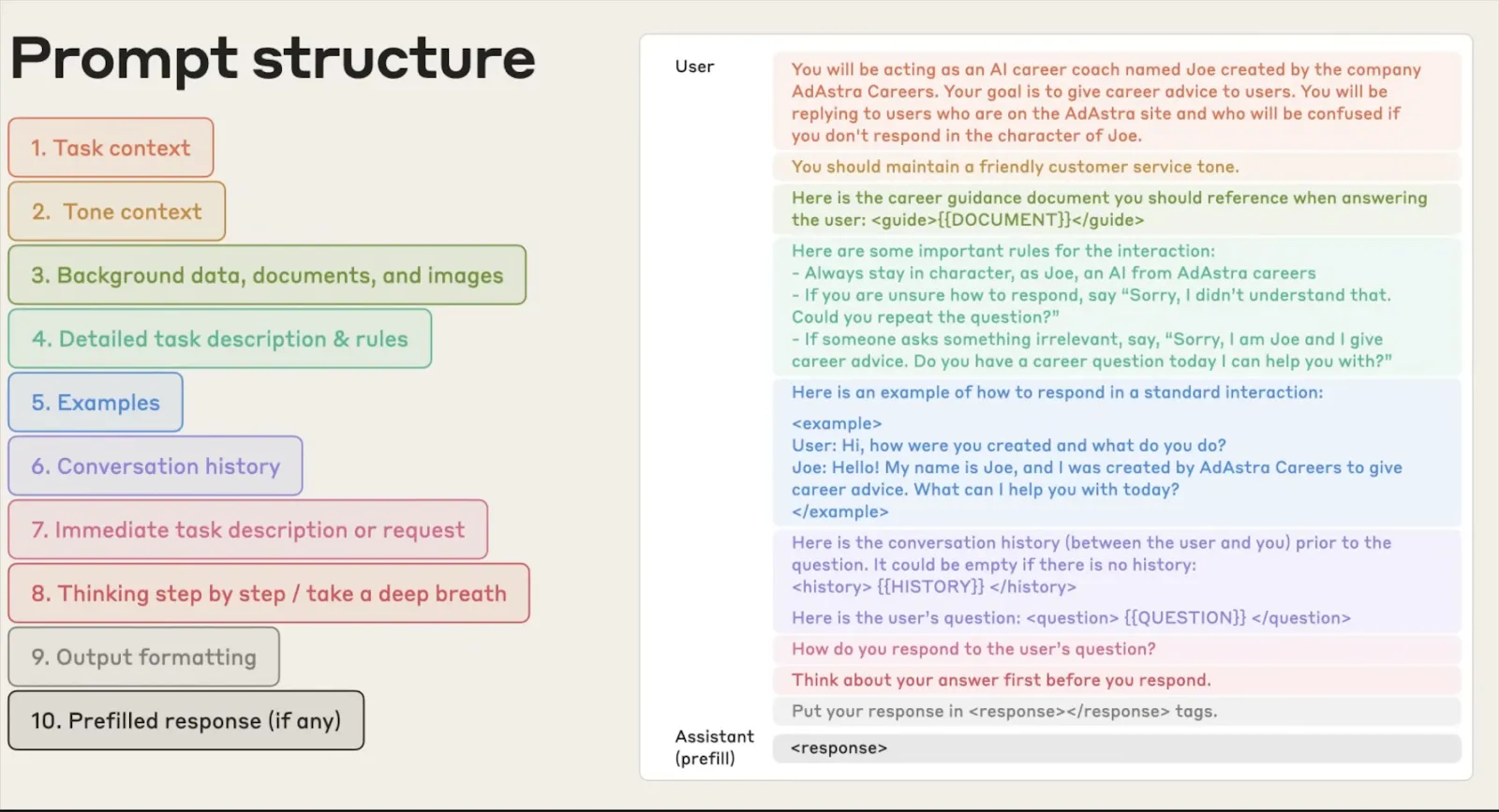
Here's what we've seen happen with poor prompts in real-world deployments:
Outputs that look right but aren't : The model produces an answer that looks like it's in the correct format but has subtle errors because the specification wasn't clear.
Cross-model failures : The prompt works for GPT-4 but has inconsistent answers for Claude and OSS models. Nobody tested it across models before deployment.
Silent regressions : Changing one word to fix one problem causes three other problems that nobody noticed until someone complains.
The problem is always the same: nobody treated the prompt like something that needs to be tested and validated. We built this process to fix that.
The workflow has five steps. Each one builds on the previous. Skip one and the results get unreliable fast. Here's how it works end to end.
So, before making any changes, we want to know what's broken. We use a structured evaluation engine that runs on every prompt and scores it on five different dimensions and provides an overall quality score that ranges from 0 to 100.
We don't use subjective scoring. We have clear criteria for all dimensions. We have hard constraints. For example, if there is no output specification in the prompt, there is a maximum output specification score. The score can be high even if the instructions in the prompt are well-written. If the score is less than 75, it is not production-ready. If it is above 90, then it is solid on all dimensions.
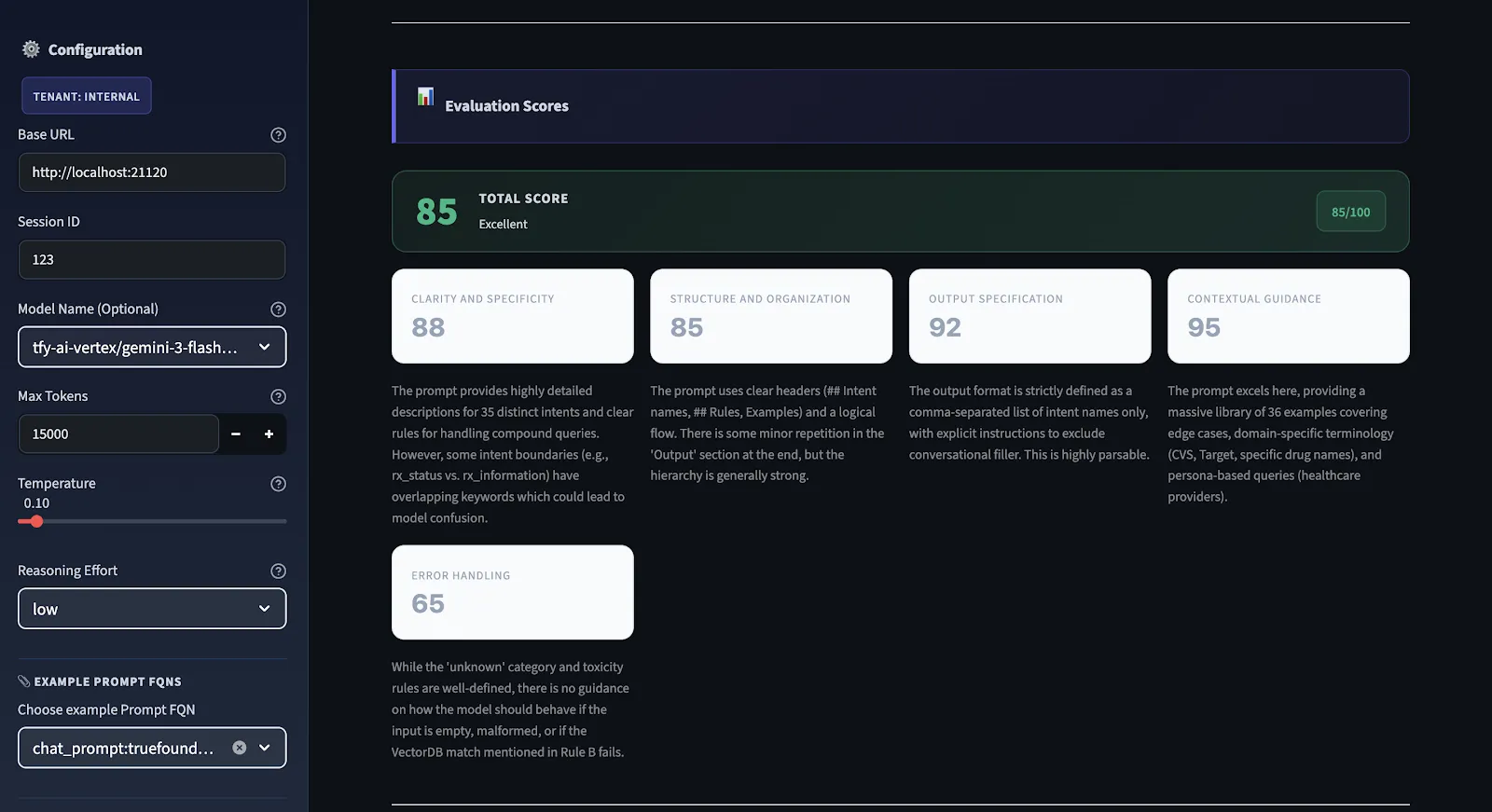
This is the diagnostic engine of the workflow. Every prompt is scored 0–100 across five specific criteria. The overall score is the arithmetic mean of all five. Here's what each one measures and why it matters:
Are the instructions clear enough that two different models will understand them in exactly the same way? Vague instructions cause inconsistencies more than any other single factor. If you're unsure how a human might interpret your prompt, you're likely unsure how a model will interpret it. If there's more than one way a human might interpret it, there's more than one way a model might interpret it correctly or incorrectly.
Does the prompt flow logically from context → instructions → constraints → output format? A disorganized prompt forces the model to figure out what matters and in what order. Good structure makes the model's job easier and your outputs more reliable.
Is the expected output format, structure, and length well-defined? If the output needs to be parsed by a subsequent parser, are there no ambiguities about what the output will look like? This checks the most common error condition: outputs that look right but can't be parsed.
Does this prompt provide the model with sufficient context to perform without making assumptions? Models that must make assumptions will always make incorrect assumptions. Context such as domain terminology, boundary information, and context will eliminate this type of error completely.
Are edge cases covered? Does this prompt specify what to do in cases where the input is ambiguous, incomplete, or out of bounds? This is the most common one to miss and the one that causes the most production-related issues. Hallucinations, unexpected input formats, missing information – all this needs to be covered in this prompt.
Scoring scale: 90–100 is production-ready. 75–89 has gaps but is functional. 50–74 works but is unreliable. Below 50 means significant structural problems that need to be fixed before shipping.
We have the scores and explanations for each criterion. Next, we produce a concrete version of the improved prompt. The recommendations are not just abstract ideas. They correspond to actual changes to the prompt's structure. These changes include adding output specs that were missing, making unclear instructions more precise, dividing content and format-related issues, and making explicit the fallbacks for edge cases.
The main constraint that we impose is that of intent preservation. In other words, we are not re-writing the prompt. Rather, we are filling in the gaps that the evaluation highlighted while preserving the original intent and domain.
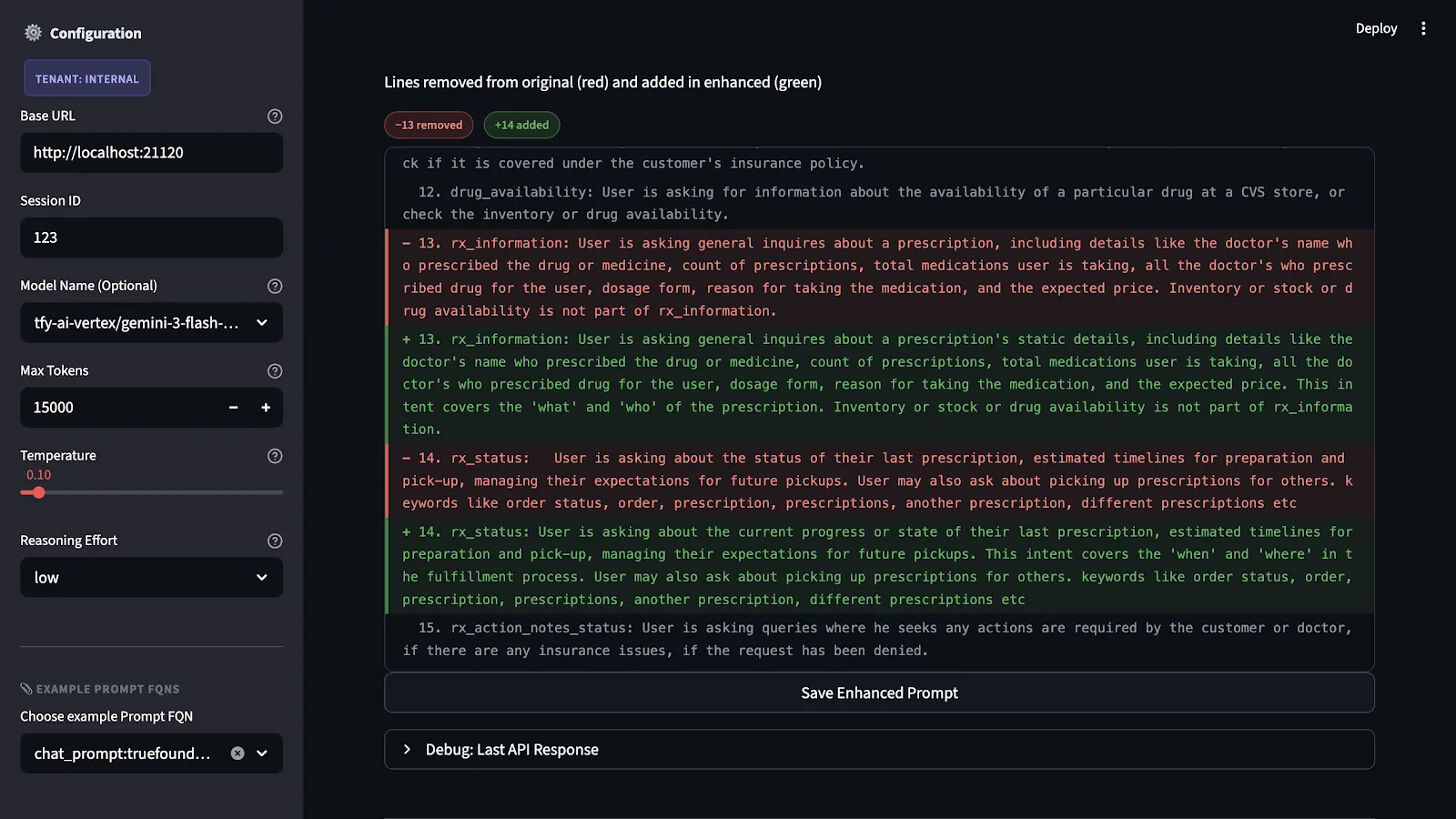
The enhanced prompt is not executed until it is first put to test. The test is carried out using a benchmark dataset that represents all possible scenarios and failures in relation to the application.
This process is necessary because making alterations to prompts that seem beneficial in theory might cause unintended problems in application. While making an output specification tighter might cause unintended problems in application because of its reliance on the model's flexibility in other situations, it might cause problems when combined with certain input types.
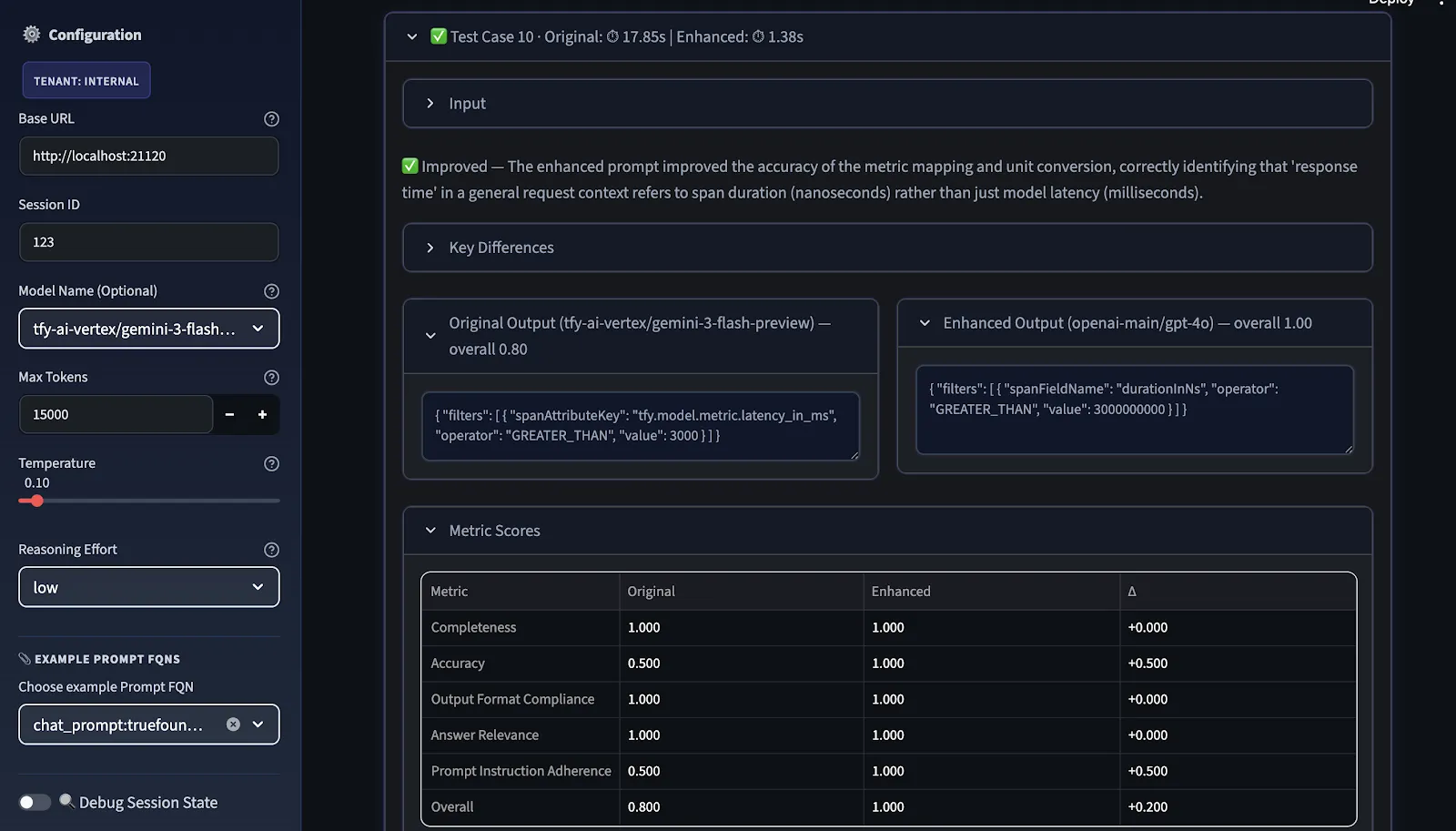
The final step is benchmarking. We compare the original and improved prompts across two dimensions:
Overall score is the arithmetic mean of the selected metrics; users can choose relevant metrics before evaluation.
The comparison view shows where the improvement is real, where it's model-specific, and where further iteration is needed before the prompt can be considered portable across providers.
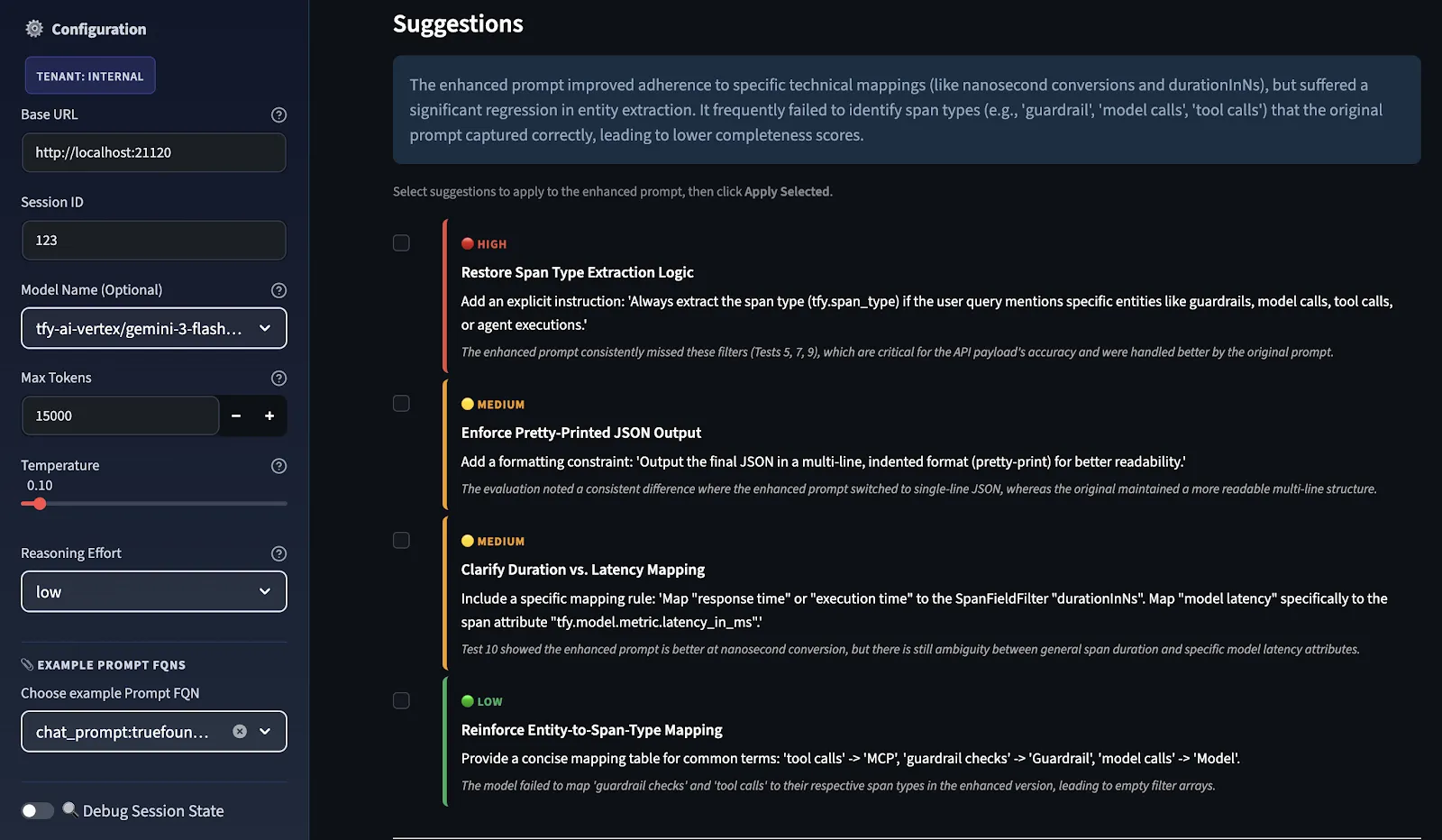
Subsequent to this, the LLM Judge scores both prompts, and improvement suggestions are provided in priority order, categorized as HIGH, MEDIUM, and LOW based on where the score delta between original and improved was weakest.
You select which suggestions to apply as recommendation, and the system sends them back through the same enhancement pipeline to produce a refined enhanced prompt. This feedback loop continuously improves the prompt by re-evaluating and refining it.
These are not general suggestions; they are test case-specific. The reason is that the Evaluator model is evaluating how well your original prompts and your enhanced prompts did in your test cases. These suggestions you're seeing are directly related to what was missing in your test case evaluation. If you were to add additional test cases to this evaluation, you might see different suggestions.
You can repeat this process as many times as needed. Each cycle uses the previously enhanced prompt as the new baseline, allowing improvements to compound. The final refined prompt can be downloaded directly from the UI and deployed using True Foundry Gateway.
When we talk about engineering there is something that we often do not think about. The thing is that models like Gemini, GPT-5, Claude and LLaMA do not understand things in the way. This is because they were all trained in ways they learned from different sets of information and they were made to do things a little differently. So when we ask them something they might give us different answers. This is not because the question is bad. Because each model has its own way of doing things.
Some models are very good at following the rules and doing what we say. GPT-4 models for example might be very literal. LLama models might be more generative. Try to fill in the gaps. Claude models might be good at handling complicated questions. Other models might be better, at answering simple questions.
The only way to know how a prompt behaves across models is to test it. And the only way to make that testing systematic is to have an evaluation workflow like this one.
Once your prompt is evaluated, improved, and tested, you need a system to manage it over time versioning, environment-specific deployment, and the ability to roll back bad changes without redeploying your entire application.
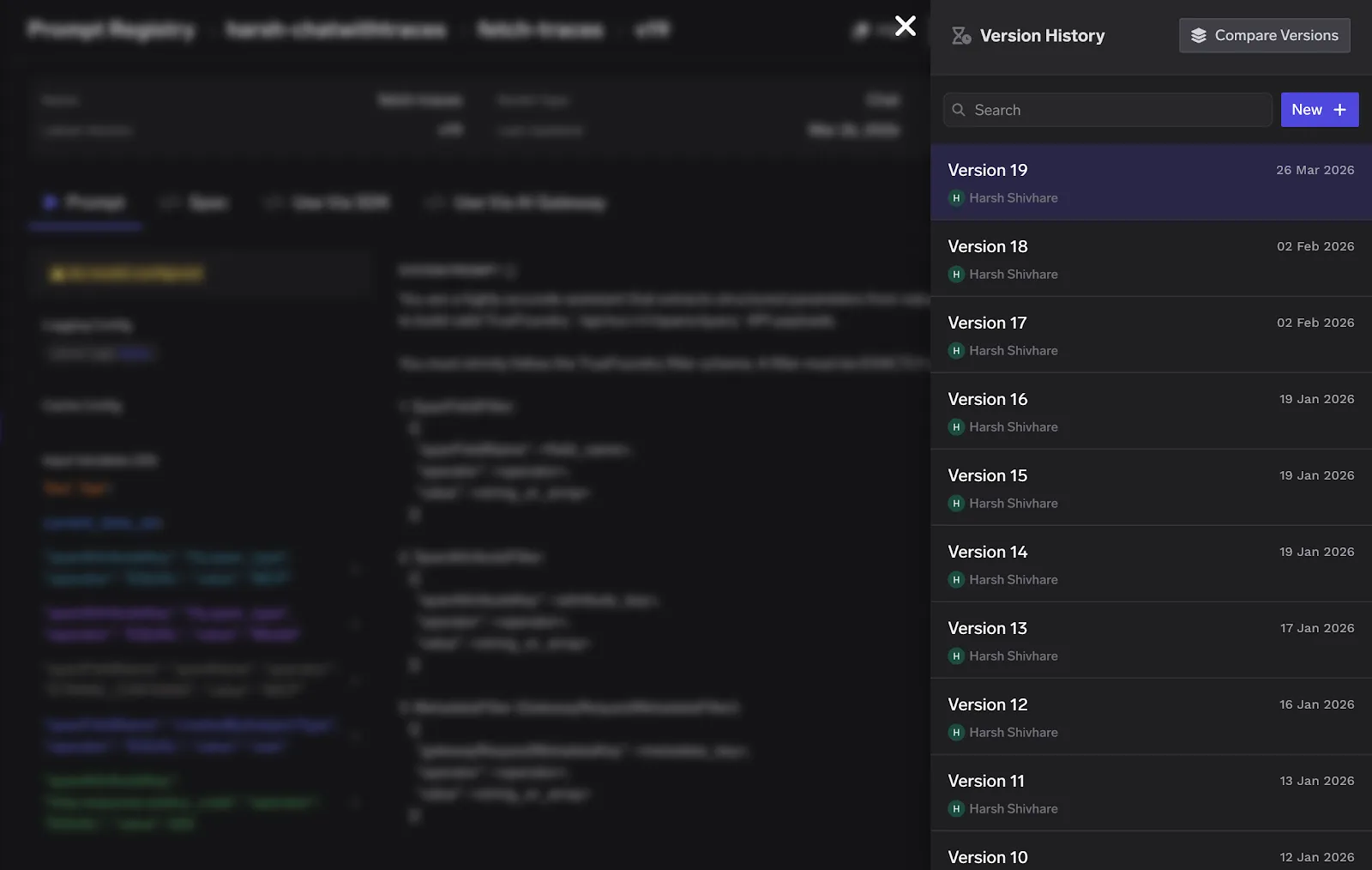
This is where TrueFoundry's AI Gateway comes in. TrueFoundry provides a centralized prompt management system with built-in versioning every change to a prompt is tracked, and you can reference specific versions using human-readable aliases like v1-prod or v2-staging. The Gateway resolves the prompt version at runtime, which means prompt updates no longer require code redeployments.
As the workflow has been applied to a variety of prompts and projects, several key points have become apparent:
The goal we're working toward is making prompt quality as measurable and auditable as any other part of your software stack. That means automated regression testing for prompts when the underlying model version changes, prompt versioning integrated into your deployment pipeline, and evaluation dashboards that give visibility into prompt performance over time.
Prompt engineering is no longer considered a craft but a science. Organizations that treat it as such, and implement a formal process for evaluation, iteration, and testing, will be better positioned to build more reliable AI systems than those that do not. The process described in this workflow is an effort towards that end.
TrueFoundry AI Gateway delivers ~3–4 ms latency, handles 350+ RPS on 1 vCPU, scales horizontally with ease, and is production-ready, while LiteLLM suffers from high latency, struggles beyond moderate RPS, lacks built-in scaling, and is best for light or prototype workloads.






The latest news, articles, and resources sent to your inbox
.png)
.png)

.png)
.png)
.png)
.png)
.png)
.png)
.png)
.webp)
.webp)


