



October 1, 2026
|
5 min read


Published: September 11, 2026
Blazingly fast way to build, track and deploy your models!
Claude Code asks for permission before it touches anything. Write a file? It stops and waits. Shell command? Stops again. Network call? Same thing. Those confirmation prompts are intentional — they're the mechanism that keeps an autonomous coding agent from doing irreversible damage while you're not looking.
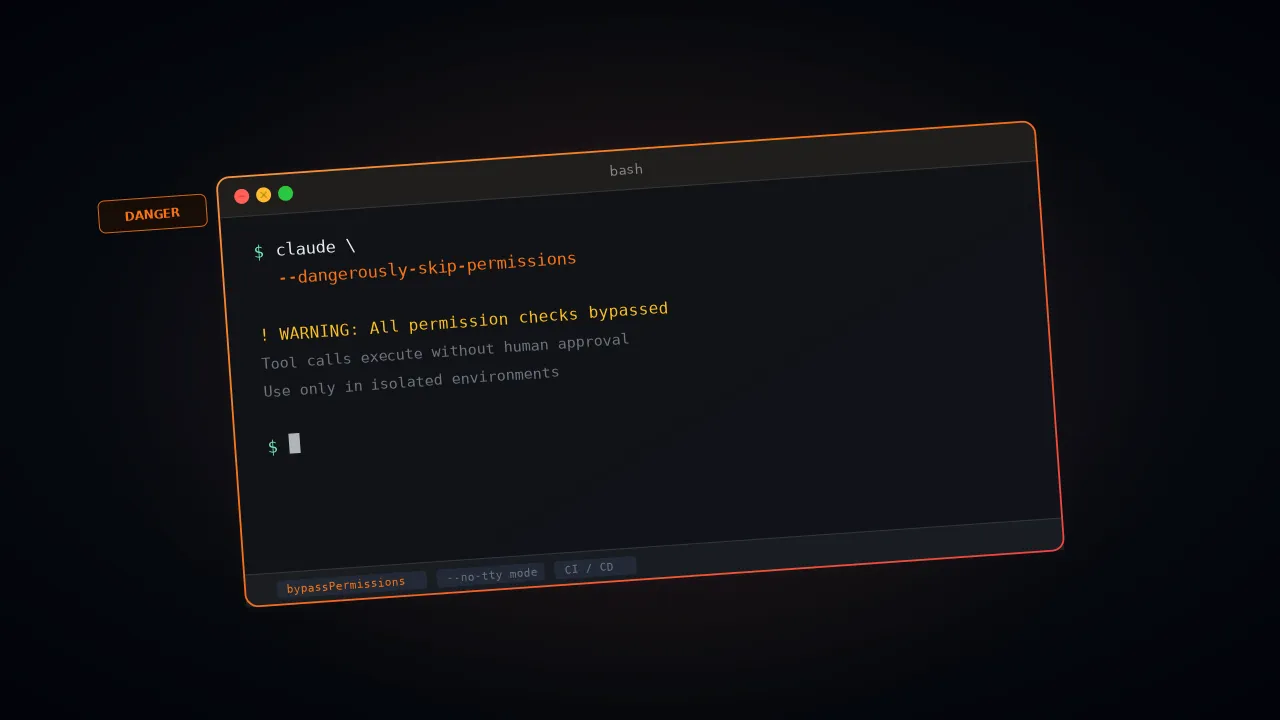
The --dangerously-skip-permissions flag kills that loop. All of it. Anthropic didn't pick that name to scare people — they picked it because it's exactly what happens. The consequences of running it carelessly? Those are well-documented now.
Here's one that got a lot of attention. In December 2025, a user asked Claude Code to clean up packages in an old repository. Claude generated rm -rf tests/ patches/ plan/ ~/. See that trailing ~/? The shell expanded it to the user's entire home directory. Desktop files, Keychain passwords, application data — everything, gone. Simon Willison flagged it on X. The post hit 197 points on Hacker News with over 156 comments.
What do Claude code permissions actually govern? Why does the bypass flag exist? When is it genuinely safe to use? We cover all three.
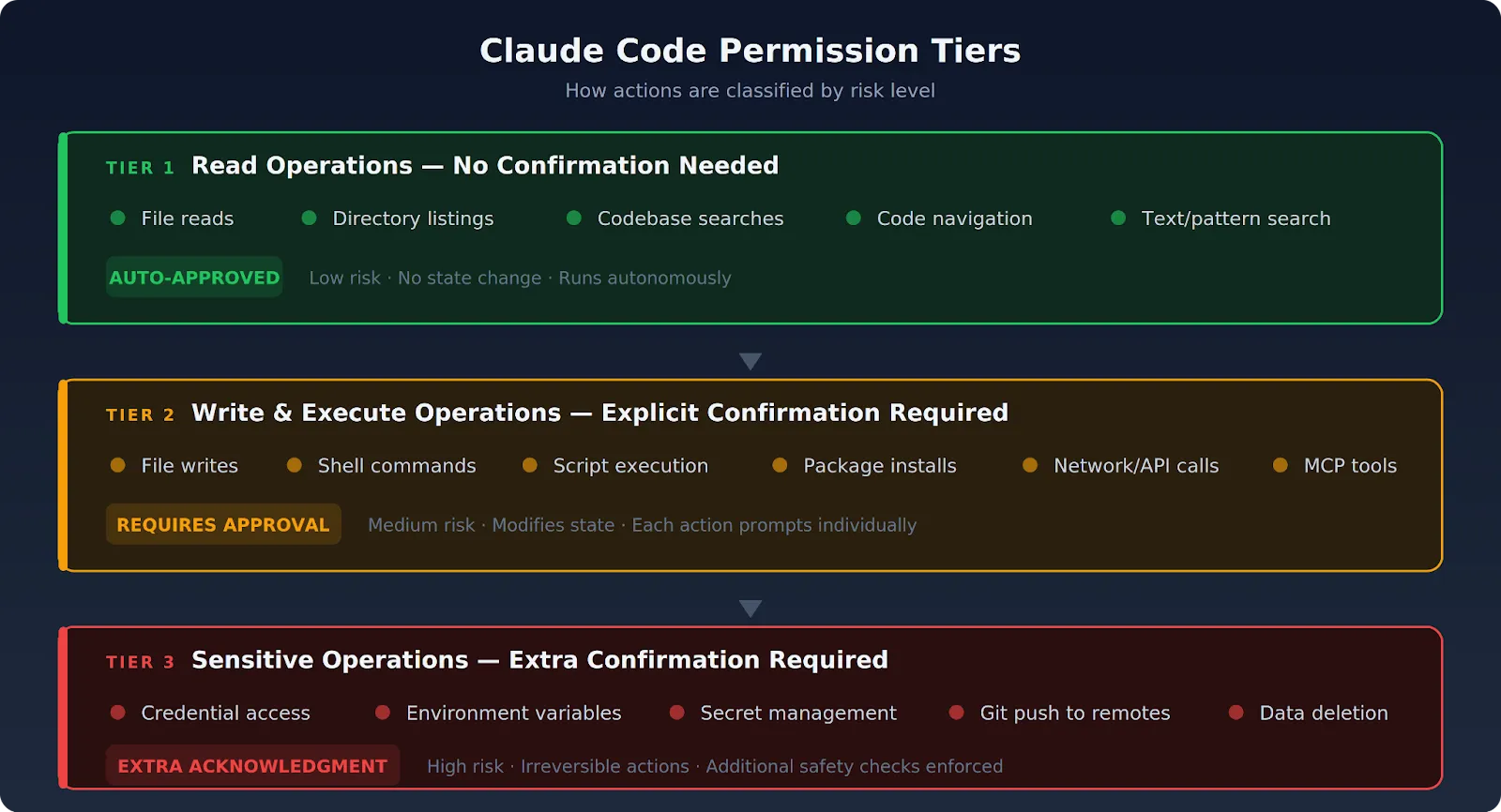
Claude Code runs on a permission-based architecture. Every consequential action the agent takes gets surfaced for review. The default won't allow Claude Code to modify state without your explicit approval. Actions break down into three tiers.
File reads, directory listings, codebase searches, and code navigation all land here. Nothing in this tier changes state. Claude Code runs these on its own, no prompt needed. Anthropic maintains a fixed allowlist of safe-by-default tools — text search, file-pattern search, and code navigation utilities all qualify.
Every one of these operations stops and waits for your "approve":
A 10-file refactor generates 30+ prompts. Most developers end up rubber-stamping them without reading a single one.
That rubber-stamping habit is its own kind of failure. It's exactly why the bypass flag exists.
Anything touching these areas gets flagged with extra scrutiny:
Claude Code's built-in safety checks won't proceed without explicit acknowledgment.
Why does all this exist? Because Claude Code is an autonomous agent with broad system access. Remove the permission layer and a single misunderstood instruction — or worse, a malicious prompt injection — can cause irreversible damage. No checkpoint, no recovery. The enterprise security guide for Claude goes deeper into how organizations should approach governance around this.
The --dangerously-skip-permissions flag is a CLI argument. It turns off the confirmation step for every write and execute operation. File writes, shell commands, network calls, tool executions — Claude Code runs them all without waiting for your approval.
The CLI flag activates what Anthropic calls "bypassPermissions mode." You can also enable the same mode through settings with --permission-mode bypassPermissions or by setting "defaultMode": "bypassPermissions" in settings.json.
The behavior is functionally equivalent — but one key caveat applies to both: since v2.1.78, writes to protected directories (.git/, .claude/, .vscode/, .husky/) still trigger a prompt even with bypass active. The exemptions are .claude/commands, .claude/agents, and .claude/skills, where Claude routinely creates content. No short alias exists. No -y shortcut. You type the full flag every time, and Anthropic did that on purpose.
What the flag strips out specifically:
What the flag leaves intact:
Here's a detail that trips people up: you can't switch into bypassPermissions mode mid-session if you didn't start with the flag. Restart with the flag, or it won't work. Admins also have the option to block the mode organization-wide — set permissions.disableBypassPermissionsMode to "disable" in managed settings, and nobody can use it.
What you end up with is total autonomy within the boundaries you've set. If you haven't set any — no network restrictions, no file access scoping, no credential isolation — the agent can reach everything your user account can reach. That's the core risk.
The legitimate use cases for the flag are narrow but real. Every one of them shares a trait: the human confirmation loop is either impossible because no human is present, or redundant because the environment already handles containment.
Automated pipelines can't stop and wait for someone to click "approve." There's nobody at the terminal. Teams run Claude Code in headless mode as part of build, test, and review workflows — and the typical invocation pairs -p (non-interactive mode) with the bypass flag:
claude -p "Fix all lint errors in the project" \
  --dangerously-skip-permissions \
  --output-format stream-json
The pipeline environment itself serves as the containment layer here. It dictates which code the agent can access and which commands it can execute.
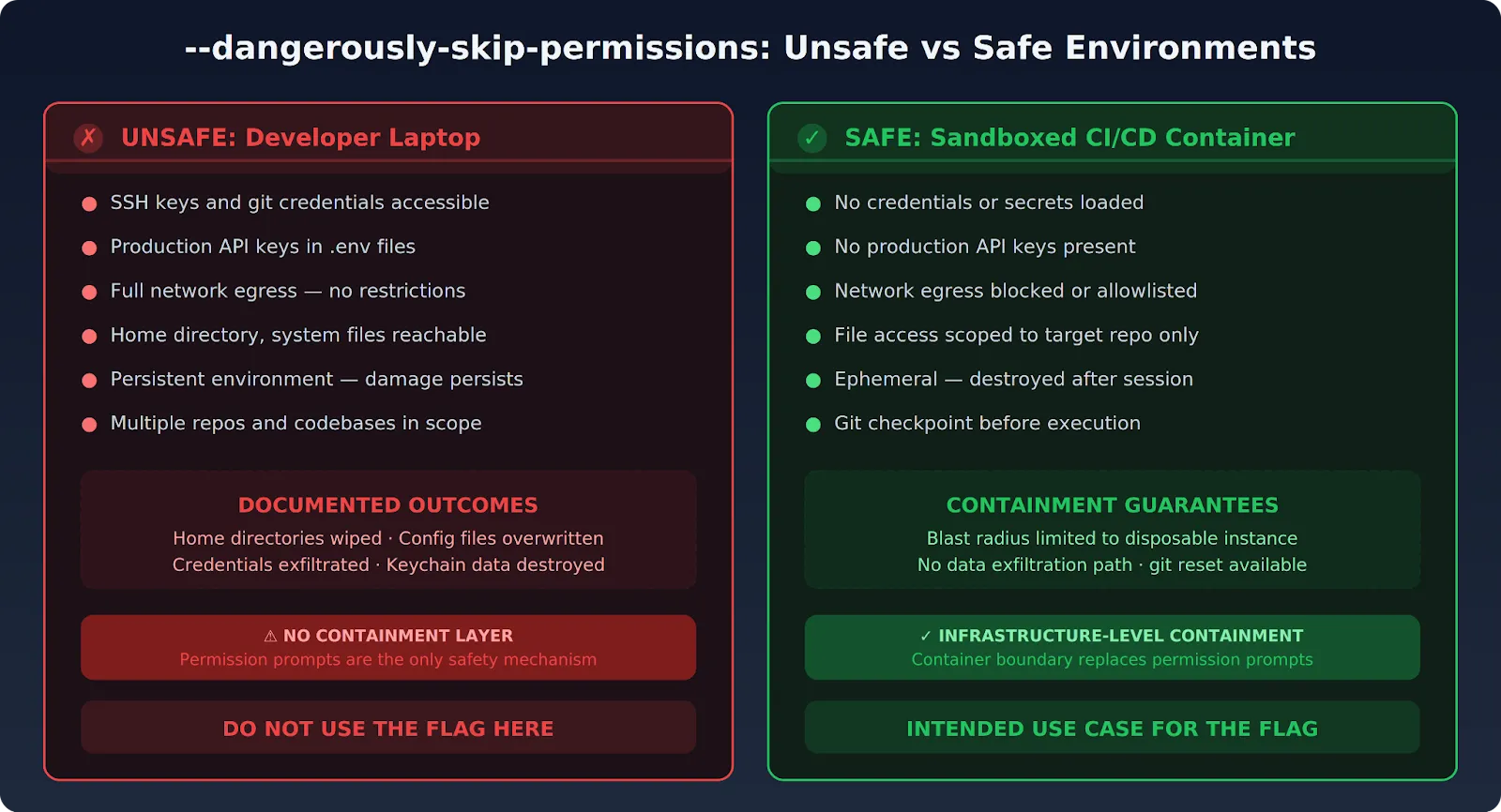
When Claude Code runs inside a purpose-built Docker container — no credentials loaded, no external network access — the permission prompts just add friction. They don't add safety. The container boundary is already doing the security work. The flag removes redundant confirmation inside an already-locked-down environment.
Anthropic recommends containerized usage explicitly. They ship reference devcontainer setups with built-in firewall rules for exactly that purpose. Nicholas Carlini, a researcher on Anthropic's Safeguards team, ran claude --dangerously-skip-permissions in a bash while-loop for 16 parallel agents building a Rust-based C compiler in February 2026.
His parenthetical note in the blog post says it all: "Run this in a container, not your actual machine." Anthropic's own people won't run this flag on bare metal.
Large refactoring tasks that span dozens of files work better without constant interruption. The workflow that seasoned developers follow is straightforward:
Your git history becomes the rollback mechanism. The permission system normally provides that safety net — here, git takes over that role.
None of this is hypothetical. Multiple documented incidents paint a clear picture of what goes wrong when autonomous execution meets weak containment.
Without per-action confirmation, a malicious instruction hidden inside a file that Claude Code reads can fire immediately. Attackers can influence what Claude processes through several channels:
If any of these contain injected commands, the agent can exfiltrate data or modify files that should be off-limits.
Anthropic takes this vector seriously. Their engineering blog on auto mode details a synthetic evaluation dataset containing 1,000 generated exfiltration attempts:
Without an approval prompt, there's no second chance to catch injected instructions before they execute.
The documented incidents speak for themselves. In October 2025, developer Mike Wolak asked Claude Code to rebuild a Makefile project from a fresh checkout on Ubuntu/WSL2. Claude Code ran an rm -rf starting from root (/). His GitHub bug report (#10077) contains error logs with thousands of "Permission denied" messages for /bin, /boot, /etc. Every user-owned file on the machine was destroyed.
The alarming part? Wolak was not running --dangerously-skip-permissions. The permission system itself failed to block the destructive command. Anthropic tagged the issue area:security and bug.
November 2025 produced something even nastier. Developer JeffreyUrban filed GitHub issue #12637 after discovering that Claude had accidentally created a directory literally named ~ during a previous session.
Later, Claude ran rm -rf * in the parent directory. The shell expanded * to include the ~ directory — and then interpreted that ~ as the home directory path. Two separate sessions, one cascading failure.
Then came the December 2025 Reddit incident: rm -rf tests/ patches/ plan/ ~/. The trailing ~/ expanded to the entire home directory. Desktop files, documents, downloads, Keychain data, application support — all wiped. And it's not just the dramatic wipes. One developer documented Claude overwriting an existing config file with blank values, no backup, no warning.
Quiet corruption like that is actually harder to catch and recover from than losing an entire directory.
Give Claude Code full write access with no confirmation prompts, and it can:
The pause before sensitive operations is the last human-readable checkpoint. Remove it, and there's nothing between the agent and credential exposure.
If someone hijacks Claude Code's session or manipulates the prompt, they get unrestricted access to everything the agent can reach. Zero friction, zero prompts, zero second chances. Worth noting: a reported bug (#17544) shows that combining --dangerously-skip-permissions with --permission-mode plan causes the bypass flag to silently override plan mode. You believe you're in read-only plan mode. You're actually running full bypass.
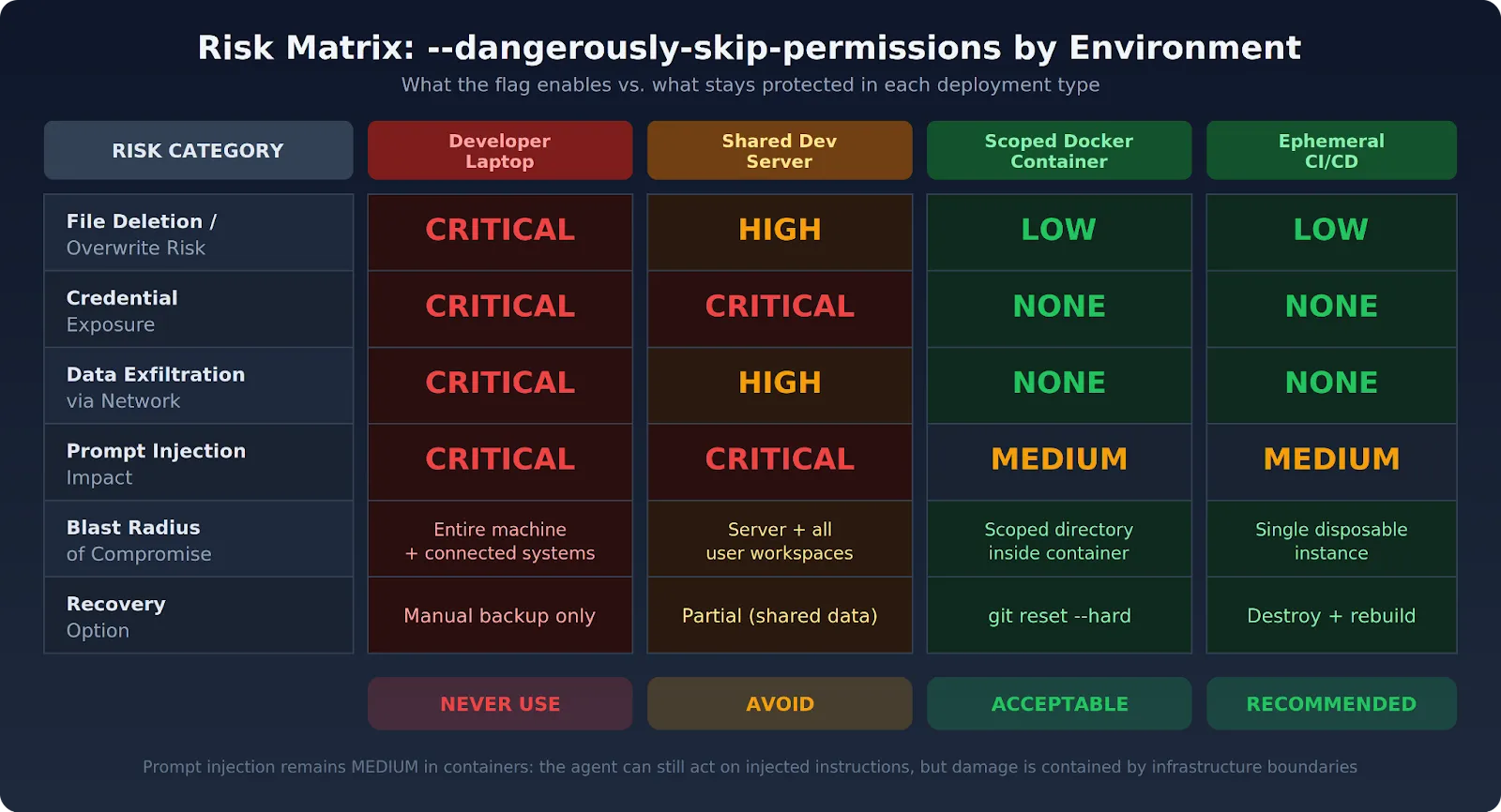
Safety here is a property of the environment. Not the flag. Anthropic's docs say this directly — container-based isolation is the intended context. The flag stays safe only when all of these conditions hold at the same time:
At this point, the community consensus is pretty much settled: containers or don't bother. Layer git checkpoints, tool restrictions, and network isolation on top. For teams managing Claude Code across multiple developers, the governance guide lays out the full policy framework.
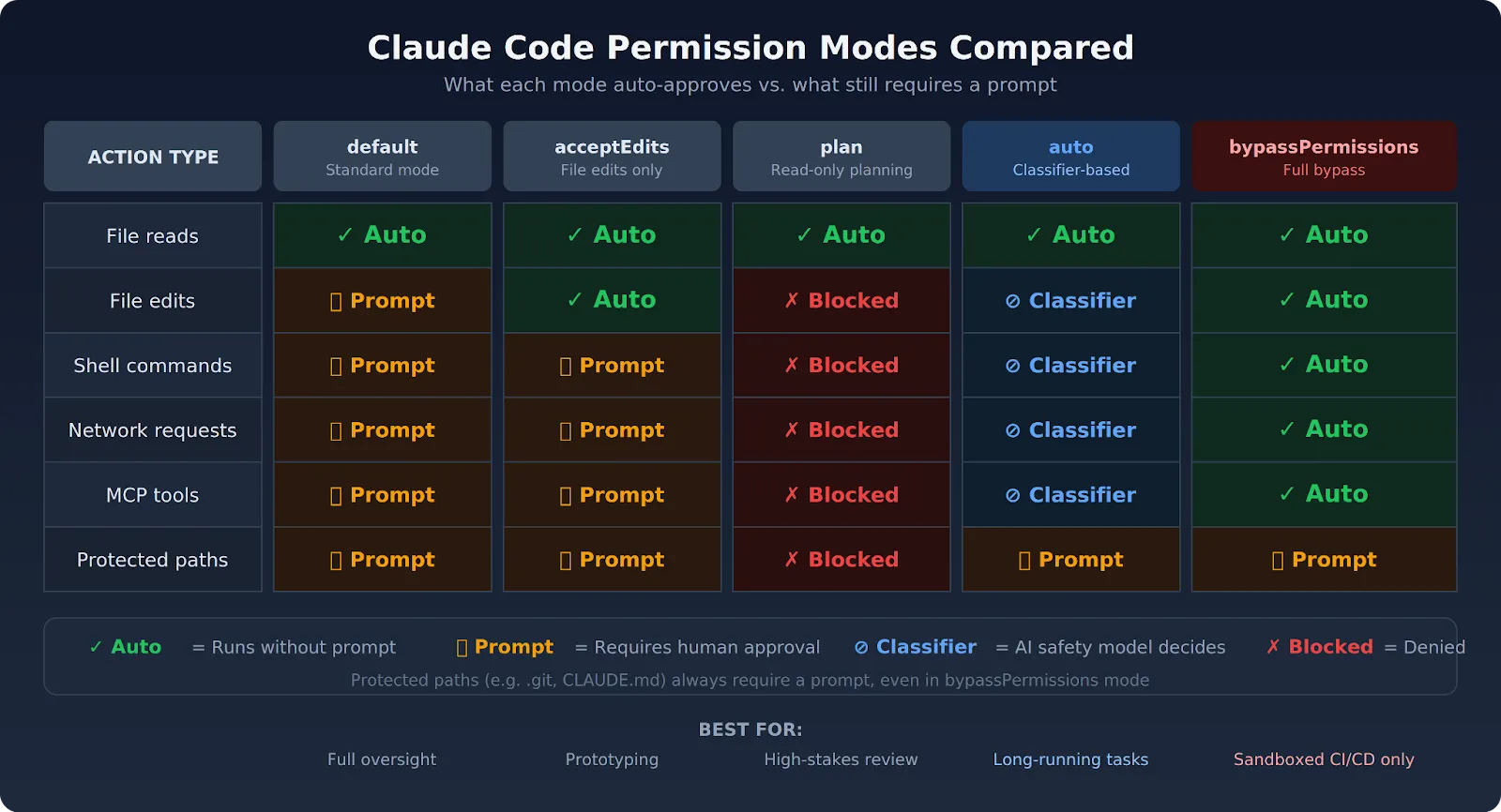
Not every team needs to nuke all safety controls just for fewer interruptions. Claude Code now ships with several alternatives, and each one trades a different piece of convenience for a different piece of safety.
Anthropic shipped auto mode specifically because --dangerously-skip-permissions kept causing problems. Auto mode lets Claude execute without permission prompts, but a separate classifier model (running on Claude Sonnet 4.6) reviews every action before it runs. The classifier watches for three categories:
Actions the classifier deems safe go through automatically. Risky ones get blocked, and Claude receives the reason so it can try a different approach. Three consecutive blocks or 20 total blocks in a session cause auto mode to pause and fall back to manual prompting. You need Claude Code v2.1.83 or later, a Team or Enterprise plan, and the Anthropic API provider to use it. Pro and Max plans don't qualify.
Enable it with:
claude --enable-auto-modeCycle to it with Shift+Tab during a session. Anthropic labels this a "research preview" — fewer catastrophic outcomes than full bypass, but not zero risk.
The --allowedTools flag lets you specify exactly which tools Claude Code can use without prompts. You can allow file reading and writing, but block shell execution or network calls. The claude_code_settings.json file supports these pre-approved operations too:
{
  "permissions": {
    "allow": ["Read", "Write"],
    "deny": ["Bash(*)", "mcp__*"]
  }
}
Another useful option: --disallowedTools "Bash(rm:*)" blocks rm commands even when bypass mode is active. Deny rules get checked before the mode evaluation, so they apply no matter which permission mode you're running.
acceptEdits auto-approves file operations, so Claude can edit code without prompting. Bash commands and network calls still need your approval, though. It works well for prototyping sessions or work inside an isolated directory where you trust file edits but still want eyes on command execution.
{
  "permissions": {
    "defaultMode": "acceptEdits"
  }
}
Plan mode gives Claude read access and reasoning capability but blocks source file edits and command execution. Claude reads the codebase, reasons about it, and produces a structured execution plan. You review the whole thing before a single change runs. Enter it by prefixing a prompt with /plan or pressing Shift+Tab. Particularly useful for high-stakes changes where you want the full picture first.
Here's a fact that surprises people: hooks fire even in bypass mode. A PreToolUse hook can block any tool call, regardless of which permission mode you're running. Trail of Bits published a configuration repository with hooks that block rm -rf patterns and direct pushes to main. Guardrails, not impenetrable walls — but they stop the obvious disasters before they happen.
Mount only the relevant files into Claude Code's working directory, and you limit the blast radius without touching the permission layer at all. Pair directory scoping with standard mode, and you get automation with far less risk than the bypass flag carries. The Claude Code workflow guide walks through practical patterns for scoped execution.
Claude Code is designed to help developers write, understand, and modify code more efficiently. For individual developers and small teams, running Claude Code locally can be sufficient for day-to-day development tasks.
However, as organizations scale AI-assisted development across teams, additional requirements emerge around security, governance, observability, and access management. This is where platforms like TrueFoundry help organizations operationalize Claude Code for enterprise environments.
As Claude Code gains access to internal tools, MCP servers, enterprise data, and production systems, organizations often need centralized controls around authentication, authorization, auditing, and governance.
TrueFoundry helps enterprises securely scale Claude Code adoption by providing centralized access management, observability, governance controls, and secure connectivity to internal MCP servers and AI infrastructure.
This enables organizations to maintain developer productivity while meeting enterprise security, compliance, and operational requirements.
TrueFoundry exists for teams that need Claude Code automation at enterprise scale — without treating --dangerously-skip-permissions as an acceptable shortcut. The platform delivers infrastructure-level controls that make the flag unnecessary in most production scenarios.
Everything deploys within your own AWS, GCP, or Azure environment. Every Claude Code session runs inside a network-isolated execution space with no external egress by default. The conditions that make the bypass flag safe — network lockdown, credential isolation, scoped access — get enforced at the infrastructure layer. Individual developers don't have to remember to set them up manually.
Organizations that run Claude Code in production through TrueFoundry have dropped --dangerously-skip-permissions from most workflows. The containment layer is baked into the platform. Nobody has to stitch it together manually around each session. For teams juggling Claude Code usage limits alongside security requirements, the AI Gateway handles both concerns from a single control plane.
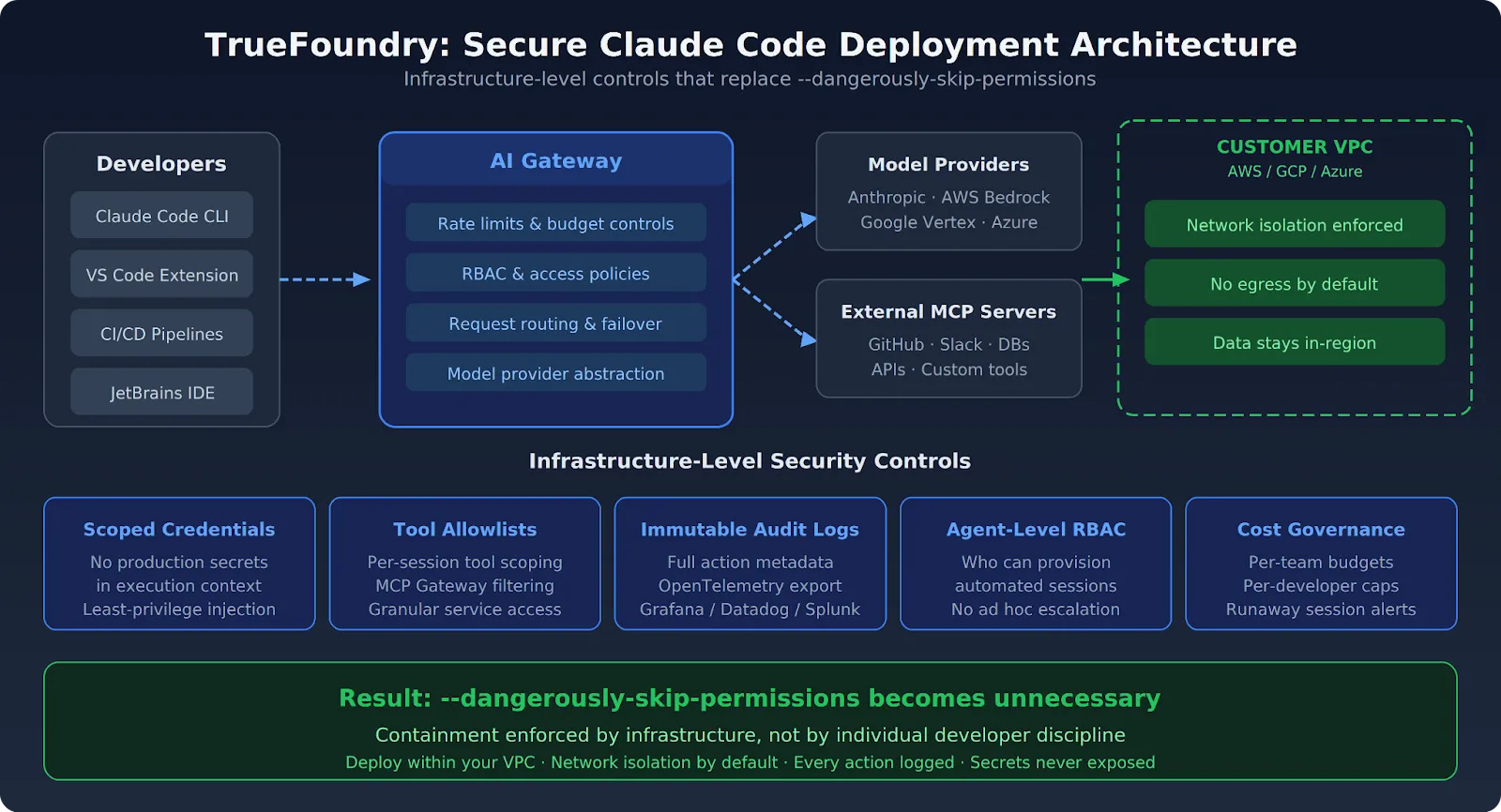
If your team is using --dangerously-skip-permissions because the permission prompts block your CI/CD pipelines, TrueFoundry gives you a better path. The platform runs Claude Code inside ephemeral containers in your VPC with network egress locked down, credentials scoped per-task, and every action logged — so the bypass flag becomes unnecessary. Book a demo to see how it works.
Enterprises can safely use Claude Code by combining developer productivity with appropriate security controls. This includes implementing authentication, role-based access controls (RBAC), audit logging, approval workflows, and access policies for connected tools and systems.
Organizations should also establish governance practices that define what actions AI-assisted tools can perform and ensure sensitive operations remain subject to appropriate oversight.
As Claude Code gains access to internal tools, repositories, databases, and infrastructure, organizations should consider implementing:
These controls help reduce risk while enabling teams to benefit from AI-assisted development.
Auditing Claude Code actions requires visibility into both user activity and tool interactions. Organizations should maintain logs of prompts, tool calls, executed actions, approvals, and access requests to create an audit trail.
For enterprise deployments, centralized monitoring and logging solutions can help teams investigate incidents, meet compliance requirements, and understand how AI-assisted tools interact with internal systems. Effective auditing is especially important when Claude Code has access to production environments, sensitive data, or critical business workflows.
TrueFoundry AI Gateway delivers ~3–4 ms latency, handles 350+ RPS on 1 vCPU, scales horizontally with ease, and is production-ready, while LiteLLM suffers from high latency, struggles beyond moderate RPS, lacks built-in scaling, and is best for light or prototype workloads.



Claude Code uses a permission model that requires explicit user approval before the agent performs sensitive actions — such as writing files, executing shell commands, or making network requests. Each action category is gated behind a prompt, and users must confirm or deny the request before Claude proceeds.
Claude Code asks for permissions repeatedly because its default configuration prioritizes safety. Each new action that falls outside pre-approved scopes triggers a fresh confirmation dialog, ensuring users maintain oversight over what the agent does on their system.
The dangerously-skip-permissions flag allows users to bypass Claude Code's interactive permission prompts entirely. Running Claude Code with this flag instructs it to proceed with all actions automatically, without pausing for user approval. This flag should only be used in isolated, sandboxed environments where the risk of unintended side effects is fully contained.
Yes, users can suppress permission prompts by launching Claude Code with the dangerously-skip-permissions flag. However, this approach carries real risk Claude may overwrite files, execute destructive commands, or make unintended network calls. Restricting its use to Docker containers or CI pipelines is strongly recommended.
Full permissions can be granted to Claude Code by using the `--dangerously-skip-permissions` flag at startup. This removes all interactive approval gates and allows Claude to act autonomously. For safer automation, a better alternative is pre-approving specific permission scopes through Claude's configuration file rather than disabling all checks globally.
Giving Claude access to files carries meaningful risk if done without proper boundaries. In its default mode with permissions enabled, Claude is safe to use because every file operation requires explicit confirmation. Granting full file access via the skip-permissions flag especially outside a sandboxed environment can lead to unintended modifications or data loss. Using Docker volumes or read-only mounts is a safer approach for giving Claude scoped file access.



The latest news, articles, and resources sent to your inbox
.png)



.webp)
.webp)

.png)
.png)
.png)

.png)
.png)
.png)
.png)
.png)
.png)
.png)


