

- Route all model traffic through the TrueFoundry AI Gateway for centralized access control, routing, and cost governance.
- Govern MCP access through the TrueFoundry MCP Gateway so Claude only reaches trusted, approved tools.
- Enforce settings consistently across every developer machine using MDM.
Identity setup (SSO, domain capture) and admin-console settings are configured in Anthropic’s own console and documented in Claude’s docs. This guide does not repeat that — it focuses on what’s specific to a TrueFoundry deployment.
MDM isn’t limited to the CLI. The same
tfy-local-ai-setup binary this guide deploys also enforces Claude Desktop (Cowork 3P) fleet-wide by writing and locking the com.anthropic.claudefordesktop managed preferences (macOS · Windows) — pass --claude-desktop alongside (or instead of) --claude-code, or omit both to auto-detect installed tools. Prebuilt binaries for every platform are on the releases page. The one Claude surface with no endpoint setting is claude.ai (web); govern it with the aitori on-device agent — see Govern all AI traffic.1. Identity (prerequisite)
Before rolling out Claude Code, enforce SSO and domain capture in the Claude Admin Console so access is tied to your IdP (Okta, Entra ID, Auth0, Google Workspace) and employees can’t fall back to personal accounts. See Claude’s SSO setup guide. With TrueFoundry, developers don’t manage personal API keys. Authentication is handled automatically by thetfy-local-ai-setup binary deployed via MDM (see Enforce settings with MDM) — it fetches a fresh gateway token scoped to the user’s TrueFoundry identity and writes it into Claude Code’s managed settings.
2. Route model traffic through TrueFoundry AI Gateway
Point Claude Code at the TrueFoundry AI Gateway so every request passes through a single control point before reaching any provider:- Reach any provider — add model accounts (Anthropic, Bedrock, Vertex, and more) and access them all through one endpoint.
- Route with Virtual Models — a single model identifier with weight-, latency-, or priority-based routing and failover; switch providers without changing any client config.
- Enforce controls — access control, rate limits, and budget limits apply to every request before it reaches the provider.
Setting environment variables on a single machine is easy to undo. To make routing tamper-resistant across your whole fleet, deploy these via MDM — see Enforce settings with MDM.
3. Govern MCP access through TrueFoundry MCP Gateway
MCP servers connect Claude to databases, APIs, and SaaS tools. Each one a developer adds expands the attack surface — unvetted servers bring prompt-injection risk, credential sprawl, and no audit trail of which tools were called or what data was returned. The recommended posture is to route all MCP access through the TrueFoundry MCP Gateway and allowlist only the AI Gateway URL in Claude’s managed settings. This gives you one control point regardless of how many MCP servers you run:- Centralized registry — register and manage all approved MCP servers in one place.
- Unified authentication — developers authenticate once; the AI Gateway handles outbound auth (API key, OAuth2, token passthrough) to each downstream server. Learn more
- Role-based access control — control which users and teams can use which servers and tools.
- Tool-level governance — disable individual tools, or expose an approved subset per team via a virtual MCP server.
- Guardrails — pre/post-execution checks and approval workflows on tool calls. Learn more
- Full audit trail — every tool call is traced with user attribution and payloads, exportable via OpenTelemetry. Learn more
Lock Claude to the AI Gateway
Allowlist only the AI Gateway URL and block marketplace-sourced installs inmanaged-settings.json:
Connect Claude Code to gateway-backed servers
1
Admin registers MCP servers in TrueFoundry
Register approved servers in the TrueFoundry Control Plane, configuring outbound auth, access policies, and guardrails for each.
2
Developer copies the connection URL
Developers log into the TrueFoundry UI to see available servers and copy each ready-to-use connection URL.
3
Add servers to Claude's config
Point each server at the AI Gateway URL:
managed-mcp.json file via MDM. When present, it takes exclusive control — developers cannot add MCP servers beyond what’s defined:
/Library/Application Support/ClaudeCode/managed-mcp.json · Linux /etc/claude-code/managed-mcp.json. Access decisions happen at the AI Gateway, so this file only changes when you add or remove an entire integration.
4. Enforce settings with MDM
Claude Code reads settings in priority order, with the system-levelmanaged-settings.json taking precedence and being un-overridable by developers:
/Library/Application Support/ClaudeCode/managed-settings.json · Linux /etc/claude-code/managed-settings.json.
This single file enforces everything covered above — gateway routing, MCP allowlisting, tool permissions, and sandboxing. A recommended baseline:
Deployment scripts
The scripts below deploy and lockmanaged-settings.json. On every run the script fetches a fresh gateway token for the logged-in user and writes it into ANTHROPIC_CUSTOM_HEADERS — no PAT or manual credentials needed. Schedule the script to run hourly so the token stays fresh; the browser device flow only appears on first run or after the refresh token expires.
The scripts download the tfy-local-ai-setup binary from the truefoundry/tfy-local-ai-setup GitHub repo. The README there documents all available flags, the default managed-settings.json config, and advanced usage (custom model IDs, settings templates, manual runs).
Prerequisites
Before running the MDM script, verify one thing: no server-managed settings active. Check the Anthropic Admin Console under Settings → Policies. If any server-side policies are enabled, they will conflict with or override the file-based managed-settings.json. Disable server-managed settings before proceeding.
How the script works
The script runs as root on a schedule (recommended: hourly) and does four things on every execution:
-
Saves and loads config — On first run, the three required values (
GATEWAY_URL,CONTROL_PLANE_URL,TENANT_NAME) are read from the script’s Config section and written to a root-owned config file (macOS:/Library/Preferences/com.truefoundry.tfy-local-ai-setup.conf; Linux:/etc/tfy/tfy-local-ai-setup.conf; Windows:C:\ProgramData\TrueFoundry\tfy-local-ai-setup.conf). On subsequent runs the file is loaded automatically — no changes to the script are needed. A non-empty value in the Config section overrides the saved file (useful for one-off updates). -
Installs or updates
tfy-local-ai-setup— Downloads the binary from thetfy-local-ai-setupGitHub releases if it is not present or if the installed version does not matchRELEASE_TAG. On subsequent runs where the version already matches, this step is skipped entirely. -
Detects the logged-in user and fetches a fresh auth token — The binary identifies who is currently logged into the machine, then silently refreshes the token from
~/.tf/refresh-token. The browser device-authorization flow only appears the very first time, or after the refresh token has expired. Every other run completes silently in the background. -
Writes and locks
managed-settings.json— The binary builds the JSON with the AI Gateway URL, model IDs, and the freshly fetched token, then writes it to the system-level path and locks the file so developers cannot modify it (macOS:chflags schg; Linux:chattr +i; Windows:icaclsACL).
- macOS
- Linux
- Windows
Run via Jamf, Mosyle, Kandji, or any MDM supporting script execution. Must run as root. Detects Apple Silicon vs Intel automatically.
Pass
--codex to configure Codex or --claude-desktop to configure Claude Desktop (Cowork 3P) instead of --claude-code, or omit all of them to auto-detect which tools are installed and configure each one.Prefer a server-side option? Claude’s Admin Console (Settings → Policies) can push tool permissions, MCP allowlists, and model restrictions to all members without deploying files — useful for BYOD. Note that server-managed settings require a direct connection to
api.anthropic.com and are bypassed when you route through a gateway via ANTHROPIC_BASE_URL.Using Claude Code MDM with a Claude Enterprise Account
If your organization has a Claude Enterprise subscription (rather than a direct Anthropic API key), the MDM setup requires one additional configuration step on TrueFoundry: you create an Anthropic provider that acts as a pass-through, and the authentication is supplied at request time by each developer’s own Claude Enterprise account — not stored as a credential on TrueFoundry. This approach also gives you per-user usage attribution on both sides — TrueFoundry logs which user made each request, and Anthropic attributes usage to the individual Claude Enterprise seat. This works because the authorization token is user-specific: each developer obtains it by logging into their own Claude Enterprise account, so every request carries their identity end-to-end through the AI Gateway.1
Create an Anthropic provider on TrueFoundry
In the TrueFoundry platform, navigate to Integrations → Providers and create a new provider of type Anthropic.When prompted for authentication credentials, leave the API key field empty. Do not enter any API key or secret. The AI Gateway will authenticate using the
X-TFY-API-KEY token injected by the MDM script at the time of each request — no stored credential is needed or desired.2
Copy the model IDs
After saving the provider, TrueFoundry assigns model IDs for each Claude model tier (for example,
claude-enterprise/claude-opus-4-6, claude-enterprise/claude-sonnet-4-6, claude-enterprise/claude-haiku-4-5). Copy these model IDs from the provider detail page.3
Update the MDM script config
In the MDM script, set the three config values to match your TrueFoundry setup:Then confirm the model env vars in the JSON block match the model IDs from the previous step:
The
tfy-local-ai-setup binary fetches a fresh OAuth token on every MDM run and writes it into ANTHROPIC_CUSTOM_HEADERS as X-TFY-API-KEY. TrueFoundry’s gateway forwards this header to Anthropic’s API to authenticate each request against the developer’s Claude Enterprise subscription. No long-lived credentials are stored anywhere on the managed machine.- Fallbacks — if one target is unavailable, traffic automatically falls through to the next
- Model changes without touching the MDM script — update the virtual model’s routing on TrueFoundry and the change takes effect immediately across all managed machines, with no script redeployment
X-TFY-API-KEY) is issued by Anthropic for a specific Claude Enterprise account. If multiple targets were Claude Enterprise providers, all of them would receive the same token — which is only valid for one account, causing the others to fail. Non-Claude-Enterprise targets (e.g. a fallback to a different provider) can coexist without issue.
Troubleshooting: 401 / 403 errors
If Claude Code returns a 401 Unauthorized or 403 Forbidden error, the session token has expired or was never initialized. The developer needs to re-authenticate manually:
- Open Claude Code and run
/login - When prompted to choose an authentication method, select Claude Enterprise (the first option)
- Complete the browser login flow
5. Observability with TrueFoundry
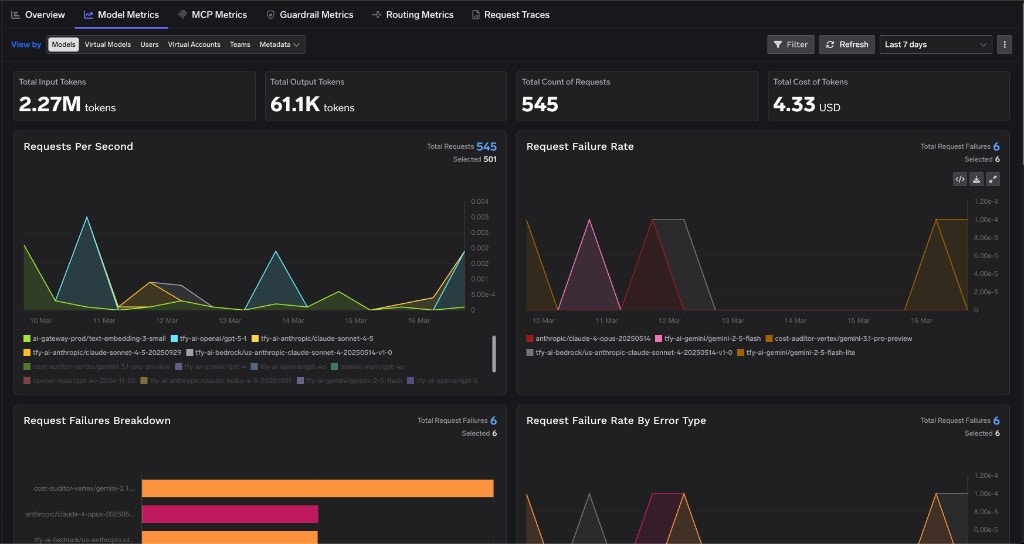
When Claude traffic flows through the TrueFoundry AI Gateway, you get built-in observability across both LLM and MCP requests — no extra instrumentation. Request tracing — every request is traced with full attribution (user, model, MCP server, tool).
6. Data retention and compliance
By default, Anthropic may retain prompts and outputs for safety and quality. Review your enterprise agreement for the full scope.Retention settings
Retention settings
- Web: set retention to a maximum of 30 days at Organization Settings → Data and Privacy.
- CLI: local transcripts are auto-deleted via
transcriptRetentionDaysinmanaged-settings.json(recommended 7–14 days). - Zero Data Retention (ZDR): an enterprise add-on requested through your Claude account team that stops Anthropic retaining prompts/outputs beyond serving the request. Learn more
SOC 2 / HIPAA / GDPR
SOC 2 / HIPAA / GDPR
Anthropic holds SOC 2 Type II (available under NDA). Your admin responsibilities:
- SOC 2 — document user provisioning/deprovisioning, retain audit logs 90+ days, and maintain a vendor risk assessment.
- HIPAA — a ZDR addendum is required before processing PHI with any Claude interface; mandate human review of outputs involving patient data and keep a full audit trail.
- GDPR — control data residency (AWS EU / Vertex with Private Service Connect), honor right-to-erasure via the Compliance API, and use
denyrules to minimize PII.
Frequently asked questions
Why route Claude Code through TrueFoundry instead of straight to Anthropic?
Why route Claude Code through TrueFoundry instead of straight to Anthropic?
A direct connection gives you no central place to enforce policy. Routing through the TrueFoundry AI Gateway lets you apply access control, rate and budget limits, multi-provider routing with failover, and full tracing — across web and CLI — from a single control point, without changing client config.
How does authentication work without distributing API keys?
How does authentication work without distributing API keys?
The MDM deployment installs the
tfy-local-ai-setup binary and runs it on a schedule (hourly) to fetch a fresh gateway token scoped to the user’s TrueFoundry identity. The token is written into ANTHROPIC_CUSTOM_HEADERS as X-TFY-API-KEY and refreshed automatically — no personal or long-lived API keys on developer machines.What does the TrueFoundry MCP Gateway add over connecting MCP servers directly?
What does the TrueFoundry MCP Gateway add over connecting MCP servers directly?
It centralizes MCP governance: a registry of approved servers, unified outbound authentication, role-based access, tool-level controls, guardrails, and a full audit trail of every tool call. You allowlist only the AI Gateway URL, so developers can’t connect to unvetted servers.
I accidentally closed the browser login window — do I have to wait for the next MDM sync?
I accidentally closed the browser login window — do I have to wait for the next MDM sync?
No. The cancelled device code expires immediately, but you can start a fresh login at any time. Since your config is already saved from the initial run, source the config file and run the binary directly — no flags to look up:Once you complete the login, the refresh token is saved and all future MDM runs will finish silently — no browser prompt needed.
- macOS
- Linux
- Windows
Can developers override these settings locally?
Can developers override these settings locally?
No. When
managed-settings.json is deployed to the system path and locked (and allowManagedPermissionRulesOnly is set), it takes highest priority and cannot be overridden by project- or user-level settings.A browser login window opens every time the MDM script runs — is this expected?
A browser login window opens every time the MDM script runs — is this expected?
No, this should only happen on the first run or when the cached refresh token at
~/.tf/refresh-token has expired. Once the developer completes the login, subsequent MDM runs silently refresh the token without any browser prompt. If the window keeps appearing on every run, the refresh token is not being saved — run the setup manually (see the FAQ above) to re-authenticate and reset the token.