



September 26, 2026
|
5 min read


Published: April 7, 2026
Blazingly fast way to build, track and deploy your models!
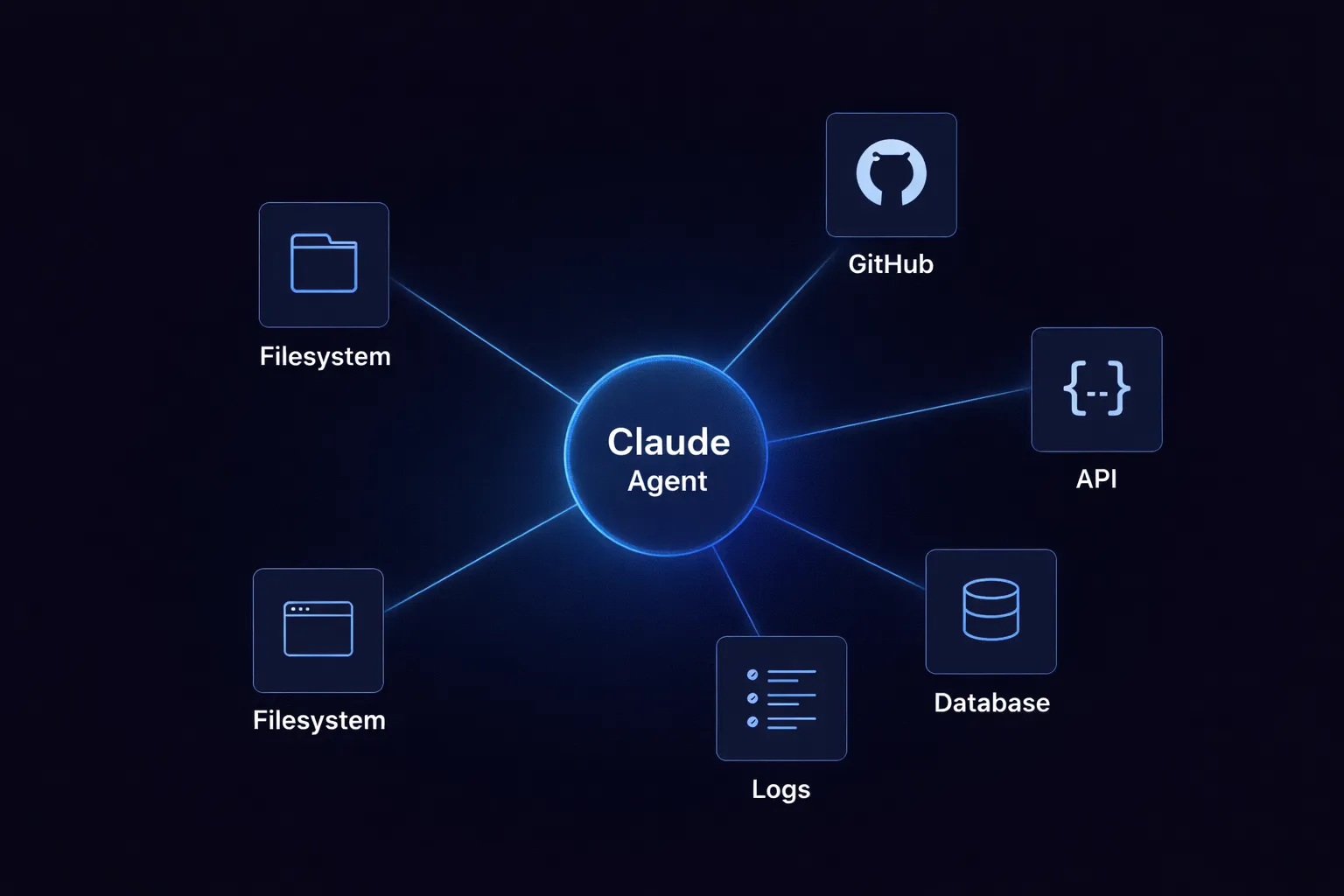
A coding agent without access to external tools can only do so much. It might explain code, suggest changes, or write a patch. But if you want it to check a repository, call an API, or read a log file, it needs to go beyond its context window. This is where most setups start to fail.
I've watched teams create these connections from scratch. There might be a Python script in one place, a custom wrapper in another. One integration uses JSON over HTTP, another runs commands through a CLI, and another depends on an old adapter from a hackathon. This setup works with a few tools, but as you add more, things get messy. Permissions become inconsistent, and debugging gets harder.
Claude Code is moving from being just an assistant to becoming a connected agent. It becomes much more helpful when it can access files, development tools, and external systems. But if there isn’t a standard way to connect everything, you end up with fragile integrations that can break unexpectedly.
This is what MCP addresses.
The Model Context Protocol provides a standard way to make tools available to models. Rather than connecting each tool to each agent, you use a shared discovery protocol. This doesn’t solve every problem, but it shifts the question from "how do I connect this" to "how do I manage what’s connected."
MCP is a protocol, not a product. This is important because it shapes how Claude Code works behind the scenes.
The Model Context Protocol specifies how tools describe themselves to a model and how the model calls them. It standardises the exchange: discovery, schema, request, and response. It doesn't implement the tool itself. It doesn't handle access control. It just provides the contract.
When we mention MCP integrations in Claude Code, we’re referring to tools that Claude can discover and use via the protocol. The model isn’t tied to each endpoint. Instead, it sees a structured interface, understands the parameters, and uses the tool as part of its workflow.
For example, say you want Claude to create a GitHub issue when it finds a bug during code review. Without MCP, you’d have to write custom code to handle Claude’s output, log in to GitHub, and make the API call. With MCP, you just register a GitHub integration that provides the create_issue tool with parameters like repository, title, body, and labels. Claude can then find and use that tool directly.
MCP integrations do more than just connect Claude to tools, they define how Claude recognises and interacts with those tools from the start.
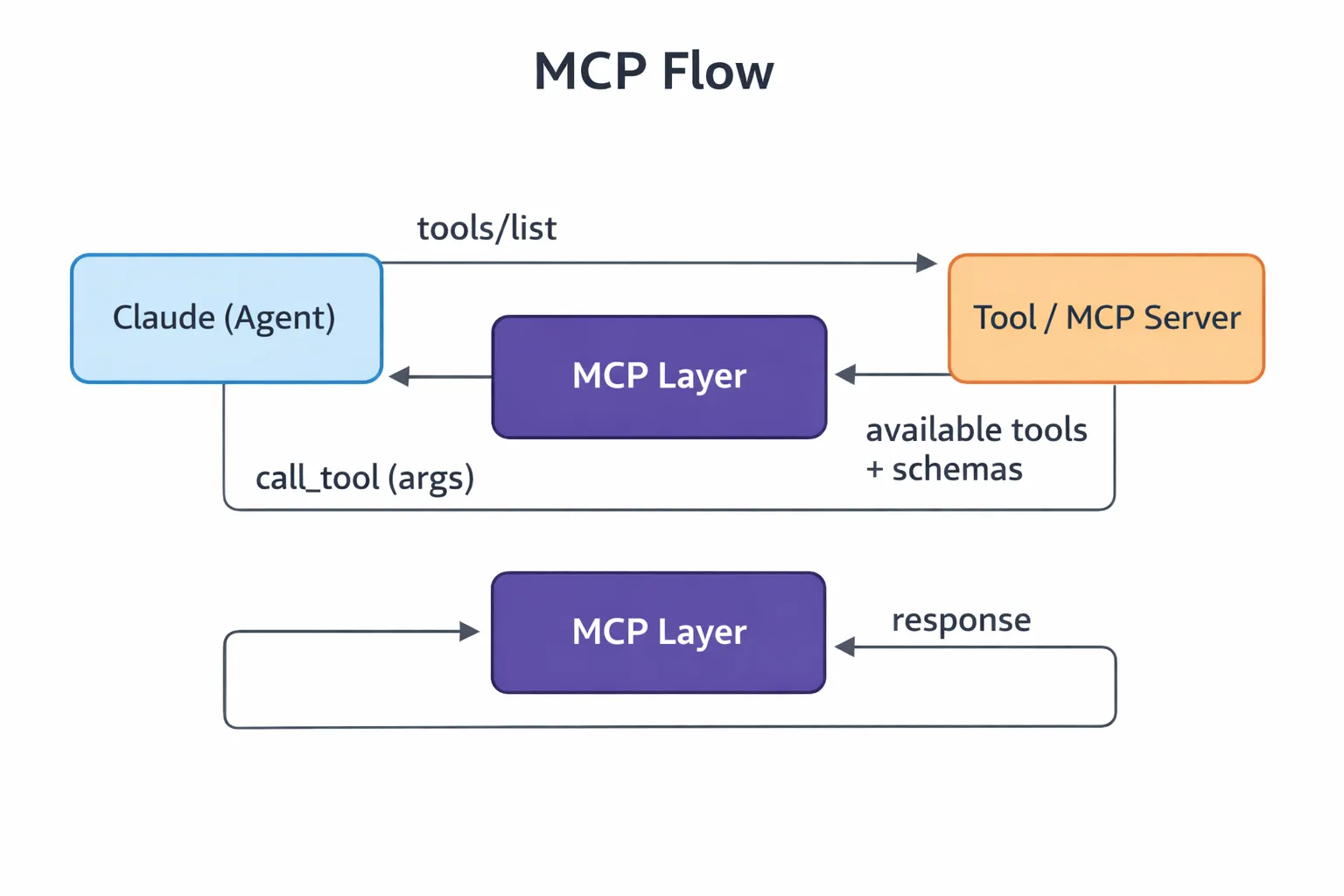
When running, Claude only knows about the tools made available through MCP. The way it interacts with them follows a set sequence.
This step happens before Claude interacts with anything. A tool is registered with an MCP server, including its name, description, and input schema. The schema helps the model understand the tool. If the registration is unclear, Claude may pick the wrong tool.
A file reader might expose a path parameter. A GitHub integration might expose repository, branch, and issue_id. A logging tool might take service_name, time_range, and severity_filter.
Tool discovery
When Claude connects, it sends a tools/list request:
{
  "method": "tools/list"
}
The server sends back the available tools and their schemas. This list becomes Claude’s set of possible actions. Claude isn’t guessing, it’s reading a clearly defined interface.
Invocation
When Claude needs a tool, it sends a call_tool request with arguments. Say Claude finds a security issue during review. It might invoke the GitHub integration like this:
{
  "method": "call_tool",
  "params": {
    "name": "github_create_issue",
    "arguments": {
      "repository": "acme/payment-service",
      "title": "SQL injection vulnerability in user input handler",
      "body": "Found unsanitized user input in src/handlers/payment.py line 142...",
      "labels": ["security", "high-priority"]
    }
  }
}
If the arguments are wrong or the tool definitions aren’t clear, things can fail at this stage.
Response handling
The tool runs independently of the model and returns a result. Claude reads this result and moves on. Sometimes the result is clear, but other times it’s messy or incomplete. Either way, it affects what happens next.
This cycle of registration, discovery, invocation, and response is how MCP operates within Claude Code.
MCP integrations all use the same protocol, but they don’t all work the same way. Differences appear in how they handle state, how predictable their responses are, and how much context Claude has to manage.
File system integrations
These are the simplest type. Claude reads and writes files in quick cycles. This is fast and usually predictable, but also fragile. If a file path is missing or a write is incomplete, the workflow can break without clear errors. I’ve seen agents get stuck because a file read returned an empty value instead of an error. Repository integrations
These include GitHub, GitLab, and similar tools. Claude can read pull requests, check commits, create issues, and push changes. This is powerful but can be risky. If permissions aren’t set up correctly, an agent might merge code that it shouldn’t. You have to be careful with permissions, reading pull requests is not the same as writing to branches.
API integrations
These are external services accessed over HTTP. They are more structured but less forgiving. You have to deal with network calls, authentication, rate limits, and timeouts. Schema mismatches can show up in the middle of a run. I’ve debugged cases where Claude kept retrying a Jira call that failed because of a hidden field validation error.
Log and observability
Claude can query logs, traces, or metrics. These are mostly read operations with large amounts of data. The main challenge is asking the right question. A tool that returns 10,000 log lines isn’t helpful, but one that lets you filter by time range, severity, and service is much better.
Database integrations
These are stateful and carry more risk. Claude creates queries based on schemas that it may not fully understand. Here, accuracy is more important than speed. Most teams set these up as read-only.
They all use the same protocol, but their behaviour in practice can vary widely.
The system works well because each layer stays separate. If you combine them, it quickly becomes harder to understand and manage.
The agent layer is Claude itself. It figures out what you want, decides what information it needs, and whether a tool should be used. Claude doesn’t run anything directly, it plans, chooses, and delegates tasks.
The MCP layer acts as the protocol boundary and standardises how tools are described and called. To Claude, every tool, whether a file reader, a database, or an external API appears as a structured interface, because MCP makes them all look the same.
The tool layer is where things actually happen. Commands are run, files are changed, and API calls are made. This is where real effects take place.
Claude does the thinking without directly interacting with the system. Tools handle the execution without making decisions. MCP turns Claude’s intent into real actions.
This setup explains some design choices. Why doesn’t Claude call the GitHub API directly? It shouldn’t need to know it’s GitHub. Instead, it just sees a tool called create_issue with a schema. Authentication, rate limits, and error handling all happen in the tool layer, behind the protocol.
MCP makes connectivity cleaner. It doesn't make it production-ready on its own.
No centralized governance
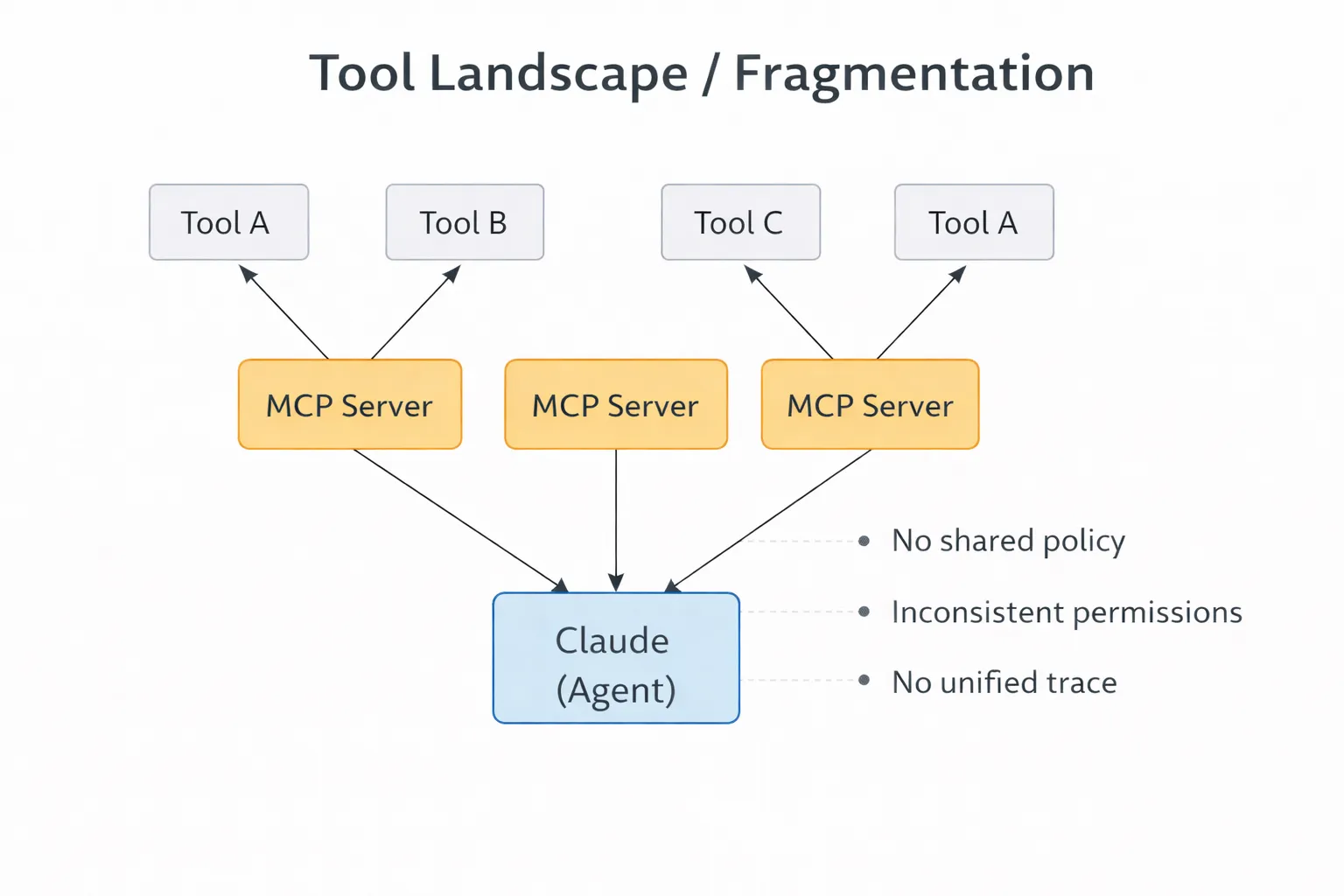
MCP makes tools available, but it doesn’t control who can see what across different teams or environments. As you add more integrations, this becomes a challenge. One agent might see too many tools, while another sees too few. There’s no central place to maintain consistency.
For example, if you have three Claude deployments, one for code review, one for incident response, and one for documentation, each needs different tool access. The code review agent shouldn’t see production database tools, and incident response shouldn’t write to the main repository. With native MCP, you have to configure each deployment separately and hope nothing gets out of sync.
Security gaps
Tool access is based on the credentials used. Many MCP setups use service-level permissions that are too broad. If you tighten them, workflows can break. If you leave them open, you add risk. The protocol doesn’t solve this problem.
No observability
Claude calls tools and moves on, leaving what happened in between invisible. Which tool was selected, why, with what arguments, and the response are unknown. Without traces, debugging becomes guesswork. I've spent hours trying to figure out why an agent made a particular tool choice, only to realize there was no record of the decision at all.
Scaling problems
A small number of integrations is manageable, but having dozens gets complicated. Names drift, schemas differ, and teams define tools in their own ways. Claude has to work with this inconsistent setup, which hurts reliability. For example, if both github_create_issue and gh_new_issue are registered, Claude has to guess which one to use.
There’s no clear boundary for what an agent should see. Tool lists get longer over time. Some tools become outdated, while others are too powerful. A cluttered list worsens performance and control.
MCP manages connections, but it doesn’t manage control.
As teams move from a few integrations to full production, their needs change. Tools need to be managed, not just found. Which agent can use which tool? Under what conditions? With what limits? Native MCP doesn’t answer these questions clearly.
This is where gateways become useful. They aren’t just extra overhead, they help manage growing complexity.
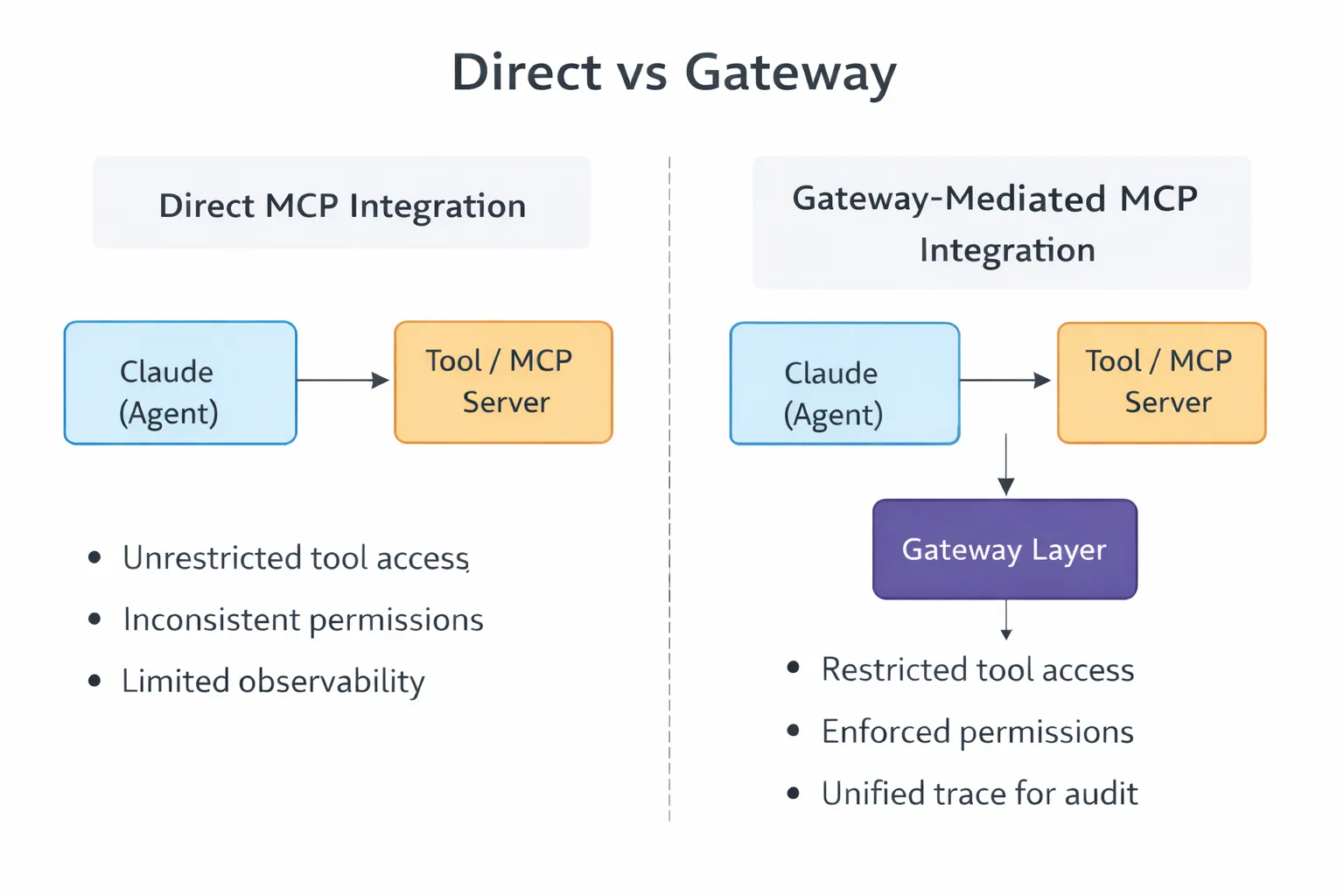
A gateway sits between the Claude and the MCP servers. It restricts tool visibility based on agent identity. It enforces auth before requests hit downstream tools. It applies rate limits, logs invocations, and rejects policy violations.
Auditing works the same way. When agents interact with production systems, like creating issues, querying databases, or reading logs, teams need to know what was done, by whom, and why. Without this, debugging and compliance are reactive, you only find out about problems after they happen.
A simple integration becomes something more: a control layer between agents and tools that shapes how access works in real situations.
MCP integrations work best when you treat them as interfaces, not as shortcuts.
Scope tool access is tightly.
Access should fit the task. If an integration only needs to read repository metadata, it shouldn’t have credentials that can delete branches. This sounds obvious, but it’s often ignored because broader permissions are quicker to set up. It’s faster at first, but you might spend weeks fixing things after an agent deletes something it shouldn’t.
Limit tool visibility per agent
The model should only see what it needs. If an agent is just reading files and looking up issues, it doesn’t need access to deployment controls or to write to the database. Fewer options mean fewer mistakes.
Design clear tool definitions.
Explicit names. Narrow responsibilities. Predictable schemas. If one tool does five things, Claude infers too much. Good integrations are boring. Each tool does one thing cleanly.
For example, instead of having a GitHub operations tool with many parameters, split it into GitHub_read_pr, GitHub_create_issue, and GitHub_add_comment. This makes each tool’s purpose clear and limited.
Prevent sprawl
Having too many similar tools makes it harder to choose the right one and slows down debugging. It’s better to have a smaller, well-organised set of tools than a large, messy one. Review tool registrations regularly, remove unused tools, and combine overlapping tools.
These solve related problems at different layers.
APIs are the basic interface in most systems, and SDKs make those APIs easier to use. MCP sits on top of both, turning tool access into a consistent format agents can use.
MCP doesn’t replace APIs or SDKs. Your GitHub integration still uses the GitHub API. MCP just standardises how Claude finds and uses that integration.
MCP brings order to what used to be a messy process. It standardises how models expose, discover, and use tools. This makes it easier to build connected agents.
But it's still only a starting point. It doesn't answer questions about control, visibility, or policy. It doesn't decide which agent accesses which tool or how interactions get audited. This is where your system’s architecture needs to evolve. You move from simple integrations to adding a managed layer in front of them. MCP makes connections possible, but what you build around it will decide whether those connections remain manageable.
What happens when an MCP tool call fails?
Claude gets the error response and decides how to proceed. It might retry, try another tool, or surface the failure. The problem is that error handling varies across integrations. Some return structured codes. Others return vague messages. Without consistent error schemas, recovery becomes unpredictable.
Can I restrict which tools a Claude deployment sees?
Not through MCP itself. The protocol handles discovery and invocation. Access control is external. You configure each MCP server separately or add a gateway that filters visibility based on agent identity.
How do MCP integrations handle auth?
At the tool layer, not the protocol layer. Each MCP server manages credentials for the services it wraps. Claude doesn't see those credentials. It just calls tools. You secure each integration separately.
What's the performance overhead of MCP?
Minimal for most cases. MCP adds protocol overhead for discovery and invocation, but actual execution still goes through whatever the tool uses—usually direct API calls or local commands. The overhead is in standardisation, not the execution path.
How do I debug bad tool selection?
Hard without observability. Log every tool/list response and every call_tool request, then manually reconstruct decisions. A gateway layer automates this logging and simplifies debugging.
TrueFoundry AI Gateway delivers ~3–4 ms latency, handles 350+ RPS on 1 vCPU, scales horizontally with ease, and is production-ready, while LiteLLM suffers from high latency, struggles beyond moderate RPS, lacks built-in scaling, and is best for light or prototype workloads.






The latest news, articles, and resources sent to your inbox


.webp)
.webp)
.webp)
.webp)
.webp)
.png)
.png)
.png)
.png)
.png)
.png)


