


.png)
November 1, 2026
|
5 min read


.png)
Blazingly fast way to build, track and deploy your models!
The Airtable MCP server is a remote Model Context Protocol server hosted by Airtable at https://mcp.airtable.com. Model Context Protocol is the open standard that lets an agent discover and call tools on an external system, and Airtable’s implementation turns bases, tables, records, and schemas into callable tools.
TrueFoundry’s docs describe it by capability and OAuth scope rather than by tool name, which is the right way to reason about it. The scope you grant is what bounds the agent.
Being remote, there is no container to babysit and no npx process on each laptop - you point a client at a URL and authenticate, like other remote MCP servers.
What makes Airtable distinctive is where the data came from: it is where operations teams build the systems of record IT never provisioned - vendor lists, hiring pipelines, onboarding trackers, budget sheets. That has two consequences.
It is high-value for an agent. The data is genuinely structured - tables, typed fields, linked records - so an agent can query and mutate it without a data-engineering project in front. schema.bases:read tells it what the fields are and data.records:read gives it the rows.
It is hard to reason about. Because it grew organically, there is no inventory. The base tracking contractor day rates sits beside the base tracking office snack orders, with the same sharing settings. These records are often the operational truth a human process depends on, with no version-history discipline behind them. A record that gets overwritten does not announce itself.
So the governance question is narrow: which bases, and is this agent allowed to write?
The uses that justify connecting it chain tools together:
Three of those four are read-only; the fourth writes comments, not records.
Read versus write is the split that matters. Reading a vendor list is harmless. Updating a record in the onboarding tracker changes what a human sees on Monday and acts on. Modifying a schema can break a view, an automation, or a linked-record relationship three other bases depend on. data.records:read and data.records:write are separate scopes for a reason.
One analyst wiring this into Claude Desktop is fine. Twenty people across four teams is not.
Nobody knows which bases are in scope. During Airtable’s OAuth flow the user picks which bases the integration can access. A good control, but exercised by whoever happens to be authorizing, in a browser, at the moment they want the agent working. The path of least resistance is to select everything, and nobody reviews it afterward.
Personal access tokens outlive the person. Teams that skip OAuth for an Airtable PAT end up with a long-lived credential in a local config, scoped broadly because narrowing it is tedious.
Write access arrives by default. If the integration was registered with the write scopes because that seemed easier, every agent using it can mutate records. The failure is quiet: an agent asked to summarize a tracker decides cleaning up a malformed field is helpful, and rewrites twelve rows.
No audit trail at the right granularity. Airtable keeps revision history on records. It does not record that your onboarding agent made the change while acting on a prompt from a Slack thread.
None of this argues against connecting Airtable. It argues for the control plane an MCP gateway provides.
Airtable is registered as a remote MCP server using your own OAuth integration, not provisioned from the TrueFoundry Managed MCPs catalogue. There is no one-click tile: you create the OAuth integration in Airtable, choose the scopes, and bring the credentials across. That extra step is where most of the governance happens.
Step 1 - Register an Airtable OAuth integration. At airtable.com/create/oauth, create an integration and set the redirect URL to:
https://<tfy-control-plane-base-url>/api/svc/v1/llm-gateway/mcp-servers/oauth2/callback
Replace <tfy-control-plane-base-url> with your control plane URL. This is the self-registered callback, not the managed one; pasting the auth.truefoundry.com callback produces mismatched-redirect errors.
Step 2 - Add only the scopes your agents need. The most consequential decision in the setup. Grant data.records:read, schema.bases:read, and workspacesAndBases:read for a reporting agent and stop. Add data.recordComments:write if it should annotate rather than edit. Leave the write and webhook scopes off unless a workflow needs them.
Step 3 - Open the picker. Go to MCP Gateway in the left sidebar and click Add Server.
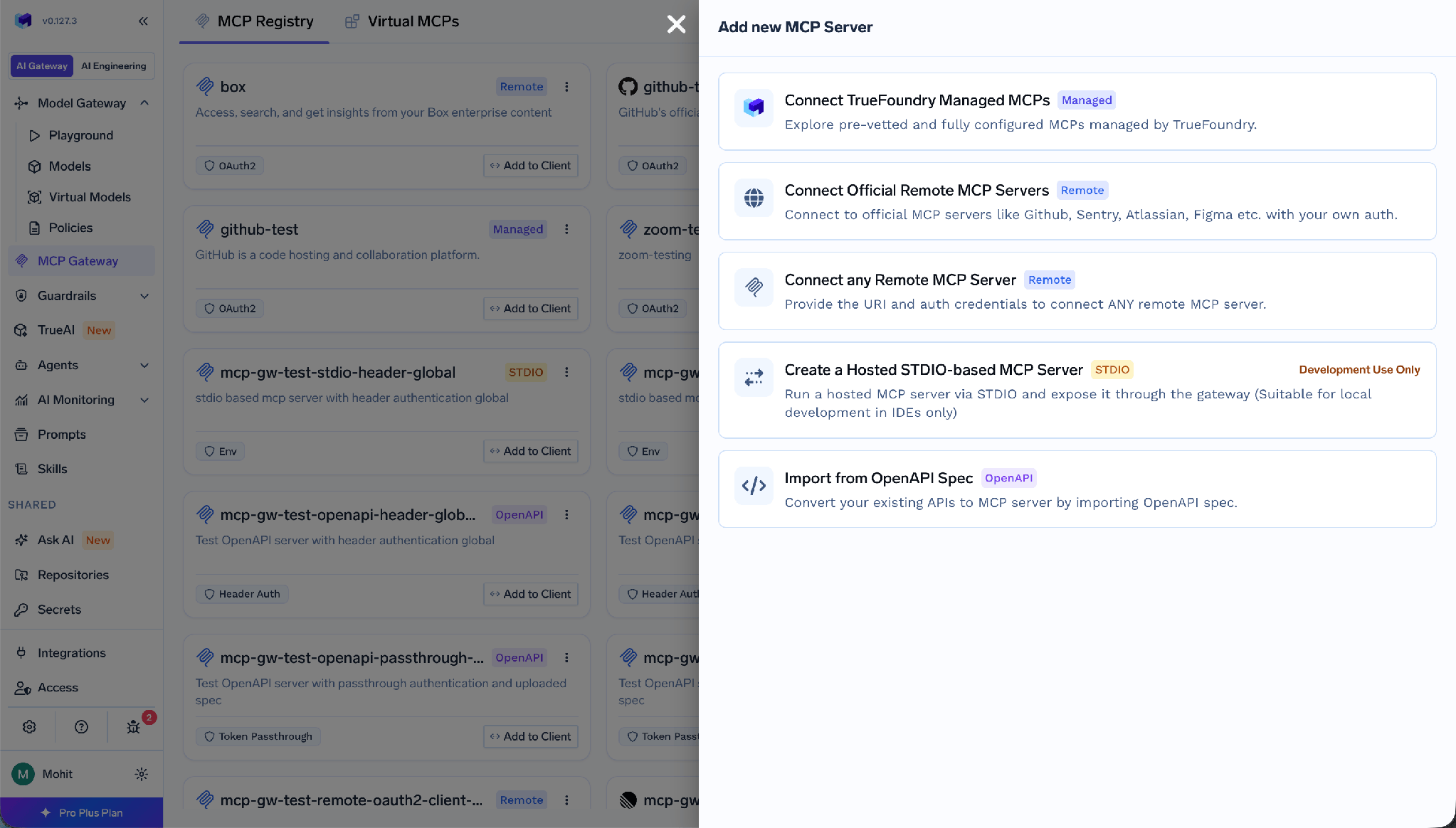
Add MCP Server picker listing the Connect any Remote MCP Server option
Select Connect any Remote MCP Server.
Step 4 - Fill in the server details.
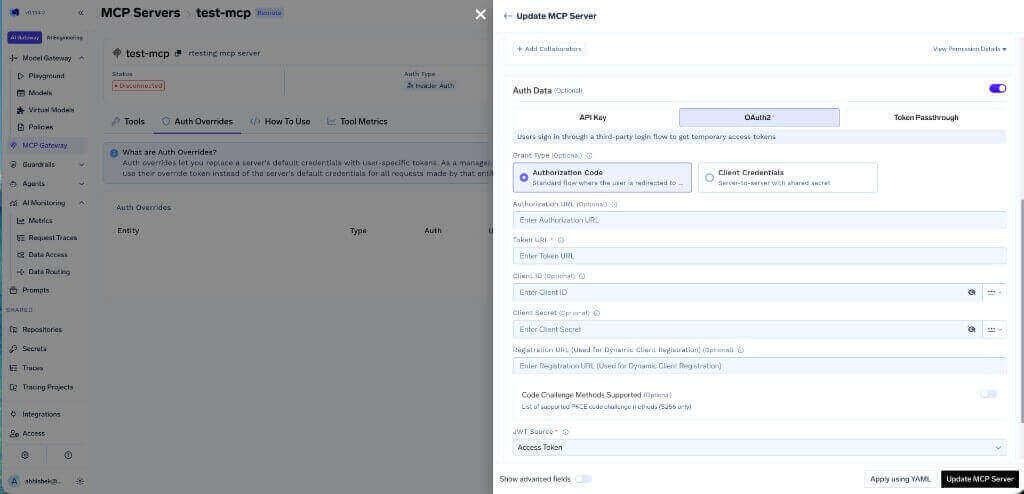
Store the credentials in the TrueFoundry secrets store and reference them by FQN rather than pasting the secret into the form.
Step 5 - Add collaborators and save.
Step 6 - Connect. Each user opens the server’s Tools section and clicks Connect Now. Airtable’s consent screen appears, and this is where the user picks which bases the integration can access.
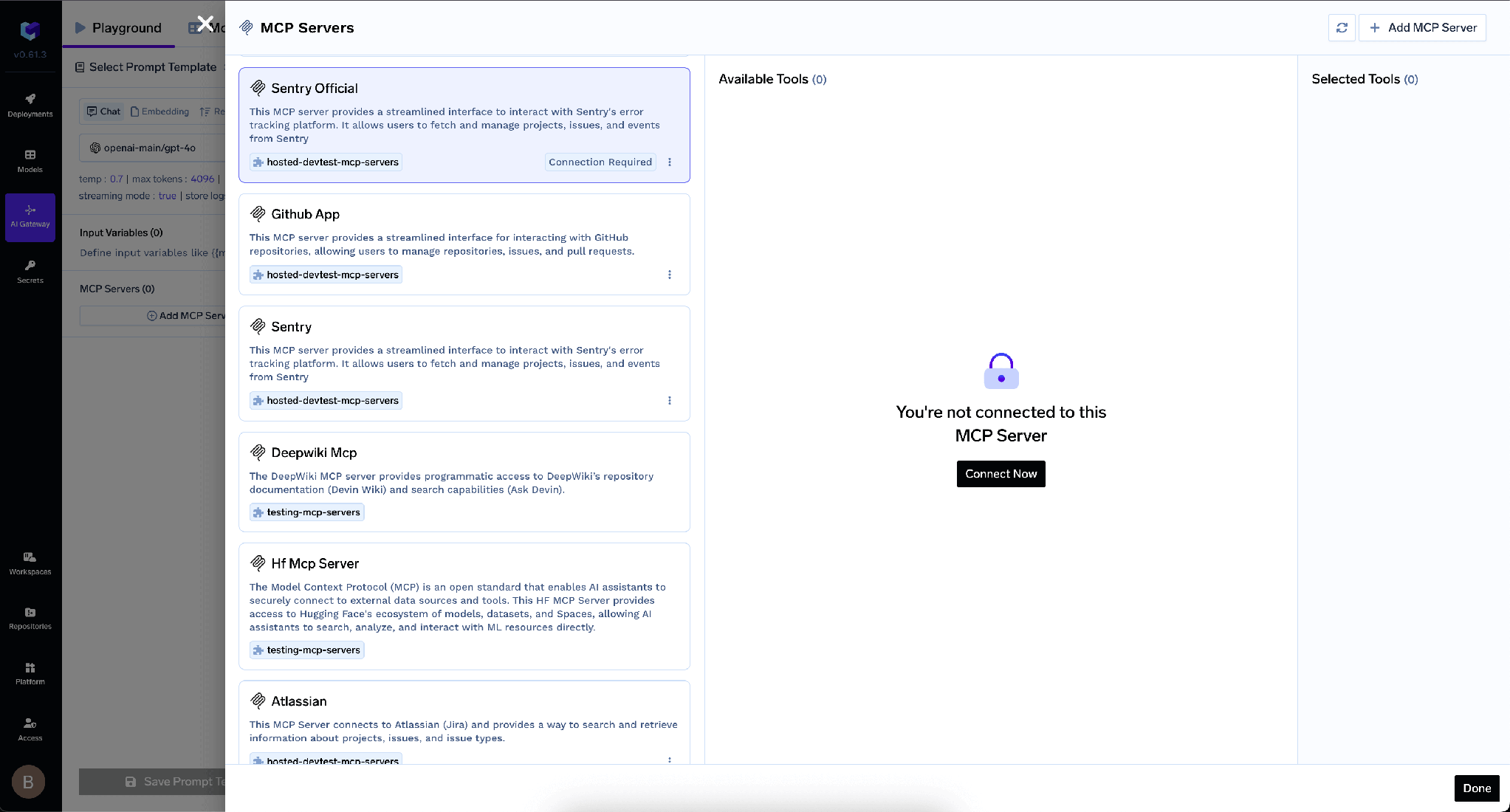
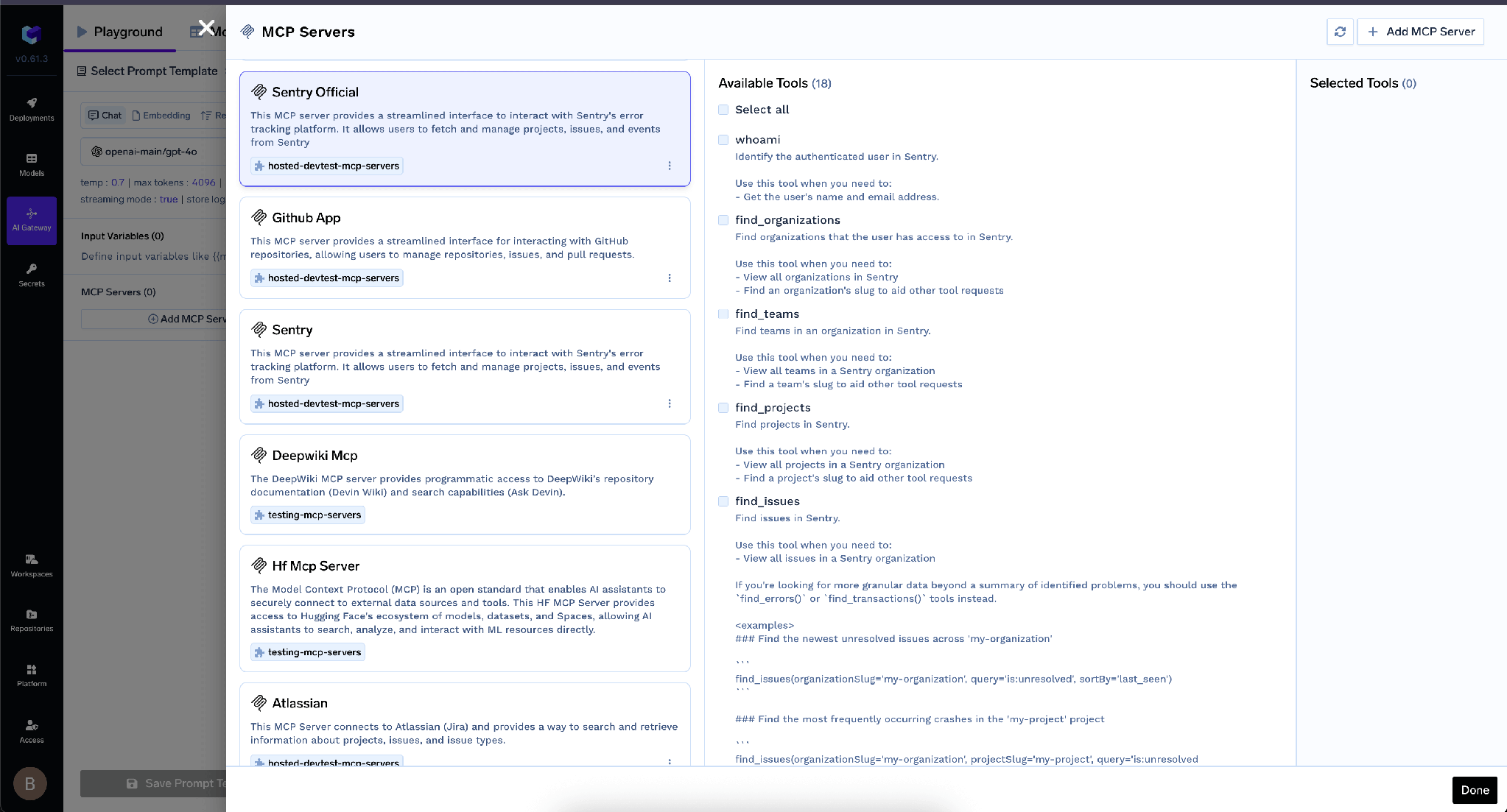
After OAuth succeeds, the Airtable tools appear and can be tried from the Agent Playground.
TrueFoundry separates inbound authentication - how a client proves itself to the gateway - from outbound, how the gateway proves itself to Airtable. The layers are independent, and conflating them is the usual mistake.
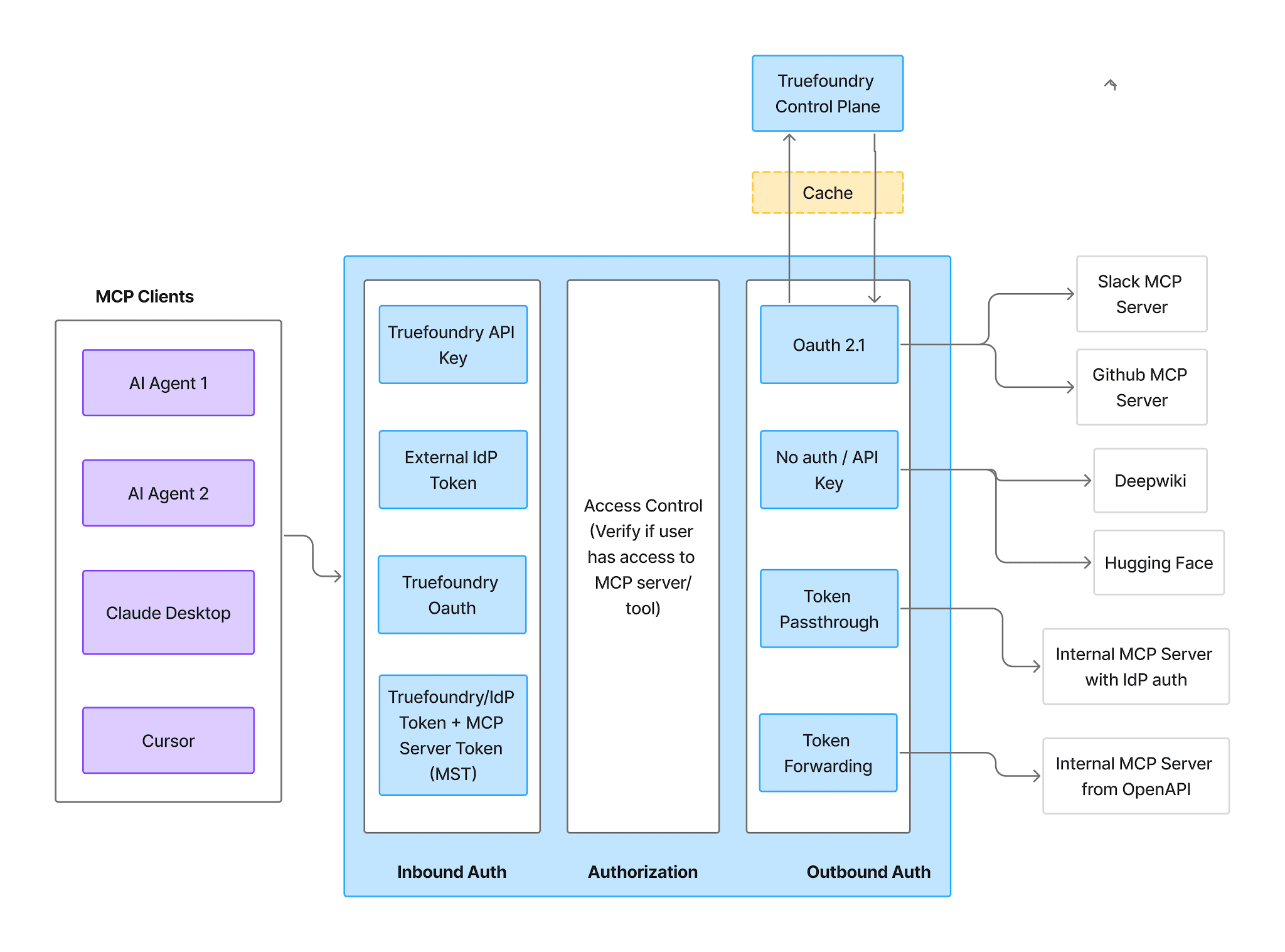
Inbound supports four methods:
Virtual Accounts give every request identical access, so they do not work for per-user Airtable access. If each person should see only the bases they authorized, use a PAT or an IdP token inbound.
Outbound for Airtable is OAuth2 Authorization Code. Each user authorizes their own Airtable account; TrueFoundry manages consent, token storage, and refresh, injecting tokens per user on every call, and never receives Airtable credentials.
The effect is worth internalizing: the gateway decides which tools exist, and Airtable’s base-level permissions decide which bases the authorizing user can reach. Disabling a write tool stops every user writing regardless of scope. Selecting three bases during OAuth stops that user touching anything else regardless of which tools are enabled. Neither substitutes for the other.
Once authorized, the Tools tab lists everything the server exposes. This is the gateway-side fence.
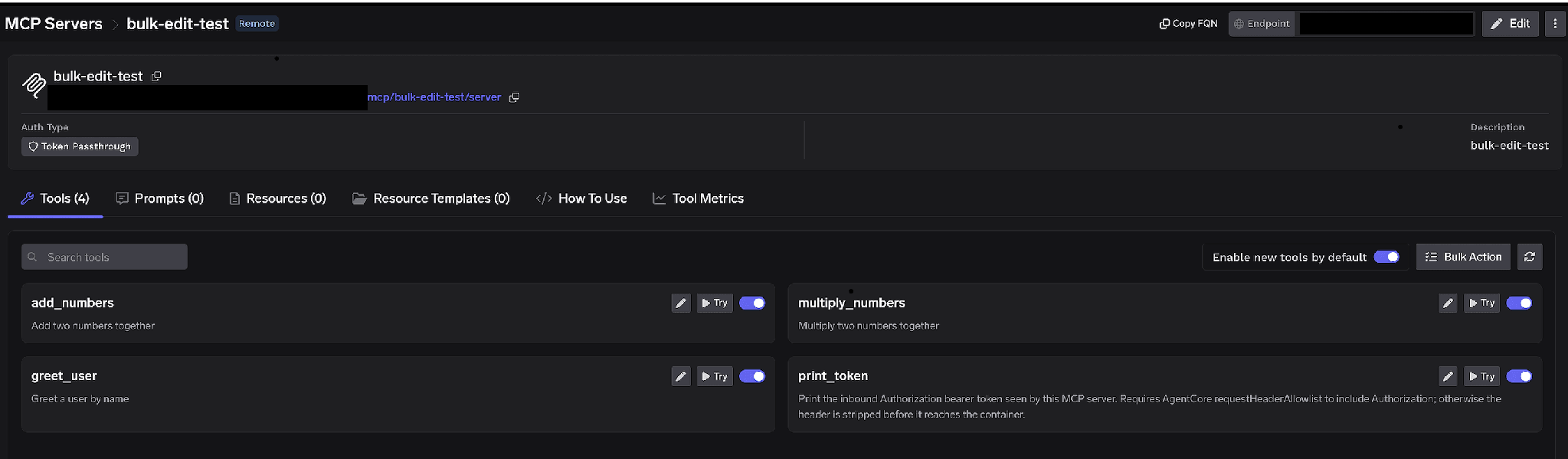
Per-tool toggles. Turn a tool off and it is omitted from tools/list entirely - clients never see it and it cannot be invoked. For Airtable, disabling every record- and schema-mutating tool makes a reporting agent structurally read-only. An agent that cannot call a write tool cannot be talked into overwriting an onboarding tracker, whatever a poisoned record description says.
Enable new tools by default. Left on, tools Airtable adds upstream appear automatically - convenient, but your capability surface then grows on its own, the wrong default when write access is the risk. Turned off, only tools you enable are available.
Bulk Action. Switches every row to checkboxes with Select all, so you can flip a class of tools at once.
Click the pencil on any tool to override how it is presented to the model:
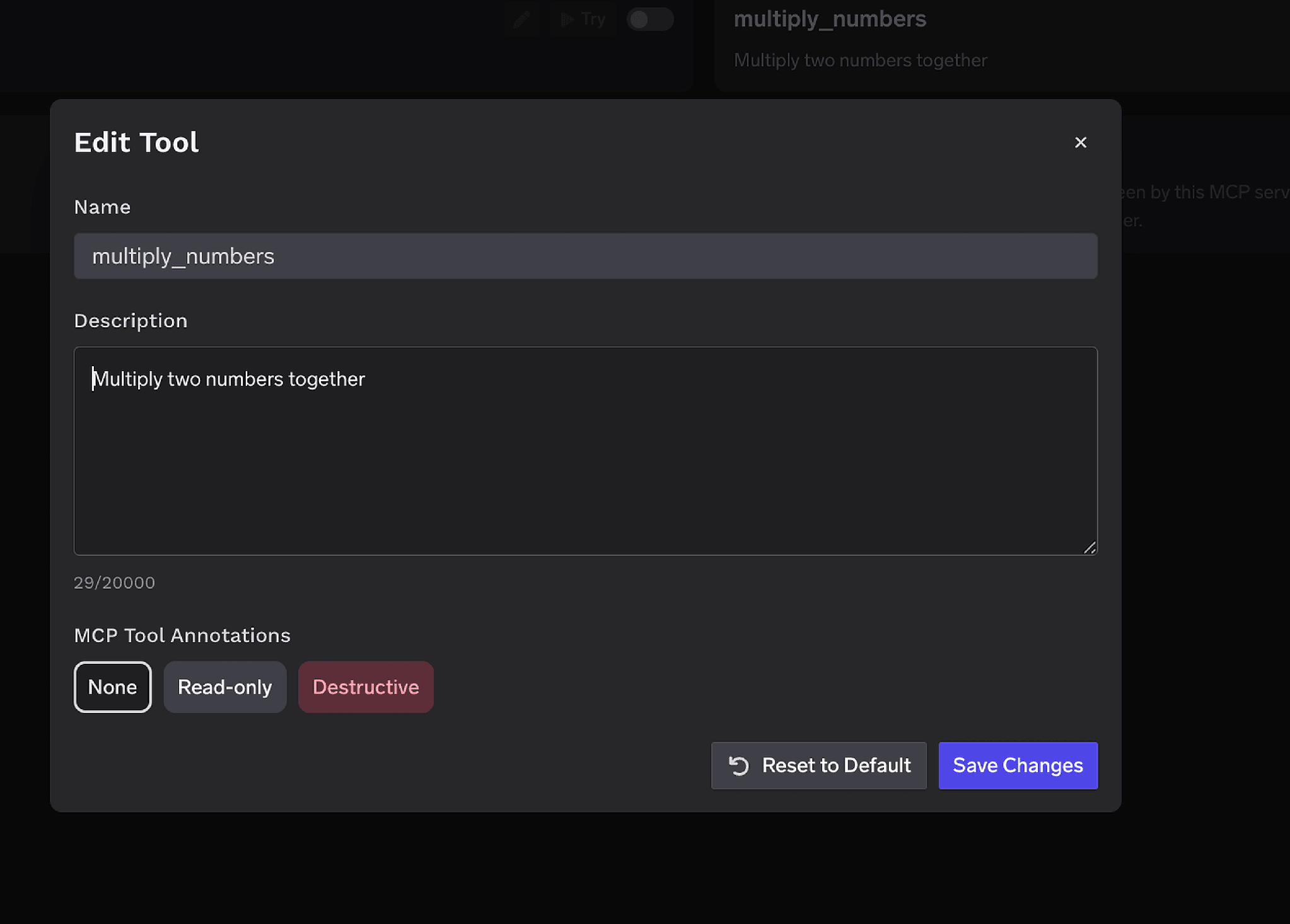
The Description override (up to 20,000 characters) steers tool selection when upstream wording is ambiguous - useful for spelling out that a tool edits live operational data. MCP Tool Annotations mark a tool Read-only or Destructive, setting readOnlyHint or destructiveHint. Marking the write tools Destructive makes the approval policies below work without naming every tool.
Access control attaches to users, teams, or virtual accounts on two dimensions: which servers an identity reaches, and which tools within a server it invokes.
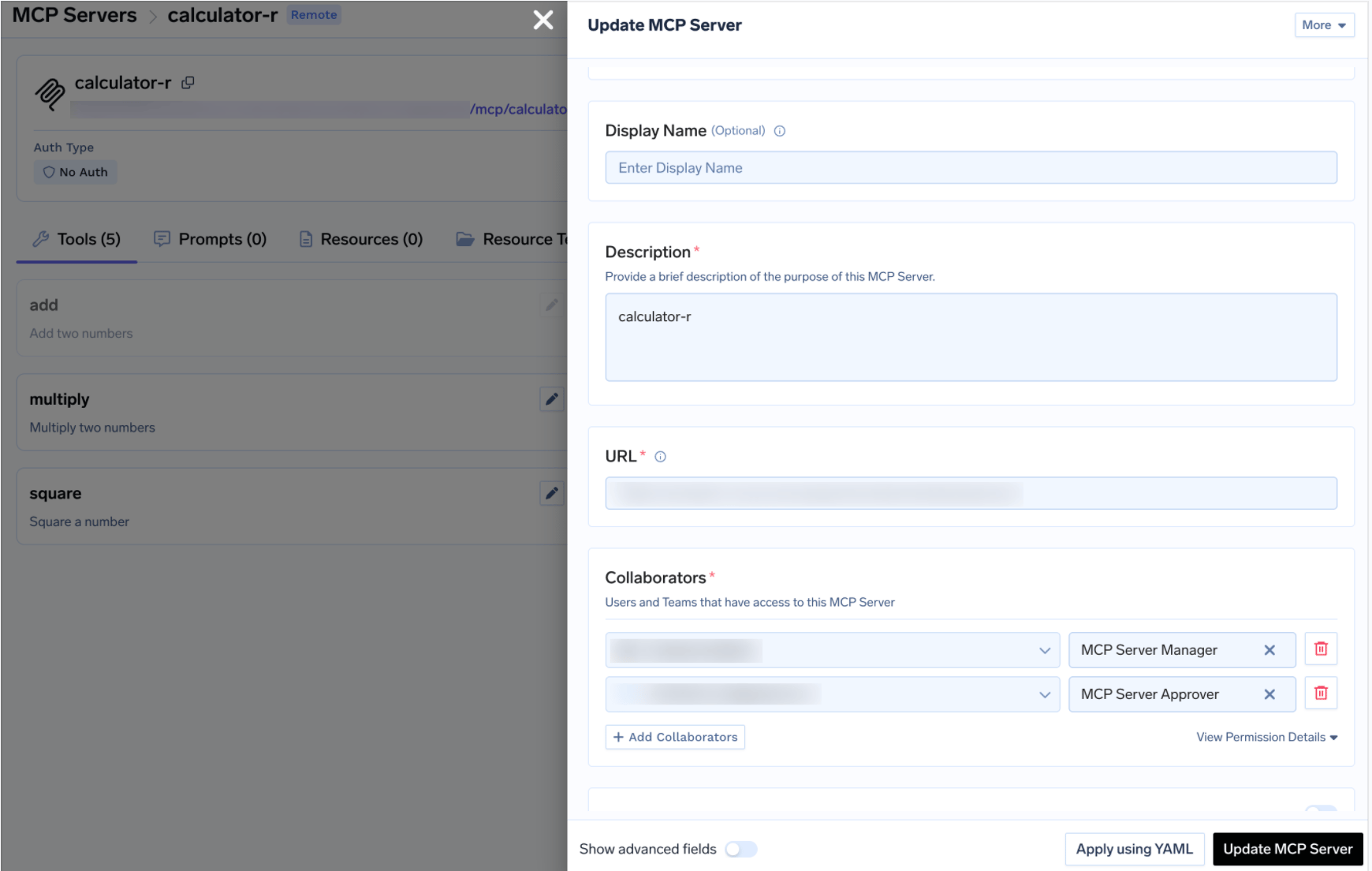
A platform lead decides which Airtable tools exist; the teams in those bases consume them. Same MCP access control model as every other server in the registry.
Disabling write tools is the blunt instrument. Sometimes you do want an agent to update a record, just not unattended - and Airtable is close to the ideal case, because the cost of a wrong write is a human process acting on bad data.
When a gated tool is called, the call is held rather than executed, a request is created, and approvers are notified. Once a human approves, the same call from the same requester executes until the grant expires.
Create a policy under AI Gateway > Policies > MCP Tool Approval, marked Beta in the console. Policy management is restricted to tenant administrators.
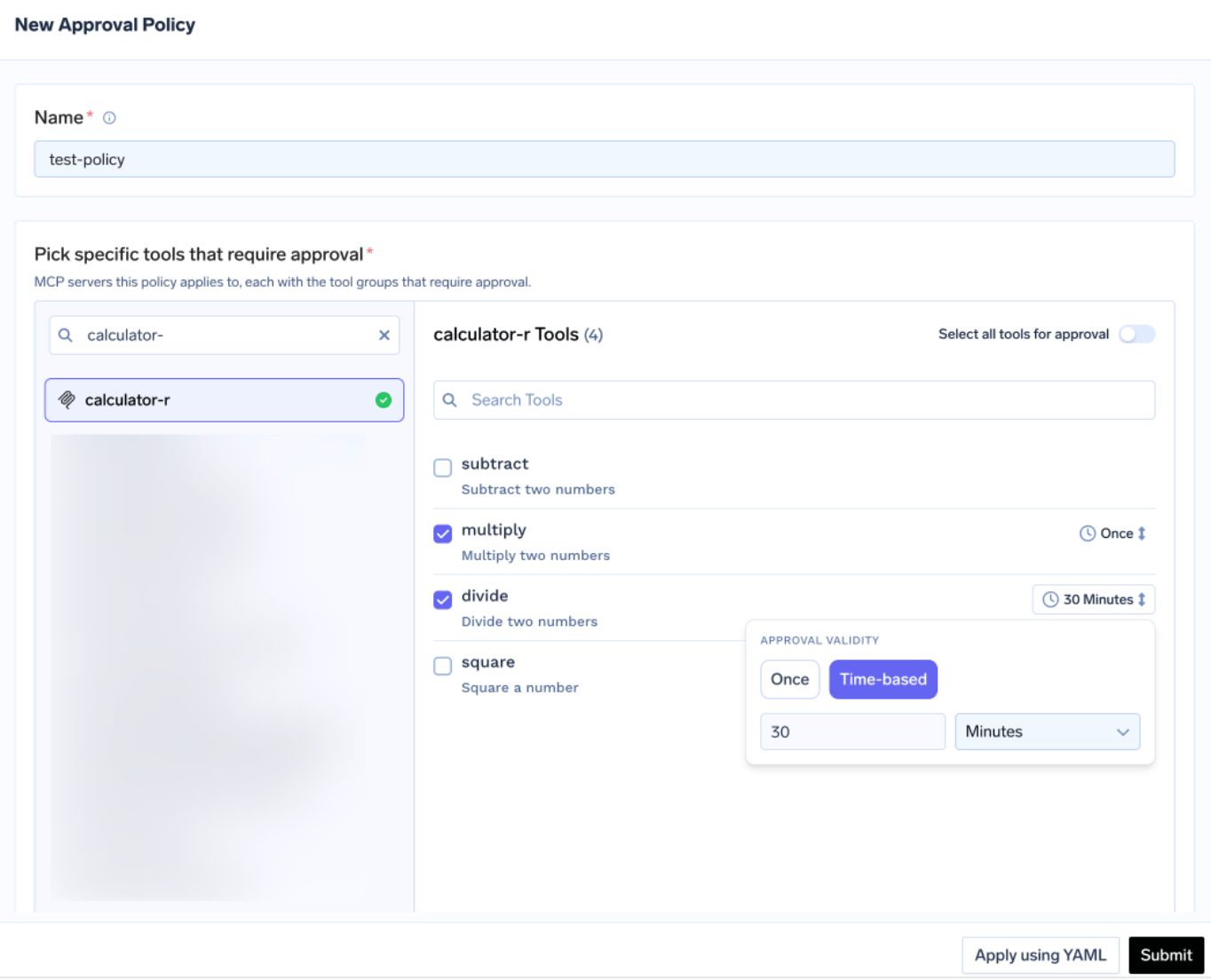
Each policy names the servers it gates and picks an approval scope:
This is where the annotations pay off. Rather than enumerating every Airtable write tool, mark them Destructive once and gate the class with approval_scope: destructive. When scopes overlap the most specific wins: named > destructive > all.
Validity is Once - a single execution - or time-based, a duration in minutes. When policies conflict the most restrictive wins: Once beats a 10-minute window beats a 30-minute window. For Airtable writes Once is usually right: a human should see each mutation, not a window in which an agent can rewrite a table.
Approvers are notified over Email, Slack, PagerDuty, or MS Teams, and review requests in the console:
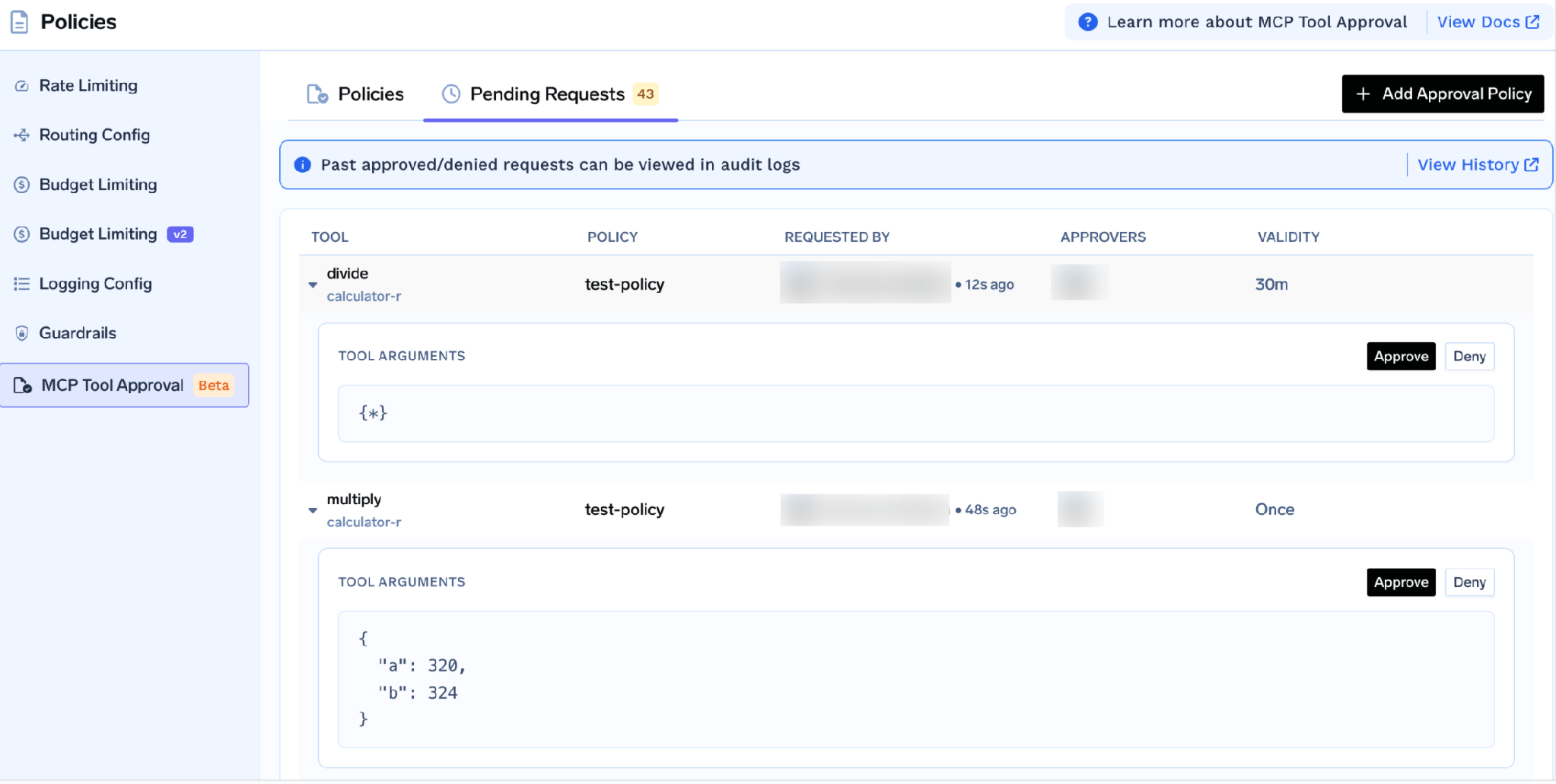
Each request shows the tool, the policy, who asked, and the actual arguments - so an approver sees which base, table, and field an agent proposes to change. While pending, the caller receives a JSON-RPC result carrying _meta.approval_status: "pending" rather than an error, so a well-behaved agent waits and retries.
Grants are scoped per requester. A denial does not permanently block anyone - the next call raises a fresh request; to block durably, disable the tool or remove the user. If a policy names a server with no MCP Server Approver collaborators, only tenant administrators can approve.
Test tools by hand first. Click Try next to any tool, fill in the parameters, execute, and read the JSON response. Try is disabled for any tool you turned off. This is where you find out the base you expected is not in the authorized set, or that a schema field name differs from the column label the ops team uses.
Open the How To Use tab for your tenant-specific Gateway URL and ready-to-paste snippets.
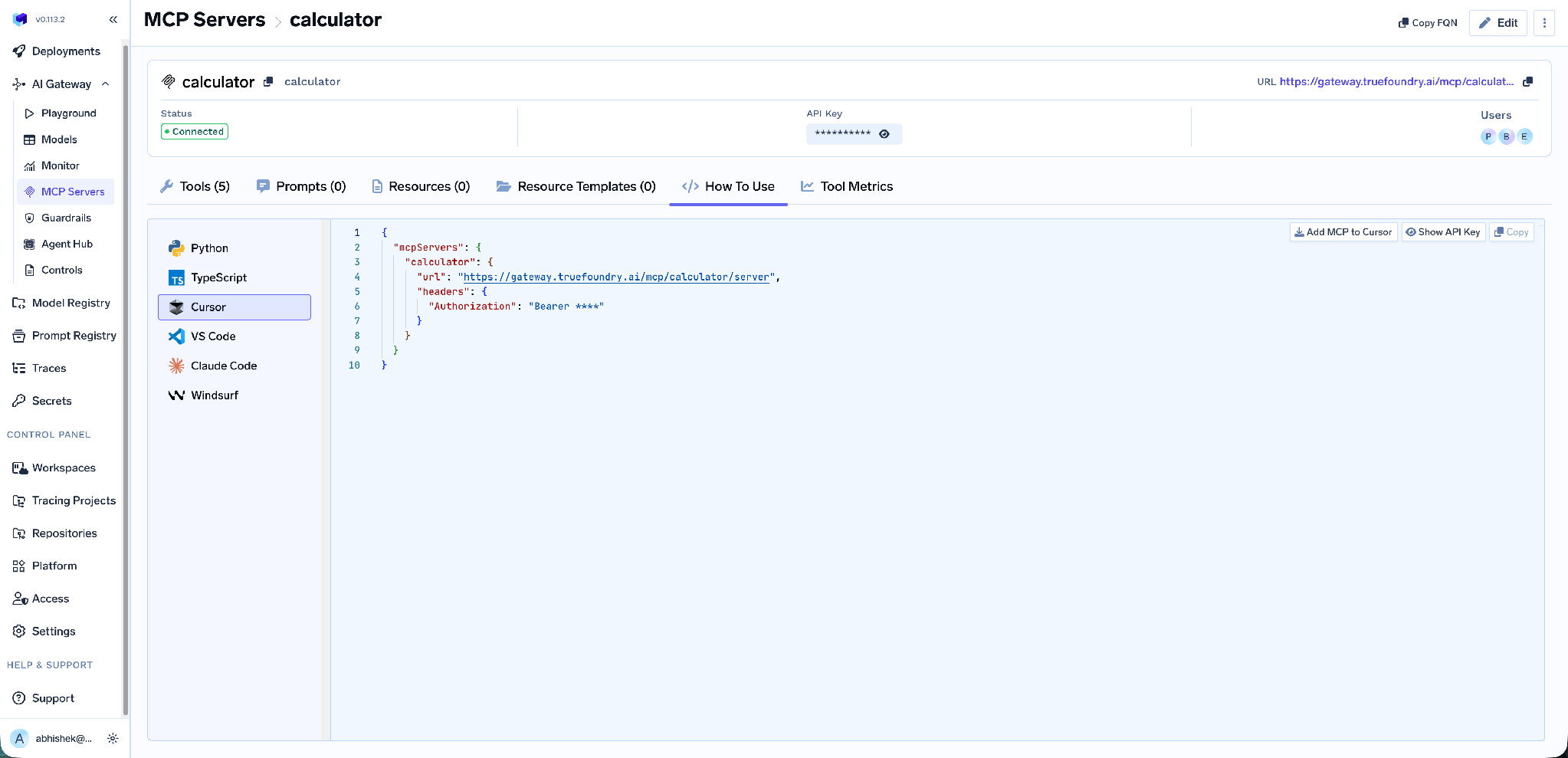
It covers Claude Code, VS Code, Claude Desktop, Cursor, Windsurf, Codex, and the Python and TypeScript MCP SDKs. Add MCP to Cursor writes the config for you; Show API Key reveals the token if your client needs one in a header. Take the URL from this tab rather than assembling it - a hand-built endpoint is the most common cause of a client that connects but lists no tools.
Tool-level metrics. The MCP Metrics dashboard breaks down requests per second, latency at P50/P75/P90/P99, failure rate by error type, and per-tool request counts.
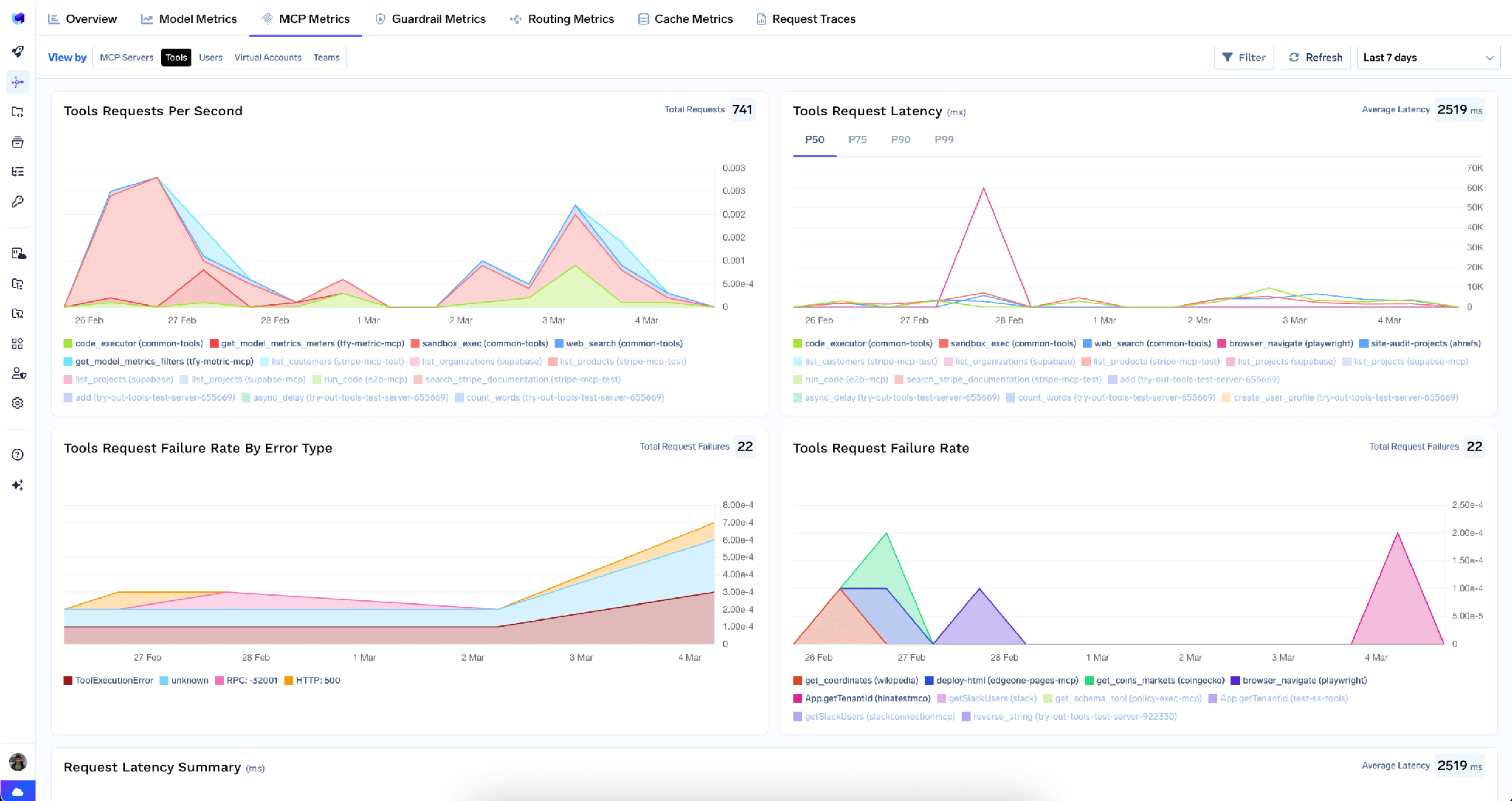
This is how you notice an agent re-reading a base schema every turn, or a record-listing tool timing out on your largest table.
Observability. Every call is traced with caller identity, tool name, inputs, and latency, exported over OpenTelemetry into Grafana, Datadog, or Prometheus. This is the audit trail Airtable’s revision history cannot give you: not just that a field changed, but which agent changed it, for whom.
Guardrails. Pre-tool and post-tool guardrails run policy on tool calls, catching sensitive data in a record response before it reaches the model - worth having when a compensation base shares a workspace with a project tracker.
Low overhead. The gateway adds roughly 3-4 ms of latency and handles 350+ RPS on a single vCPU.
One registry. Bundle a curated subset of tools from several servers behind one endpoint with a Virtual MCP Server, so an onboarding agent gets read-only Airtable tools plus the Slack tools it needs.
Users can revoke their own OAuth2 authorization from the server page. Tenant admins can wipe every stored credential in one action, from the three-dot menu beside Edit:
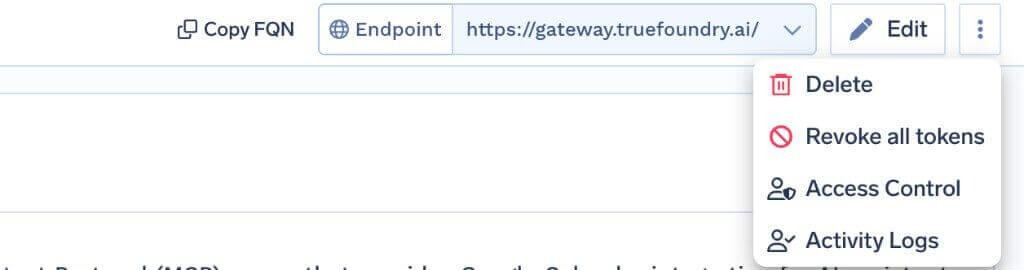
Revoke all tokens deletes every auth override and stored OAuth token for all users and virtual accounts on that server, takes effect on the next request, and is recorded in Activity Logs. It is irreversible - everyone re-runs OAuth consent. One limit matters: it deletes tokens from the gateway only, not the grant at Airtable. In a real incident, revoke the integration’s access in Airtable’s settings too. Visible only to tenant admins.
The redirect URI is the self-registered one. Airtable goes through Connect any Remote MCP Server, not the managed catalogue, so the callback is https://<tfy-control-plane-base-url>/api/svc/v1/llm-gateway/mcp-servers/oauth2/callback. Copying the managed auth.truefoundry.com callback is the most common setup failure.
Scopes are set at integration-creation time, not per agent. Every user authorizing through your integration gets the same scopes. If you registered it with data.records:write, you cannot grant one team read-only access at the Airtable layer - you do that at the gateway.
Base selection is a user decision, so audit it. Your scoping is only as good as the choices twenty people made in a browser, and no gateway control narrows an over-broad selection after the fact.
Airtable may be the most interesting MCP server operations teams connect this year: the one place structured business data already exists without a data-engineering project in front of it. It is also where a careless write does real damage.
The fix is not to avoid it, but to be specific about two fences. Keep the OAuth integration’s scopes as narrow as the work allows, and authorize only the bases the agent needs. Then use the gateway for the rest: disable the write tools a reporting agent should never reach, annotate the others as destructive, gate them behind Once-validity approval, and trace every call with caller identity.
TrueFoundry AI Gateway delivers ~3–4 ms latency, handles 350+ RPS on 1 vCPU, scales horizontally with ease, and is production-ready, while LiteLLM suffers from high latency, struggles beyond moderate RPS, lacks built-in scaling, and is best for light or prototype workloads.




Airtable’s remote Model Context Protocol server at https://mcp.airtable.com, exposing Airtable as tools an agent can call: read and write records, read and modify base schemas, read and write record comments, list workspaces and bases, and manage webhooks. Agents connect over a URL and authenticate with OAuth2.
TrueFoundry’s docs describe it by capability and OAuth scope: records read/write, base schema read/write, record comments read/write, workspace and base listing, and webhook management. The concrete list appears on the Tools tab once you authorize; each tool can be enabled, disabled, re-described, or annotated.
Yes, with deliberate scoping. The two risks are write scopes you do not need and authorizing more bases than the agent requires. Keep scopes minimal, disable write tools at the gateway, gate remaining mutations behind human approval, and use per-user OAuth.
Yes. TrueFoundry runs in your VPC, on-prem, air-gapped, or hybrid, so prompts and responses never leave your domain even as you route across many providers.
Yes. It includes an MCP Gateway, an Agent Gateway, and an MCP & Agents Registry with tool-level access control. Agents on LangGraph, CrewAI, AutoGen, or a custom framework can all be governed centrally.
Yes. The gateway is OpenTelemetry-compliant and plugs into Grafana, Datadog, Prometheus, or your preferred stack. It traces every request from prompt to tool and model execution, so you get unified logging without ripping out what you already run.



The latest news, articles, and resources sent to your inbox
.png)
.png)
.png)
.png)
.png)
.png)
.png)
.png)
.png)
.png)
.png)
.png)


