


.png)
November 1, 2026
|
5 min read


.png)
Blazingly fast way to build, track and deploy your models!
Scoping first, because the search term is broader than the product. A Firebase MCP server could front any Firebase service. The one TrueFoundry documents covers Crashlytics. If your agent needs Firestore documents or Remote Config values, this will not do it.
Model Context Protocol is the open standard that lets an agent discover and call tools on an external system, and a Crashlytics MCP server turns your crash dataset into callable tools. Per the docs, agents can inspect crash issues, stack traces, crash events, and reports.
The docs describe capabilities by IAM role rather than naming tool functions, so read the surface by role:
That third row is the whole security decision. The docs are explicit: use Viewer roles unless agents must modify issue state. For triage and reporting the user role is never needed, and granting it anyway is how an agent closes a live P0 because a prompt told it to tidy up.
It runs as a remote or hosted server, so there is no per-laptop process to babysit — the same shape as other remote MCP servers, with one difference: the credential is a service account key, not a per-user OAuth grant.
The interesting workflows chain several reads and end in a written artifact.
The split looks unusual here: with Viewer roles nearly everything is a read, which sounds safe. But read-only is not harmless. One crash event can carry a device identifier, an app-state snapshot, a user ID, and custom log breadcrumbs your engineers added — and breadcrumbs are where personal data leaks, because whoever wrote them was debugging, not writing a data policy. Pulling a hundred crash events into a model’s context is a data movement decision, not just a query.
One engineer running this against a dev project is fine. Wiring it into a shared agent for a mobile team is not.
The service account key is a shared password. The docs say to treat it as one. It is a long-lived, non-rotating file granting whatever roles you attached, to anyone holding it. It does not expire and it does not tell you who used it.
Shared credentials flatten identity. With one service account rather than per-user OAuth, every caller gets identical access and the upstream audit log sees one principal. It cannot tell you the release agent made that call for a specific engineer. That attribution comes from the gateway or not at all.
Over-broad roles are the default path. Attaching firebasecrashlytics.user “just in case” takes one click and permanently widens the blast radius.
Crash payloads are a data egress path. Nothing is written, so it feels low risk — that is the trap. Every tool response flows into a model context, then into logs, traces, and whatever the agent writes next. If breadcrumbs hold email addresses or user identifiers, an unredacted pipeline moves that data somewhere nobody reviewed. The control you want is redaction on the way out.
None of this argues against connecting Crashlytics. It argues for a control plane in front of it, which is what an MCP gateway is.
Crashlytics is not in the TrueFoundry Managed MCP catalogue. No tile to click, no platform-managed credential. Per the docs you deploy it yourself and register it.
Step 1 — Create the service account. In Google Cloud Console, select the project backing your Firebase project and create a service account named crashlytics-mcp. Grant roles/firebase.viewer and roles/firebasecrashlytics.viewer, and add roles/firebasecrashlytics.user only if your tools must update issue state. Create a JSON key and store it securely.
Step 2 — Deploy the server. Run it as a remote service or hosted stdio server, with the service account JSON and Firebase project ID supplied as environment variables or secret-backed configuration.
Step 3 — Register it. Go to MCP Gateway and click Add Server. Because this is your own deployment, pick Connect any Remote MCP Server, or Create a Hosted STDIO-based MCP Server.
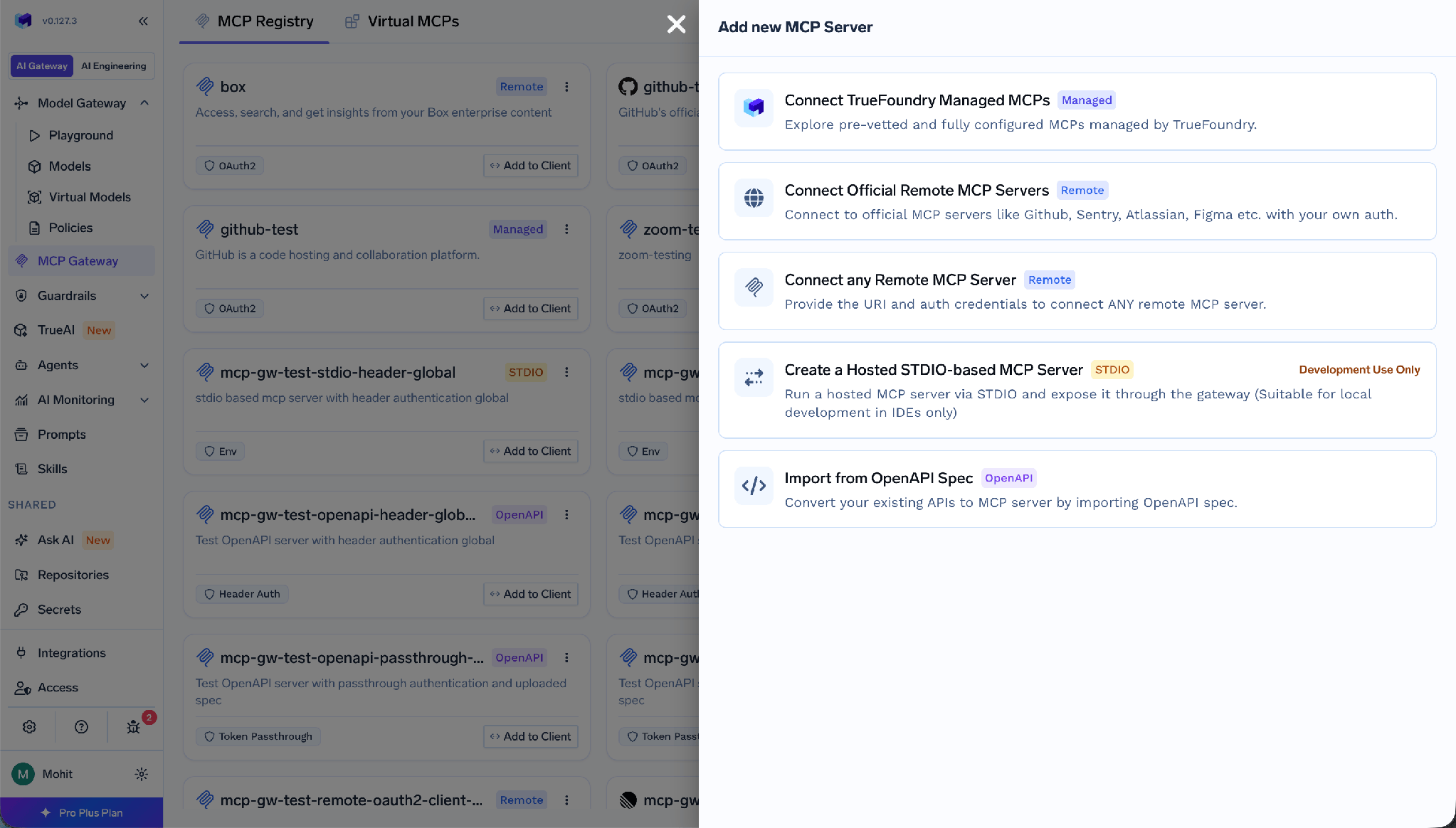
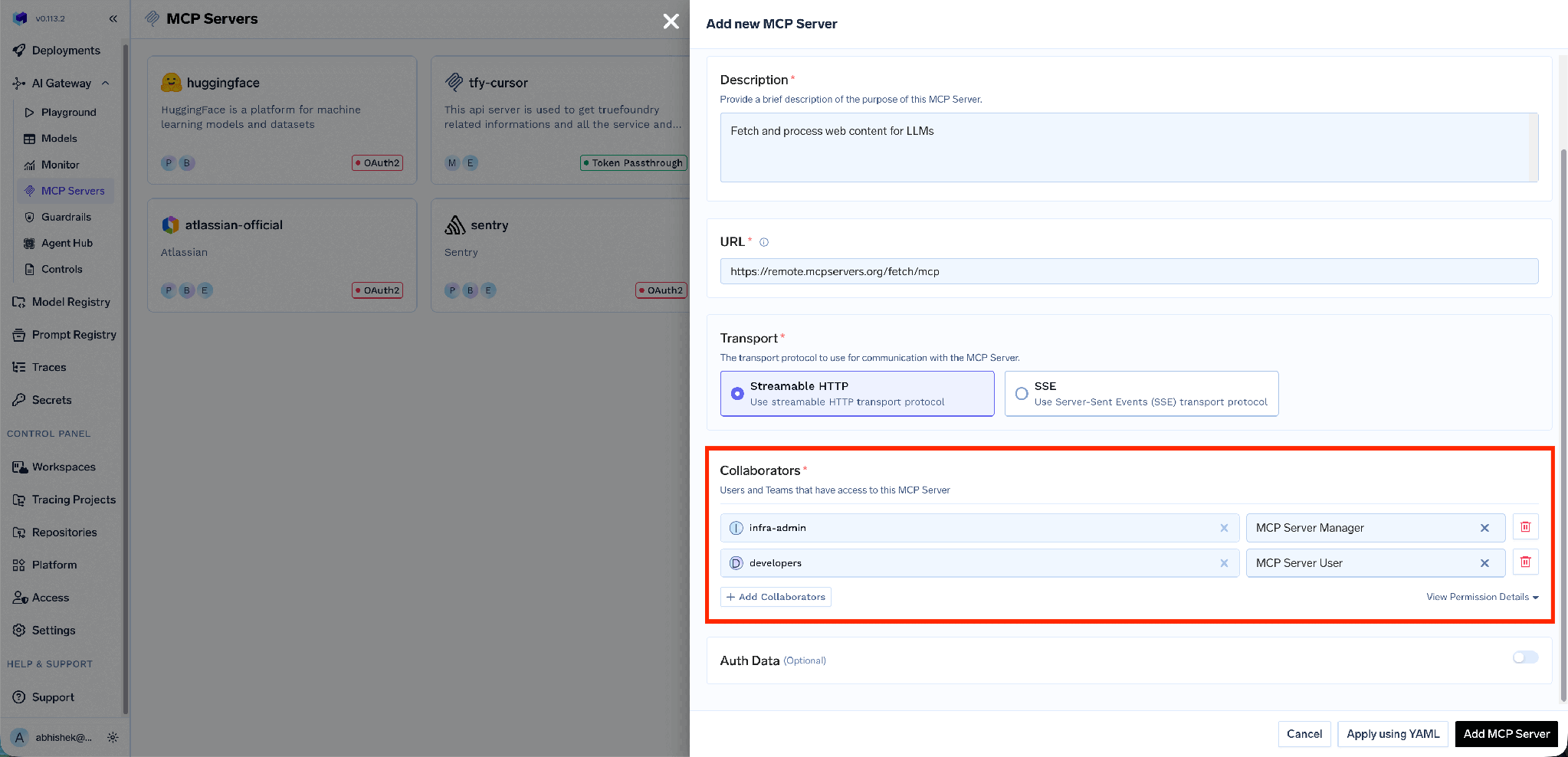
The remote path asks for a Name, an optional Display Name, a Description, the server URL, Collaborators, and Auth Data.
Step 4 — Add collaborators and verify. Add the users and teams who should reach the server, confirm tools appear under Tools, then try one from the Playground.
TrueFoundry separates inbound auth (how a client proves itself to the gateway) from outbound auth (how the gateway proves itself to your server).
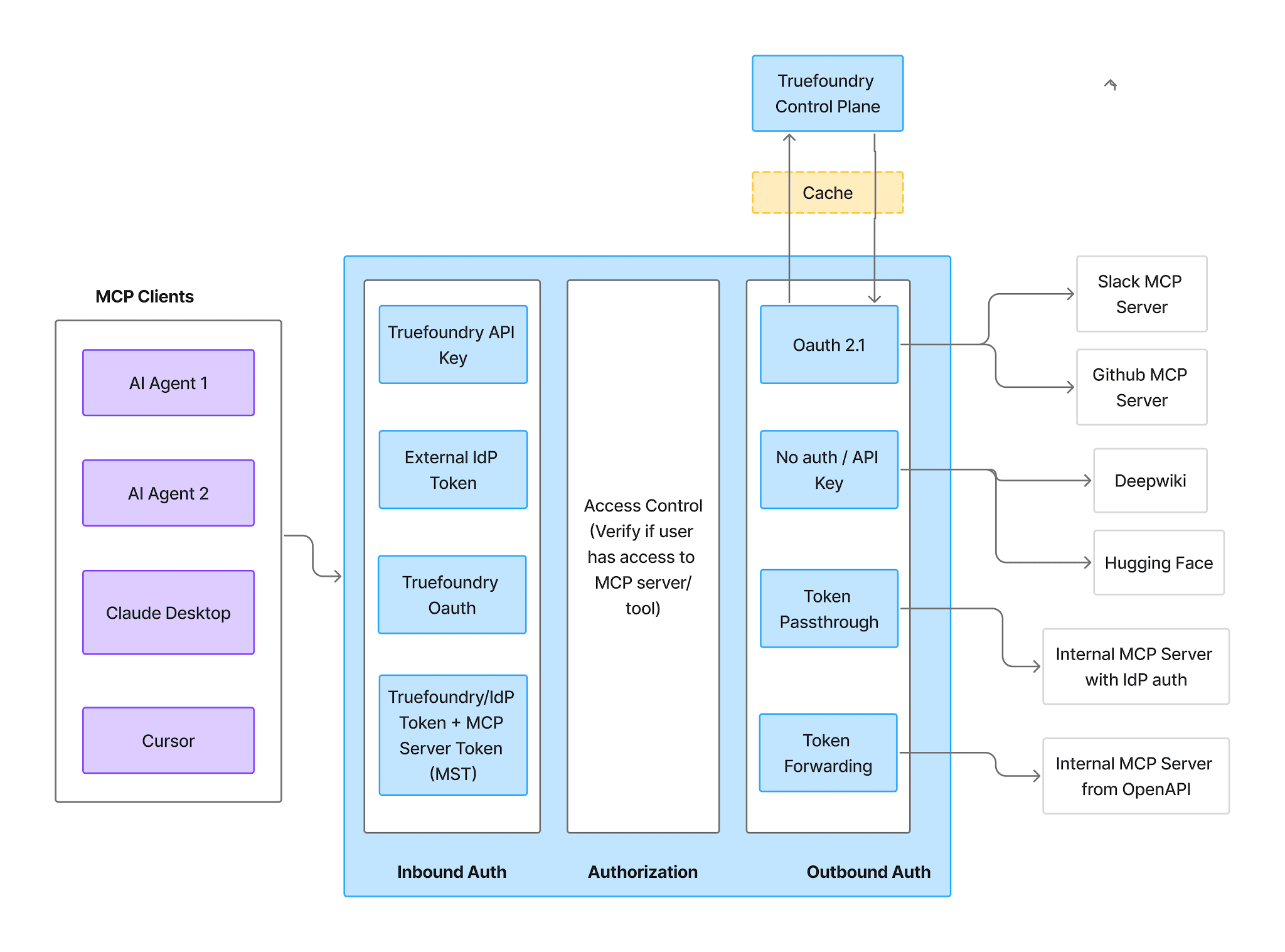
Inbound — four supported methods:
Outbound — here Crashlytics differs from OAuth-based servers. The docs describe service-account credentials, not a consent flow. Pick the auth type matching how your server expects the credential: TrueFoundry supports API Key, OAuth2, AWS SigV4, and Token Passthrough, and API Key offers two credential modes.
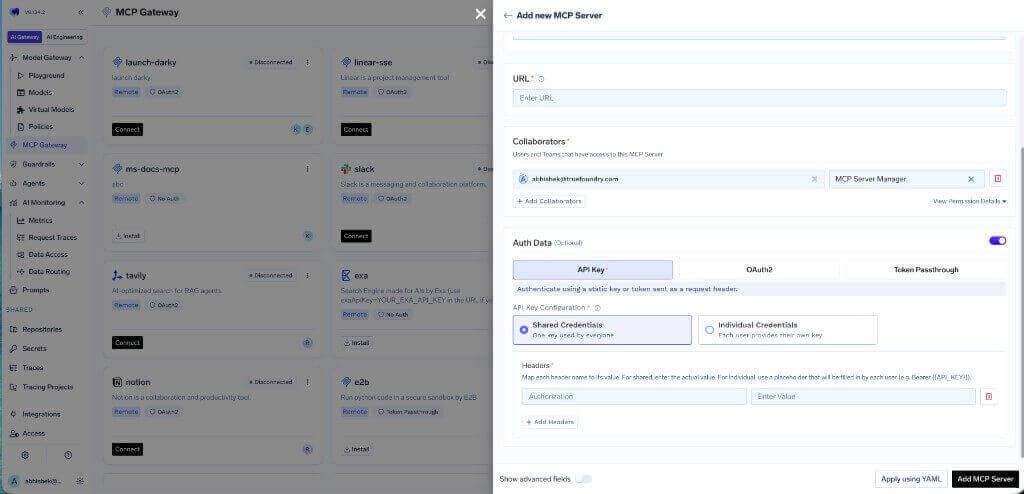
Shared Credentials means one key for everyone — the natural fit for a service account, and the reason inbound identity matters. Every caller reaches Crashlytics as the same Google Cloud principal, so the gateway’s request log is the only place per-user attribution exists. Individual Credentials lets each user supply their own key through the Auth Overrides tab, useful if you issue per-team service accounts.
Virtual Account tokens give every request identical access, so they cannot provide per-user separation. And with no consent step, access is decided entirely by your collaborator list and which tools you left enabled.
If you front your deployment with OAuth2 Authorization Code instead, self-registered servers use a different callback from managed ones. Set the redirect URI in your provider’s portal to https://<tfy-control-plane-base-url>/api/svc/v1/llm-gateway/mcp-servers/oauth2/callback. The auth.truefoundry.com callback applies only to TrueFoundry Managed MCPs, which this is not.
The Tools tab lists everything your server exposes, and is where you decide what agents can do.
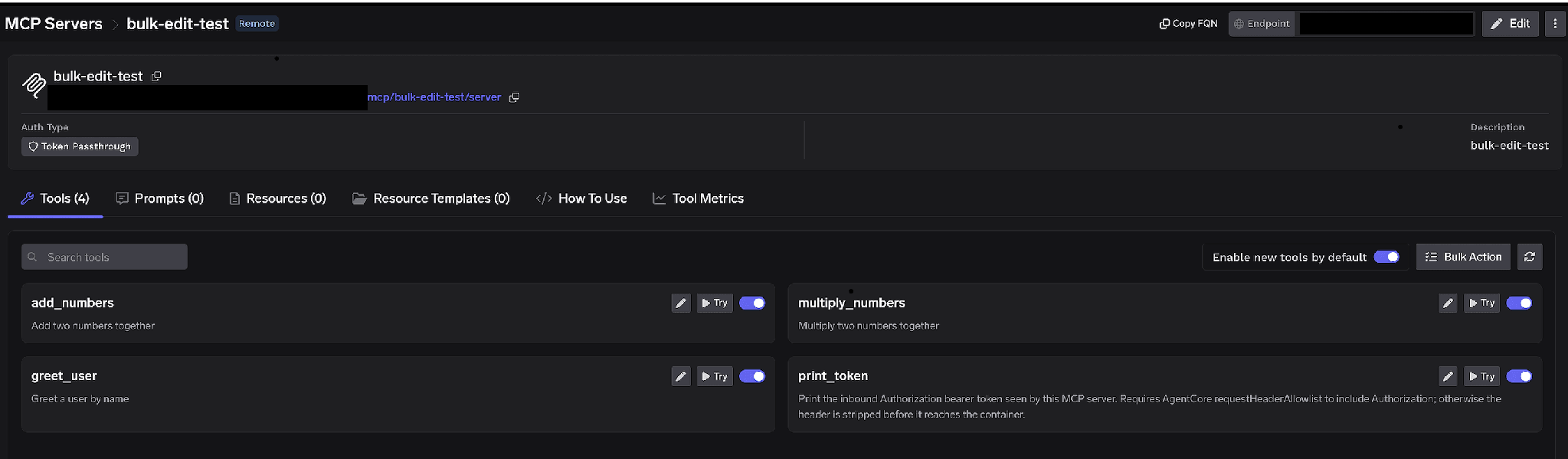
Per-tool toggles. Turn a tool off and it is omitted from tools/list entirely — clients never see it and it cannot be invoked. Not prompt-layer filtering. For Crashlytics the pattern is belt and braces: Viewer-only roles in Google Cloud and issue-mutation tools disabled at the gateway, so a misconfigured IAM binding does not quietly hand an agent write access.
Enable new tools by default. Left on, tools your server adds later appear automatically. Turned off, only tools you explicitly enabled are available — the sane default for a server you iterate on.
Bulk Action. Switches rows to checkboxes with Select all, so you can flip a batch and save once.
Click the pencil on any tool to override how it is presented to the model:
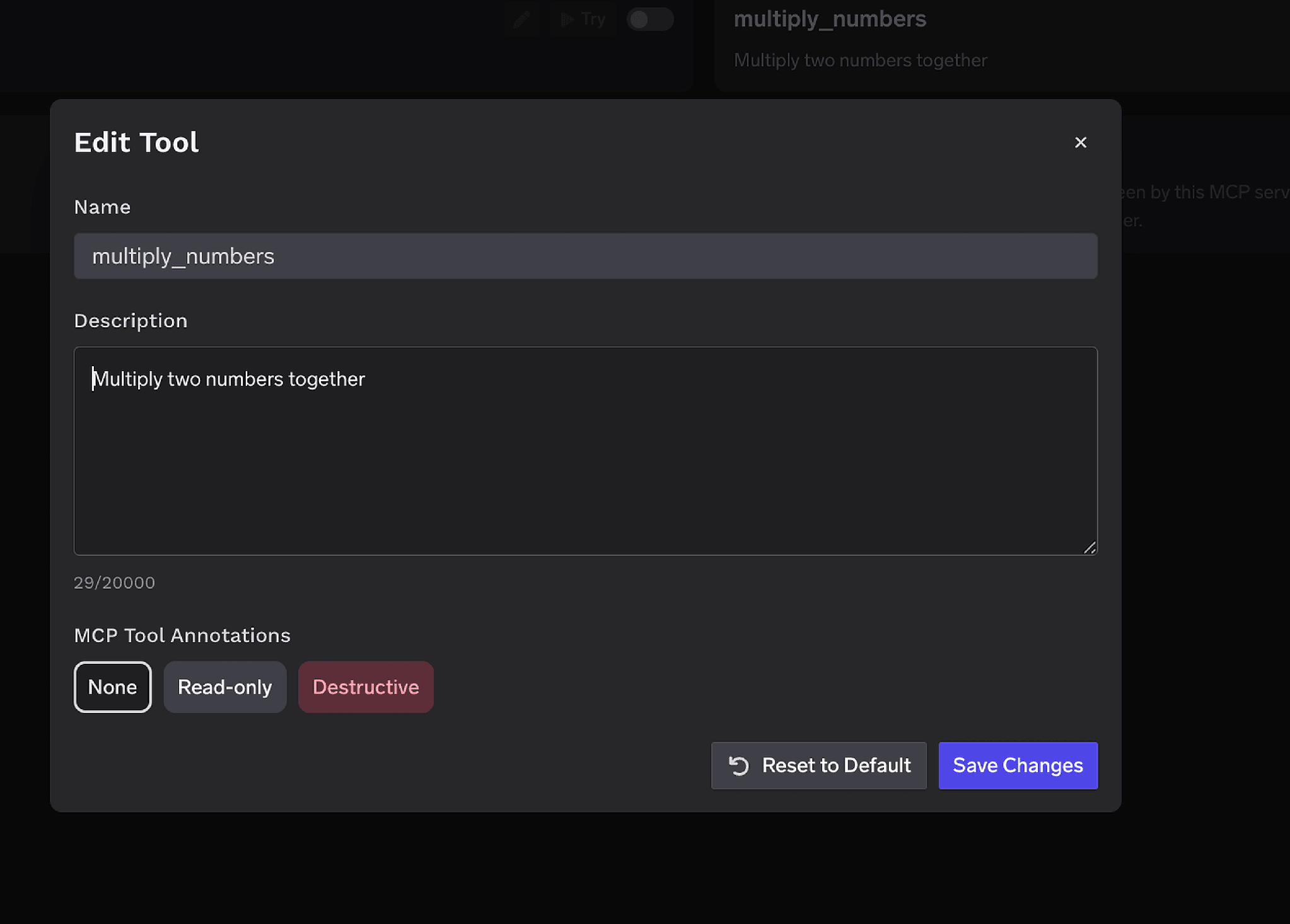
The Description override (up to 20,000 characters) steers tool selection when your server’s own wording is thin, which with a self-built server it often is. MCP Tool Annotations mark a tool Read-only or Destructive, setting readOnlyHint or destructiveHint. Marking issue-state tools Destructive is what makes the approval policies below work.
Access control attaches to users, teams, or virtual accounts on two dimensions: which servers an identity can reach, and which tools it can invoke.
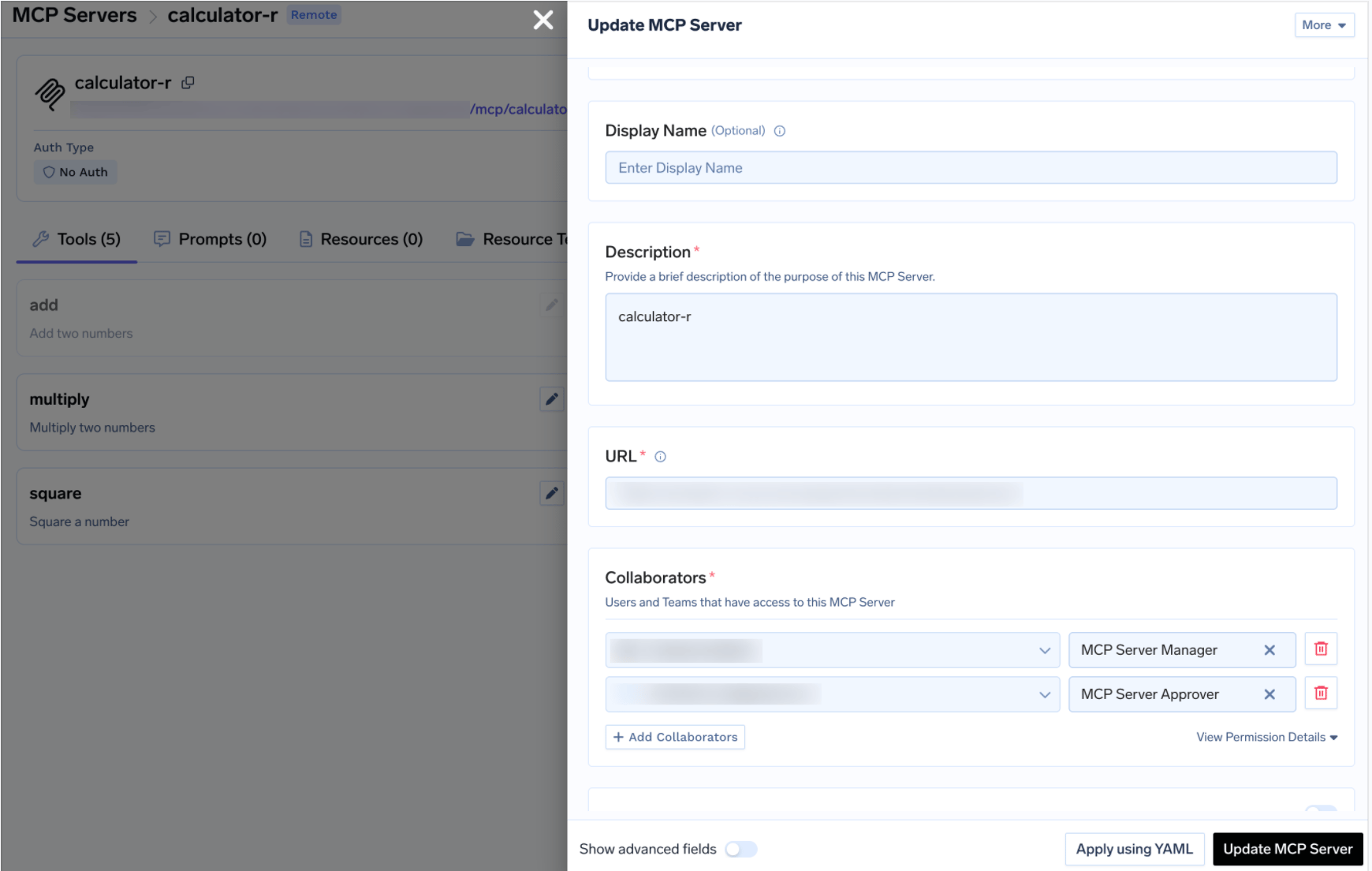
With shared credentials upstream, the collaborator list is your real access boundary — anyone on it reaches Crashlytics with the service account’s full permissions. Keep it to people who should be reading crash payloads. Same MCP access control model as every other server in your registry.
If you did grant firebasecrashlytics.user because an agent needs to close resolved issues, do not leave it unattended. Approval policies hold the call instead of executing it, raise a request, and notify approvers. Once approved, matching calls succeed for a configurable window, then a fresh approval is required.
Create one under AI Gateway → Policies → MCP Tool Approval (marked Beta in the console):
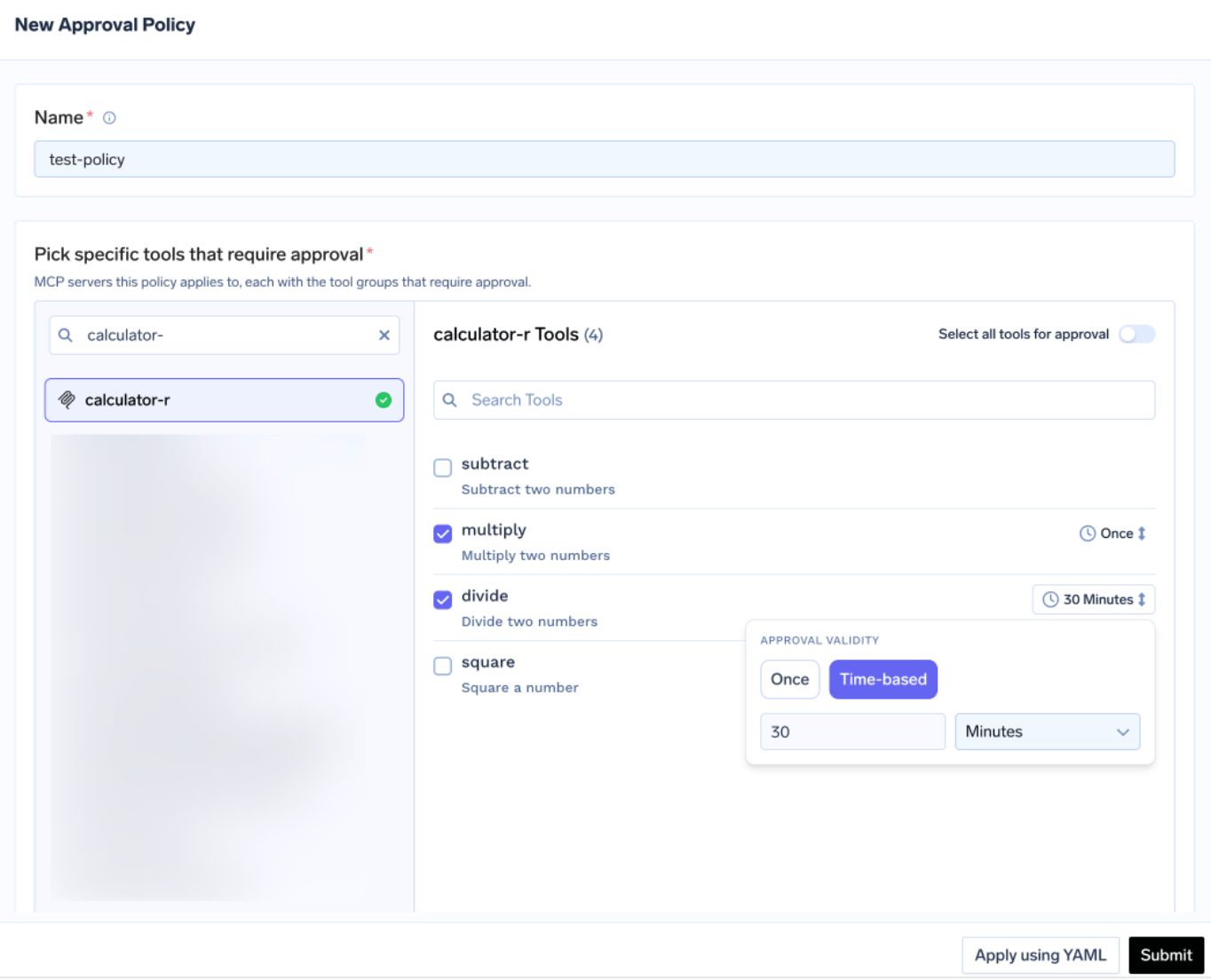
Each policy names the servers it gates and picks an approval scope:
When scopes overlap the most specific wins: named > destructive > all. Validity is Once or time-based in minutes, and when policies conflict the most restrictive applies — Once beats 10 minutes beats 30 minutes. Approvers are notified over Email, Slack, PagerDuty, or MS Teams:
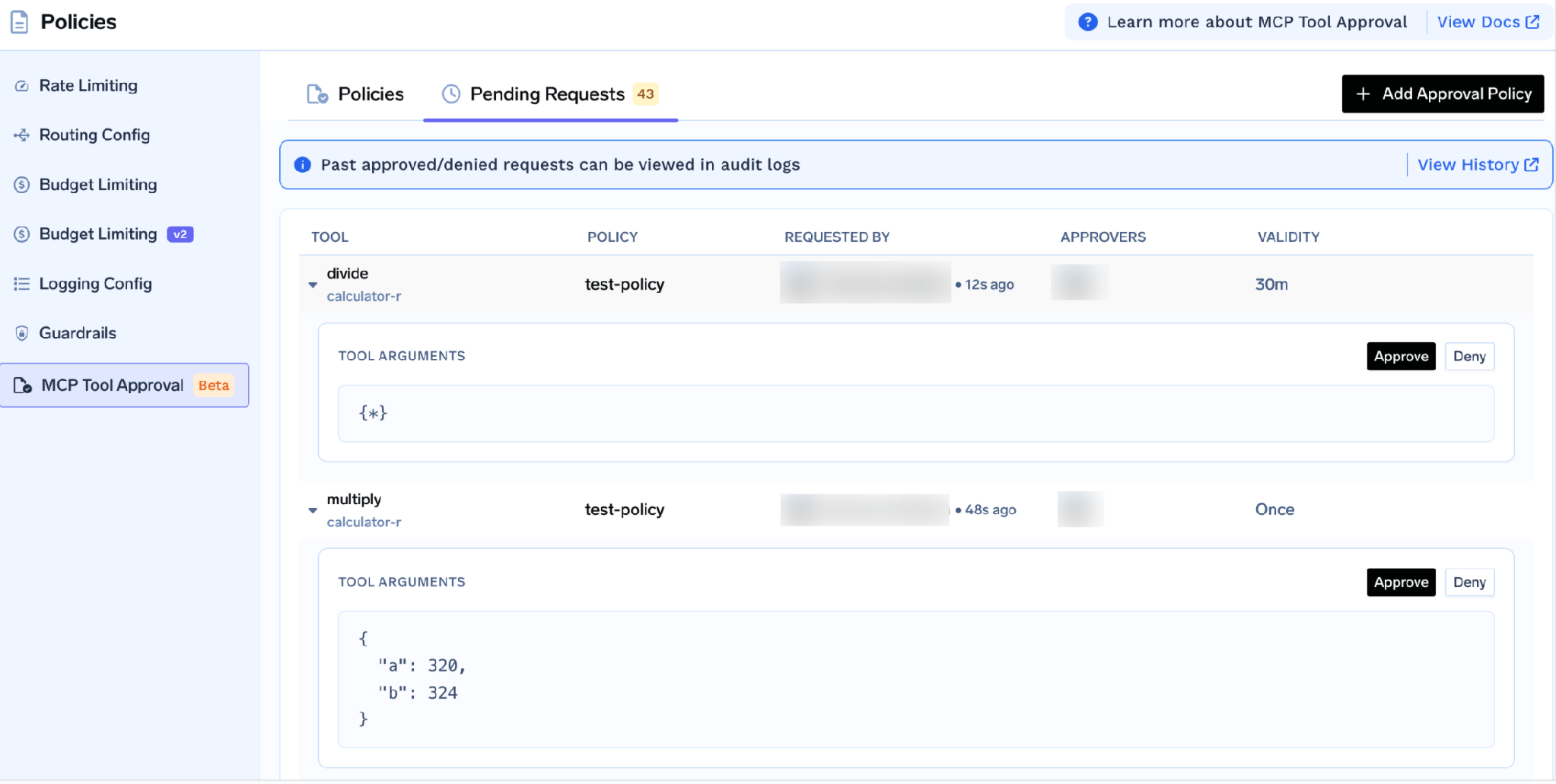
Each request shows the tool arguments, so an approver sees which issue an agent wants to mutate. While pending, the caller gets a JSON-RPC result carrying _meta.approval_status: "pending" rather than an error, so a well-behaved agent can retry. Grants are scoped per requester. A denial does not permanently block anyone — to durably block, disable the tool or remove the user.
Test by hand first. On the server detail page click Try next to any tool, fill in parameters, execute, and read the JSON. Try is disabled for tools you turned off.
This is where you find out the service account is missing a role or the project ID was never set — and the moment to read a raw crash-event response and see what is in the breadcrumbs before deciding how much redaction you need.
Open the How To Use tab for your tenant-specific Gateway URL and paste-ready snippets.
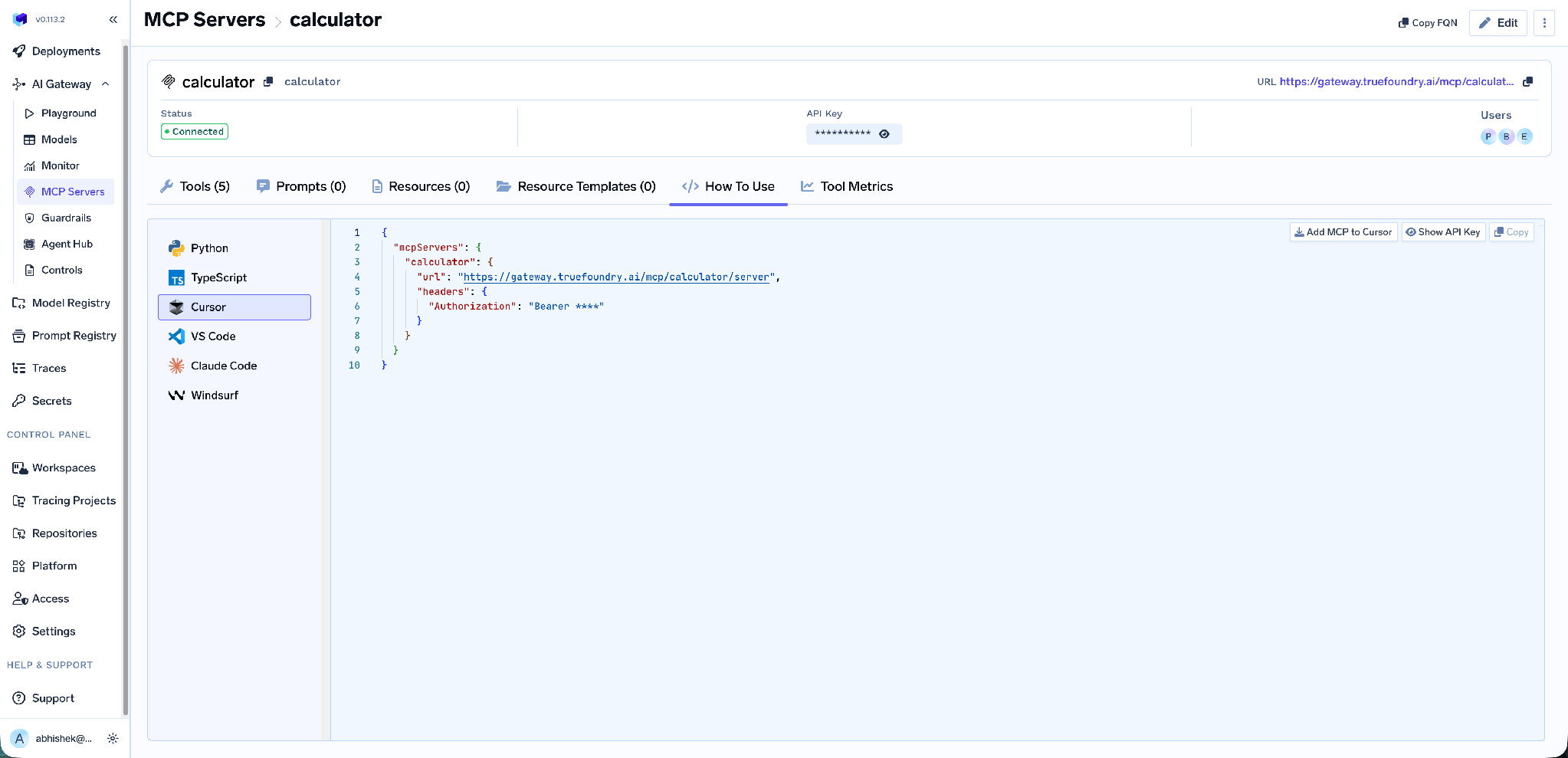
It covers Claude Code, VS Code, Cursor, Windsurf, Codex, and the Python and TypeScript MCP SDKs. Take the URL from this tab rather than assembling it by hand — a hand-built endpoint is the most common cause of a client that connects but lists no tools.
PII redaction on tool output. The control that matters most here. TrueFoundry’s built-in PII/PHI Detection guardrail applies to four hooks: LLM Input, LLM Output, MCP Pre Tool, and MCP Post Tool. Post Tool is the one you want — it redacts detected entities from tool output before it reaches the model.
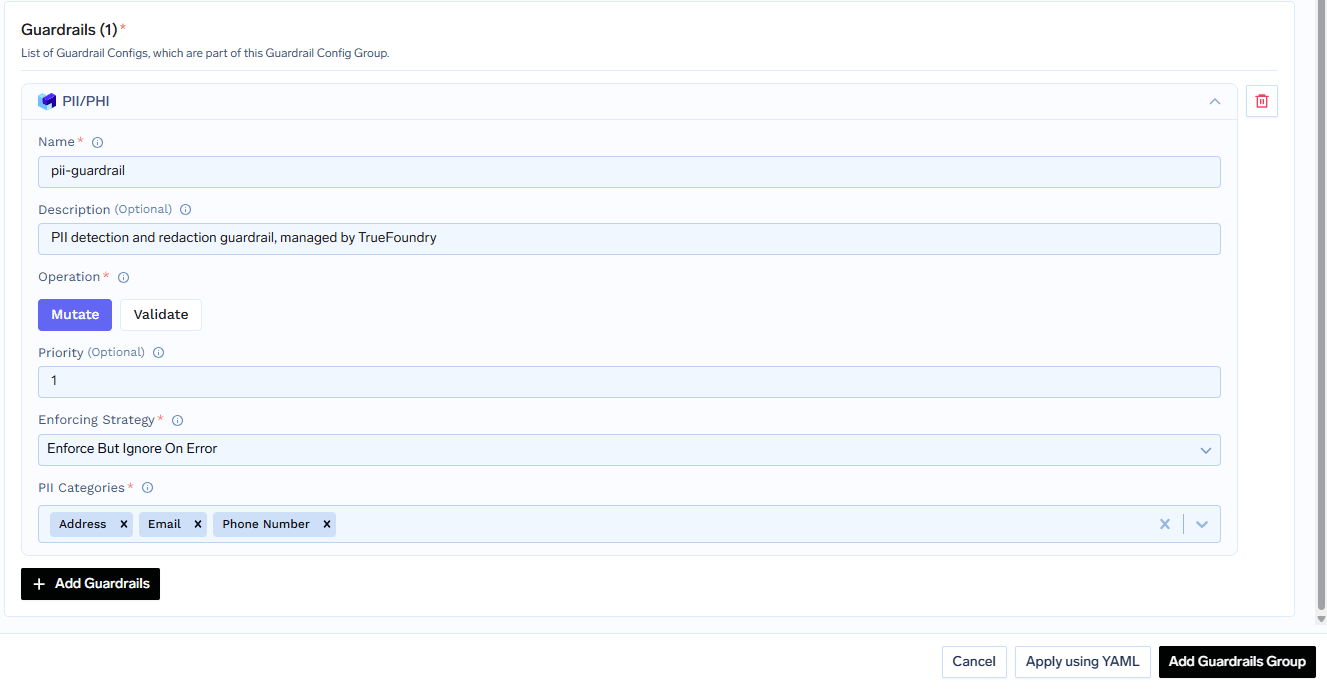
It is powered by Azure AI Language PII Detection, runs on TrueFoundry-managed infrastructure with no third-party keys, and operates in mutate mode only — detected entities are replaced with asterisks and the request continues. Pick the entity categories or select all, and choose enforce or enforce_but_ignore_on_error. Configure it under Guardrails.
For a crash-triage agent this turns an unreviewed data path into a reviewed one: the agent still gets the stack trace and device distribution it needs, while identifiers that drifted into breadcrumbs are masked on the way through.
Tool-level metrics. The MCP Metrics dashboard breaks down requests per second, latency at P50 through P99, failure rate by error type, and request counts per tool.
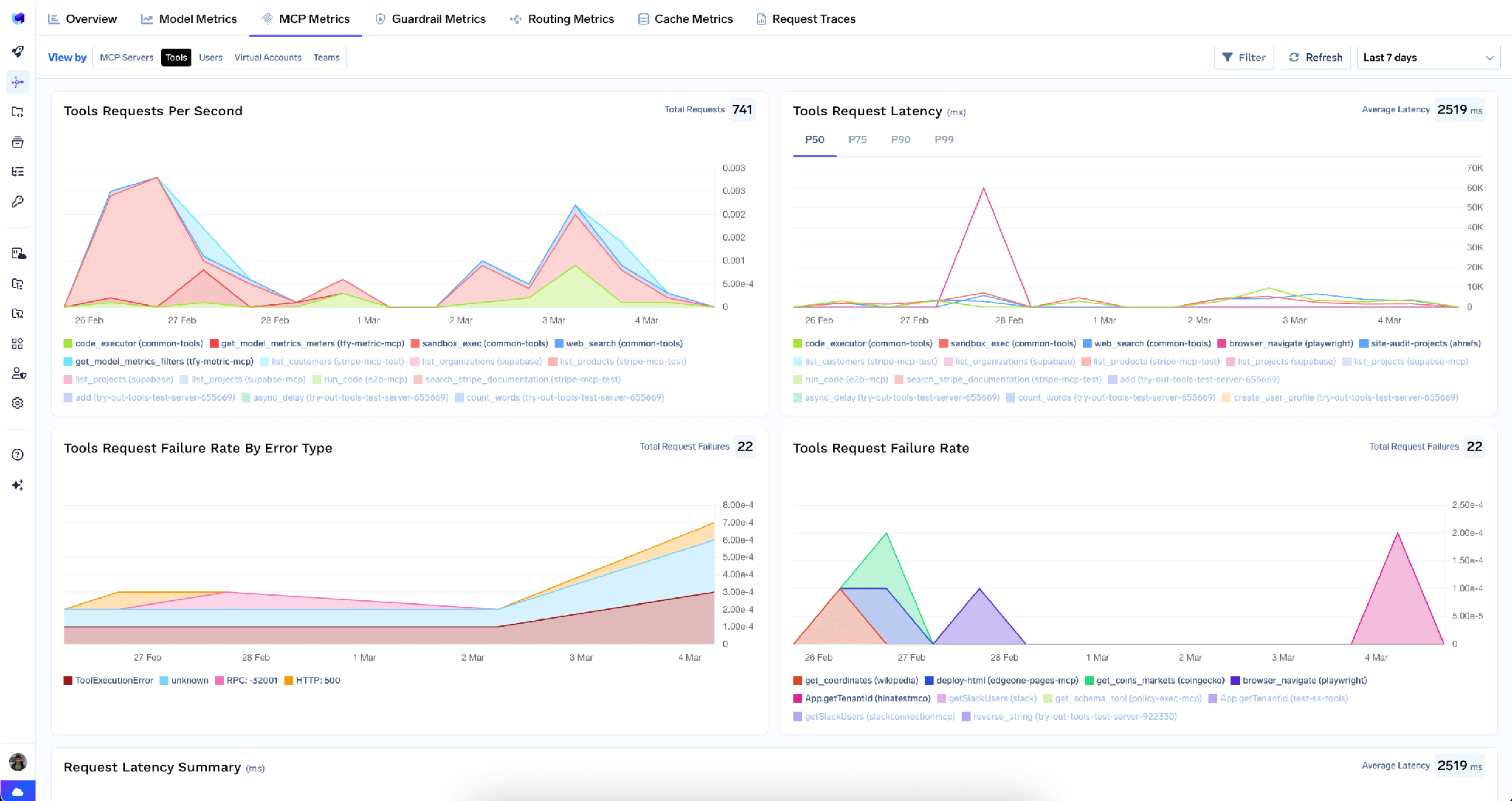
This is how you learn a triage agent pulls two thousand crash events per run when fifty would do.
Full-request observability. Every call is traced with caller identity, tool name, inputs, and latency, exported over OpenTelemetry into Grafana, Datadog, or Prometheus. With a shared service account upstream, these traces are where per-user attribution lives.
Low overhead. The gateway adds roughly 3–4 ms of latency and handles 350+ RPS on a single vCPU.
One registry. Triage rarely stops at Crashlytics. Bundle tools from several servers behind one endpoint with a Virtual MCP Server, so a triage agent gets read-only Crashlytics plus the repo tools it needs.
Two paths, not interchangeable.
At Google Cloud. The docs are clear this is the real one: delete the service account key in Google Cloud Console. It is the credential, so deleting it stops all access.
At the gateway. Tenant admins wipe stored credentials from the three-dot menu next to Edit:
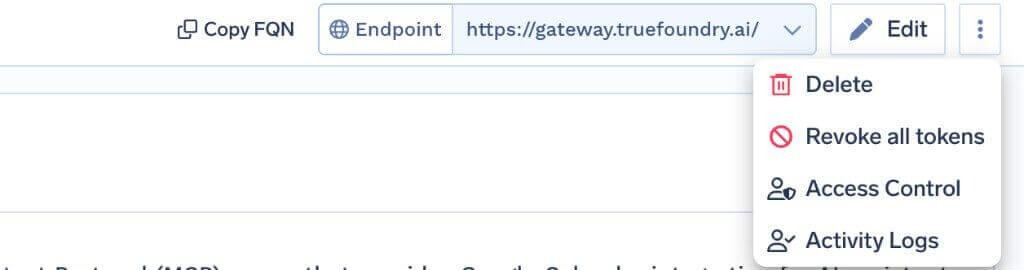
Revoke all tokens deletes every auth override and stored token for all users and virtual accounts on that server, takes effect on the next request, is recorded in Activity Logs, and is irreversible. Tenant admins only. It clears credentials at the gateway only — nothing changes in Google Cloud, so in an incident delete the key too.
It is Crashlytics, not Firebase. Worth repeating because the search term misleads: no Firestore, Auth, Remote Config, or Hosting.
You own the deployment. Unlike catalogue servers, nobody updates this one for you — when the upstream API changes, your service breaks.
Read-only still moves data. Viewer roles are not the end of the security conversation. They cap what an agent can change, not what it can read and forward.
Crash triage is the kind of work agents should be doing. Reading a cluster, correlating a stack trace with a device distribution, finding the build where a signature first appeared, writing it up — tedious, and exactly what a model with the right tools does well.
The Crashlytics MCP server makes that possible, with two caveats the docs are honest about. The credential is a shared service account key, so identity and attribution have to come from the gateway. And read-only does not mean risk-free: crash payloads carry device identifiers, app state, user IDs, and breadcrumbs written with no AI pipeline in mind. Viewer roles, per-tool scoping, and post-tool redaction is what gets you the triage agent without the data sprawl.
TrueFoundry AI Gateway delivers ~3–4 ms latency, handles 350+ RPS on 1 vCPU, scales horizontally with ease, and is production-ready, while LiteLLM suffers from high latency, struggles beyond moderate RPS, lacks built-in scaling, and is best for light or prototype workloads.




In TrueFoundry’s docs it is a Firebase Crashlytics MCP server: a Model Context Protocol server letting agents inspect crash issues, stack traces, crash events, and reports. It authenticates with a Google Cloud service account JSON key and is deployed as a remote or hosted stdio server rather than provisioned from a catalogue. It does not expose other Firebase products.
The docs describe capabilities by IAM role rather than naming functions: project metadata via roles/firebase.viewer, crash data reads via roles/firebasecrashlytics.viewer, and optional issue-state updates via roles/firebasecrashlytics.user. The exact list depends on your implementation and appears on the Tools tab.
With scoping, yes. Grant Viewer roles only, disable mutation tools at the gateway, keep the collaborator list narrow, and enable PII/PHI Detection on the MCP Post Tool hook so crash payloads are redacted before reaching the model.
Yes. TrueFoundry runs in your VPC, on-prem, air-gapped, or hybrid, so prompts and responses never leave your domain even as you route across many providers.
Yes. It includes an MCP Gateway, an Agent Gateway, and an MCP & Agents Registry with tool-level access control. Agents on LangGraph, CrewAI, AutoGen, or a custom framework can all be governed centrally.
Yes. The gateway is OpenTelemetry-compliant and plugs into Grafana, Datadog, Prometheus, or your preferred stack. It traces every request from prompt to tool and model execution, so you get unified logging without ripping out what you already run.



The latest news, articles, and resources sent to your inbox
.png)
.png)
.png)
.png)
.png)
.png)
.png)
.png)
.png)
.png)
.png)
.png)


