


.png)
November 1, 2026
|
5 min read


.png)
Blazingly fast way to build, track and deploy your models!
The MongoDB MCP server exposes a MongoDB deployment as tools an AI agent can call. Model Context Protocol is the open standard that lets agents discover and invoke tools on external systems; this server turns database operations into those tools.
TrueFoundry’s docs describe it by capability rather than by function name, so that is how we’ll describe it:
The structural difference from a GitHub or Notion MCP server matters. Those wrap a SaaS API with its own permission model and undo affordances. This wraps a database driver connection: whatever the connection string can do, the tools can do. MongoDB is also not in TrueFoundry’s managed catalogue, so mongodb mcp setup is a harder job than the one-click integrations.
The valuable uses chain tools together:
Notice something: all four are read-only. That is the whole argument. On most MCP servers the read-write split is a judgement call about convenience versus risk. Here the read side covers nearly all the value, and the write side covers work a human should be doing deliberately anyway.
One engineer pointing a local MCP client at staging is fine. The same pattern in production is not.
Write tools have no undo. If an agent drops a warehouse table, you rerun the pipeline. If it drops a collection MongoDB is serving live traffic, you restore from backup, accept the data loss since the last snapshot, and explain the outage. Dropping an index is subtler and worse short-term: nothing errors, and the application quietly falls off a performance cliff.
An agent writing its own queries is a performance risk. Agents do not know your indexes. Asked “how many users signed up last quarter,” a model will happily filter on an unindexed field, and MongoDB will scan the collection to answer. On a small collection that is a rounding error. On a large one, on a cluster sized for production traffic, it competes with real requests for IOPS and working set. A bad warehouse query costs a line on an invoice. Here it costs user-facing latency.
The connection string is the permission model. No consent screen, no per-user scoping, no grant to revoke — one credential used by every call. If it has write access, every agent request has write access.
Prompt injection reaches further than usual. An agent that reads documents and holds write tools can be steered by those documents. A user-supplied field containing instructions is read during a debugging task, and the agent asked to explain a record modifies one instead. The mistake was write tools on a connection doing read work.
None of this argues against connecting MongoDB. It argues for a control plane in front of it — an MCP gateway.
The docs describe a self-run server registered as a remote MCP — four steps.
Step 1 — Create a dedicated Atlas connection string. In Atlas, open Database → Connect → Drivers and copy it. Create a dedicated database user under Database Access with the minimum role. The docs are explicit about what minimum means for agent work: read-only access for exploration workflows. This is the highest-leverage control in the setup, because MongoDB enforces it rather than the agent stack — a read-only user cannot drop a collection even if every gateway control fails.
Step 2 — Run the MCP server. Deploy it on TrueFoundry or your own infrastructure with the connection string set as MDB_MCP_CONNECTION_STRING. For a hosted stdio version, set the same variable and keep the credential in a secret store, not inline.
Step 3 — Allow network access. Atlas blocks unknown sources, so add your deployment’s egress IP under Security → Network Access. A server that starts cleanly but times out on every call is almost always this.
Step 4 — Register the URL. In MCP Gateway, click Add Server and choose Connect any Remote MCP Server.
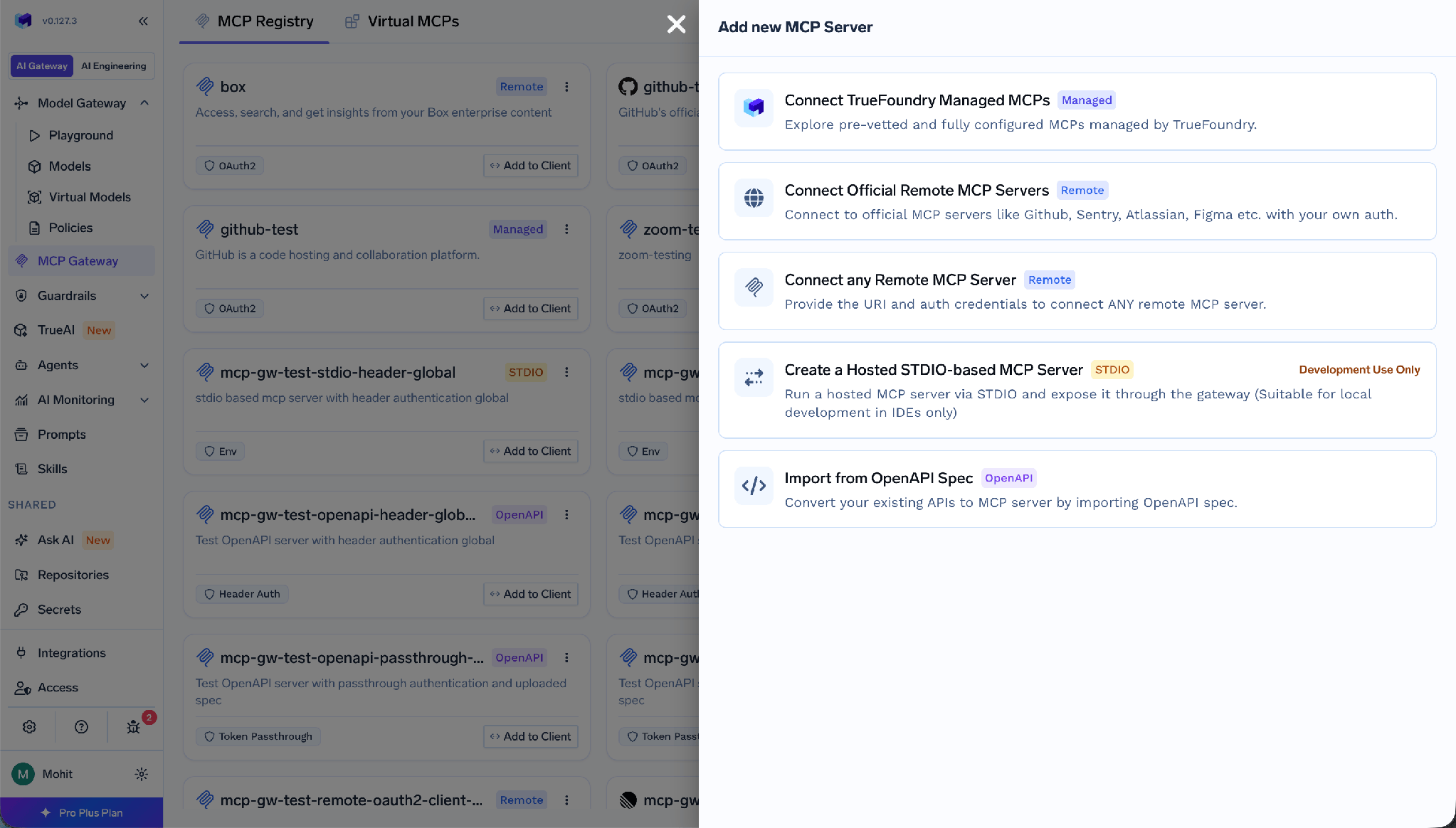
Fill in a Name (lowercase, numbers, hyphens — it appears in URLs), an optional Display Name, a Description, the URL of your running server, Collaborators, and Auth Data.
Worth being precise, because MongoDB does not follow the OAuth pattern most MCP posts assume. TrueFoundry separates inbound auth (how a client proves itself to the gateway) from outbound auth (how the gateway proves itself upstream).
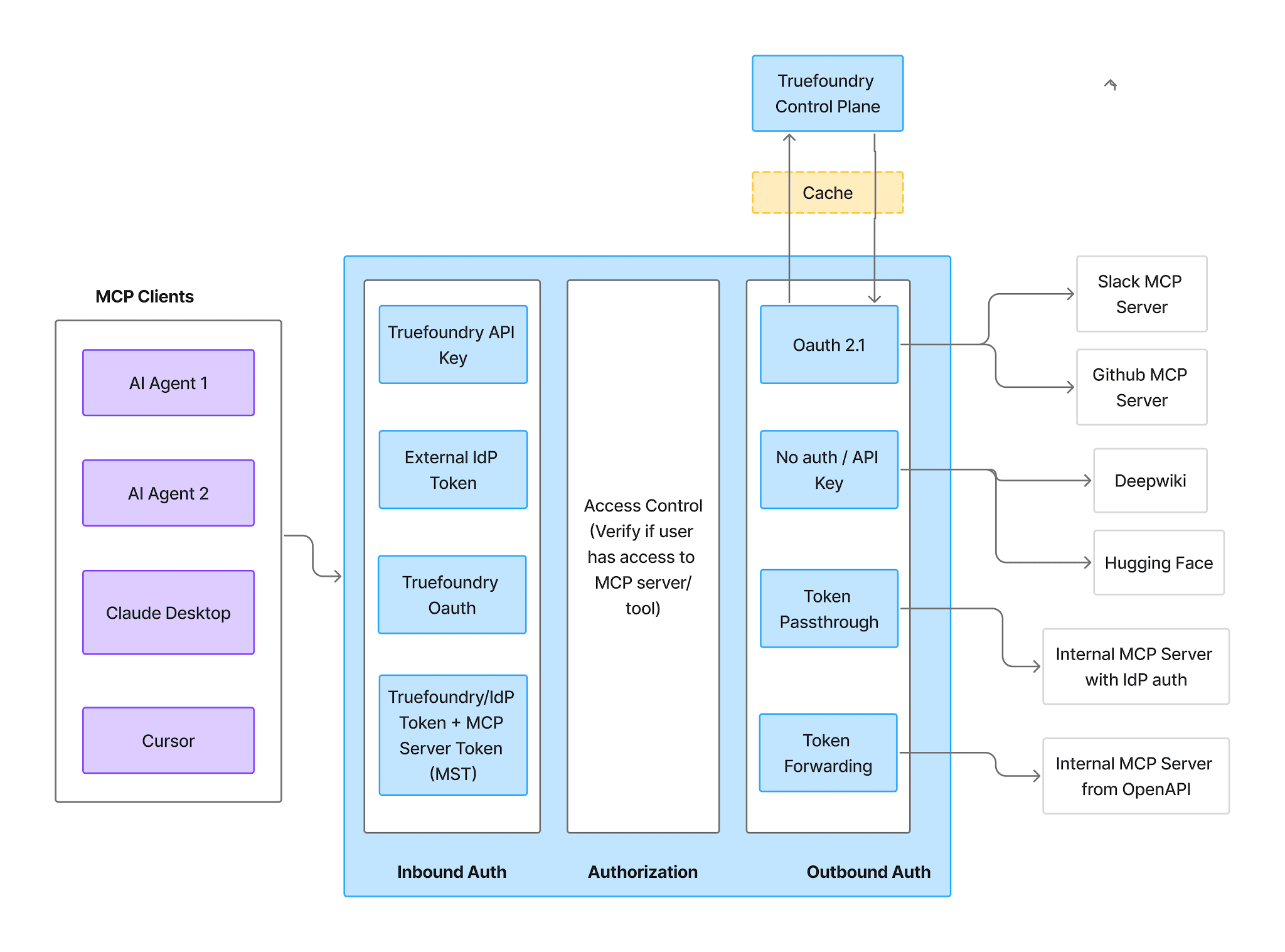
Inbound — four methods:
Outbound — here MongoDB differs from a managed MCP. Because the database credential lives in the MCP server’s own environment as MDB_MCP_CONNECTION_STRING, there is no OAuth authorization-code flow and no redirect URI to register. Nobody clicks Connect Now, there is no consent screen, and there is no user-side grant to revoke.
For the gateway-to-server hop the auth types are API Key, OAuth2, AWS SigV4, and Token Passthrough. API Key is the practical choice for a self-run server.
Two modes. Shared Credentials — one key for everyone, set as a header:
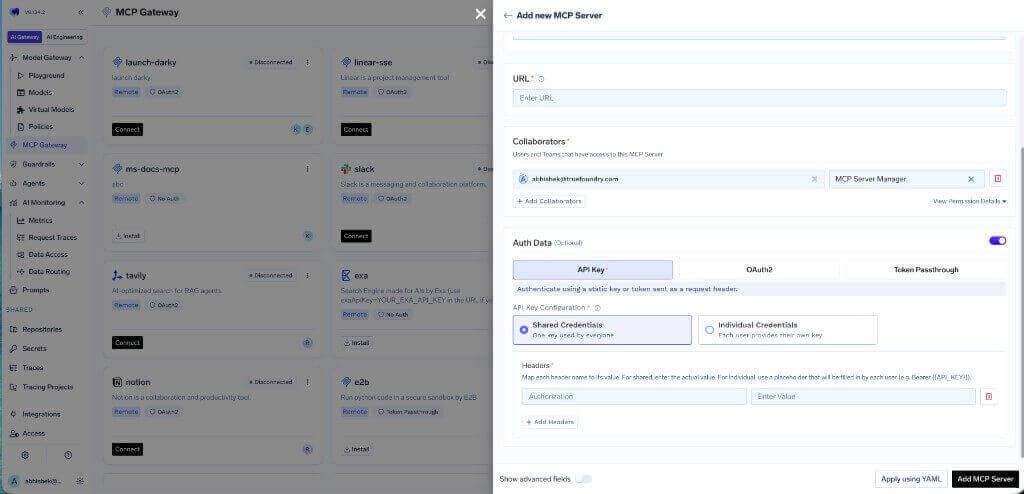
Individual Credentials — each user supplies their own via a Bearer {{API_KEY}} placeholder and the Auth Overrides tab:
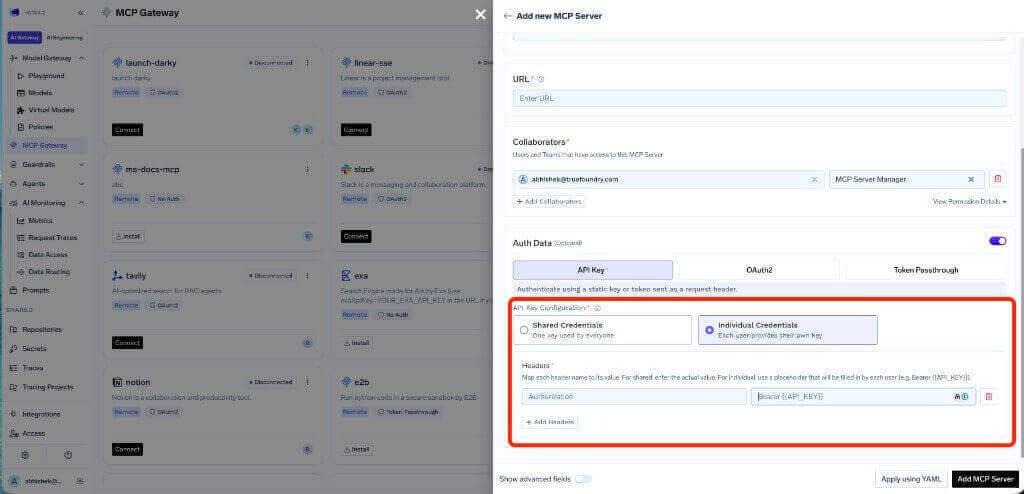
Individual credentials buy distinct inbound identities — useful for attribution and per-user tool scoping — but not per-user database permissions. Every request still lands on the same connection string with the same Atlas role. For genuinely separate data access, run separate server instances with separate Atlas users.
The Tools tab lists everything the server exposes. For MongoDB it is the most important screen in the console.
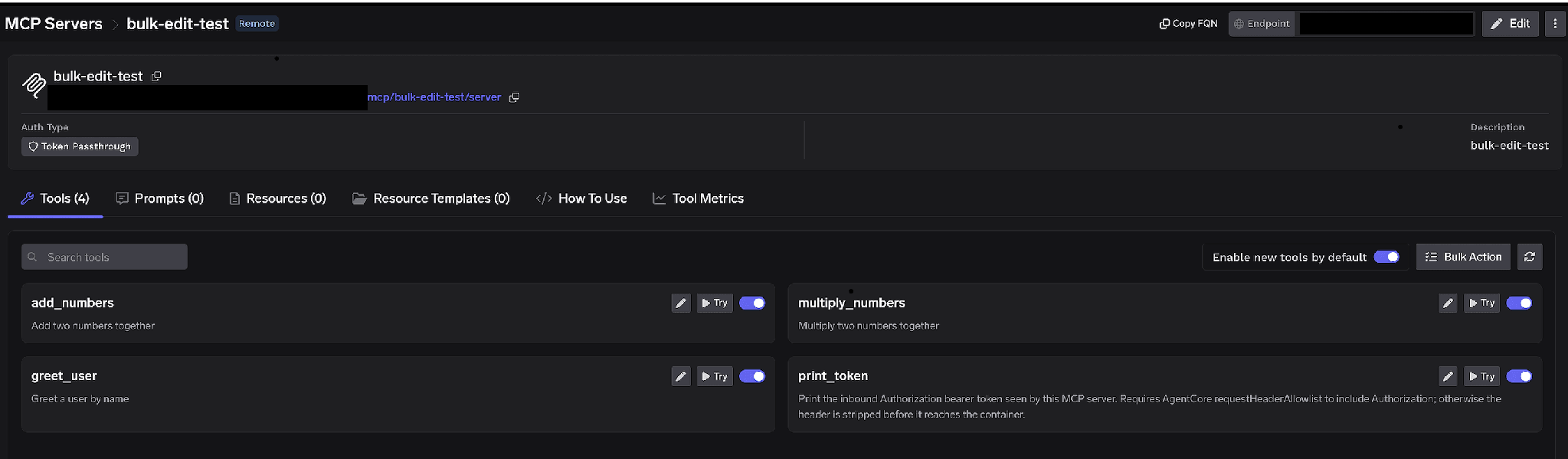
Per-tool toggles. Turn a tool off and it is omitted from tools/list entirely — clients never see it and it cannot be invoked. Not prompt-layer filtering; the tool is gone.
Our recommendation here is blunter than for most servers: disable collection and index management outright. Not approval-gated — disabled. Approval gates suit operations legitimately part of the workflow that need a second pair of eyes. Dropping a production collection is not part of any agent workflow we would ship. An agent that cannot call a drop tool cannot be talked into it, cannot be steered into it by a poisoned document, and cannot reach it because an approver clicked through a request at 2am.
If you need a write path, do not enable it on the shared server. Build a separate Virtual MCP Server with only those tools and grant it narrowly. TrueFoundry’s MongoDB security notes say the same: expose write-capable tools only through curated virtual MCP servers.
Enable new tools by default. Left on, upstream additions appear automatically. Turn it off. A new write tool silently appearing on a server your agents already use is the last surprise you want on a live database.
Bulk Action. Switches rows to checkboxes so you can flip many tools at once. Fastest route to read-only: select all, deselect the query and inspection tools, save.
Click the pencil on a tool to override how it is presented:
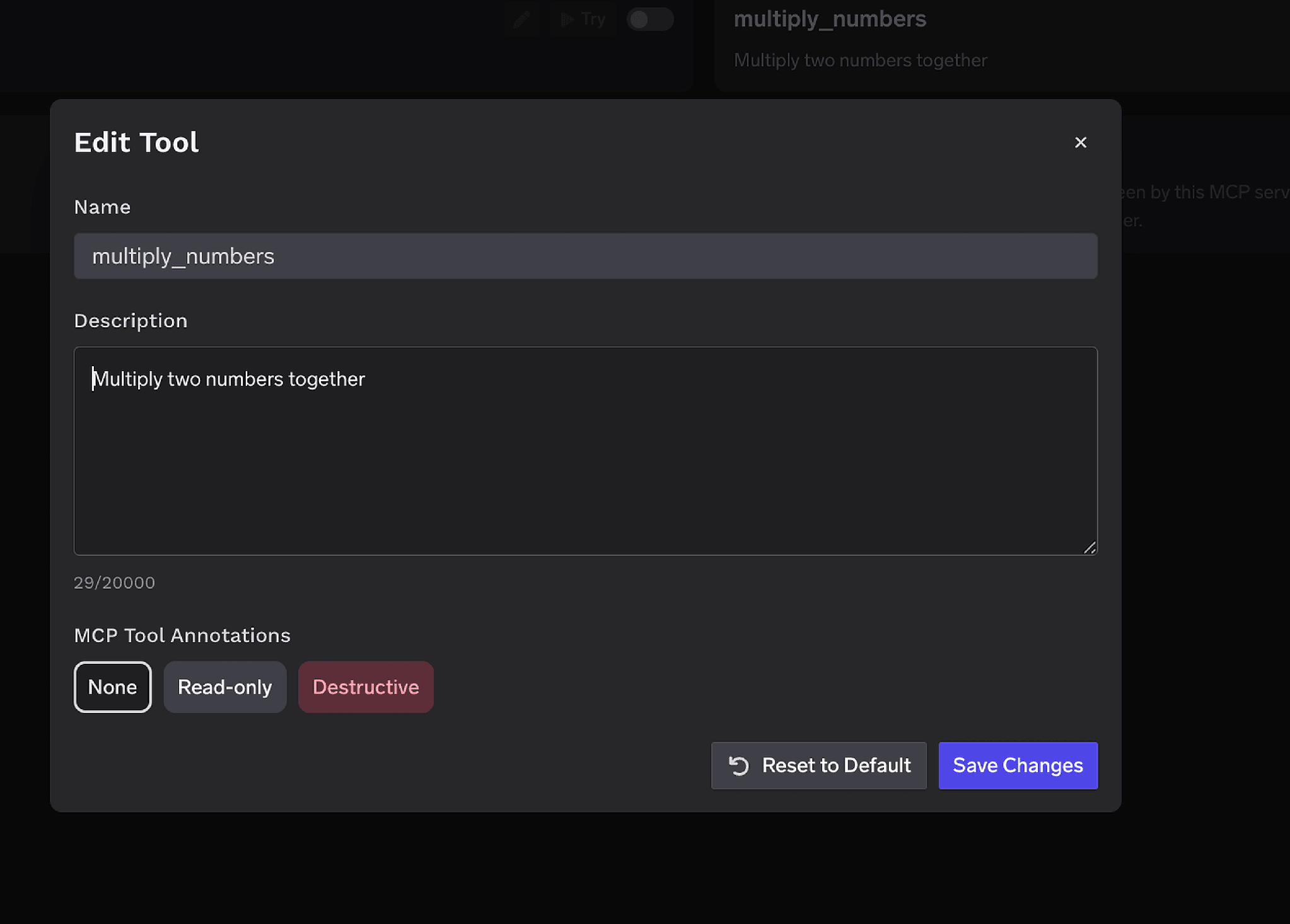
The Description override (up to 20,000 characters) is unusually valuable here: tell the model which collections are large and which fields are indexed, so it filters on them. That is the cheapest mitigation for the index-less-scan problem. MCP Tool Annotations mark a tool Read-only or Destructive, setting readOnlyHint or destructiveHint for clients that respect them.
Access control attaches to users, teams, or virtual accounts on two dimensions: which servers an identity reaches, and which tools it can invoke.
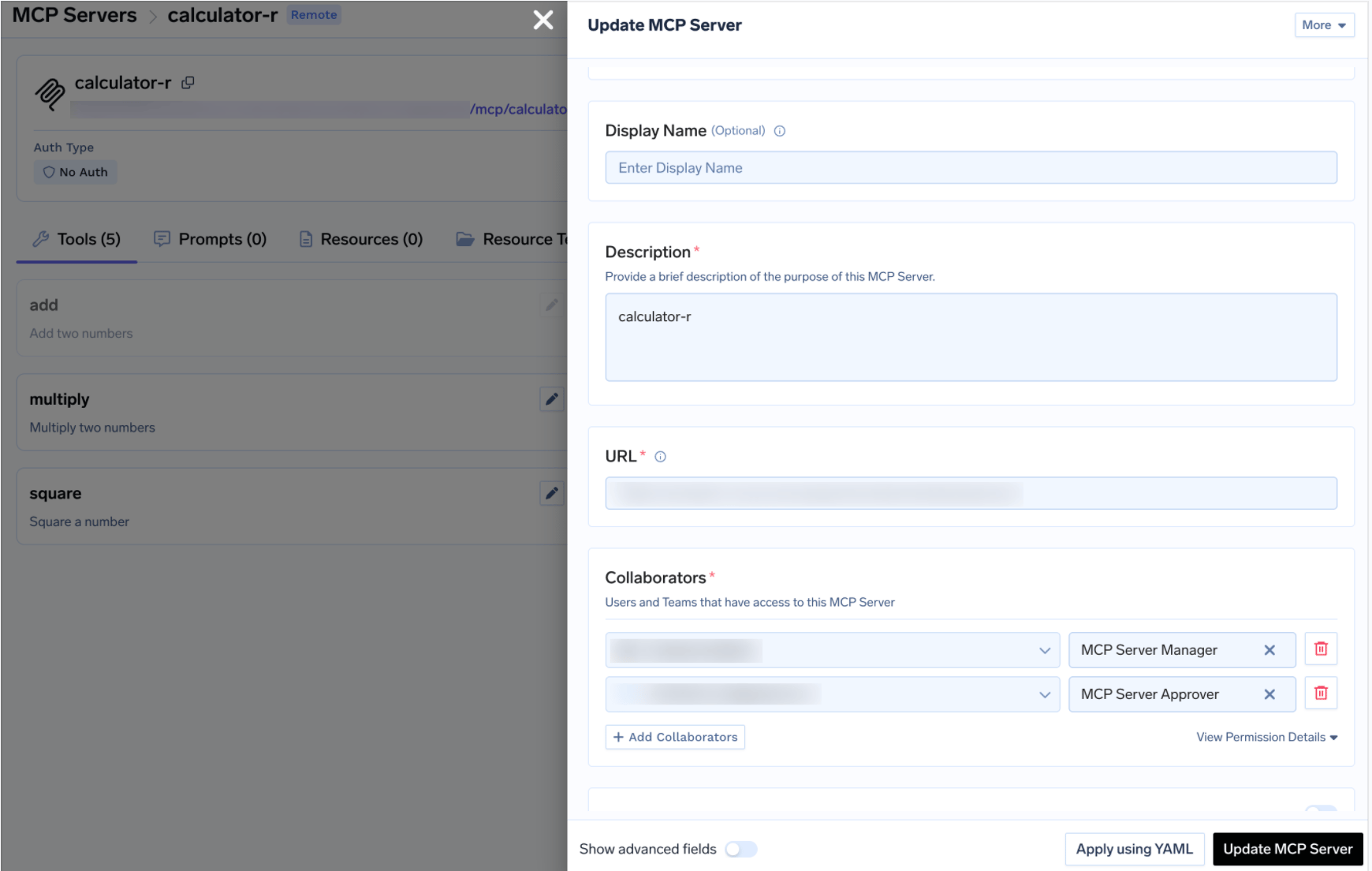
This matters more for a database server: because the connection string is shared, collaborator lists and tool toggles are your only per-user differentiation. Same MCP access control model as the rest of your registry.
If some write operation genuinely belongs in a workflow, approval policies hold the call until a human signs off: nothing executes, a request is created, approvers are notified. Create a policy under AI Gateway → Policies → MCP Tool Approval (marked Beta in the console):
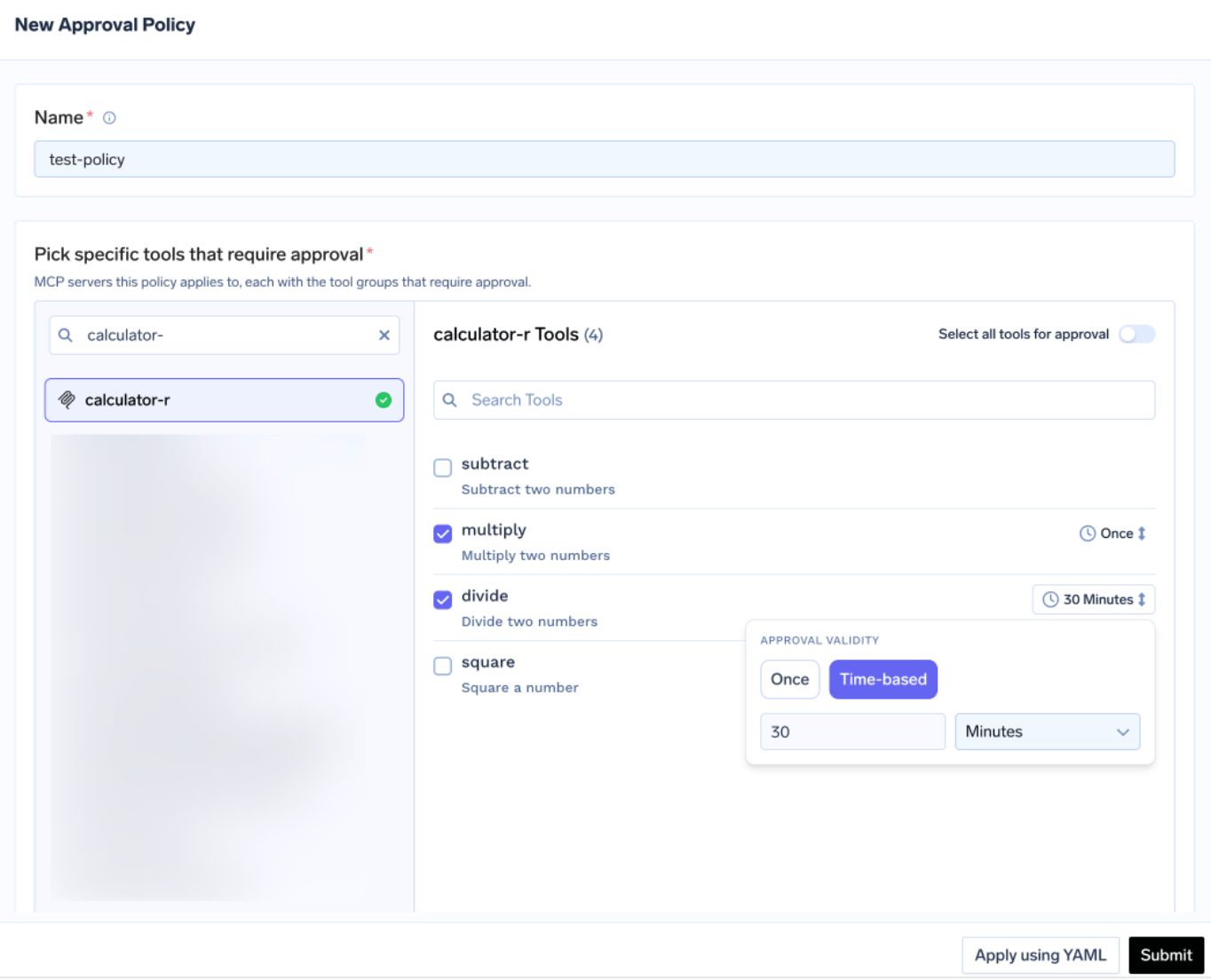
Each policy names the servers it gates and picks a scope.
When scopes overlap the most specific wins (named > destructive > all), and when validity settings conflict the most restrictive wins. Validity is Once or a duration in minutes.
Gate anything here with Once. A 30-minute window on a schema-mutating tool means one approval covers every call in it — not the guarantee anyone thinks they are buying.
Approvers are notified over Email, Slack, PagerDuty, or MS Teams and review in the console:
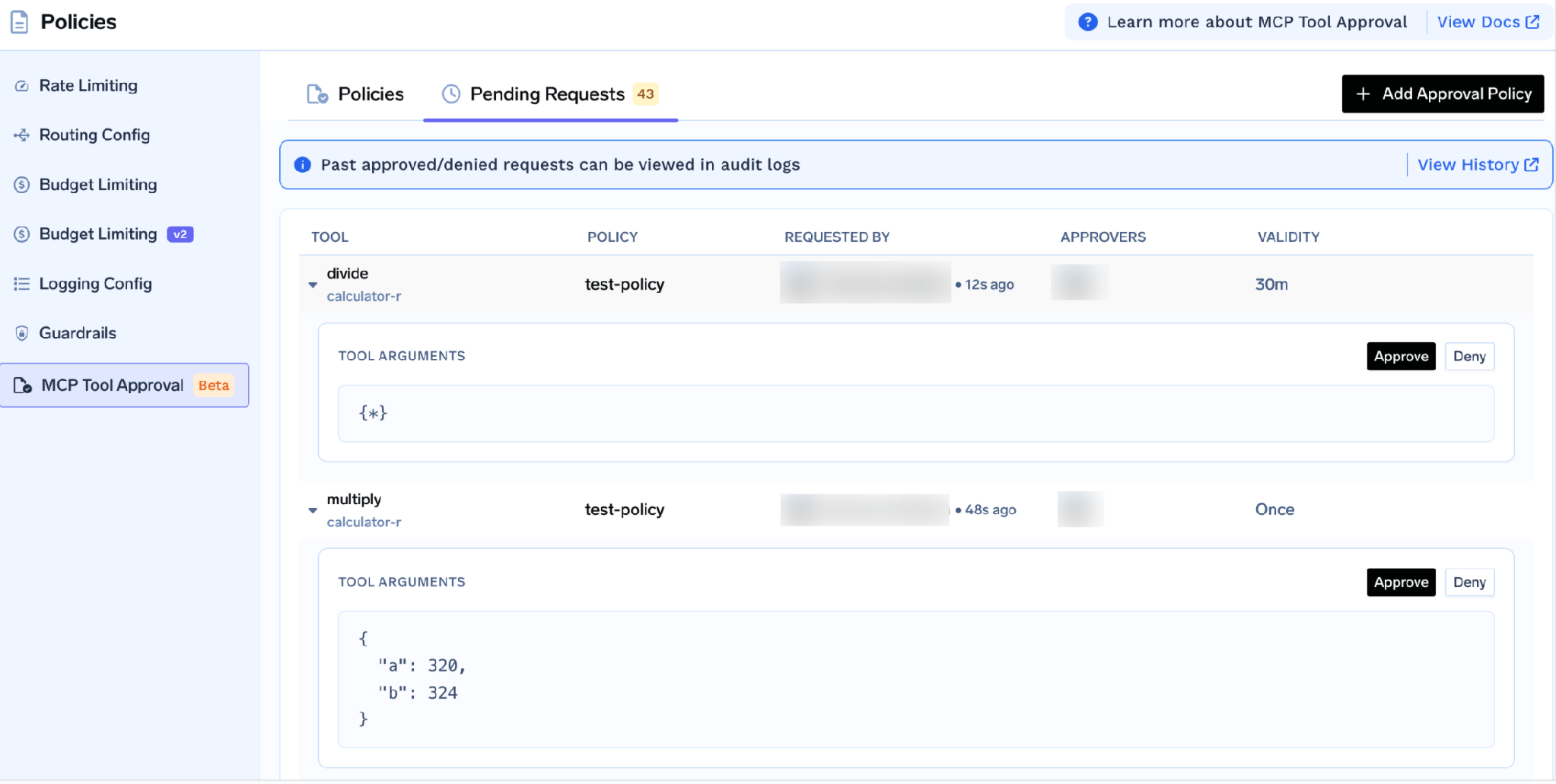
Each request shows the tool, policy, requester, and actual arguments — so an approver can read the filter before waving it through. While pending, the caller gets a JSON-RPC result carrying _meta.approval_status: "pending" rather than an error, so a well-behaved agent waits and retries. Grants are per requester; a denial blocks nobody permanently. To block durably, disable the tool.
Run the tools by hand first. On the server detail page click Try next to a tool, fill in the parameters, and read the JSON response. Try is disabled for tools you turned off. This catches the failures worth catching early: a forgotten Atlas network rule, a user without rights to the collection, or a query that takes 40 seconds because nothing indexes the field you filtered on.
Open the How To Use tab for your tenant-specific Gateway URL and ready-to-paste snippets.
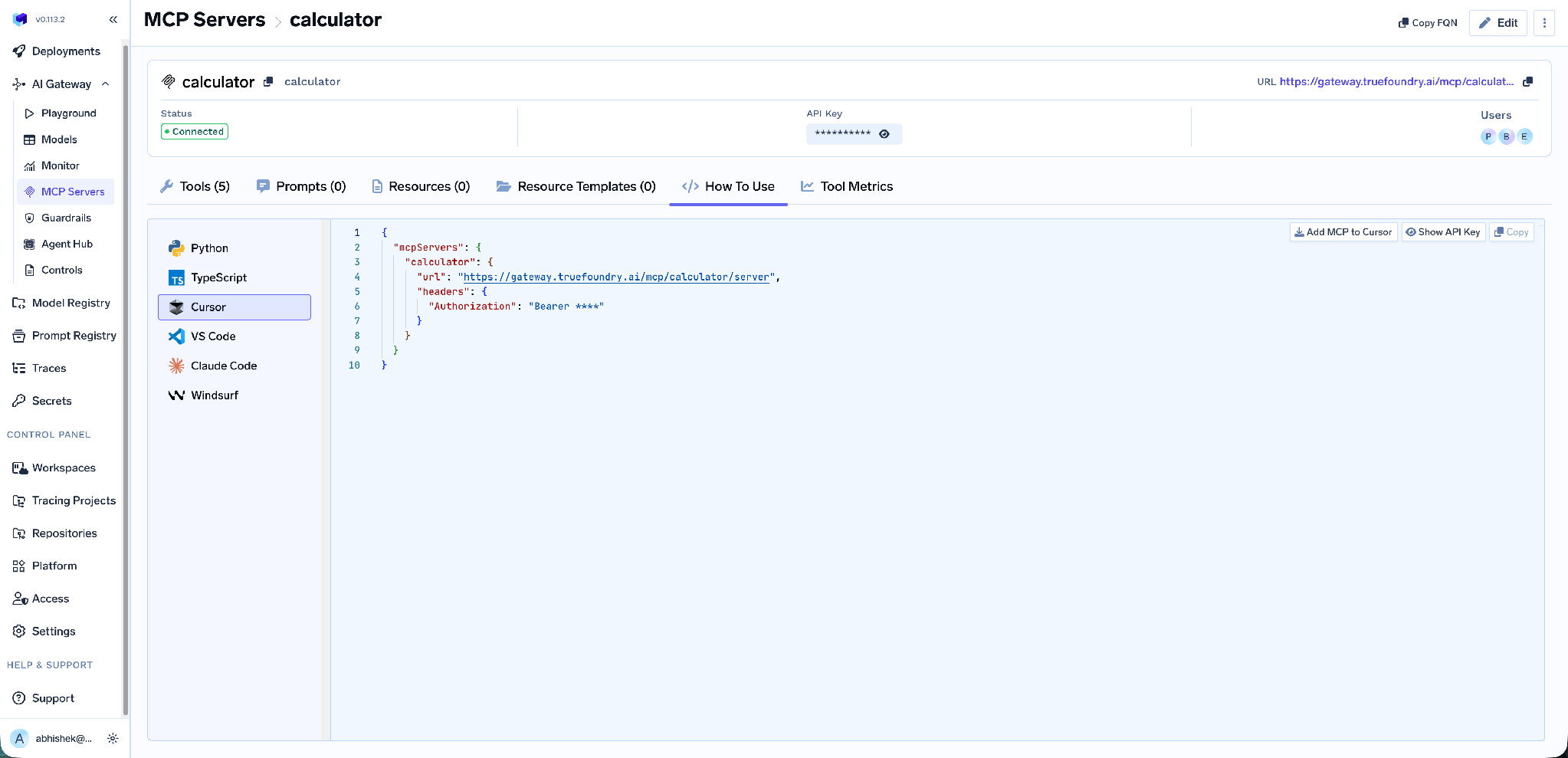
It covers Claude Code, VS Code, Claude Desktop, Cursor, Windsurf, Codex, and the Python and TypeScript MCP SDKs. Add MCP to Cursor writes the config; Show API Key reveals the token if your client needs one. Take the URL from this tab rather than building it by hand — it is tenant-specific, and a hand-built endpoint is the commonest cause of a client that connects but lists nothing.
Tool-level metrics. The MCP Metrics dashboard breaks down requests per second, latency at P50/P75/P90/P99, failure rate by error type, and ranked request counts.
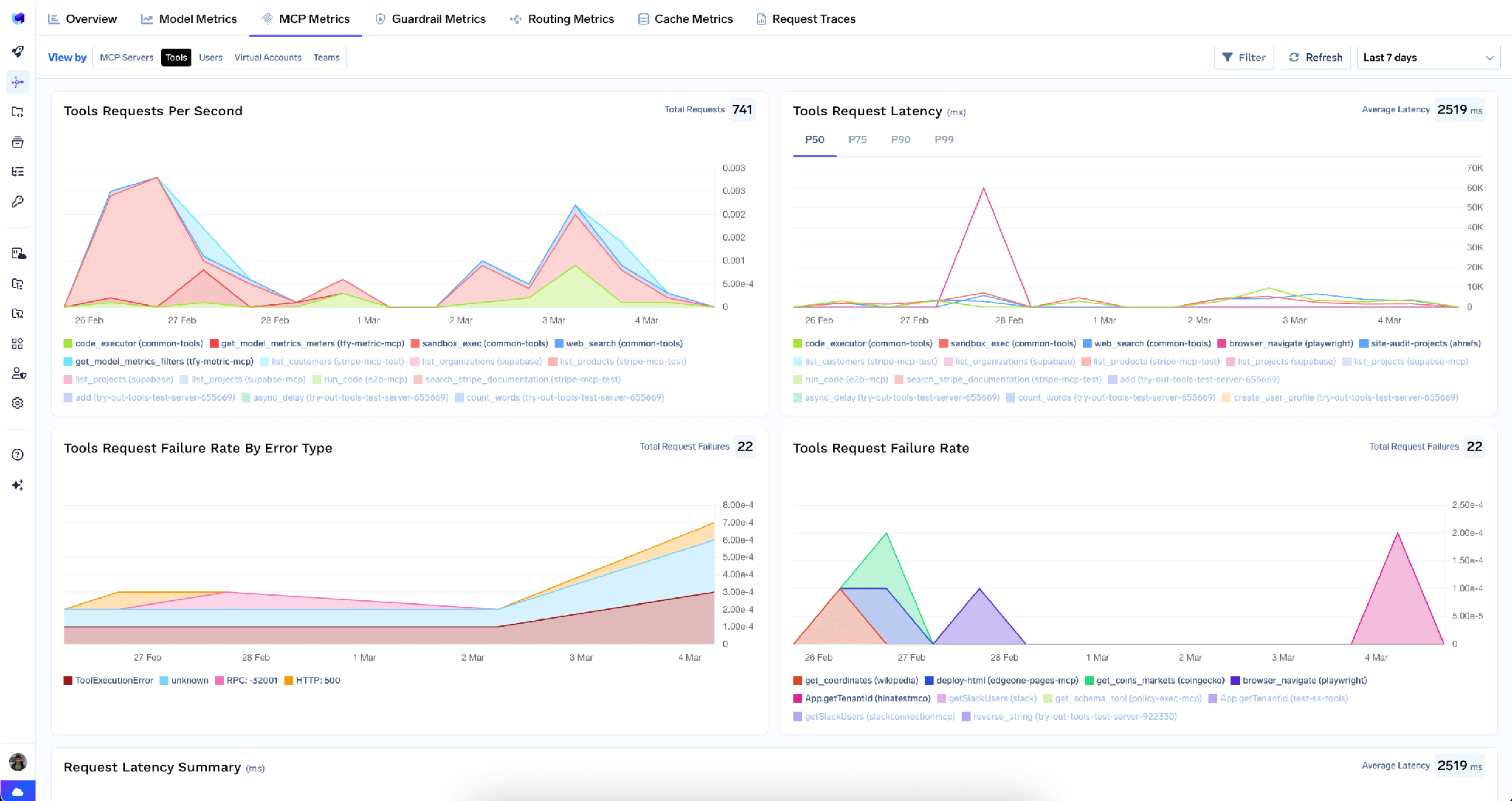
Latency percentiles are the signal to watch. A query tool whose P99 drifts from 200ms to eight seconds means an agent is scanning something it should be seeking — and you see it before on-call does.
Full-request observability. Every call is traced with caller identity, tool name, inputs, and latency, exporting over OpenTelemetry to Grafana, Datadog, or Prometheus. With a shared connection string, this is the only way to answer “who ran that query.”
Guardrails. Pre-tool and post-tool guardrails run policy on tool calls — catching personal data in a result before it reaches the model. A real concern, since production documents hold whatever users typed.
Low overhead. The gateway adds roughly 3–4 ms of latency and handles 350+ RPS on a single vCPU.
One registry. Bundle a curated tool subset behind one endpoint with a Virtual MCP Server, so a debugging agent gets read-only MongoDB plus your logging tools and nothing more.
Tenant admins can wipe every stored credential from the three-dot menu next to Edit:
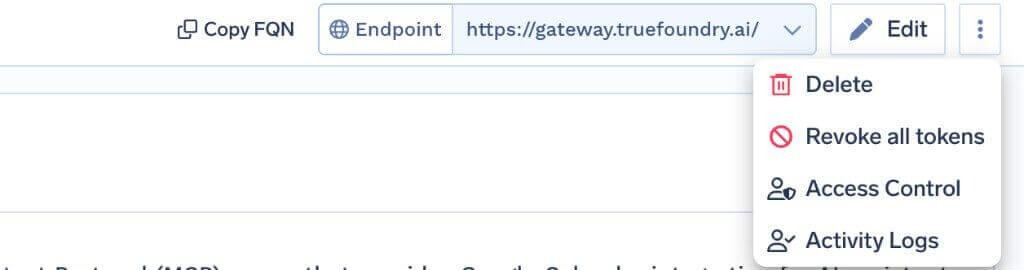
Revoke all tokens deletes every auth override and stored token on that server, takes effect on the next request, and is logged. It is irreversible and visible only to tenant admins.
Its limit matters: it clears tokens at the gateway only and does not touch the Atlas credential in your server’s environment. In a real incident, what actually cuts database access is disabling or rotating the Atlas user. Do that first.
Check network access first. Atlas denies unlisted sources, so a server that deploys fine still fails every call until your egress IP is added under Security → Network Access.
Read-only belongs at the Atlas layer too. Tool toggles are one layer. A read-only database user is enforced by MongoDB and survives a misconfiguration, a new upstream tool, or a toggle flipped in a hurry. Use both. If the MCP server offers a read-only startup mode, that is a worthwhile third layer [VERIFY — the docs page does not mention such a flag].
Never use a personal connection string. Create a dedicated database user. A personal credential in MDB_MCP_CONNECTION_STRING attributes every agent action to a human who did not take it, and outlives their access review.
Most MCP servers let you trade a little risk for a lot of convenience. MongoDB does not offer that trade on the write side: what it writes to is the state your application is serving right now, and no rebuild puts it back.
You barely need the write side. Debugging, schema exploration, index review, and data-quality checks are all reads, and they cover most of what teams want a database agent for. Grant a read-only Atlas user, disable the mutating tools, keep new upstream tools off by default, and describe the query tools well enough that the model knows which fields are indexed. The result is useful and structurally incapable of the failure modes people fear.
TrueFoundry AI Gateway delivers ~3–4 ms latency, handles 350+ RPS on 1 vCPU, scales horizontally with ease, and is production-ready, while LiteLLM suffers from high latency, struggles beyond moderate RPS, lacks built-in scaling, and is best for light or prototype workloads.




An MCP server that exposes a MongoDB deployment as tools an agent can call — querying databases, inspecting schemas, managing collections and indexes. On TrueFoundry you run it yourself with a dedicated Atlas connection string set as MDB_MCP_CONNECTION_STRING, then register its URL in the MCP Gateway.
Four capability areas: querying data, inspecting schemas, managing collections, and managing indexes. The full list appears on the Tools tab once registered, and each can be enabled, disabled, re-described, or annotated read-only or destructive.
Yes, as a read-only integration. The risks are an agent mutating live state and an unindexed query degrading a cluster under load. Both are handled the same way: a read-only Atlas user, collection and index management disabled at the gateway, any write path behind a curated Virtual MCP Server, and every call traced.
Yes. TrueFoundry runs in your VPC, on-prem, air-gapped, or hybrid, so prompts and responses never leave your domain even as you route across many providers.
Yes. It includes an MCP Gateway, an Agent Gateway, and an MCP & Agents Registry with tool-level access control. Agents on LangGraph, CrewAI, AutoGen, or a custom framework can all be governed centrally.
Yes. The gateway is OpenTelemetry-compliant and plugs into Grafana, Datadog, Prometheus, or your preferred stack. It traces every request from prompt to tool and model execution, so you get unified logging without ripping out what you already run.



The latest news, articles, and resources sent to your inbox
.png)
.png)
.png)
.png)
.png)
.png)
.png)
.png)
.png)
.png)
.png)
.png)


