October 31, 2026
|
5 min read


.png)
Blazingly fast way to build, track and deploy your models!
The Notion MCP server is a remote Model Context Protocol server for Notion. MCP is the open standard that lets an agent discover and call tools on an external system; Notion’s implementation exposes workspace search, page and database reads and writes, and comments as callable tools.
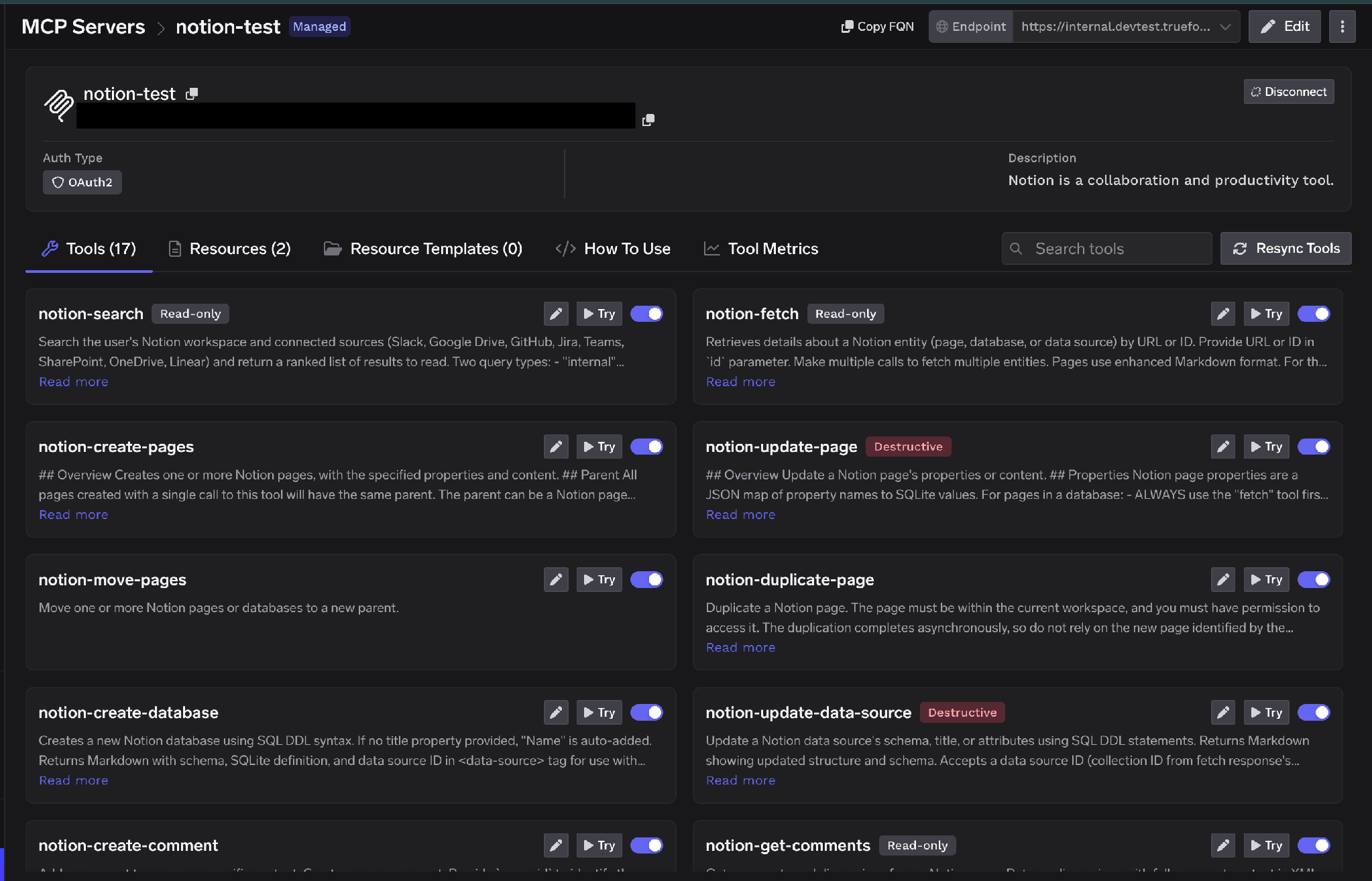
TrueFoundry’s docs describe the surface as search, fetch, create and update pages, databases, and comments, with tools named in the notion-* convention — notion-search, notion-fetch, notion-create-pages, notion-update-page. Grouped by capability:
That Resources tab matters: most MCP servers expose tools only, so Resources is a second retrieval path that’s easy to miss when auditing what an agent can reach.
Being a remote server, there’s no container to run and no npx process per laptop — you point a client at a URL and authenticate, the pattern now standard across remote MCP servers.
The valuable uses chain tools, and lean on search because Notion content is unstructured by nature:
The read-versus-write split is sharper here than in most tools. Reads are the point — retrieval is why you connect it. Writes are convenient but rarely load-bearing, and they’re what can overwrite a page a human spent a week on. Usefully, Notion’s tools arrive already labeled Read-only or Destructive, so the Tools tab tells you which is which without any inspection.
Notion’s risk profile differs from a code host’s. The dangerous failure isn’t an agent maliciously rewriting a page — it’s an agent legitimately reading far more than anyone intended.
Permission inheritance makes scope invisible. Notion access is page-tree shaped: grant a parent page and the grant flows down to every child, grandchild, and database beneath it. When someone shares “the Engineering wiki” with an integration, they’re picturing the landing page. What they’ve actually granted is whatever accumulated under that node over three years — including the compensation planning page a manager nested there in a hurry. Nobody sets out to hand an agent HR data. Inheritance does it for them.
Workspace-level consent is coarse. Notion’s OAuth screen asks you to pick a workspace, then shows the categories granted — page and database access, search, workspace users. It never asks you to enumerate pages. The unit of consent is far bigger than the unit of need, so the honest default is “the agent can see a lot” unless something narrows it.
Search amplifies it. An over-broad grant would be survivable if an agent had to guess page URLs. It doesn’t. notion-search is a discovery tool: point an agent at a workspace and it will find the sensitive pages, because that’s its job. Retrieval quality and blast radius scale together.
Nobody can reconstruct what was read. Notion logs API activity. It doesn’t log that your internal support agent searched for “severance” while answering a question from a Slack thread. Reads are the risk surface, and reads are the least likely thing to get noticed after the fact.
None of this is a reason to skip the Notion MCP server. It’s a reason to put a control plane in front of it — what an MCP gateway exists to do.
On TrueFoundry, Notion is a TrueFoundry Managed MCP. TrueFoundry publishes platform-verified server definitions to a managed catalogue; to provision one you supply only a Name, and the platform handles every URL, auth detail, scope, and credential — keeping them current as the upstream provider changes them.
Step 1 — Open the catalogue. Go to MCP Servers in the sidebar, click Add new MCP Server, and select Connect TrueFoundry Managed MCPs. Find notion — catalogued as “Notion is a collaboration and productivity tool” — and click + Add. TrueFoundry registers the server and opens its detail page.
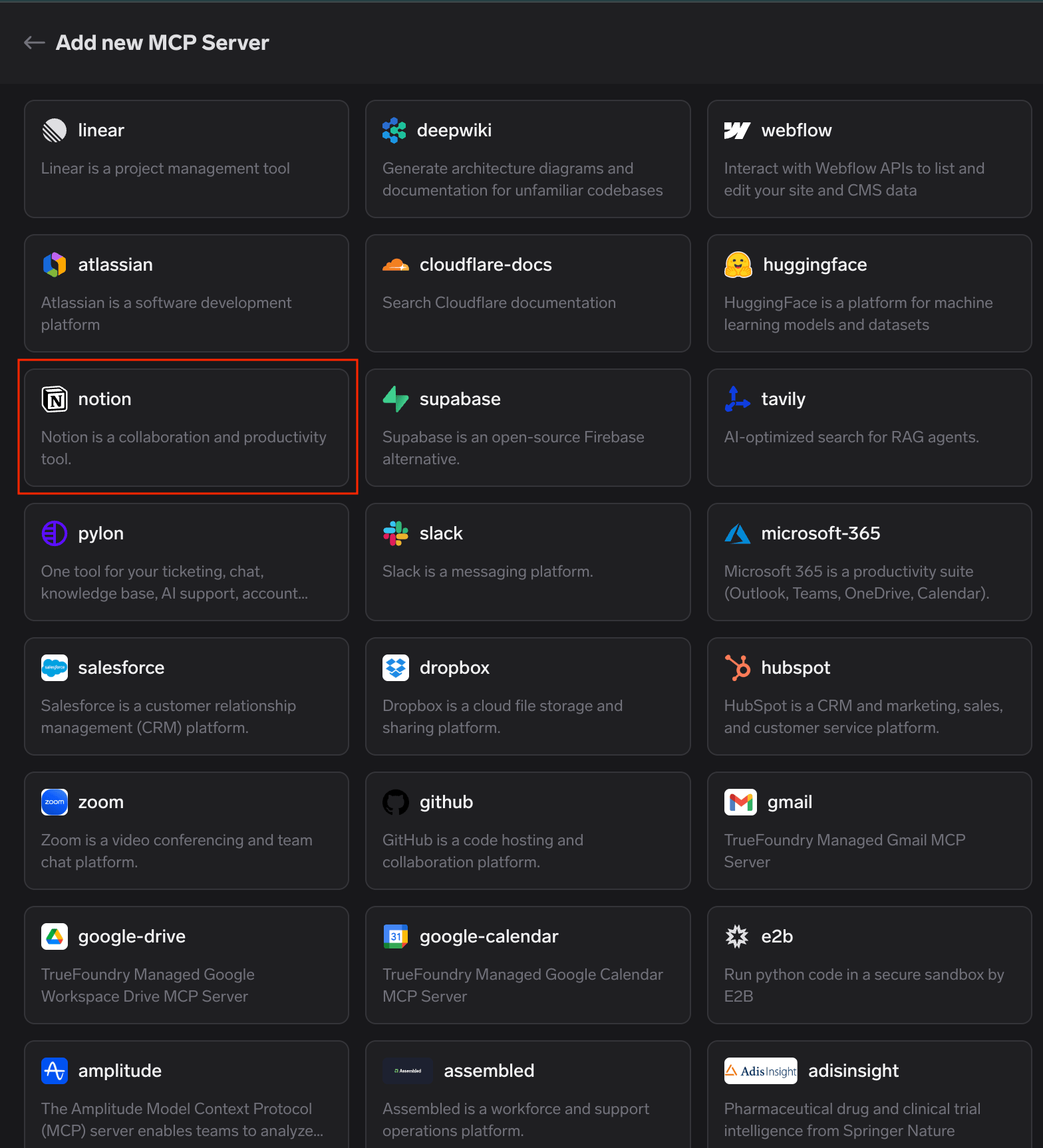
TrueFoundry managed MCP catalogue with the notion card highlighted among the available platform-verified MCP servers
That’s the entire registration — no URL to paste, no Notion integration to create, no client secret to store.
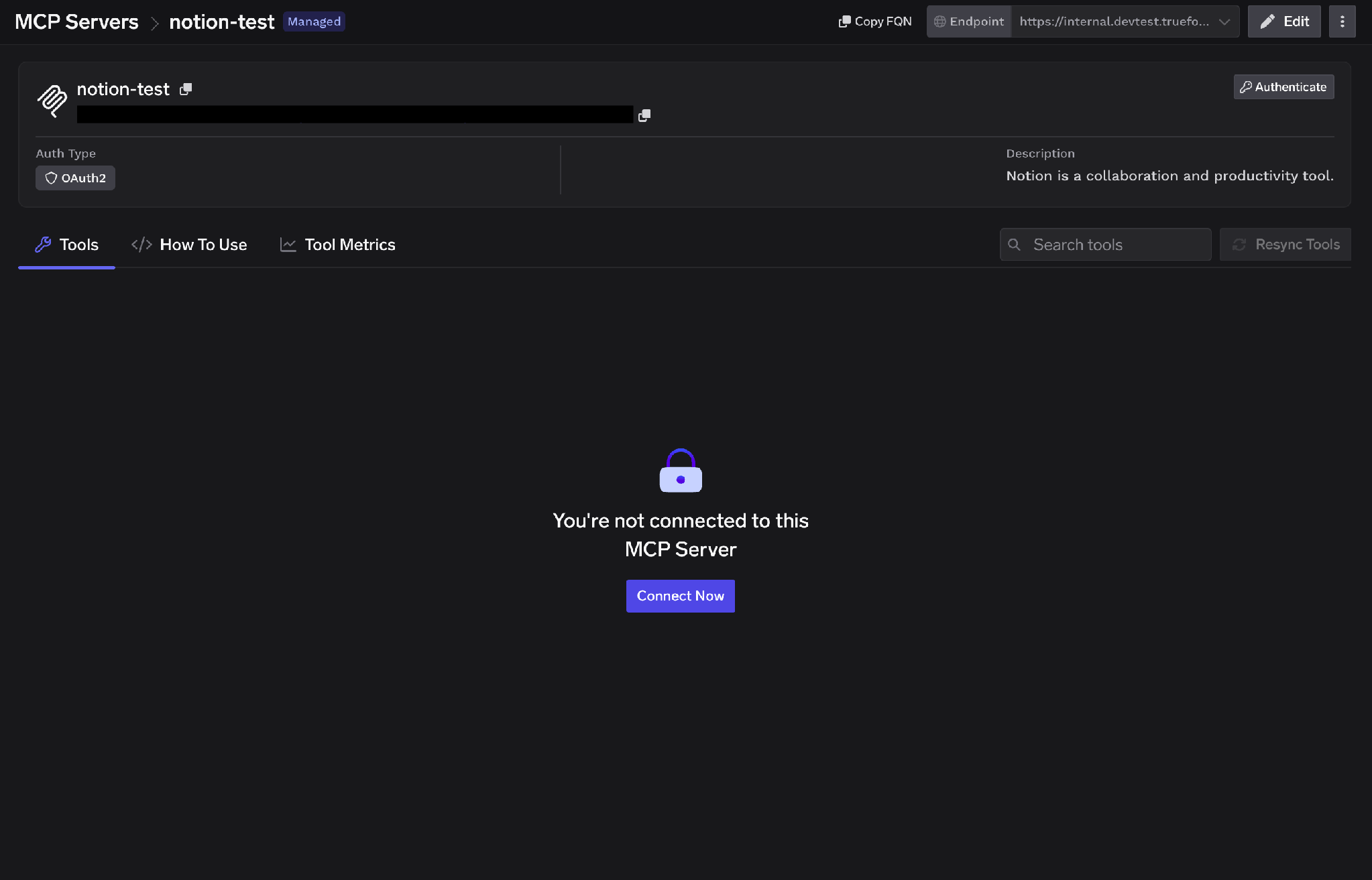
Step 2 — Start the connection. The Tools tab opens on “You’re not connected to this MCP Server.” Click Connect Now to begin OAuth2 authorization; the detail page shows the auth type before you click anything.
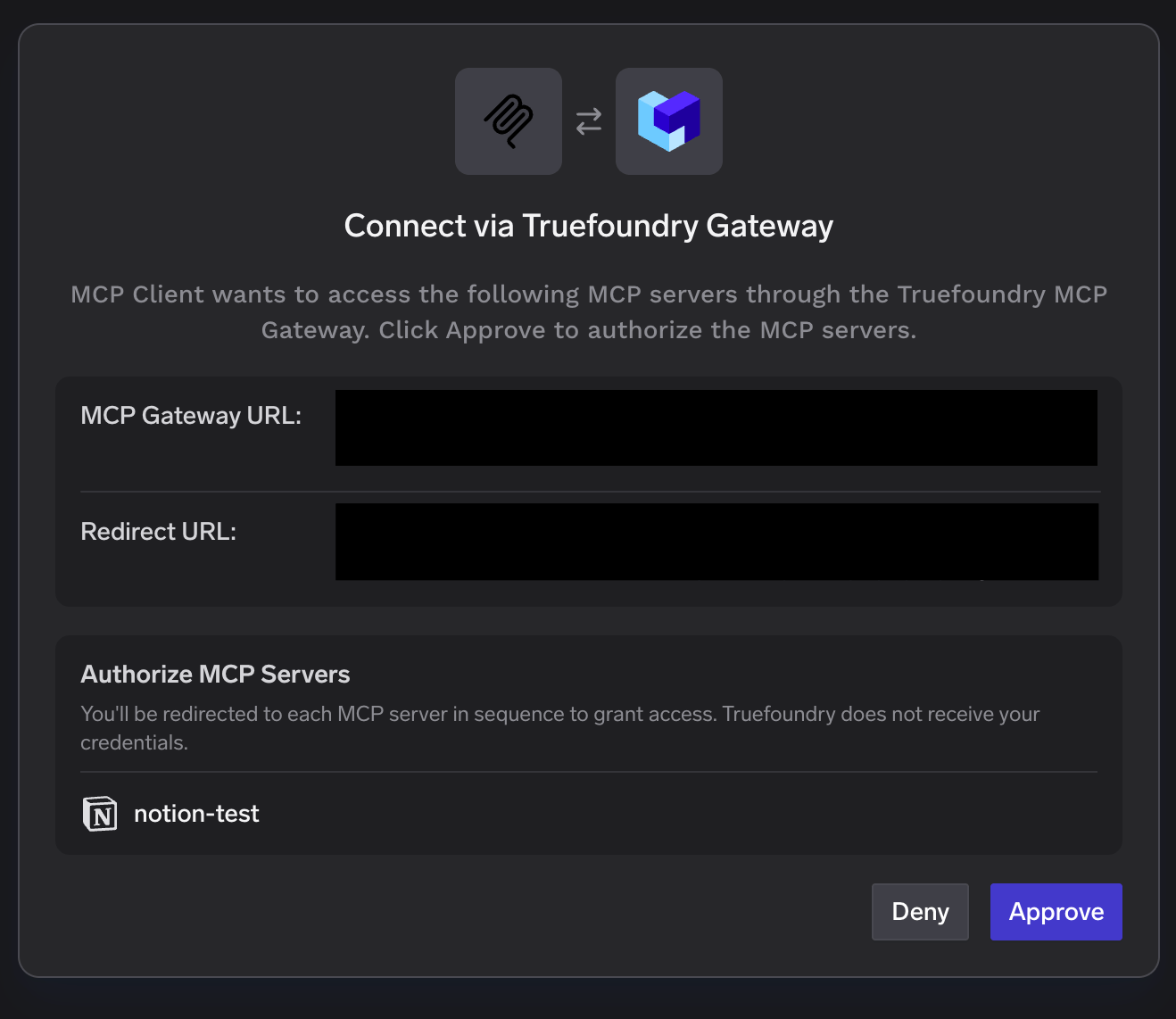
Step 3 — Approve at the gateway. A “Connect via TrueFoundry AI Gateway” popup shows the MCP Gateway URL, the redirect URL, and the servers to authorize. Review it and click Approve. You’re then redirected to each MCP server in sequence — worth knowing if you’re authorizing several at once, because the flow is a chain rather than one hop.
Step 4 — Authorize your Notion workspace. Notion’s consent screen opens. Select the workspace, review the access being granted — page and database access, search, workspace users — confirm you trust the redirect URL, and click Continue.
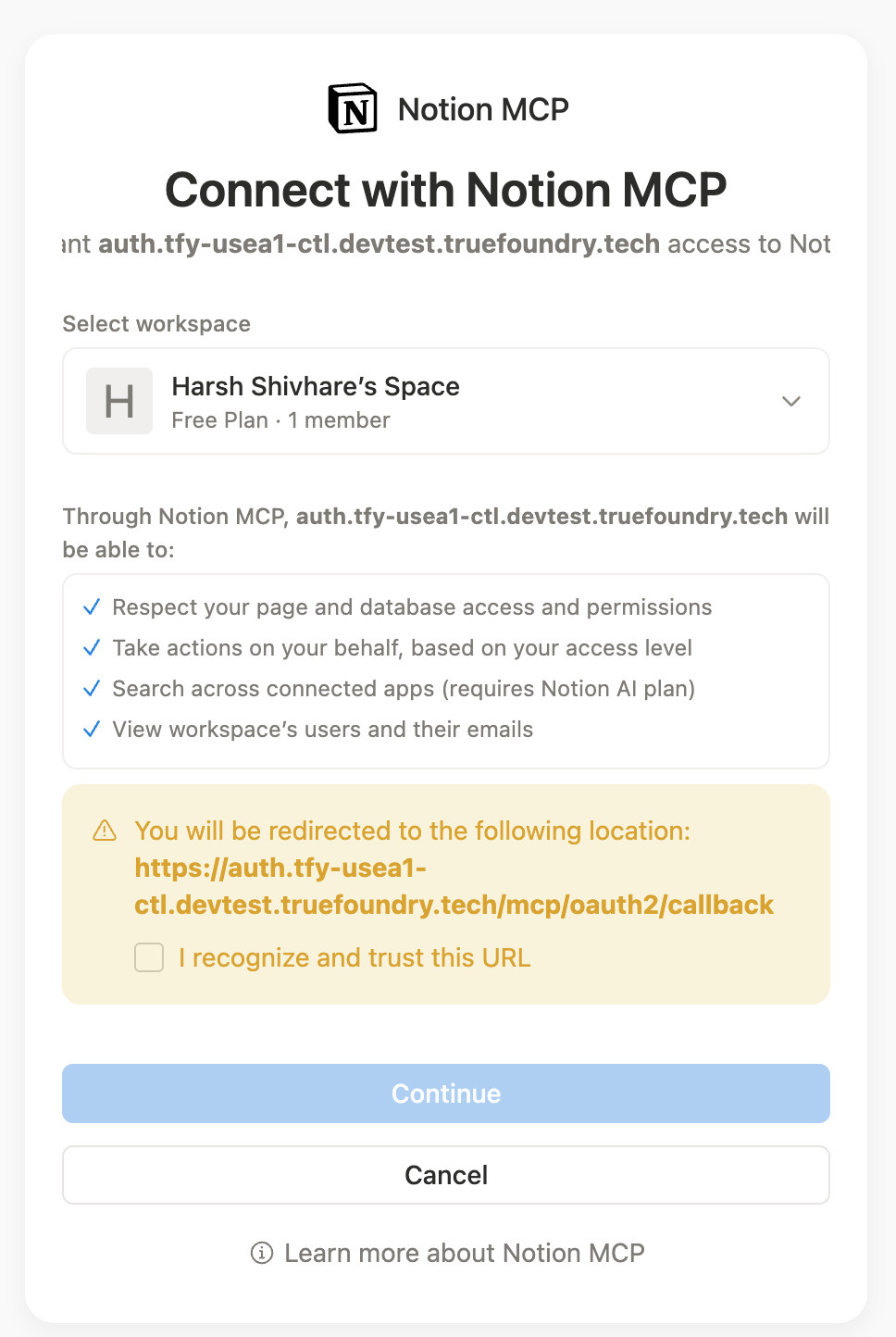
Read this screen slowly — it’s where the inheritance problem becomes a decision. Whoever clicks Continue is choosing how much of the workspace an agent can search.
Step 5 — Verify tools. The Tools tab populates with Notion’s tools, each with a description, a Try button, and a Read-only or Destructive label. Resources appear on their own tab.
TrueFoundry separates inbound authentication (how a client proves itself to the gateway) from outbound (how the gateway proves itself to Notion). The layers are independent, and that distinction is what makes per-user scoping possible.
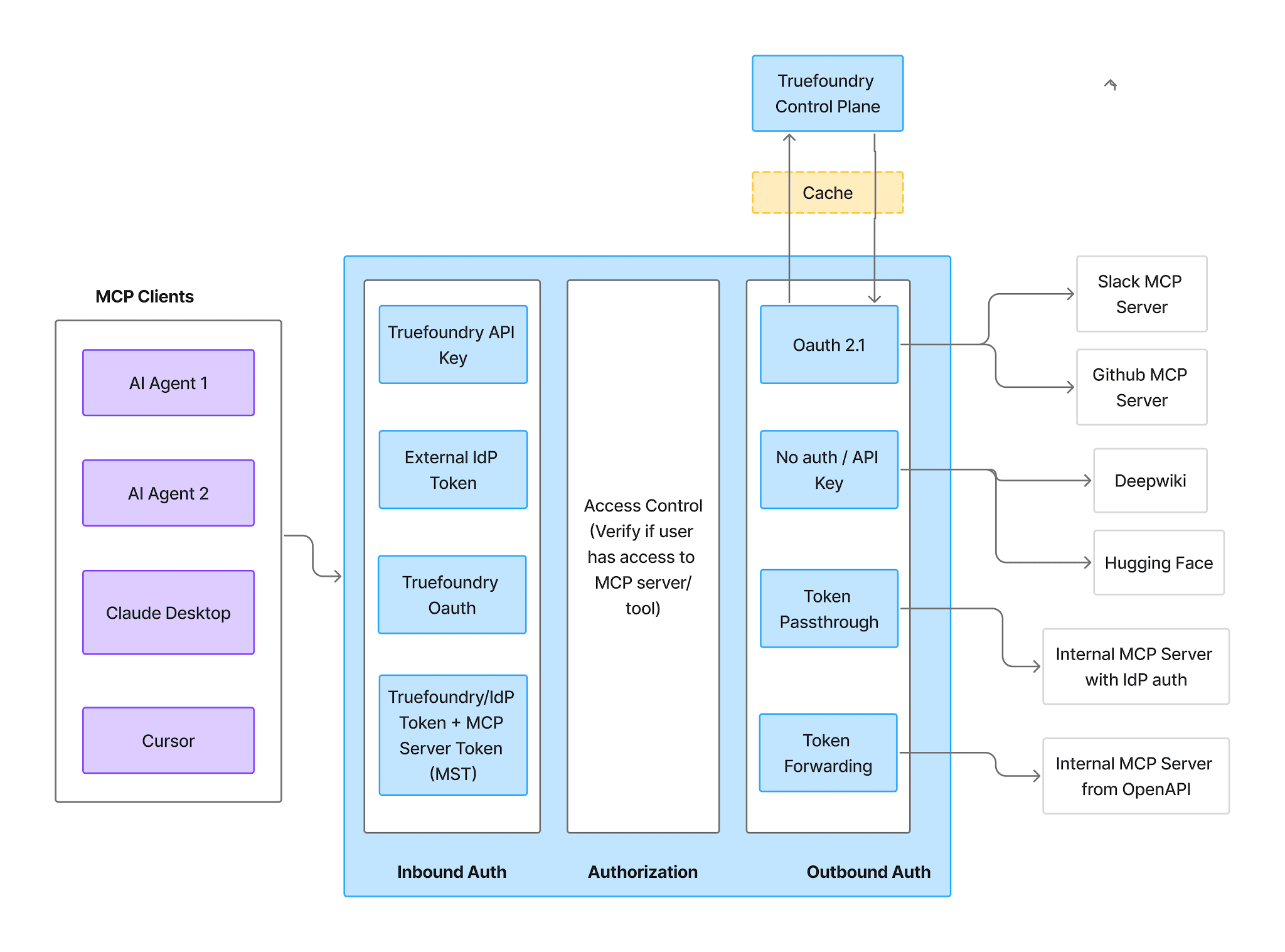
Inbound — four supported methods:
One caveat matters more for Notion than almost any other server: Virtual Account tokens give every request identical access. That’s unusable for per-user scoping — a shared token means every agent sees the same union of pages, exactly the failure mode you’re avoiding. Use a PAT or an IdP token inbound so identity survives to the outbound hop.
Outbound — Notion is OAuth2. Each user authorizes their own workspace, and TrueFoundry manages consent, token storage, and refresh, injecting the right token per user on every tool call. Authorization happens directly between the user’s account and their Notion workspace; TrueFoundry does not receive Notion credentials. For managed MCPs the redirect URI is always https://auth.truefoundry.com/mcp/oauth2/callback.
The practical effect is the whole argument of this post. An agent acting for a support engineer searches the pages that engineer can see; an agent acting for someone in HR searches HR pages. No shared token holds the union of everyone’s access, and when someone’s Notion access changes their agent’s reach changes with it — without anyone editing a config. ## Scoping tools before you ship
Per-user OAuth bounds which pages; tool management bounds what can be done to them. Use both.
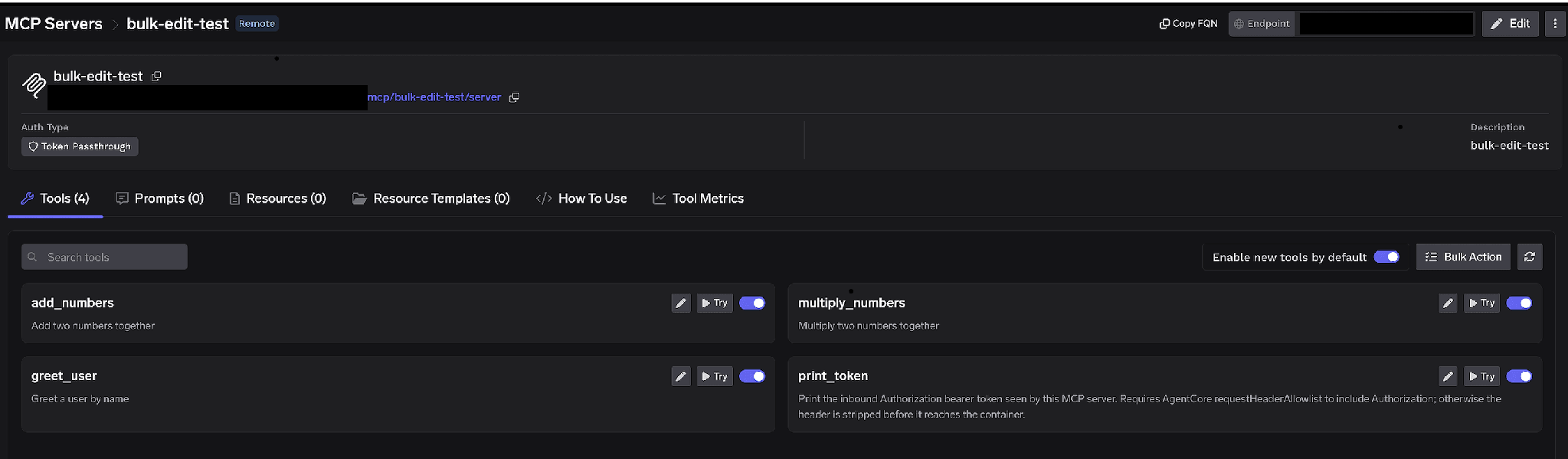
Per-tool toggles. Turn a tool off and it’s omitted from tools/list entirely — clients never see it and it cannot be invoked. This isn’t prompt-layer filtering; the tool is unavailable. For a Notion knowledge agent the usual configuration leaves search and fetch on and turns every write tool off. An agent with no notion-update-page cannot be talked into overwriting a page, whatever a poisoned page body says.
Enable new tools by default. On, tools Notion ships later appear automatically. Off, only tools you’ve explicitly enabled are available and new ones stay hidden until you approve them. For a server sitting on your entire internal wiki, off is the right default — capability growth should be a decision.
Bulk Action. Switches every row to checkboxes with Select all — the fast path to a read-only Notion server: select all, uncheck search and fetch, save.
Click the pencil on any tool to open Edit Tool. The Description override (up to 20,000 characters) steers tool selection — useful for telling a model which retrieval path to prefer, since Notion offers both search and Resources. MCP Tool Annotations set readOnlyHint or destructiveHint for clients that respect them. Notion’s tools arrive already annotated, so you’re confirming rather than authoring — but confirm anyway, because the approval policies below key off exactly those annotations.
Access control attaches to users, teams, or virtual accounts on two dimensions: which MCP servers an identity can reach, and which tools within a server it can invoke. Add collaborators from the server’s settings and assign a role:
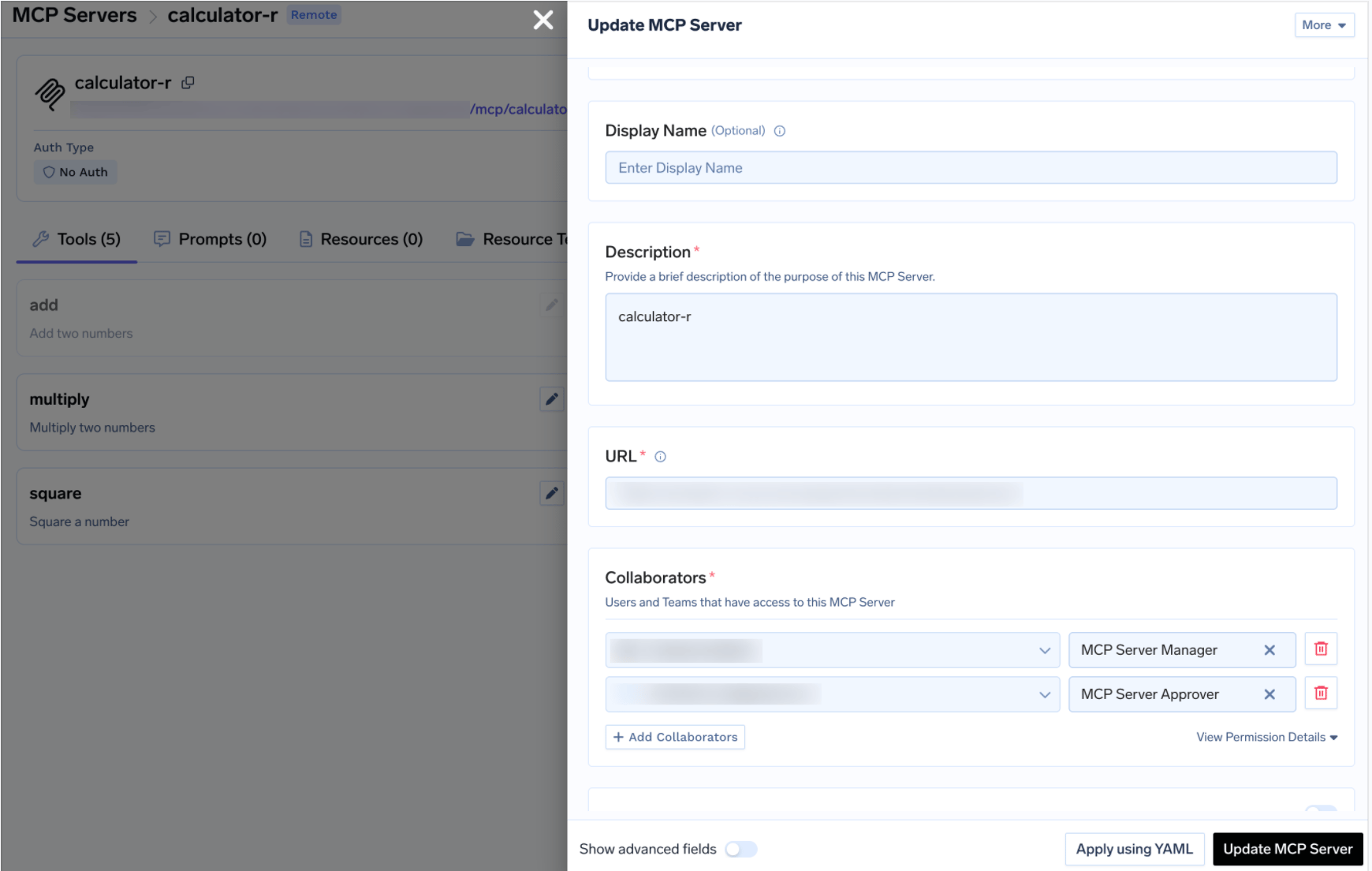
For Notion the useful split is that whoever decides what an agent can do to the wiki usually isn’t whoever owns its content: a platform team holds Manager, functional teams hold User, a knowledge or compliance owner holds Approver. Same MCP access control model as every other server in your registry.
Disabling writes is the blunt instrument. Sometimes you do want an agent creating a spec page or updating a project database — just not unattended. When a gated tool is called through the gateway the call is held rather than executed, a request is created, and approvers are notified. Once approved, the same call from the same requester succeeds until the grant expires.
Create a policy under AI Gateway → Policies → MCP Tool Approval (marked Beta in the console). Each policy names the servers it gates and picks an approval scope:
Because Notion’s tools ship pre-annotated, approval_scope: destructive is unusually effective here — it gates the whole write class without enumerating a tool name, and keeps working when Notion adds another write tool. When scopes overlap the most specific wins: named > destructive > all.
Validity is either Once (single execution) or time-based (a duration in minutes). When policies conflict the most restrictive wins — Once beats a 10-minute window beats a 30-minute one. Approvers are notified over Email, Slack, PagerDuty, or MS Teams and review requests in the console:
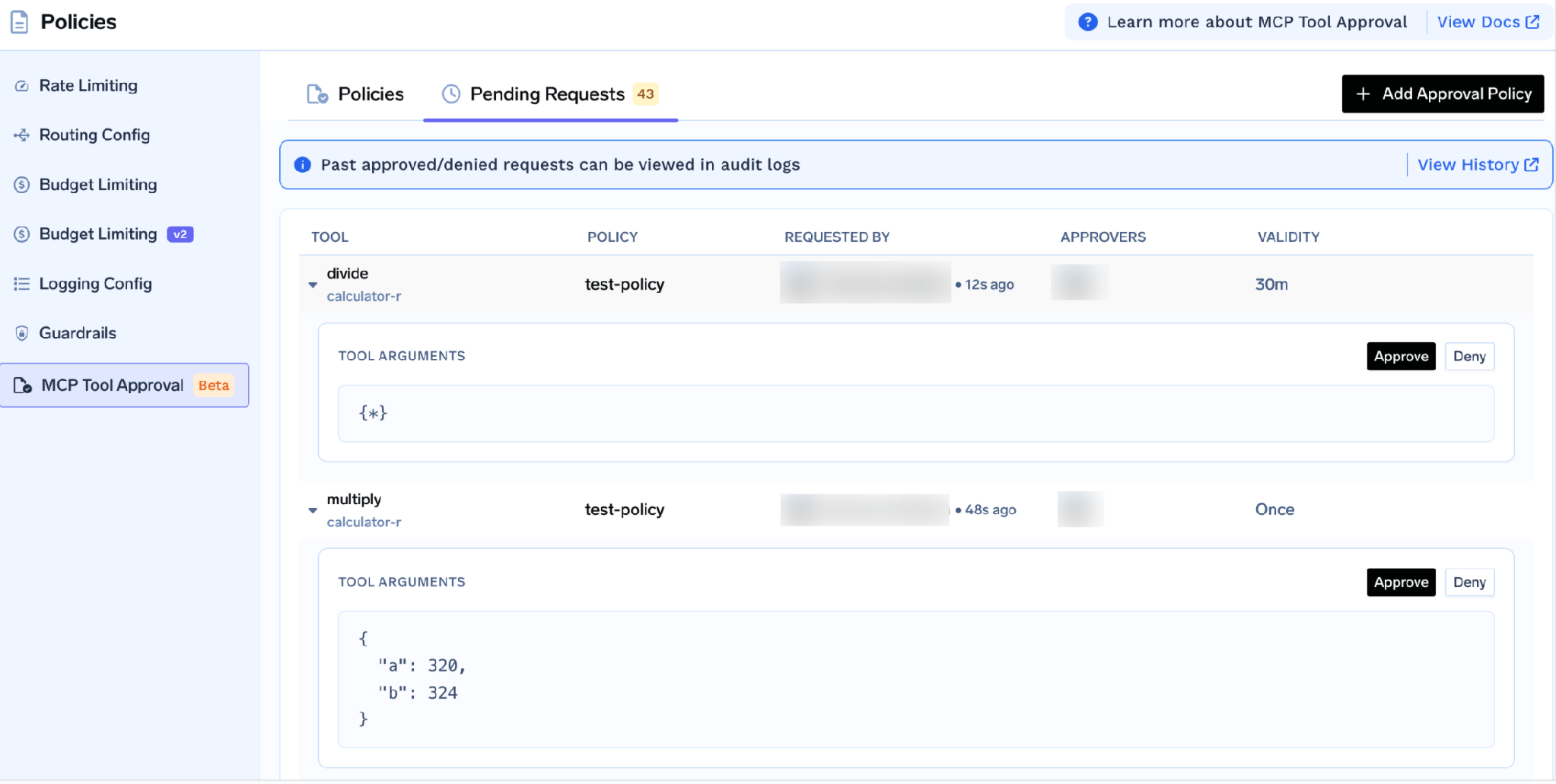
Each request shows the tool, policy, requester, and actual arguments — so an approver sees which page an agent wants to update before waving it through. While pending, the caller gets a JSON-RPC result carrying _meta.approval_status: "pending" rather than an error, so a well-behaved agent waits and retries. Grants are per requester, and a denial doesn’t permanently block anyone — the next call raises a fresh request. To durably block access, disable the tool or remove the user.
Test tools by hand first. Click Try next to any tool on the server detail page. For notion-fetch, enter the page or data source Id (or URL), optionally toggle Include transcript or Include discussions, click Execute Tool, and read the JSON in the right panel. Try is disabled for tools you’ve turned off.
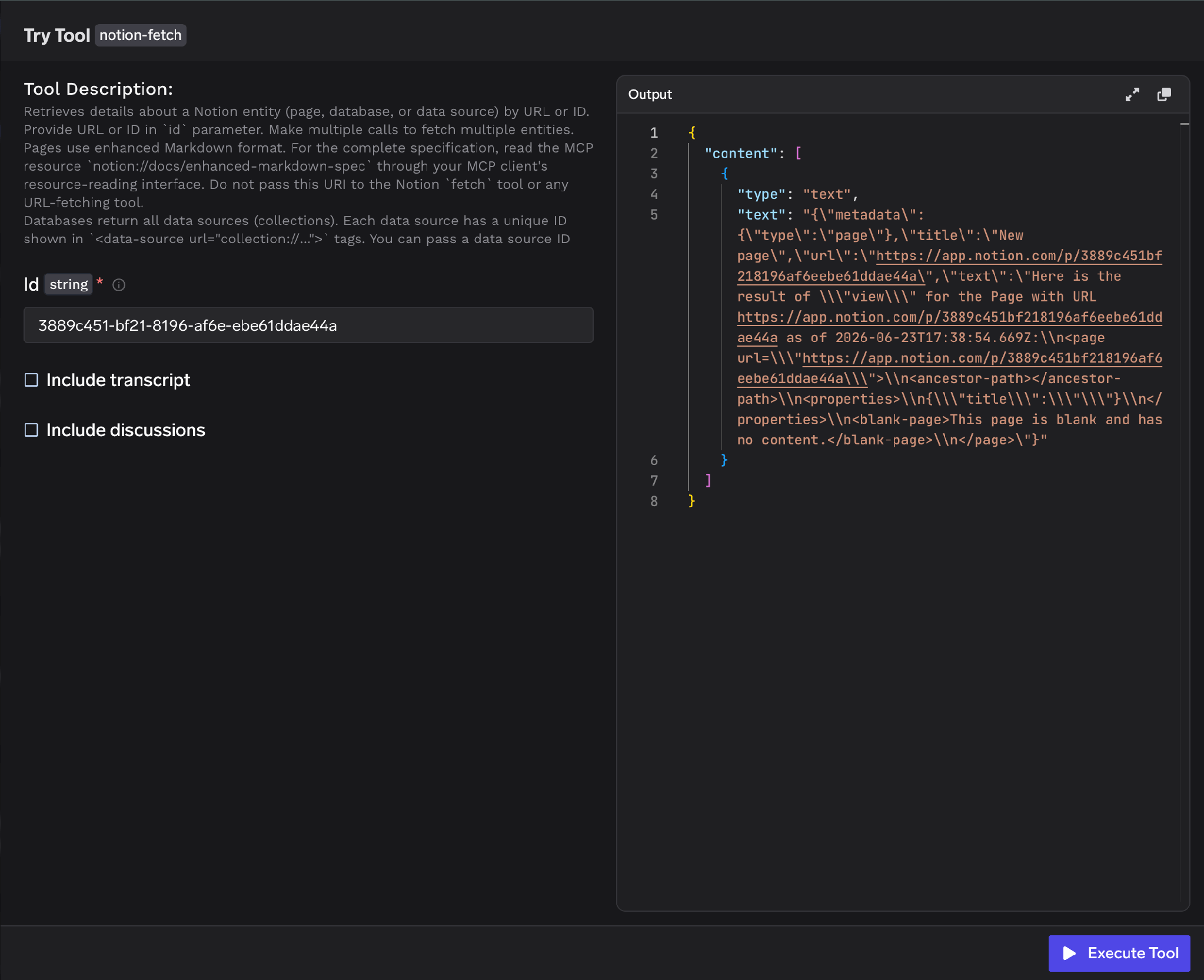
On Notion the playground doubles as the fastest honest audit of your scope. Run notion-search against a term you’d expect to be private — a comp band, an unannounced codename — and see what comes back under your grant. If something surprising returns, your inheritance tree is wider than you thought, and that’s far better to learn here than from an agent transcript.
TrueFoundry exposes the server over HTTP transport. Open the How To Use tab for your tenant-specific Gateway URL and ready-to-paste snippets.
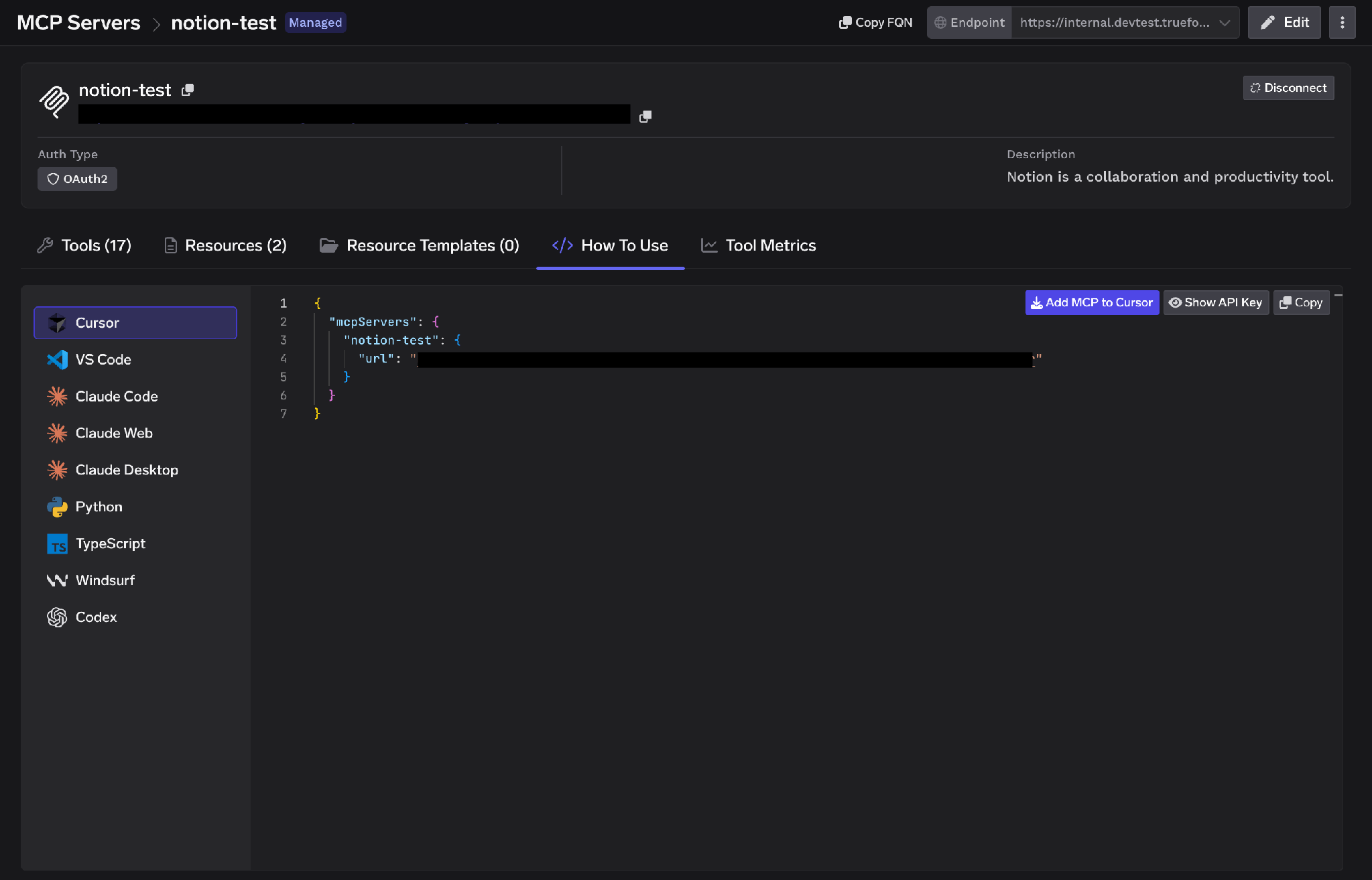
It covers Cursor, VS Code, Claude Code, Claude Web, Claude Desktop, Windsurf, Codex, and the Python and TypeScript MCP SDKs. Show API Key reveals the key if your client needs it as a header. Copy the URL from this tab rather than assembling it — it’s tenant-specific, and a hand-built endpoint is the most common cause of a client that connects but lists no tools.
Per-tool metrics. The Tool Metrics tab shows invocation count, latency distribution, and error rates per tool — how you learn an agent calls notion-search forty times per conversation, or that notion-fetch errors on your largest databases.
Full-request observability. Every invocation is traced with the calling user, tool name, input payload, and latency, exporting over OpenTelemetry into Grafana, Datadog, or Prometheus. On a read-heavy server this matters most — it’s the only way to answer “what did the agent read, for whom.”
Guardrails. Hooks run at mcp_pre_tool (before invocation) and mcp_post_tool (after it returns), enforcing content policy on request and response. On a wiki server the post-tool hook earns its keep — it catches a credential or a salary figure in a returned page before it reaches the model.
Low overhead. The gateway adds roughly 3–4 ms of latency and handles 350+ RPS on a single vCPU, so it sits in the hot path without becoming the bottleneck.
One registry. Once several servers are registered, a Virtual MCP Server bundles a curated subset of tools from several of them behind one endpoint — so a research agent gets Notion search plus Slack history and nothing that writes.
Tenant admins can wipe every stored credential from the three-dot menu next to Edit. Revoke all tokens deletes every auth override and stored OAuth token for all users and virtual accounts on that server, takes effect on the next request, and is recorded in Activity Logs. It’s irreversible — everyone re-runs OAuth consent afterward.
One limit matters: this deletes tokens from the gateway only. It does not revoke the grant inside Notion, so in a real incident remove the connection in Notion’s workspace settings too. Only tenant admins see the action — MCP Server Managers don’t.
Inheritance is the whole ballgame. Before connecting, walk the top-level pages the authorizing account can reach and ask what’s accumulated under each. The grant is not the page you’re picturing; it’s the subtree.
Resources are a second door. Notion exposes MCP Resources on a separate tab, so an audit that covered only the Tools tab was incomplete. Check both.
Don’t use a shared token for a shared wiki. Connecting once with a service identity is less setup — and it erases every per-user boundary, replacing them with the union of whatever that identity can see. Per-user OAuth is more clicks and strictly better.
Notion is the most useful thing you can give an agent and the hardest to bound, for the same reason: it’s where everything ends up. The risk isn’t an agent rewriting a page — it’s inherited page-tree permissions quietly handing a search tool a larger corpus than anyone consented to, and search is very good at finding the interesting parts of a large corpus.
Per-user OAuth resolves that: it makes the agent’s reach a function of the person it’s acting for, not a config someone set once. Running Notion as a managed MCP on TrueFoundry adds the rest — per-tool toggles instead of all-or-nothing access, approval gates on the writes, guardrails on request and response, and a traced log of every read.
TrueFoundry AI Gateway delivers ~3–4 ms latency, handles 350+ RPS on 1 vCPU, scales horizontally with ease, and is production-ready, while LiteLLM suffers from high latency, struggles beyond moderate RPS, lacks built-in scaling, and is best for light or prototype workloads.




A remote Model Context Protocol server for Notion that exposes a workspace as callable tools — search, fetch pages and databases, create and update pages, read and post comments. Agents connect over a URL and authorize with OAuth2 rather than running anything locally. Notion also exposes MCP Resources as a separate primitive.
Search, fetch, page creation and updates, database reads and writes, and comments — named in the notion-* convention, such as notion-search, notion-fetch, notion-create-pages, and notion-update-page. The full list appears on the Tools tab once authorized, each labeled Read-only or Destructive and individually configurable.
Yes, with scoping — and the question is read breadth, not malicious writes. Notion permissions inherit down page trees, so one grant can expose far more than intended. Run it behind a gateway that enforces per-user OAuth instead of a shared integration token, disable write tools an agent doesn’t need, gate the rest behind human approval, and trace every call with the calling user.
Yes. TrueFoundry runs in your VPC, on-prem, air-gapped, or hybrid, so prompts and responses never leave your domain even as you route across many providers.
Yes. It includes an MCP Gateway, an Agent Gateway, and an MCP & Agents Registry with tool-level access control. Agents on LangGraph, CrewAI, AutoGen, or a custom framework can all be governed centrally.
Yes. The gateway is OpenTelemetry-compliant and plugs into Grafana, Datadog, Prometheus, or your preferred stack. It traces every request from prompt to tool and model execution, so you get unified logging without ripping out what you already run.



The latest news, articles, and resources sent to your inbox
.png)
.png)
.png)
.png)
.png)
.png)
.png)
.webp)
.webp)